Leashable Players
# Leashable Players
Ruin friendships in this COOL new Minecraft mod for Fabric!
You can configure it via gamerules, including if the mod is enabled, how far away the two players can be before the leash breaks and the distance between the players required before the leash starts pulling.
# 可拴住的玩家
在这款适用于 Fabric 的全新 Minecraft MOD 中破坏友谊!
您可以通过游戏规则对其进行配置,包括是否启用该 MOD、在绳索断裂前玩家之间的距离以及在绳索开始拉扯前玩家之间的距离。
Killer Head


___
## What’s Killer Head ?
**Killer Head** is a project to drop the killer’s head when his victim dies.
## How it works ?
### Edit player loot table `entities/player.json`
Adds a player head to the death of a player and correlates the characteristics of the killer.
## Complementary
You can also use Drop Head.
Here’s Stackable Heads which is interesting to use.
## Compatibility
**Killer Head** should work anywhere.
## Support me!
Join my Hardcore Minecraft server: `38.143.19.130:51965`
Keep Inventory Always
## Keep Inventory Always
The mod turns on a game rule that allows you to save your inventory when you die in each world
## How to use
To use the mod, you only need to install it. Now when creating a world, the game rule keepInventory will always be enabled
## Dependencies
– Fabric loader requires Fabric API
Kappa
> ⚠️ **DEPRECATION NOTICE**
> OptiFine does not support HTTPS. I have been told by OptiFine staff *not* to use the URL that current versions of Kappa currently use (which has HTTPS support) and instead to use the one that OptiFine the mod uses (which *only* supports HTTP). I do not want my mod to be insecure, and do make insecure connections, so I will no longer update Kappa until HTTPS is enabled, as this is an extremely basic security measure nowadays.
**Kappa** adds OptiFine capes (correctly), and is aimed for use in snapshots. It’s also meant to be very light and to modify very little so it doesn’t upset server moderators, or so it doesn’t get broken very easily (which upsets me!).
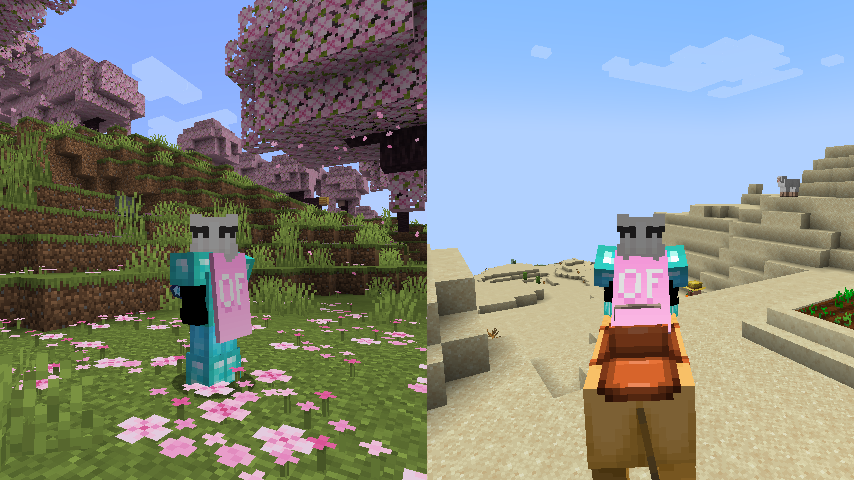
**Notice**: This mod does **not** replace OptiFine nor lets non-donors to wear them.
It merely adds the OptiFine capes and displays them, if you have donated to OptiFine.
If you enjoy OptiFine and want a cape, [consider donating to OF.][1]
**Kappa** is _not_ like other mods! It _works smart, not hard!_ Usually mods just clone the vanilla cape code, but **Kappa** uses it the intended way. Thanks to that, **Kappa** should barely break, if at all!
There’s also an upside to this: mods that affect the vanilla cape will also affect OptiFine capes from Kappa!
Fabric API is _not_ needed.
Usually Fabric/Quilt mods are compatible between versions, but sometimes, like in the 1.17 snapshots, Minecraft itself breaks the mods.
I will test my mod against the latest snapshot, because I like playing with my OptiFine cape, so if my mod is broken, I will update it.
Yes, OptiFine’s cape breaks Minecraft’s commercial usage guidelines, but I already had it for lots longer. I consider it part of my skin.
**On Quilt support:** This mod sits in a gray area, as thus is probably safe to avoid if you’re using Quilt. However, Kappa uses as little Fabric specific components as possible.
[1]: https://optifine.net/donate
Just Hotbar
# Just Hotbar
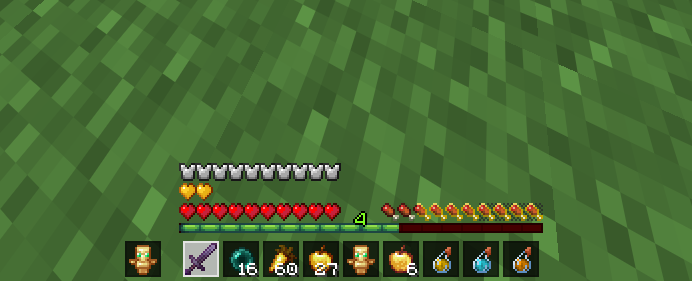
This texture pack changes the hearts and hotbar, making them simpler
Just Better Recipes
[![CurseForge-Mod][CurseForge-Mod]](https://www.curseforge.com/minecraft/mc-mods/just-better-recipes)
[![CurseForge-Datapack][CurseForge-Datapack]](https://www.curseforge.com/minecraft/customization/just-better-recipes-dp)
[![Modrinth][Modrinth]](https://modrinth.com/datapack/just-better-recipes)
[![Discord][Discord]](https://discord.gg/EKyjXRH9xN)
[![Paypal][Paypal]](https://www.paypal.com/donate/?cmd=_donations&[email protected]&lc=US&item_name=Donation&no_note=0&cn=¤cy_code=USD&bn=PP-DonationsBF:btn_donateCC_LG.gif:NonHosted)
[CurseForge-Mod]: https://img.shields.io/curseforge/dt/857652?style=for-the-badge&logo=curseforge&label=Mod&labelColor=212121&color=FF6D00
[CurseForge-Datapack]: https://img.shields.io/curseforge/dt/857654?style=for-the-badge&logo=curseforge&label=Datapack&labelColor=212121&color=FF6D00
[Modrinth]: https://img.shields.io/modrinth/dt/tXJjcIZK?style=for-the-badge&logo=modrinth&label=Mod%20%26%20Datapack&labelColor=212121&color=008000
[Discord]: https://img.shields.io/badge/join-discord?style=for-the-badge&logo=discord&label=discord&labelColor=212121&color=0d0f24
[Paypal]: https://img.shields.io/badge/Donate-Paypal?style=for-the-badge&logo=paypal&label=Paypal&labelColor=212121&color=00457C
# Just Better Recipes
is a DataPack / Mod which ads TONS (over 3.000 !!!) new useful Vanilla-friendly recipes.
Join the discord to discuss any feature requests, improvements or support!
List of all available recipes:
Special Recipes
– **Automated Dye Production with smelting/smoking flowers**
– **Cut-able & Recycling Wood Recipes**
– **Re-colorable Beds, Wool and Carpets (pre 1.20 only)**
– **Re-colorable Banners, Glass, Glass Panes, (Glazed-)Terracotta, Concrete (-powder) & Candles**
– **Dead Coral to Living Coral** ~~ Dead Coral + Bone Meal + Water Bucket
– **Any Slab to Block** ~~ Any Slab x2 + Slimeball
– **Any Carpet to Block** ~~ Any Carpet x4 + Slimeball
– **Cut-able Wart Blocks**
Smelting & Blasting Recipes
– **Blasting Recipes for some Smelting Recipes** (such as Terracotta etc.)
– **Blasting Wood to Charcoal**
– **Blasting Equipment** (vanilla-friendly, only returns you a nugget! Diamond & Netherite can be blasted too, just takes some time)
– **Raw Ore Blocks**
– **Rotten Flesh to Leather**
– Iron Bars
– Iron Trapdoor
– Iron Door
– Heavy Weighted Pressure Plate
– Shears
– Flint and Steel
– Bucket
– Chain
– Lantern
– Soul Lantern
– Cauldron
– Hopper
– Minecart, Chest/Hopper/TNT/Furnace Minecart
– Rail, Activator/Detector/Powered Rail
– Compass
– Anvil, CHipped/Damaged Anvil
– Iron Horse Armor
– Bell
– Light Weighted Pressure Plate
– Clock
– Golden Horse Armor
– Lightning Rod
– Spyglass
– Diamond Horse Armor
– Leather Horse Armor
Stonecutting Recipes
– **Cut-able Amethyst / Amethyst Cluster**
– **Wart Block to Nether Warts**
– **Cut-able Wood Recipes (and recycle)**
– **Better Stone Recipes**
– **Cut-able Deepslate**
– **Cut-able & Convertable Mossy Blocks**
– **Cut-able Bricks & Nether Bricks**
– **Cut-able Prismarine**
– **Cut-able Shulker (recycle)**
– **Cut-able Wool, Carpet & Banner (recycle)**
– **Cut-able Cobweb**
– **Better Quartz Recipes**
– **Cut-able Glass** (Glass to Glass Pane, more efficient: gives 2 extra panes !!!)**
– **Many more recycle Recipes such as Redstone stuff, Arrows, Bows, Crafting Table etc**
JPG Screenshot
## JPG Screenshot has a new look!
  
New icon, same old two-mixin mod. Now updated for 26.1!
## Why save screenshots as jpg?
### Save disk space!
Minecraft saves screenshots as ~2MB png files at 1080p. This mod changes it to ~400KB high quality jpg files which look almost indistinguishable.
Perfect if you:
– Take lots of screenshots
– Can’t let them go
– Don’t want to buy another harddisk
**Small downside:** saving the screenshot is slightly longer, although the screenshot itself is instantaneous. Taking many screenshots in succession may cause the game to stutter.
## Can I still take png screenshots?
Yes, just hold **Left CTRL Key** while taking a screenshot. You can change this key in the game’s Key Binds setting.
### About older versions
Prior to version 2.0.0, the default modifier key was Left Alt Key. Also, the jpg quality used to be worse.
## Issues
If you find an issue, feel free to open an issue here.
### Other things
Fabric API is required to properly display the keybind label and modmenu description.
No Java Edition Branding – Remove from Start-Title Screen
Removes the Java Edition Text under The “Minecraft” Logo from the Title Screen!


Also works for with other resourcepacks!


Japanese Title
This resource pack changes Minecraft title screen logo to unused official Japanese logo “マインクラフト”, the Japanese Katakana for “Minecraft”.
Originally sourced from the official website of a design company that created this logo for Mojang. but it was never officially used. For more information check the Minecraft Wiki logo page.
Version 1 replaces the main logo with “マインクラフト” and removes the subtitle.
Version 2 keeps the original main logo and changes the subtitle to “マインクラフト”.
Previews gallery
I do not own this.
日本語:
元は、Mojangのためにこのロゴをデザインしたデザイン会社の公式ウェブサイトからのものですが、公式には使用されませんでした。詳しくはMinecraft Wikiのロゴページをご覧ください。
バージョン1 は、メインロゴを「マインクラフト」に置き換え、サブタイトルを削除しています。
バージョン2 は、元のメインロゴを維持し、サブタイトルを「マインクラフト」に変更しています。
プレビューギャラリー
これは私の所有物ではありません。
Jane Doe ZZZ Title Screen Background
Replace the main menu background with Jane Doe (Zenless Zone Zero).