Minecraft Movie Iron Golem
This is a simple resourcepack that changes the look of the Iron Golem with the Iron Golem from the Minecraft Movie Event from Bedrock(Includes cracked golem visuals).
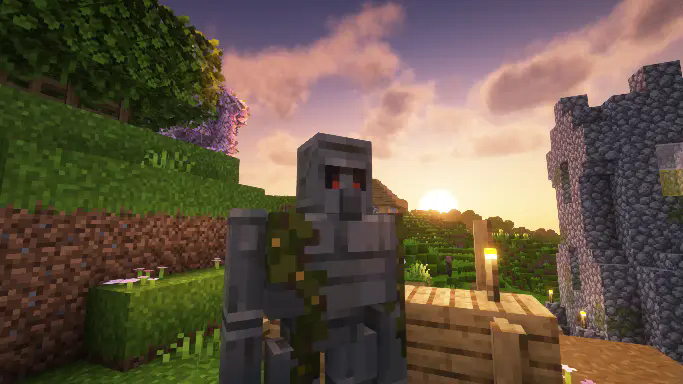
This resourcepack doesn’t change anything else in the game, and it does not change sounds for the Iron golem, just visual changes.
if you use Fresh Animations, i have also made compatible version of this same resourcepack here.
Mindful SMP Resources
# Mindful SMP Resource Pack
This resource pack is to be used with Mindful Optimized
MI-PBR
A minimal PBR resource pack for the Modern Industrialization mod. Requires a shader supporting “Lab” or “Old/seus” PBR.
This project is still an early work-in-progress so not all blocks are complete.
Methane
 
Note: **Methane is no longer being developed. The ‘new’ mod’s codebase and features became far too large after a few weeks, which combined with other commitments + minecraft’s frequent updates, really isn’t something I can keep developing.**
In the unlikely case that the mod is later finished, it will not replace Methane.
For now, report any non-bug related issues here
## What is this?
**Methane** is a highly configurable optimization mod focused on **destructively** gaining lots of performance, with optimizations on the following:
– Disabling a lot of the functionality of the lightmapper, which **improves performance on the CPU drastically.**
– Allowing the user to adjust fog behavior, which allows you to see all your chunks, without them being occluded by fog. (optional)
– Optimizing how all particles behave in-game, causing them to be **way less intensive on your computer when ticking.** (2.3+ only)
**Note:** Methane (by default) will apply a “fullbright” effect on the client as a symptom of not calculating block lighting. You can disable this in Mod Menu, but this will limit the potential performance gains and restrict you to particle (always on) and destructive (optional) optimizations. **Methane also removes toasts by default,** but you can turn this behaviour off.
– As a side effect of some optimizations, world saving acts differently to vanilla MC, but shouldn’t be noticable (aside from less save jitter), and will still save properly for the ***vast* majority of crashes and rage ALT+F4’s**. If this scares you, please use the legacy lighting engine.
If you want mob spawning to behave properly, turn on the legacy lighting engine.
## Benefits
– **increased framerate, with significantly less noticable stutter.** 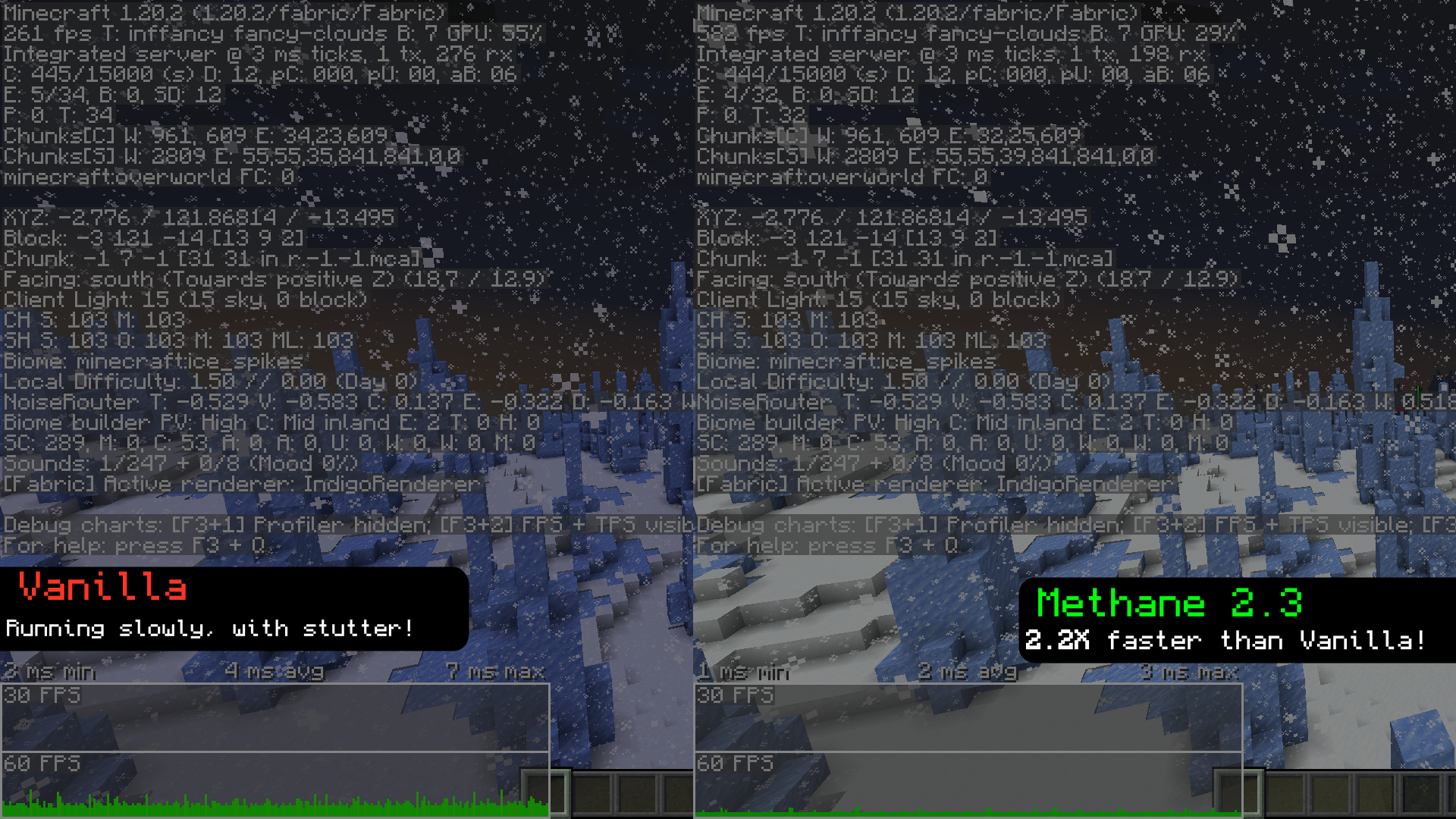
_*recorded with Methane 2.3, with everything set to `Fancy`, and with render + sim distance set to `12`._
– The same effect as fullbright, but with actual performance gains.
– Methane can help your game run faster on Distant Horizons (toggle twice), but usually leaves random dark patches in LoD’s.
## Compared to fullbright
while fullbright (also known as “brightness” and “gamma”) makes the world look fully lit, it still performs all those lighting calculations. Methane instead skips those, resulting in the same end product but with much better performance.
## Configuration
– Methane has a variety of options available to customize a lot of the aspects of the mod, mainly its startup and fog behavior. 1.19.3 and up should also have the ability to toggle the mod with “ (will be unbound by default on 2.15+), but has some issues when re-enabling.
– **Server admins** are now able to control the settings of Methane clients from version 2.2 onward, and you can get it here.
– Starting from **2.3 onwards:** There are now a handful of settings called “Destructive Settings”, that allow you to gain a lot of performance by removing certain renderer features (e.g. HUD backgrounds, sky renderers, etc). This can help in GPU-constrained scenarios.
## Can i use this with starlight?
Starlight should work on 1.19.x (obviously it only does things when Methane is OFF), and Methane will crash on 1.20+ with starlight (although most of Starlight’s functionality has been merged into 1.20).
## Compatibility
– Methane has had quite a bit of time to mature, and compatibility has improved greatly since the first release. Most mods should work just fine with methane. If not, make an issue!
Methane should be playable on forge via Sinytra Connector, but past that there probably wont be much in the way of forge support.
## Getting early builds
Most of the time, a perfectly stable update will be pushed to the repository, but the mod wont be uploaded, usually because I’m planning on adding other things. If you really want to grab one early, you can do it here
## Dependencies
– Fabric API
– Mod Menu
– Cloth Config
### modpacks
feel free to put Methane in your modpack, but please link back to Methane’s Modrinth and/or GitHub repo.
### Translations
Methane has a small amount of (likely very outdated) translations. If you want to help translate the mod, feel free to make a PR.




Mellstroy (Я уже красный) Totem of Undying
**EN**: This resource pack replaces the original **Totem of Undying** with the Meme from Mellstroy **I’m already red, it won’t work out culturally** with sound. This meme has become very popular on TikTok over the past couple of years.
**RU**: Этот ресурспак заменяет оригинальный **Тотем бессмертия** на Мем от Меллстроя **Я уже красный, культурно не получится** со звуком, данный мем за последние пару лет стал очень популярным в Тик Ток
– Омайгадность Тотем
– Тотем Меллстрой
– ПОЛНАЯ КОЛЛЕКЦИЯ РЕСУРСПАКОВ – МЕМЫ + СТРИМЕРЫ

Medium Biomes
# Medium biomes
Medium Biomes is a Minecraft datapack that adjusts world generation by introducing a biome scale between default and large biomes.
This creates a more balanced terrain layout, where biomes are neither too small and fragmented nor excessively large and repetitive.
The result is a smoother exploration experience with improved biome transitions and more coherent world generation.
## Features
– Adds a biome scale between default and large biome generation
– Creates more cohesive and naturally distributed biomes
– Improves exploration by reducing excessive biome fragmentation
– Only affects newly generated chunks
## Installation
– Download the datapack
– Move the datapack inside “.minecraft/saves//datapacks“ (How to find .minecraft?)
– Reload the world or run “/reload“
## Support the Project
If you enjoy this datapack and find it useful, please consider giving the repository a star and following me on GitHub.
This helps the project gain visibility and motivates further development and maintenance.
## Contributing
Contributions are welcome! Please read CONTRIBUTING.md for commit conventions and guidelines.
MCSM enchantment glint
**Enchantment glint in Minecraft story mode looks different than the one in minecraft**, so i decided to **make a texture pack** that **looks similar** to the one seen in Minecraft story mode, it **isnt the same** but its good enough. this texture pack **will be updated in the future** because it **isnt perfect**
Minecraft Earth Mud
**This pack still works** _at least_ up to Minecraft 1.21.8 (likely higher).
You can ignore the warning that the pack was made for an older version. I will update the metadata soon to reflect that it still works.
—
Who wants grey Mud in Minecraft when you can have the brown Mud from Minecraft Earth?
RIP Minecraft Earth 🙁
This pack implements the Mud textures from Minecraft Earth, including having different textures for the top/bottom versus the sides. The textures are also animated just as they were in Minecraft Earth. The mud inside of Muddy Mangrove Roots is also affected.
No need to unzip the file or do anything really, just drop it right in the `resourcepacks` folder, and you’re good to go.
Have fun,
-kk iris
Also available for Bedrock Edition!
The provided textures are edited versions of textures from Minecraft & Minecraft Earth. The rights to the original textures belong to the games’ developers.
Max Totem of Undying
– ENG: Max is a Russian cross-platform instant messaging service based on the digital system of the same name. It was founded in 2025 by the VK technology company. Resourcepack replaces the immortality totem with the logo
– RU: Max — российский кроссплатформенный сервис мгновенного обмена сообщениями на базе одноимённой цифровой системы. Основан в 2025 году технологической компанией VK. Ресурспак заменяет тотем бессмертия на логотип
Check collection with all memes + streamers Totems
– Тотем Я уже Красный-totem-of-undying)
– Тотем Меллстрой
– Colored Bricks
– MACAN Totem of Undying
Marker Command Engine
# Marker Command Engine (MCE)


**Marker Command Engine** is a lightweight and high-performance command execution engine for Minecraft datapacks. It allows you to run commands directly from storage using a clean marker entity + command block technique.
## Features
– Execute commands stored in `storage mce:cmd`
– Very low performance impact
– Simple and clean API
– Clean marker entity method
– Supports Minecraft 1.21+ (`pack_format: 57`)
## Installation
1. Download or clone this repository.
2. Put the `marker-command-engine` folder into your world’s `datapacks` folder.
3. Run `/reload` in your Minecraft world.
4. You should see a successful load message in chat.
## Usage
### Run a Command
“`mcfunction
# Store the command
data modify storage mce:cmd Command set value “say Hello World!”
# Execute it
function mce:api/run
“`
### Show Help
“`mcfunction
function mce:api/help
“`
## Available Functions
| Function | Description |
|———————–|————————————————–|
| `mce:api/run` | Executes the command stored in storage |
| `mce:api/help` | Shows help information |
| `mce:core/load` | Runs when datapack is loaded |
| `mce:core/reset` | Cleans up marker and command block |
## Technical Details
– **Marker**: Tagged with `Tags:[“mce.cmd”]`
– **Command Block**: Temporarily placed at `0 -64 0` and removed immediately
– Reset operation runs automatically after 3 ticks
## For Developers
Storage structure:
“`json
{
“Command”: “your command here”
}
“`
## License
This project is licensed under the **MIT License** — you are free to use, modify, and distribute.
—
**Made with ❤️ for the Minecraft Datapack Community**