Zume
# IMPORTANT LICENSE NOTICE
By using this project in any form, you hereby give your “express assent” for the terms of the license of this project (see [LICENSE](https://github.com/Nolij/Zume/raw/master/LICENSE)), and acknowledge that I (the author of this project) have fulfilled my obligation under the license to “make a reasonable effort under the circumstances to obtain the express assent of recipients to the terms of this License”.
# Zume
An ~~over-engineered~~ simple zoom mod.
This mod adds a keybind which zooms in your FOV while it’s held down, allowing you to see further away, and keybinds
for increasing and decreasing the zoom level.
# FAQ
#### Q: Where is the config?
A: You’ll find the config at `.minecraft/global/zume.json5` (note that this is the default `.minecraft` folder, not
the instance `.minecraft`). You can modify the file while the game is running, and the config will be automatically
reloaded. On platforms which have mod menus (such as Forge, and Fabric with [Mod Menu](https://modrinth.com/mod/modmenu)
installed), the config button for Zume will open this file in your system text editor.
#### Q: discord where
A: https://discord.gg/6ZjX4mvCMR
#### Q: What version is this for?
A: Zume supports the following platforms:
– Fabric: Any version supported by Fabric Keybinding API v1 (currently 14.4+)
– NeoForge: 20.4+ (requires NeoForge 20.4.195+)
– LexForge: 14.4 – 20.5 (requires MixinBootstrap before 16.1) (there are currently no plans to support 20.6+)
– Legacy Fabric: Any version supported by Legacy Fabric Keybinding API v1 (currently 7.10 – 12.2)
– Babric (Fabric for Minecraft Beta): Any version supported by Station API (currently b7.3)
– Vintage Forge: 8.9 – 12.2 (requires MixinBooter or UniMixins)
– Archaic Forge: 7.10 (requires UniMixins)
#### Q: Can you add support for ?
A: Every platform I intend to add support for myself is already supported. PRs are welcome for other platforms **if
the following conditions are met**:
– Must not break single-jar compatibility with any already supported platform (obviously).
– Must not be for a platform that has a 1st-party compatibility layer for an already supported platform – explicit
Quilt support will not be accepted so long as Quilt maintains a Fabric compatibility layer; it’d be a waste of CI
time. [Sinytra Connector](https://github.com/Sinytra/Connector) is a 3rd-party compatibility layer, so explicit
Forge support will be provided.
– Must not manually maintain overridden game options; implementations that look like
[Mooz’s](https://github.com/embeddedt/Mooz/blob/92570f7449a7e71c1c0b988788027b10c00f1346/src/main/java/org/embeddedt/mooz/ClientProxy.java#L35-L56)
will not be accepted – no offense [embeddedt](https://github.com/embeddedt). Direct ASM is fine as long as functionality is similar enough.
– Must make a reasonable effort to be maximize compatibility with existing mods on target platforms – see use of
Neo/LexForge API over mixins in Neo/LexForge implementations, and use of `@WrapWithCondition` and
`@ModifyExpressionValue` and such from MixinExtras over `@Redirect` in most implementations.
– Must follow existing format – add a Unimined subproject for each newly supported platform.
– Must not have exclusive features without significant justification – if you’re adding a feature, add it to every
version.
#### Q: What kind of weird license is this?
A: OSL-3.0 is the closest equivalent to a LAGPL I could find. AGPL and GPL are incompatible with Minecraft, and LGPL
doesn’t protect network use. OSL-3.0 protects network use and is compatible with Minecraft.
#### Q: Why though? It’s so strict!!!!
A: This is, and will remain, free, copyleft software. Any requests to change the license other than to make it even
stronger will be denied immediately (unfortunately GPL and AGPL aren’t compatible with Minecraft due to linking
restrictions, as much as I’d like to use them). Even in situations where I use parts of other projects with more
“permissive” licenses, I will treat them as copyleft, free software.
## License
This project is licensed under OSL-3.0. For more information, see [LICENSE](https://github.com/Nolij/Zume/raw/master/LICENSE).
## Need a Minecraft server? Consider CreeperHost!

Yggdrasil Proxy
# YggdrasilProxy
When starting the game, the proxy in the device is automatically read to speed up Yggdrasil verification.
It extends Vanilla’s behavior and is more automated.
## Specific implementation
There is a setting in Windows, and its path is: “settings-> network-> proxy-> manual settings”.
YggdrasilProxy automatically reads them from the registry and verifies it, if it works, then use it immediately.
It basically works with network tools like Clash, you don’t need to proxy all traffic across the entire network card, you can easily connect to Yggdrasil Server through the proxy.
When registry data is not read, or is a non-Windows operating system, then YggdrasilProxy falls back to read environment variables (it does not need to be set in the JVM startup parameters, because they are annoying enough), it reads the following environment variables in the system and selects a valid variable to set to Proxy:
– http_proxy
– https_proxy
– no_proxy
## Defect
When the proxy server/tool is shut down, you may need to restart Minecraft.
Looking for a solution if I have time…
## Compatibility
Basically compatible with all operating systems.
Specially optimized for Windows.
## Which ModLoaders are supported?
– Fabric (Support, 1.18+)
– Quilt (Built with Fabric, 1.18+)
– Forge (Support, 1.19+)
– NeoForge (Support, 1.21.4+)
YggdrasilProxy is designed to be available for both Server and Client and is compatible with the most ModLoader and Minecraft versions.
If there is no compatibility, then I have not done it yet. If you’re in a hurry, join my DC server and send your ModLoader as well as Minecraft versions, I’ll be there soon.
## I want to use it in Plugin Server
Unfortunately, plugin servers are usually not compatible with mods, and I’m reluctant to use the Mixin framework to write them on the plugin server.
If you have relevant needs, please use two patches I made specifically for this, you only need to comply with GPL 3.0.
– [Patch 1](https://github.com/404Setup/Sewlia/blob/dev/1.21.4/sewlia-server/minecraft-patches/features/0005-Merge-YggdrasilProxy.patch)
– [Patch 2](https://github.com/404Setup/Sewlia/blob/dev/1.21.4/sewlia-server/paper-patches/features/0006-Merge-YggdrasilProxy.patch)
## For Modpack
If you comply with the license, you can use it freely for Modpack.
Modpacks that redistribute Minecraft game body (i.e. packages that package the entire Minecraft game including Mod files, Config, ShaderPacks, ResourcePacks, Library and launcher into a whole zip file) are not allowed to use this mod.
## License
This work has a restrictive license in addition to the original license to prevent some unexpected behavior,
see [404Setup Public License](https://github.com/404Setup/404Setup/blob/main/LICENSE.md)
Yellow powder snow
EN: This resource pack makes powder snow yellow
RU: Этот ресурспак делает рыхлый снег жёлтым

yadoomi’s Purple Haze Font
# What does this resource pack add?
This resource pack takes the font from a PvP resource pack called “Purple Haze” and puts it in a seperate resource pack.
Here is a showcase video of the resource pack “Purple Haze” by OmnicronGaming
## Other details.
– This resource pack just takes the font from an already existing resource pack, if you are using this somewhere and want to credit someone, credit TerribleChoices, the creator of “Purple Haze”.
– You can use this resource pack in a modpack without my permission, thats alright.
– This resource pack works on ANY version below 1.8.9, even snapshots.
Hide In Grass
# Hide In Grass
You can become invisible as long as you stand in tall grass, even tall flowers can be used!
Suitable for some small games. 🙂
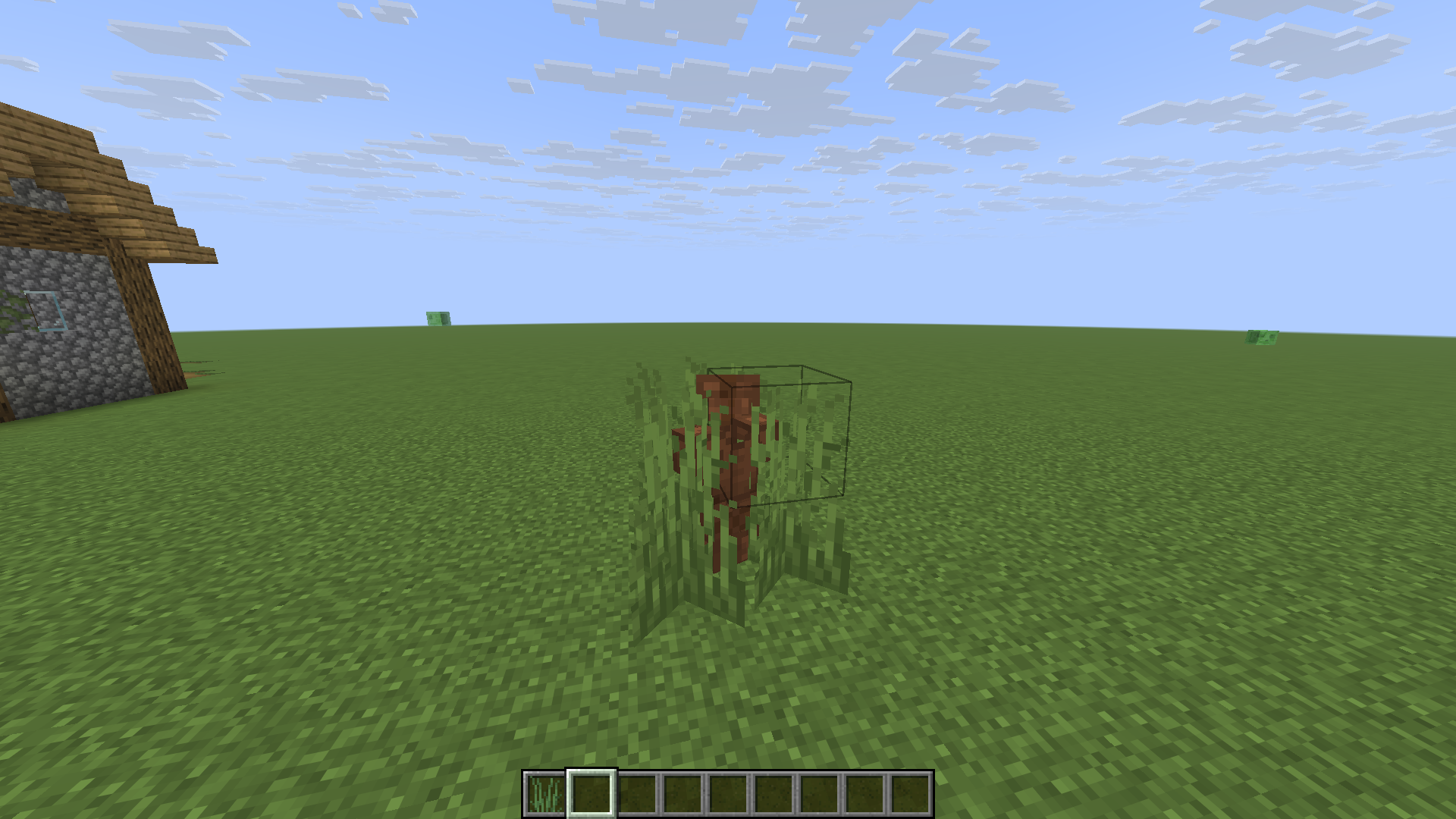
(This is my practice project while learning DataPack, so it’s a bit rough)
X Ray (no cheats)
## X Ray
Mod/Datapack that removes stone and other blocks to keep ores visible. Also works in the nether.
X-Ray is a powerful mod that radically changes the way you explore the world of Minecraft. It allows you to see through ordinary blocks, highlighting valuable resources, structures, and objects.
To use it, you need to take a filled map in any hand.

## Usage
The mod is activated automatically and requires no additional settings. However, if you want to temporarily disable the mod, use the command “`/trigger bizcub.x_ray.t“`. Information about the mod’s current status will then appear in the chat.
## Dependencies
– Fabric loader requires [Fabric API](https://modrinth.com/mod/fabric-api)
Wynn Dark Pack (Wynncraft)
Note at the very top – PLEASE tell me if this thing breaks. Also please tell me if you’re using my resource pack for something or modifying it, it’s not required or anything but it’s cool to know. my discord is `endernon`.
# About
This is a resource pack that
– Makes the game’s GUIs dark purple themed
– Changes some GUI layouts to be more functional
– And also supports some wynntils menus (WIP)
The aim of this pack was to add a missing dark theme to Wynncraft after Rekindled dropped since I hadn’t seen anyone else make one, but now it also includes what I consider to be extremely useful GUI changes, like a better hotbar, and also guis with less clutter and more simplicity.
**NOTE – if some stuff is missing or is in the wrong place (e.g. the coordinates in top right are gone and the class select menu is wonky), press F3+T once to reload all textures. This is due to a bug from ImmediatelyFast.**
**ANOTHER NOTE – You will need to figure out some way of loading this resource pack above the Wynncraft resource pack.**
# Special thanks to
– Brilliantknight (this pack was originally a port of their Stone Tablet pack but has since detached from that)
– zatzou (for helping me with the resource pack crc metadata uncorrupter)
– People on the Wynncraft discord for being top 10 haters in my dms
WingAuth

[
](https://github.com/Elytrium)
# WingAuth
WingAuth is a modern Velocity authentication plugin for offline/hybrid networks.
## How it works
It runs login/register protection before players reach backend servers, using a Limbo-based auth flow.
Designed for server admins who want strong account protection with flexible setup.
## Key features
– Velocity-only architecture (runs the login on a virtual world)
– Session handling and brute-force protection
– Premium/hybrid and Floodgate-compatible scenarios (Bedrock support)
– Configurable messages and behavior
– Database-backed account storage (legacy-compatible migration path)
Wildborne – Worldgen & Data Tweaks

**Designed for the Wildborne Modpack (Coming soon) – This Modded Datapack implements various custom JSON files, functions and other code to change world generation, tags, structures and other various features to enhance the realism, support, or immersion of various vanilla mechanics, as well as modded mechanics!**
## IMPORTANT NOTES – READ FOR AN IDEAL EXPERIENCE:
**This Data Pack is currently a work in progress! Expect new files to be added to the project, & changes to existing ones until the project is fully finished!**
**This pack IS NO LONGER COMPATIBLE WITH JUST VANILLA ALONE!**
**THE EPIC TERRAIN COMPATIBLE MOD IS NOW REQUIRED FOR THIS DATAPACK TO WORK!**
**FEATURE RECYCLER, WORLDGEN FEATURE FIX & LAKE FEATURE FIX MODS ARE ALSO NOW REQUIRED FOR THIS DATAPACK TO WORK!**
**I tried my best to get my custom biomes, features/structures and data to load in vanilla regardless of mods, but due to the MAJOR bug in vanilla Minecraft that causes “minecraft:lake” features and “minecraft:freeze_top_layer” features to crash when dealing with water, it was simply not possible to do this & keep using Epic Terrain Compatible :(**
**Maybe in a future version of the datapack I can delve deep into the nightmarish mess of density function and noise settings to add my own custom epic looking terrain when I have time, but for now, this is the best solution**
**For MODDED use, I HIGHLY recommend the Global Packs mod, so that this datapack can apply to EACH new world you create when placed in global_packs -> required_data!**
**Use this pack in combination with the Wildborne – Photorealistic VANILLA Resource Pack (Currently in BETA) for full immersion/realism! Link here:**
[https://modrinth.com/resourcepack/wildborne-photorealistic-vanilla-resource-pack](https://modrinth.com/resourcepack/wildborne-photorealistic-vanilla-resource-pack)
### CURRENTLY IMPLEMENTED FEATURES:
– TASTEFULLY increased Grass, Tall Grass, Fern, Large Fern & Cactus in all world generation in all biomes for increased realism/immersion
– Tags that attempt to add Ocean Ruins to Ocean Explorer Maps (WIP, still iffy at times)
– Tags that add more items to the Lit On Fire mod so that more fire ignition sources can light torches/campfires
– CUSTOM VILLAGER TRADES when combined with the Villager Config mod (WIP, more to be added/implemented – _**NOTE => SOME TRADES MAY BREAK DUE TO MISSING ITEMS FROM OTHER MODS/KUBEJS SCRIPTS DESIGNED FOR THE UPCOMING WILDBORNE MODPACK – USE AT YOUR OWN RISK**_)
– 5 NEW EPIC WILDBORNE BIOMES ADDED TO THE OVERWORLD! – The Sinkhole Biomes! – Based off a bug that was previously patched out of Minecraft 1.19.3 world generation – I’ve now added 5 different biomes with the chance of generating full fledged MASSIVE sinkholes! – The Desert Sinkhole, Badlands Sinkhole, Temperate Sinkhole, Icy Sinkhole and Jungle Sinkhole biomes! (See more in the image gallery)

– Compatibility for Epic Terrain Compatible mod/datapack in a way that smoothly tranistions biomes based on temperature, humidity/vegetation, erosion, continents, and size, while the world also generates 400 block tall mountains with 450 block deep sinkholes that just add a breathtaking sense of wonder and adventure to any world!
– IMPROVED/NEW FOSSIL STRUCTURES! – These can generate on BOTH the surface of the overworld, AND underground in caves/Sinkhole biomes, with 4 variations of each part of the fossil (Skull, Spine, Tail) – support for modded biomes from Biomes O’ Plenty, YUNG’s Cave Biomes, Regions Unexplored, & Biomes We’ve Gone included! (See more in the image gallery)

### WIP/PLANNED FEATURES:
– Increased/decreased foliage placed features for Vanilla/other mods featured in the upcoming Wildborne Modpack as needed (ie, Biomes O’ Plenty, Regions Unexplored etc)
– MORE Custom Villager Trades using the Villager Config mod for the modpack as needed
– More tag additions/removals as needed for fine tuning items/blocks/mechanics in the upcoming modpack as well
– Minor tweaks to improve vanilla structure generation for compatibility with the new Sinkhole Biomes
WI Zoom
# WI Zoom (Wurst-Imperium Zoom)
The WI Zoom Minecraft mod lets you zoom in and out with the mouse wheel, providing up to 50x magnification without the need for a spyglass. This mod is fully compatible with OptiFine and Sodium, but unlike OptiFine’s zoom, WI Zoom lets the camera move in a logical way, without making it wobble around. WI Zoom supports all of the latest Minecraft versions, including snapshots.

## Features
– Up to 50x zoom!
– No spyglass needed!
– Zoom in and out with the mouse wheel!
– No wobbly camera nonsense!
– Dynamic mouse sensitivity! (since v1.1)
– Fully compatible with OptiFine / Sodium!
## How To Zoom
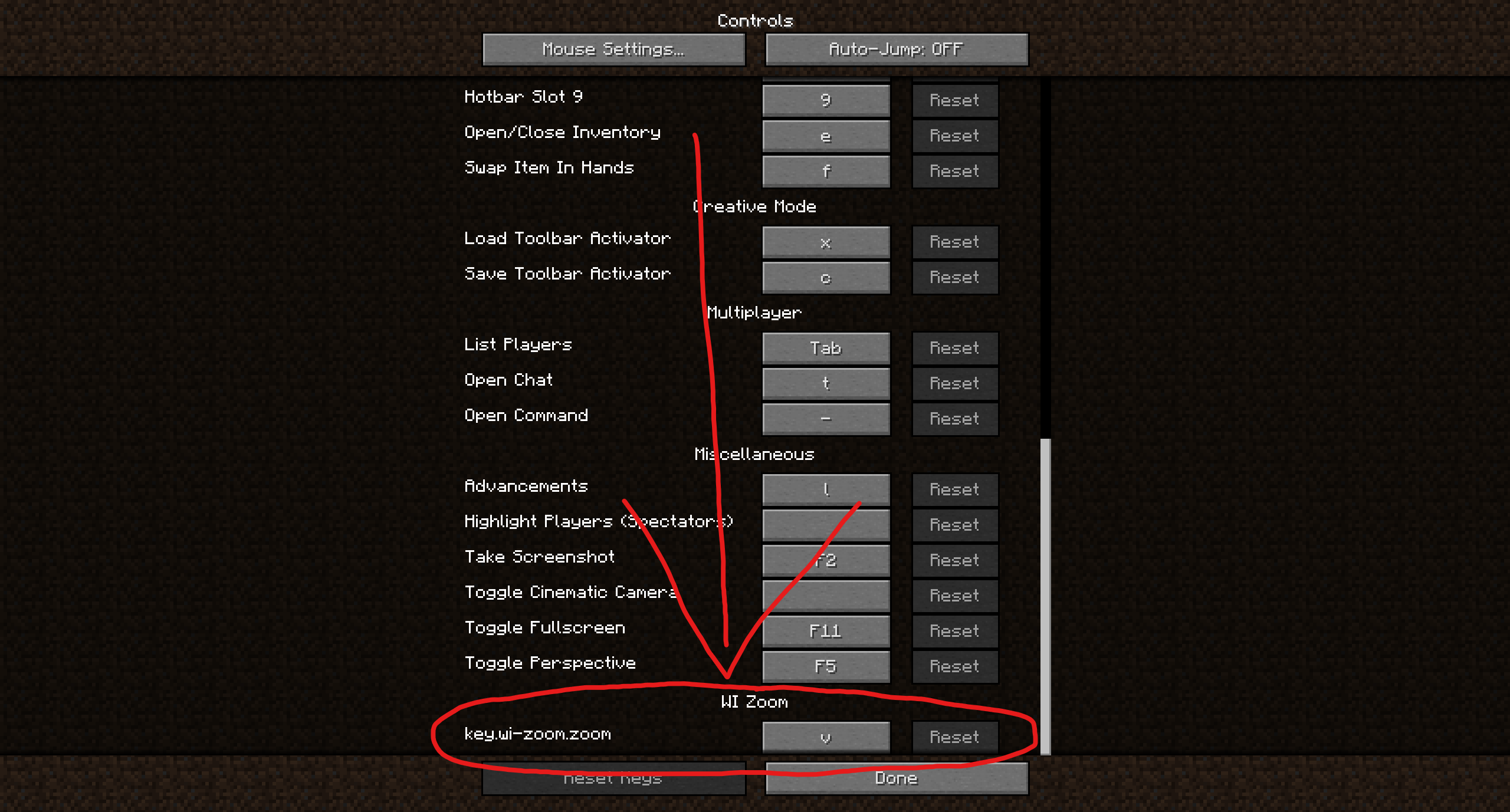
Hold down the V key to activate the zoom (this keybind can be changed).
While zooming, you can use the mouse wheel to zoom in further.
## Changing The Zoom Keybind
How to change the keybind (click to expand)
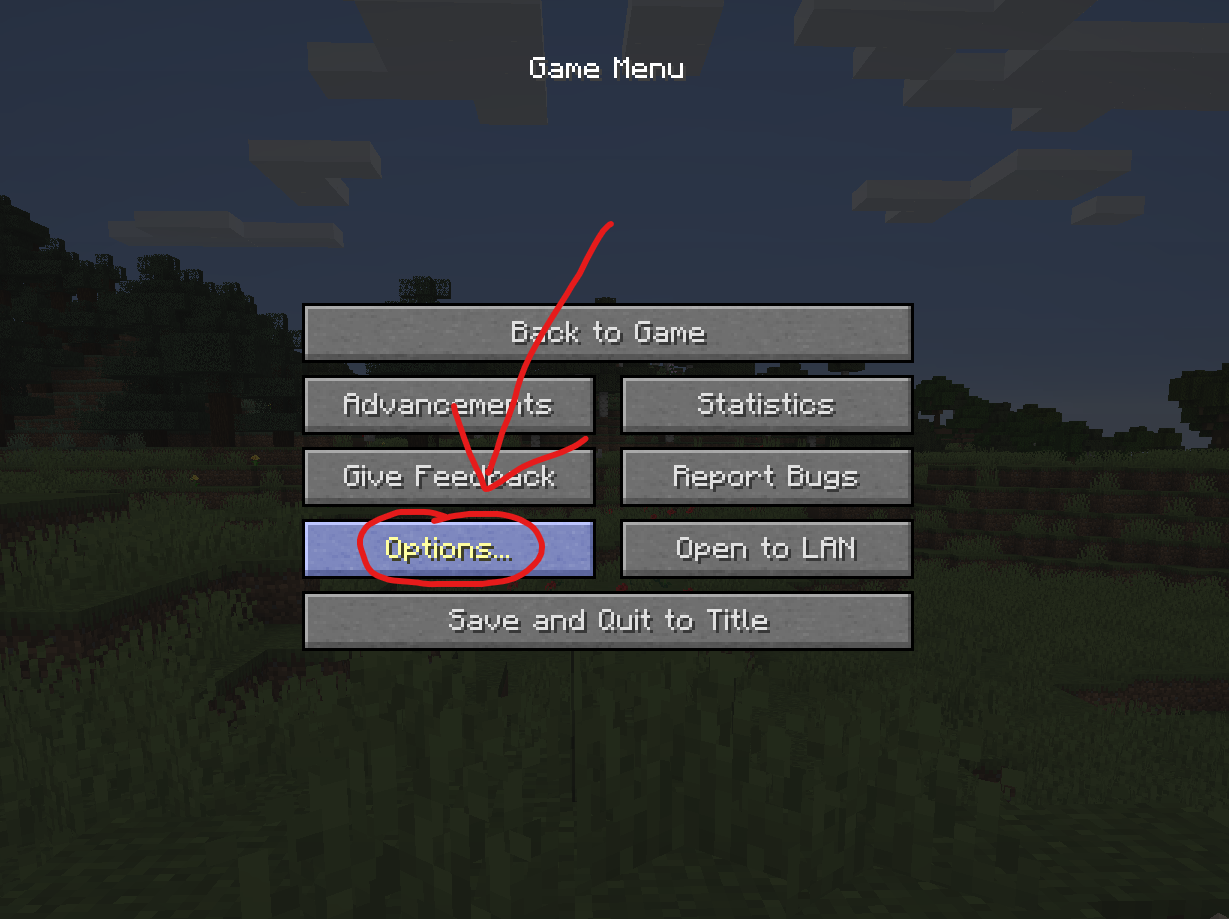
In the pause menu, click on “Options…”.
In the Options menu, click on “Controls…”.

In the Controls menu, scroll down to the “WI Zoom” section. If you don’t have any other mods installed, you will find this section at the very bottom.
## Supported Languages
– Azerbaijani (Azerbaijan) (since v1.5)
– Chinese (Simplified/Mainland) (since v1.4)
– Chinese (Traditional/Taiwan) (since v1.4)
– Cantonese (Hong Kong) (since v1.4)
– Classical Chinese (since v1.4)
– Dutch (Netherlands) (since v1.5)
– English (US)
– Estonian (Estonia) (since v1.4)
– French (France) (since v1.4)
– German (Germany)
– Kurdish (since v1.5)
– Portuguese (Brazil) (since v1.5)
– Russian (Russia) (since v1.3)
– Turkish (Turkey) (since v1.5)
– Ukrainian (Ukraine) (since v1.5)