Timo Translations
This is a Translation Pack for my project [Timo](https://modrinth.com/datapack/timo_11).
When using mods like [Coordinates Display](https://modrinth.com/mod/coordinates-display) it displays **”biome.timo.rich”** without this Pack but with this pack **”Rich”**
Supported Languages:
“`
English (United States)
ɥsᴉluƎ(uʍop ǝpᴉsd∩)
“`
Swords To Scythes


## 📚 | ABOUT
• Change the appearance of your sword into a scythe! Whether you play in singleplayer or multiplayer, this resource pack works on almost all game versions (1.8 – 1.21+). 💎✨
## 🏷️ | CREDITS
• Resource pack created by t2rtle (ARR) ©️✨
## 📦 | MODPACKS & VIDEOS
• You may freely use this resource pack in any modpack as long as the download remains hosted within the Modrinth ecosystem. ☕✨
• You are also free and welcome to create video/stream content (YouTube, Twitch, TikTok, etc.), and it is not necessary to give credits or link to this page. However, if for any reason you want to provide the download to your viewers, you must link to this page and not distribute the download outside the Modrinth ecosystem. 📽️✨
## 📮 | QUESTIONS
• 01. Can I distribute your resource pack? 📌
> R: **No**. Do not distribute my projects anywhere. 📌
Sus Sand
This resource pack is designed to make suspicious sand and gravel even more suspicious.
Enjoy

(Edit July 6th 2023): Is this going to be my legacy? An among us meme? XD
Supernova (Original Music Pack)
an original album made as a tribute to C418 in his signature style, made into a custom music pack:
this pack features 6 tracks:
– 1 title track: jang
– 2 creative tracks: albeit, burning konkrete
– 3 survival tracks: rose field, cliff hanger, supernova
this resourcepack should be compatible with versions 1.7.2 and above. newer versions may complain about it being broken or incompatible, ignore that.
there are two versions of the pack: one that replaces the vanilla music and one that does not. the one that replaces the original soundtrack doesn’t seem to do so on 1.7.2, but the music should still be added to the pool.
you may use this music in your own resource/data/mod-packs only if it’s ENTIRELY FREE. this music may NOT be resold or used for COMMERICAL PURPOSES.
[https://aurigrave.org/audio/release/supernova](https://aurigrave.org/audio/release/supernova)
Super Apple
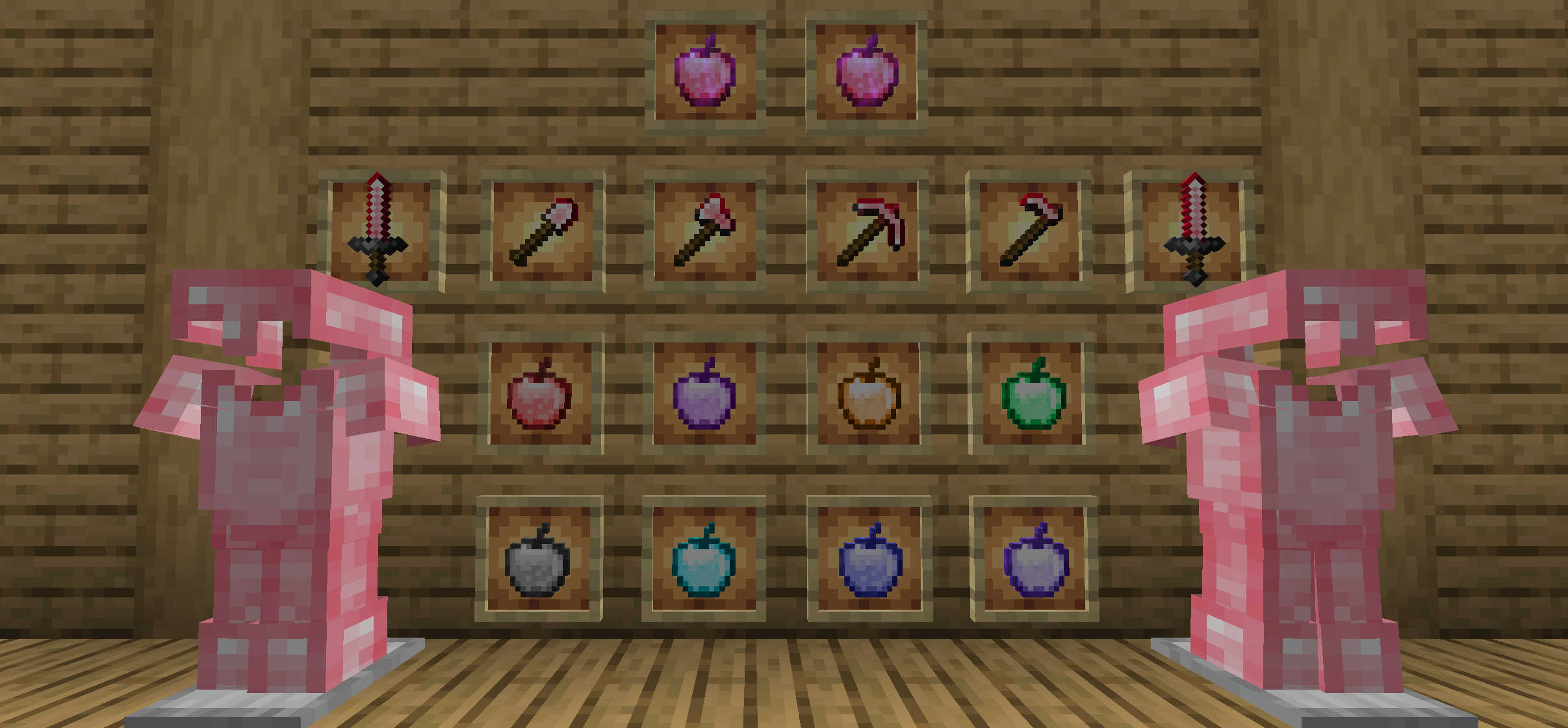
#### This mod is the extend contents of the original edition contents, such as the extra apples, the level of the enchantments, and ruby.
#### Recipes could see gallery.(1.18+)
#### Super Apple for 1.14+ requires Fabric Loader, Fabric API.
#### Translation
Submitting translations for Super Apple can be done via our [Crowdin](https://crowdin.com/project/super-apple) page. Consider helping us out if you’re fluent in any language at all! Alternatively, translations can still be submitted via pull requests.
#### New Apples
We establish 9 extra apples, respectively are haste apple, strength apple, speed apple, health boost apple, village hero apple, fire resistance apple, night vision apple, jump boost apple, suspicious apple and super apple.
Suspicious apple(fabric only) same like suspicious stew,but it is easy to crafting. It only use a apple and a flower.(2.1.0+)
Super Apple can give player 1-5 minutes buff like haste,health_boost,jump_boost,speed,strength and resistance.
#### New Ore(Only Minecraft 1.16+)
We add the ruby, which is the main material of the super apple.
Ruby use to compound Haste Apple and Super Apple.
#### New enchantment(1.3.8+)
We upgrade the up line of the enchantment levels. By doing that, you might have the better felling when you playing.
#### New Armour and tools(2.2.0+)
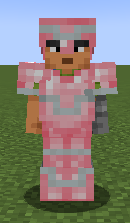
Ruby Armour and tools strenstrength and durability between diamond and Netherite.The enchantment performance better than gold. It’s also support smithing template.(Minecraft1.20+ And Super Apple 2.3.0+).
#### New tree(3.0.0+)
Adding effect apples’s fruit tree(No Super Apple Tree), the saplings only need to be composed of oak saplings and any effect apple, and the fruiting leaves will not disappear after the mature fruits has been picked.

#### For the detailed information, please read the minute contents below. THANKS!!!
StreamlineCore

MUST HAVE:
– LuckPerms. [**[ FOUND HERE ]**](https://luckperms.net/download)
– BukkitOfUtils (__For Bukkit / Spigot / Paper ONLY__). [**[ FOUND HERE ]**](https://www.spigotmc.org/resources/118276/)

Please join the Streamline Hub Discord in order to get updates and for me to fully assist you with bugs, questions, or suggestions.
Discord: [**click here**](https://dsc.gg/streamline)
[**Download Modules for Streamline Here (Click)**](https://storage.drak.gg/share/75RJ__vUBVQrC_PRfuHeTg)
# Introduction to Streamline
### What is Streamline?
Streamline is a Minecraft plugin that adds limitless functionality to Minecraft servers through what is known as **Modules**. These Modules are downloadable content that you insert into the Streamline plugin’s “modules“ folder to enhance your server.
Streamline Modules can do many things and even allow server admins and developers to make their own with a very nice framework.
The currently made modules add functionality such as:
– Redirecting players from one server to another when that server goes down. (**StreamlineRedirect Module**)
– Network staff chat, whispering, and friends. (**StreamlineMessaging Module**)
– Discord to Minecraft and Minecraft to Discord. (**StreamlineDiscord Module**)
– Logging messages to your Discord server with only webhooks. (**SimpleLogger Module**)
– Aliases, buildable functions, online list (per server, per group, or network wide), cross-network tpa, cross-network homes, cross-network teleporting, and more. (**StreamlineUtilities Module**)
– Data-Driven event-based protection for proxy and backend servers. (**ProxProtect Module**)
– Send resourcepacks to players on join. (**ResourcePackUtils Module**)
– Cross-network quests system with limitless potential. (**StreamQuests Module**)
– TAB (the plugin) integration, adding support for Streamline placeholders in TAB configurations. (**TAB-SL Module**)
– Simple and easily configured MOTD system like that of MiniMOTD. (**StreamlineMOTD Module**)
– *More.*
**NOTE**: Not seeing a feature you want? Ask Drak to add it on his Discord! – [**click here**](https://dsc.gg/streamline)
### What makes Streamline special?
Streamline allows for **universal cross-platform capabilities** with its Modules.
This essentially means you can run the same modules on a BungeeCord proxy that you would on a Velocity proxy (or even your backend servers). This, with the addition of **Modularized features** means that server admins and owners can choose *exactly* what they want in their server without bloatware.
This also makes it very easy for server admins to use a specific module across different servers. Or even for Developers to develop modules for servers (or the community).
### What exactly is Streamline capable of?
Literally *anything*. Seriously.
#### Supported Proxies:
> – Velocity
> – BungeeCord
> – Waterfall
> – FlameCord
> – Travertine
> – XCord
> – Etc.
#### Supported Backend Servers:
> – Spigot.
> – Paper.
> – Folia.
> – Purpur.
> – Tuinity.
> – ImmanitySpigot.
> – FlamePaper.
> – Mohist / Banner / Youer.
> – Etc.
#### Natively-Supported Plugins:
> – Luckperms. (Required.)
> – BukkitOfUtils. (Required on Bukkit-like servers.)
> – Geyser / Floodgate. (Everything work the same for Bedrock players as would Java players!)
> – PlaceholderAPI.
> – CMI. (With Utils module.)
> – EssentialsX. (With Utils module.)

Follow the Discord setup guide [**[ FOUND HERE ]**](https://github.com/Streamline-Essentials/StreamlineWiki/wiki/Discord-Setup) to set up the discord module.
# What can I do with the `Discord Module`?
– Link **Discord to Minecraft** and **Minecraft to Discord** with `Routes`.
– Available link types:
– Natively (Without other Modules):
– **Proxy local chat** `<->` **Discord Text Channel**
– **Proxy global chat** `<->` **Discord Text Channel**
– **All online players with specific permission** `<->` **Discord Text Channel**
– **Discord Text Channel** `<->` **Discord Text Channel**
– Groups (With `StreamlineGroups` Module):
– **Guild chat** `<->` **Discord Text Channel**
– **Party chat** `<->` **Discord Text Channel**
– Messaging (With `StreamlineMessaging` Module):
– **Local Room chat** `<->` **Discord Text Channel**
– **Global Room chat** `<->` **Discord Text Channel**
– **Custom Room chat** `<->` **Discord Text Channel**
– Message formats are completely customizable.
– Avatar with player’s skin will pop up when their message is sent to Discord.
– Link player’s Discord profile with your server.
– Players can chat using their StreamlineUser profile from Discord.
– All Discord messages can be configured to be sent as completely customized Discord embedded messages

More information is found on our wiki: [**FOUND HERE**](https://wiki.plas.host/streamline)
### NOTICE ABOUT COMMANDS, PERMISSIONS, AND MESSAGES.
***All commands are completely customizable in their `.yml` file. Including permissions and message outputs!***

1. Install dependencies.
– “BukkitOfUtils“ if on Bukkit / Spigot / Paper / Forks.
– “LuckPerms“ for all platforms.
2. Download the plugin file.
3. Drop it into your server’s plugins folder.
4. Start and stop your server.
5. Fill out the configs where necessary.
– Configurations for the streamline plugin can be found in your `plugins` folder, under `StreamlineCore`.
6. Add desired modules.
– Modules can be downloaded from here: [**click here**](https://wiki.plas.host/modules)
7. Start and stop your server again.
8. Fill out module configs where necessary.
– Module files can be found in your `plugins` folder, under `StreamlineCore`, under `module-resources`.
9. Start your server again.
More information can be found on our wiki: [**click here**](https://wiki.plas.host/streamline)

1. Look on the wiki: [**click here**](https://wiki.plas.host/streamline)
2. Get in touch on the Streamline Discord: [**click here**](https://dsc.gg/streamline)
3. Submit a bug on the issue tracker (this is rarely checked): [**click here**](https://github.com/Streamline-Essentials/StreamlineCore/
# BStats
**Bukkit**
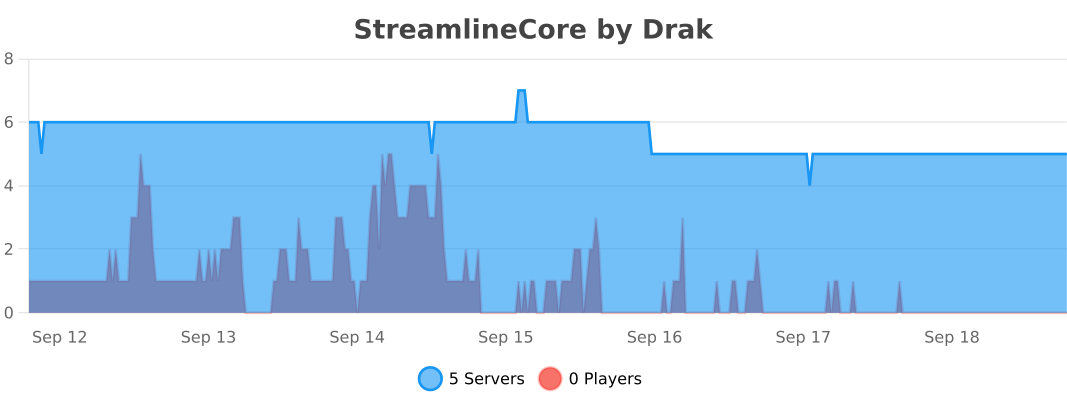
**BungeeCord**
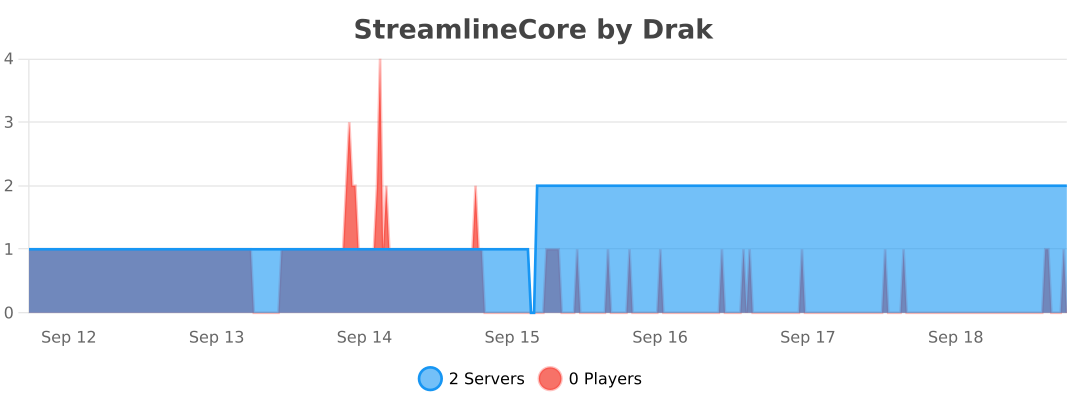
**Velocity**
The Steve Series Pack
**The texture pack has:**
– _6 invisible items (Pottery Sherds)_
– _A Darkness entity (that uses a Piglin as the base)_
– _Darkness Blockset (stairs, slabs, blocks and walls) [granite]_
– _5 colored light blocks (one for each base colored steve)_
– _Rainbow Stone_
– _A custom iron door texture_
**How to make the best Darkness entity:**
summon piglin ~ ~ ~ {IsImmuneToZombification:1,active_effects:[{id:regeneration,duration:200,amplifier:10,show_particles:0b}],HandItems:[{id:angler_pottery_sherd,count:1},{id:angler_pottery_sherd,count:1}],ArmorItems:[{id:angler_pottery_sherd,count:1},{id:angler_pottery_sherd,count:1},{id:angler_pottery_sherd,count:1},{id:angler_pottery_sherd,count:1}],HandDropChances:[0f,0f],ArmorDropChances:[0f,0f,0f,0f]}
**[Must be used inside of a command block.]**
Steak of Undying
Super simple texture pack that changes your Totem of Undying texture to a steak! For the time being, this works in any version of 1.21, and generally, this should work in any version from 1.14 to 1.21 (because in 1.14 they changed the item textures, and I’m not really sure if this the steak texture matches the one before 1.14). This pack is actually heavily inspired by Beppo’s Totem of Undying texture, so I decided to make that into an accessible for everyone pack! The translations for it are currently available in 30 of the most popular/common Minecraft languages.
Steak = Cooked Beef
Makes steak called cooked beef because it makes more sense and it will make a friend of mine happy because he likes beef!
It’s very simple, does nothing else, just this!
(And maybe a little easter egg, try to find it 😀 )
Stacked Armor Trims
## With Stacked Armor Trims you can use as many armor trims as you like, for even more custom armor options!
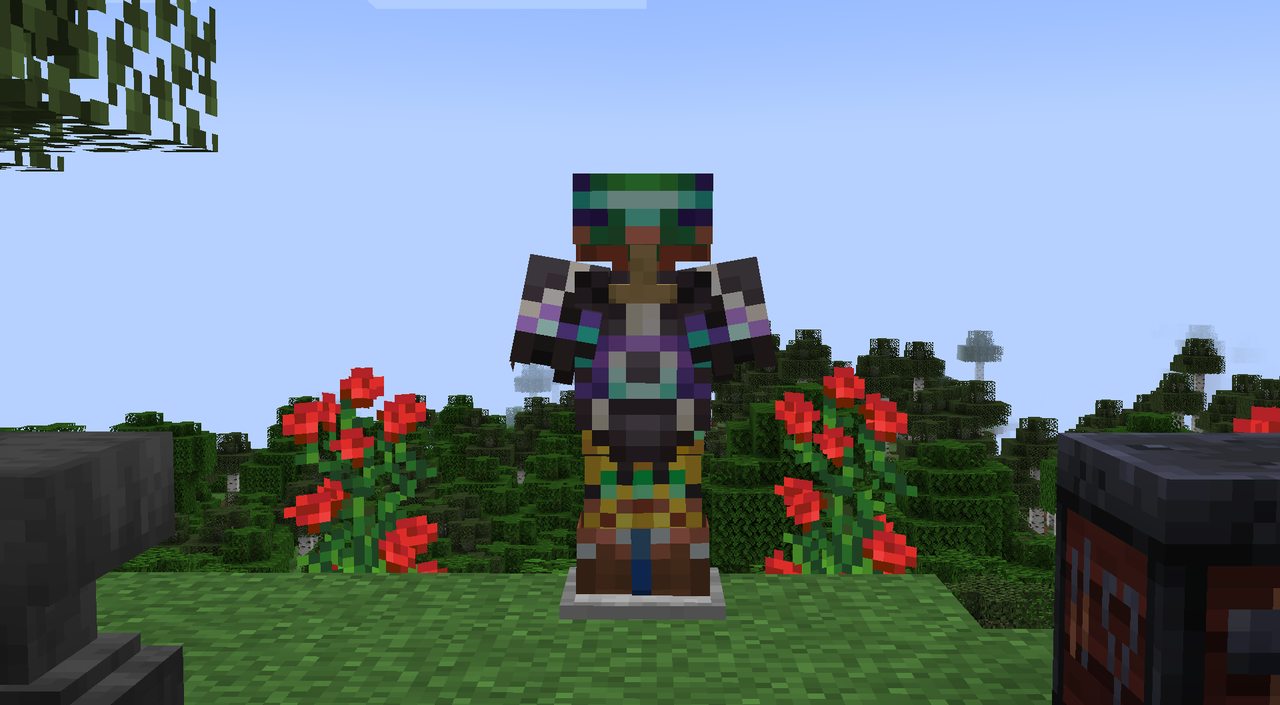
### Everything still gets displayed correctly
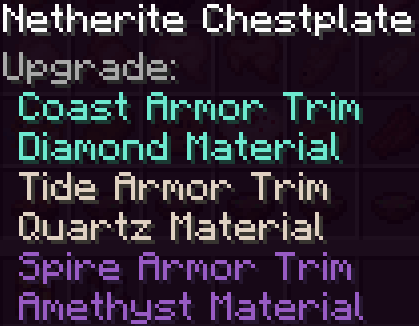
### You can remove all trims with flint in an anvil

### This mod is compatible with:
+ **Better Trim Tooltips** [ [CurseForge](https://www.curseforge.com/minecraft/mc-mods/better-trim-tooltips) | [Modrinth](https://modrinth.com/mod/better-trim-tooltips) ]
+ **All The Trims** [ [CurseForge](https://www.curseforge.com/minecraft/mc-mods/all-the-trims) | [Modrinth](https://modrinth.com/mod/allthetrims)]
+ **Better Trims** [ [CurseForge](https://www.curseforge.com/minecraft/mc-mods/better-trims) | [Modrinth](https://modrinth.com/mod/bettertrims)]
+ **Dye All the Things** [ [CurseForge](https://www.curseforge.com/minecraft/mc-mods/dyeallthethings) | [Modrinth](https://modrinth.com/mod/dyeallthethings)]
+ **Elytra Trims** [ [CurseForge](https://www.curseforge.com/minecraft/mc-mods/elytra-trims) | [Modrinth](https://modrinth.com/mod/elytra-trims)]
### FAQ:
+ **Forge or Fabric?** There is a Forge and a Fabric version available.
+ **Client or Server?** It is possible for Vanilla clients to join a server with this mod, only the newest armor trim will render though. -> Needs to be on both for it to work.
+ **Modpack?** You can use it in any modpack, credit me if possible.
+ **Curse Forge?** [Here](https://legacy.curseforge.com/minecraft/mc-mods/stacked-armor-trims)
+ **Is this mod compatible with x?** I don’t know, haven’t tested it. I will add a list of incompatible mods if any problems come to my attention.
### This mod is incompatible with:
+ **Immediately Fast** [ [CurseForge](https://www.curseforge.com/minecraft/mc-mods/immediatelyfast) | [Modrinth](https://modrinth.com/mod/immediatelyfast) ] Only one piece of armor renders its trims in the inventory.