Gojifan’s Grody Netherrack
A simplistic pack that reworks netherrack with a grody look modified from vanilla’s upcoming cinnabar; bringing back the nebulous “is it flesh or is it stone?” look lost with jappa’s final retexture in 1.14.
A simplistic pack that reworks netherrack with a grody look modified from vanilla’s upcoming cinnabar; bringing back the nebulous “is it flesh or is it stone?” look lost with jappa’s final retexture in 1.14.
# Glowing Mobs Pack
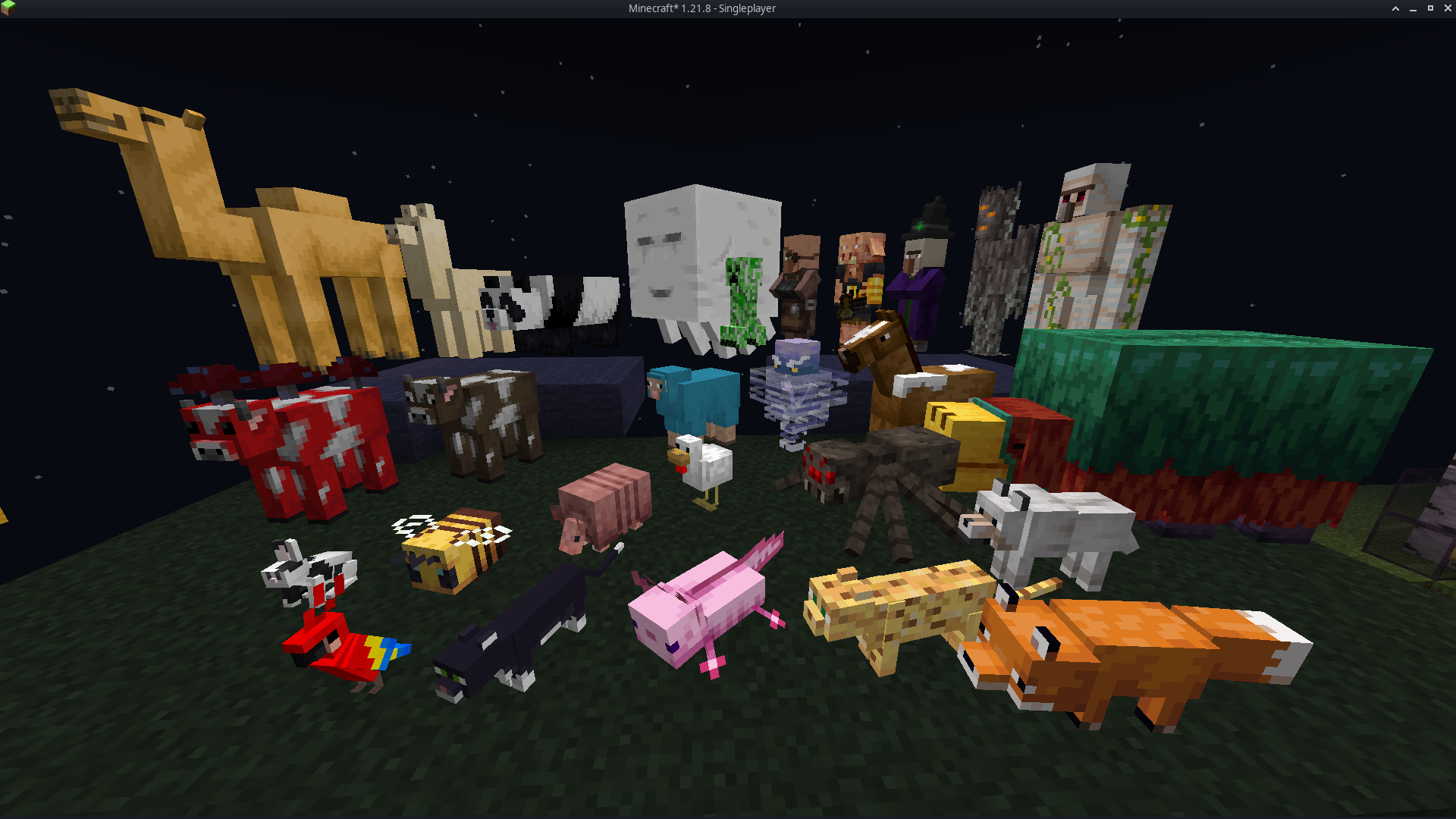
#### It enhances every Minecraft mob with soft, vibrant glow effects that make creatures stand out in caves, at night, and across long distances. Each mob keeps its original vanilla texture but gains emissive highlights that improve visibility and add a colorful, magical atmosphere. The glow system uses emissive texture maps powered by ETF, allowing the world to feel brighter and more alive without altering gameplay. The pack is lightweight, fully client-side, and compatible with most resource packs that don’t edit the same mob textures.
# Features
– Emissive glow effects for all vanilla mobs
– Soft, colorful lighting that boosts world atmosphere
– Improved visibility in dark areas and nighttime exploration
– Vanilla-faithful textures with enhanced glow details
– Visual-only upgrade with no gameplay changes
– Lightweight and optimized for smooth performance
– Compatible with most texture packs that do not replace mob textures
# Dependencies
– **Entity Texture Features (ETF)** is required
– All glow effects rely on ETF’s emissive texture system
– Without ETF installed, mobs will appear with normal vanilla textures
– Works with any client or mod loader that supports ETF (OptiFine alternatives recommended)
This resource pack is available for most Minecraft Java versions
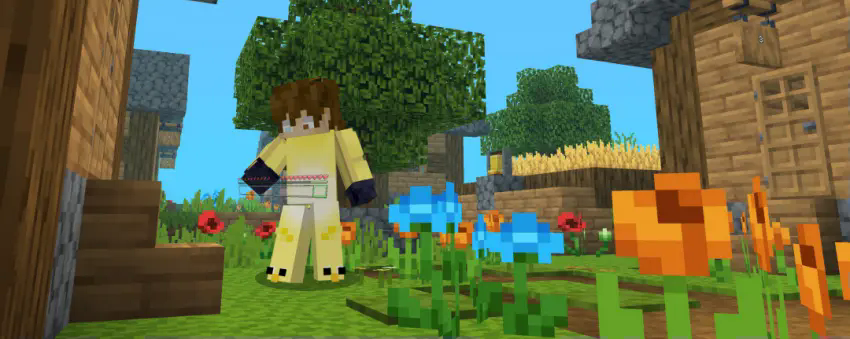
This resource pack brings a bold and beautiful makeover to your interface with a sleek, modern hotbar design that’s sure to turn heads. Here’s what to expect:
🎨 Stylish New Icons – Every hotbar icon has been carefully redesigned to enhance clarity and aesthetics.
🌟 Polished Look & Feel – A refined, immersive interface that fits perfectly whether you’re battling mobs or peacefully exploring.
🧭 Fresh Visuals – Adds a unique, contemporary touch that breathes new life into your screen.
💥 Stand Out in Every Situation – Make your hotbar not just a tool—but a statement.
Upgrade your visuals. Upgrade your vibe. This isn’t just a new look… it’s a whole new feel. 🔥
### v1.6 Update !
## Withered Hearts 
## Glorious Status Bars Terms and Conditions:
Nicky_lul is the creator.
### YOU ARE NOT TO:
You are not to reproduce these assets without modification.
You are not to use this pack inside of another resource pack, unless verbally permissed by the creator, Nicky_lul.
## YOU MAY:
You may add this to a modpack, as long as you place my name and prefereably a link somewhere on the downloads page.
# **Glass doors and Trapdoors**
—
—
## **Description**
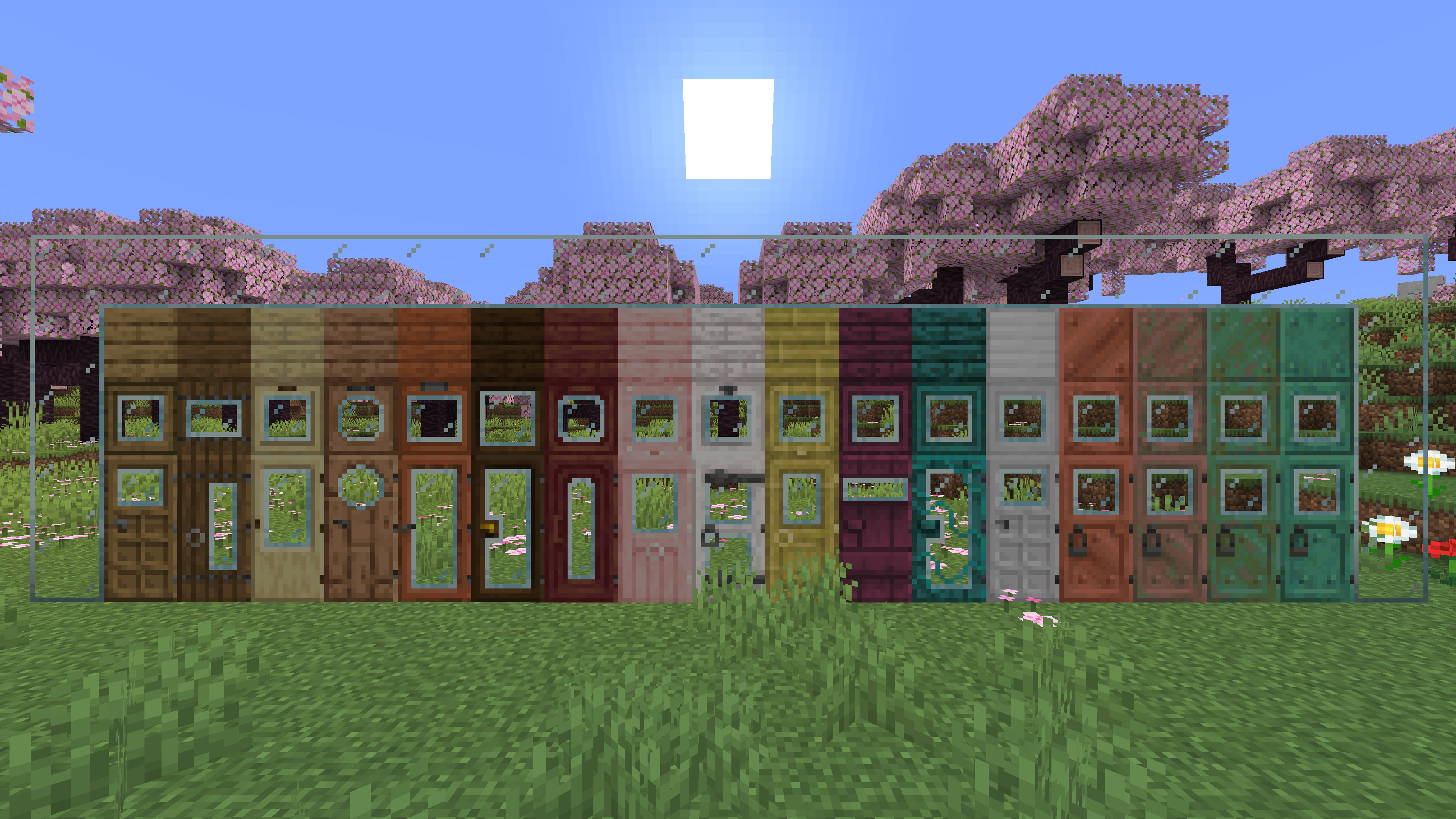
**Replaces the default doors and trapdoors with glass textures.**
**The glass variants make it easier to see through doors and trapdoors.**
# Git Pack Manager
[](https://discord.offsetmonkey538.top/)
[](https://modrinth.com/mod/git-pack-manager)
[](https://codeberg.org/OffsetMods538/Git-Pack-Manager)
[](https://modrinth.com/mod/monkeylib538)
[](https://modrinth.com/mod/mesh-lib)
[](https://git-pack-manager.docs.offsetmonkey538.top/)
## What’s this?
Git Pack Manager is a mod/plugin for dedicated servers that allows for handling resource and data packs with git.
Using git allows for easier management and collaboration.
The mod also supports automatically updating the packs as soon as modifications are made with git.
Resource packs are automatically combined based on their priorities.
See the [boring showcase for Git Pack Manager](https://www.youtube.com/watch?v=S-ei-7u6yCI) video for an example of what it can do.
## Usage
Please read the documentation located [here](https://git-pack-manager.docs.offsetmonkey538.top), and if you have any questions, feel free to contact me on [Discord](https://discord.offsetmonkey538.top/)
###### This mod collects anonymous usage statistics, read more about what’s collected [here](https://monkeylib538.docs.offsetmonkey538.top/reference/telemetry/). No personal data is collected. This can be disabled by modifying the config at `config/monkeylib538/telemetry.json` or by running the `/monkeylib538 telemetry set isEnabled false` command.

### [Join the discord to interact with me and others about Minecraft](https://discord.gg/QZUJtsbkcY)
##  OVERVIEW 
This resourcepack contains important assets for all my datapacks
### • NOT MEANT TO BE USED AS A REGULAR RESOURCEPACK
##  FEATURES 
– *Visit the [wiki](https://github.com/GenMode/Minecraft/wiki/Gen-Assets) for more information*
##  ALSO CHECK OUT 
| Resourcepacks |
| :-: |
| [](https://modrinth.com/project/eOoqH4J0) |
—
| Projects | Social | Support |
| :-: | :-: | :-: |
| [](https://legacy.curseforge.com/members/genmodetwitch/projects) [](https://modrinth.com/user/GenMode) [](https://www.planetminecraft.com/member/gen/) [](https://smithed.net/GenMode) | [](https://discord.gg/QZUJtsbkcY) [](https://twitter.com/DatapackGen) | [](https://ko-fi.com/genart_) [](https://www.patreon.com/GenMedia) |
# Gugle’s Carpet Addition
[](https://github.com/Gu-ZT/gugle-carpet-addition/actions/workflows/build.yml)
[](https://www.curseforge.com/minecraft/mc-mods/guglecarpetaddition)
[](https://modrinth.com/mod/gca)
[](https://github.com/Gu-ZT/gugle-carpet-addition/releases)
## GCA
#### If you need GCA for Minecraft 1.13, [please click here](https://github.com/Gu-ZT/TISCarpet113WithGCA/releases/latest)
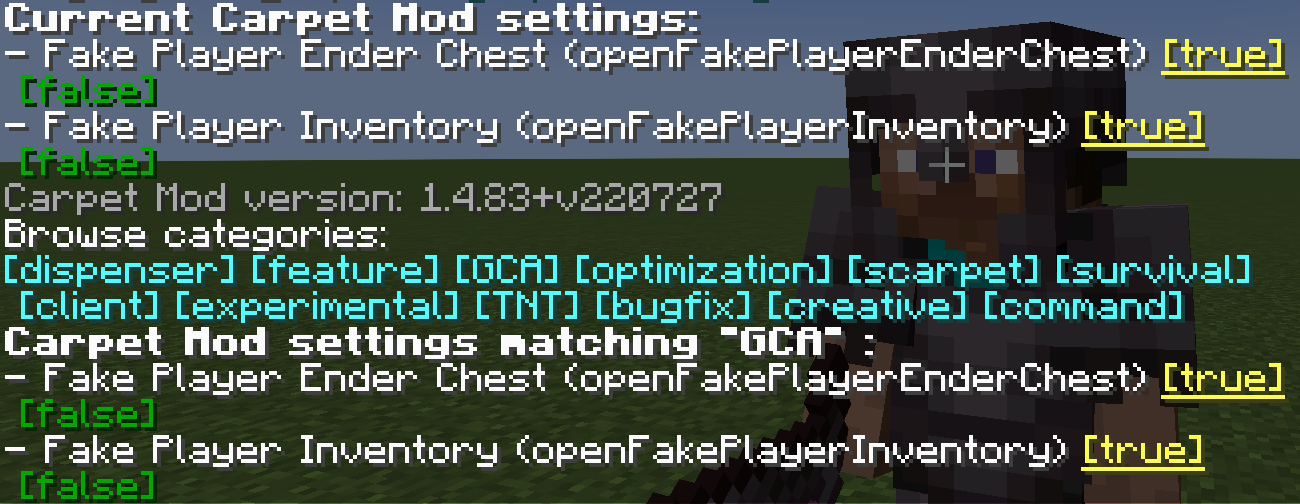
### openFakePlayerInventory
Allow player to open the fake player’s inventory
* Type: `boolean`
* Default: `false`
* Options: `true`, `false`
* Categories: `GCA`, `BOT`
“`
/carpet openFakePlayerInventory true
“`
**Usage**: Right-click on a fake player to open their inventory
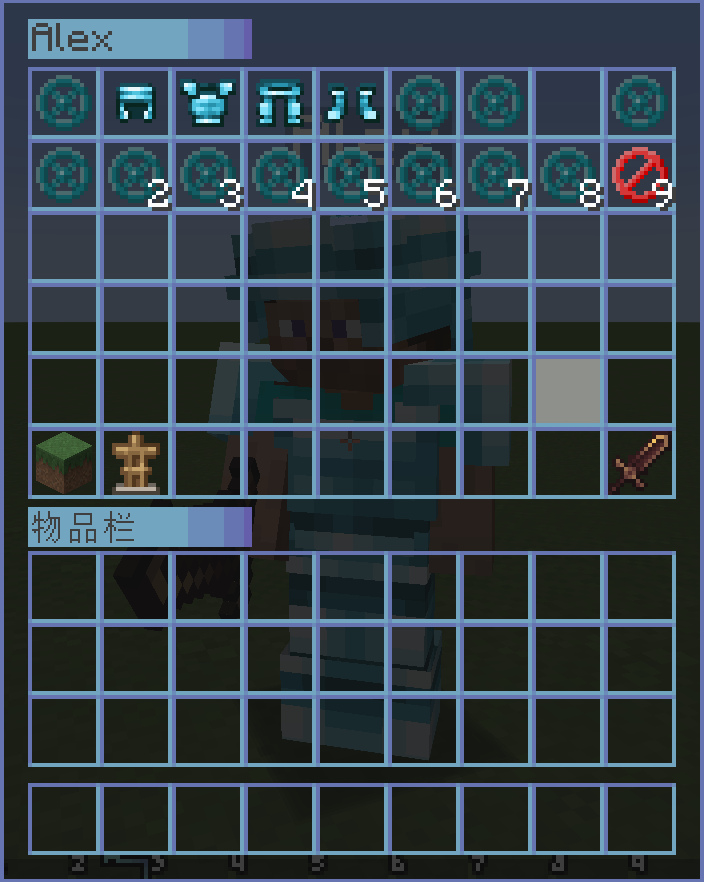
### openRealPlayerInventory
Allow player to open the real player’s inventory
* Type: `String`
* Default: `false`
* Options: `true`, `false`, `ops`, `0`, `1`, `2`, `3`, `4`
* Categories: `GCA`, `experimental`
“`
/carpet openRealPlayerInventory true
/carpet openRealPlayerInventory ops
“`
**Usage**: Right-click on other real players to open their inventory, requires appropriate permission level
### openFakePlayerEnderChest
Allow player to open the fake player’s ender chest
* Type: `String`
* Default: `false`
* Options: `ender_chest`, `true`, `false`
* Categories: `GCA`, `BOT`
“`
/carpet openFakePlayerEnderChest true
/carpet openFakePlayerEnderChest ender_chest
“`
**Usage**: Sneak (hold Shift) + right-click on a fake player to open their ender chest
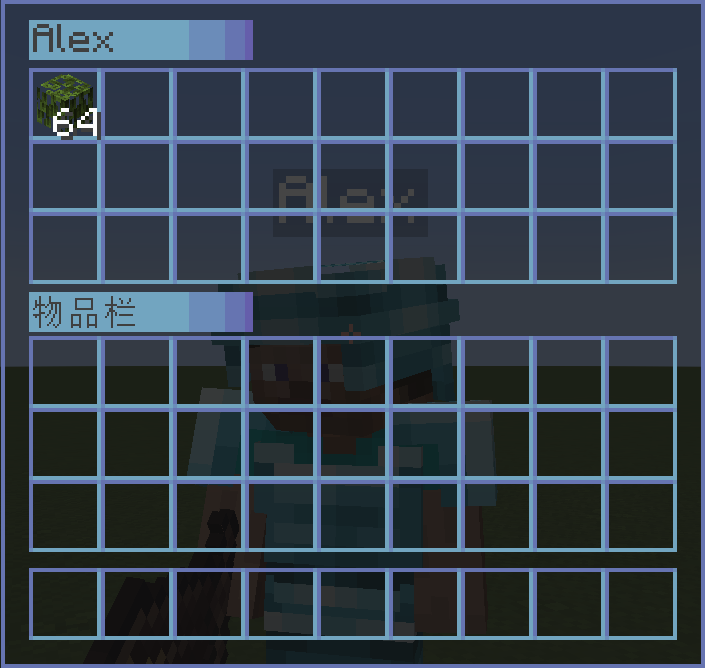
### fakePlayerResident
Keep the fake player when exiting the level
* Type: `boolean`
* Default: `false`
* Options: `true`, `false`
* Categories: `GCA`, `BOT`
“`
/carpet fakePlayerResident true
“`
### fakePlayerReloadAction
Keep the fake player action when exiting the level
* Type: `boolean`
* Default: `false`
* Options: `true`, `false`
* Categories: `GCA`, `BOT`
“`
/carpet fakePlayerReloadAction true
“`
### fakePlayerAutoReplenishment
Make fake player to auto replenishment
* Type: `boolean`
* Default: `false`
* Options: `true`, `false`
* Categories: `GCA`, `BOT`
“`
/carpet fakePlayerAutoReplenishment true
“`
### fakePlayerAutoReplenishmentFormShulkerBox
Make fake player to auto replenishment from shulker box
* Type: `boolean`
* Default: `false`
* Options: `true`, `false`
* Categories: `GCA`, `BOT`
“`
/carpet fakePlayerAutoReplenishmentFormShulkerBox true
“`
### fakePlayerAutoFish
Make fake player to auto fish. When the fishing hook catches a fish, it will automatically reel in and cast again.
* Type: `boolean`
* Default: `false`
* Options: `true`, `false`
* Categories: `GCA`, `BOT`
“`
/carpet fakePlayerAutoFish true
“`
**Usage**: Let the fake player hold a fishing rod and use `/player
### fakePlayerAutoReplaceTool
Make fake player to auto replace almost damaged tool
* Type: `boolean`
* Default: `false`
* Options: `true`, `false`
* Categories: `GCA`, `BOT`
“`
/carpet fakePlayerAutoReplaceTool true
“`
### fakePlayerPrefixName
Fake Player Prefix Name
* Type: `String`
* Default: `#none`
* Options: `#none`, `bot_`
* Categories: `GCA`, `BOT`
“`
/carpet fakePlayerPrefixName bot_
/carpet fakePlayerPrefixName #none
“`
### fakePlayerSuffixName
Fake Player Suffix Name
* Type: `String`
* Default: `#none`
* Options: `#none`, `_fake`
* Categories: `GCA`, `BOT`
“`
/carpet fakePlayerSuffixName _fake
/carpet fakePlayerSuffixName #none
“`
### commandBot
A Bot Management Menu for saving, loading, and grouping fake players
* Type: `String`
* Default: `ops`
* Options: `ops`, `0`, `1`, `2`, `3`, `4`, `true`, `false`
* Categories: `GCA`, `BOT`, `command`
“`
/carpet commandBot ops
“`
**Command Usage**:
“`
/bot # Show saved bot list
/bot list [page] # Show bot list with pagination
/bot add
/bot load
/bot remove
/bot group # Show bot group list
/bot group create
/bot group remove
/bot group add
/bot group load
/bot group unload
/bot group info
/bot group generated
“`
### commandTodo
A Todo Management Menu with support for adding, removing, and marking completion
* Type: `String`
* Default: `ops`
* Options: `ops`, `0`, `1`, `2`, `3`, `4`, `true`, `false`
* Categories: `GCA`, `command`
“`
/carpet commandTodo ops
“`
**Command Usage**:
“`
/todo # Show todo list
/todo list [page] # Show todo list with pagination
/todo add
/todo remove
/todo success
“`
### commandHere
Quickly broadcast your current position to all players and add glowing effect to yourself
* Type: `String`
* Default: `ops`
* Options: `ops`, `0`, `1`, `2`, `3`, `4`, `true`, `false`
* Categories: `GCA`, `command`
* Conditions: Only works when CarpetAmsAddition is NOT loaded
“`
/carpet commandHere ops
“`
**Command Usage**:
“`
/here # Broadcast your coordinates, showing current dimension and converted coordinates
# Also outputs Xaero’s Minimap compatible waypoint format
“`
### commandWhereis
Quickly locate players and add glowing effect to target
* Type: `String`
* Default: `ops`
* Options: `ops`, `0`, `1`, `2`, `3`, `4`, `true`, `false`
* Categories: `GCA`, `command`
“`
/carpet commandWhereis ops
“`
**Command Usage**:
“`
/whereis
/vris
“`
### commandLoc
A Location Management Menu for saving, viewing, and deleting location points
* Type: `String`
* Default: `ops`
* Options: `ops`, `0`, `1`, `2`, `3`, `4`, `true`, `false`
* Categories: `GCA`, `command`
“`
/carpet commandLoc ops
“`
**Command Usage**:
“`
/loc # Show location list
/loc list [page] # Show locations with pagination
/loc add
/loc remove
/loc info
“`
### commandWlist
Whitelist Management, allows authorized regular players to manage the whitelist
* Type: `boolean`
* Default: `false`
* Options: `true`, `false`
* Categories: `GCA`, `command`
“`
/carpet commandWlist true
“`
**Command Usage**:
“`
/wlist # Show current whitelist
/wlist add
/wlist remove
/wlist permission add
/wlist permission remove
“`
### commandBlist
Banned List Management
* Type: `boolean`
* Default: `false`
* Options: `true`, `false`
* Categories: `GCA`, `command`
“`
/carpet commandBlist true
/blist
“`
### commandSop
Simple op get
* Type: `boolean`
* Default: `false`
* Options: `true`, `false`
* Categories: `GCA`, `command`
“`
/carpet commandSop true
/sop
“`
### betterFenceGatePlacement
Make the placed fence gate have the same block status as the fence gate you clicked
* Type: `boolean`
* Default: `false`
* Options: `true`, `false`
* Categories: `GCA`
“`
/carpet betterFenceGatePlacement true
“`
### betterWoodStrip
Only the axe with “Strip” in its name is allowed to peel logs
* Type: `boolean`
* Default: `false`
* Options: `true`, `false`
* Categories: `GCA`
“`
/carpet betterWoodStrip true
“`
### betterSignInteraction
Make the block attached to the sign interact when you right-click it
* Type: `boolean`
* Default: `false`
* Options: `true`, `false`
* Categories: `GCA`
“`
/carpet betterSignInteraction true
“`
### betterItemFrameInteraction
Make the block attached to the ItemFrame interact when you right-click it
* Type: `boolean`
* Default: `false`
* Options: `true`, `false`
* Categories: `GCA`
“`
/carpet betterItemFrameInteraction true
“`
### betterQuickCrafting
Keep an item in the inventory during quick crafting
* Type: `boolean`
* Default: `false`
* Options: `true`, `false`
* Categories: `GCA`, `experimental`
“`
/carpet betterQuickCrafting true
“`
### simpleInGameCalculator
Simple In-Game Calculator
* Type: `boolean`
* Default: `false`
* Options: `true`, `false`
* Categories: `GCA`
“`
/carpet simpleInGameCalculator true
“`
### fastPingFriend
Fast ping friend
* Type: `boolean`
* Default: `false`
* Options: `true`, `false`
* Categories: `GCA`
“`
/carpet fastPingFriend true
“`
### qnmdLC
What is the height value for setting the LC value
* Type: `int`
* Default: `-1`
* Categories: `GCA`, `experimental`
“`
/carpet qnmdLC 64
/carpet qnmdLC -1
“`
### fixedEndCrystalSync
Fixed End Crystal Sync
* Type: `boolean`
* Default: `false`
* Options: `true`, `false`
* Categories: `GCA`, `experimental`
“`
/carpet fixedEndCrystalSync true
“`
### welcomePlayer
Welcome Player
* Type: `boolean`
* Default: `false`
* Options: `true`, `false`
* Categories: `GCA`
“`
/carpet welcomePlayer true
“`
### wanderingTraderSpawnFailedWarning
Wandering Trader Spawn Failed Warning
* Type: `boolean`
* Default: `false`
* Options: `true`, `false`
* Categories: `GCA`, `experimental`
“`
/carpet wanderingTraderSpawnFailedWarning true
“`
### wanderingTraderSpawnRemind
Wandering Trader Spawn Remind
* Type: `boolean`
* Default: `false`
* Options: `true`, `false`
* Categories: `GCA`, `experimental`
“`
/carpet wanderingTraderSpawnRemind true
“`
### commandTransfer
/transfer command
* Type: `boolean`
* Default: `false`
* Options: `true`, `false`
* Categories: `GCA`, `command`
* Conditions: Requires Minecraft >= 1.21
“`
/carpet commandTransfer true
/transfer
“`
### fakePlayerLocatorBar
Display Fake Player Positions On The Locator Bar
* Type: `boolean`
* Default: `true`
* Options: `true`, `false`
* Categories: `GCA`, `command`, `BOT`
* Conditions: Requires Minecraft >= 1.21.6
“`
/carpet fakePlayerLocatorBar true
“`
# Craftable Overpowered!
This mod/data pack makes Enchanted Golden Apples craftable again and returns the achievement associated with eating one (as an advancement). For those who haven’t played 1.8 or don’t remember the recipe, it will appear in your recipe book once you have obtained a Block of Gold.
The mod is *optional* client-side, but the client **will** still need the resources, so the mod’s resources would need to be present in your server’s resource pack for clients who don’t have the mod (or individually downloaded and enabled client-side). The mod’s resources are identical to the data pack’s assets file, which can be downloaded [here](/mod/gapple/version/1.1-datapack).
There are two versions of the data pack, one that only supports English (and doesn’t need a resource pack) and a version that uses a required resource pack to provide translation strings into the following languages:
### Currently Supported Languages
* `bg_bg`: Български (България) 🇧🇬
* `cs_cz`: Čeština (Česká Republika) 🇨🇿
* `da_dk`: Dansk (Danmark) 🇩🇰
* `de_at`: Österreichisches Deitsch(1) 🇦🇹
* `de_ch`: Schwiizerdutsch(1) 🇨🇭
* `de_de`: Deutsch 🇩🇪
* `el_gr`: Ελληνικά (Ελλάδα) 🇬🇷
* `en_au`: English (Australia) 🇦🇺
* `en_ca`: English (Canada) 🇨🇦
* `en_gb`: English (United Kingdom) 🇬🇧
* `en_nz`: English (New Zealand) 🇳🇿
* `en_ud`: ɥsᴉꞁᵷuƎ (uʍoᗡ ǝpᴉsd∩) ↕️
* `en_us`: English (United States) 🇺🇸
* `en_za`: English (South Africa)(1) 🇿🇦
* `es_ar`: Español (Argentina) 🇦🇷
* `es_cl`: Español (Chile) 🇨🇱
* `es_ec`: Español (Ecuador) 🇪🇨
* `es_es`: Español (España) 🇪🇸
* `es_mx`: Español (México) 🇲🇽
* `es_uy`: Español (Uruguay) 🇺🇾
* `es_ve`: Español (Venezuela) 🇻🇪
* `fi_fi`: Suomi (Suomi) 🇫🇮
* `fr_ca`: Français (Québec) 🏴
* `fr_fr`: Français (France) 🇫🇷
* `hu_hu`: Magyar (Magyarország) 🇭🇺
* `id_id`: Bahasa Indonesia (Indonesia) 🇮🇩
* `it_it`: Italiano (Italia) 🇮🇹
* `ja_jp`: 日本語 🇯🇵
* `ko_kr`: 한국어 🇰🇷
* `nl_be`: Vlaams (Vlaanderen)(1) 🏴
* `nl_nl`: Nederlands (Nederland) 🇳🇱
* `nn_no`: Norsk nynorsk (Norge)(1) 🇳🇴
* `no_no`: Norsk Bokmål (Norge) 🇳🇴
* `pl_pl`: Polski (Polska) 🇵🇱
* `pt_br`: Português (Brasil) 🇧🇷
* `pt_pt`: Português (Portugal) 🇵🇹
* `ru_ru`: Русский 🇷🇺
* `sk_sk`: Slovenčina (Slovensko) 🇸🇰
* `sv_se`: Svenska (Sverige) 🇸🇪
* `tr_tr`: Türkçe (Türkiye) 🇹🇷
* `uk_ua`: Українська 🇺🇦
* `zh_cn`: 简体中文 (中国) 🇨🇳
* `zh_hk`: 繁體中文 (香港) 🇭🇰
* `zh_tw`: 繁體中文 (台灣) 🇹🇼
(1): These may not be accurate to this language setting, but I figured it was better to provide a similar translation rather than not providing any.
# FrozenLib
A library that contains many tools for modders. May grow in the future.
This library lets you:
– Have advanced configs
– Add custom scheduledTick methods to any block
– Allow Dripstone to trigger a scheduledTick on any block
– Easily let Dripstone dry out and drip from any block
– Decrease time from item cooldowns
– Use moving looping sounds, use custom flyby sounds, and set up a custom interface to control when they should stop playing
– Disable Hopper usage on any given BlockEntity
– Use advanced math operations and noise sampling
– Set up datafixers to convert old data to newer formats
– Override entity textures
– Add screen shaking effects
– Modify gravity
– Add new mobCategories
– Use and extend a wind system
– Modify advancements on runtime
– Add MobEffects to Beacons
– And much more!
Includes a Fabric implementation of The Quilt Project’s DataFixerUpper API.
[](https://tinyurl.com/3xhmk7fb)
![[Sun]](https://cdn.modrinth.com/data/cached_images/70807fe14c7d28c4bb53f6770af5e827359c8900.png) Gives the Sun a fresh look. Improving the Sky! ![[Sun]](https://cdn.modrinth.com/data/cached_images/70807fe14c7d28c4bb53f6770af5e827359c8900.png)
Changes the sun texture! It’s no longer a square! It’s a big ball of light with rays!
Available for every version!

