Log Cleaner
A lightweight mod that cleans old, unused log files.
The best thing is that this mod keeps files not based on creation date, but the most recent access (of any kind) to the file, so logs that are still being accessed for whatever reason are not removed unwillingly.
It works both client-side only and server-side only, and works in every Minecraft version.
By default, it will clean logs that haven’t been used in more than 14 days, so there’s plenty of time in case you ever need them for debugging, but you can configure it to any amount of days you want.
## Configuration
You can find the mod’s configuration file in `config/logcleaner.json`. There’s two options you can change in there:
– `daysOld`: The number of days a log has to have been unused in order for it to be deleted. Defaults to `14`
– `silent`: If set to `true`, Log Cleaner will not send a message with the amount of deleted log files to the log. Defaults to `false`
MAKE YOUR BUILDING LIMIT UP
# MAKE YOUR BUILDING LIMIT UP
_**Think Minecraft doesn’t have enough building space? Want to build taller buildings? Try our data pack and you can increase the building limit up to 4064 blocks!!**_
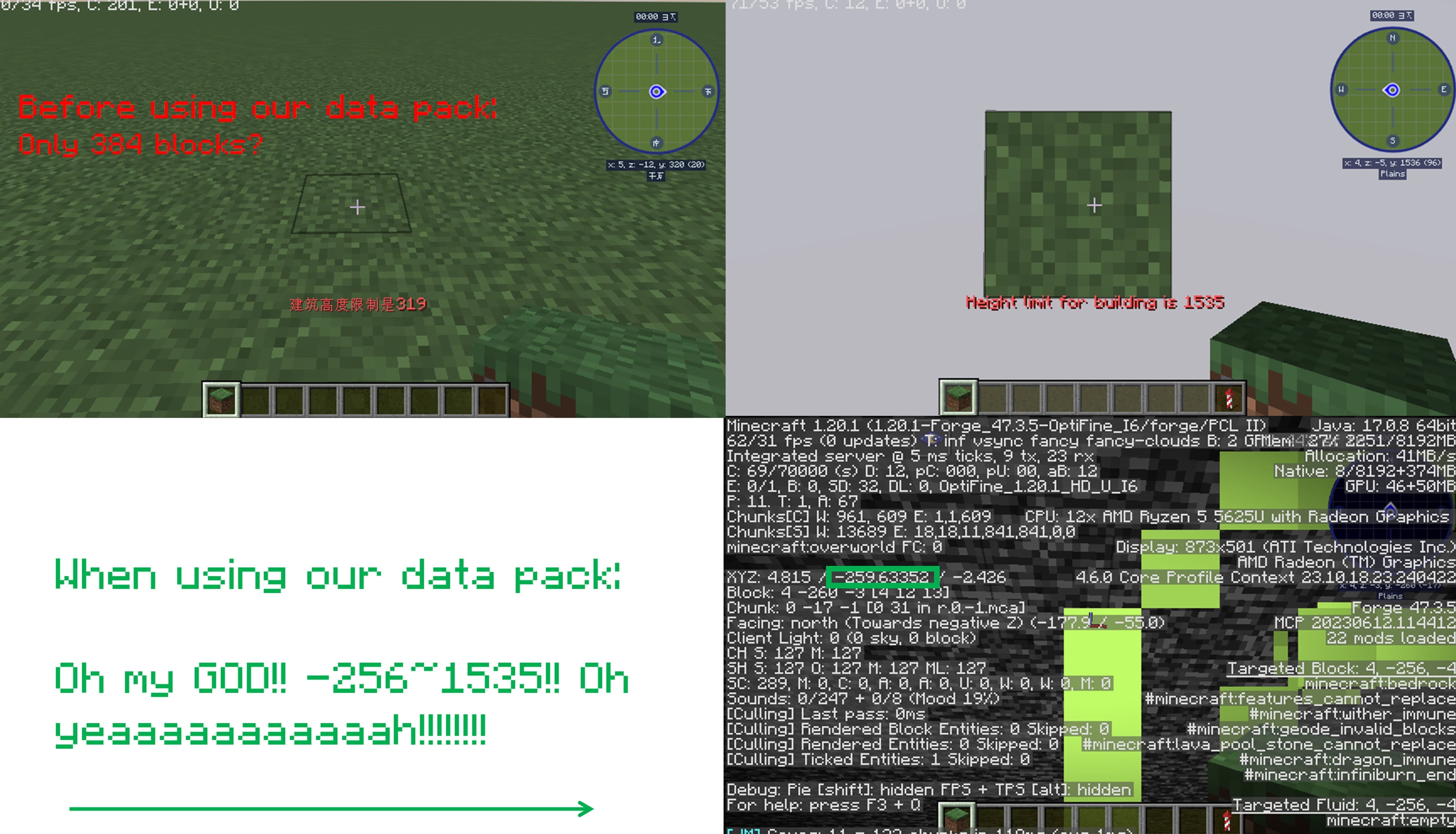
## How to install it?
**You may need to create your game world before install the data pack**
1.Open your game folder(“.minecraft”)
### If you use version isolation:
2.Open your “versions” folder
3.Choose your version
4.Open your “saves” folder
5.Choose your save
6.Open your “datapacks” folder
7.Put our data pack in the folder
### If you Don’t use version isolation
2.Open your “saves” folder
3.Choose your save
4.Open your “datapacks” folder
5.Put our data pack in the folder
**PLEASE PAY ATTENTION!! This datapack may affect the normal operation of other mods**

_This is a DATAPACK! Please put it in the “datapacks” folder in your saves folder_
**NOT THE “recoursepacks” FOLDER**
Lighty
Instead of rendering crosses or numbers on the top face of blocks, Lighty takes a different approach – It renders a transparent carpet-like block on top! Or, new in version 1.1.0 – Renders the actual light level numbers, but Lighty Style!
Make sure to check out [the Gallery](https://modrinth.com/mod/lighty/gallery) for some pictures!
## Configuration
– To activate the overlay, press `F7` and choose the desired mode. This key is configurable in the key binds menu.
– As of version 1.2.0, you can quickly toggle the light overlay on or off using `F8`! This key is configurable in the key binds menu.
– As of version 1.3.0, you can change the “red”/”orange” threshold in the new config menu (accessible using `F7`). Useful for those that want to light their places up aesthetically, or maybe you are playing with some mods that change the mobs spawning rules.
## Meaning of colors:
– Green: No mobs can spawn here!
– Orange: If the sun goes down, Mobs will spawn! Be careful!
– Red: Mobs can spawn here!
If you have some ideas for this mod, feel free to open [a new Codeberg Issue](https://codeberg.org/SchmarrnDevs/Lighty/issues)!
If you like this mod, consider following the project to get notified about new updates!
This mod was inspired by [LightLevel](https://github.com/Parzivail-Modding-Team/LightLevel).
LEGEND TRADER
This time i present you Legend Trader Datapack
If you are not getting proper trades from villagers
then
This data pack make you happy.
After reloading this data pack you get a special trader.
this trader make your Minecraft much easy.
more then 50+ trades
this villager give you cheap and best items.
This trader is best for Minecraft survival and hardcore series.
to summon this trader you have to reload the Minecraft
/reload
and use
function legend:1t
or
function legend:summon/legend
version supported
form- 1.16 to latest
make sure you check the file version before downloading the pack
all versions have separate files
enjoy the Legend Trader Datapack.
THANKS FOR DOWNLOAD
Leashable Players
# Leashable Players
Ruin friendships in this COOL new Minecraft mod for Fabric!
You can configure it via gamerules, including if the mod is enabled, how far away the two players can be before the leash breaks and the distance between the players required before the leash starts pulling.
# 可拴住的玩家
在这款适用于 Fabric 的全新 Minecraft MOD 中破坏友谊!
您可以通过游戏规则对其进行配置,包括是否启用该 MOD、在绳索断裂前玩家之间的距离以及在绳索开始拉扯前玩家之间的距离。
Killer Head
[](https://modrinth.com/project/I7bAUQBi)
[](https://discord.gg/FVq3j5heAc)
[](https://fabricmc.net/)
[](https://quiltmc.org/)
[](https://neoforged.net/)
[](minecraftforge.net)
___
## What’s Killer Head ?
**Killer Head** is a project to drop the killer’s head when his victim dies.
## How it works ?
### Edit player loot table `entities/player.json`
Adds a player head to the death of a player and correlates the characteristics of the killer.
## Complementary
You can also use [Drop Head](https://modrinth.com/project/drop-head).
Here’s [Stackable Heads](https://modrinth.com/project/stackable-heads) which is interesting to use.
## Compatibility
**Killer Head** should work anywhere.
## Support me!
Join my Hardcore Minecraft server: `38.143.19.130:51965`
Keep Inventory Always
## Keep Inventory Always
The mod turns on a game rule that allows you to save your inventory when you die in each world
## How to use
To use the mod, you only need to install it. Now when creating a world, the game rule keepInventory will always be enabled
## Dependencies
– Fabric loader requires [Fabric API](https://modrinth.com/mod/fabric-api)
Kappa
> ⚠️ **DEPRECATION NOTICE**
> OptiFine does not support HTTPS. I have been told by OptiFine staff *not* to use the URL that current versions of Kappa currently use (which has HTTPS support) and instead to use the one that OptiFine the mod uses (which *only* supports HTTP). I do not want my mod to be insecure, and do make insecure connections, so I will no longer update Kappa until HTTPS is enabled, as this is an extremely basic security measure nowadays.
**Kappa** adds OptiFine capes (correctly), and is aimed for use in snapshots. It’s also meant to be very light and to modify very little so it doesn’t upset server moderators, or so it doesn’t get broken very easily (which upsets me!).
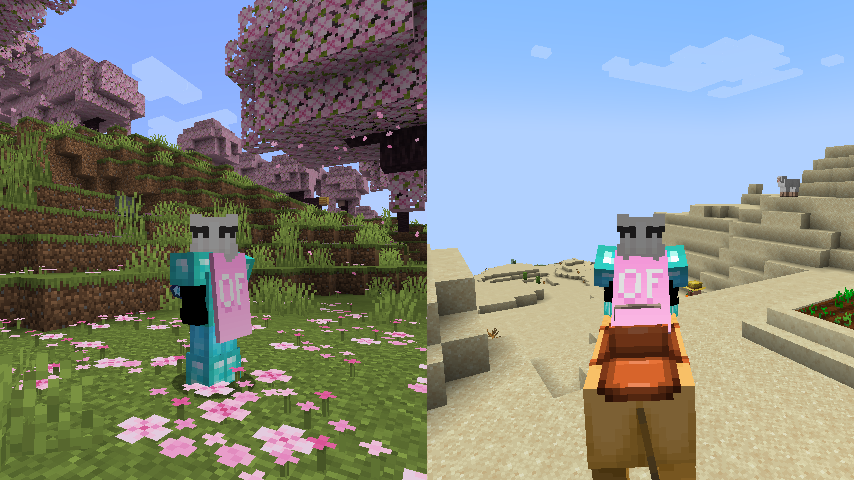
**Notice**: This mod does **not** replace OptiFine nor lets non-donors to wear them.
It merely adds the OptiFine capes and displays them, if you have donated to OptiFine.
If you enjoy OptiFine and want a cape, [consider donating to OF.][1]
**Kappa** is _not_ like other mods! It _works smart, not hard!_ Usually mods just clone the vanilla cape code, but **Kappa** uses it the intended way. Thanks to that, **Kappa** should barely break, if at all!
There’s also an upside to this: mods that affect the vanilla cape will also affect OptiFine capes from Kappa!
Fabric API is _not_ needed.
Usually Fabric/Quilt mods are compatible between versions, but sometimes, like in the 1.17 snapshots, Minecraft itself breaks the mods.
I will test my mod against the latest snapshot, because I like playing with my OptiFine cape, so if my mod is broken, I will update it.
Yes, OptiFine’s cape breaks Minecraft’s commercial usage guidelines, but I already had it for lots longer. I consider it part of my skin.
**On Quilt support:** This mod sits in a gray area, as thus is probably safe to avoid if you’re using Quilt. However, Kappa uses as little Fabric specific components as possible.
[1]: https://optifine.net/donate
Just Hotbar
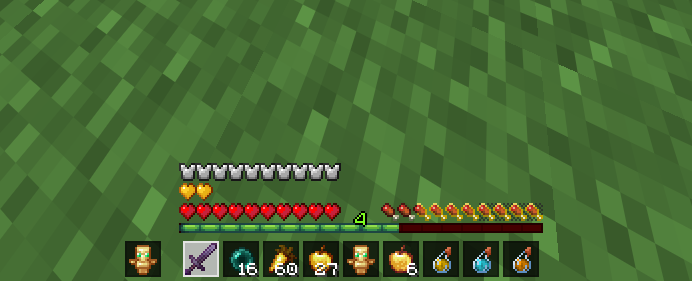
# Just Hotbar
This texture pack changes the hearts and hotbar, making them simpler
No Java Edition Branding – Remove from Start-Title Screen
Removes the Java Edition Text under The “Minecraft” Logo from the Title Screen!


Also works for with other resourcepacks!

