Chroma Key – Green Screen
## Description
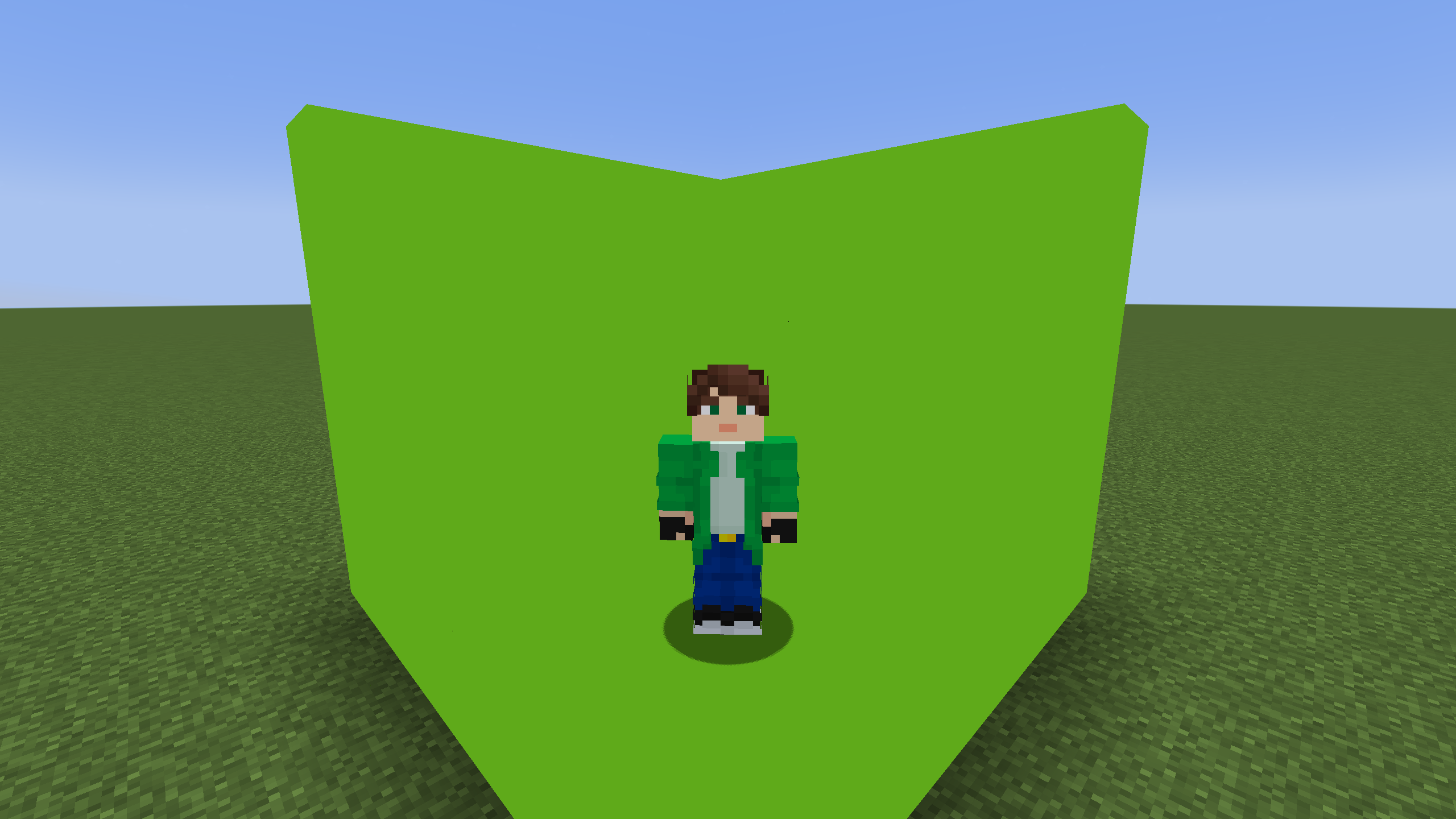
A vanilla shader that changes lime concrete to chroma key. Green screen instead of green concrete
## Description
A vanilla shader that changes lime concrete to chroma key. Green screen instead of green concrete

A simplistic pack that reworks netherrack with a grody look modified from vanilla’s upcoming cinnabar; bringing back the nebulous “is it flesh or is it stone?” look lost with jappa’s final retexture in 1.14.
# Glowing Mobs Pack
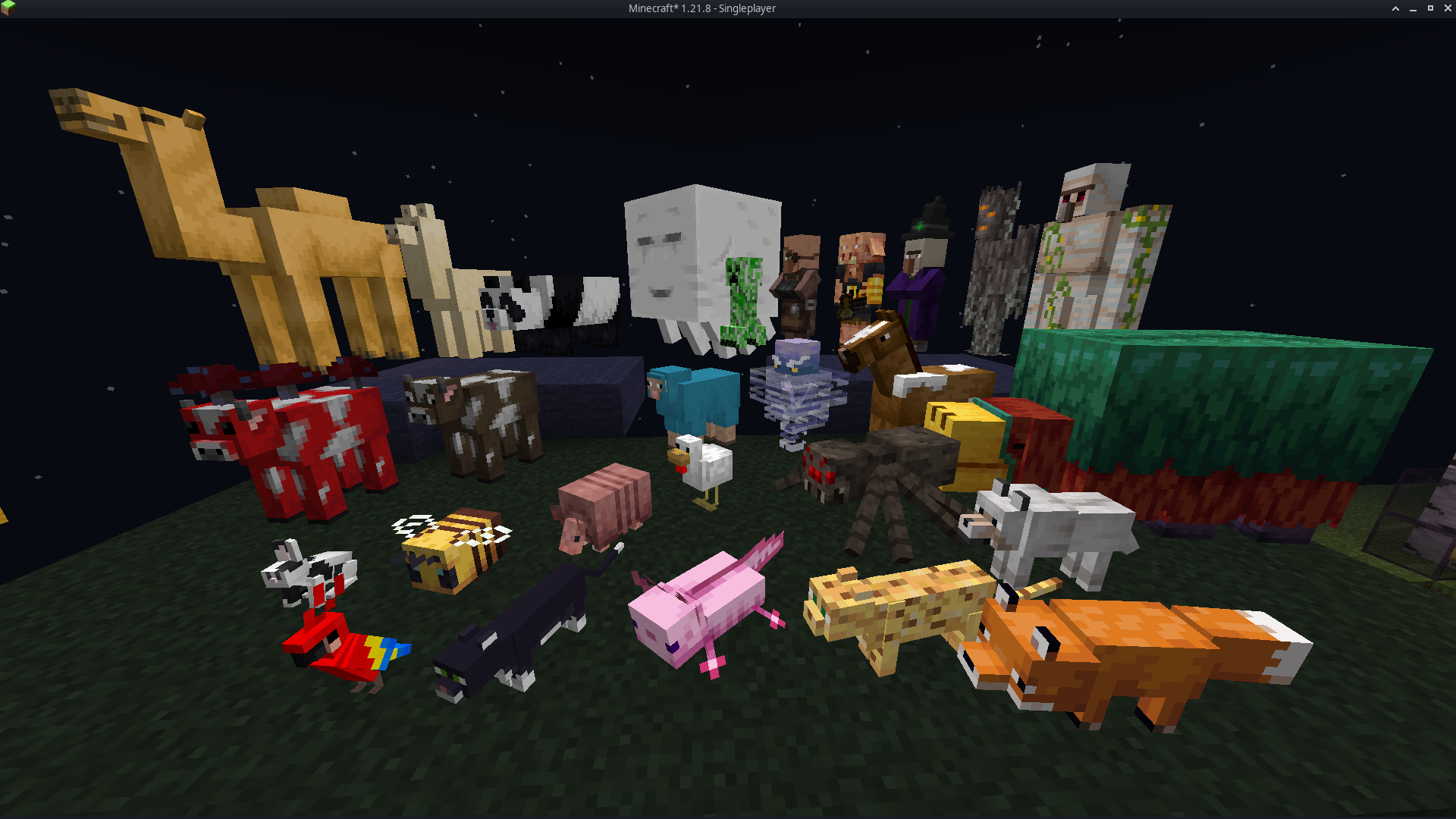
#### It enhances every Minecraft mob with soft, vibrant glow effects that make creatures stand out in caves, at night, and across long distances. Each mob keeps its original vanilla texture but gains emissive highlights that improve visibility and add a colorful, magical atmosphere. The glow system uses emissive texture maps powered by ETF, allowing the world to feel brighter and more alive without altering gameplay. The pack is lightweight, fully client-side, and compatible with most resource packs that don’t edit the same mob textures.
# Features
– Emissive glow effects for all vanilla mobs
– Soft, colorful lighting that boosts world atmosphere
– Improved visibility in dark areas and nighttime exploration
– Vanilla-faithful textures with enhanced glow details
– Visual-only upgrade with no gameplay changes
– Lightweight and optimized for smooth performance
– Compatible with most texture packs that do not replace mob textures
# Dependencies
– **Entity Texture Features (ETF)** is required
– All glow effects rely on ETF’s emissive texture system
– Without ETF installed, mobs will appear with normal vanilla textures
– Works with any client or mod loader that supports ETF (OptiFine alternatives recommended)
This resource pack is available for most Minecraft Java versions
This resource pack brings a bold and beautiful makeover to your interface with a sleek, modern hotbar design that’s sure to turn heads. Here’s what to expect:
🎨 Stylish New Icons – Every hotbar icon has been carefully redesigned to enhance clarity and aesthetics.
🌟 Polished Look & Feel – A refined, immersive interface that fits perfectly whether you’re battling mobs or peacefully exploring.
🧭 Fresh Visuals – Adds a unique, contemporary touch that breathes new life into your screen.
💥 Stand Out in Every Situation – Make your hotbar not just a tool—but a statement.
Upgrade your visuals. Upgrade your vibe. This isn’t just a new look… it’s a whole new feel. 🔥
### v1.6 Update !
## Withered Hearts 
## Glorious Status Bars Terms and Conditions:
Nicky_lul is the creator.
### YOU ARE NOT TO:
You are not to reproduce these assets without modification.
You are not to use this pack inside of another resource pack, unless verbally permissed by the creator, Nicky_lul.
## YOU MAY:
You may add this to a modpack, as long as you place my name and prefereably a link somewhere on the downloads page.
# **Glass doors and Trapdoors**
—
—
## **Description**
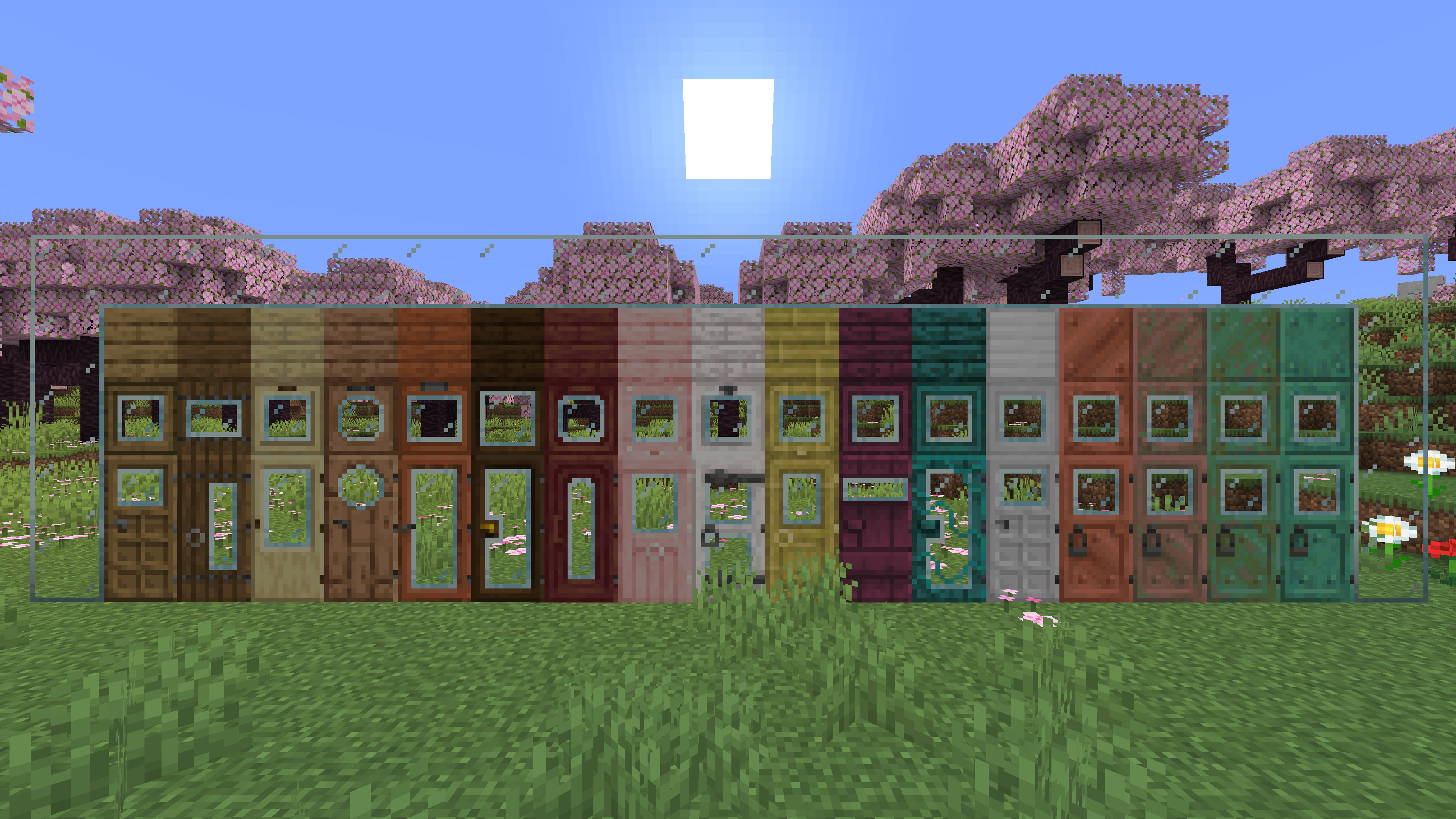
**Replaces the default doors and trapdoors with glass textures.**
**The glass variants make it easier to see through doors and trapdoors.**
# Git Pack Manager
[](https://discord.offsetmonkey538.top/)
[](https://modrinth.com/mod/git-pack-manager)
[](https://codeberg.org/OffsetMods538/Git-Pack-Manager)
[](https://modrinth.com/mod/monkeylib538)
[](https://modrinth.com/mod/mesh-lib)
[](https://git-pack-manager.docs.offsetmonkey538.top/)
## What’s this?
Git Pack Manager is a mod/plugin for dedicated servers that allows for handling resource and data packs with git.
Using git allows for easier management and collaboration.
The mod also supports automatically updating the packs as soon as modifications are made with git.
Resource packs are automatically combined based on their priorities.
See the [boring showcase for Git Pack Manager](https://www.youtube.com/watch?v=S-ei-7u6yCI) video for an example of what it can do.
## Usage
Please read the documentation located [here](https://git-pack-manager.docs.offsetmonkey538.top), and if you have any questions, feel free to contact me on [Discord](https://discord.offsetmonkey538.top/)
###### This mod collects anonymous usage statistics, read more about what’s collected [here](https://monkeylib538.docs.offsetmonkey538.top/reference/telemetry/). No personal data is collected. This can be disabled by modifying the config at `config/monkeylib538/telemetry.json` or by running the `/monkeylib538 telemetry set isEnabled false` command.

### [Join the discord to interact with me and others about Minecraft](https://discord.gg/QZUJtsbkcY)
##  OVERVIEW 
This resourcepack contains important assets for all my datapacks
### • NOT MEANT TO BE USED AS A REGULAR RESOURCEPACK
##  FEATURES 
– *Visit the [wiki](https://github.com/GenMode/Minecraft/wiki/Gen-Assets) for more information*
##  ALSO CHECK OUT 
| Resourcepacks |
| :-: |
| [](https://modrinth.com/project/eOoqH4J0) |
—
| Projects | Social | Support |
| :-: | :-: | :-: |
| [](https://legacy.curseforge.com/members/genmodetwitch/projects) [](https://modrinth.com/user/GenMode) [](https://www.planetminecraft.com/member/gen/) [](https://smithed.net/GenMode) | [](https://discord.gg/QZUJtsbkcY) [](https://twitter.com/DatapackGen) | [](https://ko-fi.com/genart_) [](https://www.patreon.com/GenMedia) |
# Craftable Overpowered!
This mod/data pack makes Enchanted Golden Apples craftable again and returns the achievement associated with eating one (as an advancement). For those who haven’t played 1.8 or don’t remember the recipe, it will appear in your recipe book once you have obtained a Block of Gold.
The mod is *optional* client-side, but the client **will** still need the resources, so the mod’s resources would need to be present in your server’s resource pack for clients who don’t have the mod (or individually downloaded and enabled client-side). The mod’s resources are identical to the data pack’s assets file, which can be downloaded [here](/mod/gapple/version/1.1-datapack).
There are two versions of the data pack, one that only supports English (and doesn’t need a resource pack) and a version that uses a required resource pack to provide translation strings into the following languages:
### Currently Supported Languages
* `bg_bg`: Български (България) 🇧🇬
* `cs_cz`: Čeština (Česká Republika) 🇨🇿
* `da_dk`: Dansk (Danmark) 🇩🇰
* `de_at`: Österreichisches Deitsch(1) 🇦🇹
* `de_ch`: Schwiizerdutsch(1) 🇨🇭
* `de_de`: Deutsch 🇩🇪
* `el_gr`: Ελληνικά (Ελλάδα) 🇬🇷
* `en_au`: English (Australia) 🇦🇺
* `en_ca`: English (Canada) 🇨🇦
* `en_gb`: English (United Kingdom) 🇬🇧
* `en_nz`: English (New Zealand) 🇳🇿
* `en_ud`: ɥsᴉꞁᵷuƎ (uʍoᗡ ǝpᴉsd∩) ↕️
* `en_us`: English (United States) 🇺🇸
* `en_za`: English (South Africa)(1) 🇿🇦
* `es_ar`: Español (Argentina) 🇦🇷
* `es_cl`: Español (Chile) 🇨🇱
* `es_ec`: Español (Ecuador) 🇪🇨
* `es_es`: Español (España) 🇪🇸
* `es_mx`: Español (México) 🇲🇽
* `es_uy`: Español (Uruguay) 🇺🇾
* `es_ve`: Español (Venezuela) 🇻🇪
* `fi_fi`: Suomi (Suomi) 🇫🇮
* `fr_ca`: Français (Québec) 🏴
* `fr_fr`: Français (France) 🇫🇷
* `hu_hu`: Magyar (Magyarország) 🇭🇺
* `id_id`: Bahasa Indonesia (Indonesia) 🇮🇩
* `it_it`: Italiano (Italia) 🇮🇹
* `ja_jp`: 日本語 🇯🇵
* `ko_kr`: 한국어 🇰🇷
* `nl_be`: Vlaams (Vlaanderen)(1) 🏴
* `nl_nl`: Nederlands (Nederland) 🇳🇱
* `nn_no`: Norsk nynorsk (Norge)(1) 🇳🇴
* `no_no`: Norsk Bokmål (Norge) 🇳🇴
* `pl_pl`: Polski (Polska) 🇵🇱
* `pt_br`: Português (Brasil) 🇧🇷
* `pt_pt`: Português (Portugal) 🇵🇹
* `ru_ru`: Русский 🇷🇺
* `sk_sk`: Slovenčina (Slovensko) 🇸🇰
* `sv_se`: Svenska (Sverige) 🇸🇪
* `tr_tr`: Türkçe (Türkiye) 🇹🇷
* `uk_ua`: Українська 🇺🇦
* `zh_cn`: 简体中文 (中国) 🇨🇳
* `zh_hk`: 繁體中文 (香港) 🇭🇰
* `zh_tw`: 繁體中文 (台灣) 🇹🇼
(1): These may not be accurate to this language setting, but I figured it was better to provide a similar translation rather than not providing any.
![[Sun]](https://cdn.modrinth.com/data/cached_images/70807fe14c7d28c4bb53f6770af5e827359c8900.png) Gives the Sun a fresh look. Improving the Sky! ![[Sun]](https://cdn.modrinth.com/data/cached_images/70807fe14c7d28c4bb53f6770af5e827359c8900.png)
Changes the sun texture! It’s no longer a square! It’s a big ball of light with rays!
Available for every version!


Gives the Moon texture a new fresh look. Improving the Sky!
Made using real moon images.
### The Full Cycle:
New Moon, Waxing Crescent, First Quarter, Waxing Gibbous,
Full Moon, Waning Gibbous, Third Quarter, and Waning Crescent!!

Inspired by this image:
