MoreTotems
# MoreTotems


**MoreTotems** is a simple Paper plugin which adds some minor tweaks to Totems of Undying.
## 🚀 Quick Start
### 📥 Installation:
> #### ⚠️ Warning!
>
> Please, do not download versions from range:
> [0.1.0-data-1.20.5](https://modrinth.com/datapack/moretotems/version/0.1.0-data-1.20.5)..[0.1.0-1.20.5+mod](https://modrinth.com/datapack/moretotems/version/0.1.0-1.20.5+mod)!
> They are not loading because of [#11](https://github.com/JustHm228/MoreTotems/issues/11) (Data pack is not loading on >=1.20.5) and
> [#13](https://github.com/JustHm228/MoreTotems/issues/13) (Data pack never registers objectives).
>
> So, it is recommended not to use experimental data pack versions of the plugin.


Please ensure that you have the following software installed:
– [Java]() (≥ 11 LTS)
– [Minecraft]() (≥ 1.19.4)
– [Paper]() (≥ 1.19.2 build
[#191]())
To install the plugin on your Minecraft server, you should:
1. Download the latest version.
2. Place it to the “plugins“ directory in the root of the server.
3. Restart the server.
### ⚠️ Experimental versions:



> #### ⚠️ Disclaimer:
>
> I am currently developing some experimental alpha versions of this plugin,
> which can be loaded as vanilla data packs. I recommend not to use them because
> of many bugs. So, if you download such experimental version and load it to
> your world, please be ready for many serious errors.
### 💡 Features:
– **”Unbreakable” Totems of Undying.** A Totem of Undying with the
[“Unbreakable“ tag]() set will not
disappear when used. To get such totem you can use one of the following commands:
– ≤ 1.20.4: “/minecraft:give @s minecraft:totem_of_undying{Unbreakable:1b} 1“
– ≥ 1.20.5: “/minecraft:give @s minecraft:totem_of_undying[minecraft:unbreakable={}] 1“
– **Enchantments for Totems of Undying:**
– **[Unbreaking](https://minecraft.wiki/w/Unbreaking).** Every Totem of Undying enchanted with
Unbreaking of “n“th level has a “100/(n+1)“% chance that it will disappear when used.
Otherwise, it will not. So, the Totem of Undying enchanted with Unbreaking of 3 level has a
75% chance that it will not disappear when used.
### 🔧 Configuration:
Coming soon!
## 📭 Contact me:


## 📖 License
This project and its sources are licensed under the [MIT License](https://github.com/JustHm228/MoreTotems/blob/main/LICENSE):
“`text
MIT License
Copyright (c) 2025 JustHuman228
Permission is hereby granted, free of charge, to any person obtaining a copy
of this software and associated documentation files (the “Software”), to deal
in the Software without restriction, including without limitation the rights
to use, copy, modify, merge, publish, distribute, sublicense, and/or sell
copies of the Software, and to permit persons to whom the Software is
furnished to do so, subject to the following conditions:
The above copyright notice and this permission notice shall be included in all
copies or substantial portions of the Software.
THE SOFTWARE IS PROVIDED “AS IS”, WITHOUT WARRANTY OF ANY KIND, EXPRESS OR
IMPLIED, INCLUDING BUT NOT LIMITED TO THE WARRANTIES OF MERCHANTABILITY,
FITNESS FOR A PARTICULAR PURPOSE AND NONINFRINGEMENT. IN NO EVENT SHALL THE
AUTHORS OR COPYRIGHT HOLDERS BE LIABLE FOR ANY CLAIM, DAMAGES OR OTHER
LIABILITY, WHETHER IN AN ACTION OF CONTRACT, TORT OR OTHERWISE, ARISING FROM,
OUT OF OR IN CONNECTION WITH THE SOFTWARE OR THE USE OR OTHER DEALINGS IN THE
SOFTWARE.
“`
Monsters Drop Mine(怪物掉落矿物)
# 简体中文
在《我的世界》(Minecraft)中,数据包(Data Pack)是一种强大的工具,它允许玩家通过修改游戏的规则和逻辑来扩展游戏内容。以下是一个功能为使部分怪物掉落矿物的数据包的介绍:
### 数据包名称:**怪物掉落矿物**
#### 功能概述:
这个数据包的核心功能是让特定的怪物在被击败时有几率掉落各种矿物,如铁矿石、金矿石、钻石等。这不仅增加了游戏的趣味性,还为玩家提供了更多的资源获取途径,丰富了游戏的玩法。
#### 设计理念:
在《我的世界》中,矿物通常只能通过挖掘获得,而这个数据包打破了这一传统设定。通过让怪物掉落矿物,玩家可以在探索和战斗的过程中获得意外的惊喜,同时也为那些喜欢战斗但不愿意长时间挖掘的玩家提供了另一种获取资源的方式。
#### 实现方式:
这个数据包主要通过修改怪物的掉落规则来实现。在Minecraft中,怪物的掉落物是通过`loot_tables`(战利品表)来定义的。数据包会为特定的怪物添加新的战利品表,或者修改现有的战利品表,使其在被击败时有几率掉落指定的矿物。
例如,对于僵尸,数据包可以在其战利品表中添加以下规则:
“`json
{
“pools”: [
{
“rolls”: 1,
“entries”: [
{
“type”: “minecraft:item”,
“name”: “minecraft:iron_ore”,
“functions”: [
{
“function”: “minecraft:set_count”,
“count”: {
“type”: “minecraft:uniform”,
“min”: 1,
“max”: 3
}
}
]
}
],
“conditions”: [
{
“condition”: “minecraft:random_chance_with_looting”,
“chance”: 0.1,
“looting_multiplier”: 0.05
}
]
}
]
}
“`
这个规则表示僵尸有10%的基础几率掉落1到3个铁矿石,且玩家的抢夺等级每增加一级,掉落几率会增加5%。
#### 适用场景:
这个数据包适用于喜欢探索和战斗的玩家,尤其是那些希望在游戏中获得更丰富资源获取体验的玩家。它可以让玩家在探索地下城、森林或沙漠等生物群系时,遇到怪物并击败它们后,有机会获得宝贵的矿物资源。
#### 安装方法:
玩家需要将这个数据包文件(通常是`.zip`格式)放入Minecraft的`data_packs`文件夹中。然后在游戏设置中启用该数据包,即可在游戏中体验到怪物掉落矿物的新功能。
#### 注意事项:
– 玩家需要注意,过多的矿物掉落可能会破坏游戏的平衡性,因此建议玩家根据自己的游戏风格和喜好调整掉落几率。
– 数据包的兼容性需要根据Minecraft的具体版本进行测试,以确保其正常工作。
总的来说,这个怪物矿物掉落包为《我的世界》带来了新的玩法和乐趣,让玩家在战斗中也能获得资源,丰富了游戏的探索和战斗体验。
# English
In Minecraft, the Data Pack is a powerful tool that allows players to extend the game’s content by modifying the game’s rules and logic. Here’s an introduction to a packet that features some monsters to drop minerals:
### Packet Name: **Monsters Drop Mine**
#### Features Overview:
The core function of this packet is to give specific monsters a chance to drop various minerals such as iron ore, gold ore, diamonds, etc., when defeated. This not only adds to the fun of the game, but also provides players with more ways to obtain resources and enrich the gameplay of the game.
#### Design Concept:
In Minecraft, minerals are usually only available through mining, and this packet breaks that convention. By having monsters drop minerals, players can get unexpected surprises as they explore and fight, while also providing another way to get resources for those who enjoy fighting but aren’t willing to dig for long periods of time.
#### Implementation:
This packet is mainly achieved by modifying the monster’s drop rules. In Minecraft, monster drops are defined by ‘loot_tables’ (loot tables). Packs will add new loot tables to specific monsters, or modify existing loot tables so that they have a chance to drop specified minerals when defeated.
For example, for zombies, a packet can add the following rules to its loot table:
“`json
{
“pools”: [
{
“rolls”: 1,
“entries”: [
{
“type”: “minecraft:item”,
“name”: “minecraft:iron_ore”,
“functions”: [
{
“function”: “minecraft:set_count”,
“count”: {
“type”: “minecraft:uniform”,
“min”: 1,
“max”: 3
}
}
]
}
],
“conditions”: [
{
“condition”: “minecraft:random_chance_with_looting”,
“chance”: 0.1,
“looting_multiplier”: 0.05
}
]
}
]
}
“`
This rule means that zombies have a 10% base chance of dropping between 1 and 3 iron ore, and that the drop chance increases by 5% for each level of the player’s loot level.
#### Applicable Scenarios:
This packet is for players who enjoy exploration and combat, especially those who want a richer resource acquisition experience in the game. It gives players the opportunity to earn valuable mineral resources when exploring biomes such as dungeons, forests, or deserts, and after encountering monsters and defeating them.
#### Installation Method:
The player needs to put this packet file (usually in ‘.zip’ format) into the ‘data_packs’ folder in Minecraft. Then enable the data package in the game settings, and you can experience the new feature of monster drop minerals in the game.
#### Notes:
– Players need to be aware that too many mineral drops can disrupt the balance of the game, so it is recommended that players adjust the drop chances according to their playstyle and preferences.
– Packet compatibility needs to be tested against the specific version of Minecraft to ensure it works properly.
Overall, this Monster Mineral Drop Pack brings new gameplay and fun to Minecraft, allowing players to earn resources in battle, enriching the game’s exploration and combat experience.
Modern Font Pack
**Before downloading, please read the description carefully!**
**This is the Standard Edition of Modern Font Pack. If you are looking for derivative project of this project, go to [Modern Font Pack – Caxton Edition](https://modrinth.com/resourcepack/modern-font-pack-caxton-edition).**
Are you tired of Minecraft’s thick and large default font?

Even if you enable Force Unicode Font, it will look rough on a high-resolution screen.

This resource pack will solve these problems so that you can see a more beautiful, modern and smooth font when you play Minecraft.
– **HD Version**: There are 5 variants, JP, KR, CN, TW and HK. The font is taken from the [Noto Sans font family](https://fonts.google.com/noto/specimen/Noto+Sans) commissioned by Google.
– **JP**: CJK font is **Noto Sans Japanese**.

– **KR**: CJK font is **Noto Sans Korean**.

– **CN**: CJK font is **Noto Sans Simplified Chinese**.

– **TW**: CJK font is **Noto Sans Traditional Chinese**.

– **HK**: CJK font is **Noto Sans Hong Kong**.

– **Basic Version**: There are also 5 variants, JP, KR, CN, TW and HK. The font is also taken from the [Noto Sans font family](https://fonts.google.com/noto/specimen/Noto+Sans) commissioned by Google. Since its content is basically the same as the HD version, it will not be repeated here. The difference is that the font uses a basic smoothing effect, designed for low-resolution screens or smaller GUI scales.

– **Supreme Version**: There are also 5 variants, JP, KR, CN, TW and HK. The font is also taken from the [Noto Sans font family](https://fonts.google.com/noto/specimen/Noto+Sans) commissioned by Google. Since its content is basically the same as the HD version, it will not be repeated here. The difference is that the smoothness of the font is very high. This version is suitable for screen resolutions of QHD (2560 × 1440), 4K UHD (3840 × 2160) or above. **It only supports Minecraft 1.13 or above.**

This resource pack supports **emojis** (emoticons), so you can use it in the game. The font is taken from the [Noto Emoji font family](https://fonts.google.com/noto/specimen/Noto+Emoji) commissioned by Google.

It also supports some **fancy characters**, so you can use it in the game. The font is taken from the [Noto Sans font family](https://fonts.google.com/noto/specimen/Noto+Sans), the [Noto Sans Math font family](https://fonts.google.com/noto/specimen/Noto+Sans+Math), and the [Noto Sans Symbols font family](https://fonts.google.com/noto/specimen/Noto+Sans+Symbols) commissioned by Google.
To use them, you don’t need to use commands such as `/tellraw` and `/title`. You just need to use any online fancy text generators, and then copy and paste the generated fancy text into the game.

**Due to technical limitations, what you need to know is:**
– Emojis and fancy characters **only support version 1.16 and above**. **Version 1.15.2 and below are not supported**. If you try to use emojis and fancy characters in **version 1.15.2 or below**, it will **be displayed as garbled characters or nothing**.
– Since Minecraft **does not support combining characters**, some emojis still cannot be displayed correctly, such as “👨👩👧” may be displayed as “👨👩👧”. Similarly, some of the fancy text like “M҉i҉n҉e҉c҉r҉a҉f҉t҉”, “M҉͈͚̳͆̌ḯ̴̝̣̩̤̚n҈͖͍̬̤̆̈̌̈e̶͍͉̟͋͊̇̽c̵͖̥̬̮̐̉͊̄r̵͈̦͇̫͇̈a҈̫͖̓̄͗̆f҉͓̰̪̉̔t̶͓̣̗͓͒̊̄̇̾”, etc. cannot be displayed correctly.
– In order to make the emoji colored by the game still display normally, **only a single color version was made**. The **colored version will not be made** to avoid **distortion or become completely black problems** after being colored by the game.
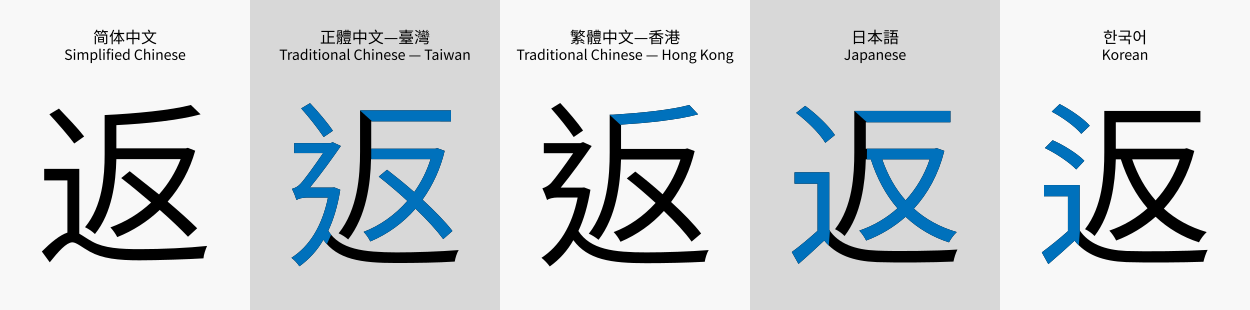
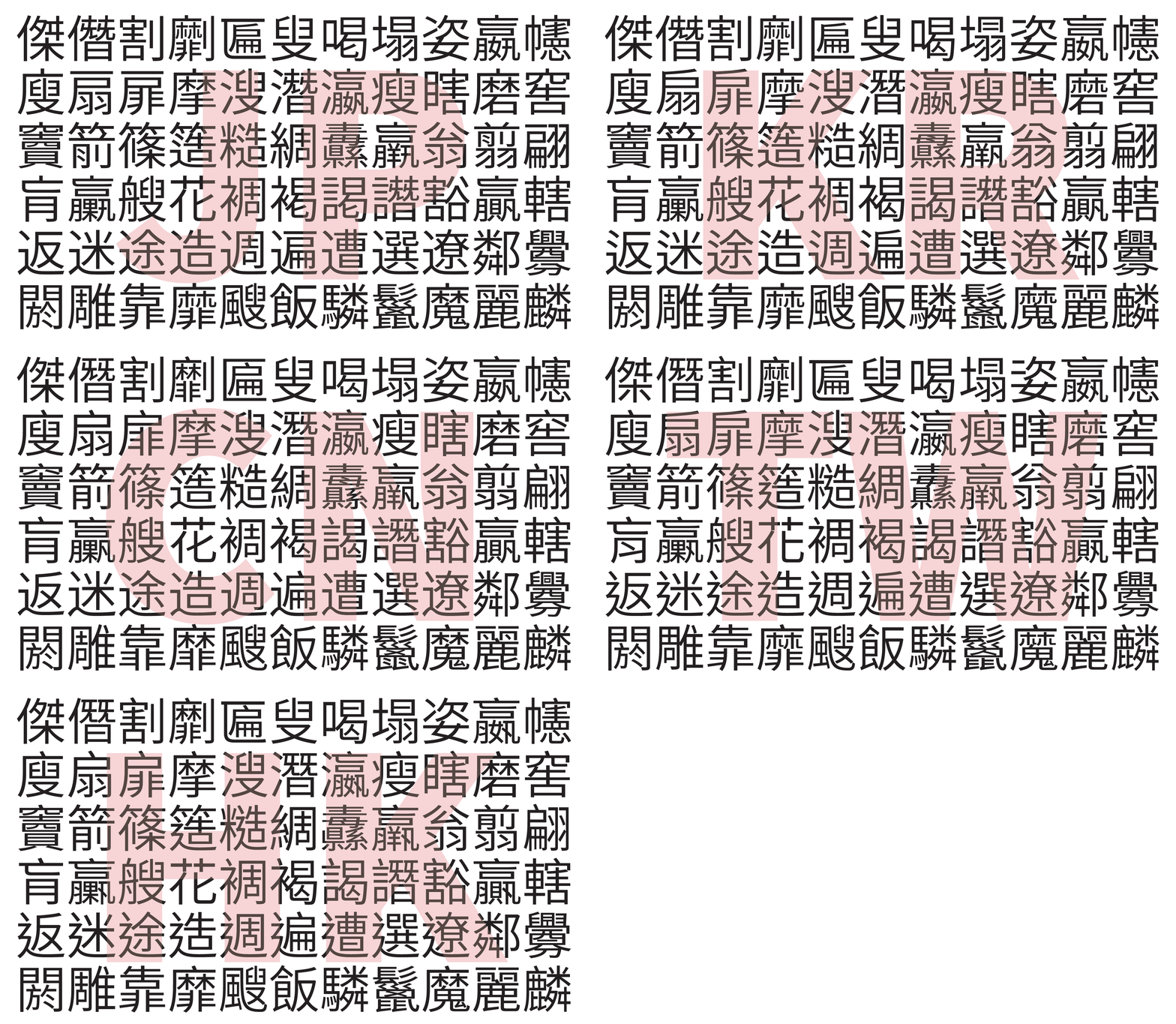
As Chinese characters have **different standards in different countries or regions**, as well as **different screen resolutions**, 15 versions have been specially designed, namely **HD-Japanese version**, **HD-Korean version**, **HD-Chinese version**, **HD-Taiwan version**, **HD-Hong Kong version**, **Basic-Japanese version**, **Basic-Korean version**, **Basic-Chinese version**, **Basic-Taiwan version**, **Basic-Hong Kong version**, **Supreme-Japanese version**, **Supreme-Korean version**, **Supreme-Chinese version**, **Supreme-Taiwan version** and **Supreme-Hong Kong version**.
Please observe the following picture carefully, and you will find some differences in the writing of some characters:
(Image taken from Wikipedia)
(Image taken from Adobe’s blog)
Due to different screen resolutions, there will be different display effects in different situations. Please see the picture below:

(Click HERE to see the original image.)
Please choose to install the **Basic** version or the **HD** version according to the actual situation. If you choose the wrong version, the interface font may become blurry or rougher.
If your screen resolution is **QHD (2560 × 1440)**, **4K UHD (3840 × 2160) or higher**, and you are playing with **version 1.13 or above**, it is recommended that you select **Supreme** version and enable **full screen** for better results.
**If you still don’t know which version you should use, click the link below to see the display effect in various resolutions:**
– [1.13 and Above](https://www.curseforge.com/minecraft/texture-packs/modern-font-pack/pages/ideal-use-of-this-resource-pack-113-and-above)
– [1.12.2 and Below](https://www.curseforge.com/minecraft/texture-packs/modern-font-pack/pages/ideal-use-of-this-resource-pack-1122-and-below)
The format of the resource pack file name is **`MFP-J[Smoothness]-[Version Category][Version Number][CJK Type].zip`**, where:
– **`[Smoothness]`:**
– **`H`** represents that the resource pack is the **HD** version.
– **`B`** represents that the resource pack is the **Basic** version.
– **`S`** represents that the resource pack is the **Supreme** version.
– **`[Version Category]`:**
– **`00`** represents that the resource pack is suitable for **versions 1.5 (13w10a) to 1.5.2 (13w23b)**.
– **`01`** represents that the resource pack is suitable for **versions 1.6.1 (13w24a) to 1.8.9**.
– **`02`** represents that the resource pack is suitable for **versions 1.9 (15w31a) to 1.10.2**.
– **`03`** represents that the resource pack is suitable for **versions 1.11 (16w32a) to 1.12.2 (17w47b)**.
– **`04`** represents that the resource pack is suitable for **versions 1.13 (17w48a) to 1.14.4 (19w46b)**.
– **`05`** represents that the resource pack is suitable for **versions 1.15 (1.15-pre1) to 1.16.1 (1.16.2-pre3)**.
– **`06`** represents that the resource pack is suitable for **versions 1.16.2 (1.16.2-rc1) to 1.16.5**.
– **`07`** represents that the resource pack is suitable for **versions 1.17 (20w45a) to 1.17.1 (21w38a)**.
– **`08`** represents that the resource pack is suitable for **versions 1.18 (21w39a) to 1.18.2**.
– **`09`** represents that the resource pack is suitable for **versions 1.19 (22w11a) to 1.19.2**.
– **`10`** represents that the resource pack is suitable for **version 1.19.3 (22w42a to 23w07a)**.
– **`11`** represents that the resource pack is suitable for **version 1.19.4 (1.19.4-pre1 to 23w13a)**.
– **`12`** represents that the resource pack is suitable for **versions 1.20 (23w14a) to 1.20.1**.
– **`13`** represents that the resource pack is suitable for **versions 1.20.2 (23w31a) to 1.20.4 (23w51b)**.
– **`14`** represents that the resource pack is suitable for **versions 1.20.5 (24w03a and above) and above**.
– **`[Version Number]`:** Start from **`00`**. Every time it is updated, the number will increase by **`1`**.
– **`[CJK Type]`:**
– **`J`** represents that the Chinese characters are designed according to the Chinese character standard in **Japan**.
– **`K`** represents that the Chinese characters are designed according to the Chinese character standard in **Korean**.
– **`C`** represents that the Chinese characters are designed according to the Chinese character standard in **China**.
– **`T`** represents that the Chinese characters are designed according to the Chinese character standard in **Taiwan**.
– **`H`** represents that the Chinese characters are designed according to the Chinese character standard in **Hong Kong**.
For example:
– If you want to use the resource pack that is the **HD version**, can be used in **version *1.16.5***, and the **Chinese characters are designed according to the Chinese character standard in *Taiwan***, the file to be downloaded is “MFP-J**H**-**06**24**T**.zip”.
– If you want to use the resource pack that is the **HD version**, can be used in **version *1.12.2***, and the **Chinese characters are designed according to the Chinese character standard in *Hong Kong***, the file to be downloaded is “MFP-J**H**-**03**24**H**.zip”.
– If you want to use the resource pack that is the **Basic version**, can be used in **version *1.17.1***, and the **Chinese characters are designed according to the Chinese character standard in *China***, the file to be downloaded is “MFP-J**B**-**07**24**C**.zip”.
– If you want to use the resource pack that is the **Supreme version**, can be used in **version *1.15.2***, and the **Chinese characters are designed according to the Chinese character standard in *Korea***, the file to be downloaded is “MFP-J**S**-**05**24**K**.zip”.
If your country or region **does not use Chinese characters**, **you do not need to pay attention to the *Chinese character standard* in the `[CJK Type]` field**. You just need to **pay attention to the `[Smoothness]` field and the `[Version Category]` field**.
**Frequently Asked Question**
Click the spoiler to view.
Frequently Asked Question
1. Isn’t there already a Smooth Font Mod or Modern UI Mod that provides a similar effect? Why would you even make a smooth font pack?
This can be used by some players who don’t have the mod installed and in Bedrock Edition. In addition, there are not many versions supported by Smooth Font Mod and Modern UI Mod, while Modern Font Pack are supported from Java Edition 1.5 to the latest version 26.1.2, and Bedrock Edition 1.2.0 to the latest version 26.13! Here’s a comparison of the three:
-
- Smooth Font Mod:
-
- Supports Java Edition 1.7.10, 1.8.9, 1.10.2, 1.11.2, 1.12.1, 1.12.2.
-
- Requires Forge loader.
-
- Modern UI Mod:
-
- For Forge loader, it supports Java Edition 1.15.2, 1.16.1, 1.16.2, 1.16.3, 1.16.4, 1.16.5, 1.17.1, 1.18, 1.18.1, 1.18.2, 1.19.2, 1.19.4, 1.20, 1.20.1, 1.20.2, 1.20.4, 1.20.6, 1.21, 1.21.1, 1.21.3, 1.21.4, 1.21.6, 1.21.7, and 1.21.8. For Fabric Loader, it supports 1.20, 1.20.1, 1.20.3, 1.20.4, 1.20.6, 1.21, 1.21.1, 1.21.3, 1.21.4, 1.21.6, 1.21.7, and 1.21.8. For NeoForge Loader, it supports 1.20.1, 1.20.2, 1.20.4, 1.20.6, 1.21, 1.21.1, 1.21.2, 1.21.3, 1.21.4, 1.21.6, 1.21.7, and 1.21.8. For Quilt Loader, it supports 1.20, 1.20.1, 1.20.2, 1.20.4, 1.20.6, 1.21, 1.21.1, and 1.21.3.
-
- Some versions of this mod require Java 11. If any mod is incompatible with Java 11, it will not work.
-
- This mod requires OpenGL 4.3 (1.15.2 – 1.16.5) or 4.5 (1.17+). If the graphics card is not supported, it will not work.
-
- If a mod is incompatible with it, it will not work.
-
- Modern Font Pack:
-
- Supports all versions of Java Edition 1.5 to 26.1.2, and all versions of Bedrock Edition 1.2.0 to 26.13.
-
- Does not require any mod loader to use.
2. What is the difference between the Basic version, the HD version and the Supreme version?
Due to the different screen resolutions, and the font rendering of Minecraft will not be resampled as the GUI Scale changes, the same resource pack will have different display effects on different screens. The smoothing effect of the Basic version is relatively simple, and it will have an ideal effect in the case of a low-resolution screen or a GUI Scale of 2. The HD version uses a normal smoothing effect, which will have an ideal effect in the case of medium and high resolution screens or GUI Scale of 3 or above. The Supreme version has a super smoothing effect, which will have an ideal effect in the case of super high-resolution screens (such as 4K) or GUI Scale of 6 or above. See HERE for details.
3. Why does the Supreme version only support Java Edition 1.13 or above?
This is because the Supreme version fonts are displayed in TTF form. Minecraft Java Edition since 1.13 supports embedding font files into resource packs to display the desired font. If a super-smooth font from the image files used in the Basic and HD versions is created to support Java Edition 1.12.2 or below or Bedrock Edition, each character may need to be enlarged to 256×256 or larger. This can make resource packs too bulky and can drastically affect the performance of the game.
4. What are the differences between CJK font types “jp”, “kr”, “cn”, “hk”, and “tw”?
For details, please see the picture below. You can see five different ways of writing the word “返”:

And this picture illustrates some of the different ways of writing Chinese characters:
To learn more about the standard of Chinese characters, please read THIS (Simplified Chinese page).
5. Can I apply multiple versions of resource packs at the same time?
No. If you do this, only the content of the top-most resource pack will take effect.
6. After downloading the resource pack and loading it into the game, the game shows an incompatibility warning. What should I do?

This is normal if you are playing versions 22w42a to 22w44a and the resource pack to be applied was designed for version 1.19.3. This is because version 22w45a started to change pack_format to 12 in the pack.mcmeta file, and this resource pack has also made the same changes in response to this update. This is also normal if you are playing versions 23w14a to 23w16a and the resource pack to be applied was designed for version 1.20. This is because version 23w17a started to change pack_format to 15 in the pack.mcmeta file, and this resource pack has also made the same changes in response to this update. This will not affect the operation of the resource pack, so you can ignore the warning and apply it directly. If you are playing a version other than 22w42a to 22w44a or 23w14a to 23w16a, you may have downloaded the wrong version. You should go back to the download page, select the correct version and download again. Please do not forcefully apply a resource pack with an incompatibility warning. Otherwise, the resource pack may not work properly.
7. After applying the resource pack, the interface font displays abnormally. What should I do?

This problem will occur in version 1.6.1 to 1.10.2. Please restart the game to fix this problem. For this problem, see MC-41270.
8. After applying the resource pack, the interface font becomes rough. What should I do?

If you use the HD version or the Supreme version of the resource pack, the interface font will become rough when the GUI Scale is lower than the recommended GUI Scale. Please adjust the GUI Scale or apply the appropriate version to achieve the desired display effect. See HERE for details.
9. After applying the resource pack, the interface font becomes blurry. What should I do?

If you use the Basic version of the resource pack, the interface font will become blurry when the GUI Scale is higher than the recommended GUI Scale. Please adjust the GUI Scale or apply the appropriate version to achieve the desired display effect. See HERE for details.
10. The text that is aligned center or aligned right will shift to the left a bit. What should I do?

This problem will occur in version 1.8.9 and below. To solve this problem, please do not turn on “Force Unicode Font”. Installing OptiFine can fix this problem, but causes another problem where some text sometimes exceeds the box. See Question 14 for details. For this problem, see MC-23952.
11. The bold text is displayed abnormally, and it looks like two texts overlap each other. What should I do?

Please install OptiFine because it can fix the problem of abnormal display of bold text. Or enable “Force Unicode Font”, but this will not work if you are using the HD version in Java Edition 1.13 to 1.19.4, or using the HD version or Basic version in Java Edition 1.20 or above. If you are using the Supreme Edition, this problem cannot be fixed.
Alternatively, you can consider using the derivative project Modern Font Pack – Caxton Edition, which also fixes the problem of abnormal bold font display and has a font smoothing effect comparable to the Supreme version. However, it requires Caxton Mod to work (which requires Fabric Loader and Fabric API, or Forge or NeoForge), and only supports 1.18.2, 1.19.2, 1.19.4, 1.20, 1.20.1, 1.20.2, 1.20.3, 1.20.4, 1.20.5, 1.20.6, 1.21, 1.21.1, 1.21.2, 1.21.3, 1.21.4, 1.21.5, 1.21.6, 1.21.7, 1.21.8, 1.21.9, and 1.21.10.
12. I’m using a glow ink sac on a sign and I’m finding the effect is getting weird. What should I do?

This problem cannot be fixed. If you are using the Basic version of the resource pack with Force Unicode Font enabled, the problem is not apparent.
Alternatively, you can consider using the derivative project Modern Font Pack – Caxton Edition, which also fixes the problem of weird glowing text effect and has a font smoothing effect comparable to the Supreme version. However, it requires Caxton Mod to work (which requires Fabric Loader and Fabric API, or Forge or NeoForge), and only supports 1.18.2, 1.19.2, 1.19.4, 1.20, 1.20.1, 1.20.2, 1.20.3, 1.20.4, 1.20.5, 1.20.6, 1.21, 1.21.1, 1.21.2, 1.21.3, 1.21.4, 1.21.5, 1.21.6, 1.21.7, 1.21.8, 1.21.9, and 1.21.10.
13. Why are the fonts in some locations such as item tooltips in the game rough?

This problem will occur in Java Edition 1.14.4 and below. Since it is a problem of Minecraft itself, this problem cannot be fixed. You can see MC-154088 for details. However, this problem is not obvious in the HD version and the Supreme version of the resource pack.
14. I installed OptiFine and found that the interface font sometimes exceeds the box. What should I do?

This problem will occur in Java Edition 1.12.2 and below. To solve this problem, please do not turn on “Force Unicode font”. However, this problem cannot be fixed in languages that do not use Latin letters, such as Chinese, Japanese, Korean, Greek, and Russian. For this problem, see HERE and HERE.
15. I installed OptiFine and found that punctuation, Chinese Characters, Japanese Kana and Hangul alphabets in CJK languages are not full-width, but are incorrectly rendered as different widths. What should I do?

This problem occurs when using the HD version of the resource pack in version 1.13 or above. It seems to be caused by OptiFine. You can remove it to fix the problem. It is currently investigating whether this problem can be fixed.
16. Why does the game crash when I use the Supreme version of the resource pack?
This problem occurs in Java Edition 1.16.5 and below and Intel graphics cards are used. Because it is a problem of Minecraft itself, this problem cannot be fixed. You can see MC-180529 for details. Please temporarily use the HD version of the resource pack, it also provides a good smoothing effect.
17. When I enable “Force Unicode font”, the interface font of the game will become blurry. What should I do?

This problem occurs when using the HD version or the Supreme version of the resource pack in the Java Edition between 1.13 and 1.15.2. Since these versions do not open the function of editing Unicode fonts, they will use the fallback fonts in the resource pack and cause the fonts to become blurry. As for why each unicode_page_##.png file does not directly use the HD version of the font, this is because of an issue MC-133372 that is resolved as “Work As Intended”, and the subsequent versions cannot be displayed correctly. Therefore, the basic font is used as a fallback font. The way to solve the problem of blurry fonts is to turn off “Force Unicode fonts”. If the problem is still not resolved, please restart the game.
18. When I apply the modern font pack in Java Edition 1.15.x, I see the game log output a lot of messages like “Codepoint ‘d83e’ declared multiple times in minecraft:textures/font/symbol_smp5.png”. What should I do?
This is because versions between Java Edition 1.15 to 1.16.1 share the same format of font packs. Since UTF-16 encoding has been supported since 1.16, and to ensure that characters in the Unicode Supplemental Multilingual Plane (SMP, U+10000 – U+1FFFF) such as emojis, fancy text and CJK Unified Ideographs Extension can be used normally in versions 1.16 and 1.16.1, these characters are added. However, 1.15 to 1.15.2 only supported UTF-8, which caused the game to get this error when loading resource packs. But don’t worry, the resource packs you use will not be affected by these errors, and the functions that should be there will continue to exist.
19. I tried to type emojis, fancy texts, extended Chinese characters, etc., but the game almost never displays those characters properly. What should I do?

This problem will occur in version 1.15.2 and below. In those versions, the emoji characters available are as follows:
© ® ‼ ⁉ ⃣ ™ ℹ ↔ ↕ ↖ ↗ ↘ ↙ ↩ ↪ ⌚ ⌛ ⌨ ⏏ ⏩ ⏪ ⏫ ⏬ ⏭ ⏮ ⏯ ⏰ ⏱ ⏲ ⏳ ⏸ ⏹ ⏺ Ⓜ ▪ ▫ ▶ ◀ ◻ ◼ ◽ ◾ ☀ ☁ ☂ ☃ ☄ ☎ ☑ ☔ ☕ ☘ ☝ ☠ ☢ ☣ ☦ ☪ ☮ ☯ ☸ ☹ ☺ ♀ ♂ ♈ ♉ ♊ ♋ ♌ ♍ ♎ ♏ ♐ ♑ ♒ ♓ ♟ ♠ ♣ ♥ ♦ ♨ ♻ ♾ ♿ ⚒ ⚓ ⚔ ⚕ ⚖ ⚗ ⚙ ⚛ ⚜ ⚠ ⚡ ⚧ ⚪ ⚫ ⚰ ⚱ ⚽ ⚾ ⛄ ⛅ ⛈ ⛎ ⛏ ⛑ ⛓ ⛔ ⛩ ⛪ ⛰ ⛱ ⛲ ⛳ ⛴ ⛵ ⛷ ⛸ ⛹ ⛺ ⛽ ✂ ✅ ✈ ✉ ✊ ✋ ✌ ✍ ✏ ✒ ✔ ✖ ✝ ✡ ✨ ✳ ✴ ❄ ❇ ❌ ❎ ❓ ❔ ❕ ❗ ❣ ❤ ➕ ➖ ➗ ➡ ➰ ➿ ⤴ ⤵ ⬅ ⬆ ⬇ ⬛ ⬜ ⭐ ⭕ 〰 〽
As for other emoji characters, fancy text, and extended Chinese characters, etc, it is not possible to fix this due to technical limitations. You can only use them in version 1.16 and above.
20. Colored emoji characters are more aesthetically pleasing, but why do you only make emoji characters in a single color?
In order for the game to color these characters and still display them properly, only single-color emoji characters are used. If colored emoji characters are used, those characters will only display properly if they are colored white by the game. When these characters are colored by the game to other colors, it will cause distortion or even completely black.
21. When this resource pack is used with the DashLoader mod, it will cause the game to load slower and the DashLoader mod to display the error message “Internal crash. Please check logs or press ENTER”. What should I do?
This may be a bug in DashLoader itself, both HD and Supreme versions are affected. The Basic version is not affected by this bug. This does not prevent the resource pack from functioning properly, so you can choose to ignore this error. If you’re bored with this error screen every time you start the game, consider removing the DashLoader mod. This bug has been reported to the author of the DashLoader mod, details can be found HERE. This does not affect if you are playing version 1.16.5 and the resource pack you are using is HD version or Basic version. If you are playing version 1.17.1 and the resource pack you are using is HD version, you have to use DashLoader version 2.0.1 or below to avoid this error.
If the resource pack you are using is Supreme version, it’s not compatible with DashLoader anyway.
22. This resource pack is so cool. Can I add its content into the resource pack I made and share it?
Not recommend. Due to the different screen resolutions, and the font rendering of Minecraft will not be resampled as the GUI Scale changes, the same resource pack will have different display effects on different screens. Therefore, it is recommended that this resource pack be used as a separate resource pack instead of being added into the resource pack you made and shared.
23. This resource pack is so cool. Can I rehost these files for easy download by some people (eg players in mainland China)?
Not recommend. As resource packs will be updated due to feature requests, bug fixes or game updates, it is recommended to use the links on this site so players can enjoy the latest version of the content. If you have to rehost these resource pack files because some people don’t have access to the site or its download link, remember to check back from time to time to see if the resource pack has been updated.
24. This resource pack is so cool. Can I add it to any modpacks?
Yes.
**Future Development**
Provides tons of characters in the Unicode Supplementary Multilingual Plane (SMP, U+10000 – U+1FFFF). Due to technical limitations, this feature is only available in version 1.16 or above.
**Share This Resource Pack!**
Welcome to share this resource pack to some Minecraft communities! As resource packs will be updated due to feature requests, bug fixes or game updates, it is recommended to use the links on this site so players can enjoy the latest version of the content. If you have to rehost these resource pack files because some people don’t have access to the site or its download link, remember to check back from time to time to see if the resource pack has been updated. It is recommended to join my Discord server to ensure that you are notified when resource packs are updated.
**Feedback**
If you find a bug or want to make a feature request, please read the FAQ first. To report a bug or make a feature request, it is recommended to go to [Issues](https://github.com/YutaYamamoto212/ModernFontPack/issues/new/choose) to submit an issue. You are also welcome to join my Discord server.
**Discord**
Click [HERE](https://discord.gg/tqzdEaBAcn) to join my Discord server!
**Installation**
**Before downloading, please note:**
– This site only provides resource packs for **Minecraft: Java Edition**. For **Minecraft: Bedrock Edition**, click [HERE](https://www.curseforge.com/minecraft-bedrock/texture-packs/modern-font-pack).
– You should read the **FAQ** before downloading.
If you are playing **Minecraft: Java Edition**, please click the spoiler and follow the steps below to install the Resource Pack:
Installation
1. Download this Resource Pack in the Versions tab or Changelog tab.

2. Select your game version in the Game versions drop-down menu on the left. If you wish to quickly find your game version, you can enter the game version number in the Search box.

3. HD version is marked as Release (the letter R in the green circle), Basic version is marked as Beta (the letter B in the yellow circle), and Supreme version is marked as Alpha (the letter A in the red circle). This does not represent their development status, but is used to distinguish different versions so that you can quickly recognize them. After you find the resource pack you want to download, click the download button (A downward arrow if you are in the Versions tab. When the cursor hovers over it, it will turn into a downward arrow in a green circle and a Download tooltip will appear) on the right.

4. Place it in “/resourcepacks”. For example, “%appdata%.minecraftresourcepacks”. If you are playing version 1.5 to 1.5.2, please place it in “/texturepacks”.
5. Go to Options -> Resource Packs (Texture Packs if you’re playing version 1.5 to 1.5.2), and then apply it. If you receive an incompatibility warning, it means you may have downloaded the wrong version. If you are playing versions 22w42a to 22w44a and the resource pack to be applied is for version 1.19.3, or playing versions 23w14a to 23w16a and the resource pack to be applied is for version 1.20, ignore this warning and continue to apply. If you are not playing versions 22w42a to 22w44a or 23w14a to 23w16a, please return to this site, select the correct version and download it. If you are using this resource pack with resource packs that have modified fonts, resource packs that have added custom characters, or Patchouli Mod, please arrange on top of those resource packs, Mod Resources or Fabric Mods to ensure proper functioning. If you are not sure how to arrange it, please arrange it at the top.


6. If the font display is abnormal, restart Minecraft.
7. If you find that the interface font becomes blurry or rougher after applying the resource pack, please adjust the GUI Scale or change to another version (Basic -> HD or HD -> Basic, etc.).
8. If you are using the HD version or Supreme version in versions between 1.13 and 1.15.2, please turn off Force Unicode Font to ensure it works.