Pehkui
This mod allows for most entities to have their size changed, either enlarging or shrinking them.
It also provides an API that other mods can make use of to manipulate the size of entities and the time it takes for their size to change.
The Quilt/Fabric version is the actively supported version and will receive features, updates, and fixes first. The NeoForge and Forge versions are not supported as actively.
For the ***Quilt/Fabric*** version, the ***most recently released jar*** can be used on: ***1.21, 1.20.6, 1.20.4, 1.20.2, 1.20.1, 1.19.4, 1.19.2, 1.18.2, 1.17.1, 1.16.5, 1.15.2, and 1.14.4***.
For the ***NeoForge*** version, there are ***separate jars*** for each supported Minecraft version. Those jars are for: ***1.21, 1.20.6, 1.20.4, and 1.20.2***.
For the ***Forge*** version, there are ***separate jars*** for each supported Minecraft version. Those jars are for: ***1.20.1, 1.19.4, 1.19.2, 1.18.2, 1.17.1, and 1.16.5***.
Removing this mod will revert entities back to their normal size. Adding it back in will ***not*** restore their size.
If you have no mods that add ways to rescale entities, you can modify and view the scale and scaling delay of an entity in-game using the `/scale` command if you have operator permissions:
`/scale set []`
`/scale set []`
`/scale (add|subtract|multiply|divide) []`
`/scale (add|subtract|multiply|divide) []`
`/scale get []`
`/scale get []`
`/scale compute []`
`/scale delay set []`
`/scale delay set []`
`/scale delay get []`
`/scale delay get []`
`/scale reset []`
`/scale reset []`
`/scale nbt get []`
If you want your scale to persist after you respawn, there’s a `/scale` subcommand for that as well:
`/scale persist set (true|false) []`
`/scale persist set (true|false) []`
`/scale persist get []`
`/scale persist reset []`
`/scale persist reset []`
The following scale types are added by default:
`pehkui:base`: Generic scale type for easily affecting other scales
`pehkui:width`: Modifies width/length/depth (affected by `pehkui:base`)
`pehkui:height`: Modifies height (affected by `pehkui:base`)
`pehkui:hitbox_width`: Modifies width/length/depth of an entity’s hitbox (affected by `pehkui:width`)
`pehkui:hitbox_height`: Modifies height of an entity’s hitbox (affected by `pehkui:height`)
`pehkui:eye_height`: Modifies height of an entity’s eye position (affected by `pehkui:height`)
`pehkui:model_width`: Modifies width/length/depth of an entity’s model (affected by `pehkui:width`)
`pehkui:model_height`: Modifies height of an entity’s model (affected by `pehkui:height`)
`pehkui:third_person`: Modifies player third person camera distance (affected by `pehkui:height`)
`pehkui:motion`: Modifies movement speed (affected by `pehkui:base`)
`pehkui:step_height`: Modifies step height (e.g. walking up slabs, stairs, snow) (affected by `pehkui:motion`)
`pehkui:view_bobbing`: Modifies view bobbing (affected by `pehkui:motion`)
`pehkui:falling`: Modifies fall damage (affected by `pehkui:motion`)
`pehkui:flight`: Modifies creative mode flight speed
`pehkui:jump_height`: Modifies jump height
`pehkui:visibility`: Modifies distance at which this entity will be targeted by enemies (affected by `pehkui:base`)
`pehkui:reach`: Modifies player reach distance (affected by `pehkui:base`)
`pehkui:block_reach`: Modifies player block reach distance (affected by `pehkui:reach`)
`pehkui:entity_reach`: Modifies player attack reach distance (affected by `pehkui:reach`)
`pehkui:held_item`: Modifies the scale of held items
`pehkui:drops`: Modifies the scale of dropped items (affected by `pehkui:base`)
`pehkui:projectiles`: Modifies the scale of thrown/shot projectiles (affected by `pehkui:base`)
`pehkui:explosions`: Modifies the size of the entity’s explosion (e.g. Creepers, End Crystals) (affected by `pehkui:base`)
`pehkui:attack`: Modifies damage dealt
`pehkui:defense`: Modifies damage taken
`pehkui:knockback`: Modifies knockback dealt
`pehkui:health`: Modifies an entity’s health
`pehkui:mining_speed`: Modifies block breaking speed
`pehkui:attack_speed`: Modifies attack speed
Peace Of Mind Music Disc
This texture pack replaces the music disc “13” and replaces it with the song “Purity” by A$AP Rocky ft. Frank Ocean. This makes it so that the name of the music disc is changed, and the music from that song is played. This music is from the album “Testing,” featuring many different artists, but for Purity, it features Frank Ocean.
Paramita Font
This fontpack adds a tight font.
To install it, make sure to select it in the resource packs screen and put it on top of other font packs.
**This pack supports Latin, Cyrillic, Greek, Armenian and Hebrew scripts.**
**_Pāramitā> perfection_**
# MY OTHER FONTS
– Marga Font by SourAlien
– PP Font
– Anicca Font by SourAlien
– Warm Mojangles
– Tiny Bold Font
– SAS SMALL CAPS FONT
– sas all lowercase font
– Samsara Mono by SourAlien
– Ostrakon Font by SourAlien
– Epsilon Font by SourAlien
– Alice Font
– Sleek DR
– Synesthete’s Dream
– HD B&W Font
Panda HUD

A resource pack that allows you to have a panda-themed HUD in game
It is very simple, it only adds bamboo in hunger HUD of the game and panda hearts, see in gallery tab.
Made by JotaPanden
Overloaded Enchantments (Enchantment Language Fix)
This is a pack that aims to fix a problem with **enchantments over 10**, which is how they are not set in the language files!
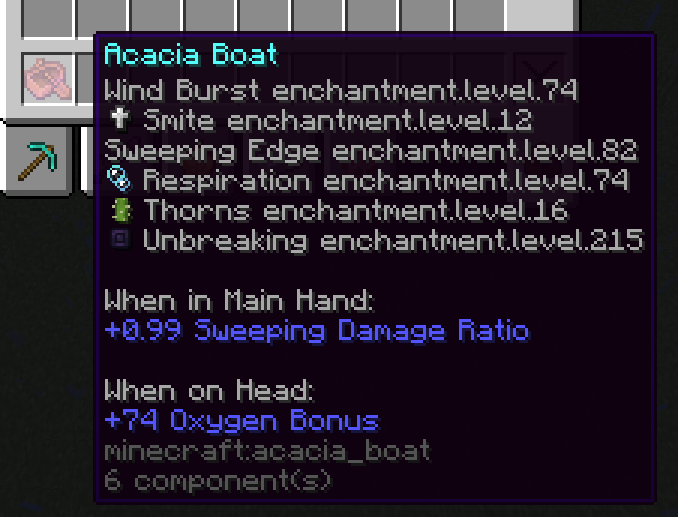
Like, my god, man! I just want to show the power of my boat!
This resource pack aims to make this simple fix with a quick patch to the language files.
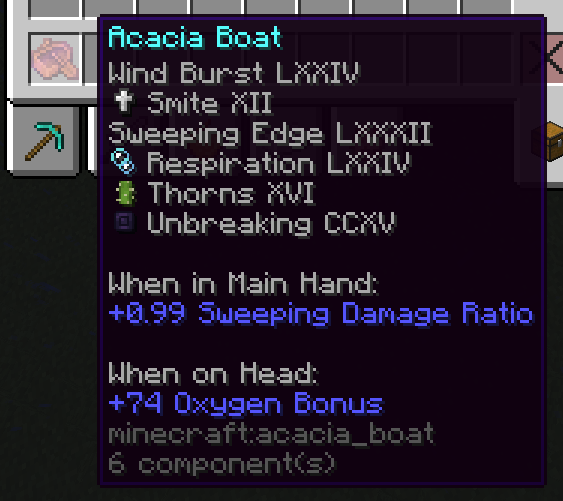
This is a very simple patch that is compatible with most recent versions.
Also the screenshots also have Visual Enchantments 3.3.1, the icons are not a part of the pack.
**Warning: This pack has not been tested on versions before 1.18.2, it may not work for any version before it.**
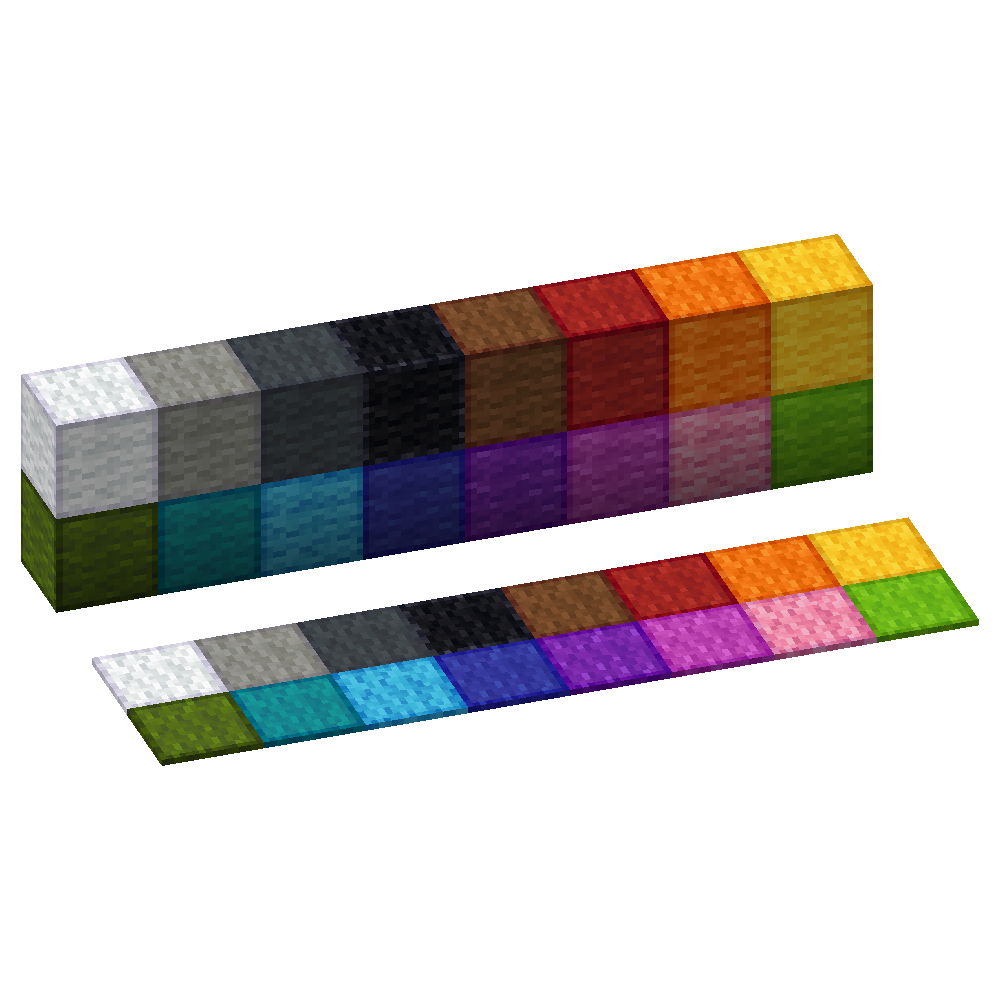
Outlined Wool
Simple and clean resource pack to add outlines to Wool blocks making them easier to see when building with wool
Ostrakon Font

This fontpack adds a bold font with some familiar mob heads as letters.
To install it, make sure to select it in the resource packs screen and put it on top of other font packs.
**_It’s bold and it’s comic reminiscent!!_**
# MY OTHER FONTS
– Paramita Font by SourAlien
– Marga Font by SourAlien
– PP Font
– Anicca Font by SourAlien
– Warm Mojangles
– Tiny Bold Font
– SAS SMALL CAPS FONT
– sas all lowercase font
– Samsara Mono by SourAlien
– Epsilon Font by SourAlien
– Alice Font
– Sleek DR
– Synesthete’s Dream
– HD B&W Font
Ores Glow

🌟 Glowing Ores – Enhanced Visibility in the Dark! 🌟
Tired of struggling to find ores in dark caves? This resource pack makes all ores glow, making mining easier and more immersive! Whether you’re exploring deep underground or in the Nether, you’ll never miss valuable resources again.
✨ Features:
– > ✅ Ores emit a subtle glow for better visibility
– > ✅ Works with all major ores (Coal, Iron, Gold, Diamond, Emerald, etc.)
– > ✅ Compatible with 1.21+
– > ✅ Lightweight and FPS-friendly
🔧 Requirements:
– > ⚠️ OptiFine is required for vanilla and Forge.
– > ⚠️ Continuity is required for Fabric.
🎮 Perfect for survival players, speedrunners, and casual miners who want an enhanced mining experience!
[ORB] OresRBack
## What does this mod/ datapack do?
This simple mod/ datapack makes it possible to mine ores like in versions before 1.17 again. That means that ores drop ores again and not raw ores. Read more here.
## But whyy??
My friends and I noticed after playing the newer versions of Minecraft that the new ore logic is a bit overpowered and makes it much easier to get resources (especially Copper Ore)
## More Minecraft Versions???
I will support more Minecraft versions if it is requested. So if someone opens an issue on GitHub, or send me an mail to [this address](mailto:[email protected]), that they want another version of Minecraft for this mod/ datapack, I will create it!
## Create Extension
I’ve also created a mod for Create’s zinc ore, see: ORBC
## BYG Extension
As well for Oh the biomes you’ll go! See: ORBB
## Disclaimer
This is not an official Minecraft product. Not approved by or associated with Mojang or Microsoft.
Optimum Realism
# **Optimum Realism**
**The realistic Minecraft resource pack with PBR, POM, and custom 3D models. 3M+ downloads across all platforms. Actively updated monthly.**
—
## **What is Optimum Realism?**
Optimum Realism replaces Minecraft’s blocks, items, and mobs with their real-world counterparts. It’s built with a focus on visual depth, shader compatibility, and consistent performance. The goal is a pack for players who want their world to feel grounded and tactile without the framerate cost that usually comes with realistic textures.
Over 650+ blocks reworked. Custom 3D mob models. PBR maps, parallax occlusion mapping, emissive textures, and depth-write POM, all in a single pack that runs on a GTX 1050.
—
## **Features**
– **650+ blocks reworked** with realistic PBR textures
– **Custom 3D models** for mobs and items (spiders, chickens, and more added monthly)
– **Parallax Occlusion Mapping, depth-write POM, emissive blocks, and full PBR support**
– **Compatible with Minecraft 1.21.x** and earlier versions back to 1.16
– **Works with all major shaders**: Kappa, BSL, SEUS PTGI, Complementary, and more
– **Java + Bedrock support**, with a dedicated **Bedrock RTX edition** launching soon
– **Performance-first design**. 64x runs smoothly on mid-range hardware
– **Actively updated monthly** with new textures, models, and features
– **3M+ total downloads** across CurseForge, Modrinth, and direct distribution
—
## **How Optimum Realism is different**
– **Real 3D models, not just retextures.** Mobs and blocks have actual geometry, not painted-on detail.
– **Depth-write POM.** Textures genuinely interact with each other. Sand fills the crevices between planks instead of sitting flat on top.
– **Performance balance.** Most realistic packs sacrifice framerate. Optimum Realism is built to run on hardware that other realistic packs choke on.
– **Consistent monthly updates.**

—
## **What’s free and what’s paid?**
– **64x edition: Free.** Fully featured, available here on Modrinth. Updated monthly.
– **128x edition: Patreon.** Higher-resolution textures, early access to monthly updates, and exclusive previews. **Subscribe on Patreon** (preferred)
– **Alternative :** Available at **store.optimumrealism.com**


—
## **Before you install**
**Playing with Iris / Sodium?** You’ll need additional mods to run Optimum Realism properly. Two easy options:
– **Full installation guide**: step by step, with all required mods listed
– **Ultimate PBR Essentials modpack**: one-click install of everything you need
—
## **System requirements**

Optimum Realism runs well on a decent gaming computer. You don’t need an RTX card unless you’re using the Bedrock RTX edition.
– **64x version:** GTX 1050 or equivalent, 8GB RAM minimum
– **128x version:** GTX 1060 / RTX 2060 recommended for shaders at higher resolutions
– **Bedrock RTX edition:** RTX 2060 or better
—
## **Community & support**
If Optimum Realism has improved your game, leaving a **review here on Modrinth** genuinely helps the project grow.

– **Join the Discord**: WIP previews, monthly polls on what gets reworked next, screenshot showcases, and direct support from the dev
– **Visit the wiki**: installation guides, troubleshooting, and feature breakdowns
– **Instagram @optimum_realism**: behind-the-scenes block previews and dev updates