Imagine trying to read Shakespeare, but every third letter has been replaced by a random symbol. That’s pseudo-localization for you! It’s the art of transforming your regular text into something that looks like it’s from another planet—Mars, perhaps.
### The Benefits:
– **Bug Buster**: It helps developers catch those pesky layout bugs. Because nothing says “fix me” like text overflowing everywhere.
– **Universal Translator**: It’s like having a universal translator… that doesn’t actually translate. It prepares your software for the diverse world of real languages.
– **Stress Tester**: It tests the strength of your user interface. If your UI can survive pseudo-localization, it can survive anything. Unlike Zenless Zone Zero, a video game from Mihoyo. It failed in this challenge, unfortunately.
### Another note:
– **Developer’s Nightmare**: “Did the cat walk across your keyboard?” “Nope, just some pseudo-localization magic.”
– **User’s Perspective**: “Is this the secret language of coders?” “Well, sort of. If coders were aliens.”
– **The Silent Hero**: “Why does this gibberish matter?” “Because it’s secretly saving your app from a thousand tiny bugs.”
In summary, pseudo-localization is like giving your software a wild, nonsensical workout to ensure it’s ready for the real world. It’s an invaluable tool in the developer’s toolkit, disguised as an alien script. And remember, if you can read pseudo-localized text without going cross-eyed, you’re practically a superhero in the tech world.
(written by Microsoft Copilot)
For more information about pseudolocalization,you can visit https://learn.microsoft.com/globalization/methodology/pseudolocalization.
For Chinese users,there is also a readable article written Simplified Chinese.bilibili cv18226873
# How can I do with this pack?
– * Test your custom fonts in an international multilingual environment.
– * Locate a translation string easily by locating the unique Hash ID.
– * Match your pseudolocalizated Windows Builds
– * Just for fun
– * (No Hash-ID Spy included)
# Bugs & Ideas
Github Issues
Note that the author might be very busy and only have a little spare time,so the problem might not be seen by the author timely.
Also,This pack might not be updated in time.:(
# Known Issues
Conflict with `AuthMe` plugin for unknown reasons.
You might need to switch back to any normal languages to connect any server using AuthMe plugin.
Or try to switch qps-ploc language after joining the server.
Tested on these server:
* `AriaCraft`
* `神域天堂 (Clover Pixel)`
* `洛花星雨`
* `Remiaft Network`


# Special Thanks
@suntrise
@what_damon
# License
CC0 1.0 Universal (since Alpha #7)
PROJECT ZWPACK & Pslo4MC by zhuWin
To the extent possible under law, the person who associated CC0 with
Pslo4MC has waived all copyright and related or neighboring rights
to Pslo4MC.
You should have received a copy of the CC0 legalcode along with this
work. If not, see https://creativecommons.org/publicdomain/zero/1.0/.
Proxy Protocol Support is a Fabric and Quilt mod which adds support for Proxy Protocol (HAProxy) for your Minecraft server. It allows to accept both proxied and direct connections simultaneously.
For example you can use TCPShield or other software (Nginx, FRP) to forward traffic, and hide your server’s IP address. Without Proxy Protocol, your console will only show the proxy’s IP address. By reading the Proxy Protocol packet, this mod makes showing the player’s real IP address possible.
**This is a Server-Side only mod; it does nothing when installed on a client.**
Supports Minecraft versions 1.14-26.1 and probably later (untested).
—
## Secure Hybrid Mode
This mod allows your Minecraft server to simultaneously accept connections from a **trusted proxy** (using the PROXY protocol) and from **trusted direct-access IPs**. This is perfect for setups where you want to hide your server’s IP behind a proxy, while still allowing admins or local players to connect directly.
The mod operates on a secure **”Default Deny”** principle. If an incoming connection’s IP address is not explicitly whitelisted in one of the lists below, it will be **rejected**. This prevents unauthorized users from bypassing your proxy and connecting directly to your server’s real IP address.
—
## Configuration
Configuration is handled in `config/proxy_protocol_support.json`.
### `enableProxyProtocol`
Set to `true` to enable the mod’s functionality.
– **Default**: `true`
### `proxyServerIPs`
A list of IP addresses that are your trusted proxy servers. Connections from these IPs **must** send a PROXY Protocol header.
– **Default**: `[“127.0.0.1”]`
### `directAccessIPs`
A list of IPs or CIDR ranges that are allowed to connect directly **without** a PROXY Protocol header. This is ideal for admins, local network players, and server-side tools.
– **Default**: `[“127.0.0.1”, “192.168.0.0/16”]`
### `whitelistTCPShieldServers`
When `true`, the mod automatically fetches TCPShield’s official proxy IPs and adds them to the trusted `proxyServerIPs` list.
– **Default**: `false`
—
## Example Scenarios
#### Scenario 1: Server behind FRP on the same machine
You run `frpc` on the same machine as the Minecraft server. Players from the internet connect through the proxy. You want to connect directly from your gaming PC on the same LAN (`192.168.1.100`).
#### Scenario 2: Server protected by a remote proxy service
Your server is at home, and you use a VPS with the IP 203.0.113.10 as a proxy. You want your entire home network (192.168.0.0/24) to have direct access.
#### Scenario 3: Maximum Security (Proxy Only)
You only want to allow connections through your proxies and nothing else (not even from the local machine).
“`toml
proxyServerIPs = [“1.2.3.4”, “5.6.7.8”] # Your proxy IPs
directAccessIPs = [] # Leave empty
“`
Looking for Minecraft server? Visit BedrockHost.pl
Programmer Art Compatibility Fixes
I play alot of mods
and I am a sucker for the Programmer Art
and I noticed most of those things arnt compatible with each other.
so I said, “why not” fix that
curently the pack changes Fusz’s Straw Statues (https://modrinth.com/mod/straw-statues) mod to have the straw statues be in line with the haybail texture of the programmer art pack
and Minimega (https://modrinth.com/mod/minimega) with the programmer art mini game icons
Pride Pack
# Pridepack
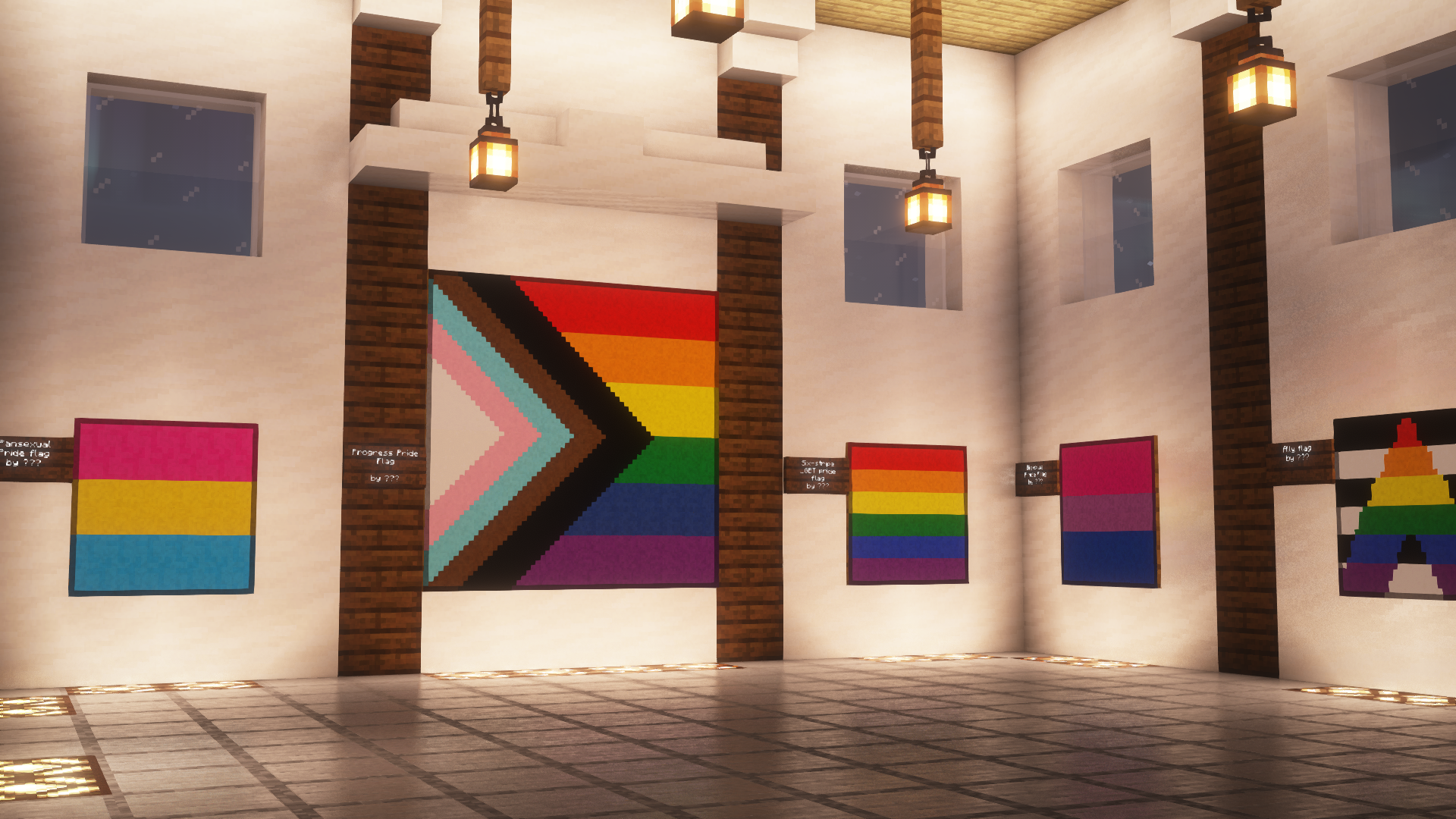
This is Pridepack, a Resource Pack made by Pridecraft Studios. It comes with many LGBT Pride additions, such as paintings, beds, mobs and Main Menu changes.
## Donate
You can support the developers of Pridecraft Studios by donating on Patreon

## Screenshots





## Who
Pridecraft Studios is a collective modding group that creates resource packs, tooling, and our flagship mod, Joy. Our team of volunteers strive to create prideful content for the diverse Minecraft community <3. We target both Java and Bedrock editions, hoping to create memorable experiences for you.
## Other Downloads
  
## Socials


# Licenses
Assets license [CC BY-SA 4.0]
Pridepack by Pridecraft Studios is licensed under CC BY-SA 4.0
Music license [ARR + Permissions]
The soundtracks for Joy are licensed from lynndova, under different terms and are **not** distributed under CC BY-SA 4.0. See here for licensing terms.
In short:
– You must provide credit to lynndova
– You can not reupload this soundtrack verbatim
– You may use this soundtrack under the fair use doctrine including but not limited to the following:
– Using this soundtrack in videos or streams
If you are unsure if you may use the soundtracks or wish to license the soundtracks for your own use, contact lynndova using [their public email](mailto:[email protected]).
PPL Better Grass
This small pack specifically changes the grass texture on NovaWostra’s Pixel Perfection Legacy resourcepack.
It also adds:
– Better Snowy Grass
– Better Podzol
– Better Mycelium
– Better Crimson Nylium
– Better Warped Nylium
– Shorter old Dirt Path
Try my new Texture pack **Pixel Perfection Fidelity**
# **MY OTHER PACKS**
– Pixel Perfection Fidelity
– Pixel Perfection x THE TWILIGHT FOREST
– Pixel Perfection x AD ASTRA
– Pixel Perfection x FARMER’S DELIGHT
– Pixel Perfection x DEHYDRATION
– Pixel Perfection x CONTROLIFY
– PPL Alternative GUI
– PPL Compat Pack
– PPL Hodgepodge
– PPL Custom Theme for Jade
Powder Snow Alerts
# Powder Snow Alerts
Makes powdered snow have an exclamation mark.
Thats it.
### Example

## FAQ
### Not Updated to version x:
The pack should work on all versions of the game, but if not, open an issue
### Usage in projects/modpacks:
I dont care if you use it in a project, however please credit me.
Potato Craft-8x
⭐ PotatoCraft 8x – Ultra FPS Boost Texture Pack ⭐
Do you want smooth FPS and a potato-friendly Minecraft? 🍟
PotatoCraft 8x is a lightweight, simplified resource pack designed for Minecraft Java Edition.
🔥 8×8 textures (down from the default 16×16)
⚡ Huge FPS boost on low-end devices
🎮 Perfect for PvP and survival gameplay
🌍 Works on all the latest Minecraft Java versions
💻 Tested on both mobile and PC
Whether you’re on a low-end phone, old laptop, or a beast PC, this pack makes the game feel faster, cleaner, and smoother.
💡 Why PotatoCraft?
Because even the weakest potato deserves to play Minecraft without lag! 🥔
📥 Download now and turn your Minecraft into a lag-free experience!
Pollachius
### Pollachius
is an 8×8 resource pack with a simple, boxy aesthetic and an emphasis on squares. With a grid-like and vivid look, Pollachius is enjoyable to use and adds colour to your Minecraft landscapes.
This resource pack primarily uses colours from the AAP-64 palette.
This project is for Minecraft: Java Edition. You can find a version for Minecraft: Bedrock Edition here.
You may:
– Use this resource pack in videos; please link back to the forum thread here, or the download page here or on CurseForge.
You may not:
– Redistribute this resource pack in any form
– Distribute derivatives or adaptations of this resource pack
– Use this resource pack on your server
– Use this resource pack commercially
Point Crosshair
Modified crosshair for PvP gameplay across all Minecraft versions (1.8.9 – 1.21.x), but feel free to use it for casual play if you like it! 🙂
This crosshair is part of my Crosshair Collection; you can find the others listed below: