Sharp Edge Swords
NOTE
It show warning will enabling but it will work properly
# Sharp Swords – Clean & Detailed Sword Textures
Sharp Swords is a simple resource pack that redesigns **all vanilla swords** with a sharper, cleaner, and more detailed look — while keeping the original Minecraft style.
This pack only modifies sword textures.
No gameplay changes. No model changes. No performance impact.
—
## 🏷 Tags
`vanilla` `pvp` `combat` `swords` `minimal` `vanilla-friendly` `16x` `lightweight`
—
## ✨ Features
– Redesigned textures for:
– Wooden Sword
– Stone Sword
– Iron Sword
– Golden Sword
– Diamond Sword
– Netherite Sword
– Copper Sword
– Clean and sharp blade design
– Vanilla-friendly style
– Lightweight and optimized
– No FPS drops
—
## 📦 Version Support
✔ Minecraft 1.14
✔ Minecraft 1.15
✔ Minecraft 1.16
✔ Minecraft 1.17
✔ Minecraft 1.18
✔ Minecraft 1.19
✔ Minecraft 1.20
✔ Minecraft 1.21 – 1.21.11
—
## 🧪 Testing & Compatibility
– ✔ Fully tested by me not work not my Problem
– ✔ Tested only with vanilla (no mods)
– ⚠ Not tested with modpacks
– If it does not work with your mods or custom setup, it is not my responsibility
—
## ⚙ Installation
1. Download the pack
2. Move the file into your `.minecraft/resourcepacks` folder
3. Open Minecraft
4. Go to Options → Resource Packs
5. Enable “Sharp Swords”
—
## 📝 Notes
– This is a resource pack, not a mod
– It only changes sword textures
– No copyrighted or stolen content is used
– name inspired from DinoCrits
If you like the pack, consider following or favoriting it on Modrinth 🚀
Shared Resources
# Shared Resources
A mod for easily sharing game files between separate Minecraft instances.
Best used with a multi-instance launcher like [MultiMC](https://multimc.org/) or [Prism Launcher](https://prismlauncher.org/).
It works by selecting a global directory to hold your common game files,
and modifying Minecraft to use that directory instead of the default one.
Where possible, the mod tries to load files from the global directory together
with the local ones, merging the two and allowing you to select from both.
This is currently only available for resource packs, data packs and shaders.
Currently supported game files/directories:
– Resource packs
– Data packs
– Saves
– Vanilla options (video settings, controls, etc.)
– Servers
– Screenshots
– Saved Hotbars
– The fabric config folder (should work with the configs of any properly coded mods)
– Shader packs (via Iris)
– Schematics (via Litematica)
– Replay Recordings (via ReplayMod)
– Skin Presets (via SkinShuffle)
– World Map Data (via Xaero’s World Map)
Shader Panorama
This resource pack replaces the default main menu panorama with a higher-quality version of
the Minecraft 1.20 Cherry Grove background.
The images are the same scene used in the original 1.20 menu, but they were captured using
Photon Shaders to create better lighting, shadows, and atmosphere.
Features
🌸 Cherry Grove panorama from Minecraft 1.20
✨ Captured using Photon Shaders
🖼 4K resolution images (2160 × 2160)
🎮 Works as a drop-in replacement for the default menu background
What this pack changes
This pack only replaces the main menu background images.
No other textures or game elements are modified.
If you like the original Cherry Grove menu but want it to look more cinematic and vibrant, this pack is for you.
Der’s Shaded Font Plus (Default 16x)


This resourcepack simply modifies Minecraft’s font by adding targeted colored shading to the lower parts of its characters, giving the game a more refreshing/visually appealing look! Supports **11,000+** characters, various languages, many symbols and is available for a wide range of game versions!
_**Note:** This pack has various (former) shading styles, check them out in the gallery! Only the latest release style is showcased here._

**All of Minecraft’s font is currently supported and shaded, consisting of:**
– **ascii.png**: Most-used characters and some other symbols
– **ascii_sga.png**: Standard Galactic Alphabet used for enchanting
– **asciillager.png**: Secret characters only illagers may understand (pre v16)
– **accented.png**: Versions of letters with accents, diacritics, ligatures and circled numbers/letters
– **nonlatin_european.png**: Accented characters, miscellaneous symbols, some non-european characters, latin script characters
**Beyond that, the latest releases also added:**
– **8,500+** shaded glyphs across 37 unicode pages
– **Extensive** language & symbol support
– **Vanilla fixes** for incorrect glyph widths like for “▚”
– Support for popular servers like **Hypixel** (symbols) and **Wynncraft** (tooltips)

**Q1**: May I use this for my modpack?
**A1**: Feel free to include it in your modpacks on Curseforge and Modrinth! If you are using it as a content creator, giving credit by linking to this project’s page in your content’s description is highly appreciated!
***
**Q2**: What are editions?
**A2**: Editions were used to group game versions, indicated by a letter at the end of the pack’s name, ex.: (C) for Copper Edition, supporting MC 1.18+, including the files shown in the table of editions (gallery). **v10+ no longer uses editions** as there is only one file for MC 1.16+ now.
***
**Q3**: What are shading styles?
**A3**: Shading styles used to provide variety in the font’s appearance. v9.2 needs the [Respackopts](https://legacy.curseforge.com/linkout?remoteUrl=https%253a%252f%252fmodrinth.com%252fmod%252frespackopts) mod to access all styles (pair with [Sinytra Connector](https://modrinth.com/mod/connector) if on forge). Standalone versions for each style, ex.: “Rose” (pink tint) are also available, not needing any mods. **v10+ no longer has multiple shading styles** nor needs any mods.
***
**Q4:** How do I tell **Der’s Shaded Font** apart from other shaded fonts?
**A4:** Last time I checked, this one was the only vanilla shaded font that supported anything other than just ascii.png characters (see features section for details). Symbols, accented characters and otherwise special characters with shading are most likely from here as well as any of the exclusive colored shading styles.
***
**Q5**: Why do a few special characters/symbols look double-struck when bold?
**A5**: Those (usually thin) characters appear as double-struck/outline due to Minecraft applying the same bolding method (duplicating and shifting by two pixels) across the board. Resourcepacks are limited in this regard as they cannot adjust said method. It is best to avoid using such characters in “**bold**” for now. Only a handful are affected.
***
[Click here](https://modrinth.com/resourcepack/smooth-shaded-font) for a 32x version! / [Submit feedback](https://docs.google.com/forms/d/e/1FAIpQLSfpLF-RLC95utvtUaEm9pXmwhpzo3kRg8XpJ-BFcLcI7ZnXAQ/viewform?usp=dialog)
Selfskin
# Selfskin
Change any skin fully client-side!
Simply put a file in `.minecraft/selfskins/.png` or `.minecraft/selfskins/slim/.png` to override a player’s skin (it works with offline players too).
Skins automatically update each time a player enters the world (as of 1.1.0). To change skins while a player is in the world, use `/selfskin:reload`. The command accepts a username to only reload one player’s skin.
This mod will change the skins you see on players, logged in or not, without other players seeing the changes.
Thus, it does not do the same as changing alex.png and steve.png in a resource pack.
Selfskin tries to work with as many versions as possible on fabric and quilt.
Forge support may come eventually as this mod is really small and simple.
Requests for version ports are welcome.
This mod also tries to be compatible with mods like [Ears](https://modrinth.com/mod/ears).
Found a mod that works or doesn’t work with selfskin? Questions? Or just want to chat? [Come join us on matrix!](https://matrix.to/#/%23wonder-minecraft:the-apothecary.club?via=the-apothecary.club&via=syndicated.gay&via=matrix.org) Alternatively, [create an issue](https://git.sleeping.town/wonder/selfskin/issues/new)
## Compatibility
The listed supported versions are not exhaustive and most mod/minecraft version combinations are not tested. The mod may work on versions that are not listed. Please reach out if you find an inaccuracy!
Known compatible mods:
– ~~3d Skin Layers~~ reportedly broken, but will run
– Ears
Known incompatible mods to be fixed:
– 3d Skin Layers
Known mods that won’t be compatible:
– none (so far)
Scripture
Scripture is an enhanced font pack with five standards:
### Modernization
One of Scripture’s goals is to modernize Minecraft’s font. Its style has remained mostly unchanged since release. This pack updates it with a simpler, more consistent design that improves readability and simplicity.
### Legibility
Even when upscaled in Faithful, Minecraft’s font can still lack legibility. Scripture redesigns several characters to make their features clearer and easier to distinguish.
### Refinement
Mojang’s font suffers from alignment, spacing, and smoothing issues. Some characters are inconsistently sized, overly pixelated, or too similar. Scripture fixes this by hand-editing each font texture to refine spacing, alignment, and smoothing.
### Coverage
Unlike many font packs, Scripture aims for full coverage. It redesigns not only ASCII but also accented characters, non-Latin European glyphs, and illager and enchanting table ASCII, covering characterss others often ignore.
### Faithfulness
Scripture’s final standard is faithfulness. While modernizing the font, it remains true to the original style. The goal is improving readability and consistency without losing the familiar look of Vanilla.
### Creation
Your first thought seeing the faithfulness standard was most likely the Faithful resource pack. You’d be right! Scripture was built off of the font set from Faithful 32x and then modified to meet standards.
### Credits
I must give them where they’re due.
Faithful 32x (base):
[](https://modrinth.com/resourcepack/faithful-32x)
screaming cat totem
screaming cat totem . which we will call sct for now. So sct is a rp that changes the totem texture to a screaming cat . its just your average rp so yeah its cool lightweight cute cool etc ok that all
Scaffolding Fix
A lightweight resource pack that adds the missing hole on top of scaffolding blocks.
**Note that the texture is off on pre 1.19.3 versions of minecraft, i might fix this in the future.**
Before/Vanilla:

After:

_You may not redistribute this resource pack anywhere without proper permission, the only official download page for this resource pack is on modrinth._
Saturation Plus
# Saturation Plus
**Saturation Plus** is a **Minecraft resource pack** designed to make your world feel alive.
By carefully boosting **color saturation** and **contrast**, it enhances every block, biome, and environment — creating a richer, more dynamic look while staying true to **vanilla Minecraft’s original style**.
## ✨ Features
– **Full-color enhancement** across all blocks and environments
– **Balanced contrast** for vivid yet natural visuals
– **Preserves vanilla charm** — no texture redesigns, just refined color
– Perfect for players who want a **brighter, more immersive** experience without altering gameplay
NAH I’D WIN (SATORU GOJO TOTEM)
The Model Gap Fix mod might cause FPS drops/crashes with this resource pack. I recommend testing it first.
El mod Model Gap Fix podria tener bajones/crasheos con este resourcepack. Recomiendo probarlo primero.
# English [🇺🇸]
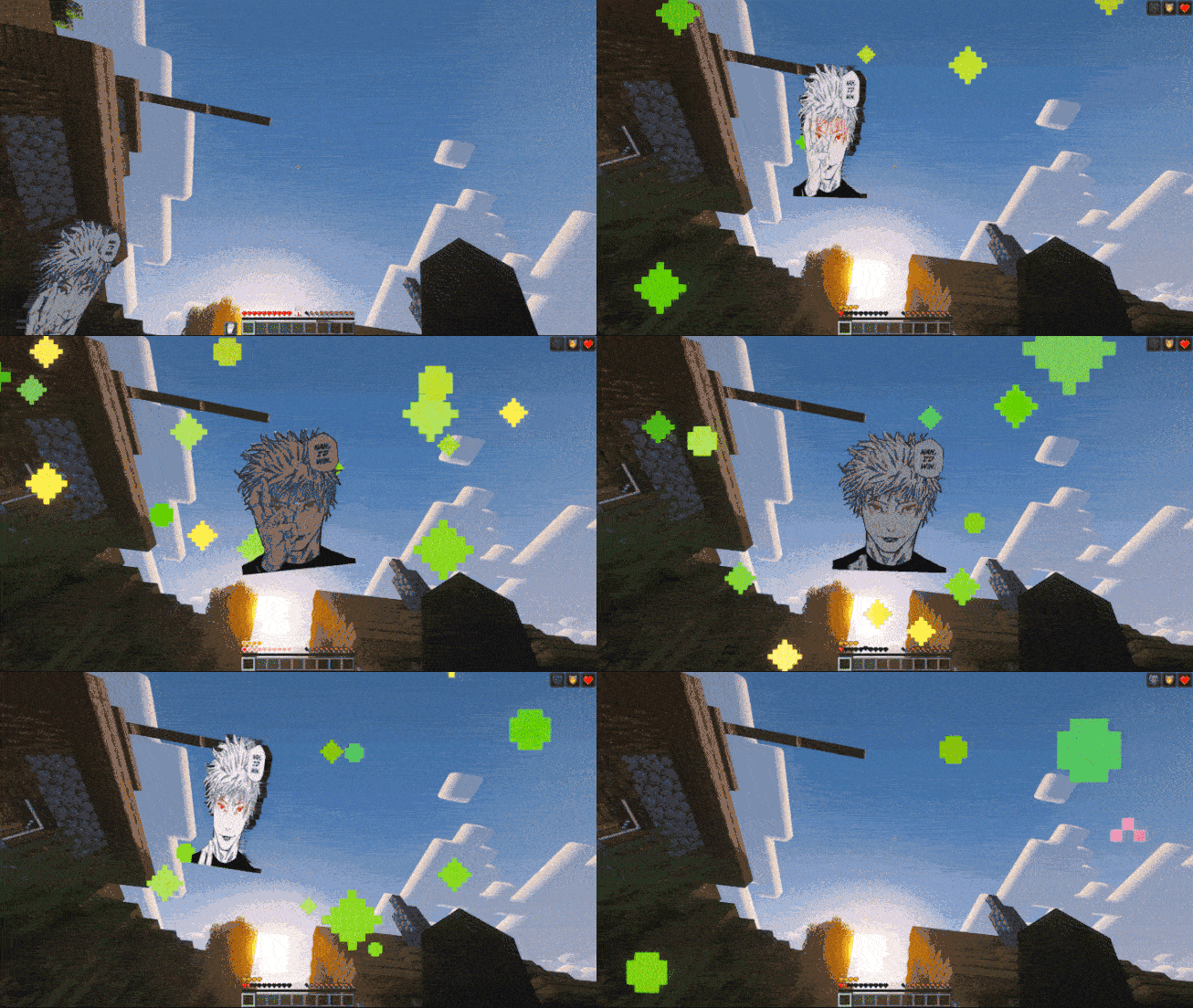
Bring the strongest sorcerer to your inventory! Replaces the boring Totem of Undying with Satoru Gojo from Jujutsu Kaisen, including his iconic phrase, the song Judas by Lady Gaga, and custom animations.
Main Features:
– Custom 3D Model: The item has thickness and depth (although I wish the thickness looked better but I couldn’t manage it).
– Perfect Positioning: Manually adjusted to look good in First Person, Third Person, and on the ground. (I spent like 6 hours lol).
– Animation: Gojo’s eyes glow with an animation while he performs his Domain Expansion.
– Song: When the totem activates, you will hear the song “Judas” by Lady Gaga.
**I TAKE REQUESTS**
> _This mod contains copyrighted musical material. All rights belong to their respective creators and legal owners:_
> – _Judas – Lady Gaga_
# Español [🇪🇸]
¡Trae al hechicero más fuerte a tu inventario! Reemplaza el aburrido Tótem de la Inmortalidad por Satoru Gojo de Jujutsu Kaisen, incluyendo su frase icónica, la canción Judas de Lady Gaga y animaciones personalizadas.
Características Principales:
– Modelo 3D Personalizado: El ítem tiene grosor y profundidad (aunque quisiera que se viera mejor el grosor pero no lo logré).
– Posicionamiento Perfecto: Ajustado manualmente para verse bien en Primera Persona, Tercera Persona y tirado en el suelo. (estuve como 6 horas lol)
– Animación: Los ojos de Gojo brillan con una animación a la vez que hace su expansión de dominio.
– Canción: Al activarse el tótem, escucharás la canción “Judas” de Lady Gaga.
**ACEPTO SUGERENCIAS**
> _Este mod contiene material musical protegido por derechos de autor. Todos los derechos pertenecen a sus respectivos creadores y titulares legales:_
> – _Judas – Lady Gaga_