AutoSwitch


# AutoSwitch
**AutoSwitch** is a Minecraft mod (for Fabric / NeoForge) that automatically swaps the held item based on what you’re
about to do – mining, attacking, interacting, or when specific stats change and what is available on your hotbar
(i.e. you hit a stone block with your fist, it will switch to a pickaxe).
It’s rule-driven and highly configurable via a HOCON config file `autoswitch.conf`,
located in the `config` folder which is next to the resource pack folder.
A quick way to navigate there is by going to `Options > Resource Packs > navigate up one folder`.
The mod can be toggled on/off dynamically in game by pressing `R`.
—
## Configuration
> This section only applies to AutoSwitch 12+. Earlier versions used a different config format.
There are four sections in the config file – three for defining selectors and targets when various actions occur,
and one for general feature configuration:
* `attack-action` – rules used when **attacking** (entities or blocks).
* `interact-action` – rules used when **interacting** (right-click-like actions).
* `stat-change-action` – rules triggered by stat events (e.g., using a totem of undying).
* `feature-config` – Controls the overall behaviour of the mod.
Each rule contains:
* `priority` – integer; higher values are given precedence what multiple targets match.
* `target` – what this rule matches (types: `BLOCK`, `ENTITY`, `STAT`, or an `EXPRESSION` allowing the combination of other targets).
Targets can reference tags or specific explicit IDs (`minecraft:ender_chest`, `sugar_cane`).
* `tools` – ordered array of candidates to switch to. Each must be an `ITEM` or an `EXPRESSION` of `ITEM`s,
or be an empty list (to disable switching for that target).
`EXPRESSION`s can have as many elements or as much depth as you wish, allowing for a great deal of control.
The default config covers a wide range of cases and should serve as a great basis for expanding.
Tools and targets can have an optional `data` field to control things like enchantments or blockstates that should be matched.
### Live edits
Simply resave the config file when ingame for it to be automatically reloaded.
### The Gritty Details
#### Expressions
Expressions can be nested to any depth you desire.
Expressions support the following operations:
* `OR` – Match any one of its children
* `AND` – Match all of its children
* `NOT` – Match none of its children
* `XOR` – Match only one of its children
#### Data
Currently, the following data types are supported:
* `BlockState` – The block state to match
* `Component` – Currently only supports `POTION_CONTENTS` on items
* `Enchantment` – The enchantments an item has
* `EntityEquipment` – The equipment an entity is wearing, such as a pig with a saddle
#### Selection Priority
**Decision order (first thing that differs wins):**
1. **Target Priority** – rules with higher priority are preferred.
2. **Target Rating (multi-level)** – compare rating level 0 – n up to the configured maximum.
At each level compare, in order:
* `isGroup` (prefer non-groups)
* `hasData` (prefer those with data)
* `typeRating` (higher preferred, e.g. weapon DPS or mining level)
* `dataRating` (higher preferred, e.g. normalized enchantment level)
3. **Tool Priority** – prefer tools that are intrinsically prioritized higher.
4. **Tool Rating (multi-level)** – same multi-level comparison logic as Target Rating (isGroup → hasData → typeRating → dataRating).
5. **Is the slot currently selected?** – prefer the currently held slot if tied so far.
6. **Smallest slot index** – final tie-breaker: lowest (leftmost) inventory slot wins.
##### Text-based Flowchart
“`
START: candidate inventory slots (all slots that matched a selector)
|
v
Compare Target Priority
|– if different –> choose highest Target Priority –> END
|
v (same)
Compare Target Rating (levels 0..N)
For each level:
– compare: isGroup? (non-group preferred)
– compare: hasData? (with data preferred)
– compare: typeRating (higher wins)
– compare: dataRating (higher wins)
|– if difference found –> choose winner –> END
|
v (no difference)
Compare Tool Priority
|– if different –> choose highest Tool Priority –> END
|
v (same)
Compare Tool Rating (levels 0..N)
(same per-level rules as Target Rating)
|– if difference found –> choose winner –> END
|
v (still tied)
Prefer currently selected slot?
|– Yes –> choose currently selected –> END
|– No –> choose smallest (leftmost) slot –> END
“`
AutoJump KeyBind
#
AutoJump KeyBind Mod – a mod that allows you to configure the button to enable and disable auto jump.
####
In minecraft 1.18, bigger mountains and rocks were added, and because of this, auto-jumping, in my opinion, made much more sense. However, auto-jump is not always needed and can sometimes get in the way. Going into the settings every time to turn it on or off is very inconvenient, but that’s what I made this mod for. It adds the ability to configure a key (default “R”) to enable and disable autojump.
####
You can also set the key to only turn on or only turn off individually if you suddenly need it.
#### At the moment, I have not yet figured out how to signal the user about the auto-jump on or off, so for now, the mod does not report switching in any way.
######
This is my first mod so I welcome suggestions and comments.
AutoAFKFish
# AutoAFKFish
A fairly simple fabric mod for all versions of Minecraft that support fabric prior to 1.21.9 with v1.1.2, and 1.21.9+
with v1.1.3, making it so that when you press the F12 Key, it will start acting as if you are holding down the right
mouse button. It will keep acting like that even if you open your inventory, open chat, pause on a multiplayer server,
and any other action that does not stop the integrated server if you are on a client world, or any action regardless on
a server world. You can toggle it off by pressing the F12 Key again (there is a 1.5 second cooldown). Must be used in
conjunction with a afk fishing farm.
Thanks for the French Translation, Calvineries!
Thanks for the Simplified Chinese Translation, Wudji!
Also available on CurseForge.
AquaHUD/Flat
# AquaHUD/Flat
A simplistic, modern UI resource pack designed to match Sodium’s UI.
## What makes AquaHUD/Flat different from normal AquaHUD?
AquaHUD Flat is AquaHUD but with:
* no grids
* no hard exterior outlines
* more seperation between elements
## About
Upon installing sodium, I immediately found it rather annoying that it’s user interface was completely different from the rest of Minecraft’s. So, I took it upon myself to create a resource pack that attempts to complement Sodium’s user interface in a way that makes every screen feel consistent and like it was meant to look that way. This has been in development for quite a while, so there may be some inconsistencies with some UIs.
## Permissions
do whatever, i dont care
## Requirements
The only requirement is my TranslucencyFix mod.
## Recommendations
Ready for the cool stuff? Me too.
* Sodium: https://modrinth.com/mod/sodium
* Sodium Extra: https://modrinth.com/mod/sodium-extra
* Blur: https://modrinth.com/mod/blur-fabric
* ‘Slight’ Gui Modifications: https://modrinth.com/mod/slight-gui-modifications
* OneBar: https://modrinth.com/mod/onebar
* Using Optifabric? Custom Background Color instead of Blur: https://modrinth.com/mod/r1ifqLkv/version/XQhFC2Zk
Special instructions:
* Blur
* set Fade Time to 0
* set Blur Radius to 32
* set Gradient Start Color to 75999999
* set Gradient End Color to 75555555
* ‘Slight Gui Modifications
* Enable Tooltip Modifications
* set Background color to A0000000
* set Outline Top Color to 00000000
* set Outline Bottom Color to 00000000
* LibGUI (Open Mods menu -> Filter -> Libraries -> Shown)
* Enable Dark mode.
* Why? Because LibGUI hardcodes damn near half of it’s GUIs and I can’t do anything about it.
* OneBar
* Set background color to A0000000
* Custom Background Color
* Alpha on both start and end: 117
* Red, Green, and Blue on start: 153
* Red, Green, and Blue on end: 85
AquaHUD
# AquaHUD
A simplistic, modern UI resource pack designed to complement Sodium’s UI.
## About
Upon installing sodium, I immediately found it rather annoying that it’s user interface was completely different from the rest of Minecraft’s. So, I took it upon myself to create a resource pack that attempts to complement Sodium’s user interface in a way that makes every screen feel consistent and like it was meant to look that way. This has been in development for quite a while, so there may be some inconsistencies with some UIs.
## Want something more faithful to sodium’s style?
AquaHUD Flat is AquaHUD but with:
* no grids
* no hard exterior outlines
* more seperation between elements
## Permissions
do whatever, i dont care
## Requirements
The only requirement is my TranslucencyFix mod.
## Recommendations
Ready for the cool stuff? Me too.
* Sodium: https://modrinth.com/mod/sodium
* Sodium Extra: https://modrinth.com/mod/sodium-extra
* Blur: https://modrinth.com/mod/blur-fabric
* ‘Slight’ Gui Modifications: https://modrinth.com/mod/slight-gui-modifications
* OneBar: https://modrinth.com/mod/onebar
* Using Optifabric? Custom Background Color instead of Blur: https://modrinth.com/mod/r1ifqLkv/version/XQhFC2Zk
Special instructions:
* Blur
* set Fade Time to 0
* set Blur Radius to 32
* set Gradient Start Color to 75999999
* set Gradient End Color to 75555555
* ‘Slight Gui Modifications
* Enable Tooltip Modifications
* set Background color to A0000000
* set Outline Top Color to 00000000
* set Outline Bottom Color to 00000000
* LibGUI (Open Mods menu -> Filter -> Libraries -> Shown)
* Enable Dark mode.
* Why? Because LibGUI hardcodes damn near half of it’s GUIs and I can’t do anything about it.
* OneBar
* Set background color to A0000000
* Custom Background Color
* Alpha on both start and end: 117
* Red, Green, and Blue on start: 153
* Red, Green, and Blue on end: 85
Apothecary Diaries Maomao Title Background
Change the main menu background to Maomao from The Apothecary Diaries.
Anton Chigurh (Антон Чигур) Totem of Undying
– Anton Chigur is the main antagonist of Cormac McCarthy’s novel “No Country for Old Men” and its film adaptation. He is a hired assassin, a drug dealer’s mercenary, who ruthlessly eliminates almost everyone he encounters.
– Антон Чигур — главный антагонист романа Кормака Маккарти «Старикам тут не место» и его киноадаптации. Это наёмный убийца, наёмник наркоторговцев, который безжалостно расправляется почти со всеми, кого встречает на своём пути
Check collection with all memes + streamers Totems
AntiXray
# Anti Xray
Anti Xray is a lightweight fabric mod that allows server owners to combat xrayers.
## Config
“`toml
# Default values
enabled = false
# World specific values
[overworld]
enabled = true
engineMode = 3
maxBlockHeight = 256
updateRadius = 2
lavaObscures = false
hiddenBlocks = [“#c:ores”, “raw_copper_block”, “raw_iron_block”, “raw_gold_block”, “!#antixray:hidden_only_ores”]
replacementBlocks = [“#antixray:hidden_only_ores”, “stone”, “deepslate”, “andesite”, “calcite”, “diorite”, “dirt”, “granite”, “gravel”, “sand”, “tuff”, “mossy_cobblestone”, “obsidian”, “clay”, “infested_stone”, “amethyst_block”, “budding_amethyst”, “chest”]
[the_nether]
enabled = true
engineMode = 1
maxBlockHeight = 128
updateRadius = 2
lavaObscures = true
hiddenBlocks = [“ancient_debris”, “nether_quartz_ore”, “nether_gold_ore”, “gold_block”, “gilded_blackstone”]
“`
### Config option overview
`enabled` if set to true anti xray will be active in the specified world
`engineMode` can either be 1, 2 or 3 see [Engine Modes](#Engine Modes)
`maxBlockHeight` controls the max height at which blocks should get obfuscated
`updateRadius` controls how many blocks away from shown blocks obfuscation should start (if your players see fake ores
it is recommended to increase this value)
`lavaObscures` if set to true blocks next to lava will get obscured
`hiddenBlocks` a list of blocks to hide *(Engine mode 1)* or a list of blocks to use for obfuscation *(Engine mode 2/3)*
`replacementBlocks` is a list of blocks that will be obfuscated, but not used as fake blocks *(Engine mode 2/3 only)*
*Blocks / block tags can be prefixed `!` to remove them from the block list.
The rules are applied from left to right, removals should be specified after additions. **(since 1.4.10)***
### Engine Modes
| Info | Image |
:————————-:|:————————-:
**Anti xray disabled:** This is just for reference | 
**EngineMode 1:** This mode will replace all fully obscured (no air around) blocks from `hiddenBlocks` with blocks from `replacementBlocks` | 
**EngineMode 2:** This mode will replace all blocks from `hiddenBlocks` and `replacementBlocks` with random blocks from `hiddenBlocks` | 
**EngineMode 3 (recommended):** Works very similar to engine mode 2, but works better with slow connections | 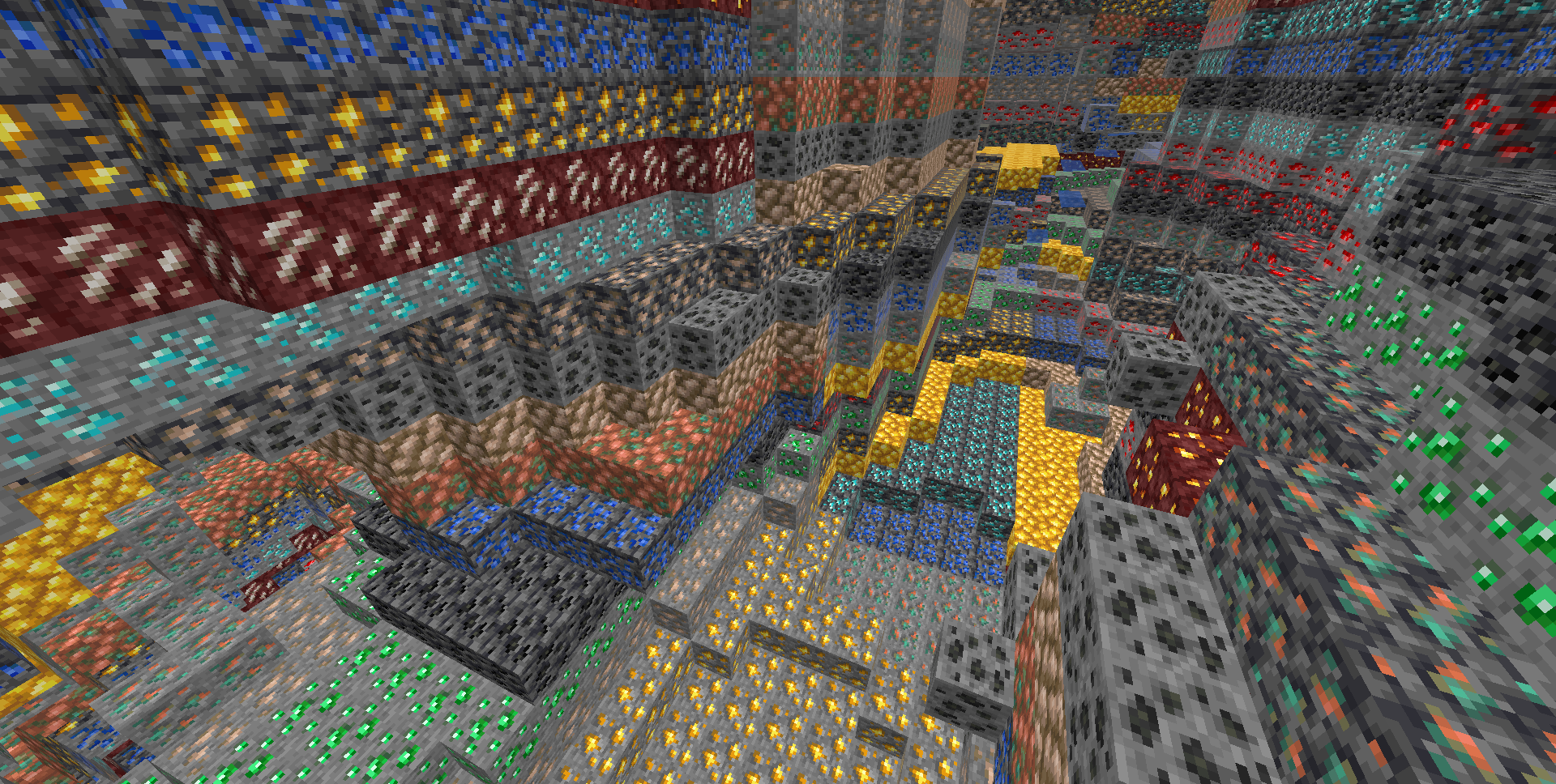
**Legit player view:** Legit players wont notice any changes when this mod is installed (unless they have high ping or modify a lot of blocks at once, eg: explosions)
### Custom Dimensions
To configure antixray in custom dimensions, specify the dimension id like this: `[“custom:cool_world”]`
## Mod Developers
Ore blocks added to the `#antixray:hidden_only_ores` block tag will be hidden from the world, but not used as fake ore.
This can be useful if your ore has effects, such as particles or sounds, that could cause problems. **(since 1.4.10)**
## About
This mod is a port of Papers Async Anti Xray Patch from 1.17 and it’s 1.14 patch for networking code, to fabric and forge
anit CHAT
# Chat anit 一个自动屏蔽《Minecraft》中文脏话,和增加IP属地的开源项目。
本插件需要装在Velocity上。前置为SignedVelocity-Proxy需要在velocity和所以1.19.1+的子服上增加
IP属地api为*xiaotuo*提供,脏话屏蔽由*Uapi提供*
使用方法
1.下载本插件,放入velocity的pluging文件夹,启动客户端
>tip
>如果你有子服的Minecraft版本在1.19.1以上需要增加signed velocity 插件到velocity和每个1.19.1+的子服务器。
2.将velocity配置文件“`velocity.toml“` 中“`force-key-authentication“`改为false
3.将所有子服务的配置文件“`server.properties“`中的“`enforce-secure-profile“`改为false
4.启动服务端
**更新日志**: https://github.com/cdpyx/Chatanit/commits/release
English:
# Chat Anit is an open-source project that automatically blocks Chinese profanity in Minecraft and increases IP ownership.
This plugin needs to be installed on Velocity. SignedVelocity Proxy needs to be added on velocity and all 1.19.1+sub servers
The IP locality API is provided by * xiaotuo *, and the profanity blocking is provided by * UAPI*
Usage
1. Download this plugin, place it in the velocity plugin folder, and start the client
> tip
> If you have a sub server version of Minecraft above 1.19.1, you need to add [signed velocity]( https://modrinth.com/plugin/signedvelocity/version/1.3.0 )Plug in to velocity and every 1.19.1+sub server.
2. Change the ‘force key authentication’ in the velocity configuration file ‘velocity. toml’ to false
3. Change the ‘enforce secure profile’ in the ‘server. properties’ configuration file for all sub services to false
4. Start the server
**Update log**: https://github.com/cdpyx/Chatanit/commits/release
Among Us

But how to make **Among Uses**? 
All you need is an anvil and a carved pumpkin:
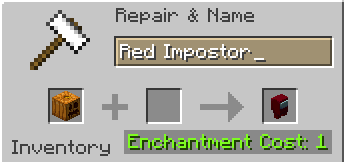
> Rename a carved pumpkin in the anvil to “Color” Impostor
* Example: Red Impostor
* Before snapshot 25w03a, using third-party mods, you could write things like “red impostor” instead of “Red Impostor”, or even “123 red impostor 123”
> After renaming, the item will automatically turn into its custom version
Make your impostors and have fun! 🎭