Technoblade Never dies!
# Description
This pack supports a wide range of versions, from 1.11 to 26.1!
I’d like you to take a look at the gallery, but unlike the other packs being distributed, this pack not only puts crowns on the pigs, but also dresses them in clothes.
# ****Preview****
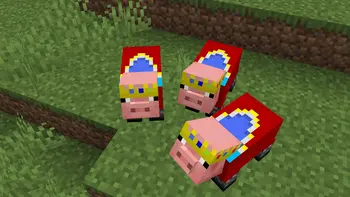
Cartoony

# 🎨 Cartoony for Minecraft
 Transform your Minecraft world into a vibrant, animated masterpiece! This shader pack brings a cel-shaded, cartoon aesthetic to your gameplay with smooth lighting, bold outlines, and stylized color grading.
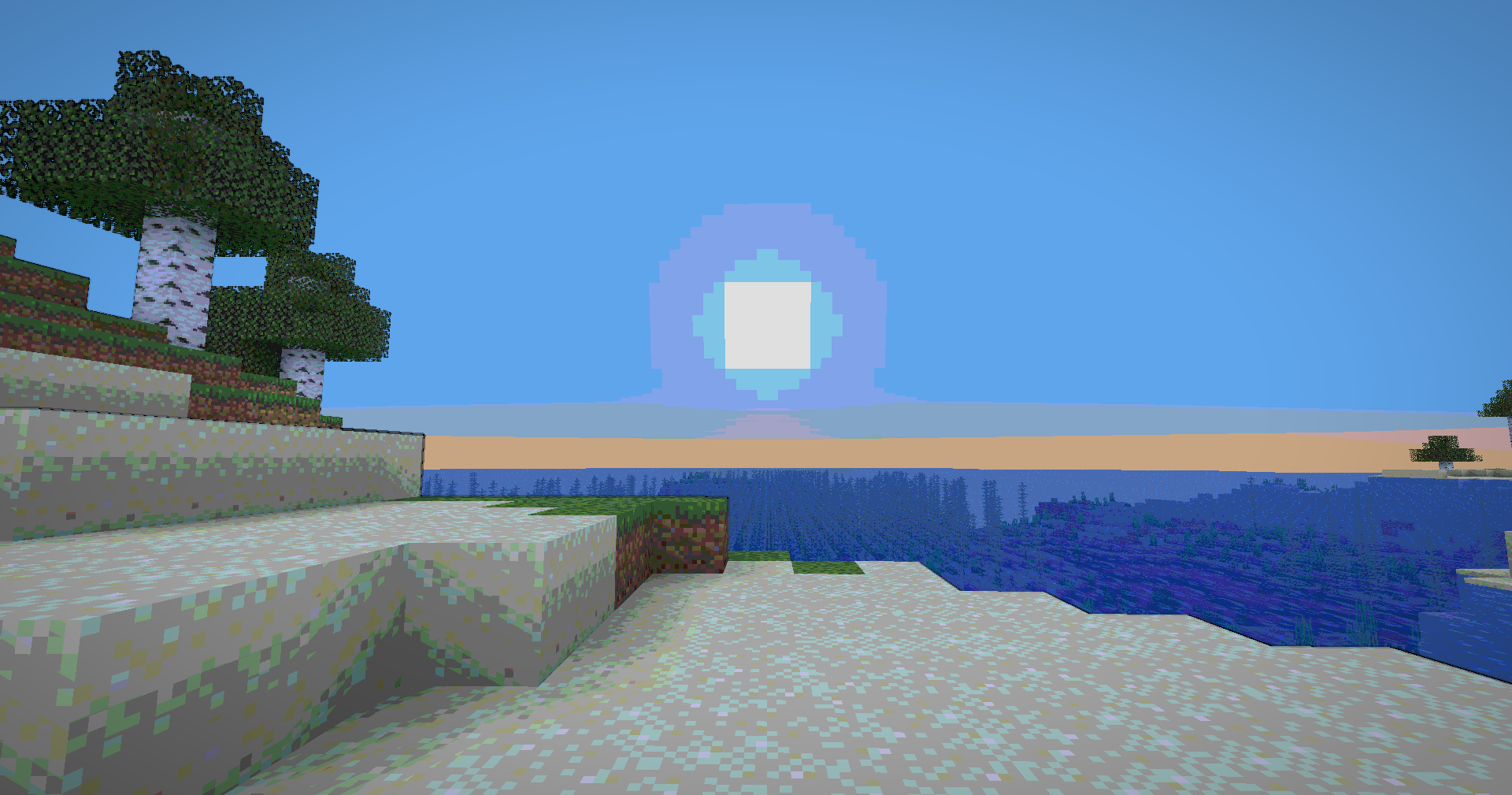
## ✨ Features
### Visual Effects
* **Cel-Shaded Lighting** – Smooth, stepped lighting that creates that iconic cartoon look
* **Dynamic Outlines** – Depth-based edge detection with smooth, artistic borders
* **Color Banding** – 8-level color quantization with seamless transitions
* **Enhanced Colors** – Carefully tuned saturation and warmth for a vibrant world
* **Cinematic Vignette** – Subtle darkening at screen edges for focus and depth
* **Optimized Contrast** – Balanced brightness that preserves detail without harsh shadows


**🧠 Lamapi: Next-Gen Open Source AI**
Pushing the boundaries of accessible intelligence. Whether you need lightweight efficiency or industrial-grade reasoning, the **Next Series** delivers.
**Why build with Lamapi?**
– ⚡ **High Efficiency:** From compact 1B models to powerful 70B reasoning engines.
– 🌍 **Multilingual Mastery:** Optimized for superior performance in English & Turkish.
– 🛠️ **Ready to Deploy:** State-of-the-art open weights available immediately.
**Explore our models and start building:**
🔗 https://huggingface.co/Lamapi

**🚀 KCB Hosting: Power Meets Reliability**
Looking for a host that takes your gaming experience as seriously as you do? We provide robust infrastructure ensuring smooth gameplay and enterprise-grade uptime.
**Why switch to us?**
– 💎 **7-Day Free Trial:** Experience the quality risk-free (No commitment).
– 🛡️ **99.9% Uptime SLA:** Your server stays online, guaranteed.
– ⏰ **24/7 Support:** Expert help whenever you need it.
🔥 Experience the difference with 25% off your first month,
Use code **XSORAS**
**Deploy your server now:**
🌐 https://kcbhosting.com
💬 https://discord.gg/kcbhosting

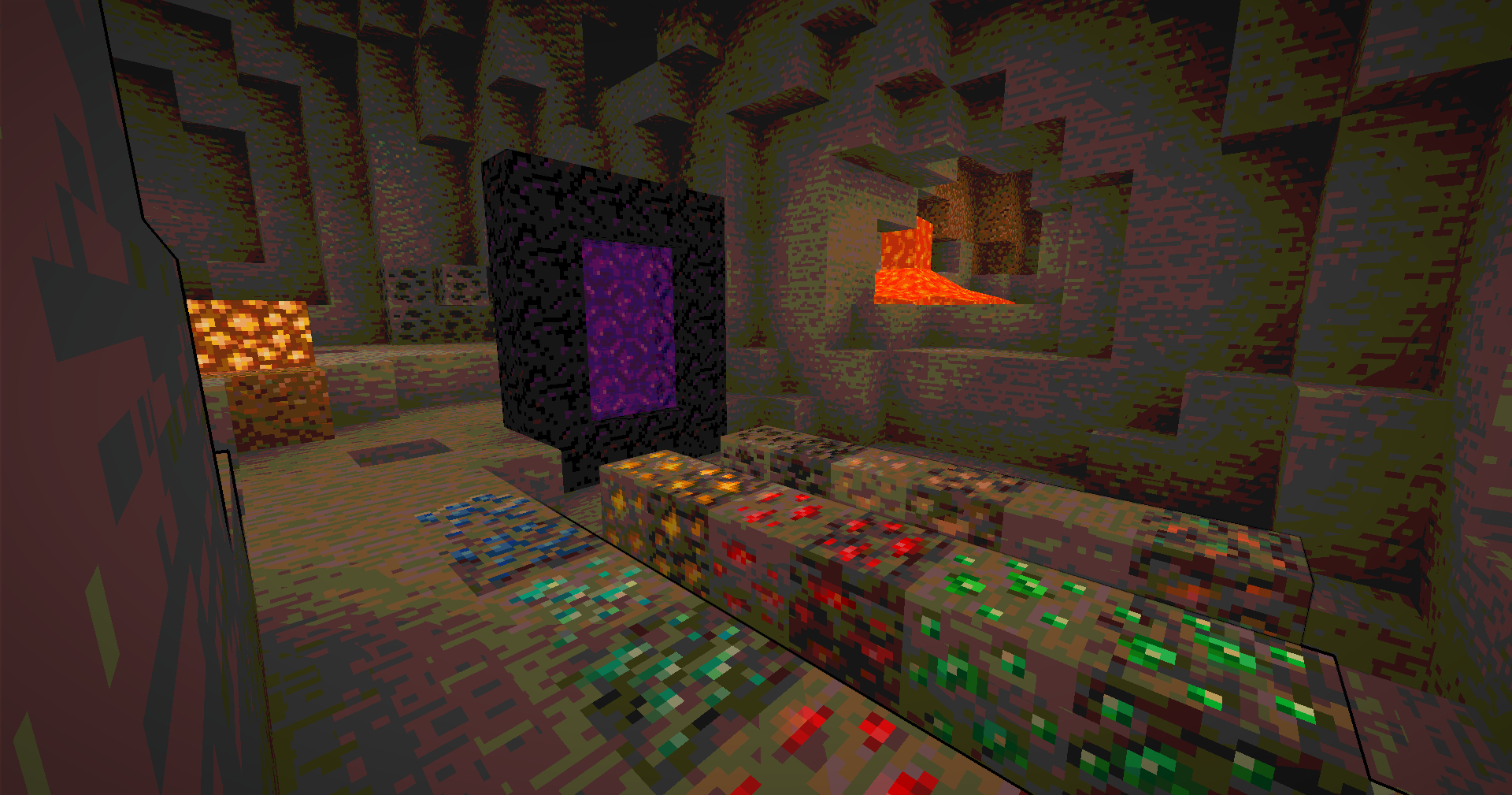

### Technical Features
* **Full Lightmap Support** – Torches, lava, and all light sources work perfectly
* **Normal-Based Shading** – Subtle 3D depth effect while maintaining the cartoon style
* **Smooth Tonemap** – Reinhard tonemapping with gamma correction for accurate colors
* **Hand Rendering** – Special lighting pass for held items to ensure visibility
* **Performance Optimized** – Efficient shader code that runs smoothly on most systems
## 🎮 Perfect For
* Builders who want a unique artistic style
* Content creators looking for standout visuals
* Players who love animated aesthetics
* Anyone tired of ultra-realistic shaders
## 📋 Requirements
* Minecraft 1.12+ (GLSL 120 compatible)
* OptiFine or Iris Shaders
* Mid-range GPU recommended

## 🚀 Installation
1. Download the shader pack
2. Place the `.zip` file in your `shaderpacks` folder
3. Open Minecraft and go to Options → Video Settings → Shaders
4. Select the Cartoonie
5. Enjoy your animated world!
 **Enjoy your cartoon adventure!** 🎬✨
Carpet TIS Addition
A carpet mod (fabric-carpet) extension, a collection of carpet mod style useful tools and interesting features
Under the default configuration conditions, this mod will not change any vanilla behavior at all
Use with carpet mod in the same Minecraft version. Use newer carpet mod versions whenever possible
For more details of the mod, see the document here https://carpet.tis.world/
For snapshot and dev builds of the mod, see the GitHub actions in the GitHub repository
Carpet Extra
## Carpet Extra
Carpet Extra is an extension adding extra features to [Carpet], like countless new dispenser behaviours, new ways to get resources in a renewable way and many others!
[Carpet]: https://modrinth.com/mod/carpet
For its enabled dispenser behaviours it also adds a new [Scarpet event] that triggers when those happen, allowing you to further customize them.
[Scarpet event]: https://github.com/gnembon/carpet-extra/blob/master/docs/scarpet/ScarpetEvents.md
## Added rules
You can find the [list of all added rules][rules] on the repo.
[rules]: https://github.com/gnembon/carpet-extra#carpet-extra-features
## More extensions
If you’re looking for Carpet autocrafting table, it has been moved to a standalone extension you can find on [its repository on Github][Autocraftingtable repo].
[Autocraftingtable repo]: https://github.com/gnembon/carpet-autoCraftingTable
There are also lots of other carpet extensions out there, adding countless new rules and functionality! You can find a list of them [in the Carpet wiki][extension list].
[extension list]: https://github.com/gnembon/fabric-carpet/wiki/List-of-Carpet-extensions
Capitalisation Fixes
Capitalisation Fixes is a resource pack that fixes various bugs related to in-game and UI text, such as labels being improperly capitalised. It currently includes 14 bugfixes, covering 52 different translation strings.
## Information
– Versions 1.19.2 to 1.21.6 are supported, and there’s a “compatibility release” that you can use for 1.18.x versions
– It currently supports two languages: `en_us` and `en_gb`. Other languages will not have the fixes applied to them.
– You can submit feedback and bug reports in the GitHub bug tracker
## Which strings are capitalised?
In Minecraft, all in-game names should be capitalised as proper nouns (e.g. Oak Boat, Bottle of Enchanting, Golden Apple)
and all action buttons should be in title case (e.g. Import Settings, Create Backup & Load, Erase Cached Data).
Naturally, all titles should be in title case, including the titles of UI screens (Video Settings) and the titles of advancements (Monster Hunter).
This rule is upheld in almost all cases, but sometimes Mojang inconsistently capitalises stuff. This pack fixes all those issues!
Note that every fix included in the pack matches a valid bug report on the Minecraft Bug Tracker. This means that the pack sticks strictly to the intended behaviour of the game.
## Additional links
– Discover similar mods that fix vanilla bugs (I am not affiliated with any of the listed projects)
– You can customise the included fixes or target an older Minecraft version by building the pack yourself (the source code for this resource pack is expressed in JavaScript, with a custom build tool to turn it into a resource pack)
Concurrent Chunk Management Engine (Fabric)
# Concurrent Chunk Management Engine (Fabric)
A Fabric mod designed to improve the chunk performance of Minecraft.
Looking for NeoForge versions?
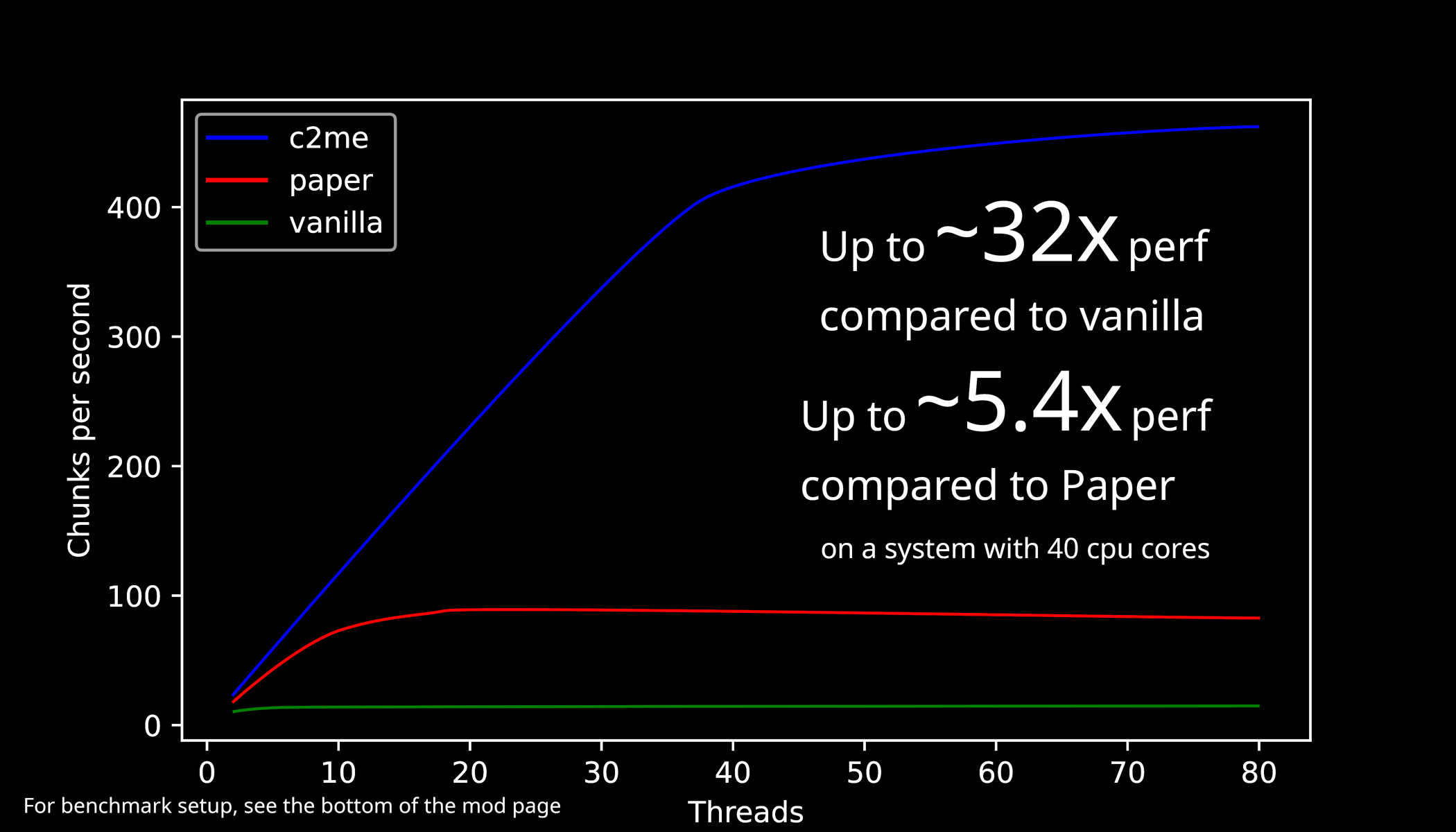
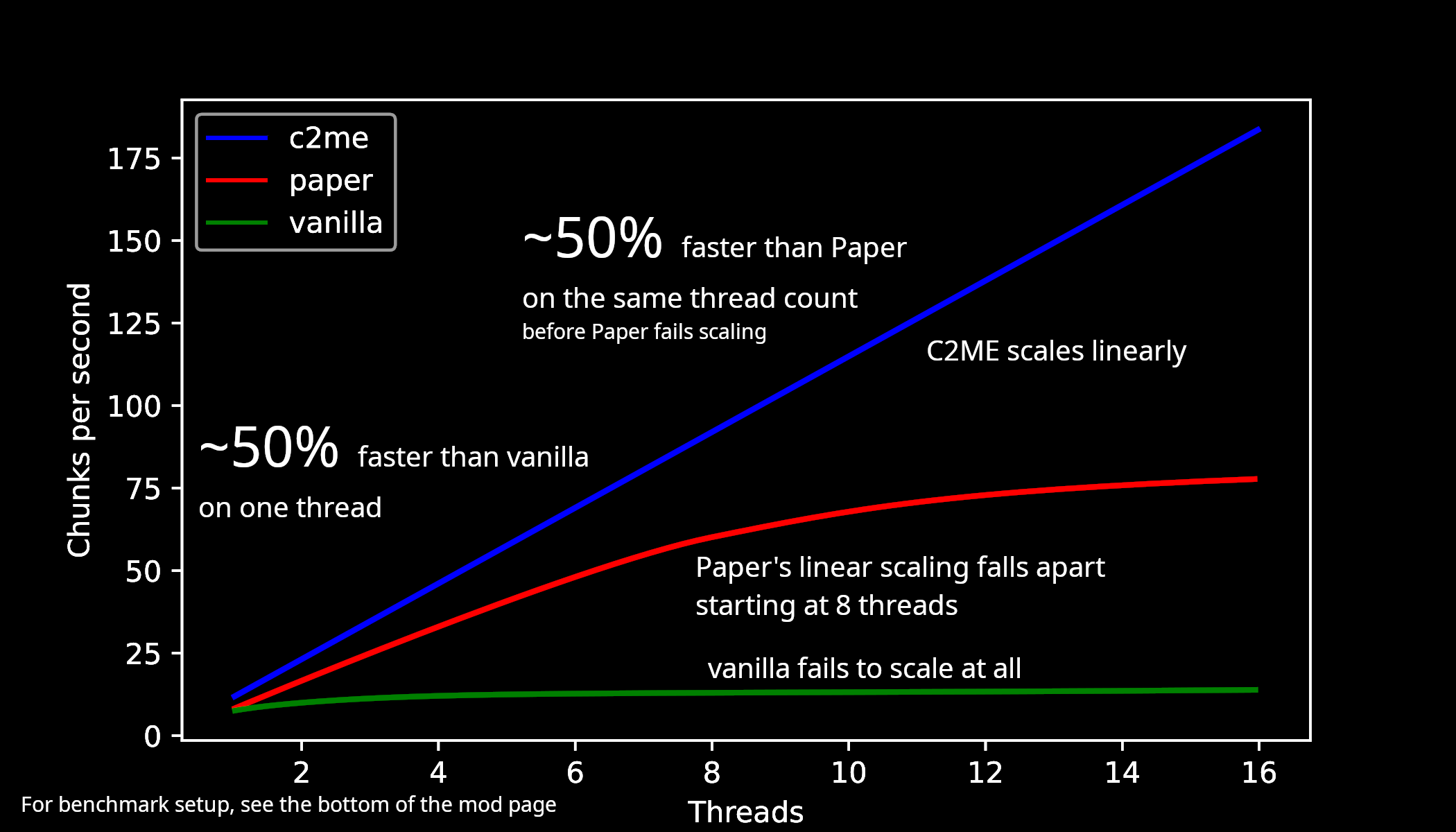
## Benchmarks for 1.21.10 w/ Terralith (Nov 21, 2025)
|2t-80t|1t-16t|
|——|——|
|||
## So what is C2ME?
C^2M-Engine, or C2ME for short, is a Fabric mod designed to improve the performance of chunk generation, I/O, and loading. This is done by taking advantage of multiple CPU cores in parallel. For the best performance it is recommended to use C2ME with Lithium and ScalableLux.
## What does C2ME stand for?
Concurrent chunk management engine, it’s about making the game better threaded and more scalable in regard to world gen and chunk io performance.
## Vanilla parity
C2ME does not sacrifice vanilla functionality or behavior, or alter the vanilla world generation in the name of raw speed by default.
However, due to the non-determinism of vanilla world generation, worlds will vary
significantly run-to-run even with the same seed. This is not a bug on our side.
While we carefully check that we do not modify any vanilla behavior, bugs are unavoidable after all.
So, if you do encounter an issue where C2ME deviates from the intended vanilla behavior, don’t hesitate to open an issue.
## Mod and Datapack compatibility
World generation datapacks that can run on vanilla Minecraft are fully supported.
Custom world generators implemented in mods usually runs well, but *may* cause compatibility issues due to certain
design assumption used by mod authors being broken for further speedups of world generation.
As a world generation mod author, if you find your mod broken, don’t hesitate to look for help in our discord server (linked below).
We are willing to help mod authors to embrace scalable world generation.
### Undefined behavior sanitization
C2ME includes `CheckedThreadLocalRandom` for world random (included in UWRAD) plus a few others.
These detections exist to prevent mods from screwing up Minecraft internals and causing undebuggable problems.
The detection should almost **never** produce false positives, and should be taken seriously and reported
to corresponding mod authors instead.
## Usage notice
**Backup your worlds and practice good game modding skills.**
## Support status for Minecraft versions
Only the latest Minecraft release and the latest Minecraft snapshot are fully supported.
Older Minecraft releases are in long-term support and will receive critical bug fixes.
Older Minecraft snapshots are not supported.
## Support
Our issue tracker: link
Our discord server: link
## More information
Check out the `README.md` here: https://github.com/RelativityMC/C2ME-fabric
## Previous benchmarks
Benchmarks for 1.21.3 (Nov 24, 2024)
|2t-80t|1t-10t|
|——|——|
|||
Footnotes: https://gist.github.com/ishland/9601a033afad4be5b17ffaed859577fd
## Footnotes
Footnotes for benchmarks
## Benchmark setup
All benchmark done with dual-socket `Intel(R) Xeon(R) Gold 5218R` limited to 2GHz max, on Debian 13.
“`
openjdk version “25.0.1” 2025-10-21 LTS
OpenJDK Runtime Environment Zulu25.30+17-CA (build 25.0.1+8-LTS)
OpenJDK 64-Bit Server VM Zulu25.30+17-CA (build 25.0.1+8-LTS, mixed mode)
“`
Datapack used: `Terralith_1.21.5_v2.5.13.zip`
https://modrinth.com/datapack/terralith/version/RFNry3l0
### C2ME benchmark
Fabric mods used for C2ME benchmark:
“`
c2me-fabric-mc1.21.10-0.3.5.1.0.jar
Chunky-Fabric-1.4.51.jar
fabric-api-0.138.3+1.21.10.jar
lithium-fabric-0.20.1+mc1.21.10.jar
ScalableLux-0.1.6+fabric.c25518a-all.jar
spark-1.10.152-fabric.jar
vmp-fabric-mc1.21.10-0.2.0+beta.7.217-all.jar
“`
Changed settings (`c2me.toml`):
– `globalExecutorParallelism` set to thread count
### Paper benchmark
Paper used: `paper-1.21.10-113.jar`
Paper plugin used: `Chunky-Bukkit-1.4.40.jar`
Changed settings (`paper-global.yml`):
– `worker-pool.io-threads = 4`
– `worker-pool.worker-threads` set to thread count
### Vanilla benchmark
Fabric mods used for vanilla benchmark:
“`
Chunky-Fabric-1.4.51.jar
fabric-api-0.138.3+1.21.10.jar
spark-1.10.152-fabric.jar
“`
Extra JVM flags: `-Dmax.bg.threads=` set to thread count
All benchmarks are run on tmpfs, on overworld, with world folder emptied before each JVM execution.
Seed: `114862964781274189`
`force-load-existing-chunks` is turned on in Chunky config.
## 2-80 threads benchmark
JVM flags: `-Xmx32G -Xms32G -Xss4m -Xshare:off -XX:+DisableExplicitGC -XX:+UseNUMA -XX:+UseZGC -XX:-ZUncommit -XX:+UseLargePages -XX:+UseTransparentHugePages -XX:+UnlockExperimentalVMOptions -XX:-OmitStackTraceInFastThrow -XX:+AlwaysPreTouch -XX:+UnlockDiagnosticVMOptions -XX:+DebugNonSafepoints -Dchunky.maxWorkingCount=256`
For vanilla tests only: `-Xmx64G -Xms64G` is used to avoid crashes during benchmark
Warmup phase: 2048 block radius with `0 0` as center (data discarded)
Measurement phase: 4096 block radius with `1000000 1000000` as center (263169 chunks in total)
| Thread count | C2ME cps | Paper cps | Vanilla cps |
|————–|———-|———–|————-|
| 2 | 22.62 | 17.37 | 10.63 |
| 4 | 45.02 | 34.17 | 12.67 |
| 6 | 69.42 | 50.87 | 13.64 |
| 8 | 89.94 | 63.14 | 13.26 |
| 10 | 115.53 | 72.66 | 14.25 |
| 12 | 135.93 | 78.63 | 14.58 |
| 14 | 159.01 | 82.09 | 14.57 |
| 16 | 182.38 | 84.76 | 14.22 |
| 18 | 208.45 | 88.94 | |
| 20 | 230.04 | 89.91 | |
| 22 | 252.08 | 87.66 | |
| 24 | 274.85 | 88.82 | |
| 26 | 297.70 | 88.43 | |
| 28 | 317.26 | 86.31 | |
| 30 | 334.40 | 87.69 | |
| 32 | 358.87 | 85.06 | |
| 34 | 377.21 | 87.52 | |
| 36 | 392.01 | 87.40 | |
| 38 | 407.59 | 85.14 | |
| 40 | 415.31 | 84.62 | |
| 42 | 423.33 | 86.06 | |
| 44 | 425.38 | 85.56 | |
| 46 | 424.47 | 86.28 | |
| 48 | 438.13 | 85.03 | |
| 50 | 440.57 | 85.31 | |
| 52 | 441.81 | 86.43 | |
| 54 | 444.29 | 83.81 | |
| 56 | 446.81 | 84.13 | |
| 58 | 444.29 | 85.03 | |
| 60 | 449.86 | 83.81 | |
| 62 | 453.48 | 85.50 | |
| 64 | 451.40 | 84.89 | |
| 66 | 454.26 | 83.60 | |
| 68 | 454.26 | 84.21 | |
| 70 | 457.16 | 83.89 | |
| 72 | 456.36 | 83.47 | |
| 74 | 460.09 | 84.70 | |
| 76 | 455.05 | 83.31 | |
| 78 | 459.82 | 83.39 | |
| 80 | 460.35 | 81.43 | 14.58 |
## 1-16 threads benchmark
JVM flags: `-Xmx16G -Xms16G -Xss4m -Xshare:off -XX:+DisableExplicitGC -XX:+UseNUMA -XX:+UseZGC -XX:-ZUncommit -XX:+UseLargePages -XX:+UseTransparentHugePages -XX:+UnlockExperimentalVMOptions -XX:-OmitStackTraceInFastThrow -XX:+AlwaysPreTouch -XX:+UnlockDiagnosticVMOptions -XX:+DebugNonSafepoints -Dchunky.maxWorkingCount=256`
Warmup phase: 1024 block radius with `0 0` as center (data discarded)
Measurement phase: 2048 block radius with `1000000 1000000` as center (66049 chunks in total)
| Thread count | C2ME cps | Paper cps | Vanilla cps |
|————–|———-|———–|————-|
| 1 | 11.62 | 8.05 | 7.37 |
| 2 | 22.65 | 16.19 | 10.01 |
| 3 | 33.46 | 24.45 | 11.46 |
| 4 | 44.95 | 32.52 | 12.05 |
| 5 | 56.94 | 40.65 | 12.41 |
| 6 | 68.55 | 48.32 | 12.61 |
| 7 | 79.82 | 54.95 | 12.83 |
| 8 | 91.57 | 60.15 | 12.83 |
| 9 | 104.76 | 63.88 | 13.08 |
| 10 | 114.42 | 68.66 | 13.53 |
| 11 | 126.83 | 70.72 | 13.01 |
| 12 | 138.73 | 72.34 | 13.39 |
| 13 | 148.35 | 75.57 | 13.58 |
| 14 | 162.25 | 76.01 | 13.34 |
| 15 | 172.34 | 76.27 | 13.56 |
| 16 | 183.78 | 77.43 | 13.72 |
Sexy Stev’s Bussin’ Banners
This massive banner overhaul pack is a standalone resource pack derived from the banner overhauls which I’ve been working on in my main in-progress pack.
This pack makes banners and shields as consistent between each other as possible and makes banners as pixel consistent as possible.
This pack also retextures the base textures for shields and banners.
This pack should be compatible from 1.15 Pre-Release 1 up to the latest version.
Bunny’s Prey Eyes

This resource pack enhances realism in Minecraft by adjusting the placement of rabbit eyes. Instead of being positioned on the front of the face, rabbit eyes are moved to the sides of the head just like in real life.
In nature, prey animals such as rabbits have side facing eyes to achieve a much wider field of vision, helping them detect predators more easily. This pack reflects that biological detail, giving rabbits a more authentic and immersive appearance in your world.
The change is subtle but meaningful, especially for players who appreciate realism and attention to detail in creature design.
Make sure you download and use the correct version of this resource pack for your specific Minecraft version. Using an incompatible version will result in the resource pack not working at all.
Here is a quick guide to how to install texture packs by _GuideRealm._
No mods required.
##

If you found a bug, or want to suggest your own idea you can chat with me about it on our [Discord]
You can support me or buy texture pack on the Patreon
Also check out my PMC page
#

BuiltUponTextures
A pack with the entire goal being to update the leftover textures from 1.14’s Texture Update! Even the snow golem’s arms got changed in this… I may be too thorough.
From chests, dirt, and creepers to arrows, particles, and sea lanterns- this pack updates þe ald classic textures while preserving original patterns to keep the classic, crusty-ish charm.
Not too much else to say, besides this technically being the 0th BNB standalone. Have fun!
Breaking Bedrock
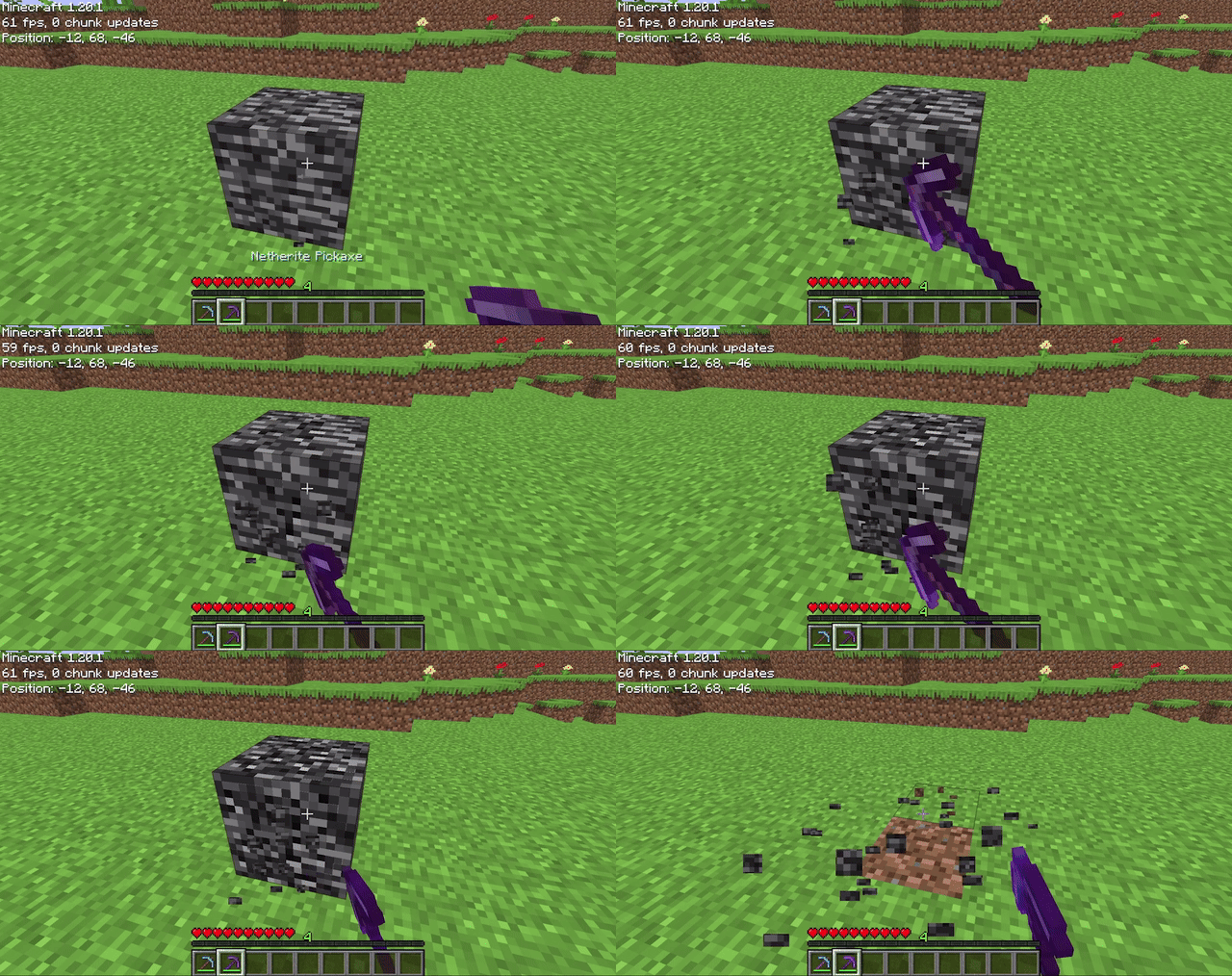
Allows players to mine bedrock using a pickaxe of mining level 4 or higher (configurable on 1.20.4 and below). After being mined, bedrock does not drop anything (also configurable), it just breaks. The destroy time (default 71) and explosion resistance (default 3600000) of bedrock are also all easily configurable.
## Config File
“`properties
# destroy_time: The destroy time for bedrock. (obsidian is 50, stone is 1.5, -1 is indestructible)
# explosion_resist: The explosion resistance for bedrock. (stone is 6, glass is 0.3)
# mining_level: The mining level required to mine bedrock. (netherite is 4) (only on 1.20.4 and below)
# drop_bedrock: Whether bedrock should drop as a block when broken.
destroy_time=100
explosion_resist=3600000
mining_level=4 #only on 1.20.4 and below
drop_bedrock=false
“`