Powder Snow Alerts
# Powder Snow Alerts
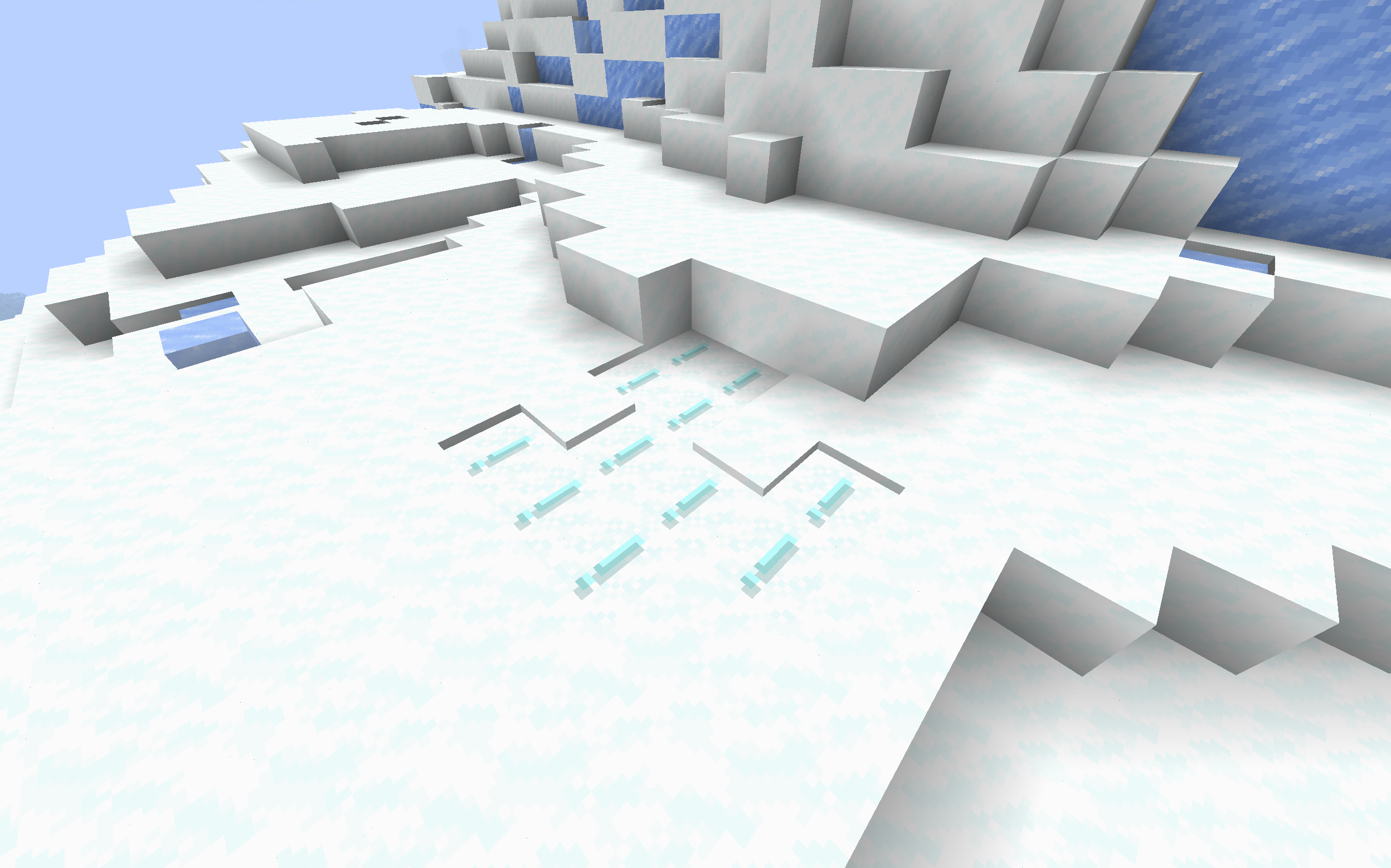
Makes powdered snow have an exclamation mark.
Thats it.
### Example
## FAQ
### Not Updated to version x:
The pack should work on all versions of the game, but if not, open an issue
### Usage in projects/modpacks:
I dont care if you use it in a project, however please credit me.
PotionRecipeLib
# Potion Recipes API
**Note:** Archived, since in newer version of FAPI this is already a thing
This simple API provides a simple way to make brewing recipes. If this is all you need, good use this, if you also need to do something else you may look also at nbt-crafting api or something like that.
This is just a “fancy” invoker, nothing less nothing more, so you could just create your own.
## Setup
Include this library into your `build.gradle` as a dependency
“`gradle
repositories {
maven {
name = “Modrinth”
url = “https://api.modrinth.com/maven”
content {
includeGroup “maven.modrinth”
}
}
}
dependencies {
modImplementation “maven.modrinth:potionrecipes:”
}
“`
If you want you can `include `the API in your jar file by adding only the `include` string:
“`gradle
repositories {
maven {
name = “Modrinth”
url = “https://api.modrinth.com/maven”
content {
includeGroup “maven.modrinth”
}
}
}
dependencies {
modImplementation “maven.modrinth:potionrecipes:”
include “maven.modrinth:potionrecipes:”
}
“`
## How to use it
Simply call
“`java
BrewingRecipeRegister.registerPotionRecipe(Potion input, Item item, Potion output);
“`
@param input The potion you want to start from, usually Potions.AWKWARD or your custom potion (which is going to be YourPotions.POTION)
@param item The ingredient you need for your potion
@param output The potion you want to have as a result of the crafting
For an example you can look into my  mod.
## License
This API is available under the CC0 license. Feel free to learn from it and incorporate it in your own projects.
Potato Craft-8x
⭐ PotatoCraft 8x – Ultra FPS Boost Texture Pack ⭐
Do you want smooth FPS and a potato-friendly Minecraft? 🍟
PotatoCraft 8x is a lightweight, simplified resource pack designed for Minecraft Java Edition.
🔥 8×8 textures (down from the default 16×16)
⚡ Huge FPS boost on low-end devices
🎮 Perfect for PvP and survival gameplay
🌍 Works on all the latest Minecraft Java versions
💻 Tested on both mobile and PC
Whether you’re on a low-end phone, old laptop, or a beast PC, this pack makes the game feel faster, cleaner, and smoother.
💡 Why PotatoCraft?
Because even the weakest potato deserves to play Minecraft without lag! 🥔
📥 Download now and turn your Minecraft into a lag-free experience!
Pixel Twemoji 9x
# Pixel perfect Twemoji (9×9 version)
This resource pack adds **all** of Twemoji, redrawn by hand as pixel art
at 9×9 pixels, to the default font in Minecraft: Java Edition
version 1.16 or later. Twemoji is the emoji set used by Discord and Twitter.
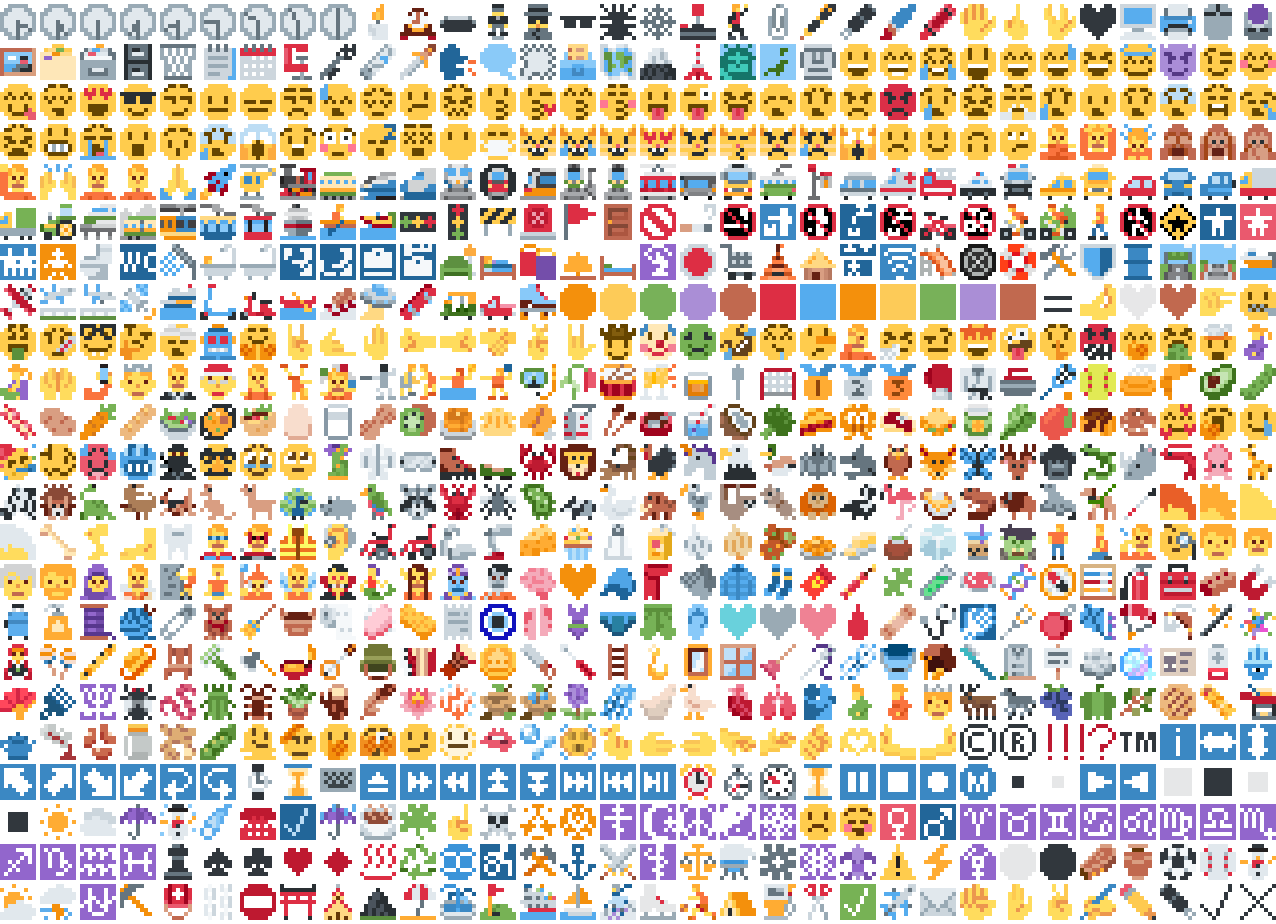
*Just some of the emoji in the pack*
## Installation
Please download the .zip file from the Versions section, put it in your
resource packs folder and select it for use in-game.
You can also embed this pack into another pack,
for use on a server or custom world for example.
Please remember to credit the project as it is
one of the requirements of the project license.
## Basic usage
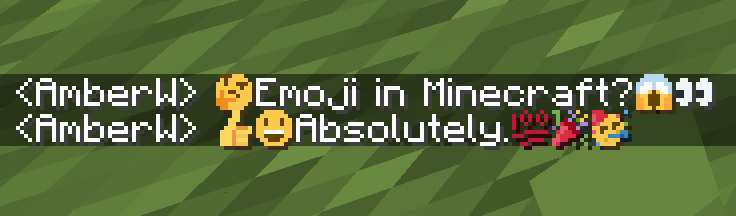
Most standard emoji characters will just work if you copy and paste them in or
use some kind of emoji input. For example, try copying emoji from
[this site](https://emojifinder.com/) or using the Windows emoji picker (Win+.).
However, emoji that consist of sequences of multiple character are not supported
by vanilla and will show up as multiple, separate characters. Sorry.
See below for ways to develop around this.
Sample of Emoji to Copy-Paste
© ® ‼ ⁉ ™ ℹ ↔ ↕ ↖ ↗ ↘ ↙ ↩ ↪ ⌚ ⌛ ⌨ ⏏ ⏩ ⏪ ⏫ ⏬ ⏭ ⏮ ⏯ ⏰ ⏱ ⏲ ⏳ ⏸ ⏹ ⏺ Ⓜ ▪ ▫ ▶ ◀ ◻ ◼ ◽ ◾ ☀ ☁ ☂ ☃ ☄ ☎ ☑ ☔ ☕ ☘ ☝ ☠ ☢ ☣ ☦ ☪ ☮ ☯ ☸ ☹ ☺ ♀ ♂ ♈ ♉ ♊ ♋ ♌ ♍ ♎ ♏ ♐ ♑ ♒ ♓ ♟ ♠ ♣ ♥ ♦ ♨ ♻ ♾ ♿ ⚒ ⚓ ⚔ ⚕ ⚖ ⚗ ⚙ ⚛ ⚜ ⚠ ⚡ ⚧ ⚪ ⚫ ⚰ ⚱ ⚽ ⚾ ⛄ ⛅ ⛈ ⛎ ⛏ ⛑ ⛓ ⛔ ⛩ ⛪ ⛰ ⛱ ⛲ ⛳ ⛴ ⛵ ⛷ ⛸ ⛹ ⛺ ⛽ ✂ ✅ ✈ ✉ ✊ ✋ ✌ ✍ ✏ ✒ ✔ ✖ ✝ ✡ ✨ ✳ ✴ ❄ ❇ ❌ ❎ ❓ ❔ ❕ ❗ ❣ ❤ ➕ ➖ ➗ ➡ ➰ ➿ ⤴ ⤵ ⬅ ⬆ ⬇ ⬛ ⬜ ⭐ ⭕ 〰 〽 ㊗ ㊙ 🀄 🃏 🅰 🅱 🅾 🅿 🆎 🆑 🆒 🆓 🆔 🆕 🆖 🆗 🆘 🆙 🆚 🇦 🇧 🇨 🇩 🇪 🇫 🇬 🇭 🇮 🇯 🇰 🇱 🇲 🇳 🇴 🇵 🇶 🇷 🇸 🇹 🇺 🇻 🇼 🇽 🇾 🇿 🈁 🈂 🈚 🈯 🈲 🈳 🈴 🈵 🈶 🈷 🈸 🈹 🈺 🉐 🉑 🌀 🌁 🌂 🌃 🌄 🌅 🌆 🌇 🌈 🌉 🌊 🌋 🌌 🌍 🌎 🌏 🌐 🌑 🌒 🌓 🌔 🌕 🌖 🌗 🌘 🌙 🌚 🌛 🌜 🌝 🌞 🌟 🌠 🌡 🌤 🌥 🌦 🌧 🌨 🌩 🌪 🌫 🌬 🌭 🌮 🌯 🌰 🌱 🌲 🌳 🌴 🌵 🌶 🌷 🌸 🌹 🌺 🌻 🌼 🌽 🌾 🌿 🍀 🍁 🍂 🍃 🍄 🍅 🍆 🍇 🍈 🍉 🍊 🍋 🍌 🍍 🍎 🍏 🍐 🍑 🍒 🍓 🍔 🍕 🍖 🍗 🍘 🍙 🍚 🍛 🍜 🍝 🍞 🍟 🍠 🍡 🍢 🍣 🍤 🍥 🍦 🍧 🍨 🍩 🍪 🍫 🍬 🍭 🍮 🍯 🍰 🍱 🍲 🍳 🍴 🍵 🍶 🍷 🍸 🍹 🍺 🍻 🍼 🍽 🍾 🍿 🎀 🎁 🎂 🎃 🎄 🎅 🎆 🎇 🎈 🎉 🎊 🎋 🎌 🎍 🎎 🎏 🎐 🎑 🎒 🎓 🎖 🎗 🎙 🎚 🎛 🎞 🎟 🎠 🎡 🎢 🎣 🎤 🎥 🎦 🎧 🎨 🎩 🎪 🎫 🎬 🎭 🎮 🎯 🎰 🎱 🎲 🎳 🎴 🎵 🎶 🎷 🎸 🎹 🎺 🎻 🎼 🎽 🎾 🎿 🏀 🏁 🏂 🏃 🏄 🏅 🏆 🏇 🏈 🏉 🏊 🏋 🏌 🏍 🏎 🏏 🏐 🏑 🏒 🏓 🏔 🏕 🏖 🏗 🏘 🏙 🏚 🏛 🏜 🏝 🏞 🏟 🏠 🏡 🏢 🏣 🏤 🏥 🏦 🏧 🏨 🏩 🏪 🏫 🏬 🏭 🏮 🏯 🏰 🏳 🏴 🏵 🏷 🏸 🏹 🏺 🏻 🏼 🏽 🏾 🏿 🐀 🐁 🐂 🐃 🐄 🐅 🐆 🐇 🐈 🐉 🐊 🐋 🐌 🐍 🐎 🐏 🐐 🐑 🐒 🐓 🐔 🐕 🐖 🐗 🐘 🐙 🐚 🐛 🐜 🐝 🐞 🐟 🐠 🐡 🐢 🐣 🐤 🐥 🐦 🐧 🐨 🐩 🐪 🐫 🐬 🐭 🐮 🐯 🐰 🐱 🐲 🐳 🐴 🐵 🐶 🐷 🐸 🐹 🐺 🐻 🐼 🐽 🐾 🐿 👀 👁 👂 👃 👄 👅 👆 👇 👈 👉 👊 👋 👌 👍 👎 👏 👐 👑 👒 👓 👔 👕 👖 👗 👘 👙 👚 👛 👜 👝 👞 👟 👠 👡 👢 👣 👤 👥 👦 👧 👨 👩 👪 👫 👬 👭 👮 👯 👰 👱 👲 👳 👴 👵 👶 👷 👸 👹 👺 👻 👼 👽 👾 👿 💀 💁 💂 💃 💄 💅 💆 💇 💈 💉 💊 💋 💌 💍 💎 💏 💐 💑 💒 💓 💔 💕 💖 💗 💘 💙 💚 💛 💜 💝 💞 💟 💠 💡 💢 💣 💤 💥 💦 💧 💨 💩 💪 💫 💬 💭 💮 💯 💰 💱 💲 💳 💴 💵 💶 💷 💸 💹 💺 💻 💼 💽 💾 💿 📀 📁 📂 📃 📄 📅 📆 📇 📈 📉 📊 📋 📌 📍 📎 📏 📐 📑 📒 📓 📔 📕 📖 📗 📘 📙 📚 📛 📜 📝 📞 📟 📠 📡 📢 📣 📤 📥 📦 📧 📨 📩 📪 📫 📬 📭 📮 📯 📰 📱 📲 📳 📴 📵 📶 📷 📸 📹 📺 📻 📼 📽 📿 🔀 🔁 🔂 🔃 🔄 🔅 🔆 🔇 🔈 🔉 🔊 🔋 🔌 🔍 🔎 🔏 🔐 🔑 🔒 🔓 🔔 🔕 🔖 🔗 🔘 🔙 🔚 🔛 🔜 🔝 🔞 🔟 🔠 🔡 🔢 🔣 🔤 🔥 🔦 🔧 🔨 🔩 🔪 🔫 🔬 🔭 🔮 🔯 🔰 🔱 🔲 🔳 🔴 🔵 🔶 🔷 🔸 🔹 🔺 🔻 🔼 🔽 🕉 🕊 🕋 🕌 🕍 🕎 🕐 🕑 🕒 🕓 🕔 🕕 🕖 🕗 🕘 🕙 🕚 🕛 🕜 🕝 🕞 🕟 🕠 🕡 🕢 🕣 🕤 🕥 🕦 🕧 🕯 🕰 🕳 🕴 🕵 🕶 🕷 🕸 🕹 🕺 🖇 🖊 🖋 🖌 🖍 🖐 🖕 🖖 🖤 🖥 🖨 🖱 🖲 🖼 🗂 🗃 🗄 🗑 🗒 🗓 🗜 🗝 🗞 🗡 🗣 🗨 🗯 🗳 🗺 🗻 🗼 🗽 🗾 🗿 😀 😁 😂 😃 😄 😅 😆 😇 😈 😉 😊 😋 😌 😍 😎 😏 😐 😑 😒 😓 😔 😕 😖 😗 😘 😙 😚 😛 😜 😝 😞 😟 😠 😡 😢 😣 😤 😥 😦 😧 😨 😩 😪 😫 😬 😭 😮 😯 😰 😱 😲 😳 😴 😵 😶 😷 😸 😹 😺 😻 😼 😽 😾 😿 🙀 🙁 🙂 🙃 🙄 🙅 🙆 🙇 🙈 🙉 🙊 🙋 🙌 🙍 🙎 🙏 🚀 🚁 🚂 🚃 🚄 🚅 🚆 🚇 🚈 🚉 🚊 🚋 🚌 🚍 🚎 🚏 🚐 🚑 🚒 🚓 🚔 🚕 🚖 🚗 🚘 🚙 🚚 🚛 🚜 🚝 🚞 🚟 🚠 🚡 🚢 🚣 🚤 🚥 🚦 🚧 🚨 🚩 🚪 🚫 🚬 🚭 🚮 🚯 🚰 🚱 🚲 🚳 🚴 🚵 🚶 🚷 🚸 🚹 🚺 🚻 🚼 🚽 🚾 🚿 🛀 🛁 🛂 🛃 🛄 🛅 🛋 🛌 🛍 🛎 🛏 🛐 🛑 🛒 🛕 🛖 🛗 🛜 🛝 🛞 🛟 🛠 🛡 🛢 🛣 🛤 🛥 🛩 🛫 🛬 🛰 🛳 🛴 🛵 🛶 🛷 🛸 🛹 🛺 🛻 🛼 🟠 🟡 🟢 🟣 🟤 🟥 🟦 🟧 🟨 🟩 🟪 🟫 🟰 🤌 🤍 🤎 🤏 🤐 🤑 🤒 🤓 🤔 🤕 🤖 🤗 🤘 🤙 🤚 🤛 🤜 🤝 🤞 🤟 🤠 🤡 🤢 🤣 🤤 🤥 🤦 🤧 🤨 🤩 🤪 🤫 🤬 🤭 🤮 🤯 🤰 🤱 🤲 🤳 🤴 🤵 🤶 🤷 🤸 🤹 🤺 🤼 🤽 🤾 🤿 🥀 🥁 🥂 🥃 🥄 🥅 🥇 🥈 🥉 🥊 🥋 🥌 🥍 🥎 🥏 🥐 🥑 🥒 🥓 🥔 🥕 🥖 🥗 🥘 🥙 🥚 🥛 🥜 🥝 🥞 🥟 🥠 🥡 🥢 🥣 🥤 🥥 🥦 🥧 🥨 🥩 🥪 🥫 🥬 🥭 🥮 🥯 🥰 🥱 🥲 🥳 🥴 🥵 🥶 🥷 🥸 🥹 🥺 🥻 🥼 🥽 🥾 🥿 🦀 🦁 🦂 🦃 🦄 🦅 🦆 🦇 🦈 🦉 🦊 🦋 🦌 🦍 🦎 🦏 🦐 🦑 🦒 🦓 🦔 🦕 🦖 🦗 🦘 🦙 🦚 🦛 🦜 🦝 🦞 🦟 🦠 🦡 🦢 🦣 🦤 🦥 🦦 🦧 🦨 🦩 🦪 🦫 🦬 🦭 🦮 🦯 🦰 🦱 🦲 🦳 🦴 🦵 🦶 🦷 🦸 🦹 🦺 🦻 🦼 🦽 🦾 🦿 🧀 🧁 🧂 🧃 🧄 🧅 🧆 🧇 🧈 🧉 🧊 🧋 🧌 🧍 🧎 🧏 🧐 🧑 🧒 🧓 🧔 🧕 🧖 🧗 🧘 🧙 🧚 🧛 🧜 🧝 🧞 🧟 🧠 🧡 🧢 🧣 🧤 🧥 🧦 🧧 🧨 🧩 🧪 🧫 🧬 🧭 🧮 🧯 🧰 🧱 🧲 🧳 🧴 🧵 🧶 🧷 🧸 🧹 🧺 🧻 🧼 🧽 🧾 🧿 🩰 🩱 🩲 🩳 🩴 🩵 🩶 🩷 🩸 🩹 🩺 🩻 🩼 🪀 🪁 🪂 🪃 🪄 🪅 🪆 🪇 🪈 🪐 🪑 🪒 🪓 🪔 🪕 🪖 🪗 🪘 🪙 🪚 🪛 🪜 🪝 🪞 🪟 🪠 🪡 🪢 🪣 🪤 🪥 🪦 🪧 🪨 🪩 🪪 🪫 🪬 🪭 🪮 🪯 🪰 🪱 🪲 🪳 🪴 🪵 🪶 🪷 🪸 🪹 🪺 🪻 🪼 🪽 🪿 🫀 🫁 🫂 🫃 🫄 🫅 🫎 🫏 🫐 🫑 🫒 🫓 🫔 🫕 🫖 🫗 🫘 🫙 🫚 🫛 🫠 🫡 🫢 🫣 🫤 🫥 🫦 🫧 🫨 🫰 🫱 🫲 🫳 🫴 🫵 🫶 🫷 🫸
Also, check out the [18x version](https://modrinth.com/resourcepack/pixel-twemoji-18x) with more detail!
## Supported mods
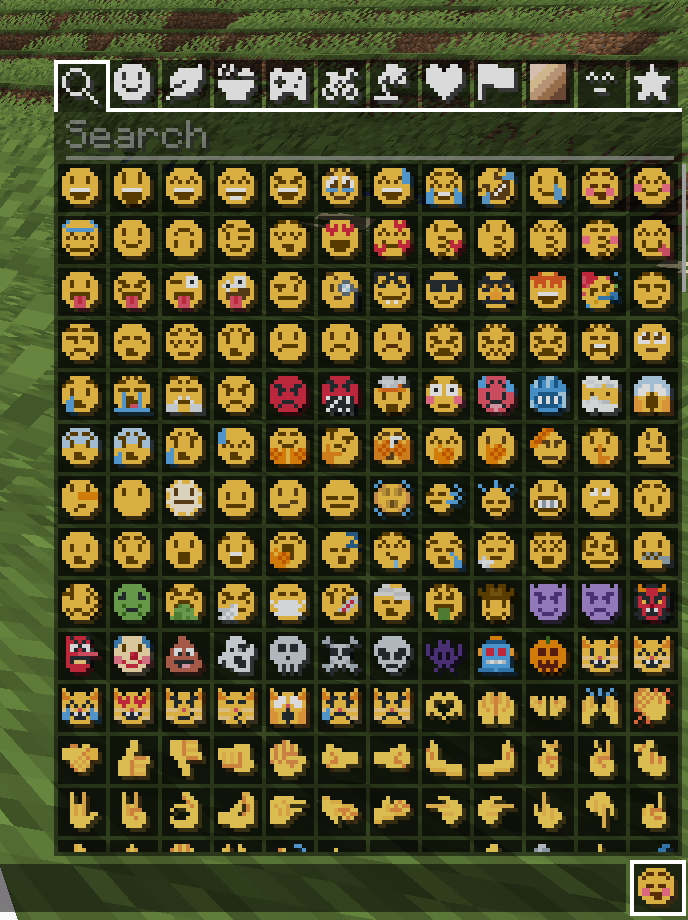
### [Symbol Chat](https://modrinth.com/mod/symbol-chat)
Easy to use emoji and symbol picker
## Remapped characters (for developers)
In order to have any support for emoji consisting of sequences they have been
remapped to unused single characters. An index of these can be found in
/assets/emoji_remappings/lang/en_us.json.
For example, `ud83dudc69u200dud83dudd2c` (👩+🔬=👩🔬)
is mapped to `udb80udf30` using this translation snippet:
“`json
“ud83dudc69u200dud83dudd2c”: “udb80udf30”
“`
**Please note that vanilla has no mechanism to
automatically convert to the remapped form.**
A custom emoji picker or some kind of mod/plugin is
required to make using these a smooth experience.
Because the index acts as a language file, a server side chat listener
could detect emoji sequences and turn them into translations like this one:
“`json
{“translate”: “ud83dudc69u200dud83dudd2c”}
“`
Any client with the pack installed can then perform the remapping for the server.
If the pack is not installed or the sequence is not found then it will just
fall back to displaying the sequence. This means that the server doesn’t need a
complete list of emoji sequences, just a way to detect potential ones.
(The [Unicode website](https://unicode.org/Public/emoji/latest/)
contains data files describing what is an emoji.)
## Shortcodes (for developers)
Shortcodes are a popular way to insert emoji by name. An index of shortcodes
can be found in /assets/emoji_shortcodes/lang/en_us.json.
For example, `:thinking:` is mapped to `ud83eudd14` (🤔):
“`json
“thinking”: “ud83eudd14”
“`
Emoji that need remapping already map to the remapped version.
**Please note that vanilla has no mechanism to
automatically convert shortcodes into emoji.**
Some kind of mod/plugin is required.
Because the index acts as a language file, a server side chat listener could
detect shortcodes and turn them into translations like this one:
“`json
{“translate”: “:thinking:”}
“`
Any client with the pack installed can then convert it for the server. If the
pack is not installed or the shortcode is not found then it will just fall back
to displaying the shortcode. This means that the server doesn’t need a complete
list of shortcodes, just a way to detect potential ones by finding substrings
beginning and ending with a colon `:`.
### Custom emoji?
Custom emoji could be created in a similar way by adding them to unused code
points of the default font and adding a translation with a shortcode.
For example, this translation snippet adds the shortcode `:pog:` for the
character `uE502`:
“`json
“:pog:”: “uE502”
“`
## Reverse shortcodes (for developers)
Maybe you want to display a name for each emoji, in some hover text for example.
That is where reverse shortcodes come in. An index of these can be found in
/assets/emoji_shortcodes_reverse/lang/en_us.json.
For example, `u200cud83eudd14` (`` + 🤔) is mapped to `:thinking:` using
this translation snippet:
“`json
“u200cud83eudd14”: “:thinking:”
“`
`u200c` is added to each entry to allow the index to be used as a language file
without conflicting with the other indexes. If the pack is not installed or the
emoji is not found then it will just fall back to displaying the characters,
including the invisible `u200c`.
A server side chat listener could detect shortcodes and
turn them into emoji with tooltips like this one:
“`json
{“translate”: “:thinking:”, “hoverEvent”: {“action”: “show_text”, “contents”: “:thinking:”}}
“`
With reverse shortcodes, it could also detect emoji and
emoji sequences and also give them tooltips like this one:
“`json
{“translate”:”ud83eudd14″,”hoverEvent”:{“action”:”show_text”,”contents”:{“translate”:”u200cud83eudd14″}}}
“`
## License
Graphics based on Twemoji Copyright (c) 2018 Twitter, Inc and other contributors, licensed under Creative Commons Attribution 4.0 International
Pixel art and resource pack adaptation Copyright (c) 2020 AmberW, licensed under Creative Commons Attribution 4.0 International
Pixel Twemoji 18x
# Pixel perfect Twemoji (18×18 version)
This resource pack adds **all** of Twemoji, redrawn by hand as pixel art
at 18×18 pixels, to the default font in Minecraft: Java Edition
version 1.16 or later. Twemoji is the emoji set used by Discord and Twitter.
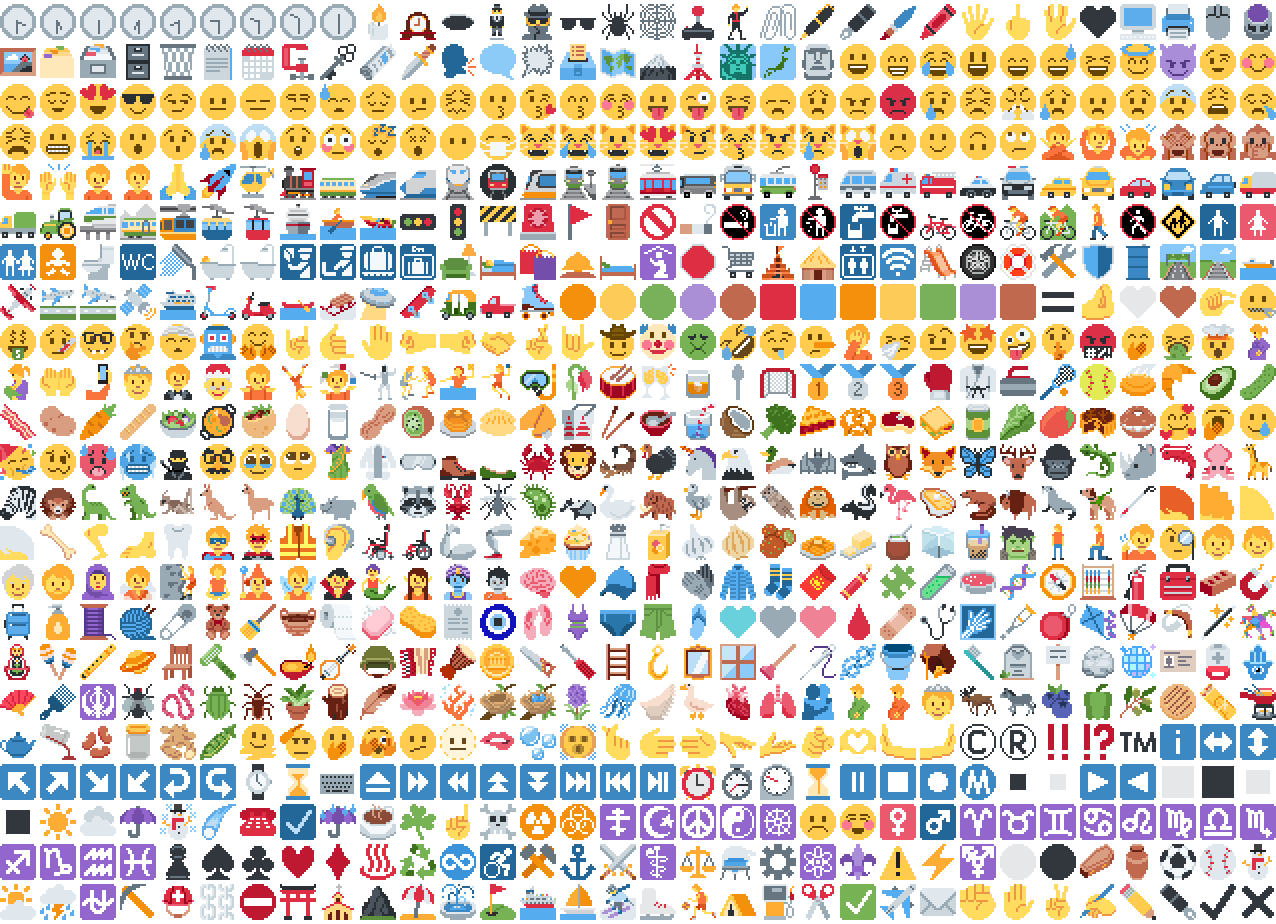
*Just some of the emoji in the pack*
## Installation
Please download the .zip file from the Versions section, put it in your
resource packs folder and select it for use in-game.
You can also embed this pack into another pack,
for use on a server or custom world for example.
Please remember to credit the project as it is
one of the requirements of the project license.
## Basic usage

Most standard emoji characters will just work if you copy and paste them in or
use some kind of emoji input. For example, try copying emoji from
[this site](https://emojifinder.com/) or using the Windows emoji picker (Win+.).
However, emoji that consist of sequences of multiple character are not supported
by vanilla and will show up as multiple, separate characters. Sorry.
See below for ways to develop around this.
Sample of Emoji to Copy-Paste
© ® ‼ ⁉ ™ ℹ ↔ ↕ ↖ ↗ ↘ ↙ ↩ ↪ ⌚ ⌛ ⌨ ⏏ ⏩ ⏪ ⏫ ⏬ ⏭ ⏮ ⏯ ⏰ ⏱ ⏲ ⏳ ⏸ ⏹ ⏺ Ⓜ ▪ ▫ ▶ ◀ ◻ ◼ ◽ ◾ ☀ ☁ ☂ ☃ ☄ ☎ ☑ ☔ ☕ ☘ ☝ ☠ ☢ ☣ ☦ ☪ ☮ ☯ ☸ ☹ ☺ ♀ ♂ ♈ ♉ ♊ ♋ ♌ ♍ ♎ ♏ ♐ ♑ ♒ ♓ ♟ ♠ ♣ ♥ ♦ ♨ ♻ ♾ ♿ ⚒ ⚓ ⚔ ⚕ ⚖ ⚗ ⚙ ⚛ ⚜ ⚠ ⚡ ⚧ ⚪ ⚫ ⚰ ⚱ ⚽ ⚾ ⛄ ⛅ ⛈ ⛎ ⛏ ⛑ ⛓ ⛔ ⛩ ⛪ ⛰ ⛱ ⛲ ⛳ ⛴ ⛵ ⛷ ⛸ ⛹ ⛺ ⛽ ✂ ✅ ✈ ✉ ✊ ✋ ✌ ✍ ✏ ✒ ✔ ✖ ✝ ✡ ✨ ✳ ✴ ❄ ❇ ❌ ❎ ❓ ❔ ❕ ❗ ❣ ❤ ➕ ➖ ➗ ➡ ➰ ➿ ⤴ ⤵ ⬅ ⬆ ⬇ ⬛ ⬜ ⭐ ⭕ 〰 〽 ㊗ ㊙ 🀄 🃏 🅰 🅱 🅾 🅿 🆎 🆑 🆒 🆓 🆔 🆕 🆖 🆗 🆘 🆙 🆚 🇦 🇧 🇨 🇩 🇪 🇫 🇬 🇭 🇮 🇯 🇰 🇱 🇲 🇳 🇴 🇵 🇶 🇷 🇸 🇹 🇺 🇻 🇼 🇽 🇾 🇿 🈁 🈂 🈚 🈯 🈲 🈳 🈴 🈵 🈶 🈷 🈸 🈹 🈺 🉐 🉑 🌀 🌁 🌂 🌃 🌄 🌅 🌆 🌇 🌈 🌉 🌊 🌋 🌌 🌍 🌎 🌏 🌐 🌑 🌒 🌓 🌔 🌕 🌖 🌗 🌘 🌙 🌚 🌛 🌜 🌝 🌞 🌟 🌠 🌡 🌤 🌥 🌦 🌧 🌨 🌩 🌪 🌫 🌬 🌭 🌮 🌯 🌰 🌱 🌲 🌳 🌴 🌵 🌶 🌷 🌸 🌹 🌺 🌻 🌼 🌽 🌾 🌿 🍀 🍁 🍂 🍃 🍄 🍅 🍆 🍇 🍈 🍉 🍊 🍋 🍌 🍍 🍎 🍏 🍐 🍑 🍒 🍓 🍔 🍕 🍖 🍗 🍘 🍙 🍚 🍛 🍜 🍝 🍞 🍟 🍠 🍡 🍢 🍣 🍤 🍥 🍦 🍧 🍨 🍩 🍪 🍫 🍬 🍭 🍮 🍯 🍰 🍱 🍲 🍳 🍴 🍵 🍶 🍷 🍸 🍹 🍺 🍻 🍼 🍽 🍾 🍿 🎀 🎁 🎂 🎃 🎄 🎅 🎆 🎇 🎈 🎉 🎊 🎋 🎌 🎍 🎎 🎏 🎐 🎑 🎒 🎓 🎖 🎗 🎙 🎚 🎛 🎞 🎟 🎠 🎡 🎢 🎣 🎤 🎥 🎦 🎧 🎨 🎩 🎪 🎫 🎬 🎭 🎮 🎯 🎰 🎱 🎲 🎳 🎴 🎵 🎶 🎷 🎸 🎹 🎺 🎻 🎼 🎽 🎾 🎿 🏀 🏁 🏂 🏃 🏄 🏅 🏆 🏇 🏈 🏉 🏊 🏋 🏌 🏍 🏎 🏏 🏐 🏑 🏒 🏓 🏔 🏕 🏖 🏗 🏘 🏙 🏚 🏛 🏜 🏝 🏞 🏟 🏠 🏡 🏢 🏣 🏤 🏥 🏦 🏧 🏨 🏩 🏪 🏫 🏬 🏭 🏮 🏯 🏰 🏳 🏴 🏵 🏷 🏸 🏹 🏺 🏻 🏼 🏽 🏾 🏿 🐀 🐁 🐂 🐃 🐄 🐅 🐆 🐇 🐈 🐉 🐊 🐋 🐌 🐍 🐎 🐏 🐐 🐑 🐒 🐓 🐔 🐕 🐖 🐗 🐘 🐙 🐚 🐛 🐜 🐝 🐞 🐟 🐠 🐡 🐢 🐣 🐤 🐥 🐦 🐧 🐨 🐩 🐪 🐫 🐬 🐭 🐮 🐯 🐰 🐱 🐲 🐳 🐴 🐵 🐶 🐷 🐸 🐹 🐺 🐻 🐼 🐽 🐾 🐿 👀 👁 👂 👃 👄 👅 👆 👇 👈 👉 👊 👋 👌 👍 👎 👏 👐 👑 👒 👓 👔 👕 👖 👗 👘 👙 👚 👛 👜 👝 👞 👟 👠 👡 👢 👣 👤 👥 👦 👧 👨 👩 👪 👫 👬 👭 👮 👯 👰 👱 👲 👳 👴 👵 👶 👷 👸 👹 👺 👻 👼 👽 👾 👿 💀 💁 💂 💃 💄 💅 💆 💇 💈 💉 💊 💋 💌 💍 💎 💏 💐 💑 💒 💓 💔 💕 💖 💗 💘 💙 💚 💛 💜 💝 💞 💟 💠 💡 💢 💣 💤 💥 💦 💧 💨 💩 💪 💫 💬 💭 💮 💯 💰 💱 💲 💳 💴 💵 💶 💷 💸 💹 💺 💻 💼 💽 💾 💿 📀 📁 📂 📃 📄 📅 📆 📇 📈 📉 📊 📋 📌 📍 📎 📏 📐 📑 📒 📓 📔 📕 📖 📗 📘 📙 📚 📛 📜 📝 📞 📟 📠 📡 📢 📣 📤 📥 📦 📧 📨 📩 📪 📫 📬 📭 📮 📯 📰 📱 📲 📳 📴 📵 📶 📷 📸 📹 📺 📻 📼 📽 📿 🔀 🔁 🔂 🔃 🔄 🔅 🔆 🔇 🔈 🔉 🔊 🔋 🔌 🔍 🔎 🔏 🔐 🔑 🔒 🔓 🔔 🔕 🔖 🔗 🔘 🔙 🔚 🔛 🔜 🔝 🔞 🔟 🔠 🔡 🔢 🔣 🔤 🔥 🔦 🔧 🔨 🔩 🔪 🔫 🔬 🔭 🔮 🔯 🔰 🔱 🔲 🔳 🔴 🔵 🔶 🔷 🔸 🔹 🔺 🔻 🔼 🔽 🕉 🕊 🕋 🕌 🕍 🕎 🕐 🕑 🕒 🕓 🕔 🕕 🕖 🕗 🕘 🕙 🕚 🕛 🕜 🕝 🕞 🕟 🕠 🕡 🕢 🕣 🕤 🕥 🕦 🕧 🕯 🕰 🕳 🕴 🕵 🕶 🕷 🕸 🕹 🕺 🖇 🖊 🖋 🖌 🖍 🖐 🖕 🖖 🖤 🖥 🖨 🖱 🖲 🖼 🗂 🗃 🗄 🗑 🗒 🗓 🗜 🗝 🗞 🗡 🗣 🗨 🗯 🗳 🗺 🗻 🗼 🗽 🗾 🗿 😀 😁 😂 😃 😄 😅 😆 😇 😈 😉 😊 😋 😌 😍 😎 😏 😐 😑 😒 😓 😔 😕 😖 😗 😘 😙 😚 😛 😜 😝 😞 😟 😠 😡 😢 😣 😤 😥 😦 😧 😨 😩 😪 😫 😬 😭 😮 😯 😰 😱 😲 😳 😴 😵 😶 😷 😸 😹 😺 😻 😼 😽 😾 😿 🙀 🙁 🙂 🙃 🙄 🙅 🙆 🙇 🙈 🙉 🙊 🙋 🙌 🙍 🙎 🙏 🚀 🚁 🚂 🚃 🚄 🚅 🚆 🚇 🚈 🚉 🚊 🚋 🚌 🚍 🚎 🚏 🚐 🚑 🚒 🚓 🚔 🚕 🚖 🚗 🚘 🚙 🚚 🚛 🚜 🚝 🚞 🚟 🚠 🚡 🚢 🚣 🚤 🚥 🚦 🚧 🚨 🚩 🚪 🚫 🚬 🚭 🚮 🚯 🚰 🚱 🚲 🚳 🚴 🚵 🚶 🚷 🚸 🚹 🚺 🚻 🚼 🚽 🚾 🚿 🛀 🛁 🛂 🛃 🛄 🛅 🛋 🛌 🛍 🛎 🛏 🛐 🛑 🛒 🛕 🛖 🛗 🛜 🛝 🛞 🛟 🛠 🛡 🛢 🛣 🛤 🛥 🛩 🛫 🛬 🛰 🛳 🛴 🛵 🛶 🛷 🛸 🛹 🛺 🛻 🛼 🟠 🟡 🟢 🟣 🟤 🟥 🟦 🟧 🟨 🟩 🟪 🟫 🟰 🤌 🤍 🤎 🤏 🤐 🤑 🤒 🤓 🤔 🤕 🤖 🤗 🤘 🤙 🤚 🤛 🤜 🤝 🤞 🤟 🤠 🤡 🤢 🤣 🤤 🤥 🤦 🤧 🤨 🤩 🤪 🤫 🤬 🤭 🤮 🤯 🤰 🤱 🤲 🤳 🤴 🤵 🤶 🤷 🤸 🤹 🤺 🤼 🤽 🤾 🤿 🥀 🥁 🥂 🥃 🥄 🥅 🥇 🥈 🥉 🥊 🥋 🥌 🥍 🥎 🥏 🥐 🥑 🥒 🥓 🥔 🥕 🥖 🥗 🥘 🥙 🥚 🥛 🥜 🥝 🥞 🥟 🥠 🥡 🥢 🥣 🥤 🥥 🥦 🥧 🥨 🥩 🥪 🥫 🥬 🥭 🥮 🥯 🥰 🥱 🥲 🥳 🥴 🥵 🥶 🥷 🥸 🥹 🥺 🥻 🥼 🥽 🥾 🥿 🦀 🦁 🦂 🦃 🦄 🦅 🦆 🦇 🦈 🦉 🦊 🦋 🦌 🦍 🦎 🦏 🦐 🦑 🦒 🦓 🦔 🦕 🦖 🦗 🦘 🦙 🦚 🦛 🦜 🦝 🦞 🦟 🦠 🦡 🦢 🦣 🦤 🦥 🦦 🦧 🦨 🦩 🦪 🦫 🦬 🦭 🦮 🦯 🦰 🦱 🦲 🦳 🦴 🦵 🦶 🦷 🦸 🦹 🦺 🦻 🦼 🦽 🦾 🦿 🧀 🧁 🧂 🧃 🧄 🧅 🧆 🧇 🧈 🧉 🧊 🧋 🧌 🧍 🧎 🧏 🧐 🧑 🧒 🧓 🧔 🧕 🧖 🧗 🧘 🧙 🧚 🧛 🧜 🧝 🧞 🧟 🧠 🧡 🧢 🧣 🧤 🧥 🧦 🧧 🧨 🧩 🧪 🧫 🧬 🧭 🧮 🧯 🧰 🧱 🧲 🧳 🧴 🧵 🧶 🧷 🧸 🧹 🧺 🧻 🧼 🧽 🧾 🧿 🩰 🩱 🩲 🩳 🩴 🩵 🩶 🩷 🩸 🩹 🩺 🩻 🩼 🪀 🪁 🪂 🪃 🪄 🪅 🪆 🪇 🪈 🪐 🪑 🪒 🪓 🪔 🪕 🪖 🪗 🪘 🪙 🪚 🪛 🪜 🪝 🪞 🪟 🪠 🪡 🪢 🪣 🪤 🪥 🪦 🪧 🪨 🪩 🪪 🪫 🪬 🪭 🪮 🪯 🪰 🪱 🪲 🪳 🪴 🪵 🪶 🪷 🪸 🪹 🪺 🪻 🪼 🪽 🪿 🫀 🫁 🫂 🫃 🫄 🫅 🫎 🫏 🫐 🫑 🫒 🫓 🫔 🫕 🫖 🫗 🫘 🫙 🫚 🫛 🫠 🫡 🫢 🫣 🫤 🫥 🫦 🫧 🫨 🫰 🫱 🫲 🫳 🫴 🫵 🫶 🫷 🫸
Also, check out the [9x version](https://modrinth.com/resourcepack/pixel-twemoji-9x) that blends right into the default font!
## Supported mods
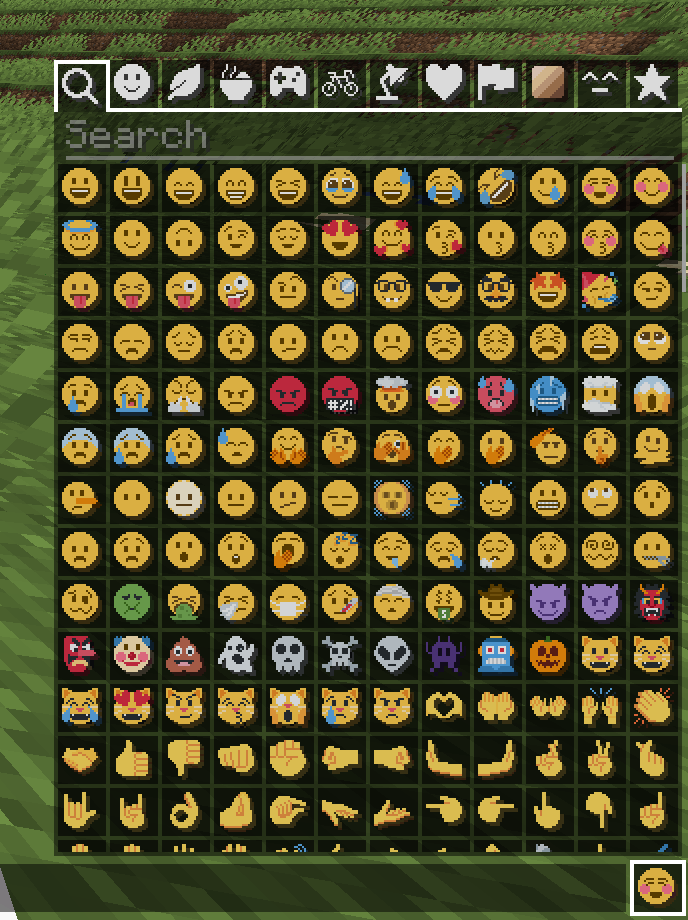
### [Symbol Chat](https://modrinth.com/mod/symbol-chat)
Easy to use emoji and symbol picker
## Remapped characters (for developers)
In order to have any support for emoji consisting of sequences they have been
remapped to unused single characters. An index of these can be found in
/assets/emoji_remappings/lang/en_us.json.
For example, `ud83dudc69u200dud83dudd2c` (👩+🔬=👩🔬)
is mapped to `udb80udf30` using this translation snippet:
“`json
“ud83dudc69u200dud83dudd2c”: “udb80udf30”
“`
**Please note that vanilla has no mechanism to
automatically convert to the remapped form.**
A custom emoji picker or some kind of mod/plugin is
required to make using these a smooth experience.
Because the index acts as a language file, a server side chat listener
could detect emoji sequences and turn them into translations like this one:
“`json
{“translate”: “ud83dudc69u200dud83dudd2c”}
“`
Any client with the pack installed can then perform the remapping for the server.
If the pack is not installed or the sequence is not found then it will just
fall back to displaying the sequence. This means that the server doesn’t need a
complete list of emoji sequences, just a way to detect potential ones.
(The [Unicode website](https://unicode.org/Public/emoji/latest/)
contains data files describing what is an emoji.)
## Shortcodes (for developers)
Shortcodes are a popular way to insert emoji by name. An index of shortcodes
can be found in /assets/emoji_shortcodes/lang/en_us.json.
For example, `:thinking:` is mapped to `ud83eudd14` (🤔):
“`json
“thinking”: “ud83eudd14”
“`
Emoji that need remapping already map to the remapped version.
**Please note that vanilla has no mechanism to
automatically convert shortcodes into emoji.**
Some kind of mod/plugin is required.
Because the index acts as a language file, a server side chat listener could
detect shortcodes and turn them into translations like this one:
“`json
{“translate”: “:thinking:”}
“`
Any client with the pack installed can then convert it for the server. If the
pack is not installed or the shortcode is not found then it will just fall back
to displaying the shortcode. This means that the server doesn’t need a complete
list of shortcodes, just a way to detect potential ones by finding substrings
beginning and ending with a colon `:`.
### Custom emoji?
Custom emoji could be created in a similar way by adding them to unused code
points of the default font and adding a translation with a shortcode.
For example, this translation snippet adds the shortcode `:pog:` for the
character `uE502`:
“`json
“:pog:”: “uE502”
“`
## Reverse shortcodes (for developers)
Maybe you want to display a name for each emoji, in some hover text for example.
That is where reverse shortcodes come in. An index of these can be found in
/assets/emoji_shortcodes_reverse/lang/en_us.json.
For example, `u200cud83eudd14` (`` + 🤔) is mapped to `:thinking:` using
this translation snippet:
“`json
“u200cud83eudd14”: “:thinking:”
“`
`u200c` is added to each entry to allow the index to be used as a language file
without conflicting with the other indexes. If the pack is not installed or the
emoji is not found then it will just fall back to displaying the characters,
including the invisible `u200c`.
A server side chat listener could detect shortcodes and
turn them into emoji with tooltips like this one:
“`json
{“translate”: “:thinking:”, “hoverEvent”: {“action”: “show_text”, “contents”: “:thinking:”}}
“`
With reverse shortcodes, it could also detect emoji and
emoji sequences and also give them tooltips like this one:
“`json
{“translate”:”ud83eudd14″,”hoverEvent”:{“action”:”show_text”,”contents”:{“translate”:”u200cud83eudd14″}}}
“`
## License
Graphics based on Twemoji Copyright (c) 2018 Twitter, Inc and other contributors, licensed under Creative Commons Attribution 4.0 International
Pixel art and resource pack adaptation Copyright (c) 2020 AmberW, licensed under Creative Commons Attribution 4.0 International
Pick Block Pro


# **Pick Block Pro**
Pick Block: Get the block/item of what you’re looking at in creative or switch to that block/item in survival.
This mod is an advanced version of this and adds a lot of extra features (see below)
**Important:**
This mod replaces the default Pick Block, however the ID and Tool picker use their own keybindings.
## **Features**
Most things below are configurable in the config settings using the config file or Mod Menu
– In survival the block picker will now also search through item-containers like shulkers that are inside your inventory
– Holding ALT while picking will add [block-state data](https://minecraft.wiki/w/Block_states) as NBT to the block/item
(stacks with CTRL for [block-entity data](https://minecraft.wiki/w/Block_entity))
– Holding CTRL while Entity picking will add [entity data](https://www.digminecraft.com/data_tags/index.php) as NBT to the item:
– Copies mob data and adds it to the spawn egg
– Copies armor stands with their items and pose
– Copies item frames including the framed item
– Copies painting variants
– Pick block extra things:
– Pick fire and get a flint & steel (1.16+)
– Pick the sun or moon and get a light block (1.17+)
Cycle through the light levels by picking the sun or moon while holding the light block
– Pick a player and get the head of that player
– Pick falling blocks
– Pick fluids and get a bucket of the fluid (disabled by default)
– Or even decide yourself which item you get from a block or entity when using pick block
– Extended Pick Block range, decide how far the picker should be able to reach
– Lock inventory slots to prevent the picker from switching or replacing the item in that slot
– Use the Tool Picker and get the best available tool to break the block or kill the entity
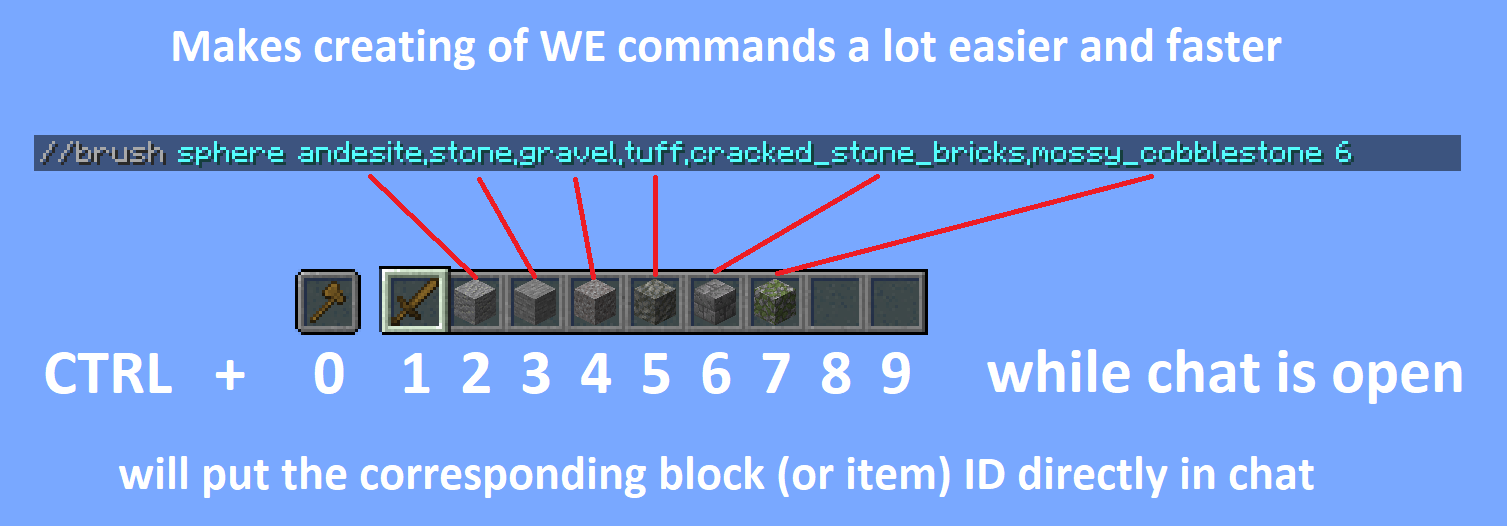
– Copy ID’s of hotbar blocks/items directly into your chat, for easy WorldEdit command creation
(Use CTRL + 0 through 9 while your chat is open, 0 is for the off hand slot)
– Pick ID’s of blocks in the world with the ID Picker and copy them directly to your clipboard
## **Detailed explanations**
Block Picking with item-containers (shulkers / bundles)
When picking a block in survival the mod will first search through all the items in your inventory. If it can’t find the item, it’ll search containers like shulkers and bundles that are inside the inventory. If found, the mod will move the container with the highest amount of that item to the player’s main hand. This should work with all item-containers that work in the same way as the shulker or bundle do.
Hold ALT for block state copying
You might already know it’s possible to hold CTRL while block picking to copy [block-entity data](https://minecraft.wiki/w/Block_entity), such as player skulls and banners with patterns. This mod allows on top of that to also copy [block-state data](https://minecraft.wiki/w/Block_states) when holding ALT, this includes for example if a campfire/candle is lit or not and also the rotation of blocks like stairs. (There are many more things you can copy with this, see wiki link for the full list)
This feature was inspired by the [Pick-BlockState](https://modrinth.com/mod/pickblockstate) mod by [Minenash](https://modrinth.com/user/XqxDWNf7).
Hold CTRL for entity data copying
Just like how you can pick [block-entity data](https://minecraft.wiki/w/Block_entity), now you can also pick [entity data](https://www.digminecraft.com/data_tags/index.php). This will for example copy most data of the mob and put it inside the spawn egg as NBT data. This will also work for things like armor stands, item frames (copying what’s inside of them) and paintings (copying the exact variant of the painting).
Extended pick block range
By default Minecraft only allows to pick blocks that are within reaching distance (3 blocks). This mod however allows to pick blocks at a distance of 100 blocks away and this can even be set way higher (or lower) if so desired. No need anymore to fly all the way over to a block you’d like to pick.
Configure which item you should get from a block/entity
Pick Block Pro comes with an `overrides.json` config file. Within this file you can configure which item you should get when picking a block or entity. This also has full support for NBT data.
The file already includes some overrides for blocks and entities that didn’t have any pick stack.
The overrides can be reloaded in game with the command: `/pbp reload`
**Default overrides:**
“`json
{
“Block to ItemStack”: {
“minecraft:fire”: “minecraft:flint_and_steel”,
“minecraft:soul_fire”: “minecraft:flint_and_steel”,
“minecraft:frosted_ice”: “minecraft:ice”
},
“Entity to ItemStack”: {
“minecraft:tnt”: “minecraft:tnt”,
“minecraft:fireball”: “minecraft:fire_charge”,
“minecraft:wither”: “minecraft:wither_spawn_egg”,
“minecraft:ender_dragon”: “minecraft:ender_dragon_spawn_egg”,
“minecraft:giant”: “minecraft:zombie_spawn_egg{EntityTag:{id:giant,CustomName:”},display:{Name:'{“text”:”Giant Spawn Egg”,”color”:”light_purple”,”italic”:”false”}’}}”,
“minecraft:illusioner”: “minecraft:evoker_spawn_egg{EntityTag:{id:illusioner,CustomName:”},display:{Name:'{“text”:”Illusioner Spawn Egg”,”color”:”light_purple”,”italic”:”false”}’}}”
}
}
“`
Lock inventory slots
By default Minecraft will first fill in all empty slots in the hotbar when using pick block, however once the hotbar is completely full it’ll replace the item in your current selected slot. This item might actually be something you’d prefer to keep. This mod lets you lock any slots you’d like in the config settings. When locked, this mod will still place an item inside that slot if it’s empty. However once an item/block is located in a locked slot, this mod will skip that slot (keeping the item/block safe) and use the next available slot instead.
Tool Picking
When using the Tool Picker this mod will provide you with the best tool for the job. In creative you’ll get a fully enchanted tool (configurable), but in survival it’ll go through your inventory and search for the best tool instead. If it’s able to find a suitable tool it’ll switch it to your current selected slot.
Hotbar block/item ID copy
Copy the ID’s of blocks/items from your hotbar directly in the chat when it’s open. Making it a lot easier and faster to create WE commands. Especially great for making brushes with a lot of different blocks. Hold CTRL + 0 through 9 while your chat is open, 0 is for the off hand slot.
Pick ID’s
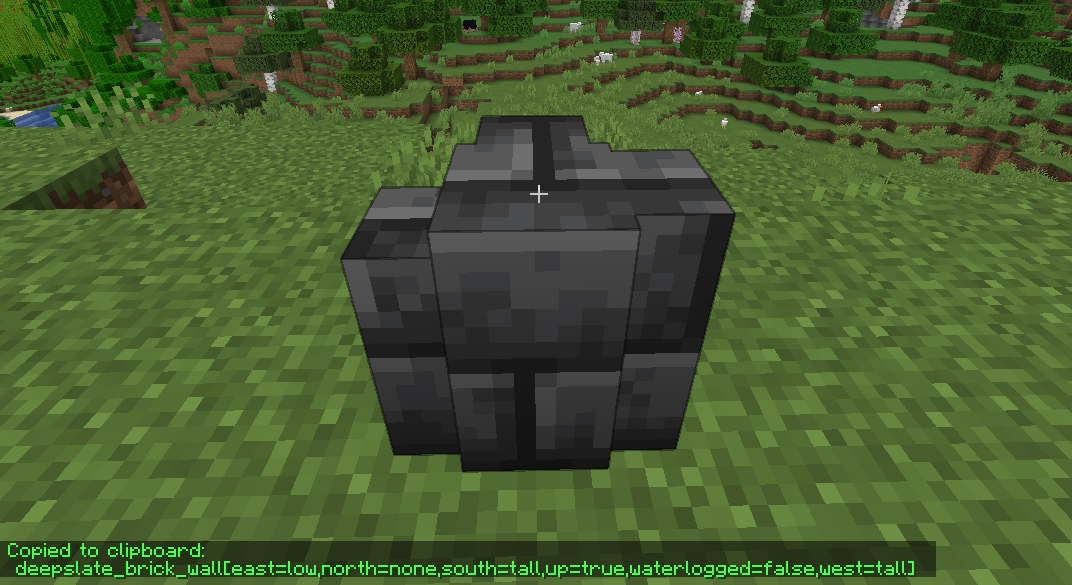
Ever wrote a WE command using block ID’s with a lot of properties? This mod will make that a lot easier by allowing you to pick the ID including properties of the block you’re looking at directly into your clipboard. Once picked you can then paste this ID when writing out your command.
When using the ID picker it’s also possible to copy (block)entity data to the clipboard by holding CTRL.
## **Versions & Dependencies**
1.19+
**Required**:
[Fabric API](https://modrinth.com/mod/fabric-api)
[Cloth Config API](https://modrinth.com/mod/cloth-config) (Is needed to make the config work)
**Optional:**
[Mod Menu](https://modrinth.com/mod/modmenu) (This mod allows you to edit the configs in game)
1.16 – 1.18
**Required**:
[Fabric API](https://modrinth.com/mod/fabric-api) (0.31.0 or later)
**Optional:**
[Mod Menu](https://modrinth.com/mod/modmenu) (This mod allows you to edit the configs in game)
**Already included/embedded:**
[Cloth Config API](https://modrinth.com/mod/cloth-config) (Is needed to make the config work)
1.14 – 1.15
**Required:**
[Fabric API](https://modrinth.com/mod/fabric-api) (0.14.0 or later)
**Optional:**
[Mod Menu](https://modrinth.com/mod/modmenu) (This mod allows you to edit the configs in game)
**Already included/embedded:**
[Auto Config Updated API](https://github.com/shedaniel/AutoConfig) (Is needed to make the config work)
[Cloth Config API](https://modrinth.com/mod/cloth-config) (Required for Auto Config)
Pehkui
This mod allows for most entities to have their size changed, either enlarging or shrinking them.
It also provides an API that other mods can make use of to manipulate the size of entities and the time it takes for their size to change.
The Quilt/Fabric version is the actively supported version and will receive features, updates, and fixes first. The NeoForge and Forge versions are not supported as actively.
For the ***Quilt/Fabric*** version, the ***most recently released jar*** can be used on: ***1.21, 1.20.6, 1.20.4, 1.20.2, 1.20.1, 1.19.4, 1.19.2, 1.18.2, 1.17.1, 1.16.5, 1.15.2, and 1.14.4***.
For the ***NeoForge*** version, there are ***separate jars*** for each supported Minecraft version. Those jars are for: ***1.21, 1.20.6, 1.20.4, and 1.20.2***.
For the ***Forge*** version, there are ***separate jars*** for each supported Minecraft version. Those jars are for: ***1.20.1, 1.19.4, 1.19.2, 1.18.2, 1.17.1, and 1.16.5***.
Removing this mod will revert entities back to their normal size. Adding it back in will ***not*** restore their size.
If you have no mods that add ways to rescale entities, you can modify and view the scale and scaling delay of an entity in-game using the `/scale` command if you have operator permissions:
`/scale set []`
`/scale set []`
`/scale (add|subtract|multiply|divide) []`
`/scale (add|subtract|multiply|divide) []`
`/scale get []`
`/scale get []`
`/scale compute []`
`/scale delay set []`
`/scale delay set []`
`/scale delay get []`
`/scale delay get []`
`/scale reset []`
`/scale reset []`
`/scale nbt get []`
If you want your scale to persist after you respawn, there’s a `/scale` subcommand for that as well:
`/scale persist set (true|false) []`
`/scale persist set (true|false) []`
`/scale persist get []`
`/scale persist reset []`
`/scale persist reset []`
The following scale types are added by default:
`pehkui:base`: Generic scale type for easily affecting other scales
`pehkui:width`: Modifies width/length/depth (affected by `pehkui:base`)
`pehkui:height`: Modifies height (affected by `pehkui:base`)
`pehkui:hitbox_width`: Modifies width/length/depth of an entity’s hitbox (affected by `pehkui:width`)
`pehkui:hitbox_height`: Modifies height of an entity’s hitbox (affected by `pehkui:height`)
`pehkui:eye_height`: Modifies height of an entity’s eye position (affected by `pehkui:height`)
`pehkui:model_width`: Modifies width/length/depth of an entity’s model (affected by `pehkui:width`)
`pehkui:model_height`: Modifies height of an entity’s model (affected by `pehkui:height`)
`pehkui:third_person`: Modifies player third person camera distance (affected by `pehkui:height`)
`pehkui:motion`: Modifies movement speed (affected by `pehkui:base`)
`pehkui:step_height`: Modifies step height (e.g. walking up slabs, stairs, snow) (affected by `pehkui:motion`)
`pehkui:view_bobbing`: Modifies view bobbing (affected by `pehkui:motion`)
`pehkui:falling`: Modifies fall damage (affected by `pehkui:motion`)
`pehkui:flight`: Modifies creative mode flight speed
`pehkui:jump_height`: Modifies jump height
`pehkui:visibility`: Modifies distance at which this entity will be targeted by enemies (affected by `pehkui:base`)
`pehkui:reach`: Modifies player reach distance (affected by `pehkui:base`)
`pehkui:block_reach`: Modifies player block reach distance (affected by `pehkui:reach`)
`pehkui:entity_reach`: Modifies player attack reach distance (affected by `pehkui:reach`)
`pehkui:held_item`: Modifies the scale of held items
`pehkui:drops`: Modifies the scale of dropped items (affected by `pehkui:base`)
`pehkui:projectiles`: Modifies the scale of thrown/shot projectiles (affected by `pehkui:base`)
`pehkui:explosions`: Modifies the size of the entity’s explosion (e.g. Creepers, End Crystals) (affected by `pehkui:base`)
`pehkui:attack`: Modifies damage dealt
`pehkui:defense`: Modifies damage taken
`pehkui:knockback`: Modifies knockback dealt
`pehkui:health`: Modifies an entity’s health
`pehkui:mining_speed`: Modifies block breaking speed
`pehkui:attack_speed`: Modifies attack speed
Peace Of Mind Music Disc
This texture pack replaces the music disc “13” and replaces it with the song “Purity” by A$AP Rocky ft. Frank Ocean. This makes it so that the name of the music disc is changed, and the music from that song is played. This music is from the album “Testing,” featuring many different artists, but for Purity, it features Frank Ocean.
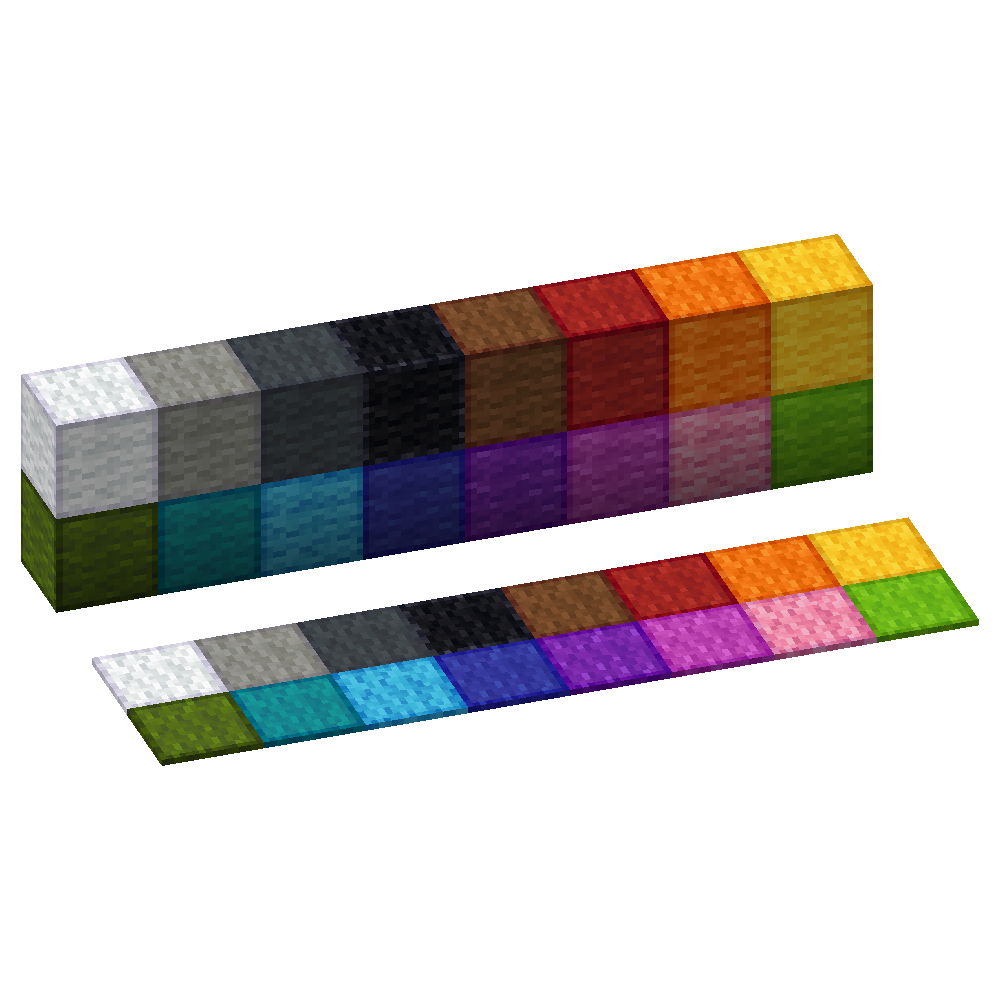
Outlined Wool
Simple and clean resource pack to add outlines to Wool blocks making them easier to see when building with wool
[ORB] OresRBack
## What does this mod/ datapack do?
This simple mod/ datapack makes it possible to mine ores like in versions before 1.17 again. That means that ores drop ores again and not raw ores. [Read more here.](https://github.com/orbmcmod/orb/wiki#what-is-this-mod-about)
## But whyy??
My friends and I noticed after playing the newer versions of Minecraft that the new ore logic is a bit overpowered and makes it much easier to get resources (especially Copper Ore)
## More Minecraft Versions???
I will support more Minecraft versions if it is requested. So if someone opens an issue on GitHub, or send me an mail to [this address](mailto:[email protected]), that they want another version of Minecraft for this mod/ datapack, I will create it!
## Create Extension
I’ve also created a mod for Create’s zinc ore, see: [ORBC](https://modrinth.com/mod/orb-create)
## BYG Extension
As well for Oh the biomes you’ll go! See: [ORBB](https://github.com/orbmcmod/orbb/releases)
## Disclaimer
This is not an official Minecraft product. Not approved by or associated with Mojang or Microsoft.
 ](https://modrinth.com/mod/totem-party-popper)
 ](https://modrinth.com/mod/modern-advancement-screen)
 ](https://modrinth.com/mod/area-sign-alerts)
 ](https://modrinth.com/mod/yeeterite)
 ](https://modrinth.com/mod/yeeterite-extras)
 ](https://modrinth.com/mod/adventure-bags)
 ](https://modrinth.com/mod/hopper-the-hedgehog)
 ](https://modrinth.com/mod/smelter-the-hedgehog)
 ](https://modrinth.com/mod/note-block-tuner)
 ](https://modrinth.com/mod/stonecutter-gui-remastered)
 ](https://modrinth.com/mod/loom-gui-remastered)
 ](https://modrinth.com/mod/glass-carpet)
 ](https://modrinth.com/mod/explosive-party)
 ](https://modrinth.com/mod/stacks-are-stacks)
 ](https://modrinth.com/mod/fov-toggle)
 ](https://modrinth.com/mod/spongesucc)
 ](https://modrinth.com/mod/wwg)
 ](https://modrinth.com/mod/party-spores)
 ](https://modrinth.com/mod/party-cacti)
 ](https://modrinth.com/mod/party-flames)
 ](https://modrinth.com/mod/superflat-plus)
 ](https://modrinth.com/mod/cottagecraft-mod)
 ](https://modrinth.com/mod/cottagecraft-axolotls)
 ](https://modrinth.com/mod/cottagecraft-festive-eggs)