BorderPlus
Other images
## Description of the BorderPlus Plugin:
BorderPlus is a Minecraft plugin that allows your players to literally move the world borders. This is done through a user-friendly GUI that is fully customizable to meet your needs. Players can pay for expanding the world border using items, blocks, or currency. With the latest update, we’ve introduced a **Collective Pot System**, enabling players to pool their resources and expand the border together, making the experience even more interactive and engaging.
The **Collective Pot System** gives your server a community-focused twist, where players can contribute items or currency towards a shared goal to extend the world’s border. Once the goal is reached, the border will expand automatically, with a custom notification alerting all online players. The collective system not only tracks contributions but also displays the top contributors on a leaderboard, encouraging friendly competition. To open the pot’s GUI, players simply type `/borderplus collective `.
Each **world’s border** can be configured with individual limits to prevent expansion beyond a specified maximum radius. This ensures balance and prevents the world from becoming too large to manage. Contributions are tracked through an SQLite database, so no player efforts are lost, even across restarts.
The plugin offers **extensive customization options**, including per-world GUIs, configurable permissions, support for heads via **HeadDatabase** and **Base64**, and integration with economy plugins like **Vault** and **PlayerPoints**. Your players will be notified with custom messages and sounds when the border expands, further enhancing the immersive experience.
### Java **17+** is required.
## Features of the BorderPlus Plugin:
– Each message can be customized.
– Create a separate GUI for each world.
– Each GUI has its own usage permissions.
– **Collective Pot System:** Players can now contribute together to expand the world border using the `/borderplus collective ` command.
– SQLite database system for saving all player expansions.
– Tracks the number of blocks acquired by players.
– Flexible placeholder system for leaderboards.
– Compatible with PlaceholderAPI.
– Notifies all players when someone expands the world border.
– Customizable title when someone expands the world border.
– Supports economy.
– Vault with compatible economies, such as EssentialsX.
– PlayerPoints.
– In one menu for a world, you can add payment options for both currency and items.
– Maximum world border value is specified for each world.
– Support for the HeadDatabase plugin.
– You can use the format `hdb-`. Example: `hdb-4188`.
– Support for heads in Base64 format.
– Supports hex color codes.
Example: `ᱹDA &lDiamond Expansion`.
– Custom sound settings for each upgrade item. The sound parameter in the GUI.
– Supports the Skulls plugin. To specify a skull, you must use the format `skull-`.
– Automatically expand other worlds relative to the expanding world by listing them in the config.
## Commands and Permissions for the BorderPlus Plugin
### **Player Commands:**
– **/borderplus open ** – Opens the plugin’s menu, allowing players to use various functions to expand the world border.
*Example:* `/borderplus open world`
– **/borderplus collective ** – Opens the collective contribution menu, enabling players to contribute resources or currency to expand the world border.
*Example:* `/borderplus collective world`
—
## **Permissions for the BorderPlus Plugin**
### **Player Permissions:**
– **borderplus.open.** – Grants players access to the specific world’s menu.
– **borderplus.collective.** – Grants players access to the collective contribution menu for that world.
### **Admin Permissions:**
– **borderplus.change** – Allows the player to modify the world border using the `/borderplus ` command.
– **borderplus.reload** – Grants permission to reload the plugin and its configuration.
## Configuration File Example:
**config.yml**
“`yml
# ===============================
# Plugin Settings
# ===============================
#
# You can configure separate GUIs for each world. These GUIs will open automatically
# when a player is in the respective world or by using the command «/borderplus open world_name».
#
# Configuration examples:
# – Specify the world name and the GUI file that will open for this world.
# – Comment out or remove lines for unused worlds.
#
settings:
# Language selection for plugin messages
# Possible values:
# “en” for English
# “ru” для Русского
# “de” für Deutsch
# “fr” pour le français
# “es” para español
# “it” per l’italiano
# “pt” para português
# “zh” 表示中文
language: “en”
# Show a title to all players when a player expands the world border?
# true = show
# false = do not show
show_title: true
# Enable or disable the use of economy
economy_enabled: true
# The economic system to be used
# Possible values: “playerpoints”, “vault”, “default”
# “default” means that the old logic will be used: if both plugins are found, PlayerPoints will be used.
preferred_economy: “default”
# The total amount of resources or currency required to reach the goal
# and trigger the world border expansion.
# Once the collective goal is reached, the border will expand.
collective_goal: 1000
# The number of blocks by which the world border will expand
# after the goal is achieved.
# For example, if set to 1000, the world border will expand by 1000 blocks in every direction.
collective_expansion_amount: 1000
# The duration (in seconds) it takes for the world border to expand to its new size.
# For example, if set to 10, the border will take 10 seconds to fully expand after the goal is achieved.
world_border_expand_duration: 10
worlds:
world:
gui: “gui.yml”
max_size: 5000
collective_gui: “collective_gui_world.yml”
name: “Survival World”
automatically_expand_worlds:
# Worlds that expand automatically when this world expands.
# Key = exact world name on server (check your world/ folder for folder names).
# Any world works: Nether, End, void, custom, skyblock, etc. Just use its folder name.
#
# Value = expansion ratio in format 1.X (means 1:X).
# The number after the dot is the denominator. Formula: dependent_expansion = source_expansion / X
#
# Examples:
# 1.1 = 1:1 -> multiplier 1.0 -> overworld +1000 = dependent +1000 (same)
# 1.2 = 1:2 -> multiplier 0.5 -> overworld +1000 = dependent +500 (half)
# 1.3 = 1:3 -> multiplier 0.333 -> overworld +1000 = dependent +333
# 1.8 = 1:8 -> multiplier 0.125 -> overworld +1000 = dependent +125 (Minecraft Nether formula)
#
# Values outside 1.0-2.0 range are used as raw multiplier (e.g. 0.5 = half, 2.0 = double).
#
# Don’t want automatic expansion? Remove automatically_expand_worlds block entirely. Old configs without it work fine.
# Want only Nether to expand? Remove world_the_end line below. Want only End? Remove world_nether.
world_nether: 1.8 # Nether. 1:8 = overworld +1000 blocks = nether +125 blocks
world_the_end: 1.1 # End. 1:1 = expands same amount as overworld
expand_worlds_names: # display names for automatically_expand_worlds (shown in messages instead of world_nether etc.). Optional.
world_nether: “Nether”
world_the_end: “The End”
#world_nether:
# gui: “gui_nether.yml” # expansion menu file for Nether
# max_size: 625 # max border diameter (625 = 1/8 of 5000)
# collective_gui: “collective_gui_nether.yml” # collective contribution menu
# name: “Nether” # display name in messages
# depends_on: “world” # expands together with world
# depends_ratio: 1.8 # 1.8 = 1:8 Minecraft formula
#world_the_end:
# gui: “gui_end.yml” # menu file for End
# max_size: 5000 # max border diameter
# collective_gui: “collective_gui_end.yml” # collective contribution menu
# name: “The End” # display name
# depends_on: “world” # expands together with world
#flat_world:
# gui: “gui2.yml” # menu for flat world
# collective_gui: “collective_gui_flat_world.yml” # collective menu
# max_size: 5000 # max border diameter
# name: “Flat World” # display name
#world3:
# gui: “gui3.yml” # menu for third world
# collective_gui: “collective_gui_world3.yml”
# max_size: 5000
# name: “Third World”
# ===============================
# GUI Rotation Settings
# ===============================
#
# Settings for automatic resource rotation in GUI files
#
gui_rotation:
# Enable automatic resource rotation in GUI
enabled: true
# Rotation interval in seconds (for testing)
# For production, it’s recommended to use days: 259200 (3 days)
interval_seconds: 300
# Notification settings
notifications:
# Show messages about automatic resource rotation
auto_rotation: true
# Show messages about manual updates
# Message output for command: /borderplus rotategui world_name file_name
# example: /borderplus rotategui world collective_gui_world.yml
manual_rotation: false
# Show notifications only for collective GUIs
collective_only: true
# Show notifications only for regular GUIs
world_only: false
“`
### How the GUI for the world “world” looks:
In the material field, you can use three types of items:
Item names. Example: DIAMOND, which will display a diamond.
Heads from the HeadDatabase plugin. Example: hdb-4188, where 4188 is the ID of the head from the plugin.
Heads in Base64 format. Example:
“`
material: base64-eyJ0ZXh0dXJlcyI6eyJTS0lOIjp7InVybCI6Imh0dHA6Ly90ZXh0dXJlcy5taW5lY3JhZnQubmV0L3RleHR1cmUvZjRhMmFmMjYxMDFmNDRmMTE2YWY5MzM3NzRjMDQ3NGI3NjcxODJlNmNhM2Y4ZmRmMTc2NDFlY2YwMmI2YTE4ZCJ9fX0=
“`
You can find the head you need on the website: https://minecraft-heads.com/
Heads from the Skulls plugin. Example: skull-, where is the ID of the head. Ensure that the Skulls plugin is installed to use this feature.
**gui.yml**
“`yml
menus:
border_menu:
title: ‘ b◂ ˑc8a&lBorder Expansion b▸’
size: 27
items:
increase_diamond_20:
required_material: DIAMOND
cost: 0.0
material: DIAMOND
lore:
– ”
– ‘ &7Spend &b&l100 diamonds&7 to’
– ‘ &7increase the world border’
– ‘ &7by &b&l500 blocks’
– ”
– ‘ 𩁠⋅  a852click &7- to expand the border’
– ”
required_amount: 100
sound: BLOCK_ANVIL_LAND
weight: 500
economy: false
slot: 10
display_name: ‘ᱹDA &lDiamond Expansion’
increase_gold_50:
required_material: GOLD_INGOT
cost: 0.0
material: GOLD_INGOT
lore:
– ”
– ‘ &7Spend &6&l50 gold ingots&7 to’
– ‘ &7increase the world border’
– ‘ &7by &6&l500 blocks’
– ”
– ‘ 𩁠⋅  a852click &7- to expand the border’
– ”
required_amount: 50
sound: ENTITY_PLAYER_LEVELUP
weight: 500
economy: false
slot: 13
display_name: ‘ᱹDA &lGold Expansion’
increase_iron_100:
required_material: IRON_INGOT
cost: 0.0
material: IRON_INGOT
lore:
– ”
– ‘ &7Spend &f&l100 iron ingots&7 to’
– ‘ &7increase the world border’
– ‘ &7by &f&l100 blocks’
– ”
– ‘ 𩁠⋅  a852click &7- to expand the border’
– ”
required_amount: 100
sound: ENTITY_EXPERIENCE_ORB_PICKUP
weight: 500
economy: false
slot: 16
display_name: ‘&f&lIron Expansion’
increase_economy_1000:
required_material: EMERALD
cost: 1000.0
material: EMERALD
lore:
– ”
– ‘ &7Spend &61000 coins&7 to’
– ‘ &7increase the world border’
– ‘ &7by &a&l1000 blocks’
– ”
– ‘ 𩁠⋅  a852click &7- to expand the border’
– ”
required_amount: 1000
sound: BLOCK_GRASS_BREAK
weight: 1000
economy: true
slot: 22
display_name: ‘&a&lEmerald Border Expansion’
“`
**collective_gui_world.yml**
“`yml
menus:
collective_menu:
title: ‘ b◂ ˑc8a&lPiggy Bank b▸’
size: 27
items:
center_item:
material: GOLD_INGOT
lore:
– ”
– ”
– ‘ &7Contributed: &a%borderplus_collective_progress_world%&7%’
– ‘ %progress_bar_world%’
– ”
– ‘ &9&lLeaders’
– ‘ &e1st place: &b%borderplus_collective_top_name_1%’
– ‘ &e2nd place: &b%borderplus_collective_top_name_2%’
– ‘ &e3rd place: &b%borderplus_collective_top_name_3%’
– ”
– ‘ &aYour contribution: &7%borderplus_collective_player_contribution%’
– ”
– ‘ 𩁠⋅  a852Click the buttons below’
– ‘ 𩁠 below to contribute’
– ”
slot: 13
display_name: ‘&eWorld Expansion Progress’
contribute_1:
material: IRON_INGOT
lore:
– ”
– ‘ &7Click to contribute’
– ‘ &a1 &7resource to the piggy bank.’
– ”
slot: 21
economy: false
display_name: ‘&aContribute 1 resource’
contribution_amount: 1
contribute_100:
cost: 100.0
material: EMERALD
lore:
– ”
– ‘ &7Click to contribute’
– ‘ &a100 coins &7to the piggy bank.’
– ”
slot: 23
economy: true
display_name: ‘&aContribute 100 coins’
contribution_amount: 100
“`
### Message File:
“`yml
# ===============================
# Plugin Messages #
# ===============================
#
# You can customize it to your liking and make it more informative and appealing.
# ===============================
messages:
border_expanded_one: |
A0DAD&l *✧・゚ &#C4B0FBWorld border expanded A0DAD&l゚・✧*
A0DAD &#AB47BC%player% A0DADexpanded &#B388EB%borderplus_world_name% by A0DAD&#AB47BC%actual_amount% A0DADblocks!!
A0DAD
&#C4B0FB New world borders:
E57C2 Min. coordinates: ╧CD[%minX%, %minZ%]
E57C2 Max. coordinates: ╧CD[%maxX%, %maxZ%]
%expanded_worlds_info%
A0DAD&l ・✧゚======================= ゚✧・
border_expanded_piggybank: |
A0DAD&l *✧・゚ &#C4B0FBWorld border expanded A0DAD&l゚・✧*
A0DAD &#AB47BC%player% A0DADexpanded &#B388EB%borderplus_world_name% by A0DAD&#AB47BC%actual_amount% A0DADblocks!!
A0DAD
&#C4B0FB New world borders:
E57C2 Min. coordinates: ╧CD[%minX%, %minZ%]
E57C2 Max. coordinates: ╧CD[%maxX%, %maxZ%]
%expanded_worlds_info%
A0DAD&l ・✧゚======================= ゚✧・
expanded_worlds_header: “&#C4B0FB Also expanded:”
expanded_worlds_line: “E57C2 &#B388EB%world_name%E57C2: Min ╧CD[%minX%, %minZ%] E57C2- Max ╧CD[%maxX%, %maxZ%]”
insufficient_items: “&cYou don’t have enough %material% (%needed% pcs.)!”
insufficient_funds: ” &cNo money, but you’re holding on. Required: %cost%.”
items_removed: “nᱹDA Removed ᱹDA&l%amount_removed% ᱹDAitems from your inventory.n ”
money_removed: “nᱹDA Removed ᱹDA&l%amount_removed% ᱹDAcoins from your account.n ”
invalid_number: “&cInvalid number.”
gui_item_not_found: “&cItem not found in the menu.”
reload_complete: “&aConfiguration reloaded.”
title_message: “&eWorld border expansion”
title_next: “&e%player% expanded the world border by %actual_amount% blocks”
usage: “&cNot enough arguments”
usage_open: “&cInvalid command usage! &7Use: &f/borderplus open &e”
no_permission: ” &cNo permission, better luck next time.”
loaded_guis: “§aLoaded GUIs for worlds:”
world_gui_info: “§aWorld: §e{world} §a| GUI: §e{gui}”
gui_not_found: “§cGUI for this world not found.”
gui_title_size: “Title: %title% | Size: %size%”
max_radius_reached: “§cWorld border has already reached its maximum size. Further expansion is not possible.”
no_data: “No data”
not_in_top: “Not in top”
not_found: “Not found”
world_not_found: “World not found”
invalid_position_number: “Invalid position number”
usage_change: |
&#ff6b6b✧ &cUsage:
&#ff6b6b &f/borderplus change &8[&e&8] &e
&#ff6b6b &7Examples:
&#ff6b6b &f/borderplus change 1000
&#ff6b6b &f/borderplus change world 500
invalid_world: |
&#ff5252✖ &cWorld &cnot found. Please check the name and try again.
border_changed: |
A0DAD
A0DAD&l *✧・゚ &#C4B0FBWorld border &#AB47BC%world% &#C4B0FBchanged by &#AB47BC%amount% &#C4B0FBblocks! A0DAD&l゚・✧*
A0DAD
gui_rotation_changed: |
A0DAD&l *✧・゚ &#C4B0FB🔄 Items Update A0DAD&l゚・✧*
A0DAD &#AB47BC%world% A0DAD- required items changed
A0DAD&l ・✧゚======================= ゚✧・
gui_rotated_manually: |
A0DAD&l *✧・゚ &#C4B0FB⚡ Force Update A0DAD&l゚・✧*
A0DAD &#AB47BC%world% A0DAD- items updated by admin
A0DAD&l ・✧゚======================= ゚✧・
# Log messages
log_gui_rotation_enabled: “GUI rotation enabled: %enabled%”
log_rotation_interval: “Rotation interval: %seconds% seconds”
log_auto_notifications: “Auto notifications: %enabled%”
log_manual_notifications: “Manual notifications: %enabled%”
log_rotation_task_started: “GUI rotation task started (checking every 30 seconds)”
log_gui_rotated: “GUI rotated for world %world% file: %gui% (interval: %seconds%s)”
# Command messages
command_rotategui_usage: “Usage: /borderplus rotategui [guiFile]”
command_world_settings_not_found: “§cSettings for world %world% not found”
command_gui_status_header: “§6=== GUI Status for world %world% ===”
command_gui_status_main: “§eMain GUI: §f%gui%”
command_gui_status_collective: “§eCollective GUI: §f%gui%”
command_gui_status_rotations: “§6Active rotations:”
command_gui_status_no_rotations: “§7No active rotations”
command_gui_status_rotation_item: “§7- %key%: %value%”
command_gui_status_next_rotation: “§eTime until next rotation: §f%minutes%m %seconds%s”
command_gui_status_next_rotation_soon: “§eNext rotation: §fsoon”
# ============= End of Messages Settings ================== #
“`
## BorderPlus Plugin Placeholders:
*Requires PlaceholderAPI to function correctly.*
### General Placeholders:
– **`%borderplus_player_rank%`**
Returns the player’s current rank on the leaderboard based on the number of blocks expanded. If the player is not in the top rankings, it returns the message “Not in the top.”
– **`%borderplus_player_blocks%`**
Shows the total number of blocks the player has contributed to expanding the world border. This placeholder reflects the cumulative amount of blocks expanded by a specific player.
– **`%borderplus_top_block_nick_X%`**
Returns the name of the player who holds a specific position (X) on the leaderboard by block expansion.
– *X* is the leaderboard position (e.g., `1` for the first place).
– **`%borderplus_top_block_rank_X%`**
Displays the number of blocks expanded by the player in a specific leaderboard position (X).
– *X* represents the position in the leaderboard.
– **`%borderplus_top_block_position_X%`**
Shows the numerical position on the leaderboard.
– *X* is the desired leaderboard position.
– **`%borderplus_world_display_name_%`**
Returns the display name of the world configured in the plugin’s settings. If the world is not found, it returns the message “World not found.”
– **`%borderplus_world_current_size_%`**
Shows the current size (radius) of the specified world.
– **`%borderplus_world_max_size_%`**
Displays the maximum allowed radius for the specified world.
– **`%borderplus_world_max_diameter_%`**
Returns the maximum allowed diameter for the specified world.
These placeholders allow flexible display of information related to world borders and leaderboards, enabling easy integration of both physical items and virtual economy in your server.
### Collective Pot Placeholders:
– **`%borderplus_collective_progress_world%`**
Displays the percentage of progress towards filling the collective pot.
– **`%borderplus_collective_top_name_%`**
Shows the name of the player holding the corresponding position on the leaderboard for the collective pot.
– **`%borderplus_collective_player_contribution%`**
Displays the amount of items or coins the player has contributed to the pot. This placeholder reflects the contributions of the player currently viewing it.
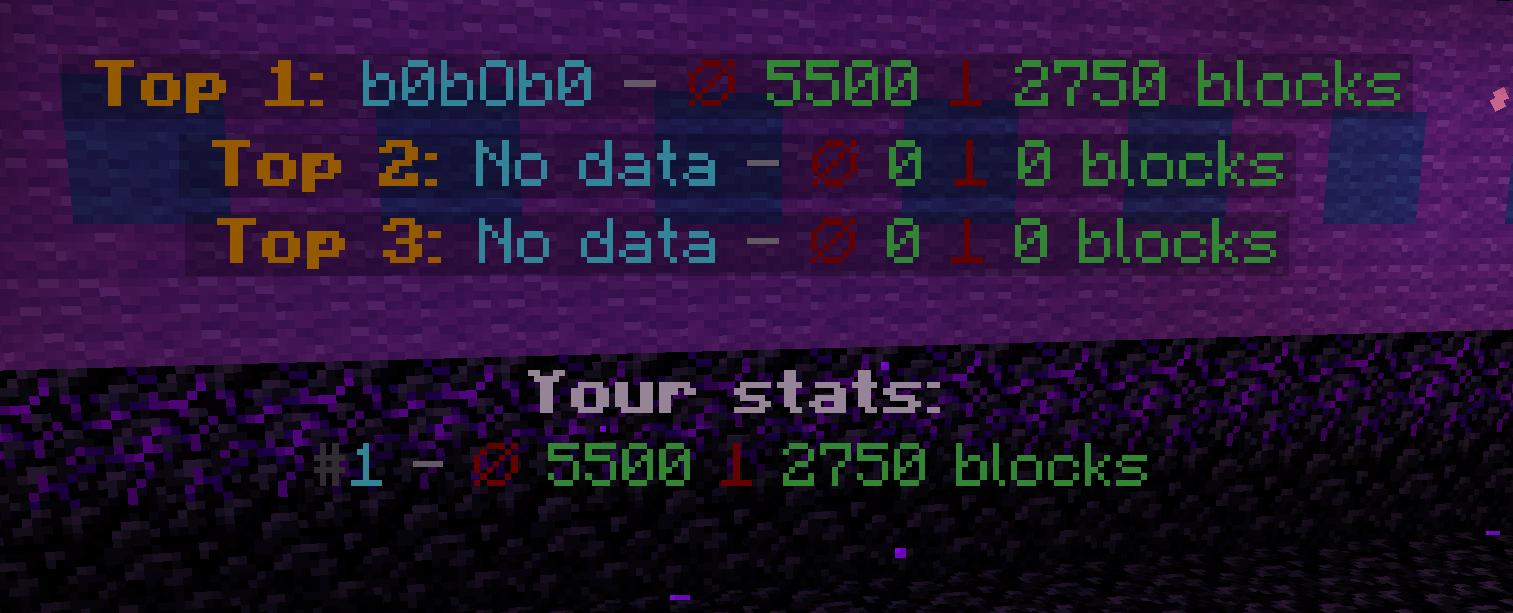
## Configuring Leaderboard in BorderPlus:
If you want to display a leaderboard, you can use a plugin of your choice… I prefer to use: DecentHolograms.
“`yml
pages:
– lines:
– content: ” &6&lTop 1: &b%borderplus_top_block_nick_1% &7- &4⌀ &a%borderplus_top_block_rank_1% &4⟘ &a%borderplus_top_block_radius_1% blocks”
height: 0.3
– content: ” &6&lTop 2: &b%borderplus_top_block_nick_2% &7- &4⌀ &a%borderplus_top_block_rank_2% &4⟘ &a%borderplus_top_block_radius_2% blocks”
height: 0.3
– content: ” &6&lTop 3: &b%borderplus_top_block_nick_3% &7- &4⌀ &a%borderplus_top_block_rank_3% &4⟘ &a%borderplus_top_block_radius_3% blocks”
height: 0.3
– content: “”
height: 0.3
– content: “&f&lYour stats:”
height: 0.3
– content: “&8#&b%borderplus_player_rank%&7 &7- &4⌀ &a%borderplus_player_blocks% &4⟘ &a%borderplus_player_radius% blocks”
height: 0.3
actions: {}
“`
## Installation Guide for the BorderPlus Plugin:
### Required Dependencies:
To use the BorderPlus plugin, the following dependencies are necessary:
#### **Mandatory Plugins:**
– **Placeholders:** PlaceholderAPI
– **Economy System:**
– You must install at least one economy plugin:
– **Vault** along with any economy plugin, such as **EssentialsX** for economy support.
– **PlayerPoints** (if you prefer points-based economy).
– If both **Vault** and **PlayerPoints** are installed, the plugin will automatically prioritize **PlayerPoints**.
#### **Optional Plugins (Soft Dependencies):**
– **DecentHolograms** (or any other hologram plugin): Recommended if you wish to display holograms on your server.
– **HeadDatabase**: Used to display custom heads as item replacements within GUIs.
—
### Installation Steps:
1. **Ensure all required dependencies** listed above are installed on your server.
2. **Download the BorderPlus plugin** from the official source.
3. **Stop your server.**
4. **Move the `.jar` file** to the `/plugins/` folder in your server directory.
5. **Start your server** again.
6. **All set!** The plugin is now installed and ready to use.
By following these steps, you’ll have BorderPlus running smoothly on your server with all its features unlocked. Enjoy!
BoatRacing
 English
# BoatRacing


An F1‒style ice boat racing plugin for Bukkit/Spigot (compatible with Paper/Purpur) with a clean, vanilla‒like GUI. Manage teams, configure tracks with the built‒in BoatRacing selection tool, run timed races with checkpoints, pit area penalties, and a guided setup wizard.
> Status: Public release (1.1.5)
> [!WARNING]
> Snapshot name: **snapshot-26.1-gui-fallback-01**
> Snapshot only for Paper 26.1.
> If your server version is not 26.1, please wait for the stable release.
> This build includes a temporary reflective fallback implementation for AnvilGUI, and some GUI/Anvil flows may still contain errors on certain server builds or forks.
Snapshot 26.1 Note (snapshot-26.1-gui-fallback-01)
– Snapshot target: Paper 26.1 first validation build.
– Implementation type: temporary reflective fallback for AnvilGUI close-event compatibility (`handleInventoryCloseEvent`).
– Known risk: GUI/anvil interactions may still fail on some 26.1 dev builds and non-Paper forks.
– Plan: keep this fallback until an official AnvilGUI release ships a stable 26.1 close-event fix.
See the changelog in CHANGELOG.md.
This is how we test the plugin to validate its behavior after each update: see the QA checklist in [CHECKLIST.md](CHECKLIST.md)
What’s New (1.1.5)
Practice mode, map vote flow upgrades, admin-track rename support, and track record placeholder refresh fixes:
Added:
– `/boatracing race practice
Changed:
- Same-track race/practice mutual lock now also applies during pre-start countdown, while other tracks remain independent (you can still practice on track2 if track1 has a race).
- Practice countdown/race split/lap/result messages are private to the practicing player (no global race-style broadcasts).
- During solo practice, the sidebar now shows a localized practice marker (`race.scoreboard.practice-label`), e.g. `PRACTICE` / `PRÁCTICA` depending on configured language.
- Solo practice now captures pre-practice return context, so when the run ends the player is moved to lobby and receives the same clickable `/boatracing race back` hint/window as standard race flows.
- Admin Tracks GUI now supports renaming existing tracks with right-click on a track item (left-click still loads, shift-right-click still deletes).
- Tracks GUI item lore now explicitly shows the rename action (`Right-click`) and this hint is available across bundled language files.
- `/boatracing race voteopen` now supports opening a vote with all saved tracks via `all` (or no explicit track list).
- Vote-start broadcast now includes both clickable UI (`/boatracing race voteui`) and a plain typed command instruction (`/{label} race vote
Fixed:
- `%boatracing_track_best_*_
What's New (1.1.4)
This 1.1.4 release combines everything delivered in `snapshot-26.1-gui-fallback-01` plus the final release additions.
- **Added**: track best-record placeholders by token `%boatracing_track_best_player_
What's New (1.1.3)
Track-aware placeholders and spawn reliability improvements:
- **Track-scoped race placeholders**: added `%boatracing_track_race_running_
What's New (1.1.2)
Placeholders, wizard UX and i18n refinements:
- **PlaceholderAPI integration**: BoatRacing now registers `%boatracing_*%` placeholders for holograms/scoreboards (player/team data, live race values, records, wins and top rankings).
- **Persistent race stats**: new aggregated stats storage (`stats.yml`) for player wins, team wins, best race and best lap.
- **Wizard readability pass**: setup wizard prompts are now more compact and step-focused to reduce chat noise.
- **Registration announce fully i18n-based**: registration broadcast template now lives in `messages_.yml` (`race.registration.announce`) instead of `config.yml`.
- **Lobby back flow**: added `/boatracing race back`; after race finish/cancel players return to the waiting lobby, get a clickable back hint, and can return to their pre-lobby location within a 3-minute in-memory window.
- **Expanded bundled language coverage**: added and reviewed community bundles for `fr`, `pt_BR`, `pt_PT`, `es_419`, `de`, `it`, `pl`, `tr`, `ja`, and `ko`; Chinese is now split into `zh_TW` (Taiwan, Traditional) and `zh_CN` (Mainland, Simplified).
- **Race boat cleanup reliability**: race-spawned boats/rafts are now tracked and removed on finish/cancel/reset to prevent leftover vehicle entities.
What's New (1.1.1)
Lobby and stability updates:
- **Optional registration lobby zone**: new `racing.lobby.*` config block. When enabled, players are teleported to a configurable lobby zone/location when they join registration.
- **Quick lobby command**: new `/boatracing setup setlobby` command saves your current position as the registration lobby and enables it automatically.
- **Return to previous location**: with `racing.lobby.return-on-leave: true`, players return to their original location when they leave registration or when registration is cancelled.
- **Active track safety**: race commands no longer force a disk reload when the requested track is already active (notably `unsaved`), avoiding stale in-memory state issues.
- **Track reload consistency**: `TrackConfig.load()` now clears all in-memory collections before reading from disk.
- **SimpleScore compatibility hook**: when SimpleScore is installed, BoatRacing now integrates with its hide/show viewer flow during races to prevent sidebar ownership conflicts and restore the external scoreboard after stop/cancel.
- **Registration restart-loop fix**: fixed a state/timer issue where an old `race open` countdown could survive `start/force/stop` paths and re-trigger race starts unexpectedly.
- **Setup clickable UX**: setup wizard/admin tips now suggest commands in chat when arguments are needed, so players can tab-complete before execution.
- **Lobby messages translated**: lobby teleport/return feedback added to EN/ES/zh_TW/zh_CN/ru message files.
Explicit compatibility:
- **SimpleScore**: BoatRacing includes explicit compatibility with SimpleScore.
- GitHub: https://github.com/RuiPereiraDev/SimpleScore
- Modrinth: https://modrinth.com/plugin/simplescore
- **TAB**: BoatRacing includes explicit compatibility with TAB.
- GitHub: https://github.com/NEZNAMY/TAB
- Modrinth: https://modrinth.com/plugin/tab-was-taken
What's New (1.1.0)
Languages and player controls:
- **Multi-language support**: messages are now fully translatable. Configure language in config.yml (`language`). Bundled options are `en`, `es`, `es_419`, `fr`, `pt_BR`, `pt_PT`, `de`, `it`, `pl`, `tr`, `ja`, `ko`, `sv`, `zh_TW`, `zh_CN`, and `ru`, and custom bundles are also supported by adding `messages_.yml` to the plugin folder. Reload with `/boatracing reload` to switch languages without restart.
- **Player-controlled race management**: new config option `player-actions.allow-player-race-start` (default: false) lets non-admin players open, start, force-start and stop races. Can be overridden per-track via `racing.allow-player-start: true` in individual track configs.
- **Reward system**: full customizable race-end rewards. Configure under `racing.rewards` with position-specific commands, messages and broadcasts. Supports placeholders: {player}, {position}, {time}, {track}, {laps}. Per-track rewards override the global config.
- **Performance**: PlayerMoveEvent throttle — checkpoint detection now only triggers when entering a new block, not every sub-meter movement.
- **Complete i18n infrastructure**: all plugin messages (race, setup, team, admin) updated to use the new externalized message system with dynamic placeholder support.
Previous versions:
- **1.0.9**: Compatibility across 1.19–1.21.11; safe boat/raft materials; Bukkit/Spigot classification on Paper.
What's New (1.0.9)
Compatibility and fixes:
- Official support: Bukkit/Spigot/Paper/Purpur 1.19 → 26.1.1. Requires Java 17+.
- Safer boat types across versions: dynamic Material resolution for boats/rafts (including Bamboo Raft and Pale Oak variants) avoids NoSuchFieldError on older APIs and removes CraftLegacy warnings.
- Classified as a Bukkit/Spigot plugin on Paper (paper-plugin.yml excluded from the JAR). Paper-only APIs replaced with Bukkit-safe calls.
- Docs: README, CHANGELOG and QA checklist updated (EN/ES).
Updater cadence:
- Background checks still run every 5 minutes. When a new version is first detected during runtime, a console WARN is printed immediately (once per version).
- Hourly reminder aligned to the top of each hour (00:00, 01:00, …) while outdated (respects `updates.console-warn`).
- Admin join: always notifies in chat (if enabled), never prints to console on player join.
What's New (1.0.8)
Improvements and toggles:
- Customizable HUD: new config flags to show/hide parts of the sidebar and ActionBar.
- `racing.ui.scoreboard.show-position|show-lap|show-checkpoints|show-pitstops|show-name`
- `racing.ui.actionbar.show-lap|show-checkpoints|show-pitstops|show-time`
- Pitstops on HUD: when `racing.mandatory-pitstops > 0`, show “PIT A/B” on the sidebar and “Pit A/B” in the ActionBar (gated by the toggles above).
- Registration broadcast now includes the track name and the exact join command (language key `race.registration.announce` in `messages_.yml`).
- Sidebar order switched to “L/CP - Name”; removed centering/padding; names shown as-is (keeps leading '.' for Bedrock).
- Finish attempt message: crossing the finish line without all required checkpoints now shows a clear player message (in addition to the denial sound).
- Setup Wizard: new optional step “Mandatory pit stops” with quick buttons [0] [1] [2] [3].
- Setup command: `/boatracing setup setpitstops ` sets and persists `racing.mandatory-pitstops`.
- Results broadcast: podium medals 🥇/🥈/🥉 and rank colors for top‑3; keeps a penalty suffix when present; names rendered safely (keeps leading '.' for Bedrock).
- Wizard flow: if a default pit is already set in step 4, the wizard automatically advances to Checkpoints (team pits remain optional).
- Permissions: introduced wildcard `boatracing.*`. Admins still get absolutely all plugin permissions, now by explicit children under `boatracing.admin` to avoid circular inheritance.
- Tab-complete: players (non-admin) see `join|leave|status|vote|voteui|votestatus` under `/boatracing race`; admin-only verbs (`open|start|force|stop|voteopen|voteclose`) are suggested only to admins.
Updater:
- Console notice restored: a single WARN shortly after startup when outdated, plus an hourly reminder while still outdated (respects `updates.console-warn`).
- Admin join: when an admin joins, a quick check runs (throttled) and notifies them within seconds if a new update was just published.
What's New (1.0.7)
Bugfixes and quality-of-life:
- Console update check noise removed: only a single WARN shortly after startup when you are outdated (respecting `updates.console-warn`). Periodic 5‑minute checks remain but are silent.
- Stability: network errors during update checks are logged at most once per server run.
Removal:
- The built‑in hiding of vanilla scoreboard numbers has been removed. If you want to hide the sidebar’s right‑side numbers, use an external plugin for now while a future built‑in approach is evaluated.
UI:
- Scoreboard redesigned: centered rows, compact “Name - L X/Y CP A/B” layout, rank colors (1=gold, 2=silver-ish, 3=bronze-ish), and your own name in green.
What's New (1.0.6)
Improvements and tweaks:
- New sidebar leaderboard: the sidebar now shows the top‑10 positions in real time. Personal stats moved to the ActionBar.
- Personal HUD: your Lap, CP and Elapsed Time now appear in the ActionBar, updated every 0.5s.
- Sector and finish gaps: compact messages show your time gap vs the lap/finish leader at each checkpoint and at lap finish (and vs winner at race finish).
- Start lights jitter: optional random jitter added to the lights‑out delay via `racing.lights-out-jitter-seconds`.
- Live leaderboard: sidebar shows the top‑10 positions; your Lap/CP/Time are shown in the ActionBar (auto‑created on race start and cleaned up on stop/reset).
- Vanilla numbers hidden: the sidebar’s right‑side numbers are hidden natively when supported by your server (Paper 1.20.5+); no TAB plugin required.
- Layout polish: names are left‑aligned and the whole " - Lap X/Y [CP]" block is centered. Removed the decorative separator and arrow prefix, compact/dynamic padding based on the longest visible name. Long names are truncated with "..." and no extra padding is added after the ellipsis. Your own name is highlighted in green (no bold).
- FIN label: standardized to “FINISHED”.
- Display names: supports EssentialsX displayName and strips common rank wrappers like [Admin]/(Rank) at the start for cleaner alignment.
What's New (1.0.5)
Fixes and polish:
- Team member persistence: team members are preserved across updates/reloads/startup; loading restores teams without re‑applying capacity limits.
- Setup pit command: `/boatracing setup setpit [team]` accepts team names with spaces when quoted (e.g., "/boatracing setup setpit "Toast Peace""); tab‑completion suggests quoted names when the input starts with a quote.
- Config defaults: on plugin update or `/boatracing reload`, new default keys are merged into your existing `config.yml` without overwriting your changes.
- Boat/Raft type: racers are mounted in their selected wood variant (including chest variants and rafts) instead of always OAK; works across API versions with a safe fallback.
What's New (1.0.4)
- Team-specific pit areas: new unified command `/boatracing setup setpit [team]` sets the default pit when no team is provided, or the pit for a specific team when a team name is given. Tab‑completion suggests team names.
- Mandatory pitstops: new `racing.mandatory-pitstops` config (default 0). When > 0, racers must complete at least that many pit exits before they are allowed to finish; pitstops are counted on exiting the pit area and persist for the whole race.
- Wizard: Pit step updated to mention default pit vs per‑team pits and to guide the flow with clickable tips.
- Config updates: on plugin updates/reloads, new `config.yml` keys are merged into your existing file without overwriting your changes.
- Boat type: racers are mounted in their selected boat/raft wood variant (including chest variants) instead of always OAK; works across API versions with a safe fallback.
- Permissions: players can use `join`, `leave`, and `status` by default; only `open|start|force|stop` remain admin‑only. Removed extra runtime checks that could block players with permissive defaults.
- Boats: spawned boats now respect the player’s selected wood type robustly across API versions; falls back to OAK if the enum value is not available.
- Per‑player start slots and grid ordering: new setup commands `/boatracing setup setpos ` and `/boatracing setup clearpos `. On race start, players bound to a slot are placed there first; remaining racers are ordered by their best recorded race time on that track (fastest first), and racers without a time are placed last.
- Setup show: now also displays the presence of team‑specific pits and the number of custom start positions configured.
- Wizard (Starts): shows optional buttons for per‑player custom slots — setpos/clearpos/auto — and displays the number of custom slots configured.
What's New (1.0.3)
- Admin Tracks GUI: manage multiple named tracks — Create and select, Delete (with confirmation), and Reapply selected. Requires `boatracing.setup`.
- Admin Race GUI: manage race lifecycle from a GUI — open/close registration, start/force/stop, quick-set laps, remove registrants, and handy setup tips.
- Terminology: “loaded” → “selected”; “pit lane” → “pit area”.
- All track configuration lives per‑track under `plugins/BoatRacing/tracks/.yml`.
- On startup, a legacy `track.yml` (if present) is migrated automatically to `tracks/default.yml` (with in‑game admin notice).
- Setup Wizard UX: concise, colorized, clickable. Adds a Laps step and an explicit Finish button; navigation buttons now use emojis (⟵, ℹ, ✖) and the blank line is placed at the top of the block for readability.
- Selection tool: built‑in wand (Blaze Rod). Left‑click = Corner A, right‑click = Corner B. Richer `/boatracing setup selinfo` diagnostics.
- Race commands now require a track argument: `open|join|leave|force|start|stop|status
- Start lights + false starts: configure exactly 5 Redstone Lamps and enjoy an F1-style left-to-right light-up countdown (no redstone wiring needed). Moving forward during the countdown (false start) applies a configurable time penalty.
- Race permissions: split by subcommand. Players can `join`, `leave`, and `status` by default; admin actions `open|start|force|stop` require `boatracing.race.admin` (or `boatracing.setup`).
- Pit area and checkpoints are now optional. Track readiness only requires at least one start slot and a finish line; the wizard labels Pit area and Checkpoints as “(optional)” and lets you skip them.
- Removed “Save as…” from the Tracks GUI (create/select, delete, and reapply remain).
- New: live in‑race scoreboard per participant showing Lap, Checkpoints, and Elapsed Time.
- New: crossing the pit area counts as finish for lap counting once all lap checkpoints are completed (still applies pit penalty when enabled).
## Available Languages
Official translations: 
 
Community translations: 













             
Available codes and names:
- `en` English (official)
- `es` Español (España) (official)
- `es_419` Español (Latinoamerica)
- `fr` Francais
- `pt_BR` Portugues (Brasil)
- `pt_PT` Portugues (Portugal)
- `de` Deutsch
- `it` Italiano
- `pl` Polski
- `tr` Turkce
- `ja` Japanese
- `ko` Korean
- `sv` Svenska
- `zh_TW` Chinese (Taiwan, Traditional)
- `zh_CN` Chinese (Mainland, Simplified)
- `ru` Russian
## Features
- Team GUI for players: browse teams, open team view, join/leave, manage your racer number and boat type, and optionally rename/change color/disband from the GUI when enabled in config.
- Admin tooling: dedicated GUIs for teams, players, race control, and named tracks, plus command equivalents for scripting or console-style workflows.
- Named tracks: each track lives in its own YAML file and can override core race settings such as laps, mandatory pit stops, registration time, penalties, and player race-start permissions.
- Built-in setup flow: Blaze Rod selection wand, cuboid region tools, clickable setup tips, and a compact guided wizard with auto-advance where possible.
- Grid control: custom per-player start slots, auto placement for the rest, and fallback ordering by best recorded track time.
- Race systems: ordered checkpoints, optional pit area, optional mandatory pit stops, false-start penalties, registration lobby teleport/return, 5-light countdown, and live results broadcasting.
- Multi-track race orchestration: independent race sessions per track and map-vote commands for admins/players in chat.
- HUD and scoreboard: in-race sidebar plus ActionBar with per-section config toggles, safe scoreboard restoration after races, and compatibility flow for external scoreboards.
- Persistent stats: `stats.yml` stores wins, best race and best lap so PlaceholderAPI, holograms, scoreboards, and NPCs can show live and historical data.
- i18n: bundled message packs for `en`, `es`, `es_419`, `fr`, `pt_BR`, `pt_PT`, `de`, `it`, `pl`, `tr`, `ja`, `ko`, `sv`, `zh_TW`, `zh_CN`, and `ru`; `en`/`es` are official and the rest are community translations. All are hot-reloadable with `/boatracing reload`.
- Rewards, updates, and metrics: per-position race rewards, Modrinth update checks, and optional bStats metrics.
## Requirements
- Java 17+
- A Bukkit-compatible server running Minecraft 1.19 to 1.21.11
## Supported Servers
- CraftBukkit
- Spigot
- Paper
- Purpur
- Folia
Other Bukkit-compatible forks may work, but they are not officially verified in this repository.
## Platform Notes
- Single plugin jar for the Bukkit family. `plugin.yml` targets the Bukkit API, and the Paper metadata also marks the plugin as Folia-supported.
- Proxies such as Velocity and BungeeCord are not execution targets for BoatRacing gameplay logic.
- Sponge and Forge hybrid servers such as Mohist, Magma, or Arclight are not supported by this jar.
## Install
1. Download the latest BoatRacing jar from Modrinth: https://modrinth.com/plugin/boatracing
2. Put it in your `plugins/` folder.
3. Start the server once to generate config, messages, teams, racers, stats, and track files.
4. Optionally install PlaceholderAPI if you want `%boatracing_*%` placeholders.
## Usage
Quick flow:
1. Run `/boatracing teams` and create or join a team.
2. Set your racer number and boat type.
3. Create or select a track from the Admin Tracks GUI, or start directly with the setup wand on the active track.
4. Configure starts, finish, lights, and optional pit/checkpoints.
5. Open registration with `/boatracing race open
Root command groups:
- `/boatracing teams` opens the player team GUI.
- `/boatracing race ...` manages registration and race lifecycle.
- `/boatracing stats [player]` shows your stats or another player's stats.
- `/boatracing setup ...` configures the active track.
- `/boatracing admin` opens the admin GUI, and also exposes admin subcommands such as live language switching.
- `/boatracing reload` reloads config, messages, teams, racers, and stats.
- `/boatracing version` shows plugin version and update status.
## Track Setup
Use the built-in BoatRacing selection wand to define cuboid regions.
- Left-click a block with the wand: set Corner A.
- Right-click a block with the wand: set Corner B.
- Wand item: Blaze Rod named `BoatRacing Selection Tool`.
Setup commands:
- `/boatracing setup help` shows the setup command list.
- `/boatracing setup wand` gives the selection wand.
- `/boatracing setup addstart` adds your current position as a start slot.
- `/boatracing setup clearstarts` removes all start slots.
- `/boatracing setup setfinish` saves the current selection as the finish region.
- `/boatracing setup setpit [team]` saves the current selection as the default pit or a team-specific pit.
- `/boatracing setup addcheckpoint` appends a checkpoint in order.
- `/boatracing setup clearcheckpoints` removes all checkpoints.
- `/boatracing setup addlight` adds the Redstone Lamp you are looking at as a start light.
- `/boatracing setup clearlights` removes all start lights.
- `/boatracing setup setlaps ` saves the lap count for the active track.
- `/boatracing setup setpitstops ` saves mandatory pit stops for the active track.
- `/boatracing setup setlobby` stores your current location as the registration lobby and enables it.
- `/boatracing setup setpos ` binds a player to a custom start slot or clears the binding with `auto`.
- `/boatracing setup clearpos ` removes a custom start slot binding.
- `/boatracing setup show` prints a summary of starts, lights, finish, pit, team pits, checkpoints, custom slots, pit stops, and active per-track overrides.
- `/boatracing setup selinfo` prints selection debug information.
Setup rules:
- A track is race-ready when it has at least one start slot and a finish region.
- Pit area is optional.
- Checkpoints are optional.
- Start lights are optional for track validity, but if used the system expects exactly 5.
- Team-specific pit regions are supported alongside the default pit region.
### Guided Setup Wizard
Start it with `/boatracing setup wizard`.
Wizard flow:
- Starts
- Finish
- Start lights
- Pit area
- Checkpoints
- Mandatory pit stops
- Laps
Wizard behavior:
- The wizard is chat-driven and uses clickable buttons for the next action.
- It auto-advances when a step becomes valid.
- Optional steps support skip.
- Sub-actions like `back`, `status`, `cancel`, `skip`, `next`, and `finish` exist, but are intentionally not shown in tab-completion to keep the entrypoint simple.
- The Starts step also exposes quick buttons for custom start-slot management.
## Racing and Registration
Race commands:
- `/boatracing race help`
- `/boatracing race open
Stats command:
- `/boatracing stats` shows your own competitive and practice summary.
- `/boatracing stats ` shows another player's summary (requires `boatracing.stats.others`).
Race behavior:
- Players must belong to a team before joining registration.
- Registration loads track settings before opening, including any per-track `racing.*` overrides.
- Multiple race sessions can run in parallel on different tracks.
- A player can only be registered/racing in one session at a time.
- Tab-complete includes `vote`, `voteui`, and `votestatus` for players, plus `voteopen` and `voteclose` for admins.
- `/boatracing race vote` without `
Player-managed races:
- By default, race control is admin-only.
- Non-admin players can also open/start/force/stop races when `player-actions.allow-player-race-start: true` is enabled globally.
- A track can override that via `tracks/.yml` with `racing.allow-player-start: true|false`.
## Tab Completion
Root suggestions:
- `teams`, `race`, `setup`, `admin`, `reload`, `version` depending on permissions.
Teams suggestions:
- `create`, `rename`, `color`, `join`, `leave`, `boat`, `number`, `confirm`, `cancel`
- `join` suggests team names.
- `color` suggests all dye colors.
- `boat` suggests supported boat and chest-boat variants, plus bamboo rafts.
Race suggestions:
- Everyone sees `help`, `join`, `leave`, `status`, `vote`, `voteui`, `votestatus`.
- Players with `boatracing.race.back` also see `back`.
- Players with `boatracing.race.practice` also see `practice`.
- Players with `boatracing.race.voteopen` (or admin-capable users) also see `voteopen`.
- Admin-capable users also see `open`, `start`, `force`, `stop`, `voteclose`.
- Track-taking subcommands (`open`, `join`, `leave`, `force`, `start`, `practice`, `stop`, `status`, `vote`) suggest existing named tracks.
Setup suggestions:
- `help`, `addstart`, `clearstarts`, `setfinish`, `setpit`, `addcheckpoint`, `clearcheckpoints`, `addlight`, `clearlights`, `setlaps`, `setpitstops`, `setlobby`, `setpos`, `clearpos`, `show`, `selinfo`, `wand`, `wizard`
- `setpit` suggests team names, quoting names with spaces when needed.
- `setpos` and `clearpos` suggest online and known offline player names.
- `setpos` also suggests `auto` and available slot numbers.
Admin suggestions:
- `help`, `team`, `player`, `tracks`, `language`
- `team` suggests `create`, `delete`, `rename`, `color`, `add`, `remove`
- `player` suggests `setteam`, `setnumber`, `setboat`
- `language` suggests available language codes discovered from bundled and plugin-folder message files.
## Admin Commands and GUI
`/boatracing admin` opens the admin hub.
Admin GUI sections:
- Teams: create teams, open team view, rename, recolor, add/remove members, delete teams.
- Players: assign/remove team, set racer number, set boat type.
- Race: open/close registration, start/force/stop, quick-set laps, custom laps, and remove registrants.
- Tracks: create/select/rename/delete named tracks and reapply the selected track from disk.
Command equivalents:
- `/boatracing admin team create [color] [firstMember]`
- `/boatracing admin team delete `
- `/boatracing admin team rename `
- `/boatracing admin team color `
- `/boatracing admin team add `
- `/boatracing admin team remove `
- `/boatracing admin player setteam `
- `/boatracing admin player setnumber <1-99>`
- `/boatracing admin player setboat `
- `/boatracing admin tracks`
- `/boatracing admin language `
## Permissions
- `boatracing.*` (default: false): wildcard for the full plugin.
- `boatracing.use` (default: true): base meta permission.
- `boatracing.teams` (default: true): access to `/boatracing teams`.
- `boatracing.stats` (default: true): access to `/boatracing stats [player]`.
- `boatracing.stats.others` (default: true): allow `/boatracing stats ` for other players.
- `boatracing.version` (default: true): access to `/boatracing version`.
- `boatracing.reload` (default: op): access to `/boatracing reload`.
- `boatracing.update` (default: op): receive in-game update notices.
- `boatracing.setup` (default: op): access to track setup, wizard, selection, and setup GUIs.
- `boatracing.admin` (default: op): access to the admin hub and admin management features.
- `boatracing.admin.language` (default: op): change plugin language with `/boatracing admin language `.
- `boatracing.race.join` (default: true): join registration.
- `boatracing.race.leave` (default: true): leave registration.
- `boatracing.race.back` (default: true): return to the saved pre-lobby location.
- `boatracing.race.status` (default: true): check track race status.
- `boatracing.race.practice` (default: true): start solo practice mode on a ready track.
- `boatracing.race.voteopen` (default: op): open map voting with `/boatracing race voteopen`.
- `boatracing.race.admin` (default: op): manage races with `open`, `start`, `force`, `stop`, and `voteclose`.
Permission notes:
- `boatracing.admin` grants the other plugin permissions through explicit children.
- `boatracing.admin.language` can be granted independently so trusted staff can switch language without broader admin powers.
- Players can always see the `race` root suggestion, but actual subcommands remain permission/config-gated.
- Non-admin race management is controlled by config and per-track overrides, not by a separate extra permission node.
## Configuration
Core:
- `prefix`: chat prefix.
- `language`: bundled values are `en`, `es`, `es_419`, `fr`, `pt_BR`, `pt_PT`, `de`, `it`, `pl`, `tr`, `ja`, `ko`, `sv`, `zh_TW`, `zh_CN`, and `ru`; can be changed live with `/boatracing admin language `.
- `max-members-per-team`: team size limit.
Player actions:
- `player-actions.allow-team-create`
- `player-actions.allow-team-rename`
- `player-actions.allow-team-color`
- `player-actions.allow-team-disband`
- `player-actions.allow-set-boat`
- `player-actions.allow-set-number`
- `player-actions.allow-player-race-start`
Updates and metrics:
- `updates.enabled`
- `updates.console-warn`
- `updates.notify-admins`
- `bstats.enabled`
Global racing defaults:
- `racing.laps`
- `racing.mandatory-pitstops`
- `racing.pit-penalty-seconds`
- `racing.registration-seconds`
- `racing.min-players-to-start`
- `racing.false-start-penalty-seconds`
- `racing.enable-pit-penalty`
- `racing.enable-false-start-penalty`
- `racing.lights-out-delay-seconds`
- `racing.lights-out-jitter-seconds`
Registration lobby:
- `racing.lobby.enabled`
- `racing.lobby.return-on-leave`
- `racing.lobby.back-window-seconds`
- `racing.lobby.world`
- `racing.lobby.x`
- `racing.lobby.y`
- `racing.lobby.z`
- `racing.lobby.yaw`
- `racing.lobby.pitch`
HUD toggles:
- `racing.ui.scoreboard.show-position`
- `racing.ui.scoreboard.show-lap`
- `racing.ui.scoreboard.show-checkpoints`
- `racing.ui.scoreboard.show-pitstops`
- `racing.ui.scoreboard.show-name`
- `racing.ui.actionbar.show-lap`
- `racing.ui.actionbar.show-checkpoints`
- `racing.ui.actionbar.show-pitstops`
- `racing.ui.actionbar.show-time`
Rewards:
- `racing.rewards.enabled`
- `racing.rewards.positions..commands`
- `racing.rewards.positions..messages`
- `racing.rewards.positions..broadcast`
- Legacy compatibility: `racing.rewards.positions..command` (single string) is also accepted, but `commands` list is recommended.
- Recommended schema hygiene: keep `commands: []` explicitly present for each configured position block (including `1`).
- Supported reward placeholders: `{player}`, `{position}`, `{time}`, `{track}`, `{laps}`
Message templates:
- Registration announce text is language-specific and lives in `messages_.yml` under `race.registration.announce`.
- That template supports `{track}`, `{laps}`, `{cmd}`, and `{label}`.
- Minimum-player start warning is language-specific under `race.not-enough-players` and supports `{min}` and `{current}`.
Per-track overrides:
- Track files under `plugins/BoatRacing/tracks/.yml` can override `racing.*` values.
- Common override example: `racing.min-players-to-start` for tracks that require larger grids.
- `setup show` prints the active override set for the current track.
## Updates and Metrics
- Update source: Modrinth.
- Startup can print a WARN if the plugin is outdated.
- Silent background checks run every 5 minutes.
- A newly detected version during runtime triggers a one-time console WARN for that version.
- Hourly reminder warnings remain active while outdated if `updates.console-warn` is enabled.
- Admin players with `boatracing.update` can receive in-game notices on join.
- bStats is enabled by default and can be disabled with `bstats.enabled`.
## Storage
- `plugins/BoatRacing/teams.yml`: team membership, colors, names, and current team leader.
- `plugins/BoatRacing/racers.yml`: per-player racer numbers and boat types.
- `plugins/BoatRacing/stats.yml`: player wins, team wins, best race, and best lap.
- `plugins/BoatRacing/tracks/.yml`: one file per track containing starts, finish, pit areas, team pits, checkpoints, lights, custom slots, best times, and per-track racing overrides.
Legacy migration:
- If an old `plugins/BoatRacing/track.yml` is found, it is migrated to `plugins/BoatRacing/tracks/default.yml` (or `default_N.yml` if needed).
## Compatibility
- Minecraft: 1.19 to 1.21.11
- Java: 17+
- Server families: CraftBukkit, Spigot, Paper, Purpur, Folia
- Optional PlaceholderAPI support through a soft dependency
- SimpleScore compatibility hook for hiding/restoring external sidebars during races
- Compatible with TAB environments for scoreboard usage, without requiring a TAB-specific dependency
- Bundled languages: English, Spanish, French, Portuguese (Brazil), Portuguese (Portugal), German, Italian, Polish, Turkish, Japanese, Korean, Swedish, Chinese (Taiwan, Traditional), Chinese (Mainland, Simplified), Russian
- Note: `pt_BR`, `pt_PT`, `de`, `it`, `pl`, `tr`, `ja`, `ko`, and `sv` are bundled community files and may still require translation review.
- Custom languages are supported via `messages_.yml` in the plugin data folder and can be selected with `language: ""`.
## Placeholders (PlaceholderAPI)
If PlaceholderAPI is installed, BoatRacing registers `%boatracing_*%` placeholders for scoreboards, holograms, NPCs, and static displays.
Resolution rules:
- Missing text-like data usually resolves to `-`.
- Missing numeric data usually resolves to `0` or `-1` depending on the placeholder.
- `%boatracing_player_*%` uses the viewer as context.
- `%boatracing_player_*_%` uses an explicit player name or UUID and is ideal for NPCs and static holograms.
- Team leader placeholders always resolve the current saved leader of that team.
- Track-scoped race placeholders (`%boatracing_track_race_*_
### Category: Viewer Player and Team
| Placeholder(s) | What it shows | Example text on screen | Visibility |
|---|---|---|---|
| `%boatracing_player_name%` | Viewer player name | `Driver: jaie55` | Only the viewer sees their own value |
| `%boatracing_player_team_name%` / `%boatracing_player_team_id%` / `%boatracing_player_team_color%` | Viewer team identity | `Team: Sharks` / `Team ID: sharks` / `Color: AQUA` | Viewer context |
| `%boatracing_player_team_leader_name%` / `%boatracing_player_team_leader_id%` | Current leader of the viewer's team | `Leader: jaie55` | Viewer context |
| `%boatracing_player_team_players%` / `%boatracing_player_team_player_count%` | Viewer team roster and size | `Members: jaie55, KiluGod` / `Members: 2` | Viewer context |
| `%boatracing_player_number%` / `%boatracing_player_boat%` | Viewer racer number and selected boat | `Number: 7` / `Boat: OAK_BOAT` | Viewer context |
### Category: Viewer Live Race State
| Placeholder(s) | What it shows | Example text on screen | Visibility |
|---|---|---|---|
| `%boatracing_player_race_running%` / `%boatracing_player_race_registering%` | Whether the viewer is currently racing or currently registered in their own race session | `Running: true` / `Registering: false` | Viewer context |
| `%boatracing_player_practice_running%` | Whether the viewer is currently in a solo practice session | `Practice running: true` | Viewer context |
| `%boatracing_track_race_running_
### Category: Viewer Practice Stats
| Placeholder(s) | What it shows | Example text on screen | Visibility |
|---|---|---|---|
| `%boatracing_player_practice_best_run%` / `%boatracing_player_practice_best_run_ms%` | Viewer best complete practice run on current track | `Practice best run: 1:10.245` | Viewer context |
| `%boatracing_player_practice_last_run%` / `%boatracing_player_practice_last_run_ms%` | Viewer last complete practice run on current track | `Practice last run: 1:12.040` | Viewer context |
| `%boatracing_player_practice_best_lap%` / `%boatracing_player_practice_best_lap_ms%` | Viewer best practice lap on current track | `Practice best lap: 0:33.112` | Viewer context |
| `%boatracing_player_practice_last_lap%` / `%boatracing_player_practice_last_lap_ms%` | Viewer last practice lap on current track | `Practice last lap: 0:34.506` | Viewer context |
| `%boatracing_player_practice_best_sector_
%` / `%boatracing_player_practice_best_sector_ms_
%` | Viewer best section split for current track | `%boatracing_player_practice_best_sector_2%` -> `0:10.820` | Viewer context |
| `%boatracing_player_practice_last_sector_
%` / `%boatracing_player_practice_last_sector_ms_
%` | Viewer last section split for current track | `%boatracing_player_practice_last_sector_2%` -> `0:11.064` | Viewer context |
| `%boatracing_player_practice_best_run_