Pixel Twemoji 9x
# Pixel perfect Twemoji (9×9 version)
This resource pack adds **all** of Twemoji, redrawn by hand as pixel art
at 9×9 pixels, to the default font in Minecraft: Java Edition
version 1.16 or later. Twemoji is the emoji set used by Discord and Twitter.
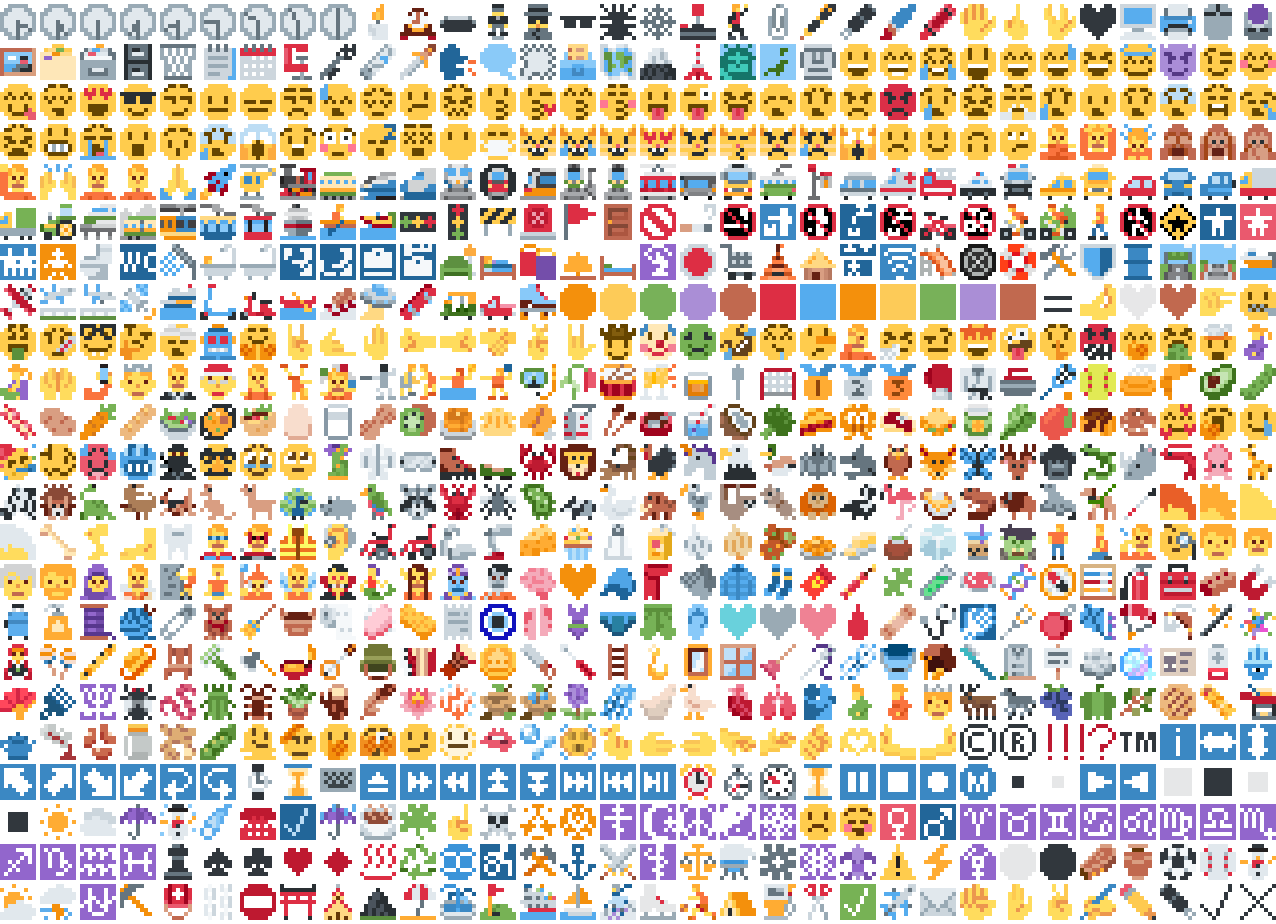
*Just some of the emoji in the pack*
## Installation
Please download the .zip file from the Versions section, put it in your
resource packs folder and select it for use in-game.
You can also embed this pack into another pack,
for use on a server or custom world for example.
Please remember to credit the project as it is
one of the requirements of the project license.
## Basic usage
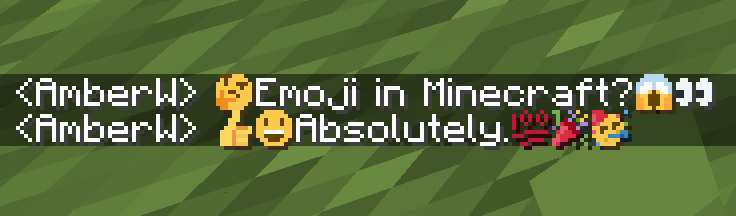
Most standard emoji characters will just work if you copy and paste them in or
use some kind of emoji input. For example, try copying emoji from
[this site](https://emojifinder.com/) or using the Windows emoji picker (Win+.).
However, emoji that consist of sequences of multiple character are not supported
by vanilla and will show up as multiple, separate characters. Sorry.
See below for ways to develop around this.
Sample of Emoji to Copy-Paste
© ® ‼ ⁉ ™ ℹ ↔ ↕ ↖ ↗ ↘ ↙ ↩ ↪ ⌚ ⌛ ⌨ ⏏ ⏩ ⏪ ⏫ ⏬ ⏭ ⏮ ⏯ ⏰ ⏱ ⏲ ⏳ ⏸ ⏹ ⏺ Ⓜ ▪ ▫ ▶ ◀ ◻ ◼ ◽ ◾ ☀ ☁ ☂ ☃ ☄ ☎ ☑ ☔ ☕ ☘ ☝ ☠ ☢ ☣ ☦ ☪ ☮ ☯ ☸ ☹ ☺ ♀ ♂ ♈ ♉ ♊ ♋ ♌ ♍ ♎ ♏ ♐ ♑ ♒ ♓ ♟ ♠ ♣ ♥ ♦ ♨ ♻ ♾ ♿ ⚒ ⚓ ⚔ ⚕ ⚖ ⚗ ⚙ ⚛ ⚜ ⚠ ⚡ ⚧ ⚪ ⚫ ⚰ ⚱ ⚽ ⚾ ⛄ ⛅ ⛈ ⛎ ⛏ ⛑ ⛓ ⛔ ⛩ ⛪ ⛰ ⛱ ⛲ ⛳ ⛴ ⛵ ⛷ ⛸ ⛹ ⛺ ⛽ ✂ ✅ ✈ ✉ ✊ ✋ ✌ ✍ ✏ ✒ ✔ ✖ ✝ ✡ ✨ ✳ ✴ ❄ ❇ ❌ ❎ ❓ ❔ ❕ ❗ ❣ ❤ ➕ ➖ ➗ ➡ ➰ ➿ ⤴ ⤵ ⬅ ⬆ ⬇ ⬛ ⬜ ⭐ ⭕ 〰 〽 ㊗ ㊙ 🀄 🃏 🅰 🅱 🅾 🅿 🆎 🆑 🆒 🆓 🆔 🆕 🆖 🆗 🆘 🆙 🆚 🇦 🇧 🇨 🇩 🇪 🇫 🇬 🇭 🇮 🇯 🇰 🇱 🇲 🇳 🇴 🇵 🇶 🇷 🇸 🇹 🇺 🇻 🇼 🇽 🇾 🇿 🈁 🈂 🈚 🈯 🈲 🈳 🈴 🈵 🈶 🈷 🈸 🈹 🈺 🉐 🉑 🌀 🌁 🌂 🌃 🌄 🌅 🌆 🌇 🌈 🌉 🌊 🌋 🌌 🌍 🌎 🌏 🌐 🌑 🌒 🌓 🌔 🌕 🌖 🌗 🌘 🌙 🌚 🌛 🌜 🌝 🌞 🌟 🌠 🌡 🌤 🌥 🌦 🌧 🌨 🌩 🌪 🌫 🌬 🌭 🌮 🌯 🌰 🌱 🌲 🌳 🌴 🌵 🌶 🌷 🌸 🌹 🌺 🌻 🌼 🌽 🌾 🌿 🍀 🍁 🍂 🍃 🍄 🍅 🍆 🍇 🍈 🍉 🍊 🍋 🍌 🍍 🍎 🍏 🍐 🍑 🍒 🍓 🍔 🍕 🍖 🍗 🍘 🍙 🍚 🍛 🍜 🍝 🍞 🍟 🍠 🍡 🍢 🍣 🍤 🍥 🍦 🍧 🍨 🍩 🍪 🍫 🍬 🍭 🍮 🍯 🍰 🍱 🍲 🍳 🍴 🍵 🍶 🍷 🍸 🍹 🍺 🍻 🍼 🍽 🍾 🍿 🎀 🎁 🎂 🎃 🎄 🎅 🎆 🎇 🎈 🎉 🎊 🎋 🎌 🎍 🎎 🎏 🎐 🎑 🎒 🎓 🎖 🎗 🎙 🎚 🎛 🎞 🎟 🎠 🎡 🎢 🎣 🎤 🎥 🎦 🎧 🎨 🎩 🎪 🎫 🎬 🎭 🎮 🎯 🎰 🎱 🎲 🎳 🎴 🎵 🎶 🎷 🎸 🎹 🎺 🎻 🎼 🎽 🎾 🎿 🏀 🏁 🏂 🏃 🏄 🏅 🏆 🏇 🏈 🏉 🏊 🏋 🏌 🏍 🏎 🏏 🏐 🏑 🏒 🏓 🏔 🏕 🏖 🏗 🏘 🏙 🏚 🏛 🏜 🏝 🏞 🏟 🏠 🏡 🏢 🏣 🏤 🏥 🏦 🏧 🏨 🏩 🏪 🏫 🏬 🏭 🏮 🏯 🏰 🏳 🏴 🏵 🏷 🏸 🏹 🏺 🏻 🏼 🏽 🏾 🏿 🐀 🐁 🐂 🐃 🐄 🐅 🐆 🐇 🐈 🐉 🐊 🐋 🐌 🐍 🐎 🐏 🐐 🐑 🐒 🐓 🐔 🐕 🐖 🐗 🐘 🐙 🐚 🐛 🐜 🐝 🐞 🐟 🐠 🐡 🐢 🐣 🐤 🐥 🐦 🐧 🐨 🐩 🐪 🐫 🐬 🐭 🐮 🐯 🐰 🐱 🐲 🐳 🐴 🐵 🐶 🐷 🐸 🐹 🐺 🐻 🐼 🐽 🐾 🐿 👀 👁 👂 👃 👄 👅 👆 👇 👈 👉 👊 👋 👌 👍 👎 👏 👐 👑 👒 👓 👔 👕 👖 👗 👘 👙 👚 👛 👜 👝 👞 👟 👠 👡 👢 👣 👤 👥 👦 👧 👨 👩 👪 👫 👬 👭 👮 👯 👰 👱 👲 👳 👴 👵 👶 👷 👸 👹 👺 👻 👼 👽 👾 👿 💀 💁 💂 💃 💄 💅 💆 💇 💈 💉 💊 💋 💌 💍 💎 💏 💐 💑 💒 💓 💔 💕 💖 💗 💘 💙 💚 💛 💜 💝 💞 💟 💠 💡 💢 💣 💤 💥 💦 💧 💨 💩 💪 💫 💬 💭 💮 💯 💰 💱 💲 💳 💴 💵 💶 💷 💸 💹 💺 💻 💼 💽 💾 💿 📀 📁 📂 📃 📄 📅 📆 📇 📈 📉 📊 📋 📌 📍 📎 📏 📐 📑 📒 📓 📔 📕 📖 📗 📘 📙 📚 📛 📜 📝 📞 📟 📠 📡 📢 📣 📤 📥 📦 📧 📨 📩 📪 📫 📬 📭 📮 📯 📰 📱 📲 📳 📴 📵 📶 📷 📸 📹 📺 📻 📼 📽 📿 🔀 🔁 🔂 🔃 🔄 🔅 🔆 🔇 🔈 🔉 🔊 🔋 🔌 🔍 🔎 🔏 🔐 🔑 🔒 🔓 🔔 🔕 🔖 🔗 🔘 🔙 🔚 🔛 🔜 🔝 🔞 🔟 🔠 🔡 🔢 🔣 🔤 🔥 🔦 🔧 🔨 🔩 🔪 🔫 🔬 🔭 🔮 🔯 🔰 🔱 🔲 🔳 🔴 🔵 🔶 🔷 🔸 🔹 🔺 🔻 🔼 🔽 🕉 🕊 🕋 🕌 🕍 🕎 🕐 🕑 🕒 🕓 🕔 🕕 🕖 🕗 🕘 🕙 🕚 🕛 🕜 🕝 🕞 🕟 🕠 🕡 🕢 🕣 🕤 🕥 🕦 🕧 🕯 🕰 🕳 🕴 🕵 🕶 🕷 🕸 🕹 🕺 🖇 🖊 🖋 🖌 🖍 🖐 🖕 🖖 🖤 🖥 🖨 🖱 🖲 🖼 🗂 🗃 🗄 🗑 🗒 🗓 🗜 🗝 🗞 🗡 🗣 🗨 🗯 🗳 🗺 🗻 🗼 🗽 🗾 🗿 😀 😁 😂 😃 😄 😅 😆 😇 😈 😉 😊 😋 😌 😍 😎 😏 😐 😑 😒 😓 😔 😕 😖 😗 😘 😙 😚 😛 😜 😝 😞 😟 😠 😡 😢 😣 😤 😥 😦 😧 😨 😩 😪 😫 😬 😭 😮 😯 😰 😱 😲 😳 😴 😵 😶 😷 😸 😹 😺 😻 😼 😽 😾 😿 🙀 🙁 🙂 🙃 🙄 🙅 🙆 🙇 🙈 🙉 🙊 🙋 🙌 🙍 🙎 🙏 🚀 🚁 🚂 🚃 🚄 🚅 🚆 🚇 🚈 🚉 🚊 🚋 🚌 🚍 🚎 🚏 🚐 🚑 🚒 🚓 🚔 🚕 🚖 🚗 🚘 🚙 🚚 🚛 🚜 🚝 🚞 🚟 🚠 🚡 🚢 🚣 🚤 🚥 🚦 🚧 🚨 🚩 🚪 🚫 🚬 🚭 🚮 🚯 🚰 🚱 🚲 🚳 🚴 🚵 🚶 🚷 🚸 🚹 🚺 🚻 🚼 🚽 🚾 🚿 🛀 🛁 🛂 🛃 🛄 🛅 🛋 🛌 🛍 🛎 🛏 🛐 🛑 🛒 🛕 🛖 🛗 🛜 🛝 🛞 🛟 🛠 🛡 🛢 🛣 🛤 🛥 🛩 🛫 🛬 🛰 🛳 🛴 🛵 🛶 🛷 🛸 🛹 🛺 🛻 🛼 🟠 🟡 🟢 🟣 🟤 🟥 🟦 🟧 🟨 🟩 🟪 🟫 🟰 🤌 🤍 🤎 🤏 🤐 🤑 🤒 🤓 🤔 🤕 🤖 🤗 🤘 🤙 🤚 🤛 🤜 🤝 🤞 🤟 🤠 🤡 🤢 🤣 🤤 🤥 🤦 🤧 🤨 🤩 🤪 🤫 🤬 🤭 🤮 🤯 🤰 🤱 🤲 🤳 🤴 🤵 🤶 🤷 🤸 🤹 🤺 🤼 🤽 🤾 🤿 🥀 🥁 🥂 🥃 🥄 🥅 🥇 🥈 🥉 🥊 🥋 🥌 🥍 🥎 🥏 🥐 🥑 🥒 🥓 🥔 🥕 🥖 🥗 🥘 🥙 🥚 🥛 🥜 🥝 🥞 🥟 🥠 🥡 🥢 🥣 🥤 🥥 🥦 🥧 🥨 🥩 🥪 🥫 🥬 🥭 🥮 🥯 🥰 🥱 🥲 🥳 🥴 🥵 🥶 🥷 🥸 🥹 🥺 🥻 🥼 🥽 🥾 🥿 🦀 🦁 🦂 🦃 🦄 🦅 🦆 🦇 🦈 🦉 🦊 🦋 🦌 🦍 🦎 🦏 🦐 🦑 🦒 🦓 🦔 🦕 🦖 🦗 🦘 🦙 🦚 🦛 🦜 🦝 🦞 🦟 🦠 🦡 🦢 🦣 🦤 🦥 🦦 🦧 🦨 🦩 🦪 🦫 🦬 🦭 🦮 🦯 🦰 🦱 🦲 🦳 🦴 🦵 🦶 🦷 🦸 🦹 🦺 🦻 🦼 🦽 🦾 🦿 🧀 🧁 🧂 🧃 🧄 🧅 🧆 🧇 🧈 🧉 🧊 🧋 🧌 🧍 🧎 🧏 🧐 🧑 🧒 🧓 🧔 🧕 🧖 🧗 🧘 🧙 🧚 🧛 🧜 🧝 🧞 🧟 🧠 🧡 🧢 🧣 🧤 🧥 🧦 🧧 🧨 🧩 🧪 🧫 🧬 🧭 🧮 🧯 🧰 🧱 🧲 🧳 🧴 🧵 🧶 🧷 🧸 🧹 🧺 🧻 🧼 🧽 🧾 🧿 🩰 🩱 🩲 🩳 🩴 🩵 🩶 🩷 🩸 🩹 🩺 🩻 🩼 🪀 🪁 🪂 🪃 🪄 🪅 🪆 🪇 🪈 🪐 🪑 🪒 🪓 🪔 🪕 🪖 🪗 🪘 🪙 🪚 🪛 🪜 🪝 🪞 🪟 🪠 🪡 🪢 🪣 🪤 🪥 🪦 🪧 🪨 🪩 🪪 🪫 🪬 🪭 🪮 🪯 🪰 🪱 🪲 🪳 🪴 🪵 🪶 🪷 🪸 🪹 🪺 🪻 🪼 🪽 🪿 🫀 🫁 🫂 🫃 🫄 🫅 🫎 🫏 🫐 🫑 🫒 🫓 🫔 🫕 🫖 🫗 🫘 🫙 🫚 🫛 🫠 🫡 🫢 🫣 🫤 🫥 🫦 🫧 🫨 🫰 🫱 🫲 🫳 🫴 🫵 🫶 🫷 🫸
Also, check out the [18x version](https://modrinth.com/resourcepack/pixel-twemoji-18x) with more detail!
## Supported mods
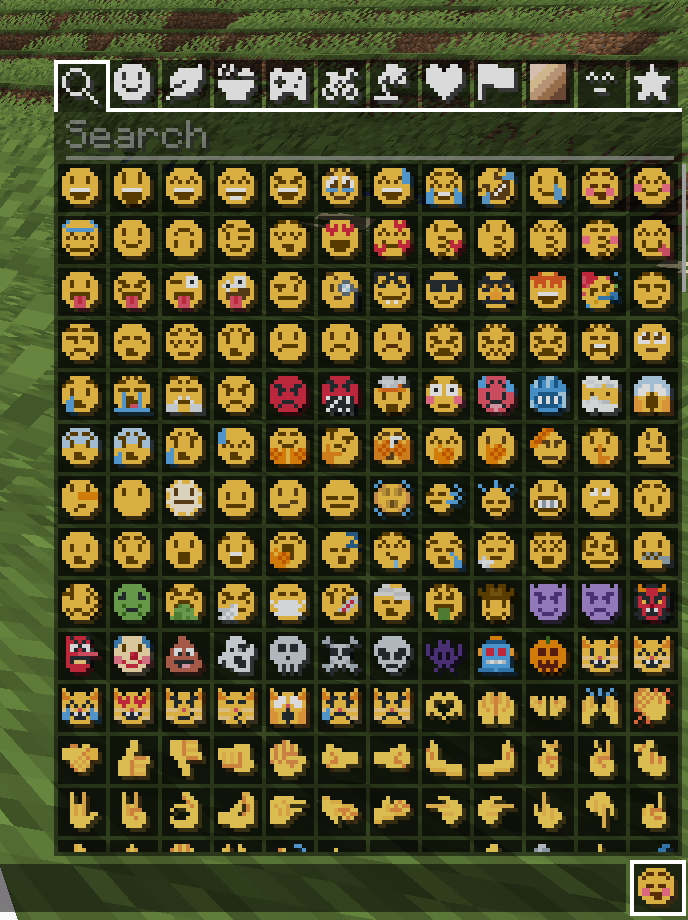
### [Symbol Chat](https://modrinth.com/mod/symbol-chat)
Easy to use emoji and symbol picker
## Remapped characters (for developers)
In order to have any support for emoji consisting of sequences they have been
remapped to unused single characters. An index of these can be found in
/assets/emoji_remappings/lang/en_us.json.
For example, `ud83dudc69u200dud83dudd2c` (👩+🔬=👩🔬)
is mapped to `udb80udf30` using this translation snippet:
“`json
“ud83dudc69u200dud83dudd2c”: “udb80udf30”
“`
**Please note that vanilla has no mechanism to
automatically convert to the remapped form.**
A custom emoji picker or some kind of mod/plugin is
required to make using these a smooth experience.
Because the index acts as a language file, a server side chat listener
could detect emoji sequences and turn them into translations like this one:
“`json
{“translate”: “ud83dudc69u200dud83dudd2c”}
“`
Any client with the pack installed can then perform the remapping for the server.
If the pack is not installed or the sequence is not found then it will just
fall back to displaying the sequence. This means that the server doesn’t need a
complete list of emoji sequences, just a way to detect potential ones.
(The [Unicode website](https://unicode.org/Public/emoji/latest/)
contains data files describing what is an emoji.)
## Shortcodes (for developers)
Shortcodes are a popular way to insert emoji by name. An index of shortcodes
can be found in /assets/emoji_shortcodes/lang/en_us.json.
For example, `:thinking:` is mapped to `ud83eudd14` (🤔):
“`json
“thinking”: “ud83eudd14”
“`
Emoji that need remapping already map to the remapped version.
**Please note that vanilla has no mechanism to
automatically convert shortcodes into emoji.**
Some kind of mod/plugin is required.
Because the index acts as a language file, a server side chat listener could
detect shortcodes and turn them into translations like this one:
“`json
{“translate”: “:thinking:”}
“`
Any client with the pack installed can then convert it for the server. If the
pack is not installed or the shortcode is not found then it will just fall back
to displaying the shortcode. This means that the server doesn’t need a complete
list of shortcodes, just a way to detect potential ones by finding substrings
beginning and ending with a colon `:`.
### Custom emoji?
Custom emoji could be created in a similar way by adding them to unused code
points of the default font and adding a translation with a shortcode.
For example, this translation snippet adds the shortcode `:pog:` for the
character `uE502`:
“`json
“:pog:”: “uE502”
“`
## Reverse shortcodes (for developers)
Maybe you want to display a name for each emoji, in some hover text for example.
That is where reverse shortcodes come in. An index of these can be found in
/assets/emoji_shortcodes_reverse/lang/en_us.json.
For example, `u200cud83eudd14` (`` + 🤔) is mapped to `:thinking:` using
this translation snippet:
“`json
“u200cud83eudd14”: “:thinking:”
“`
`u200c` is added to each entry to allow the index to be used as a language file
without conflicting with the other indexes. If the pack is not installed or the
emoji is not found then it will just fall back to displaying the characters,
including the invisible `u200c`.
A server side chat listener could detect shortcodes and
turn them into emoji with tooltips like this one:
“`json
{“translate”: “:thinking:”, “hoverEvent”: {“action”: “show_text”, “contents”: “:thinking:”}}
“`
With reverse shortcodes, it could also detect emoji and
emoji sequences and also give them tooltips like this one:
“`json
{“translate”:”ud83eudd14″,”hoverEvent”:{“action”:”show_text”,”contents”:{“translate”:”u200cud83eudd14″}}}
“`
## License
Graphics based on Twemoji Copyright (c) 2018 Twitter, Inc and other contributors, licensed under Creative Commons Attribution 4.0 International
Pixel art and resource pack adaptation Copyright (c) 2020 AmberW, licensed under Creative Commons Attribution 4.0 International
Pixel Twemoji 18x
# Pixel perfect Twemoji (18×18 version)
This resource pack adds **all** of Twemoji, redrawn by hand as pixel art
at 18×18 pixels, to the default font in Minecraft: Java Edition
version 1.16 or later. Twemoji is the emoji set used by Discord and Twitter.
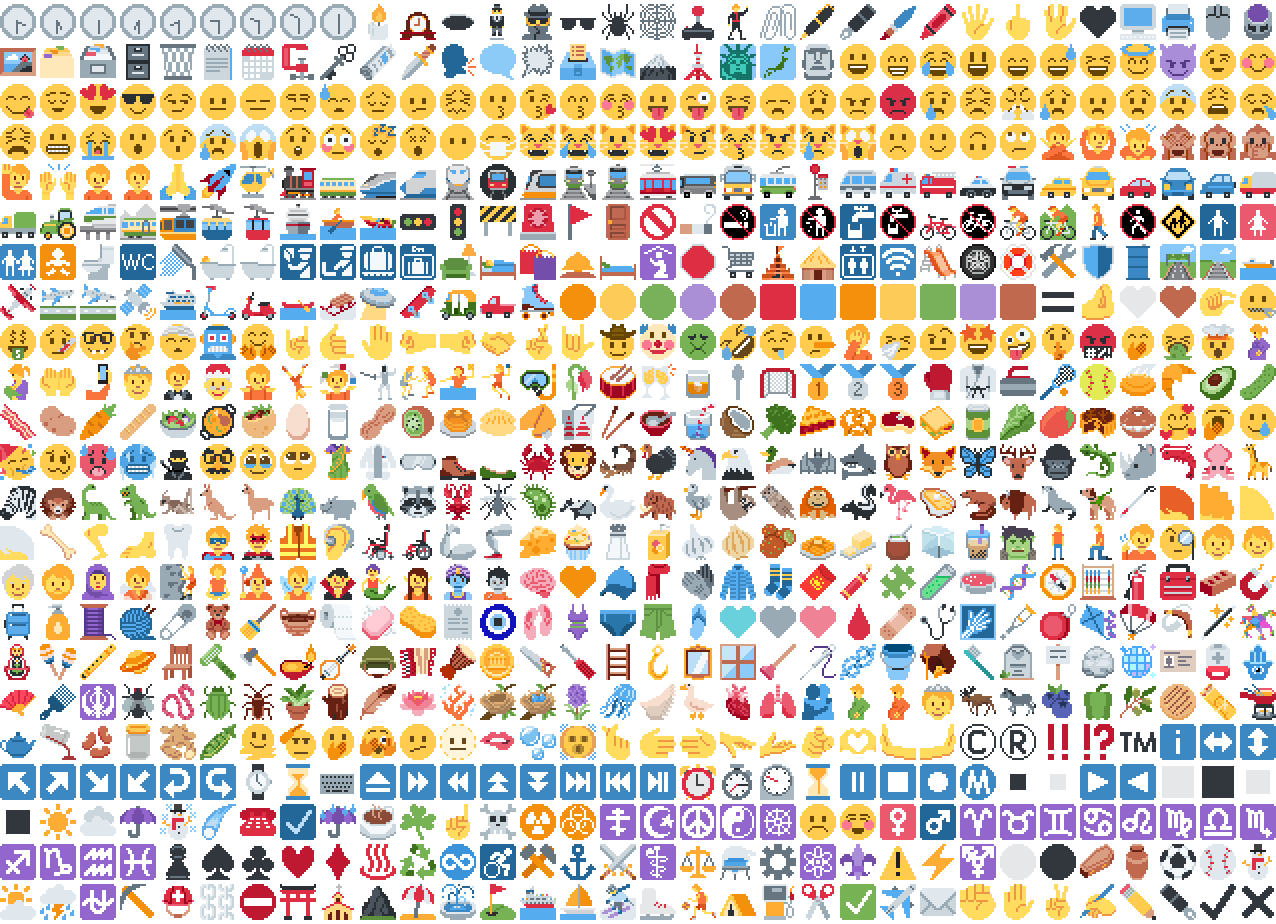
*Just some of the emoji in the pack*
## Installation
Please download the .zip file from the Versions section, put it in your
resource packs folder and select it for use in-game.
You can also embed this pack into another pack,
for use on a server or custom world for example.
Please remember to credit the project as it is
one of the requirements of the project license.
## Basic usage
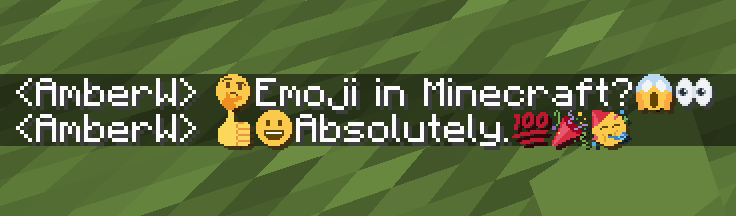
Most standard emoji characters will just work if you copy and paste them in or
use some kind of emoji input. For example, try copying emoji from
[this site](https://emojifinder.com/) or using the Windows emoji picker (Win+.).
However, emoji that consist of sequences of multiple character are not supported
by vanilla and will show up as multiple, separate characters. Sorry.
See below for ways to develop around this.
Sample of Emoji to Copy-Paste
© ® ‼ ⁉ ™ ℹ ↔ ↕ ↖ ↗ ↘ ↙ ↩ ↪ ⌚ ⌛ ⌨ ⏏ ⏩ ⏪ ⏫ ⏬ ⏭ ⏮ ⏯ ⏰ ⏱ ⏲ ⏳ ⏸ ⏹ ⏺ Ⓜ ▪ ▫ ▶ ◀ ◻ ◼ ◽ ◾ ☀ ☁ ☂ ☃ ☄ ☎ ☑ ☔ ☕ ☘ ☝ ☠ ☢ ☣ ☦ ☪ ☮ ☯ ☸ ☹ ☺ ♀ ♂ ♈ ♉ ♊ ♋ ♌ ♍ ♎ ♏ ♐ ♑ ♒ ♓ ♟ ♠ ♣ ♥ ♦ ♨ ♻ ♾ ♿ ⚒ ⚓ ⚔ ⚕ ⚖ ⚗ ⚙ ⚛ ⚜ ⚠ ⚡ ⚧ ⚪ ⚫ ⚰ ⚱ ⚽ ⚾ ⛄ ⛅ ⛈ ⛎ ⛏ ⛑ ⛓ ⛔ ⛩ ⛪ ⛰ ⛱ ⛲ ⛳ ⛴ ⛵ ⛷ ⛸ ⛹ ⛺ ⛽ ✂ ✅ ✈ ✉ ✊ ✋ ✌ ✍ ✏ ✒ ✔ ✖ ✝ ✡ ✨ ✳ ✴ ❄ ❇ ❌ ❎ ❓ ❔ ❕ ❗ ❣ ❤ ➕ ➖ ➗ ➡ ➰ ➿ ⤴ ⤵ ⬅ ⬆ ⬇ ⬛ ⬜ ⭐ ⭕ 〰 〽 ㊗ ㊙ 🀄 🃏 🅰 🅱 🅾 🅿 🆎 🆑 🆒 🆓 🆔 🆕 🆖 🆗 🆘 🆙 🆚 🇦 🇧 🇨 🇩 🇪 🇫 🇬 🇭 🇮 🇯 🇰 🇱 🇲 🇳 🇴 🇵 🇶 🇷 🇸 🇹 🇺 🇻 🇼 🇽 🇾 🇿 🈁 🈂 🈚 🈯 🈲 🈳 🈴 🈵 🈶 🈷 🈸 🈹 🈺 🉐 🉑 🌀 🌁 🌂 🌃 🌄 🌅 🌆 🌇 🌈 🌉 🌊 🌋 🌌 🌍 🌎 🌏 🌐 🌑 🌒 🌓 🌔 🌕 🌖 🌗 🌘 🌙 🌚 🌛 🌜 🌝 🌞 🌟 🌠 🌡 🌤 🌥 🌦 🌧 🌨 🌩 🌪 🌫 🌬 🌭 🌮 🌯 🌰 🌱 🌲 🌳 🌴 🌵 🌶 🌷 🌸 🌹 🌺 🌻 🌼 🌽 🌾 🌿 🍀 🍁 🍂 🍃 🍄 🍅 🍆 🍇 🍈 🍉 🍊 🍋 🍌 🍍 🍎 🍏 🍐 🍑 🍒 🍓 🍔 🍕 🍖 🍗 🍘 🍙 🍚 🍛 🍜 🍝 🍞 🍟 🍠 🍡 🍢 🍣 🍤 🍥 🍦 🍧 🍨 🍩 🍪 🍫 🍬 🍭 🍮 🍯 🍰 🍱 🍲 🍳 🍴 🍵 🍶 🍷 🍸 🍹 🍺 🍻 🍼 🍽 🍾 🍿 🎀 🎁 🎂 🎃 🎄 🎅 🎆 🎇 🎈 🎉 🎊 🎋 🎌 🎍 🎎 🎏 🎐 🎑 🎒 🎓 🎖 🎗 🎙 🎚 🎛 🎞 🎟 🎠 🎡 🎢 🎣 🎤 🎥 🎦 🎧 🎨 🎩 🎪 🎫 🎬 🎭 🎮 🎯 🎰 🎱 🎲 🎳 🎴 🎵 🎶 🎷 🎸 🎹 🎺 🎻 🎼 🎽 🎾 🎿 🏀 🏁 🏂 🏃 🏄 🏅 🏆 🏇 🏈 🏉 🏊 🏋 🏌 🏍 🏎 🏏 🏐 🏑 🏒 🏓 🏔 🏕 🏖 🏗 🏘 🏙 🏚 🏛 🏜 🏝 🏞 🏟 🏠 🏡 🏢 🏣 🏤 🏥 🏦 🏧 🏨 🏩 🏪 🏫 🏬 🏭 🏮 🏯 🏰 🏳 🏴 🏵 🏷 🏸 🏹 🏺 🏻 🏼 🏽 🏾 🏿 🐀 🐁 🐂 🐃 🐄 🐅 🐆 🐇 🐈 🐉 🐊 🐋 🐌 🐍 🐎 🐏 🐐 🐑 🐒 🐓 🐔 🐕 🐖 🐗 🐘 🐙 🐚 🐛 🐜 🐝 🐞 🐟 🐠 🐡 🐢 🐣 🐤 🐥 🐦 🐧 🐨 🐩 🐪 🐫 🐬 🐭 🐮 🐯 🐰 🐱 🐲 🐳 🐴 🐵 🐶 🐷 🐸 🐹 🐺 🐻 🐼 🐽 🐾 🐿 👀 👁 👂 👃 👄 👅 👆 👇 👈 👉 👊 👋 👌 👍 👎 👏 👐 👑 👒 👓 👔 👕 👖 👗 👘 👙 👚 👛 👜 👝 👞 👟 👠 👡 👢 👣 👤 👥 👦 👧 👨 👩 👪 👫 👬 👭 👮 👯 👰 👱 👲 👳 👴 👵 👶 👷 👸 👹 👺 👻 👼 👽 👾 👿 💀 💁 💂 💃 💄 💅 💆 💇 💈 💉 💊 💋 💌 💍 💎 💏 💐 💑 💒 💓 💔 💕 💖 💗 💘 💙 💚 💛 💜 💝 💞 💟 💠 💡 💢 💣 💤 💥 💦 💧 💨 💩 💪 💫 💬 💭 💮 💯 💰 💱 💲 💳 💴 💵 💶 💷 💸 💹 💺 💻 💼 💽 💾 💿 📀 📁 📂 📃 📄 📅 📆 📇 📈 📉 📊 📋 📌 📍 📎 📏 📐 📑 📒 📓 📔 📕 📖 📗 📘 📙 📚 📛 📜 📝 📞 📟 📠 📡 📢 📣 📤 📥 📦 📧 📨 📩 📪 📫 📬 📭 📮 📯 📰 📱 📲 📳 📴 📵 📶 📷 📸 📹 📺 📻 📼 📽 📿 🔀 🔁 🔂 🔃 🔄 🔅 🔆 🔇 🔈 🔉 🔊 🔋 🔌 🔍 🔎 🔏 🔐 🔑 🔒 🔓 🔔 🔕 🔖 🔗 🔘 🔙 🔚 🔛 🔜 🔝 🔞 🔟 🔠 🔡 🔢 🔣 🔤 🔥 🔦 🔧 🔨 🔩 🔪 🔫 🔬 🔭 🔮 🔯 🔰 🔱 🔲 🔳 🔴 🔵 🔶 🔷 🔸 🔹 🔺 🔻 🔼 🔽 🕉 🕊 🕋 🕌 🕍 🕎 🕐 🕑 🕒 🕓 🕔 🕕 🕖 🕗 🕘 🕙 🕚 🕛 🕜 🕝 🕞 🕟 🕠 🕡 🕢 🕣 🕤 🕥 🕦 🕧 🕯 🕰 🕳 🕴 🕵 🕶 🕷 🕸 🕹 🕺 🖇 🖊 🖋 🖌 🖍 🖐 🖕 🖖 🖤 🖥 🖨 🖱 🖲 🖼 🗂 🗃 🗄 🗑 🗒 🗓 🗜 🗝 🗞 🗡 🗣 🗨 🗯 🗳 🗺 🗻 🗼 🗽 🗾 🗿 😀 😁 😂 😃 😄 😅 😆 😇 😈 😉 😊 😋 😌 😍 😎 😏 😐 😑 😒 😓 😔 😕 😖 😗 😘 😙 😚 😛 😜 😝 😞 😟 😠 😡 😢 😣 😤 😥 😦 😧 😨 😩 😪 😫 😬 😭 😮 😯 😰 😱 😲 😳 😴 😵 😶 😷 😸 😹 😺 😻 😼 😽 😾 😿 🙀 🙁 🙂 🙃 🙄 🙅 🙆 🙇 🙈 🙉 🙊 🙋 🙌 🙍 🙎 🙏 🚀 🚁 🚂 🚃 🚄 🚅 🚆 🚇 🚈 🚉 🚊 🚋 🚌 🚍 🚎 🚏 🚐 🚑 🚒 🚓 🚔 🚕 🚖 🚗 🚘 🚙 🚚 🚛 🚜 🚝 🚞 🚟 🚠 🚡 🚢 🚣 🚤 🚥 🚦 🚧 🚨 🚩 🚪 🚫 🚬 🚭 🚮 🚯 🚰 🚱 🚲 🚳 🚴 🚵 🚶 🚷 🚸 🚹 🚺 🚻 🚼 🚽 🚾 🚿 🛀 🛁 🛂 🛃 🛄 🛅 🛋 🛌 🛍 🛎 🛏 🛐 🛑 🛒 🛕 🛖 🛗 🛜 🛝 🛞 🛟 🛠 🛡 🛢 🛣 🛤 🛥 🛩 🛫 🛬 🛰 🛳 🛴 🛵 🛶 🛷 🛸 🛹 🛺 🛻 🛼 🟠 🟡 🟢 🟣 🟤 🟥 🟦 🟧 🟨 🟩 🟪 🟫 🟰 🤌 🤍 🤎 🤏 🤐 🤑 🤒 🤓 🤔 🤕 🤖 🤗 🤘 🤙 🤚 🤛 🤜 🤝 🤞 🤟 🤠 🤡 🤢 🤣 🤤 🤥 🤦 🤧 🤨 🤩 🤪 🤫 🤬 🤭 🤮 🤯 🤰 🤱 🤲 🤳 🤴 🤵 🤶 🤷 🤸 🤹 🤺 🤼 🤽 🤾 🤿 🥀 🥁 🥂 🥃 🥄 🥅 🥇 🥈 🥉 🥊 🥋 🥌 🥍 🥎 🥏 🥐 🥑 🥒 🥓 🥔 🥕 🥖 🥗 🥘 🥙 🥚 🥛 🥜 🥝 🥞 🥟 🥠 🥡 🥢 🥣 🥤 🥥 🥦 🥧 🥨 🥩 🥪 🥫 🥬 🥭 🥮 🥯 🥰 🥱 🥲 🥳 🥴 🥵 🥶 🥷 🥸 🥹 🥺 🥻 🥼 🥽 🥾 🥿 🦀 🦁 🦂 🦃 🦄 🦅 🦆 🦇 🦈 🦉 🦊 🦋 🦌 🦍 🦎 🦏 🦐 🦑 🦒 🦓 🦔 🦕 🦖 🦗 🦘 🦙 🦚 🦛 🦜 🦝 🦞 🦟 🦠 🦡 🦢 🦣 🦤 🦥 🦦 🦧 🦨 🦩 🦪 🦫 🦬 🦭 🦮 🦯 🦰 🦱 🦲 🦳 🦴 🦵 🦶 🦷 🦸 🦹 🦺 🦻 🦼 🦽 🦾 🦿 🧀 🧁 🧂 🧃 🧄 🧅 🧆 🧇 🧈 🧉 🧊 🧋 🧌 🧍 🧎 🧏 🧐 🧑 🧒 🧓 🧔 🧕 🧖 🧗 🧘 🧙 🧚 🧛 🧜 🧝 🧞 🧟 🧠 🧡 🧢 🧣 🧤 🧥 🧦 🧧 🧨 🧩 🧪 🧫 🧬 🧭 🧮 🧯 🧰 🧱 🧲 🧳 🧴 🧵 🧶 🧷 🧸 🧹 🧺 🧻 🧼 🧽 🧾 🧿 🩰 🩱 🩲 🩳 🩴 🩵 🩶 🩷 🩸 🩹 🩺 🩻 🩼 🪀 🪁 🪂 🪃 🪄 🪅 🪆 🪇 🪈 🪐 🪑 🪒 🪓 🪔 🪕 🪖 🪗 🪘 🪙 🪚 🪛 🪜 🪝 🪞 🪟 🪠 🪡 🪢 🪣 🪤 🪥 🪦 🪧 🪨 🪩 🪪 🪫 🪬 🪭 🪮 🪯 🪰 🪱 🪲 🪳 🪴 🪵 🪶 🪷 🪸 🪹 🪺 🪻 🪼 🪽 🪿 🫀 🫁 🫂 🫃 🫄 🫅 🫎 🫏 🫐 🫑 🫒 🫓 🫔 🫕 🫖 🫗 🫘 🫙 🫚 🫛 🫠 🫡 🫢 🫣 🫤 🫥 🫦 🫧 🫨 🫰 🫱 🫲 🫳 🫴 🫵 🫶 🫷 🫸
Also, check out the [9x version](https://modrinth.com/resourcepack/pixel-twemoji-9x) that blends right into the default font!
## Supported mods
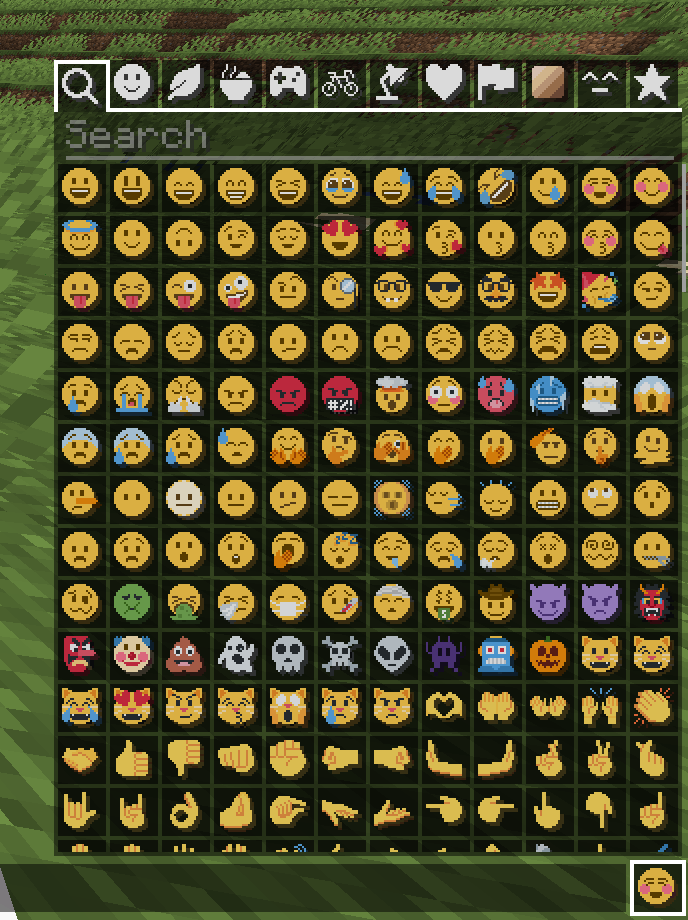
### [Symbol Chat](https://modrinth.com/mod/symbol-chat)
Easy to use emoji and symbol picker
## Remapped characters (for developers)
In order to have any support for emoji consisting of sequences they have been
remapped to unused single characters. An index of these can be found in
/assets/emoji_remappings/lang/en_us.json.
For example, `ud83dudc69u200dud83dudd2c` (👩+🔬=👩🔬)
is mapped to `udb80udf30` using this translation snippet:
“`json
“ud83dudc69u200dud83dudd2c”: “udb80udf30”
“`
**Please note that vanilla has no mechanism to
automatically convert to the remapped form.**
A custom emoji picker or some kind of mod/plugin is
required to make using these a smooth experience.
Because the index acts as a language file, a server side chat listener
could detect emoji sequences and turn them into translations like this one:
“`json
{“translate”: “ud83dudc69u200dud83dudd2c”}
“`
Any client with the pack installed can then perform the remapping for the server.
If the pack is not installed or the sequence is not found then it will just
fall back to displaying the sequence. This means that the server doesn’t need a
complete list of emoji sequences, just a way to detect potential ones.
(The [Unicode website](https://unicode.org/Public/emoji/latest/)
contains data files describing what is an emoji.)
## Shortcodes (for developers)
Shortcodes are a popular way to insert emoji by name. An index of shortcodes
can be found in /assets/emoji_shortcodes/lang/en_us.json.
For example, `:thinking:` is mapped to `ud83eudd14` (🤔):
“`json
“thinking”: “ud83eudd14”
“`
Emoji that need remapping already map to the remapped version.
**Please note that vanilla has no mechanism to
automatically convert shortcodes into emoji.**
Some kind of mod/plugin is required.
Because the index acts as a language file, a server side chat listener could
detect shortcodes and turn them into translations like this one:
“`json
{“translate”: “:thinking:”}
“`
Any client with the pack installed can then convert it for the server. If the
pack is not installed or the shortcode is not found then it will just fall back
to displaying the shortcode. This means that the server doesn’t need a complete
list of shortcodes, just a way to detect potential ones by finding substrings
beginning and ending with a colon `:`.
### Custom emoji?
Custom emoji could be created in a similar way by adding them to unused code
points of the default font and adding a translation with a shortcode.
For example, this translation snippet adds the shortcode `:pog:` for the
character `uE502`:
“`json
“:pog:”: “uE502”
“`
## Reverse shortcodes (for developers)
Maybe you want to display a name for each emoji, in some hover text for example.
That is where reverse shortcodes come in. An index of these can be found in
/assets/emoji_shortcodes_reverse/lang/en_us.json.
For example, `u200cud83eudd14` (`` + 🤔) is mapped to `:thinking:` using
this translation snippet:
“`json
“u200cud83eudd14”: “:thinking:”
“`
`u200c` is added to each entry to allow the index to be used as a language file
without conflicting with the other indexes. If the pack is not installed or the
emoji is not found then it will just fall back to displaying the characters,
including the invisible `u200c`.
A server side chat listener could detect shortcodes and
turn them into emoji with tooltips like this one:
“`json
{“translate”: “:thinking:”, “hoverEvent”: {“action”: “show_text”, “contents”: “:thinking:”}}
“`
With reverse shortcodes, it could also detect emoji and
emoji sequences and also give them tooltips like this one:
“`json
{“translate”:”ud83eudd14″,”hoverEvent”:{“action”:”show_text”,”contents”:{“translate”:”u200cud83eudd14″}}}
“`
## License
Graphics based on Twemoji Copyright (c) 2018 Twitter, Inc and other contributors, licensed under Creative Commons Attribution 4.0 International
Pixel art and resource pack adaptation Copyright (c) 2020 AmberW, licensed under Creative Commons Attribution 4.0 International
Pick Block Pro


# **Pick Block Pro**
Pick Block: Get the block/item of what you’re looking at in creative or switch to that block/item in survival.
This mod is an advanced version of this and adds a lot of extra features (see below)
**Important:**
This mod replaces the default Pick Block, however the ID and Tool picker use their own keybindings.
## **Features**
Most things below are configurable in the config settings using the config file or Mod Menu
– In survival the block picker will now also search through item-containers like shulkers that are inside your inventory
– Holding ALT while picking will add [block-state data](https://minecraft.wiki/w/Block_states) as NBT to the block/item
(stacks with CTRL for [block-entity data](https://minecraft.wiki/w/Block_entity))
– Holding CTRL while Entity picking will add [entity data](https://www.digminecraft.com/data_tags/index.php) as NBT to the item:
– Copies mob data and adds it to the spawn egg
– Copies armor stands with their items and pose
– Copies item frames including the framed item
– Copies painting variants
– Pick block extra things:
– Pick fire and get a flint & steel (1.16+)
– Pick the sun or moon and get a light block (1.17+)
Cycle through the light levels by picking the sun or moon while holding the light block
– Pick a player and get the head of that player
– Pick falling blocks
– Pick fluids and get a bucket of the fluid (disabled by default)
– Or even decide yourself which item you get from a block or entity when using pick block
– Extended Pick Block range, decide how far the picker should be able to reach
– Lock inventory slots to prevent the picker from switching or replacing the item in that slot
– Use the Tool Picker and get the best available tool to break the block or kill the entity
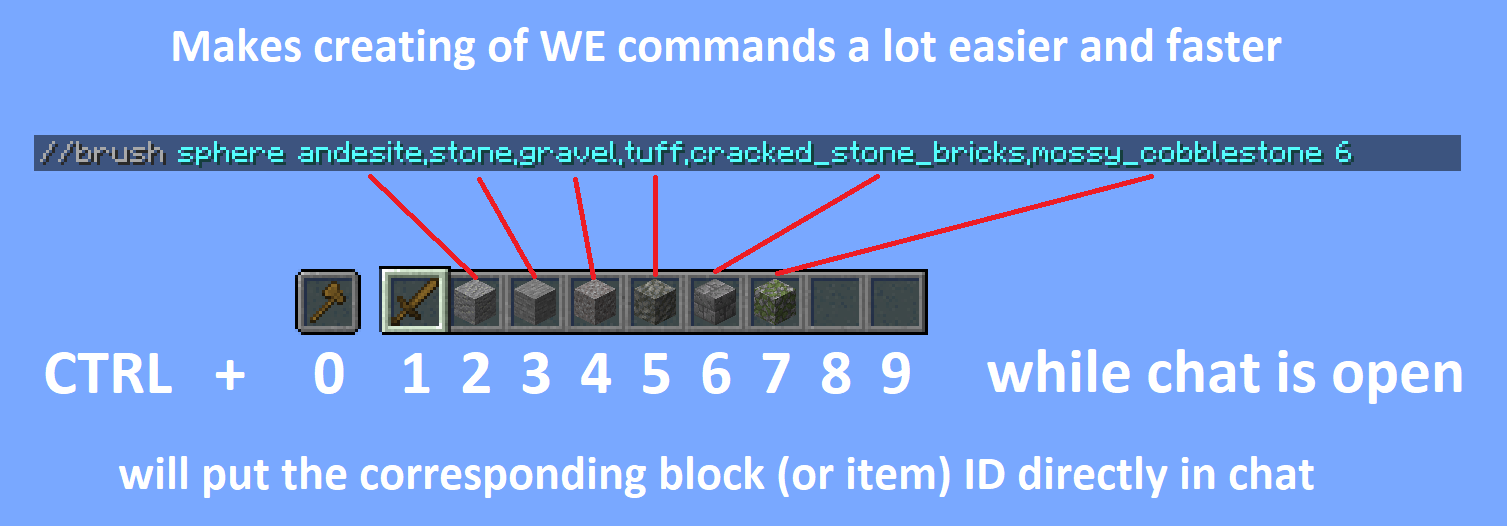
– Copy ID’s of hotbar blocks/items directly into your chat, for easy WorldEdit command creation
(Use CTRL + 0 through 9 while your chat is open, 0 is for the off hand slot)
– Pick ID’s of blocks in the world with the ID Picker and copy them directly to your clipboard
## **Detailed explanations**
Block Picking with item-containers (shulkers / bundles)
When picking a block in survival the mod will first search through all the items in your inventory. If it can’t find the item, it’ll search containers like shulkers and bundles that are inside the inventory. If found, the mod will move the container with the highest amount of that item to the player’s main hand. This should work with all item-containers that work in the same way as the shulker or bundle do.
Hold ALT for block state copying
You might already know it’s possible to hold CTRL while block picking to copy [block-entity data](https://minecraft.wiki/w/Block_entity), such as player skulls and banners with patterns. This mod allows on top of that to also copy [block-state data](https://minecraft.wiki/w/Block_states) when holding ALT, this includes for example if a campfire/candle is lit or not and also the rotation of blocks like stairs. (There are many more things you can copy with this, see wiki link for the full list)
This feature was inspired by the [Pick-BlockState](https://modrinth.com/mod/pickblockstate) mod by [Minenash](https://modrinth.com/user/XqxDWNf7).
Hold CTRL for entity data copying
Just like how you can pick [block-entity data](https://minecraft.wiki/w/Block_entity), now you can also pick [entity data](https://www.digminecraft.com/data_tags/index.php). This will for example copy most data of the mob and put it inside the spawn egg as NBT data. This will also work for things like armor stands, item frames (copying what’s inside of them) and paintings (copying the exact variant of the painting).
Extended pick block range
By default Minecraft only allows to pick blocks that are within reaching distance (3 blocks). This mod however allows to pick blocks at a distance of 100 blocks away and this can even be set way higher (or lower) if so desired. No need anymore to fly all the way over to a block you’d like to pick.
Configure which item you should get from a block/entity
Pick Block Pro comes with an `overrides.json` config file. Within this file you can configure which item you should get when picking a block or entity. This also has full support for NBT data.
The file already includes some overrides for blocks and entities that didn’t have any pick stack.
The overrides can be reloaded in game with the command: `/pbp reload`
**Default overrides:**
“`json
{
“Block to ItemStack”: {
“minecraft:fire”: “minecraft:flint_and_steel”,
“minecraft:soul_fire”: “minecraft:flint_and_steel”,
“minecraft:frosted_ice”: “minecraft:ice”
},
“Entity to ItemStack”: {
“minecraft:tnt”: “minecraft:tnt”,
“minecraft:fireball”: “minecraft:fire_charge”,
“minecraft:wither”: “minecraft:wither_spawn_egg”,
“minecraft:ender_dragon”: “minecraft:ender_dragon_spawn_egg”,
“minecraft:giant”: “minecraft:zombie_spawn_egg{EntityTag:{id:giant,CustomName:”},display:{Name:'{“text”:”Giant Spawn Egg”,”color”:”light_purple”,”italic”:”false”}’}}”,
“minecraft:illusioner”: “minecraft:evoker_spawn_egg{EntityTag:{id:illusioner,CustomName:”},display:{Name:'{“text”:”Illusioner Spawn Egg”,”color”:”light_purple”,”italic”:”false”}’}}”
}
}
“`
Lock inventory slots
By default Minecraft will first fill in all empty slots in the hotbar when using pick block, however once the hotbar is completely full it’ll replace the item in your current selected slot. This item might actually be something you’d prefer to keep. This mod lets you lock any slots you’d like in the config settings. When locked, this mod will still place an item inside that slot if it’s empty. However once an item/block is located in a locked slot, this mod will skip that slot (keeping the item/block safe) and use the next available slot instead.
Tool Picking
When using the Tool Picker this mod will provide you with the best tool for the job. In creative you’ll get a fully enchanted tool (configurable), but in survival it’ll go through your inventory and search for the best tool instead. If it’s able to find a suitable tool it’ll switch it to your current selected slot.
Hotbar block/item ID copy
Copy the ID’s of blocks/items from your hotbar directly in the chat when it’s open. Making it a lot easier and faster to create WE commands. Especially great for making brushes with a lot of different blocks. Hold CTRL + 0 through 9 while your chat is open, 0 is for the off hand slot.
Pick ID’s
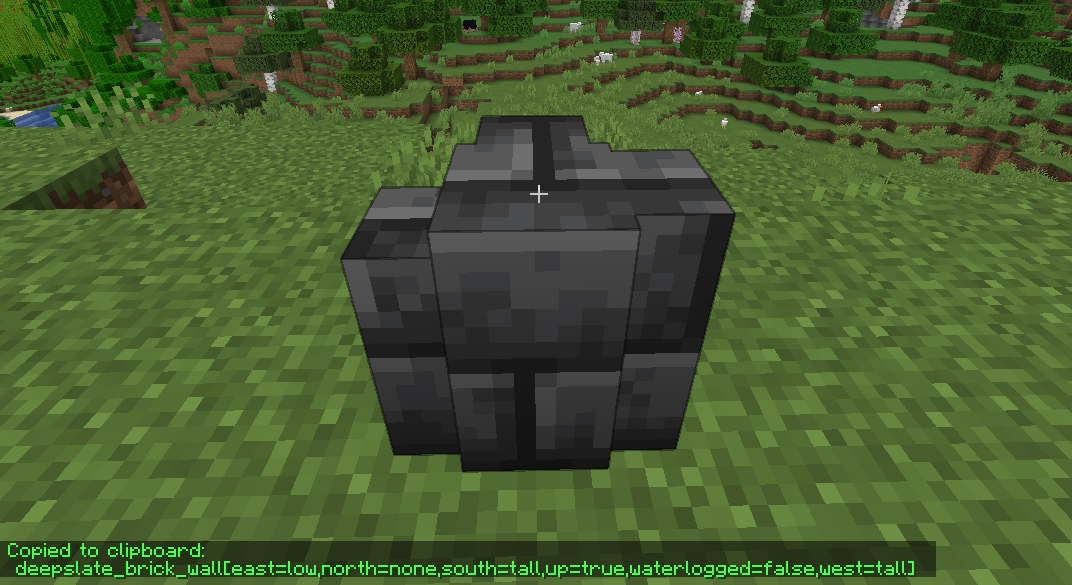
Ever wrote a WE command using block ID’s with a lot of properties? This mod will make that a lot easier by allowing you to pick the ID including properties of the block you’re looking at directly into your clipboard. Once picked you can then paste this ID when writing out your command.
When using the ID picker it’s also possible to copy (block)entity data to the clipboard by holding CTRL.
## **Versions & Dependencies**
1.19+
**Required**:
[Fabric API](https://modrinth.com/mod/fabric-api)
[Cloth Config API](https://modrinth.com/mod/cloth-config) (Is needed to make the config work)
**Optional:**
[Mod Menu](https://modrinth.com/mod/modmenu) (This mod allows you to edit the configs in game)
1.16 – 1.18
**Required**:
[Fabric API](https://modrinth.com/mod/fabric-api) (0.31.0 or later)
**Optional:**
[Mod Menu](https://modrinth.com/mod/modmenu) (This mod allows you to edit the configs in game)
**Already included/embedded:**
[Cloth Config API](https://modrinth.com/mod/cloth-config) (Is needed to make the config work)
1.14 – 1.15
**Required:**
[Fabric API](https://modrinth.com/mod/fabric-api) (0.14.0 or later)
**Optional:**
[Mod Menu](https://modrinth.com/mod/modmenu) (This mod allows you to edit the configs in game)
**Already included/embedded:**
[Auto Config Updated API](https://github.com/shedaniel/AutoConfig) (Is needed to make the config work)
[Cloth Config API](https://modrinth.com/mod/cloth-config) (Required for Auto Config)
Peace Of Mind Music Disc
This texture pack replaces the music disc “13” and replaces it with the song “Purity” by A$AP Rocky ft. Frank Ocean. This makes it so that the name of the music disc is changed, and the music from that song is played. This music is from the album “Testing,” featuring many different artists, but for Purity, it features Frank Ocean.
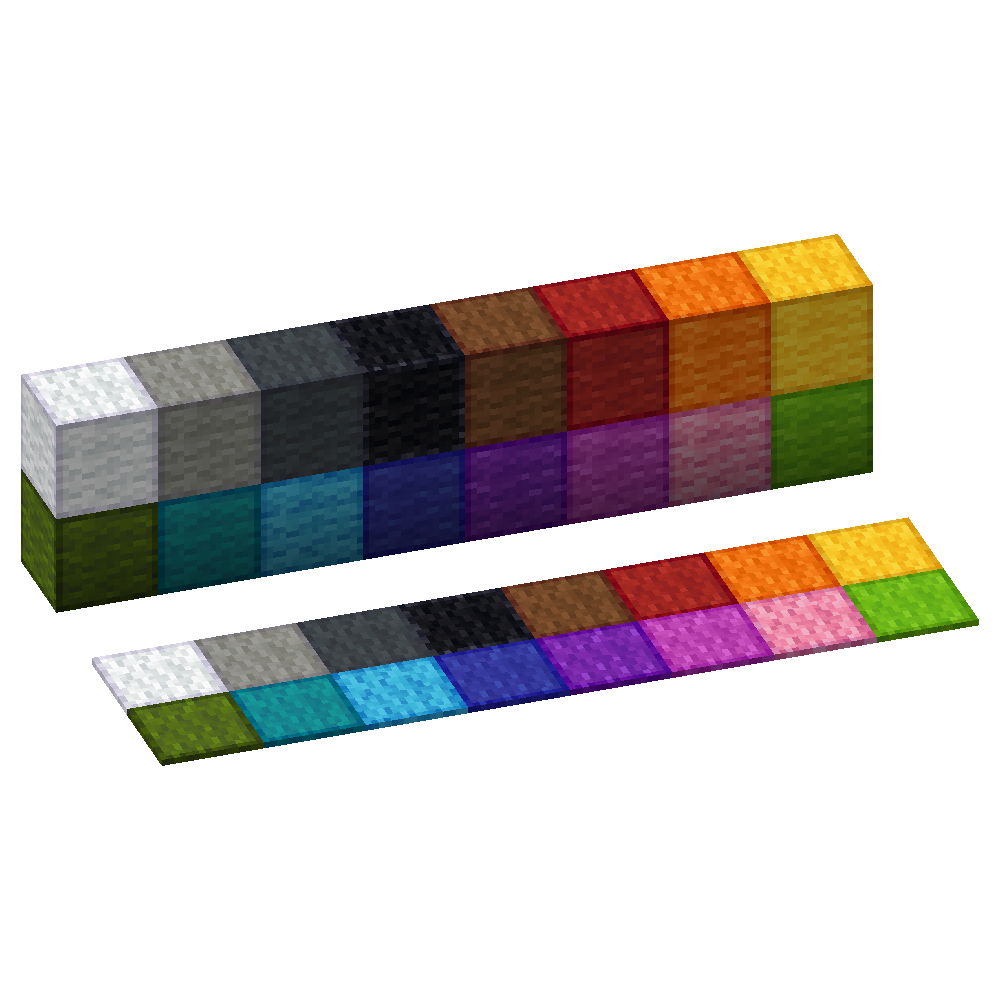
Outlined Wool
Simple and clean resource pack to add outlines to Wool blocks making them easier to see when building with wool
[ORB] OresRBack
## What does this mod/ datapack do?
This simple mod/ datapack makes it possible to mine ores like in versions before 1.17 again. That means that ores drop ores again and not raw ores. [Read more here.](https://github.com/orbmcmod/orb/wiki#what-is-this-mod-about)
## But whyy??
My friends and I noticed after playing the newer versions of Minecraft that the new ore logic is a bit overpowered and makes it much easier to get resources (especially Copper Ore)
## More Minecraft Versions???
I will support more Minecraft versions if it is requested. So if someone opens an issue on GitHub, or send me an mail to [this address](mailto:[email protected]), that they want another version of Minecraft for this mod/ datapack, I will create it!
## Create Extension
I’ve also created a mod for Create’s zinc ore, see: [ORBC](https://modrinth.com/mod/orb-create)
## BYG Extension
As well for Oh the biomes you’ll go! See: [ORBB](https://github.com/orbmcmod/orbb/releases)
## Disclaimer
This is not an official Minecraft product. Not approved by or associated with Mojang or Microsoft.
Optimum Realism
# **Optimum Realism**
**The realistic Minecraft resource pack with PBR, POM, and custom 3D models. 3M+ downloads across all platforms. Actively updated monthly.**
—
## **What is Optimum Realism?**
Optimum Realism replaces Minecraft’s blocks, items, and mobs with their real-world counterparts. It’s built with a focus on visual depth, shader compatibility, and consistent performance. The goal is a pack for players who want their world to feel grounded and tactile without the framerate cost that usually comes with realistic textures.
Over 650+ blocks reworked. Custom 3D mob models. PBR maps, parallax occlusion mapping, emissive textures, and depth-write POM, all in a single pack that runs on a GTX 1050.
—
## **Features**
– **650+ blocks reworked** with realistic PBR textures
– **Custom 3D models** for mobs and items (spiders, chickens, and more added monthly)
– **Parallax Occlusion Mapping, depth-write POM, emissive blocks, and full PBR support**
– **Compatible with Minecraft 1.21.x** and earlier versions back to 1.16
– **Works with all major shaders**: Kappa, BSL, SEUS PTGI, Complementary, and more
– **Java + Bedrock support**, with a dedicated **Bedrock RTX edition** launching soon
– **Performance-first design**. 64x runs smoothly on mid-range hardware
– **Actively updated monthly** with new textures, models, and features
– **3M+ total downloads** across CurseForge, Modrinth, and direct distribution
—
## **How Optimum Realism is different**
– **Real 3D models, not just retextures.** Mobs and blocks have actual geometry, not painted-on detail.
– **Depth-write POM.** Textures genuinely interact with each other. Sand fills the crevices between planks instead of sitting flat on top.
– **Performance balance.** Most realistic packs sacrifice framerate. Optimum Realism is built to run on hardware that other realistic packs choke on.
– **Consistent monthly updates.**

—
## **What’s free and what’s paid?**
– **64x edition: Free.** Fully featured, available here on Modrinth. Updated monthly.
– **128x edition: Patreon.** Higher-resolution textures, early access to monthly updates, and exclusive previews. **[Subscribe on Patreon](https://www.patreon.com/optimumrealism)** (preferred)
– **Alternative :** Available at **[store.optimumrealism.com](http://store.optimumrealism.com/)**


—
## **Before you install**
**Playing with Iris / Sodium?** You’ll need additional mods to run Optimum Realism properly. Two easy options:
– **[Full installation guide](https://www.optimumrealism.com/installation)**: step by step, with all required mods listed
– **[Ultimate PBR Essentials modpack](https://modrinth.com/modpack/ultimate-pbr-essentials)**: one-click install of everything you need
—
## **System requirements**

Optimum Realism runs well on a decent gaming computer. You don’t need an RTX card unless you’re using the Bedrock RTX edition.
– **64x version:** GTX 1050 or equivalent, 8GB RAM minimum
– **128x version:** GTX 1060 / RTX 2060 recommended for shaders at higher resolutions
– **Bedrock RTX edition:** RTX 2060 or better
—
## **Community & support**
If Optimum Realism has improved your game, leaving a **review here on Modrinth** genuinely helps the project grow.

– **[Join the Discord](https://discord.gg/optimum-realism-862970144049725490)**: WIP previews, monthly polls on what gets reworked next, screenshot showcases, and direct support from the dev
– **[Visit the wiki](https://www.optimumrealism.com/)**: installation guides, troubleshooting, and feature breakdowns
– **[Instagram @optimum_realism](https://www.instagram.com/optimum_realism/)**: behind-the-scenes block previews and dev updates
Only Pink Sheeps
**Only Pink Sheep** is fairly self-explanatory: every sheep you encounter in the wild is going to be pink.
Configuration options to customize the sheep colours is coming soon.
[](https://modrinth.com/mod/qsl)
—
[](https://github.com/sponsors/triphora)
[](https://discord.gg/buPbUvw5FD)
OneBar
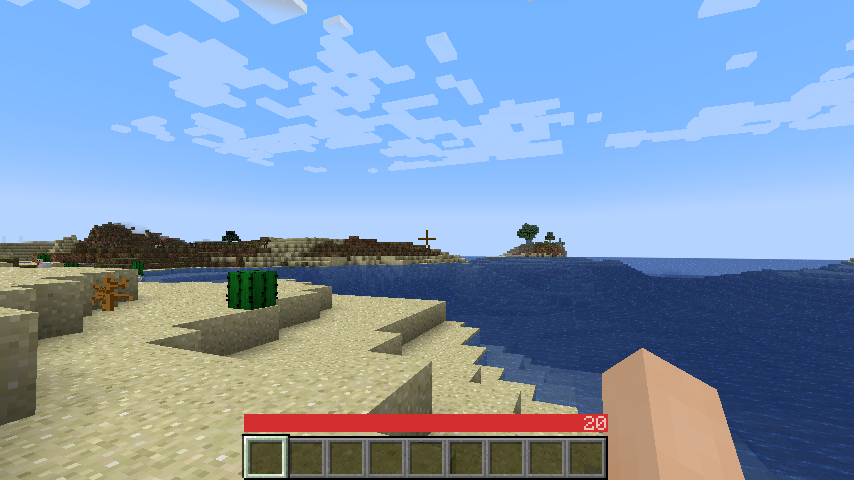
A sleek HUD mod for Minecraft: Java Edition using Fabric mod loader.
Reviews by Niche Duck: [main mod](https://www.youtube.com/watch?v=-Exd6HXWSpc) (v1.2.2), [config](https://www.youtube.com/watch?v=fJbe21IGc7U) (v1.2.2). [Mob arena gameplay with customized OneBar](https://www.youtube.com/watch?v=2wvhI5AhvE0) (v2.3.1) by agata_m
## How it works
[**See the gallery for a tutorial image!**](https://modrinth.com/mod/onebar/gallery)
Tips:
* Every value and bar is displayed only when you need it.
* The positive effects, including health itself, are displayed left-to-right; negative effects are displayed right-to-left.
* If you get hungry, the hunger overlay is displayed over the health by its value.
* If you eat, you’ll lose the overlay and the value, because you no longer need it.
* If you are also underwater, the water bar is displayed on top of health _and_ hunger because it is the most important value in this case.
* Health is _always_ the first number and hunger is _almost always_ the last number (except when you have the hunger effect).
* Everything in between is an estimate, additional health or damage source (can be disabled).
* You can also enable “Show additional symbols” in options to get icons for those
* Remember [old Minecraft without hunger and experience](https://minecraft.wiki/w/File:Beta_1.7.png)? This mod gives you a visually similar experience without losing modern functionality.
The mod only uses client-side data, so it is never needed on a server. There are also a lot of settings for configuring the colors and visibility of various elements.
### [Meanings of the colors and icons](https://github.com/Madis0/OneBar#bars-and-values)
## Installation
1. Install Minecraft 1.16 or later
2. Install [Fabric Loader](https://fabricmc.net/use/)
3. Download OneBar, [Fabric API](https://modrinth.com/mod/fabric-api), [Mod Menu](https://modrinth.com/mod/modmenu), [Cloth Config API](https://modrinth.com/mod/cloth-config)
4. Place the JARs you downloaded to your Minecraft’s mods folder
5. Run the game!
Currently also works on [Quilt](https://quiltmc.org), though no effort has yet been made to explicitly support it. See [#21](https://github.com/Madis0/OneBar/issues/21).
## Mod compatibility
– [Raised](https://modrinth.com/mod/raised) – moves OneBar and hotbar upwards, height of both can be adjusted
– [Auto HUD](https://modrinth.com/mod/autohud) – automatically shows and hides certain elements of OneBar as needed
– [Exordium](https://modrinth.com/mod/exordium) (beta) – improve HUD performance
– [OneBar + MCC Island Compat](https://modrinth.com/mod/onebarmcci) (unofficial) – disables OneBar when you have no health bar on MCC Island
– [Flour’s Various Tweaks](https://modrinth.com/mod/fvt) and [Head-down display](https://modrinth.com/mod/hdd) – partial compatibility for the auto-hide feature, does not hide OneBar elements
## FAQ
**Q: Why do I have to download [Cloth Config API](https://www.curseforge.com/minecraft/mc-mods/cloth-config) separately?**
A: Because it’s big, gets updated a lot and you probably have a mod or two that requires it anyway. If one of your mods already bundles it, you don’t have to download it at all 🙂
**Q: How do I edit the colors?**
A: Click Esc -> Mods -> OneBar -> config button. Colors are formatted as opacity + RGB in HEX, so choose an opacity from [this list](https://gist.github.com/lopspower/03fb1cc0ac9f32ef38f4#all-hex-value-from-100-to-0-alpha) and use [any HEX color picker](https://rgbacolorpicker.com/hex-color-picker) for choosing a color. For example if I want 80% opacity (`CC`) on blue (`0000FF`), I will enter `#CC0000FF`.
**Q: Forge support?**
A: No. Feel free to fork according to the license or [check out my resource pack that inspired this](https://modrinth.com/resourcepack/material-design-hud).
**Q: Backports?**
A: No, latest is greatest.
**Q: Snapshots?**
A: Sometimes. If not published here, check GitHub Actions.
Omnilook
# Omnilook
_A simple freelook/perspective mod for Minecraft._
Omnilook implements a small utility function for your player camera, which lets you rotate which way the third-person camera faces independent of your player’s head movement. This lets you take fancy cinematic shots or aim your cursor in a specific direction while not having to be locked to looking in that direction too!
## Version Support
Omnilook will support pretty much any and every mod loader and version of Minecraft you can think of. The table for this is kind of big, so please see [the GitHub readme](https://github.com/rhysdh540/Omnilook#version-support) for the full thing.
## Why Omnilook?
Omnilook is not the first mod to do this. Here’s why you should try it out:
– **It’s lightweight.** Unlike other mods, Omnilook is small and lightweight in about every way possible. It depends on other mods minimally, doesn’t interrupt your game in the slightest, and the mod jar weighs in at far under 100 kilobytes.
– **It’s compatible.** Omnilook will *just work* anywhere you put it. It uses as few injections as possible to get the job done, and often uses mod loaders’ events and APIs to make sure it functions well with other mods.
– …that’s about it for now.
## Configuration
Omnilook at its core is a pretty simple mod, so there aren’t too many configuration options right now. Besides the activation key binding (by default bound to the grave key, `), the one other option to configure is if pressing it toggles the effect, or if holding it keeps it activated.
## Issues?
See me on [GitHub](https://github.com/rhysdh540/Omnilook/issues). I’d love to help!
 ](https://modrinth.com/mod/totem-party-popper)
 ](https://modrinth.com/mod/modern-advancement-screen)
 ](https://modrinth.com/mod/area-sign-alerts)
 ](https://modrinth.com/mod/yeeterite)
 ](https://modrinth.com/mod/yeeterite-extras)
 ](https://modrinth.com/mod/adventure-bags)
 ](https://modrinth.com/mod/hopper-the-hedgehog)
 ](https://modrinth.com/mod/smelter-the-hedgehog)
 ](https://modrinth.com/mod/note-block-tuner)
 ](https://modrinth.com/mod/stonecutter-gui-remastered)
 ](https://modrinth.com/mod/loom-gui-remastered)
 ](https://modrinth.com/mod/glass-carpet)
 ](https://modrinth.com/mod/explosive-party)
 ](https://modrinth.com/mod/stacks-are-stacks)
 ](https://modrinth.com/mod/fov-toggle)
 ](https://modrinth.com/mod/spongesucc)
 ](https://modrinth.com/mod/wwg)
 ](https://modrinth.com/mod/party-spores)
 ](https://modrinth.com/mod/party-cacti)
 ](https://modrinth.com/mod/party-flames)
 ](https://modrinth.com/mod/superflat-plus)
 ](https://modrinth.com/mod/cottagecraft-mod)
 ](https://modrinth.com/mod/cottagecraft-axolotls)
 ](https://modrinth.com/mod/cottagecraft-festive-eggs)