OneBar
A sleek HUD mod for Minecraft: Java Edition using Fabric mod loader.
Reviews by Niche Duck: [main mod](https://www.youtube.com/watch?v=-Exd6HXWSpc) (v1.2.2), [config](https://www.youtube.com/watch?v=fJbe21IGc7U) (v1.2.2). [Mob arena gameplay with customized OneBar](https://www.youtube.com/watch?v=2wvhI5AhvE0) (v2.3.1) by agata_m
## How it works
[**See the gallery for a tutorial image!**](https://modrinth.com/mod/onebar/gallery)
Tips:
* Every value and bar is displayed only when you need it.
* The positive effects, including health itself, are displayed left-to-right; negative effects are displayed right-to-left.
* If you get hungry, the hunger overlay is displayed over the health by its value.
* If you eat, you’ll lose the overlay and the value, because you no longer need it.
* If you are also underwater, the water bar is displayed on top of health _and_ hunger because it is the most important value in this case.
* Health is _always_ the first number and hunger is _almost always_ the last number (except when you have the hunger effect).
* Everything in between is an estimate, additional health or damage source (can be disabled).
* You can also enable “Show additional symbols” in options to get icons for those
* Remember [old Minecraft without hunger and experience](https://minecraft.wiki/w/File:Beta_1.7.png)? This mod gives you a visually similar experience without losing modern functionality.
The mod only uses client-side data, so it is never needed on a server. There are also a lot of settings for configuring the colors and visibility of various elements.
### [Meanings of the colors and icons](https://github.com/Madis0/OneBar#bars-and-values)
## Installation
1. Install Minecraft 1.16 or later
2. Install [Fabric Loader](https://fabricmc.net/use/)
3. Download OneBar, [Fabric API](https://modrinth.com/mod/fabric-api), [Mod Menu](https://modrinth.com/mod/modmenu), [Cloth Config API](https://modrinth.com/mod/cloth-config)
4. Place the JARs you downloaded to your Minecraft’s mods folder
5. Run the game!
Currently also works on [Quilt](https://quiltmc.org), though no effort has yet been made to explicitly support it. See [#21](https://github.com/Madis0/OneBar/issues/21).
## Mod compatibility
– [Raised](https://modrinth.com/mod/raised) – moves OneBar and hotbar upwards, height of both can be adjusted
– [Auto HUD](https://modrinth.com/mod/autohud) – automatically shows and hides certain elements of OneBar as needed
– [Exordium](https://modrinth.com/mod/exordium) (beta) – improve HUD performance
– [OneBar + MCC Island Compat](https://modrinth.com/mod/onebarmcci) (unofficial) – disables OneBar when you have no health bar on MCC Island
– [Flour’s Various Tweaks](https://modrinth.com/mod/fvt) and [Head-down display](https://modrinth.com/mod/hdd) – partial compatibility for the auto-hide feature, does not hide OneBar elements
## FAQ
**Q: Why do I have to download [Cloth Config API](https://www.curseforge.com/minecraft/mc-mods/cloth-config) separately?**
A: Because it’s big, gets updated a lot and you probably have a mod or two that requires it anyway. If one of your mods already bundles it, you don’t have to download it at all 🙂
**Q: How do I edit the colors?**
A: Click Esc -> Mods -> OneBar -> config button. Colors are formatted as opacity + RGB in HEX, so choose an opacity from [this list](https://gist.github.com/lopspower/03fb1cc0ac9f32ef38f4#all-hex-value-from-100-to-0-alpha) and use [any HEX color picker](https://rgbacolorpicker.com/hex-color-picker) for choosing a color. For example if I want 80% opacity (`CC`) on blue (`0000FF`), I will enter `#CC0000FF`.
**Q: Forge support?**
A: No. Feel free to fork according to the license or [check out my resource pack that inspired this](https://modrinth.com/resourcepack/material-design-hud).
**Q: Backports?**
A: No, latest is greatest.
**Q: Snapshots?**
A: Sometimes. If not published here, check GitHub Actions.
Omnilook
# Omnilook
_A simple freelook/perspective mod for Minecraft._
Omnilook implements a small utility function for your player camera, which lets you rotate which way the third-person camera faces independent of your player’s head movement. This lets you take fancy cinematic shots or aim your cursor in a specific direction while not having to be locked to looking in that direction too!
## Version Support
Omnilook will support pretty much any and every mod loader and version of Minecraft you can think of. The table for this is kind of big, so please see [the GitHub readme](https://github.com/rhysdh540/Omnilook#version-support) for the full thing.
## Why Omnilook?
Omnilook is not the first mod to do this. Here’s why you should try it out:
– **It’s lightweight.** Unlike other mods, Omnilook is small and lightweight in about every way possible. It depends on other mods minimally, doesn’t interrupt your game in the slightest, and the mod jar weighs in at far under 100 kilobytes.
– **It’s compatible.** Omnilook will *just work* anywhere you put it. It uses as few injections as possible to get the job done, and often uses mod loaders’ events and APIs to make sure it functions well with other mods.
– …that’s about it for now.
## Configuration
Omnilook at its core is a pretty simple mod, so there aren’t too many configuration options right now. Besides the activation key binding (by default bound to the grave key, `), the one other option to configure is if pressing it toggles the effect, or if holding it keeps it activated.
## Issues?
See me on [GitHub](https://github.com/rhysdh540/Omnilook/issues). I’d love to help!
Ohmygod (Омайгад) Mellstroy Totem of Undying
– RU: «Омайгад» — это мем, связанный с стримером Меллстроем. В его основе — реакция Меллстроя на стриме, когда он производит эмоциональную жестикуляцию и произносит: «О май гад. Них.., красавчик».
Фраза вместе с выражением лица стали частью Меллстрой-мем-вселенной. Например, появился персонаж Омайгадность в сезоне «Село Молочное»
– EN: “Omaygad” is a meme associated with the streamer Mellstroy. It is based on Mellstroy’s reaction on the stream, when he makes emotional gestures and says, “Oh my god. Nikh.., handsome.”
The phrase, along with the facial expression, has become part of the Mellstroy meme universe. For example, the character Omaygadnost appeared in the “Molochnoye Village” season.
– [Тотем я уже красный со звуком](https://modrinth.com/resourcepack/mellstroy-(-)-totem-of-undying)
– [Тотем Меллстрой](https://modrinth.com/resourcepack/mellstroy-totem-of-undying)
– [ПОЛНАЯ КОЛЛЕКЦИЯ РЕСУРСПАКОВ – МЕМЫ + СТРИМЕРЫ](https://modrinth.com/collection/sfDcDGAi)
Ocean Panorama
Ocean Panorama replaces the Minecraft title-screen panorama with a high-quality, performance-conscious cube-mapped scene.
### Additional Information
Type:
`RELEASE`
Version:
`1.0.0`
MC Version:
`1.13.x, 1.14.x, 1.15.x, 1.16.x, 1.17.x, 1.18.x, 1.19.x, 1.20.x, 1.21.x`
NyaPack 🤺 Minimal Armor

**NyaPack 🦋** is a resource pack that lets you show off your skin even more!
Armor becomes more like **accessories** or **situational outfits**, helping you customize your appearance without covering your character entirely.
✨ **Features:**
– **Emissives** and **animations** support in newer versions, all **without additional mods**
– Support for the new **copper armor**
– Versions **without emissive** and **without animations** are also available for those who prefer a simpler look
Give your skin more personality and style! 🦋
Numbered Levels
# Numbered Levels
[ 
See more in the Gallery](https://modrinth.com/resourcepack/numbered-levels/gallery)
—
[](https://www.curseforge.com/members/ChicknTurtle) [](https://modrinth.com/user/ChicknTurtle) [](https://www.curseforge.com/minecraft/texture-packs/numbered-levels) [](https://modrinth.com/resourcepack/numbered-levels)
## Features
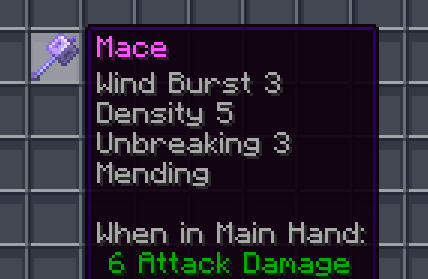
✨ Enchantment levels are displayed as numbers
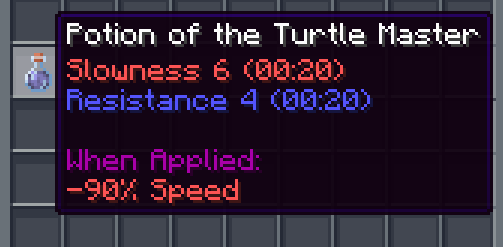
🧪 Potion potencies are displayed as numbers
🛠️ Fixes “enchantment.level.255” when levels are above level 10 (or 6 for potions)
🌐 Works in all 137 of Minecraft’s supported languages (as of 1.21.8)
## Info
Examples:
– Sharpness IV → Sharpness 4
– Instant Damage II → Instant Damage 2
– Mending (unchanged)
– Unbreaking I → Unbreaking 1
– Protection enchantment.level.255 → Protection 255
– Strength potion.potency.10 → Strength 10
Feel free to modify this pack or include it in a modpack!
—
[](https://modrinth.com/resourcepack/chicknturtles-3d-totems) [](https://modrinth.com/resourcepack/chicknturtles-better-shield) [](https://modrinth.com/resourcepack/chicknturtles-3d-tools)
**💚 Make sure to follow!**
NotAnnoyingHorses
# NotAnnoyingHorses


**NotAnnoyingHorses** is a Minecraft data pack/mod which allows you to nerf annoying AI of your horse with a nametag.
> _Have you ever been annoyed that your horse immediately leaves you as soon as you get off?_
>
> _With this data pack/mod, this won’t happen again!_
## 🚀 Quick Start
### 📥 Installation:



> #### 🛠️ Install as data pack:
>
> Please ensure that you have the following software installed:
> – [Minecraft]() (≥ 1.13)
>
> To install the data pack to your Minecraft world, you should:
> 1. Download the latest version.
> 2. Drop this data pack to the “datapacks“ folder of your world.
> 3. Load the world.
> #### ⚙️ Install as mod:
>
> Please ensure that you have the following software installed:
> – [Minecraft]() (≥ 1.13)
> – Mod loader ([Fabric](), [Forge](),
> [Quilt](), [NeoForge]())
>
> To install the mod to your client/server, you should:
> 1. Download the latest version.
> 2. Place it to the “mods“ directory in the Minecraft/server root folder.
> 3. Load the world/server.
### 💡 Features:
– **AI nerfing on specific horses.** Use the nametag “nerfed“ on your horse to nerf its AI.
Nerfed horses won’t be able to move by themselves, but you can still use them normally.
– **Reset nerfing of a horse.** Just use nametag “unnerfed“ on your horse to reset nerfing.
## 📭 Contact me:


Not So Scary Spiders
[](https://discord.gg/3qCU9bGPmt)
Nose Goes Definitive
Simply removes the nosepiece from player helmets. Great for those who want their face unobscured! Also fixes two pixels on the side of netherite helmets. [A programmer art variant is also available here](https://modrinth.com/project/nose-goes-definitive-programmer).
This mod is compatible with every version, all the way back to `1.6.1` when resource packs were added. For versions pre-`1.14`, you probably want the [programmer art variant](https://modrinth.com/project/nose-goes-definitive-programmer). In theory, there is no reason it should break with updates, excluding the addition of more armor types or trims.
This is an updated version of [Nose Goes](https://modrinth.com/resourcepack/nose-goes). However, several changes have been made over the original.
– Unique [programmer art variant](https://modrinth.com/project/nose-goes-definitive-programmer)
– Copper helmet support
– Netherite helmet icon changed
– Wild armor trim edited, the only trim which uses the nosepiece
– An edit in the original, above the left and right of the netherite helmet’s face, was reverted
[Miniature](https://modrinth.com/shader/miniature-shader) used for the gallery screenshots.
[Programmer art variant.](https://modrinth.com/project/nose-goes-definitive-programmer) ;D
NoRollback
[](https://modrinth.com/project/K4Ytaql5)
[](https://discord.gg/FVq3j5heAc)
[](https://fabricmc.net/)
[](https://quiltmc.org/)
[](https://neoforged.net/)
[](minecraftforge.net)
___
## What’s NoRollback ?
**NoRollback** is a project that removes 99% _(source : trust me)_ of rollbacks.
**You can remove this project from a world after loading a world with it. One use is enough.**
## How it works ?
### Changed the game rule `elytra_movement_check` and `player_movement_check`
Ignores the player’s speed limit & speed limit when using elytra. This removes most rollbacks but makes it easier to cheat on a server. (source : [Minecraft Wiki – Gamerule](https://minecraft.wiki/w/Game_rule))
## Complementary
If you use this project, you might be interested by [ClienThings](https://modrinth.com/project/clienthings)
## Compatibility
**NoRollback** work with anything and anywhere.
## Support me!
Join my Hardcore Minecraft server: `38.143.19.130:51965`