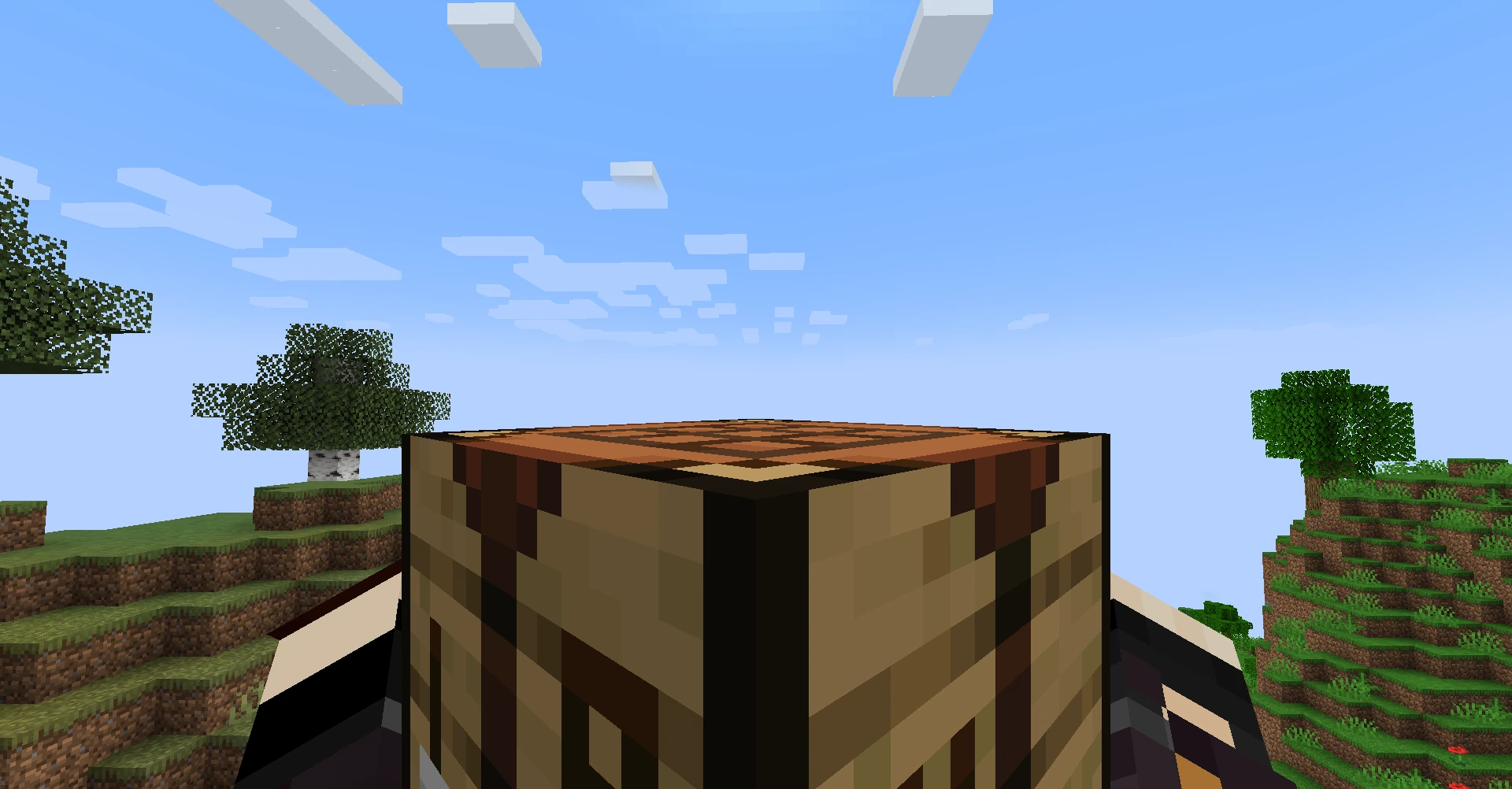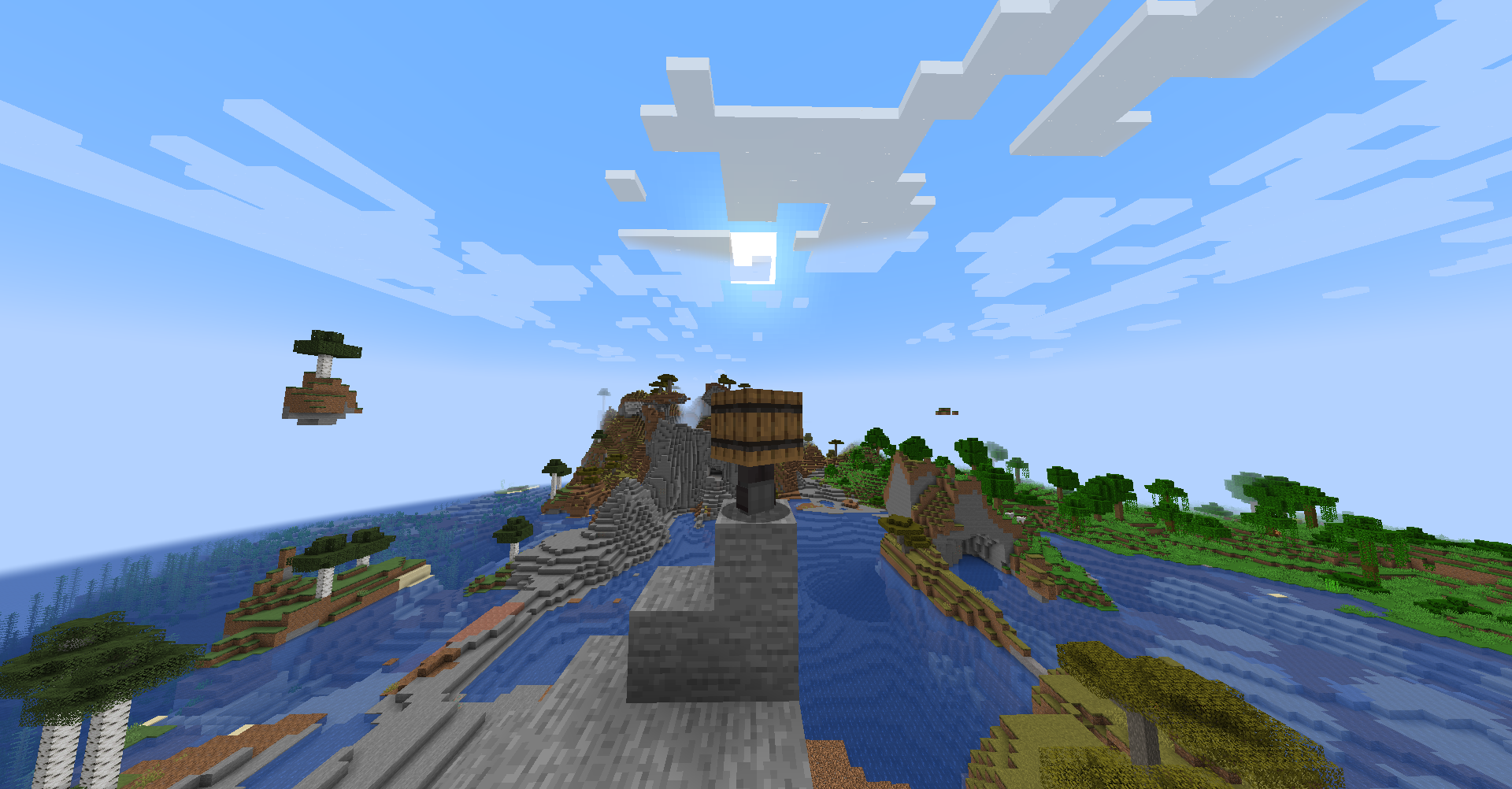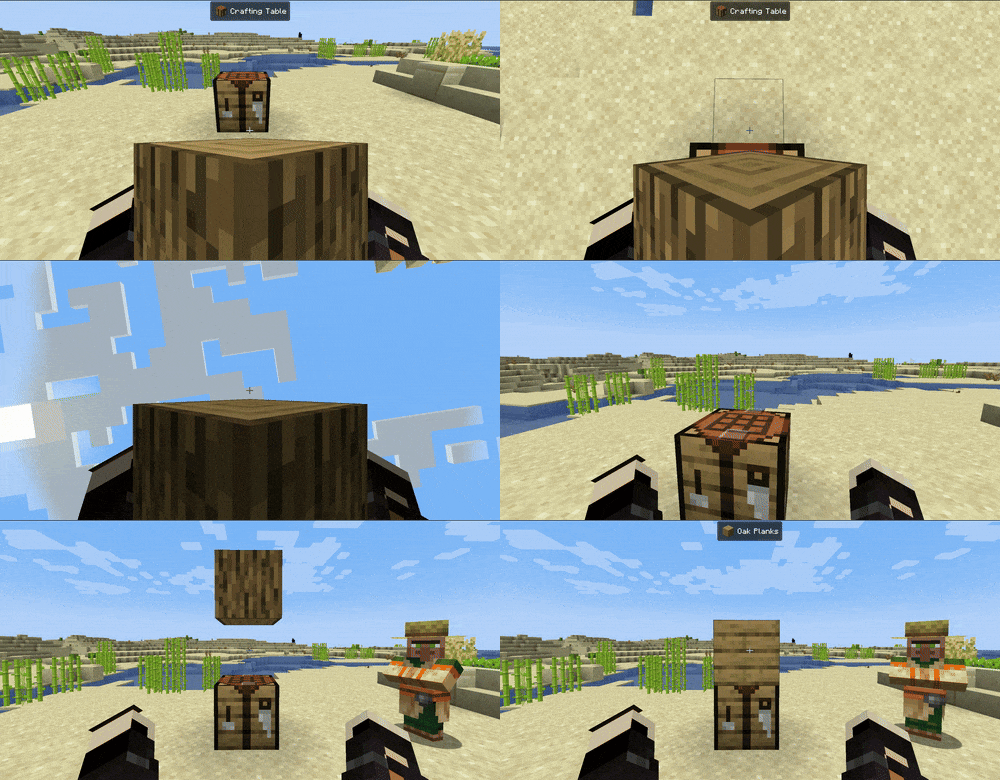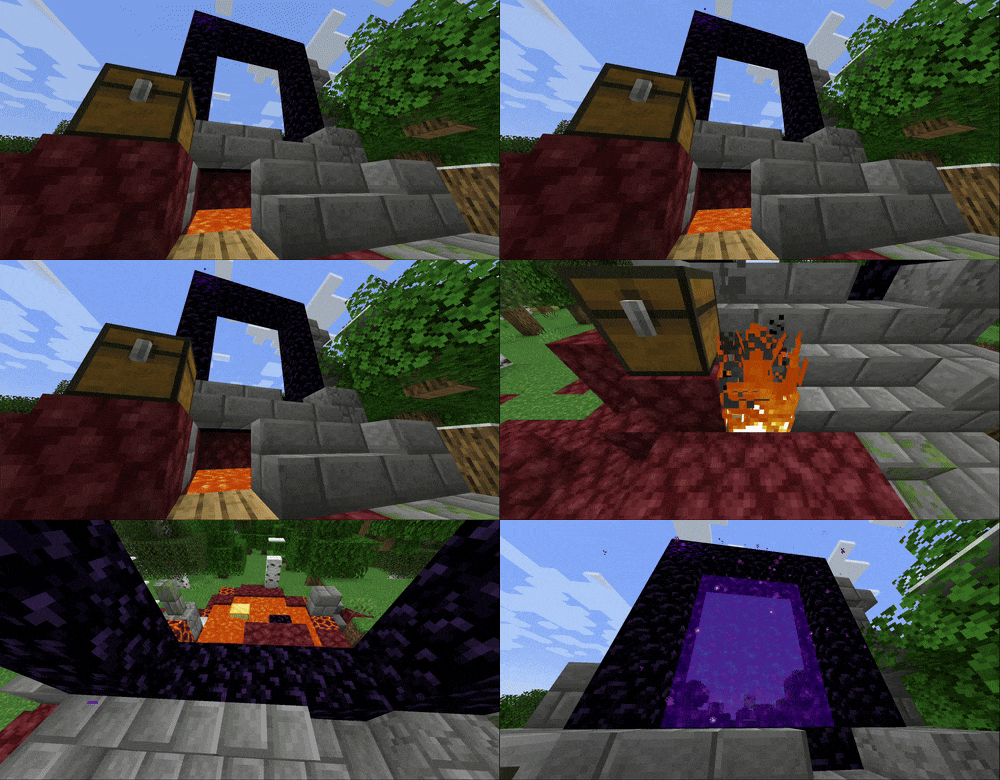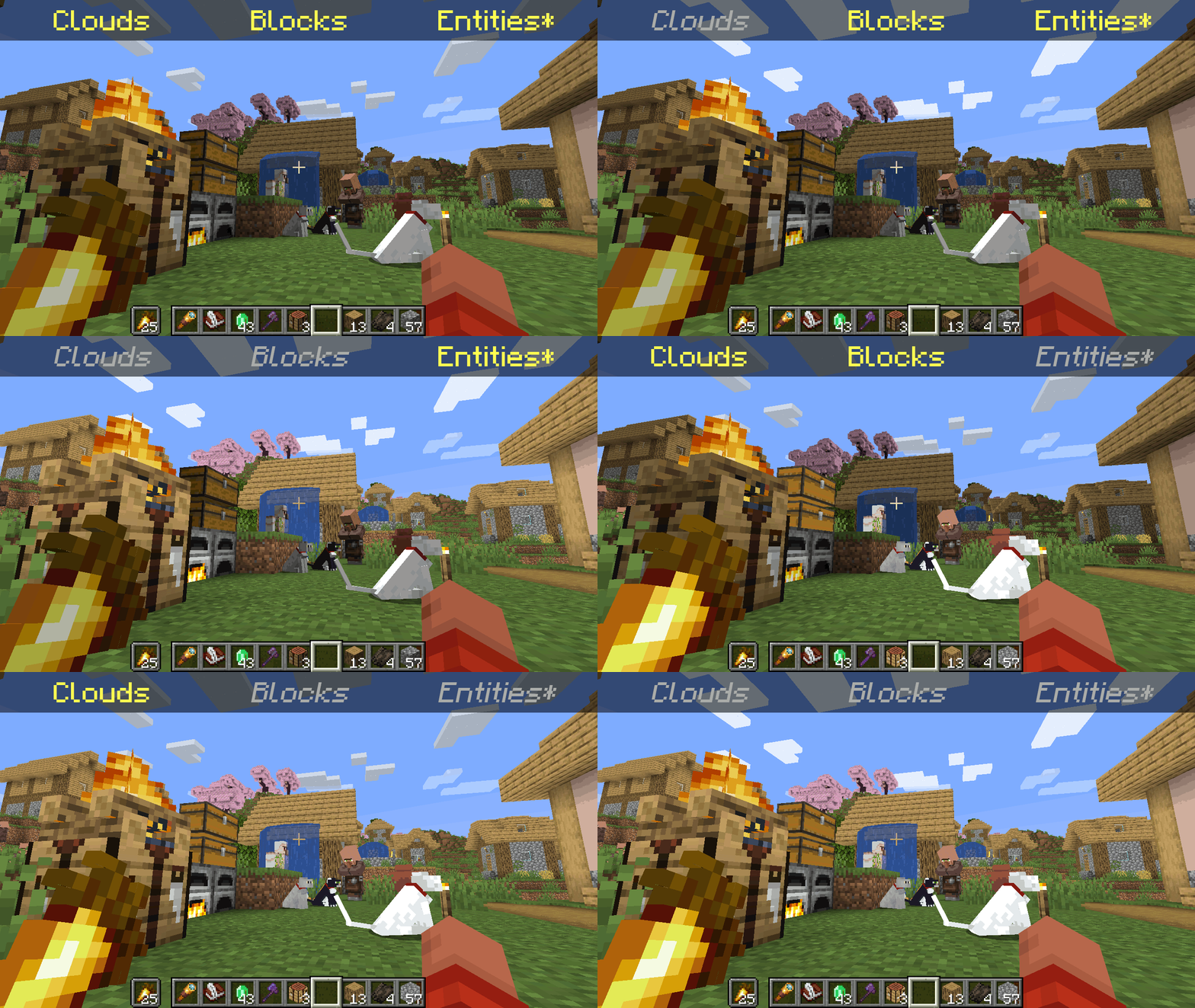
*Clarification that Entity shading is now stable and DOES NOT affect the inventory and in-game screens.
—
Simply No Shading is a [Fabric]-based [modification] (mod) for the [Minecraft] [client]. This mod removes the darkening on sides or faces (also known as [shading]) to in-game objects such as blocks, clouds, and entities as illustrated above.
[Fabric]: https://fabricmc.net
[modification]: https://minecraft.wiki/w/Mods
[Minecraft]: https://minecraft.net
[client]: https://minecraft.wiki/w/Mods#Client-based
[shading]: https://en.m.wikipedia.org/wiki/Shading
## Compatibility
Simply No Shading provides active compatibility for [BedrockIfy] and [Sodium]. Some mods that provide or replace stuff may work such as [Enhanced Block Entities] (EBE), where block entities act like blocks and are affected as such when toggling shading. Some mods that replace rendering are most likely incompatible; exceptions have active support such as Sodium, for example. One example of incompatibility is shaders, usually applied using [Iris], as they may not crash the game but would just render this mod ineffective when they are applied.
[BedrockIfy]: https://modrinth.com/mod/bedrockify
[Sodium]: https://modrinth.com/mod/sodium
[Enhanced Block Entities]: https://modrinth.com/mod/ebe
[Iris]: https://modrinth.com/mod/iris
## Similar Solutions
Simply No Shading is not the only effort to removing shading, there are other solutions such as:
– [Flat Lighting] is a simple Fabric mod that achieves the same results for blocks and supports Sodium.
– [internal-shaders](https://modrinth.com/shader/internal-shaders), though unlisted, is a simple Iris shader that removes shading on blocks and entities.
– [Lightingless] is a simple shader that removes shading on blocks and entities.
– [OptiFine]’s old lighting through the internal shader. Achieved by turning `Options > Video Settings > Shaders… > (internal) > Old Lighting` to `ON`.
– [New Lighting 1.18+ (Internal Shaders without Optifine)]. This resource pack achieves the similar results by setting the `shade` flag on block models to `false` (OFF).
[Flat Lighting]: https://modrinth.com/mod/flat-lighting
[Lightingless]: https://modrinth.com/shader/lightingless
[OptiFine]: https://optifine.net
[New Lighting 1.18+ (Internal Shaders without Optifine)]: https://www.planetminecraft.com/texture-pack/new-lighting-1-16/
## Features
Simply No Shading supports the following categories for toggling shading:
– Blocks — this includes blocks, liquids, and EBE‘s block entities
– Clouds — this includes clouds
– Entities ([`≥7.4.0`]) — this includes normal entities and block entities in the world
– ***Deprecated** Experimental Entities Built-in Resource Pack — this includes block entities, entities, and blocks, block entities, entities, and items in toasts (pop-ups, e.g. completing an [advancement]) and inventories and or Graphical User Interfaces (GUIs)*
[`≥7.4.0`]: https://modrinth.com/mod/simply-no-shading/version/7.4.0+mc1.21
[advancement]: https://minecraft.wiki/w/Advancement
## Configuration
Simply No Shading has a configuration screen and it’s accessible through:
– a key mapping. It’s unbound by default and can be bound at `Options > Controls > Keys > Simply No Shading > Open Config Screen`
– [Mod Menu]. `Mods > Simply No Shading > Configure…`
[Mod Menu]: https://modrinth.com/mod/modmenu
Simply No Shading stores its configuration as a formatted [JSON] file at `/config/simply-no-shading.json`.
[JSON]: https://en.m.wikipedia.org/wiki/JSON
[`1.2.0`]: https://modrinth.com/mod/flat-lighting/version/1.2.0
[core shaders]: https://minecraft.wiki/w/Shaders
[Fabric Loom]: https://github.com/FabricMC/fabric-loom
[MIT License]: https://github.com/simply-no-shading/blob/master/LICENSE
[Modrinth]: https://modrinth.com/mod/simply-no-shading/versions
[resource pack]: https://minecraft.wiki/w/Resource_Packs
## Versions
Simply No Shading follows semantic versioning. This mod aims to maintain the same feature across supported Minecraft versions. Given the version `X.Y.Z` where:
* `X` changes when breaking changes occur, such as with breaking config format changes.
* `Y` changes when features are added or changed (non-breaking).
* `Z` changes for bug and compatibility fixes and may not stay consistent across supported Minecraft versions.
Target versions is currently being reconsidered. Mod version `8.x` will likely only be maintained for the newest versions of the game. `7.x` will still remain maintained for bug-fixing and translations.
Simply No Shading aims to provide support for the latest minor updates to major releases along with some April Fool’s snapshots. All minor releases for the latest major version are supported. The latest snapshot versions also get temporary support before the next major release. Following are all those versions:
| # | Mod Version | Minecraft Version |
|—:|:———–:|:———————-:|
| 1 | `7.6.4` | `1.14.4` |
| 2 | `7.6.4` | `1.15.2` |
| 3 | `7.6.4` | `20w14infinite` |
| 4 | `7.6.4` | `1.16.5` |
| 5 | `7.6.4` | `1.17.1` |
| 6 | `7.6.4` | `1.18.2` |
| 7 | `7.6.4` | `22w13oneblockatatime` |
| 8 | `7.6.4` | `1.19.4` |
| 9 | `7.6.4` | `23w13a_or_b` |
| 10 | `7.6.4` | `1.20.1` |
| 11 | `7.6.4` | `24w14potato` |
| 12 | `7.6.4` | `1.20.6` |
| 13 | `7.6.4` | `1.21` |
| 14 | `7.6.4` | `1.21.1` |
| 15 | `7.6.4` | `1.21.2` |
| 16 | `7.6.4` | `1.21.3` |
| 17 | `7.6.4` | `1.21.4` |
| 18 | `7.6.4` | `25w14craftmine` |
| 19 | `7.6.4` | `1.21.5` |
| 20 | `7.6.4` | `1.21.6` |
| 21 | `7.6.4` | `1.21.7` |
| 22 | `7.6.4` | `1.21.8` |
| 23 | `7.6.6` | `1.21.9` |
| 24 |`8.0.0-alpha.1`| `1.21.10` |
| 25 |`8.0.0-alpha.3`| `1.21.11` |
| 26 |`8.0.0-alpha.3`| `26.1-snapshot-2` |
Silent Discs Plus
This Silent Discs resource pack is made specifically for use with redstone disk/jukebox ROMs. It not only silences all music discs, but also removes the “now playing” text and silences minecarts too
(Minecarts have a bad habbit of taking up the sound cap even if you can’t hear them, this pack fixes that)
Shorty Swords
Shortened Sword are Just Built Different! Aren’t they look hot?
Texture-pack makes swords a bit shorter. Supports almost **EVERY** ever existed Minecraft Version.
ShiNeaL’s Simplacity

ShiNeaL’s Simplastic Pack:
This pack has been worked on for around 3 years now (Since 2019) and we have put a lot of time and effort into the pack, and we love to see that people enjoy it. I hope everyone enjoys the pack and we will continue to update the pack constantly!
“ShiNeaL’s Simplastic Pack is a pack of textures as its simple name suggests with a resolution of 16x with a soft or plastic style with very marked edges in all its blocks as well as keeping the original colors to preserve its style.”
– Random Site I Found #1
“With this pack, all the blocks in the game will become simple and smooth. Their textures will look as simple as possible, but easily recognizable and not devoid of detail. If you want to see simple, but not too simple, textures in the game, then this resource pack is perfect for you!”
– Random Site I Found #2
“Perfect for those who want a mix of simplicity, plastic, and default textures!”
– RobinTheTraveler, a “Loving Subscriber”
ShinyDragon96 – Owner, Founder, Textures, Models, Organizer
Tgw Creeper – Textures
pigeo – Just Here, the Usual
Swimmingturtle247 – “Simplastic” Idea
Mod Support Addon — [ShiNeaL’s Simplastic Mod Support](https://planetminecraft.com/texture-pack/shineal-s-simplastic-mod-support)
Bedrock Port — [ShiNeaL’s Simplastic Bedrock](https://planetminecraft.com/texture-pack/shineal-s-simplistic-pack-bedrock)
CTM Addon — [ShiNeaL’s Simplastic CTM](https://planetminecraft.com/texture-pack/shineal-s-simplastic-ctm)
All My Vanilla Packs In One – [Shiny’s Mashup Pack](https://planetminecraft.com/texture-pack/shiny-s-vanilla-overhaul)
Realistic Entities — [Shiny’s Entity Models Plus](https://planetminecraft.com/texture-pack/shiny-s-entity-models-plus-optifine)
ShiNeaL’s Simplastic Pack© 2020 by ShinyDragon96 and ShiNeaL’s Packs is licensed under CC BY-NC 4.0! – If you use this pack in a video, post, or anything else, it must be linked back to here & credited in my name – !
shea’s simple Totem x bare bones
# shea’s simple Totem x bare bones
## what does this pack does
### it takes Totems and cleans it up
This pack does not include any bare bones textures
**Bare Bones is required for the intended look**
disclaimer if you use this pack make sure to place this pack above bare Bones in your resource pack list for it to use its own instead of bare bones
i recomend using other shader and resource packs like [bliss](https://github.com/X0nk/Bliss-Shader) to improve looks but that is optional
**you can showcase this if you want just dont redistrabute it**
Spawn Egg Recipes Reborn
This is a Data Pack/Mods. It adds recipes for spawn eggs, and it also includes spawn egg recipes that work with other mods. This mainly supports Data Pack.This SER Reborn has more integrations with mods than the original Spawn egg recipes and is more user-friendly.
Selfskin
# Selfskin
Change any skin fully client-side!
Simply put a file in `.minecraft/selfskins/.png` or `.minecraft/selfskins/slim/.png` to override a player’s skin (it works with offline players too).
Skins automatically update each time a player enters the world (as of 1.1.0). To change skins while a player is in the world, use `/selfskin:reload`. The command accepts a username to only reload one player’s skin.
This mod will change the skins you see on players, logged in or not, without other players seeing the changes.
Thus, it does not do the same as changing alex.png and steve.png in a resource pack.
Selfskin tries to work with as many versions as possible on fabric and quilt.
Forge support may come eventually as this mod is really small and simple.
Requests for version ports are welcome.
This mod also tries to be compatible with mods like [Ears](https://modrinth.com/mod/ears).
Found a mod that works or doesn’t work with selfskin? Questions? Or just want to chat? [Come join us on matrix!](https://matrix.to/#/%23wonder-minecraft:the-apothecary.club?via=the-apothecary.club&via=syndicated.gay&via=matrix.org) Alternatively, [create an issue](https://git.sleeping.town/wonder/selfskin/issues/new)
## Compatibility
The listed supported versions are not exhaustive and most mod/minecraft version combinations are not tested. The mod may work on versions that are not listed. Please reach out if you find an inaccuracy!
Known compatible mods:
– ~~3d Skin Layers~~ reportedly broken, but will run
– Ears
Known incompatible mods to be fixed:
– 3d Skin Layers
Known mods that won’t be compatible:
– none (so far)
Scaffolding Fix
A lightweight resource pack that adds the missing hole on top of scaffolding blocks.
**Note that the texture is off on pre 1.19.3 versions of minecraft, i might fix this in the future.**
Before/Vanilla:

After:

_You may not redistribute this resource pack anywhere without proper permission, the only official download page for this resource pack is on modrinth._