Bedwars TP
# 🛏️ BedwarsTP
A clean and simple texture pack made for Bedwars players.
It focuses on PvP visibility, performance, and style, without overdoing effects or changing the classic Minecraft feel.
# 🎨 Features
– Shortened swords
– Low-fire texture
– Simple blocks and clear glass
– Custom sky
– Clean GUI and hotbar
– Optimized for more FPS
**Perfect for players who want a lightweight, good-looking PvP.**
**Please give me your feedback here.**
Bedwars Ultimate
This Resource Pack focuses on Bedwars and PvP Textures, like tiny Swords or some simple Block Textures.
Tools and Weapons:
25
Blocks:
128
Items:
11
Armor and Equipment:
21
Coming soon: Item Textures 🙂
Bedrock Hotbar

## Description
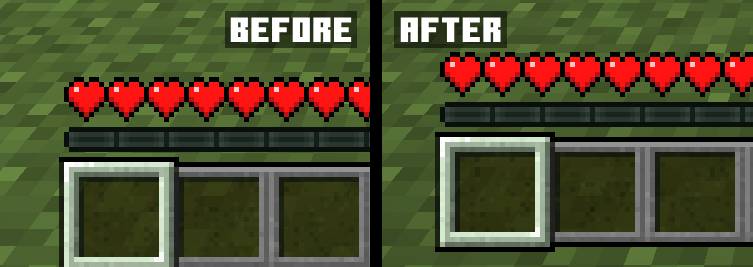
The mod makes the hotbar offset in Java Edition the same as in Bedrock Edition with the ability to customize its offset
## Usage
The mod currently has a settings menu that can be used if you install Cloth Config and ModMenu for Fabric. In the settings window, you can change the hotbar offset, and this can also be done by changing the value in the config file. Since version 1.1, the mod renders the bottom of the texture of the selected item (missing since Minecraft version 1.20.2), which allows it to be used with resource packs that change the hotbar
## Compatibility
AppleSkin: Health and saturation HUD linked to the hotbar
Bedrock GUI
> A gui style for menus based on Bedrock Edition
## About
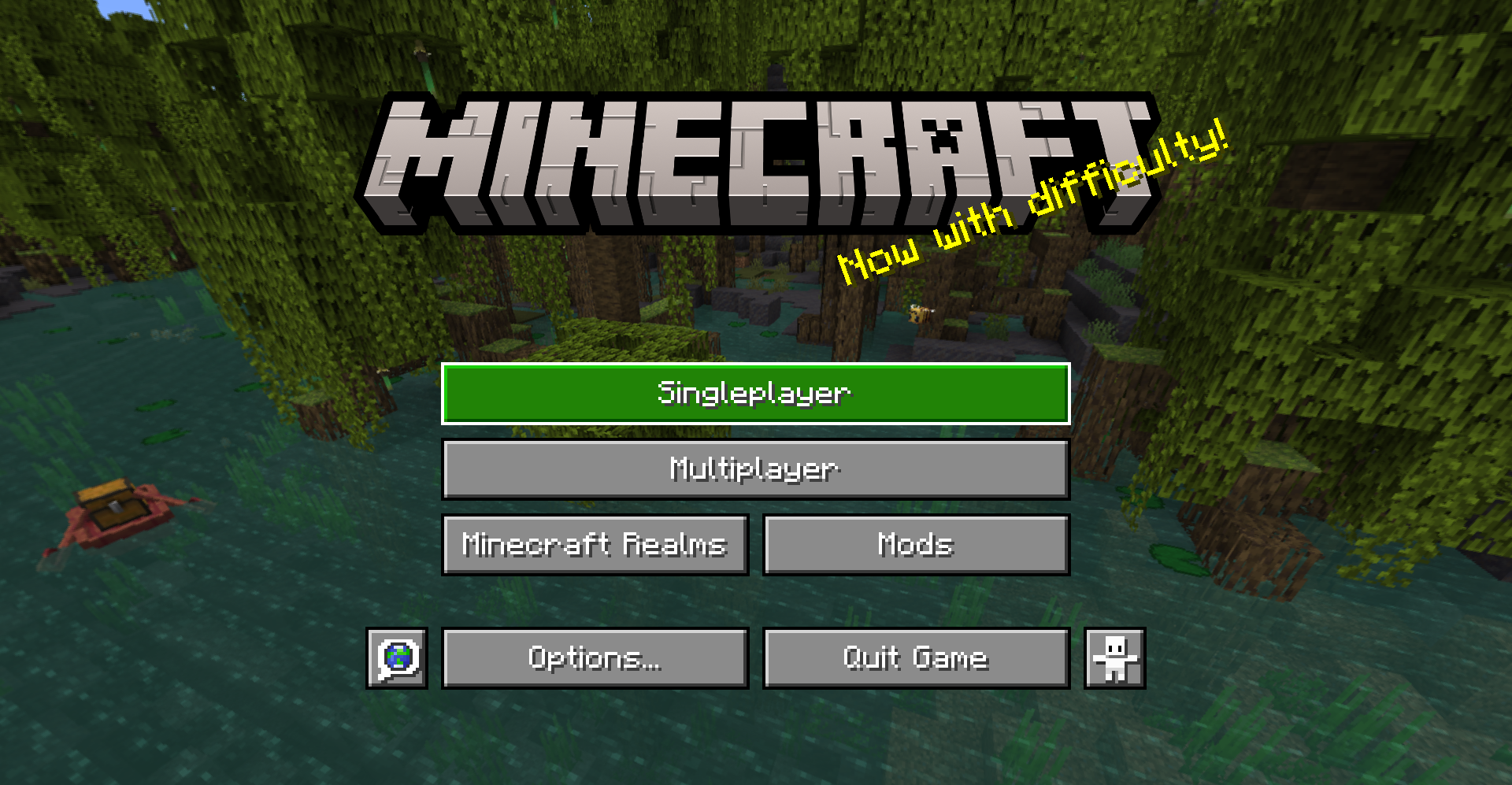
This pack changes the style of most menu buttons (even some modded ones!) to look more like Bedrock Edition’s gui. It also replaces the vanilla title with the Bedrock one.
Supported mods:
– Mod Menu
– Capes
– Malilib
– Litematica
This pack also supports Respackops! If you have it installed, you’ll be able to disable certain features or even try out alternate styles!
## Install
For loading the pack in-game, check out the official Minecraft wiki page on how to install resourcepacks.
## Usage
You can use these assets however you want and post projects that include them as long as any of the following pages are linked to as credit: Github | Modrinth | Curseforge
Please do not rehost this pack directly. If you want to make releases on other platforms, redirect downloads to any of the above links.
Bat
**OPTIFINE/EMF REQUIRED.**
________________________________________________________________________________________
Quite literally ONLY remodels and retextures the bat to be more like it’s original brown look but pixel consistent.
Said look being from any point before 1.21.3, where they didn’t bother keeping it…
Basic Skyblock
# SkyBlock
A basic syblock implementation where all blocks and entities are
removed _after_ they are generated as to ensure that the structure
bounding boxes are generated in their original position, but before
the chunk is lit so every chunk does not have to be relit.
The ***+entities*** (-e) version does _not_ remove entities, although they
do fall into the void. They may be catchable using flying machines.
You can find a recreation of the original
skyblock 2.1 map with seed: -5013545841426130646
at: https://www.mediafire.com/folder/n7a7x0gkdvunw/Skyblock
***WARNING:*** do not open any pre-1.18 worlds with this mod active!
While converting from pre 1.18 to post 1.18, the mod will remove all
blocks and entities
in the old chunks.
Remove the mod, convert your world and re-add
the mod afterwards.
Updating between any post 1.18 versions should be fine, although I do
recommend backing up your world beforehand.
# Installation
Fabric Installer: https://fabricmc.net/use/
If you have any trouble with a part of the installation,
I made a step by step on the process:
https://docs.google.com/document/d/1BWKdWrVqP9K3t1T7GJG-C6UjfWvbO4MiADr9DMjai00/
The tutorial is written for 1.18 but the steps are the same for
subsequent versions.
You can also look at one of many mod installation tutorials on youtube.
Bare Bones – Stained Glass Fix
This resource pack changes the stained glass blocks and pains from the Bare Bones pack by RobotPants to make them more vanilla-like, by adding borders and decreasing their opacity.
Bare Bones Borders
Bare Bones Borders adds borders to important blonks like ores and powdered snow in the style of Bare Bones.
Also supports emissive textures with the use of Continuity or ~~Optifine~~.
I’m open to suggestions for more blocks or mod support.
Balanced Recall
# Balanced Recall
*Mirrors and a mat*
This mod requires Fabric and the Fabric API.
## Features
**Magic Mirror**

Using the magic mirror will teleport you to your spawnpoint from anywhere in the same dimension. It has 256 charges, and can be recharged at a smithing table with an ender pearl. If it runs out of charges, rather than breaking, it will simply cease to function until recharged.
—
**Dimensional Mirror**

The dimensional mirror is identical to the magic mirror, except it has twice the charges and can travel between dimensions.
—
**Sleeping Mat**

The sleeping mat allows you to skip the night without setting your spawn. Be warned, though, sleeping on this rough straw-padded bamboo mat is not enough to ward off phantoms. The sleeping mat has 128 uses and cannot be repaired.
—
## Planned features
– **Config Options**
– Toggle taking damage interrupting recall
– Toggle taking damage putting mirrors on cooldown
– Toggle ability to recall when monsters are nearby
– Set magic mirror use time
– Set magic mirror cooldown time
– Set dimensional mirror use time
– Set dimensional mirror cooldown time
– Toggle sleeping mat resetting phantom timer
Back to the PIT
# Back to the PIT
### formerly known as LRRgh
This resource pack replaces the default Minecraft bell sound with “Back to the PIT”
This can be useful if, for example, you wanted to dig a 16×16 hole down to bedrock, and ring a bell each time you intend to return to that hole.
## CREDITS
“Back to the PIT” sound voiced by the late Wayne June for Darkest Dungeon by Red Hook Studios
— https://www.darkestdungeon.com/darkest-dungeon/
resource pack icon taken from famous youtuber James Turner’s jlrrPit emote
— https://twitch.tv/James_LRR
art made by Taylor “TQ” Quinn
— https://linktr.ee/WitchyTQ
resource pack haphazardly hacked together by MungoDude
— https://kind.social/@mungodude
— https://bsky.app/profile/mungodude.bsky.social