OpenBagTwo’s Custom Items
# OpenBagTwo’s Custom Items
This project comprises a wide variety of custom item models that can
be obtained—as of 1.21.5—without mods or datapacks and simply grab an anvil
and renaming each item as specified in the resource pack’s README.
These items can then be:
– held in hand
– placed in an item frame
– worn as a hat (when the base item is a carved pumpkin)
– equipped onto an armor stand (using the
Armor Statues Datapack
or an equivalent mod)
These custom models can be downloaded as independent packs
from the project GitHub, or
you can use the `combine.py` script in that repo to mix and match
and obtain your own custom pack.
## Table of Contents
### Caffeinate
Texture potions as cups of coffee or shots of esperesso
(see accompanying datapack to for better immersion through auto-naming)
### Clear Carved Pumpkins
My own carved-pumpkin clearing resourcepack, included for (my own?) convenience
### Corrupted Cores
Wear a _Portal 2_ personality core on your head
### Ghast Legs
Not sure what to do with all those ghast heads you’ve been getting through
the More Mob Heads datapack?
Why not turns some of your excess tears into legs and put up a ~~baby~~
_even babier_ ghast around your base?
### Hermit Soundboard
Mixes various in-game sounds for Hermit soundbytes
### Hermit Totems
Provides the custom Totems of Undying created by
u/BrazenWolf_
of the r/HermitCraft subreddit
### HIM
Cursed Goomba model based on the “HIM” Mari0 jumpscare mappacks
developed by Britdan
### Jameson
Jameson-Type Cyborg from _Ghost in the Shell: Stand Alone Complex_
### Knitting Needles
Turn a sword into an (equally deadly) set of double-pointed knitting needles
### Mojivation
Add some custom paintings to your Minecraft workplace to improve morale
### Moonescent Pearl
Turn Ender Pearls and Eyes of Ender into everyone’s favorite Aussie Hermit
(see accompanying datapack to enable some fun sounds)
### Spheres With Leaves
Oddishes of various flavors
### Steam Deck
Turn your poisonous potato into a portable console
### Trek Roleplay
Various _Trek_-themed items
## Credits and Acknowledgements
The Steam Deck was modeled by me, from scratch, in Blockbench.
The Cursed Goomba model is courtesy of Alesan99
Hermit Totem models and textures are provided courtesy of u/BrazenWolf_ and
can be downloaded separately.
The model for Wheatley comes from bunbunny via
sketchfab
and is available under a Creative Commons Attribution license.
The “motivational” posters were adaoted from the background of Mojang’s
“How We Make Minecraft” series
(Season 2) as featured on the
Minecraft YouTube channel.
PearlescentMoon textures are all courtesy of PearlescentMoon.
The Hermit egg model and textures were extracted from the official Hermitcraft Season 9 world download
obtained from the official website and were originally created by Danny.
Several models were remapped and baked in Blender then converted using
voxelizer. Most were either designed in or
edited using Blockbench.
Textures were edited using a combination of Blockbench,
PikoPixel
and GIMP.
Some other tutorials and resources that were instrumental in the development of this datapack:
– How To Make CUSTOM HATS in Minecraft! Pt.1 – YouTube
– Bake Multiple Materials to One Texture Map (Blender Tutorial) – YouTube
– How to bake textures in Blender – Artisticrender.com —
an honest-to-God _written guide!_
– This Minecraft Bug Report for explaining to me why my commands were deleting
the first potion in the brewing stand (“works as intended” lol)
– This thread on minecraftforum.net for providing me with a workaround to the above not-a-bug.
– Custom items using components for Minecraft 1.21.5
## License
All resourcepacks, datapack, scripts and their respecitve contents—including model
assets and textures—are provided and made available by me,
**@OpenBagTwo**, under
the GNU Public License v3,
except where explicitly stated otherwise. Some assets may be available under
less restrictive terms from their original sources.
Technoblade Never dies!
# Description
This pack supports a wide range of versions, from 1.11 to 26.1!
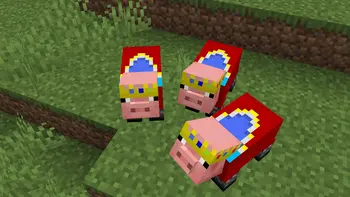
I’d like you to take a look at the gallery, but unlike the other packs being distributed, this pack not only puts crowns on the pigs, but also dresses them in clothes.
# ****Preview****
Cartoony

# 🎨 Cartoony for Minecraft
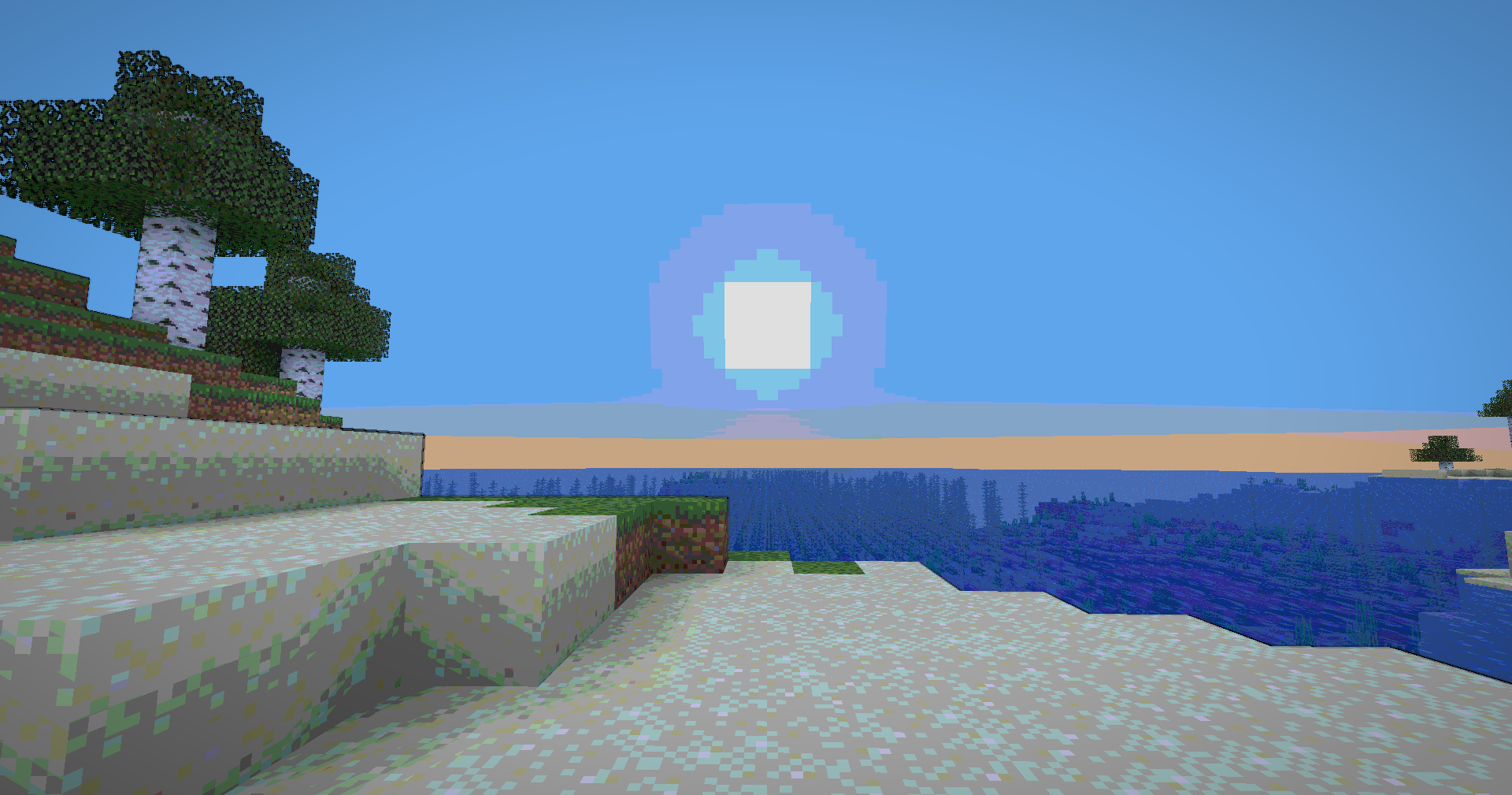
 Transform your Minecraft world into a vibrant, animated masterpiece! This shader pack brings a cel-shaded, cartoon aesthetic to your gameplay with smooth lighting, bold outlines, and stylized color grading.
## ✨ Features
### Visual Effects
* **Cel-Shaded Lighting** – Smooth, stepped lighting that creates that iconic cartoon look
* **Dynamic Outlines** – Depth-based edge detection with smooth, artistic borders
* **Color Banding** – 8-level color quantization with seamless transitions
* **Enhanced Colors** – Carefully tuned saturation and warmth for a vibrant world
* **Cinematic Vignette** – Subtle darkening at screen edges for focus and depth
* **Optimized Contrast** – Balanced brightness that preserves detail without harsh shadows


**🧠 Lamapi: Next-Gen Open Source AI**
Pushing the boundaries of accessible intelligence. Whether you need lightweight efficiency or industrial-grade reasoning, the **Next Series** delivers.
**Why build with Lamapi?**
– ⚡ **High Efficiency:** From compact 1B models to powerful 70B reasoning engines.
– 🌍 **Multilingual Mastery:** Optimized for superior performance in English & Turkish.
– 🛠️ **Ready to Deploy:** State-of-the-art open weights available immediately.
**Explore our models and start building:**
🔗 https://huggingface.co/Lamapi

**🚀 KCB Hosting: Power Meets Reliability**
Looking for a host that takes your gaming experience as seriously as you do? We provide robust infrastructure ensuring smooth gameplay and enterprise-grade uptime.
**Why switch to us?**
– 💎 **7-Day Free Trial:** Experience the quality risk-free (No commitment).
– 🛡️ **99.9% Uptime SLA:** Your server stays online, guaranteed.
– ⏰ **24/7 Support:** Expert help whenever you need it.
🔥 Experience the difference with 25% off your first month,
Use code **XSORAS**
**Deploy your server now:**
🌐 https://kcbhosting.com
💬 https://discord.gg/kcbhosting


### Technical Features
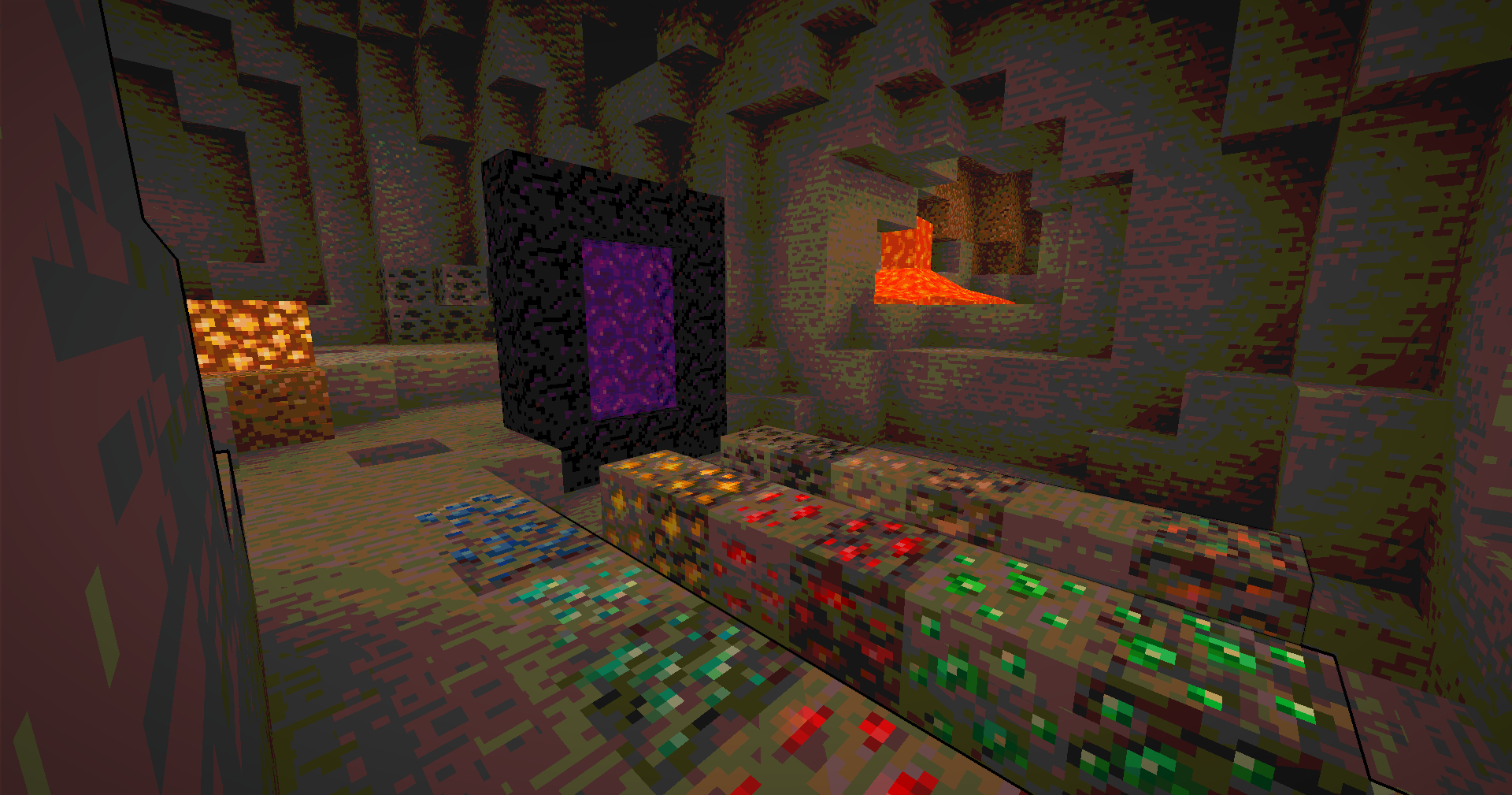
* **Full Lightmap Support** – Torches, lava, and all light sources work perfectly
* **Normal-Based Shading** – Subtle 3D depth effect while maintaining the cartoon style
* **Smooth Tonemap** – Reinhard tonemapping with gamma correction for accurate colors
* **Hand Rendering** – Special lighting pass for held items to ensure visibility
* **Performance Optimized** – Efficient shader code that runs smoothly on most systems
## 🎮 Perfect For
* Builders who want a unique artistic style
* Content creators looking for standout visuals
* Players who love animated aesthetics
* Anyone tired of ultra-realistic shaders
## 📋 Requirements
* Minecraft 1.12+ (GLSL 120 compatible)
* OptiFine or Iris Shaders
* Mid-range GPU recommended

## 🚀 Installation
1. Download the shader pack
2. Place the `.zip` file in your `shaderpacks` folder
3. Open Minecraft and go to Options → Video Settings → Shaders
4. Select the Cartoonie
5. Enjoy your animated world!
 **Enjoy your cartoon adventure!** 🎬✨
Carpet-Fixes
# Carpet-Fixes
Fabric Carpet extension mod which attempts to fix as many vanilla minecraft bugs as possible!
**Currently has more than 220+ Fixes**
—
### Requires Carpet: Download
—
## Settings
See List of all available settings
## More detail
This mod works for both Singleplayer & Multiplayer, although it only modifies server-side functionality!
The mod does fix some client-side bugs (not many), and only if carpet-fixes is on the server as well.
For Client-Side fixes, go check out: blanket
## My other optimizations/fixes
* MemoryLeakFix – Fixes multiple memory leaks for both the client and server
* MoreCulling – Changes how blockstate culling is handled to improve performance
* Blanket – Client-side tweaks/fixes
—
Capitalisation Fixes
Capitalisation Fixes is a resource pack that fixes various bugs related to in-game and UI text, such as labels being improperly capitalised. It currently includes 14 bugfixes, covering 52 different translation strings.
## Information
– Versions 1.19.2 to 1.21.6 are supported, and there’s a “compatibility release” that you can use for 1.18.x versions
– It currently supports two languages: `en_us` and `en_gb`. Other languages will not have the fixes applied to them.
– You can submit feedback and bug reports in the GitHub bug tracker
## Which strings are capitalised?
In Minecraft, all in-game names should be capitalised as proper nouns (e.g. Oak Boat, Bottle of Enchanting, Golden Apple)
and all action buttons should be in title case (e.g. Import Settings, Create Backup & Load, Erase Cached Data).
Naturally, all titles should be in title case, including the titles of UI screens (Video Settings) and the titles of advancements (Monster Hunter).
This rule is upheld in almost all cases, but sometimes Mojang inconsistently capitalises stuff. This pack fixes all those issues!
Note that every fix included in the pack matches a valid bug report on the Minecraft Bug Tracker. This means that the pack sticks strictly to the intended behaviour of the game.
## Additional links
– Discover similar mods that fix vanilla bugs (I am not affiliated with any of the listed projects)
– You can customise the included fixes or target an older Minecraft version by building the pack yourself (the source code for this resource pack is expressed in JavaScript, with a custom build tool to turn it into a resource pack)
Sexy Stev’s Bussin’ Banners
This massive banner overhaul pack is a standalone resource pack derived from the banner overhauls which I’ve been working on in my main in-progress pack.
This pack makes banners and shields as consistent between each other as possible and makes banners as pixel consistent as possible.
This pack also retextures the base textures for shields and banners.
This pack should be compatible from 1.15 Pre-Release 1 up to the latest version.
Bunny’s Prey Eyes

This resource pack enhances realism in Minecraft by adjusting the placement of rabbit eyes. Instead of being positioned on the front of the face, rabbit eyes are moved to the sides of the head just like in real life.
In nature, prey animals such as rabbits have side facing eyes to achieve a much wider field of vision, helping them detect predators more easily. This pack reflects that biological detail, giving rabbits a more authentic and immersive appearance in your world.
The change is subtle but meaningful, especially for players who appreciate realism and attention to detail in creature design.
Make sure you download and use the correct version of this resource pack for your specific Minecraft version. Using an incompatible version will result in the resource pack not working at all.
Here is a quick guide to how to install texture packs by _GuideRealm._
No mods required.
##

If you found a bug, or want to suggest your own idea you can chat with me about it on our [Discord]
You can support me or buy texture pack on the Patreon
Also check out my PMC page
#

BuiltUponTextures
A pack with the entire goal being to update the leftover textures from 1.14’s Texture Update! Even the snow golem’s arms got changed in this… I may be too thorough.
From chests, dirt, and creepers to arrows, particles, and sea lanterns- this pack updates þe ald classic textures while preserving original patterns to keep the classic, crusty-ish charm.
Not too much else to say, besides this technically being the 0th BNB standalone. Have fun!
Breaking Bedrock
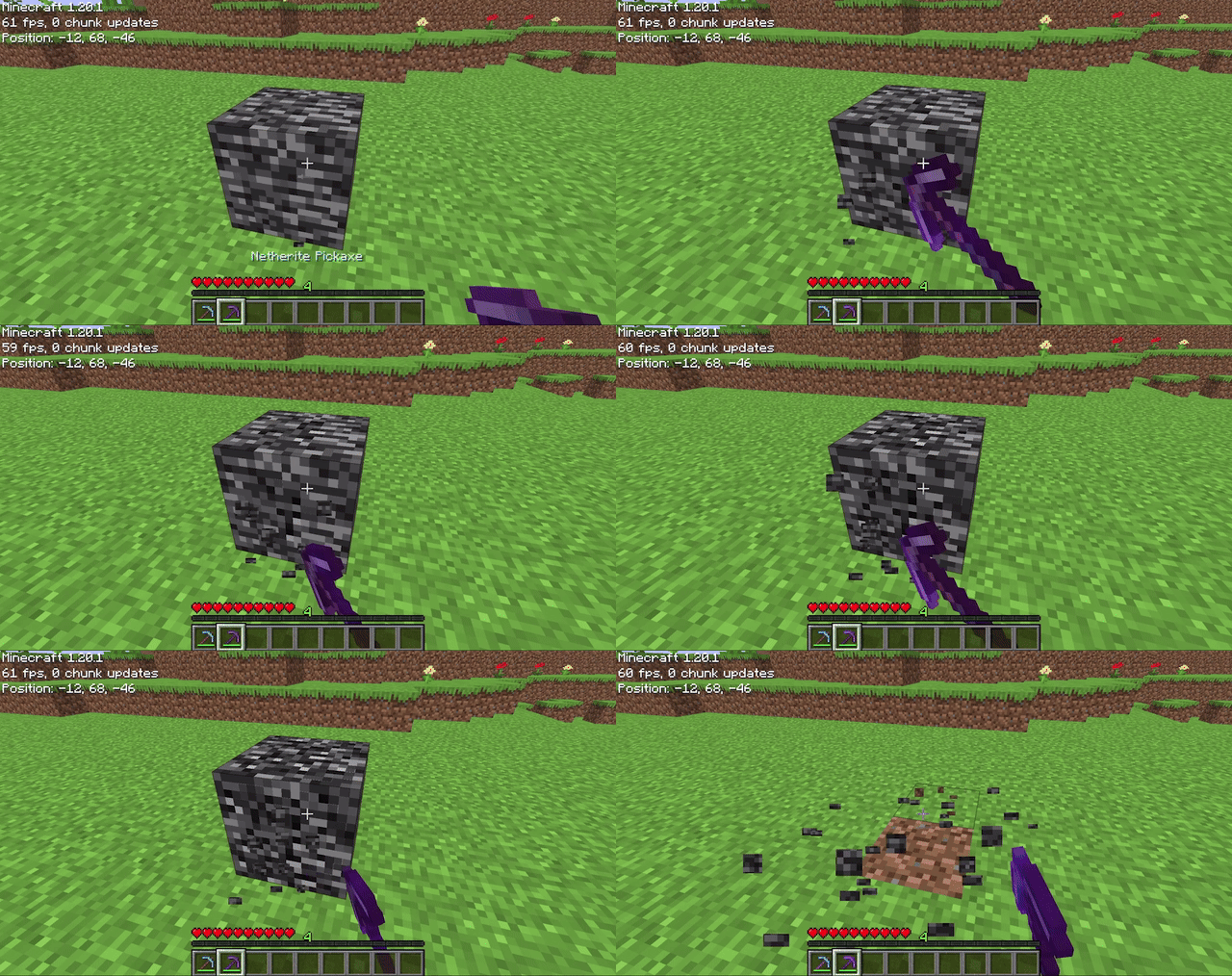
Allows players to mine bedrock using a pickaxe of mining level 4 or higher (configurable on 1.20.4 and below). After being mined, bedrock does not drop anything (also configurable), it just breaks. The destroy time (default 71) and explosion resistance (default 3600000) of bedrock are also all easily configurable.
## Config File
“`properties
# destroy_time: The destroy time for bedrock. (obsidian is 50, stone is 1.5, -1 is indestructible)
# explosion_resist: The explosion resistance for bedrock. (stone is 6, glass is 0.3)
# mining_level: The mining level required to mine bedrock. (netherite is 4) (only on 1.20.4 and below)
# drop_bedrock: Whether bedrock should drop as a block when broken.
destroy_time=100
explosion_resist=3600000
mining_level=4 #only on 1.20.4 and below
drop_bedrock=false
“`
BorderPlus
Other images
## Description of the BorderPlus Plugin:
BorderPlus is a Minecraft plugin that allows your players to literally move the world borders. This is done through a user-friendly GUI that is fully customizable to meet your needs. Players can pay for expanding the world border using items, blocks, or currency. With the latest update, we’ve introduced a **Collective Pot System**, enabling players to pool their resources and expand the border together, making the experience even more interactive and engaging.
The **Collective Pot System** gives your server a community-focused twist, where players can contribute items or currency towards a shared goal to extend the world’s border. Once the goal is reached, the border will expand automatically, with a custom notification alerting all online players. The collective system not only tracks contributions but also displays the top contributors on a leaderboard, encouraging friendly competition. To open the pot’s GUI, players simply type `/borderplus collective `.
Each **world’s border** can be configured with individual limits to prevent expansion beyond a specified maximum radius. This ensures balance and prevents the world from becoming too large to manage. Contributions are tracked through an SQLite database, so no player efforts are lost, even across restarts.
The plugin offers **extensive customization options**, including per-world GUIs, configurable permissions, support for heads via **HeadDatabase** and **Base64**, and integration with economy plugins like **Vault** and **PlayerPoints**. Your players will be notified with custom messages and sounds when the border expands, further enhancing the immersive experience.
### Java **17+** is required.
## Features of the BorderPlus Plugin:
– Each message can be customized.
– Create a separate GUI for each world.
– Each GUI has its own usage permissions.
– **Collective Pot System:** Players can now contribute together to expand the world border using the `/borderplus collective ` command.
– SQLite database system for saving all player expansions.
– Tracks the number of blocks acquired by players.
– Flexible placeholder system for leaderboards.
– Compatible with PlaceholderAPI.
– Notifies all players when someone expands the world border.
– Customizable title when someone expands the world border.
– Supports economy.
– Vault with compatible economies, such as EssentialsX.
– PlayerPoints.
– In one menu for a world, you can add payment options for both currency and items.
– Maximum world border value is specified for each world.
– Support for the HeadDatabase plugin.
– You can use the format `hdb-`. Example: `hdb-4188`.
– Support for heads in Base64 format.
– Supports hex color codes.
Example: `ᱹDA &lDiamond Expansion`.
– Custom sound settings for each upgrade item. The sound parameter in the GUI.
– Supports the Skulls plugin. To specify a skull, you must use the format `skull-`.
– Automatically expand other worlds relative to the expanding world by listing them in the config.
## Commands and Permissions for the BorderPlus Plugin
### **Player Commands:**
– **/borderplus open ** – Opens the plugin’s menu, allowing players to use various functions to expand the world border.
*Example:* `/borderplus open world`
– **/borderplus collective ** – Opens the collective contribution menu, enabling players to contribute resources or currency to expand the world border.
*Example:* `/borderplus collective world`
—
## **Permissions for the BorderPlus Plugin**
### **Player Permissions:**
– **borderplus.open.** – Grants players access to the specific world’s menu.
– **borderplus.collective.** – Grants players access to the collective contribution menu for that world.
### **Admin Permissions:**
– **borderplus.change** – Allows the player to modify the world border using the `/borderplus ` command.
– **borderplus.reload** – Grants permission to reload the plugin and its configuration.
## Configuration File Example:
**config.yml**
“`yml
# ===============================
# Plugin Settings
# ===============================
#
# You can configure separate GUIs for each world. These GUIs will open automatically
# when a player is in the respective world or by using the command «/borderplus open world_name».
#
# Configuration examples:
# – Specify the world name and the GUI file that will open for this world.
# – Comment out or remove lines for unused worlds.
#
settings:
# Language selection for plugin messages
# Possible values:
# “en” for English
# “ru” для Русского
# “de” für Deutsch
# “fr” pour le français
# “es” para español
# “it” per l’italiano
# “pt” para português
# “zh” 表示中文
language: “en”
# Show a title to all players when a player expands the world border?
# true = show
# false = do not show
show_title: true
# Enable or disable the use of economy
economy_enabled: true
# The economic system to be used
# Possible values: “playerpoints”, “vault”, “default”
# “default” means that the old logic will be used: if both plugins are found, PlayerPoints will be used.
preferred_economy: “default”
# The total amount of resources or currency required to reach the goal
# and trigger the world border expansion.
# Once the collective goal is reached, the border will expand.
collective_goal: 1000
# The number of blocks by which the world border will expand
# after the goal is achieved.
# For example, if set to 1000, the world border will expand by 1000 blocks in every direction.
collective_expansion_amount: 1000
# The duration (in seconds) it takes for the world border to expand to its new size.
# For example, if set to 10, the border will take 10 seconds to fully expand after the goal is achieved.
world_border_expand_duration: 10
worlds:
world:
gui: “gui.yml”
max_size: 5000
collective_gui: “collective_gui_world.yml”
name: “Survival World”
automatically_expand_worlds:
# Worlds that expand automatically when this world expands.
# Key = exact world name on server (check your world/ folder for folder names).
# Any world works: Nether, End, void, custom, skyblock, etc. Just use its folder name.
#
# Value = expansion ratio in format 1.X (means 1:X).
# The number after the dot is the denominator. Formula: dependent_expansion = source_expansion / X
#
# Examples:
# 1.1 = 1:1 -> multiplier 1.0 -> overworld +1000 = dependent +1000 (same)
# 1.2 = 1:2 -> multiplier 0.5 -> overworld +1000 = dependent +500 (half)
# 1.3 = 1:3 -> multiplier 0.333 -> overworld +1000 = dependent +333
# 1.8 = 1:8 -> multiplier 0.125 -> overworld +1000 = dependent +125 (Minecraft Nether formula)
#
# Values outside 1.0-2.0 range are used as raw multiplier (e.g. 0.5 = half, 2.0 = double).
#
# Don’t want automatic expansion? Remove automatically_expand_worlds block entirely. Old configs without it work fine.
# Want only Nether to expand? Remove world_the_end line below. Want only End? Remove world_nether.
world_nether: 1.8 # Nether. 1:8 = overworld +1000 blocks = nether +125 blocks
world_the_end: 1.1 # End. 1:1 = expands same amount as overworld
expand_worlds_names: # display names for automatically_expand_worlds (shown in messages instead of world_nether etc.). Optional.
world_nether: “Nether”
world_the_end: “The End”
#world_nether:
# gui: “gui_nether.yml” # expansion menu file for Nether
# max_size: 625 # max border diameter (625 = 1/8 of 5000)
# collective_gui: “collective_gui_nether.yml” # collective contribution menu
# name: “Nether” # display name in messages
# depends_on: “world” # expands together with world
# depends_ratio: 1.8 # 1.8 = 1:8 Minecraft formula
#world_the_end:
# gui: “gui_end.yml” # menu file for End
# max_size: 5000 # max border diameter
# collective_gui: “collective_gui_end.yml” # collective contribution menu
# name: “The End” # display name
# depends_on: “world” # expands together with world
#flat_world:
# gui: “gui2.yml” # menu for flat world
# collective_gui: “collective_gui_flat_world.yml” # collective menu
# max_size: 5000 # max border diameter
# name: “Flat World” # display name
#world3:
# gui: “gui3.yml” # menu for third world
# collective_gui: “collective_gui_world3.yml”
# max_size: 5000
# name: “Third World”
# ===============================
# GUI Rotation Settings
# ===============================
#
# Settings for automatic resource rotation in GUI files
#
gui_rotation:
# Enable automatic resource rotation in GUI
enabled: true
# Rotation interval in seconds (for testing)
# For production, it’s recommended to use days: 259200 (3 days)
interval_seconds: 300
# Notification settings
notifications:
# Show messages about automatic resource rotation
auto_rotation: true
# Show messages about manual updates
# Message output for command: /borderplus rotategui world_name file_name
# example: /borderplus rotategui world collective_gui_world.yml
manual_rotation: false
# Show notifications only for collective GUIs
collective_only: true
# Show notifications only for regular GUIs
world_only: false
“`
### How the GUI for the world “world” looks:
In the material field, you can use three types of items:
Item names. Example: DIAMOND, which will display a diamond.
Heads from the HeadDatabase plugin. Example: hdb-4188, where 4188 is the ID of the head from the plugin.
Heads in Base64 format. Example:
“`
material: base64-eyJ0ZXh0dXJlcyI6eyJTS0lOIjp7InVybCI6Imh0dHA6Ly90ZXh0dXJlcy5taW5lY3JhZnQubmV0L3RleHR1cmUvZjRhMmFmMjYxMDFmNDRmMTE2YWY5MzM3NzRjMDQ3NGI3NjcxODJlNmNhM2Y4ZmRmMTc2NDFlY2YwMmI2YTE4ZCJ9fX0=
“`
You can find the head you need on the website: https://minecraft-heads.com/
Heads from the Skulls plugin. Example: skull-, where is the ID of the head. Ensure that the Skulls plugin is installed to use this feature.
**gui.yml**
“`yml
menus:
border_menu:
title: ‘ b◂ ˑc8a&lBorder Expansion b▸’
size: 27
items:
increase_diamond_20:
required_material: DIAMOND
cost: 0.0
material: DIAMOND
lore:
– ”
– ‘ &7Spend &b&l100 diamonds&7 to’
– ‘ &7increase the world border’
– ‘ &7by &b&l500 blocks’
– ”
– ‘ 𩁠⋅  a852click &7- to expand the border’
– ”
required_amount: 100
sound: BLOCK_ANVIL_LAND
weight: 500
economy: false
slot: 10
display_name: ‘ᱹDA &lDiamond Expansion’
increase_gold_50:
required_material: GOLD_INGOT
cost: 0.0
material: GOLD_INGOT
lore:
– ”
– ‘ &7Spend &6&l50 gold ingots&7 to’
– ‘ &7increase the world border’
– ‘ &7by &6&l500 blocks’
– ”
– ‘ 𩁠⋅  a852click &7- to expand the border’
– ”
required_amount: 50
sound: ENTITY_PLAYER_LEVELUP
weight: 500
economy: false
slot: 13
display_name: ‘ᱹDA &lGold Expansion’
increase_iron_100:
required_material: IRON_INGOT
cost: 0.0
material: IRON_INGOT
lore:
– ”
– ‘ &7Spend &f&l100 iron ingots&7 to’
– ‘ &7increase the world border’
– ‘ &7by &f&l100 blocks’
– ”
– ‘ 𩁠⋅  a852click &7- to expand the border’
– ”
required_amount: 100
sound: ENTITY_EXPERIENCE_ORB_PICKUP
weight: 500
economy: false
slot: 16
display_name: ‘&f&lIron Expansion’
increase_economy_1000:
required_material: EMERALD
cost: 1000.0
material: EMERALD
lore:
– ”
– ‘ &7Spend &61000 coins&7 to’
– ‘ &7increase the world border’
– ‘ &7by &a&l1000 blocks’
– ”
– ‘ 𩁠⋅  a852click &7- to expand the border’
– ”
required_amount: 1000
sound: BLOCK_GRASS_BREAK
weight: 1000
economy: true
slot: 22
display_name: ‘&a&lEmerald Border Expansion’
“`
**collective_gui_world.yml**
“`yml
menus:
collective_menu:
title: ‘ b◂ ˑc8a&lPiggy Bank b▸’
size: 27
items:
center_item:
material: GOLD_INGOT
lore:
– ”
– ”
– ‘ &7Contributed: &a%borderplus_collective_progress_world%&7%’
– ‘ %progress_bar_world%’
– ”
– ‘ &9&lLeaders’
– ‘ &e1st place: &b%borderplus_collective_top_name_1%’
– ‘ &e2nd place: &b%borderplus_collective_top_name_2%’
– ‘ &e3rd place: &b%borderplus_collective_top_name_3%’
– ”
– ‘ &aYour contribution: &7%borderplus_collective_player_contribution%’
– ”
– ‘ 𩁠⋅  a852Click the buttons below’
– ‘ 𩁠 below to contribute’
– ”
slot: 13
display_name: ‘&eWorld Expansion Progress’
contribute_1:
material: IRON_INGOT
lore:
– ”
– ‘ &7Click to contribute’
– ‘ &a1 &7resource to the piggy bank.’
– ”
slot: 21
economy: false
display_name: ‘&aContribute 1 resource’
contribution_amount: 1
contribute_100:
cost: 100.0
material: EMERALD
lore:
– ”
– ‘ &7Click to contribute’
– ‘ &a100 coins &7to the piggy bank.’
– ”
slot: 23
economy: true
display_name: ‘&aContribute 100 coins’
contribution_amount: 100
“`
### Message File:
“`yml
# ===============================
# Plugin Messages #
# ===============================
#
# You can customize it to your liking and make it more informative and appealing.
# ===============================
messages:
border_expanded_one: |
A0DAD&l *✧・゚ &#C4B0FBWorld border expanded A0DAD&l゚・✧*
A0DAD &#AB47BC%player% A0DADexpanded &#B388EB%borderplus_world_name% by A0DAD&#AB47BC%actual_amount% A0DADblocks!!
A0DAD
&#C4B0FB New world borders:
E57C2 Min. coordinates: ╧CD[%minX%, %minZ%]
E57C2 Max. coordinates: ╧CD[%maxX%, %maxZ%]
%expanded_worlds_info%
A0DAD&l ・✧゚======================= ゚✧・
border_expanded_piggybank: |
A0DAD&l *✧・゚ &#C4B0FBWorld border expanded A0DAD&l゚・✧*
A0DAD &#AB47BC%player% A0DADexpanded &#B388EB%borderplus_world_name% by A0DAD&#AB47BC%actual_amount% A0DADblocks!!
A0DAD
&#C4B0FB New world borders:
E57C2 Min. coordinates: ╧CD[%minX%, %minZ%]
E57C2 Max. coordinates: ╧CD[%maxX%, %maxZ%]
%expanded_worlds_info%
A0DAD&l ・✧゚======================= ゚✧・
expanded_worlds_header: “&#C4B0FB Also expanded:”
expanded_worlds_line: “E57C2 &#B388EB%world_name%E57C2: Min ╧CD[%minX%, %minZ%] E57C2- Max ╧CD[%maxX%, %maxZ%]”
insufficient_items: “&cYou don’t have enough %material% (%needed% pcs.)!”
insufficient_funds: ” &cNo money, but you’re holding on. Required: %cost%.”
items_removed: “nᱹDA Removed ᱹDA&l%amount_removed% ᱹDAitems from your inventory.n ”
money_removed: “nᱹDA Removed ᱹDA&l%amount_removed% ᱹDAcoins from your account.n ”
invalid_number: “&cInvalid number.”
gui_item_not_found: “&cItem not found in the menu.”
reload_complete: “&aConfiguration reloaded.”
title_message: “&eWorld border expansion”
title_next: “&e%player% expanded the world border by %actual_amount% blocks”
usage: “&cNot enough arguments”
usage_open: “&cInvalid command usage! &7Use: &f/borderplus open &e”
no_permission: ” &cNo permission, better luck next time.”
loaded_guis: “§aLoaded GUIs for worlds:”
world_gui_info: “§aWorld: §e{world} §a| GUI: §e{gui}”
gui_not_found: “§cGUI for this world not found.”
gui_title_size: “Title: %title% | Size: %size%”
max_radius_reached: “§cWorld border has already reached its maximum size. Further expansion is not possible.”
no_data: “No data”
not_in_top: “Not in top”
not_found: “Not found”
world_not_found: “World not found”
invalid_position_number: “Invalid position number”
usage_change: |
&#ff6b6b✧ &cUsage:
&#ff6b6b &f/borderplus change &8[&e&8] &e
&#ff6b6b &7Examples:
&#ff6b6b &f/borderplus change 1000
&#ff6b6b &f/borderplus change world 500
invalid_world: |
&#ff5252✖ &cWorld &cnot found. Please check the name and try again.
border_changed: |
A0DAD
A0DAD&l *✧・゚ &#C4B0FBWorld border &#AB47BC%world% &#C4B0FBchanged by &#AB47BC%amount% &#C4B0FBblocks! A0DAD&l゚・✧*
A0DAD
gui_rotation_changed: |
A0DAD&l *✧・゚ &#C4B0FB🔄 Items Update A0DAD&l゚・✧*
A0DAD &#AB47BC%world% A0DAD- required items changed
A0DAD&l ・✧゚======================= ゚✧・
gui_rotated_manually: |
A0DAD&l *✧・゚ &#C4B0FB⚡ Force Update A0DAD&l゚・✧*
A0DAD &#AB47BC%world% A0DAD- items updated by admin
A0DAD&l ・✧゚======================= ゚✧・
# Log messages
log_gui_rotation_enabled: “GUI rotation enabled: %enabled%”
log_rotation_interval: “Rotation interval: %seconds% seconds”
log_auto_notifications: “Auto notifications: %enabled%”
log_manual_notifications: “Manual notifications: %enabled%”
log_rotation_task_started: “GUI rotation task started (checking every 30 seconds)”
log_gui_rotated: “GUI rotated for world %world% file: %gui% (interval: %seconds%s)”
# Command messages
command_rotategui_usage: “Usage: /borderplus rotategui [guiFile]”
command_world_settings_not_found: “§cSettings for world %world% not found”
command_gui_status_header: “§6=== GUI Status for world %world% ===”
command_gui_status_main: “§eMain GUI: §f%gui%”
command_gui_status_collective: “§eCollective GUI: §f%gui%”
command_gui_status_rotations: “§6Active rotations:”
command_gui_status_no_rotations: “§7No active rotations”
command_gui_status_rotation_item: “§7- %key%: %value%”
command_gui_status_next_rotation: “§eTime until next rotation: §f%minutes%m %seconds%s”
command_gui_status_next_rotation_soon: “§eNext rotation: §fsoon”
# ============= End of Messages Settings ================== #
“`
## BorderPlus Plugin Placeholders:
*Requires PlaceholderAPI to function correctly.*
### General Placeholders:
– **`%borderplus_player_rank%`**
Returns the player’s current rank on the leaderboard based on the number of blocks expanded. If the player is not in the top rankings, it returns the message “Not in the top.”
– **`%borderplus_player_blocks%`**
Shows the total number of blocks the player has contributed to expanding the world border. This placeholder reflects the cumulative amount of blocks expanded by a specific player.
– **`%borderplus_top_block_nick_X%`**
Returns the name of the player who holds a specific position (X) on the leaderboard by block expansion.
– *X* is the leaderboard position (e.g., `1` for the first place).
– **`%borderplus_top_block_rank_X%`**
Displays the number of blocks expanded by the player in a specific leaderboard position (X).
– *X* represents the position in the leaderboard.
– **`%borderplus_top_block_position_X%`**
Shows the numerical position on the leaderboard.
– *X* is the desired leaderboard position.
– **`%borderplus_world_display_name_%`**
Returns the display name of the world configured in the plugin’s settings. If the world is not found, it returns the message “World not found.”
– **`%borderplus_world_current_size_%`**
Shows the current size (radius) of the specified world.
– **`%borderplus_world_max_size_%`**
Displays the maximum allowed radius for the specified world.
– **`%borderplus_world_max_diameter_%`**
Returns the maximum allowed diameter for the specified world.
These placeholders allow flexible display of information related to world borders and leaderboards, enabling easy integration of both physical items and virtual economy in your server.
### Collective Pot Placeholders:
– **`%borderplus_collective_progress_world%`**
Displays the percentage of progress towards filling the collective pot.
– **`%borderplus_collective_top_name_%`**
Shows the name of the player holding the corresponding position on the leaderboard for the collective pot.
– **`%borderplus_collective_player_contribution%`**
Displays the amount of items or coins the player has contributed to the pot. This placeholder reflects the contributions of the player currently viewing it.
## Configuring Leaderboard in BorderPlus:
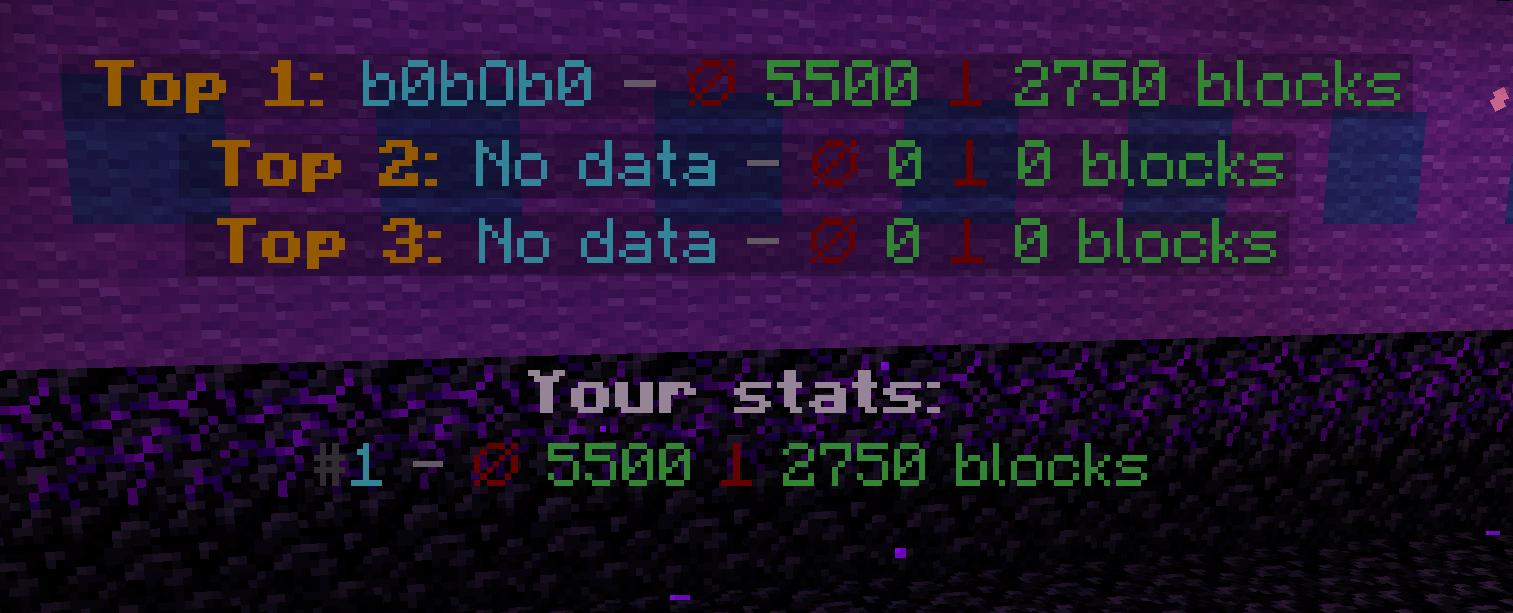
If you want to display a leaderboard, you can use a plugin of your choice… I prefer to use: DecentHolograms.
“`yml
pages:
– lines:
– content: ” &6&lTop 1: &b%borderplus_top_block_nick_1% &7- &4⌀ &a%borderplus_top_block_rank_1% &4⟘ &a%borderplus_top_block_radius_1% blocks”
height: 0.3
– content: ” &6&lTop 2: &b%borderplus_top_block_nick_2% &7- &4⌀ &a%borderplus_top_block_rank_2% &4⟘ &a%borderplus_top_block_radius_2% blocks”
height: 0.3
– content: ” &6&lTop 3: &b%borderplus_top_block_nick_3% &7- &4⌀ &a%borderplus_top_block_rank_3% &4⟘ &a%borderplus_top_block_radius_3% blocks”
height: 0.3
– content: “”
height: 0.3
– content: “&f&lYour stats:”
height: 0.3
– content: “&8#&b%borderplus_player_rank%&7 &7- &4⌀ &a%borderplus_player_blocks% &4⟘ &a%borderplus_player_radius% blocks”
height: 0.3
actions: {}
“`
## Installation Guide for the BorderPlus Plugin:
### Required Dependencies:
To use the BorderPlus plugin, the following dependencies are necessary:
#### **Mandatory Plugins:**
– **Placeholders:** PlaceholderAPI
– **Economy System:**
– You must install at least one economy plugin:
– **Vault** along with any economy plugin, such as **EssentialsX** for economy support.
– **PlayerPoints** (if you prefer points-based economy).
– If both **Vault** and **PlayerPoints** are installed, the plugin will automatically prioritize **PlayerPoints**.
#### **Optional Plugins (Soft Dependencies):**
– **DecentHolograms** (or any other hologram plugin): Recommended if you wish to display holograms on your server.
– **HeadDatabase**: Used to display custom heads as item replacements within GUIs.
—
### Installation Steps:
1. **Ensure all required dependencies** listed above are installed on your server.
2. **Download the BorderPlus plugin** from the official source.
3. **Stop your server.**
4. **Move the `.jar` file** to the `/plugins/` folder in your server directory.
5. **Start your server** again.
6. **All set!** The plugin is now installed and ready to use.
By following these steps, you’ll have BorderPlus running smoothly on your server with all its features unlocked. Enjoy!