PencilVoid’s Distinctive Ores
This pack gives ores unique and fun designs while remaining true to the vanilla style. The goal is to improve playability and accessibility by making each ore identifiable by shape. 1.17’s texture update aimed to do something similar, but the shapes of the ores are largely random and hard to tell apart when colour is absent. This pack aims to rectify that.
Each ore is given a stylised and thoughtful shape: gold forms shiny bars, lapis forms flowing waves, redstone forms circuit-like crystals. These all serve to give each ore its own identity and make them stand out.
Deluxe fullbright
### 1.7-1.21.11 | Complete drawn 64x/128x pack with Optifine & Mod support (Pixelmon, Hypixel Skyblock etc.) Sounds, Fonts & All in one File!

Tired of cluttering your screen with shields, totems, or fireworks in your off-hand? This resource pack has the solution!
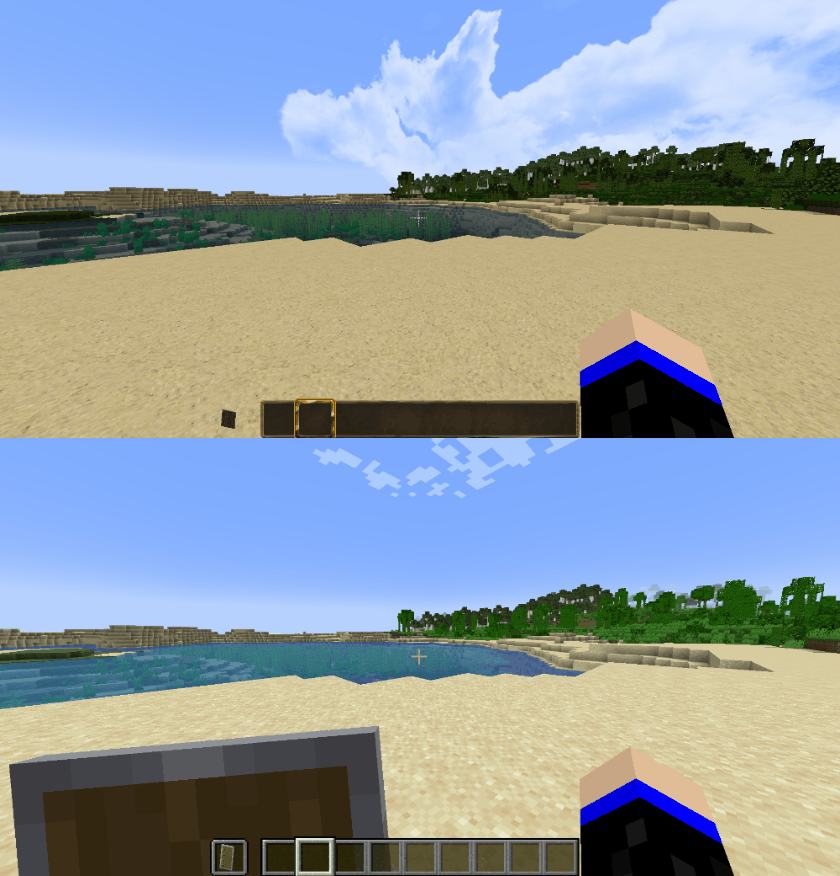
We all know that carrying items like shields, totems, or fireworks in your off-hand can be distracting, as they take up valuable screen space. With this resource pack, that annoyance is gone! It cleverly attaches these items to your character’s arm, making them invisible in first-person view while still keeping them active for gameplay. Your screen stays clean, allowing you to enjoy a more immersive experience.
It’s compatible with every Minecraft version! And this in One file!
Whether you’re playing on Minecraft 1.8, jumping to 1.12, or even enjoying the latest versions like 1.21, this resource pack adapts to all of them—no need to switch packs every time you switch versions. Supported versions range from 1.8 all the way up to 1.21, but it also works with older or future versions. For Minecraft 1.7, which doesn’t support 3D textures like ladders or sugar cane, the pack seamlessly switches to 2D textures.
For versions 1.8.9 or lower, you’ll need Optifine to ensure textures render correctly and avoid any warping or shifting issues. In newer versions, Optifine isn’t required but is still highly recommended to enable features like connected glass textures and stackable items. There are also alternative mods if you prefer not to use Optifine, allowing you to keep those features active.
A visually immersive yet lightweight pack for all players
This pack gives Minecraft a realistic feel without being too taxing on your system. The textures are available in both 64×64 and 128×128 resolution options, offering a smoother, cleaner look while keeping performance optimized. Features like connected glass for seamless windows and dynamic item textures based on stack size provide a more immersive, polished experience. Despite the higher resolution, it’s optimized to run smoothly even on less powerful setups.
Supports popular mods for extra fun!
This resource pack doesn’t stop at vanilla Minecraft. It also has mod support for many popular mods, such as:
Pixelmon (full support for most textures)
Advanced Solar Panel
Applied Energistics 2
Baubles
Better Grass and Leaves
Chisel
ComputerCraft
Forestry
Iron Chest
Natura
Not Enough Items (NEI), Just Enough Items (JEI)
Thermal Foundation
Tinker’s Construct
Voicechat
Many more…
Whether you’re building complex machines, exploring new biomes, or catching Pokémon in Pixelmon, this pack enhances your gameplay while staying true to the mod’s aesthetics.
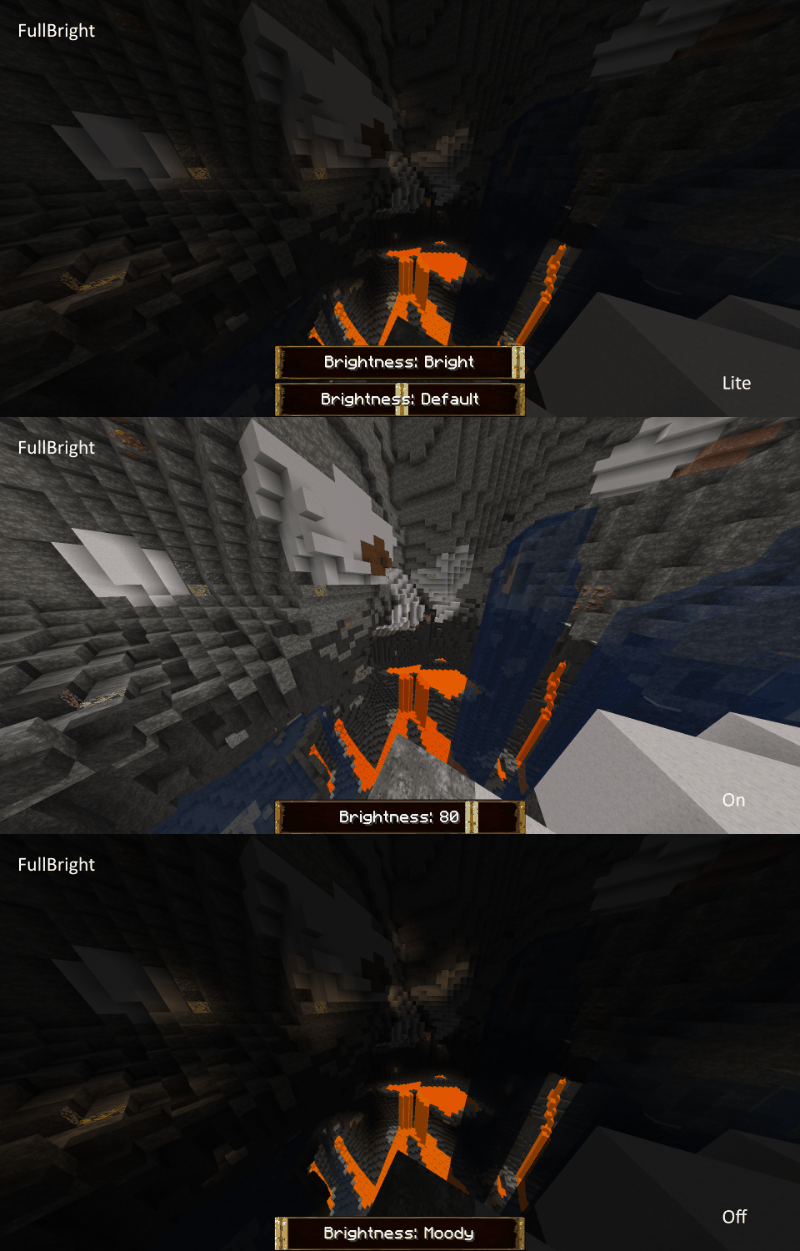
Additional cool features:
Custom sounds for a more immersive audio experience.
Special effects like seeing through blindness or custom mob textures.
Highly optimized for performance, ensuring smooth gameplay even with all these features.
deko Totem of Undying
– EN: deko is a popular CS2 streamer and esports player who is known for his changeable mood and meme, as well as playing in esports teams at the highest level. This resource pack replaces the Totem of Immortality with his meme face:
– RU: deko – популярный CS2 стример и киберспортсмен, который известен за счет своего переменчевого настроения и мемности, а также игры в киберспортивных командах на высшем уровне. Этот ресурспак заменяет тотем бессмертия на его мемное лицо
ALL RESOURCEPACKS COLLECTION: MEMES + STREAMERS
– Тотем Я уже Красный-totem-of-undying)
– Тотем Меллстрой
– Colored Bricks
– MACAN Music Discs
– MACAN Totem of Undying
Deep Ocean Panorama
Deep Ocean Panorama replaces the Minecraft title-screen panorama with a high-quality, performance-conscious cube-mapped scene.
### Additional Information
Type:
`RELEASE`
Version:
`1.0.0`
MC Version:
`1.13.x, 1.14.x, 1.15.x, 1.16.x, 1.17.x, 1.18.x, 1.19.x, 1.20.x, 1.21.x`
Death Coordinates
## Description
This datapack/mod displays coordinates immediately after death on the screen, so that the player can find the stolen items or place. If you need coordinates in the chat, you can use this command:
“`
/trigger bizcub.death_coords.trigger1
“`
The principle of operation is shown in the video

## Dependencies
– Fabric loader requires Fabric API
Dark Red Shield
# Dark Red Shield
This resource pack replaces the default shield with a custom 3D model.
The design uses a dark red theme.
No OptiFine required. Vanilla compatible.
## More Shield Themes
– Black
– Blue
– Creeper
– Mirror
– Navy Blue
– Rabbit
– Red
Cypress (Alphaver) Font
# A font from an alternate timeline!
This font comes from a modified version of Minecraft that’s part of an **unfiction web series** centered around footage of the closed “16.05” branch from the Alpha stage of Minecraft’s development. **It’s basically the classic Minecraft font, but with rounded edges and some subtle differences.** I really like it, so I thought I’d go ahead and port it to modern versions!

Thank you to the AlphaVer team for making such a compelling story, and sparking my interest in modding Minecraft. If anyone involved would like for me to take this down, please don’t hesitate to contact me.
CustomSkinLoader
# CustomSkinLoader
## What’s this?
Custom Skin Loader mod for Minecraft.
It’s a mod which can load skins and capes from any online source or from your local.
## Download
Build Server : CircleCI & ~~Infinity Studio CI~~
Release Page : MCBBS & GitHub & CurseForge
## Contact Us
QQ Group: 651287593
Telegram: @customskinloader
## Feature
### Support Plenty of Skin Load API and Customizable Skin Load List
Supported Skin Load APIs:
– Mojang API
– CustomSkinAPI
– CustomSkinAPIPlus (Test Only)
– UniSkinAPI
– ElyByAPI
– Legacy
You can use this feature to customize your skin load list so as to load your skins from any skin server you want.
If you are the owner of skin server, you can use CustomSkinLoader to load skins from your server if one of the APIs has been actualized by your server.
### HD Skins Support
Even though you don’t have OptiFine and MCPatcher, CustomSkinLoader can still load and render HD skins.
You can easily to get a better view of skins.
### Skull Support
Fixed skull loading bug, you can apply any skin to your skull now.
Dynamic skull supported.
### Profile Cache
– Decrease the frenquency of using the network.
– Meanwhile, you can still load profiles when network is unavailable.(*)
*Only when it is opened in configratulation.
### Local Skin
Load skins without a skin server.
Furthermore, by using this function you can preview your skins in game and even change the default skin and model.
You can load local skins by using any API (excluding MojangAPI).
*While using default configratulation, just put your skins into `.minecraft/CustomSkinLoader/LocalSkin/(skin|cape)s/{USERNAME}.png`.
### Extra List
A json file generated by skin servers which supports this feature.
To add a server to your load list, users just need to put the file into `.minecraft/CustomSkinLoader/ExtraList` .
### Transparent Skin Support
The problem of incorrectly rendering textures has been fixed.
### Spectator Menu Fixed
By using this mod, you can see correct avatar of players in Spectator Menu rather than steve and alex.
## Default Load List
– Mojang (Mojang API)
– LittleSkin (CustomSkinAPI)
– Blessing Skin (CustomSkinAPI)
– ElyBy (ElyByAPI)
– SkinMe (UniSkinAPI)
– TLauncher (ElyByAPI)
– LocalSkin (Legacy)
If you want to apply to add other skin server to default list, please go to issue.
## To Skin Server Owner
CustomSkinLoader is designed for loading from any server, which makes the mod complex.
It’s not a good idea to refer to CustomSkinLoader’s source code to develop your own skin mod.
It’s recommended to use CustomSkinLoader for your server directly.
Furthermore, you can add your server to ‘Default Load List’.
You can also use ‘ExtraList’ which makes it easier for users to add your server into load list.
## Development and Contribution
See [CONTRIBUTING.md](CONTRIBUTING.md)
## Copyright & LICENSE
### Binary File
You could not modify binary file.
Feel free to use and share this mod and unmodified file in anyway like modpack.
When using in modpack, you must put ‘CustomSkinLoader’ in mod list.
You could not repost this mod to any website without permission.
You could not earn money with this mod excluding modpack.
### Source Code
#### Package ‘customskinloader’
Including some codes from
– AsteriskTeam/TabIconHackForge (GPLv3)
– RecursiveG/UniSkinMod (GPLv3)
– NekoCaffeine/Alchemy (GPLv3)
Copyright © 2013-2014 Jeremy Lam “JLChnToZ”.
Copyright © 2014-2019 Alexander Xia “xfl03”.
This program is free software: you can redistribute it and/or modify it under the terms of the GNU General Public License as published by the Free Software Foundation, either version 3 of the License, or (at your option) any later version.
This program is distributed in the hope that it will be useful, but WITHOUT ANY WARRANTY; without even the implied warranty of MERCHANTABILITY or FITNESS FOR A PARTICULAR PURPOSE. See the GNU General Public License for more details.
GPLv3: http://www.gnu.org/licenses/gpl.html
You should change the name of the package to avoid others’ misunderstanding.
Customizable Timer
I made a simple timer data pack with some customization!
# Commands
– /function timer:settings -> Change settings like color and style
– /function timer:pause -> Pause the timer
– /function timer:resume -> Start or resume the timer
– /function timer:reset -> Reset and pause the timer.
Cursed View

# **Cursed View is not your typical shaderpack.**

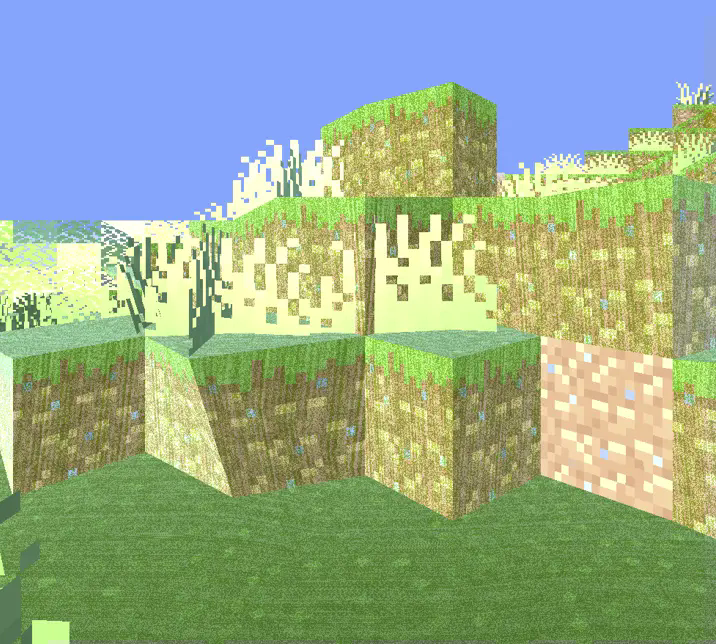
This shader was created to intentionally break the visual norms of Minecraft.
Instead of aiming for beauty or realism, it dives headfirst into chaos, distortion, and discomfort.

With Cursed View, you’ll experience:
* Overexposed lighting that burns your world in light
* Colors that look like they’re fighting each other
* Shadows that don’t behave like they should
* Blocks and entities that feel off, distorted, or almost corrupted
* A surreal atmosphere that turns peaceful villages into cursed zones
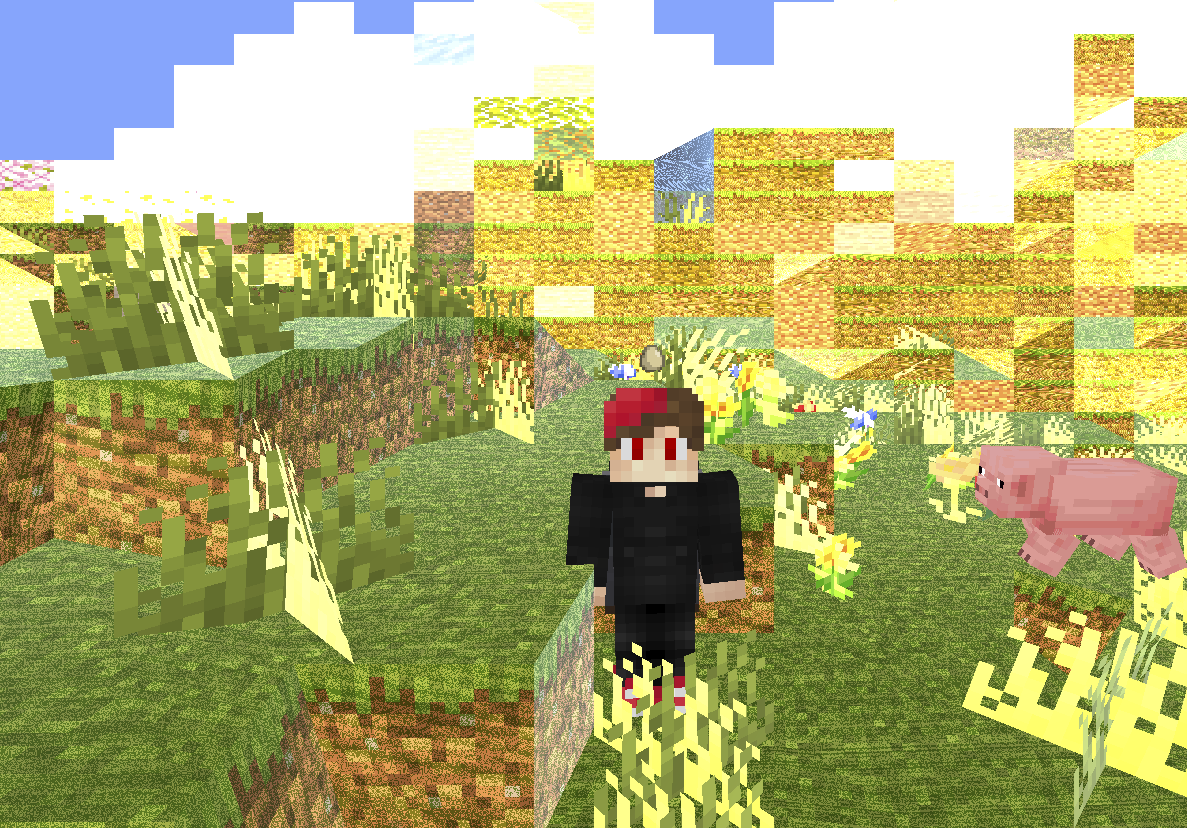
The goal is simple: make Minecraft look _wrong_ — and weirdly fascinating.
Whether you’re exploring glitchcore builds, recording cursed videos, or just want to mess with your perception,
Cursed View delivers an experience that no “normal” shader would dare attempt.
It doesn’t aim to be pretty.
It doesn’t aim to be playable.
It exists to disturb, confuse, and sometimes even amuse.
**Recommended FOV: Quake Pro** — to fully embrace the madness.
If you’ve ever asked,
**_”What if a shader hated you?”_** — this is your answer.


**🧠 Lamapi: Next-Gen Open Source AI**
Pushing the boundaries of accessible intelligence. Whether you need lightweight efficiency or industrial-grade reasoning, the **Next Series** delivers.
**Why build with Lamapi?**
– ⚡ **High Efficiency:** From compact 1B models to powerful 70B reasoning engines.
– 🌍 **Multilingual Mastery:** Optimized for superior performance in English & Turkish.
– 🛠️ **Ready to Deploy:** State-of-the-art open weights available immediately.
**Explore our models and start building:**
🔗 https://huggingface.co/Lamapi

**🚀 KCB Hosting: Power Meets Reliability**
Looking for a host that takes your gaming experience as seriously as you do? We provide robust infrastructure ensuring smooth gameplay and enterprise-grade uptime.
**Why switch to us?**
– 💎 **7-Day Free Trial:** Experience the quality risk-free (No commitment).
– 🛡️ **99.9% Uptime SLA:** Your server stays online, guaranteed.
– ⏰ **24/7 Support:** Expert help whenever you need it.
🔥 Experience the difference with 25% off your first month,
Use code **XSORAS**
**Deploy your server now:**
🌐 https://kcbhosting.com
💬 https://discord.gg/kcbhosting

# **_Welcome to the chaos._**