Max Totem of Undying
– ENG: Max is a Russian cross-platform instant messaging service based on the digital system of the same name. It was founded in 2025 by the VK technology company. Resourcepack replaces the immortality totem with the logo
– RU: Max — российский кроссплатформенный сервис мгновенного обмена сообщениями на базе одноимённой цифровой системы. Основан в 2025 году технологической компанией VK. Ресурспак заменяет тотем бессмертия на логотип
[Check collection with all memes + streamers Totems ](https://modrinth.com/collection/sfDcDGAi)
– [Тотем Я уже Красный](https://modrinth.com/resourcepack/mellstroy-(-)-totem-of-undying)
– [Тотем Меллстрой](https://modrinth.com/resourcepack/mellstroy-totem-of-undying)
– [Colored Bricks](https://modrinth.com/mod/colored-bricks-mod)
– [MACAN Totem of Undying](https://modrinth.com/resourcepack/macan-totem-of-undying)
MaLiLib API
MaLiLib API is a library mod designed to make use of the [MaLiLib](https://modrinth.com/project/malilib) config library easier
MacOS Input Fixes
Fixes [MC-122296](https://bugs.mojang.com/browse/MC-122296)
Fixes [MC-121772](https://bugs.mojang.com/browse/MC-121772)
Fixes [MC-59810](https://bugs.mojang.com/browse/MC-59810)
Fixes [MC-22882](https://bugs.mojang.com/browse/MC-22882)
Fixes control + tab and control + escape not being detected
Specific fixes:
– Correctly detects left click while control is pressed
– Make trackpad scrolling not scroll a ridiculous number of items at once
– It also fixes momentum scrolling (which changes the number of scroll events based on how quickly you did it, even by like x5-10, meaning you couldn’t easily scroll to the correct item)
– On the trackpad it also only considers scrolling while fingers are on the trackpad (and the same for any fancy mice that support the relevant api e.g. probably apple’s fancy mice/trackpad thing)
– It also fixes scrolling being broken when shift is down on some older mice.
– When dropping an item, Minecraft checks for command + the key, since the default key is Q, this doesn’t make sense, so this mod allows both control + key and command + key to work
– Fixes control + tab and control + escape not being detected
Menu Options (under Mouse Settings Screen):
– Option for trackpad scrolling sensitivity (macOS only)
– Option to enable momentum scrolling on hotbar (macOS only)
– Option to disable workaround for smooth scrolling in interfaces (macOS only)
– Option to reverse scrolling of the whole game
– Option to reverse scrolling of the hotbar
– Option to disable the fix for the ctrl + left click becomes right click bug (macOS only)
On platforms other than macOS, the mod does nothing (except the aformentioned menu options), so it can be safely included in any modpack.
Requires Fabric Loader 0.18.5+
Requires Minecraft 1.14+
NOTE!
If you get an error like the following, you need to update Fabric Launcher to the version specified above. Some launchers may require you to update fabric launcher, remove macos input fixes mod fully, and then re-add macos input fixes mod. See https://github.com/hamarb123/MCMacOSInputFixes/issues/60 for the original issue. Note that the “More details” section is very misleading, and parts around it about my mod should be ignored (try disabling it, after the steps before for re-installing, if you are still getting errors to confirm that it is actually an issue with this mod).

Github repository: [https://github.com/hamarb123/MCMacOSInputFixes](https://github.com/hamarb123/MCMacOSInputFixes).
And yes, I know I need a better icon 😉
### DISCLAIMER
As [required](https://www.minecraft.net/en-us/usage-guidelines) to mention prominently according to Mojang – THIS IS NOT AN OFFICIAL MINECRAFT PRODUCT. NOT APPROVED BY OR ASSOCIATED WITH MOJANG OR MICROSOFT.
View the license for the disclaimer of the actual mod.
Low Fire & Side Shield
# 🔥Low Fire & Side Shield
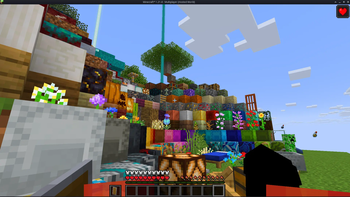
**Low Fire & Side Shield** is a **Minecraft resource pack** designed to keep your screen clear and focused.
It lowers both the **fire overlay** and the **shield position**, introducing a **minimal side shield** that lets you see more of your surroundings without losing the vanilla feel.
Whether you’re in the middle of a **PvP battle**, exploring dangerous caves, or just want a cleaner screen, this pack makes gameplay smoother and more immersive.
It’s lightweight, **FPS-friendly**, and works seamlessly with default Minecraft textures.
—
## ✨ Features
– 🔥 **Reduced fire overlay** — less visual clutter during combat.
– 🛡️ **Lowered side shield** — improved visibility without removing functionality.
– 🎮 **Vanilla-friendly look** — keeps the original Minecraft style intact.
– ⚙️ **Optimized for PvP and survival** — clear visuals, faster reactions.
– 💻 **Lightweight & compatible** — works with most other packs and versions.
—
## 📦 Perfect For
– PvP players needing better visibility
– Streamers who prefer a clean HUD
– Anyone wanting a minimal, modern look in Minecraft
—
**Tags / Keywords:**
`low fire`, `low shield`, `side shield`, `minecraft pvp`, `clear hud`, `visibility pack`, `vanilla friendly`, `clean screen`, `minimal resource pack`, `fps boost`, `combat tweaks`, `minecraft texture pack`, `darkshadowx21`
—
### 📜 License
This project is licensed under the **MIT License**.
You’re free to use, modify, and share this resource pack — just include proper credit to **Darkshadowx21**.
LoTAS
> # This project is currently not actively being developed!
>If you want to TAS Minecraft versions 1.20.3-1.20.6 and 1.21+, check [LoTAS-Light](https://modrinth.com/mod/lotas-light),
>which will be easier to maintain, while we focus on developing [TASmod](https://modrinth.com/mod/tasmod).
>For more information and plans, read this announcement: [Future of Mineraft TAS tools](https://gist.github.com/ScribbleTAS/43b18e8a92a111e92bf4bb0d9cf49e99)
# LoTAS
Used for creating non-playback, Low optimization Tool-Assisted Speedruns (LoTAS).
You essentially play through your route in slow motion while using a recording program such as [OBS](https://obsproject.com) to capture yourself playing the game. Later you speed up the video footage and edit your attempts into a final video, then speed up the video footage.
LoTAS is a collection of tools commonly used for TASing, with a big focus on RNG manipulation.
## Tools
– *Tickrate Changer*: Used for slowing down the game speed
– *Savestates*: Used for creating backups of your world, basically quick save/quick load
– *Drop Manipulation*: Manipulates mob drops to always drop the best items
– *Dragon Manipulation*: Manipulates the dragon phases
– *Item Duplication (Dupemod)*: Replicates the duping bug from vanilla, without the need to close the game.
– *Spawn Manipulation*: Spawn entities at a certain location.
– *AI Manipulation*: Let entities pathfind to a certain place
*and more…*
## Bugs / Feature Requests
We won’t accept any feature-requests at this time, as well as bug reports.
If you need help with setting up LoTAS then join this [Discord](https://discord.gg/minecraft-tas-373166430478401555)
## Compatibility
LoTAS has compatibility issues with the following mods/programs:
– *ReplayMod*: Game Crashes in Replay Viewer and Replays behave weirdly, when recording in low tickrates
– *Optifabric+Optifine*: Game Crashes on startup -> Use Sodium and Iris
– *Feather*: Feather have their own dubious forge version, which breaks everything.
– *Speedruning Mods*: LoTAS changes a lot of things in the world saving code to make savestates possible. Coincidentally, speedrunning mods do the same, making them incompatible. We are not supporting them, since LoTAS is not supposed to be used with speedrunning mods in the first place.
## Translations
Credits:
Simplified Chinese: [RayXu6](https://github.com/Naruyoko), Proofreading by normalzombie
Japanese: [Naruyoko](https://github.com/Naruyoko)
Korean: Sidite
French: azulamazigh
# FAQ
## How do I start?
– Most of LoTAS is accessible via the in-game pause menu.
– The main menu has a “configuration” button
– Pressing F6 opens an in game HUD, where you can display various information onscreen.
## Can I disable the potion in the hotbar?
No, we do not provide that feature. We want to prevent cheating with our mod and this is our compromise for making it not too annoying. Please live with it and support our fight against cheaters.
## Can this mod record and play back inputs?
No, it can not. This mod was specifically made to not allow for that, hence the “non-playback” in the description. For a playback mod, check [TASmod](https://github.com/MinecraftTAS/TASmod).
## How do I use item duplication?
This differs if you are on versions below 1.12.2 (Forge) or versions higher than 1.14.4 (Fabric)
### 1.14.4-1.20.1
1. Open the pause menu and click in the top left **Save Items**
2. Throw item(s) on the ground
3. Open the pause menu and click in the top left **Load Items**
4. An item should spawn *in your inventory*
### 1.8.9-1.12.2
1. Throw the item(s) you want to duplicate on the ground
2. Open the pause menu and click in the top left **Save Items**
3. Pick up the item(s)
4. Open the pause menu and click in the top left **Load Items**
5. An item should spawn *on the ground*
## Where is the video upspeeder?
This feature that was a minor desaster…
We decided to remove it, because video editors like [Shotcut](https://shotcut.org) are much better, provide more functionality and happen to work as intended.
## Why is there no multiplayer?
This mod wasn’t developed with multiplayer in mind. The plan was to add it later but this turned out to be *very* tedious. Multiplayer support is/was planned in [LoTAS 3.0](https://github.com/MinecraftTAS/LoTAS/tree/dev-3.0.0)
Lombina: April Fools

# Lombina: April Fools | لومبينا: اڤريل فولس
**What does this project add? / Apa yang ditambahkan dalam projek ini?**
– This project adds translations for all April Fools versions starting from 15w14a in Malay, Malay (Jawi), as well as languages included in the “[Lombina: Englishlah & Melayunya](https://modrinth.com/resourcepack/lombina-englishlah-melayunya)” language pack (for the April Fools 2024 pack and beyond).
Pek ini menambah terjemahan untuk semua versi April Fools bermula dari 15w14a dalam bahasa Melayu (Rumi dan Jawi), dan juga bahasa-bahasa yang disertakan dalam pek bahasa “[Lombina: Englishlah & Melayunya](https://modrinth.com/resourcepack/lombina-englishlah-melayunya)” (untuk versi April Fools 2024 dan seterusnya).
**Why “Lombina”? / Kenapa “Lombina”?**
– The direct translation of “Mine” and “Craft” is “**Lomb**ong” dan “**Bina**” respectively. That is then merged into “Lombina”. And that name kind of fits as a name for this series of “joke” packs. [Thanks Ahmad!](https://imgur.com/a/lombina-idea-xvWXUYX)
Terjemahan “Mine” dan “Craft” secara terus ialah “**Lomb**ong” dan “**Bina**”. Kedua perkataan tersebut kemudian digabung menjadi “Lombina”. Dan nama itu agak sesuai untuk koleksi pek “lawak” ini. [Terima kasih Ahmad!](https://imgur.com/a/lombina-idea-xvWXUYX)
—
**Available Versions / Versi Tersedia**
| April Fools | Version Name | Support | Bahasa Melayu
(Rumi Malay) | بهاس ملايو
(Jawi Malay) | [Englishlah & Melayunya](https://modrinth.com/resourcepack/lombina-englishlah-melayunya)
Joke Pack | Download |
| :—: | :—: | :—: | :—: | :—: | :—: | :—: |
| 2015 | [15w14a](https://minecraft.wiki/w/Java_Edition_15w14a) | Full | ✔️ | ✔️ | ❌ᵇ | [⬇️](https://modrinth.com/resourcepack/lombina-april-fools/versions?g=15w14a)
v1.0 |
| 2016 | [1.RV-Pre1](https://minecraft.wiki/w/Java_Edition_1.RV-Pre1) | Full | ✔️ | ✔️ | ❌ᵇ | [⬇️](https://modrinth.com/resourcepack/lombina-april-fools/versions?g=1.RV-Pre1)
v1.0 |
| 2019 | [3D Shareware v1.34](https://minecraft.wiki/w/Java_Edition_3D_Shareware_v1.34) | Fullᶜ | ✔️ | ✔️ | ❌ᵇ | [⬇️](https://modrinth.com/resourcepack/lombina-april-fools/versions?g=3D-Shareware-v1.34)
v1.0 |
| 2020 | [20w14∞](https://minecraft.wiki/w/Java_Edition_20w14%E2%88%9E) | Full | ✔️ | ✔️ | ❌ᵇ | [⬇️](https://modrinth.com/resourcepack/lombina-april-fools/versions?g=20w14infinite)
v1.0 |
| 2022 | [22w13oneBlockAtATime](https://minecraft.wiki/w/Java_Edition_22w13oneBlockAtATime) | Full | ✔️ | ✔️ | ❌ᵇ | [⬇️](https://modrinth.com/resourcepack/lombina-april-fools/versions?g=22w13oneblockatatime)
v1.0 |
| 2023 | [23w13a_or_b](https://minecraft.wiki/w/Java_Edition_23w13a_or_b) | Full | ✔️ | ✔️ | ❌ᵇ | [⬇️](https://modrinth.com/resourcepack/lombina-april-fools/versions?g=23w13a_or_b)
v1.0 |
| 2024 | [24w14potato](https://minecraft.wiki/w/Java_Edition_24w14potato) | Partialᵃ | ✔️ | ✔️ | ✔️ | [⬇️](https://modrinth.com/resourcepack/lombina-april-fools/versions?g=24w14potato)
v1.0 |
| 2025 | [25w14craftmine](https://minecraft.wiki/w/Java_Edition_25w14craftmine) | Full | ✔️ | ✔️ | ✔️ | [⬇️](https://modrinth.com/resourcepack/lombina-april-fools/versions?g=25w14craftmine)
v1.0 |
– a = Does not include translation for the “potato poem”
– b = Pack does not (really) support versions prior to 1.20 (aka April Fools 2024 version)
– c = Some strings are hardcoded and cannot be translated into Malay

Resource Pack Pairing
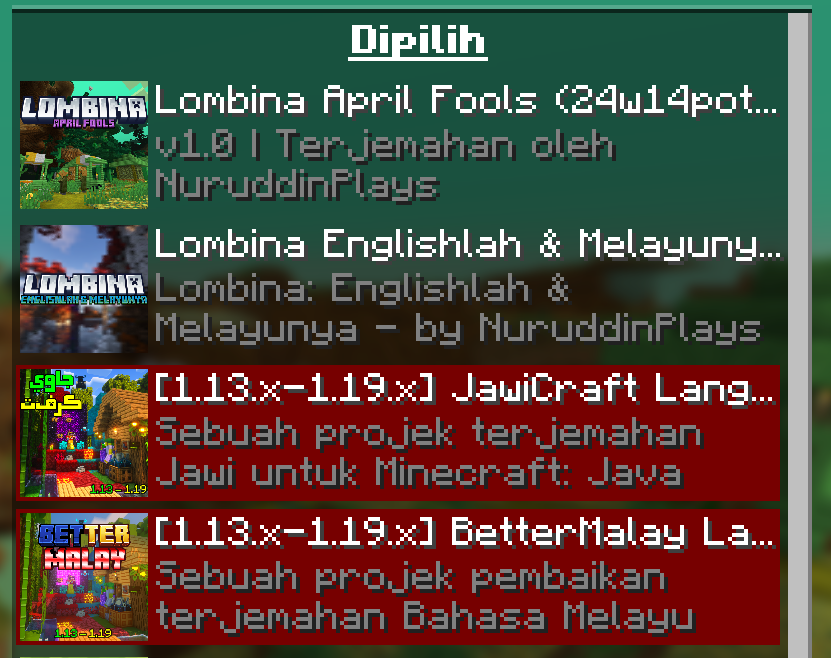
– Lombina: April Fools
– This pack
Pek yang ini
– Lombina: Englishlah & Melayulah
– Enables the joke language options, also adds it’s own splash texts set. For version 24w14potato and above only.
Mendayakan pilihan bahasa lawak, juga menambah set teks tampilannya tersendiri. Untuk versi 24w14potato dan ke atas sahaja.
– JawiCraft Language Pack
– Enables the Jawi Malay language option, also adds it’s own splash texts set. Recommended for versions 23w13a_or_b and below only.
Mendayakan pilihan tulisan Jawi, juga menambah set teks tampilannya tersendiri. Disarankan untuk versi 23w13a_or_b dan ke bawah sahaja.
– BetterMalay Language Pack
– Improves the Malay translations, also adds it’s own splash texts set. Recommended for versions 23w13a_or_b and below only.
Menambah baik terjemahan Bahasa Melayu Rumi, juga menambah set teks tampilannya tersendiri. Disarankan untuk versi 23w13a_or_b dan ke bawah sahaja.
– Untuk JawiCraft dan BetterMalay, susunan kedua pack ini boleh diubah bergantung kepada set teks tampilan/splash text mana yang ingin digunakan. Dan kebanyakan teks tampilan yang disertakan dalam JawiCraft hanya boleh dipaparkan dengan betul jika pilihan bahasa Melayu bertulisan Jawi dipilih dalam permainan (`بهاس ملايو (مليسيا)`).
—

Check out other MCEM packs! / Jom tengok pek MCEM lainnya!









—
**Credits / Penghargaan**
| Credits / Penghargaan | Contributors / Penyumbang |
| :– | :– |
| Compiler
Penyusun | Muhammad Nuruddin (NuruddinPlays) |
| Translator
Penterjemah | Muhammad Nuruddin (NuruddinPlays)
Ahmad Ali Karim (EmpAhmadK) |
—

**Sebuah Projek Koleksi Pek Sumber Minecraft Bertemakan Melayu
A Malay-themed Minecraft Resource Pack Collection Project
سبواه ڤروجيک کوليکسي ڤيک سومبر ماءينکرفت برتيماکن ملايو**





LoginPhaseProxy
**LoginPhaseProxy** is a somewhat “*simple*” Velocity Plugin that allows you to proxy the LoginPluginMessagePacket from backend server to the player and LoginPluginResponsePacket from the player to the backend server. This is useful for modded backend servers that rely on Login Plugin Message communication to work, such as [AutoModpack](https://github.com/Skidamek/AutoModpack).
> Disclaimer: This plugin is in early development and may contain bugs and performance issues. Use it at your own risk.
## 🔁 When to use
| Author(s) | Mod |
|—————————————–|——————————————————————————–|
| [Skidam](https://github.com/Skidamek) | [AutoModpack](https://github.com/Skidamek/AutoModpack) (Fabric/Forge/Neoforge) |
> You’re welcome to suggest new use cases via [Issue](https://github.com/caiostoduto/LoginPhaseProxy/issues/new/choose) or [Pull Request](https://github.com/caiostoduto/LoginPhaseProxy/pulls)!
## ❓ What does it solve (detailed)

Normal Setup ⦁ Made in Figma
On a normal Velocity setup, when a player connects to the proxy, they go through the (P ↔ V) Login Phase, exchanging packets with the Velocity until the proxy sends a Server Login Success Packet, completing the (P ↔ V) Login Phase and triggering the backend connection process. The backend server then goes through its own (V ↔ B) Login Phase, where it may send Login Plugin Message Packets to the Velocity, and they can’t be forwarded to the player, because the (P ↔ V) Login Phase is already complete, so Velocity reponds them with an empty data Login Plugin Response Packet, as it doesn’t know how to handle them. This is a problem for modded backend servers that rely on Login Plugin Message communication to work, such as [AutoModpack](https://github.com/Skidamek/AutoModpack), as they won’t be able to send the necessary data to the player during the Login Phase, and the player won’t be able to join the backend server. This plugin tries to solve this issue by proxying the Login Plugin Message communication between the player and the backend server, allowing modded backend servers to work with Velocity without any issues.
## ✨ How it works (detailed)
~~Basically black magic 🪄🔮~~. It uses [Java Reflection](https://www.oracle.com/technical-resources/articles/java/javareflection.html) to access the internal Velocity classes [ProxyServer](https://github.com/PaperMC/Velocity/blob/ad8de4361c9d6e93b818d3381e85b14e0c90ad05/proxy/src/main/java/com/velocitypowered/proxy/VelocityServer.java) -> [ConnectionManager](https://github.com/PaperMC/Velocity/blob/dev/3.0.0/proxy/src/main/java/com/velocitypowered/proxy/network/ConnectionManager.java)[[1]](https://github.com/caiostoduto/LoginPhaseProxy/blob/main/src/main/java/com/caiostoduto/loginPhaseProxy/initializer/VelocityChannelInitializer.java) to override the serverChannelInitializer[[2]](https://github.com/caiostoduto/LoginPhaseProxy/blob/main/src/main/java/com/caiostoduto/loginPhaseProxy/initializer/FrontendChannelInitializer.java) and backendChannelInitializer[[3]](https://github.com/caiostoduto/LoginPhaseProxy/blob/main/src/main/java/com/caiostoduto/loginPhaseProxy/initializer/BackendChannelInitializer.java), so it can intercept the Velocity communication with the player (P <-> V)[[4]](https://github.com/caiostoduto/LoginPhaseProxy/blob/main/src/main/java/com/caiostoduto/loginPhaseProxy/intercept/FrontendInterceptor.java) and backend server (V <-> S)[[5]](https://github.com/caiostoduto/LoginPhaseProxy/blob/main/src/main/java/com/caiostoduto/loginPhaseProxy/intercept/BackendInterceptor.java), respectively.

Plugin Implementation ⦁ Made in Figma
With that, our plugin watches the Login Phase player connection until it sees a SetCompressionPacket(5) (optionally) and ServerLoginSuccessPacket(6), adding them to a buffer instead of sending them to the player and synthetically sends a loginAcknowledgedPacket(7) to the Velocity pipeline, tricking it into thinking the Login Phase is complete and starting the backend connection process. To make sure the Velocity doesn’t mess the packet interception and sending process, our plugin removes stealthly (so that it doesn’t trigger it’s handlerRemoved lifecycle[[6]](https://github.com/caiostoduto/LoginPhaseProxy/blob/main/src/main/java/com/caiostoduto/loginPhaseProxy/utils/StealthPipeline.java)) the handlers from the Velocity serverChannel pipeline[[4]](https://github.com/caiostoduto/LoginPhaseProxy/blob/main/src/main/java/com/caiostoduto/loginPhaseProxy/intercept/FrontendInterceptor.java) that were added after the Login Phase to Config Phase transition ([MinecraftCompressorAndLengthEncoder](https://github.com/PaperMC/Velocity/blob/ad8de4361c9d6e93b818d3381e85b14e0c90ad05/proxy/src/main/java/com/velocitypowered/proxy/protocol/netty/MinecraftCompressorAndLengthEncoder.java#L33) and [MinecraftCompressDecoder](https://github.com/PaperMC/Velocity/blob/ad8de4361c9d6e93b818d3381e85b14e0c90ad05/proxy/src/main/java/com/velocitypowered/proxy/protocol/netty/MinecraftCompressDecoder.java#L34), others are removed naturally afterwards). Also, our plugin adds the [MinecraftVarintLengthEncoder](https://github.com/PaperMC/Velocity/blob/ad8de4361c9d6e93b818d3381e85b14e0c90ad05/proxy/src/main/java/com/velocitypowered/proxy/protocol/netty/MinecraftVarintLengthEncoder.java#L33)[[4]](https://github.com/caiostoduto/LoginPhaseProxy/blob/main/src/main/java/com/caiostoduto/loginPhaseProxy/intercept/FrontendInterceptor.java) back (was removed at the transition) and sets the [MinecraftDecoder](https://github.com/PaperMC/Velocity/blob/ad8de4361c9d6e93b818d3381e85b14e0c90ad05/proxy/src/main/java/com/velocitypowered/proxy/protocol/netty/MinecraftDecoder.java#L34) state to StateRegistry.LOGIN[[4]](https://github.com/caiostoduto/LoginPhaseProxy/blob/main/src/main/java/com/caiostoduto/loginPhaseProxy/intercept/FrontendInterceptor.java) so the packets are properly encoded and decoded.
If the backend server sends a LoginPluginMessagePacket(10) during its Login Phase, our plugin will intercept it and send it to the player(11), and if the player sends a LoginPluginResponsePacket(12), our plugin will intercept it and send it to the backend server(13). This way, we can effectively proxy the LoginPluginMessagePacket and LoginPluginResponsePacket between the player and the backend server, allowing modded backend servers to work with Velocity without any issues. Then, when the backend server ends the Login Phase sending the ServerLoginSuccessPacket(15), our plugin will flush the buffered packets to the player, completing the Login Phase and allowing the player to join the backend server as normal. Afterwards, if the user sends a LoginAcknowledgedPacket (clientProtocolVersion >= ProtocolVersion.MINECRAFT_1_20_2)(16) after the Login Phase is complete, our plugin will simply ignore it, as it is not expected to be sent by the player at that point. Finally, the plugin will restore the [MinecraftDecoder](https://github.com/PaperMC/Velocity/blob/ad8de4361c9d6e93b818d3381e85b14e0c90ad05/proxy/src/main/java/com/velocitypowered/proxy/protocol/netty/MinecraftDecoder.java#L34) state to its previous state (Config Phase).
So, yeah, *basically black magic* 🪄🔮. Yayyyy!
## 🙏 Acknowledgements
– [Skidam](https://github.com/Skidamek), who inspired me to create this plugin!
– [lucas-gcp](https://github.com/lucas-gcp), who supported me and helped with testing!
Log Cleaner
A lightweight mod that cleans old, unused log files.
The best thing is that this mod keeps files not based on creation date, but the most recent access (of any kind) to the file, so logs that are still being accessed for whatever reason are not removed unwillingly.
It works both client-side only and server-side only, and works in every Minecraft version.
By default, it will clean logs that haven’t been used in more than 14 days, so there’s plenty of time in case you ever need them for debugging, but you can configure it to any amount of days you want.
## Configuration
You can find the mod’s configuration file in `config/logcleaner.json`. There’s two options you can change in there:
– `daysOld`: The number of days a log has to have been unused in order for it to be deleted. Defaults to `14`
– `silent`: If set to `true`, Log Cleaner will not send a message with the amount of deleted log files to the log. Defaults to `false`
MAKE YOUR BUILDING LIMIT UP
# MAKE YOUR BUILDING LIMIT UP
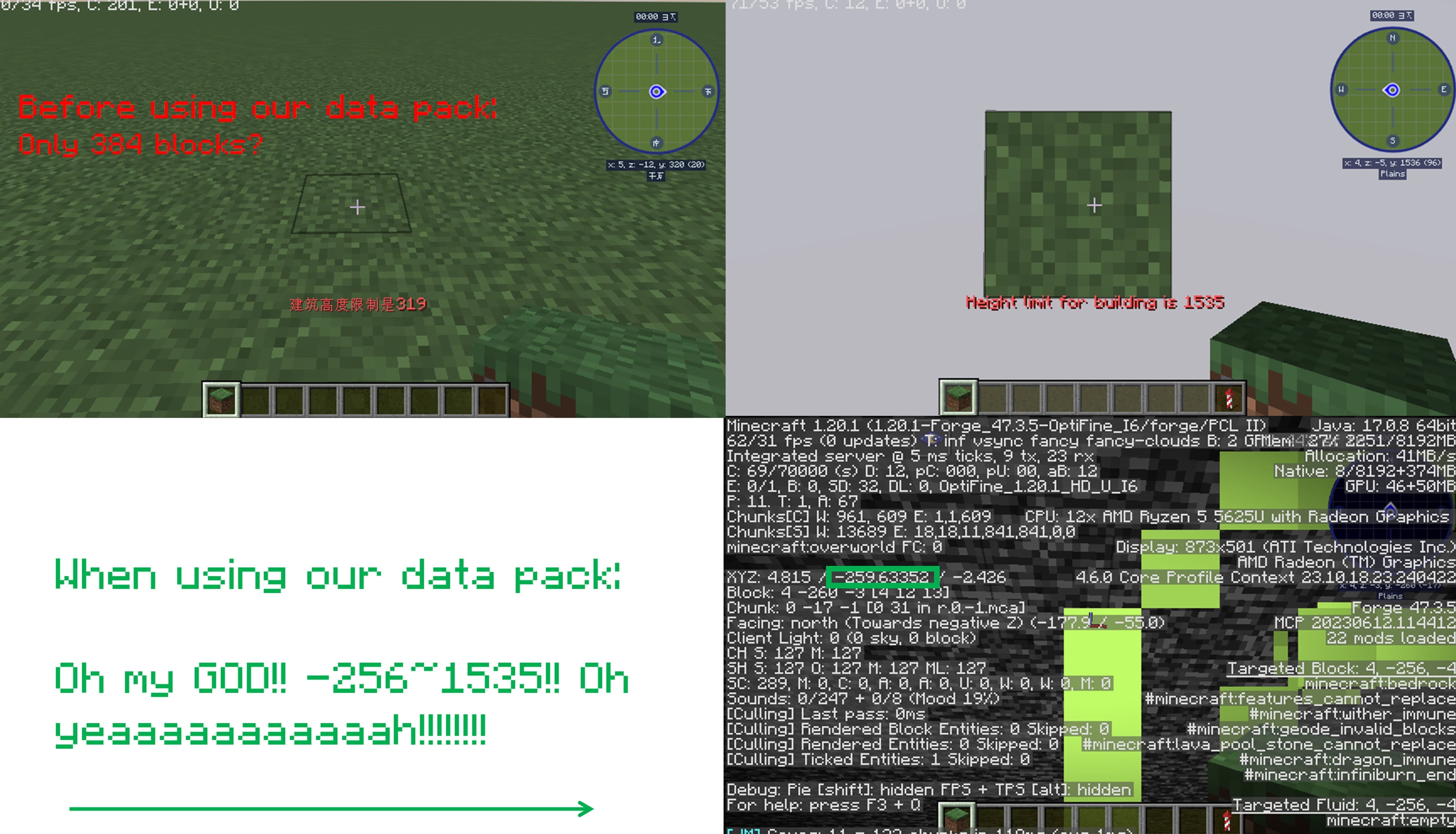
_**Think Minecraft doesn’t have enough building space? Want to build taller buildings? Try our data pack and you can increase the building limit up to 4064 blocks!!**_
## How to install it?
**You may need to create your game world before install the data pack**
1.Open your game folder(“.minecraft”)
### If you use version isolation:
2.Open your “versions” folder
3.Choose your version
4.Open your “saves” folder
5.Choose your save
6.Open your “datapacks” folder
7.Put our data pack in the folder
### If you Don’t use version isolation
2.Open your “saves” folder
3.Choose your save
4.Open your “datapacks” folder
5.Put our data pack in the folder
**PLEASE PAY ATTENTION!! This datapack may affect the normal operation of other mods**

_This is a DATAPACK! Please put it in the “datapacks” folder in your saves folder_
**NOT THE “recoursepacks” FOLDER**
Legacy Console Edition Click Sound
Re-tunes the Click Sound to the one From Console Edition!
–
– Brings [click.ogg](https://files.catbox.moe/jmnkur.ogg) to Java.
Extra
Enjoy the button-sized Nostalgia! :3
Here, have a [Bedrock Edition](https://files.catbox.moe/u53n4p.mcpack) port.