Steak = Cooked Beef
Makes steak called cooked beef because it makes more sense and it will make a friend of mine happy because he likes beef!
It’s very simple, does nothing else, just this!
(And maybe a little easter egg, try to find it 😀 )
Makes steak called cooked beef because it makes more sense and it will make a friend of mine happy because he likes beef!
It’s very simple, does nothing else, just this!
(And maybe a little easter egg, try to find it 😀 )
# Stacker
Minecraft mod to change the stack size of all items. For Fabric 1.17, 1.18, 1.18.2, and 1.19!

This mod has a config that defaults to 64. Change it to be whatever you like (below int_max), but I do not recommend anything too far over 1 Billion (No support will be given for stacks larger than 1,073,741,823).
Requires Stacc API and Cloth Config API. Stacc API is an embedded library, so don’t worry about downloading it. I recommend installing with Mod Menu (for in-game access to the configs), but it is not needed to run.
This is a Texture Pack, originally designed for “[Better Than Adventure!](https://www.betterthanadventure.net/)”, and consequentially Beta 1.7.3 (although it will work with ANY version of Minecraft that has a Shadow, since the location and filename has never changed, despite the outdated Resource Pack version warning), that gives the Entities a squared Shadow, instead of a circular one. Consistency, my beloved.
# CREDITS
– Shadow texture and “pack.png” made by AndreWharn.
– Do not use the assets without permission, please!
# Thanks for using this pack! 😀
# 25w08a Spawn Egg Textures – Backported!
This resource pack brings the **spawn egg textures** introduced in **Minecraft Snapshot 25w08a** to **all versions from Minecraft 1.14 snapshots up to 25w07a**! If you love the new spawn egg textures but prefer playing on older versions, this pack is perfect for you.
### ✨ **Features:**
– Backports **25w08a spawn egg textures** to **all versions from Minecraft 1.14 snapshots up to 25w07a**.
– Faithful to the vanilla aesthetic.
– Perfect for those who want the latest textures on older versions.
Enjoy and let me know if you find any issues! 🥚🎨
# Tschipcraft’s Spawn Animations
> A server-side data pack/mod for 1.14x-26.1x
 Features
Hostile mobs dig out of the ground or poof into existence when they spawn.
**Works with:**
Zombies, Husks, Drowned, Skeletons, Strays, Bogged, Wither Skeletons, Spiders, Cave Spiders, Creepers, Endermen, Slimes, Magma Cubes, Zombified Piglins, Striders and Giants.
This data pack/mod is designed to be as unintrusive as possible. Hidden entities including their worn armor and tools will only be invisible and silent.
Spawn Animations is completely server-side!
[-> For available settings and customization, take a look at the wiki <-](https://github.com/Tschipcraft/spawnanimations/wiki)
More sophisticated animations with Animated Java are planned for v2.0!
## Installation
Install either as:
* **Data Pack [DP]** ➜ Place `.zip` in your world's `datapacks` folder
* **Mod [Mod]** ➜ Drop into your `mods` folder and optionally install [MidnightLib](https://modrinth.com/project/codAaoxh) for a global config file and UI
For hiding entities with emissive layers in 1.20.4 or below, and generally smoother animations, you may additionally install [Pehkui](https://modrinth.com/project/t5W7Jfwy).
To manage settings, reset, or uninstall the pack, use the command `/trigger tschipcraft.menu` or `/function #tschipcraft:menu`.
## Demo GIFs
Click here to expand


## Compatibility
**Forge** is only natively supported until Minecraft 1.21.5.
For Minecraft 1.14, 1.15 or 1.16, you can use [a legacy version](https://github.com/Tschipcraft/spawnanimations/tree/master/other_editions).
For mod support, check out [Spawn Animations Compats by Fyoncle](https://modrinth.com/datapack/spawn-animations-compats).
## External Links




## Partner Offers
Want to buy **Hytale** or upgrade your edition? Use creator code `Tschipcraft` upon checkout for me to receive a commission! (The price for you stays the same)

Straightforward, pure ASM (SpASM)
Allows registering class transformers that process all classes, without specifying the class’s names like in FabricASM.
Entrypoint – `spasm:transformer`
Interface – `net.mine_diver.spasm.api.transform.ClassTransformer`
add biome blending to moss block, donesnt work with moss carpet unfortunatly.
/! NEEDS either continuity OR optifine to work as it use theyre CTM feature /!
smoothing also need continuity or optiphine as it was not intentional at firs, i will have to remake the texture in the plain for everyone one day but for now, everything in this pack need continuity or optifine
# Small Shield & Totem
### Features
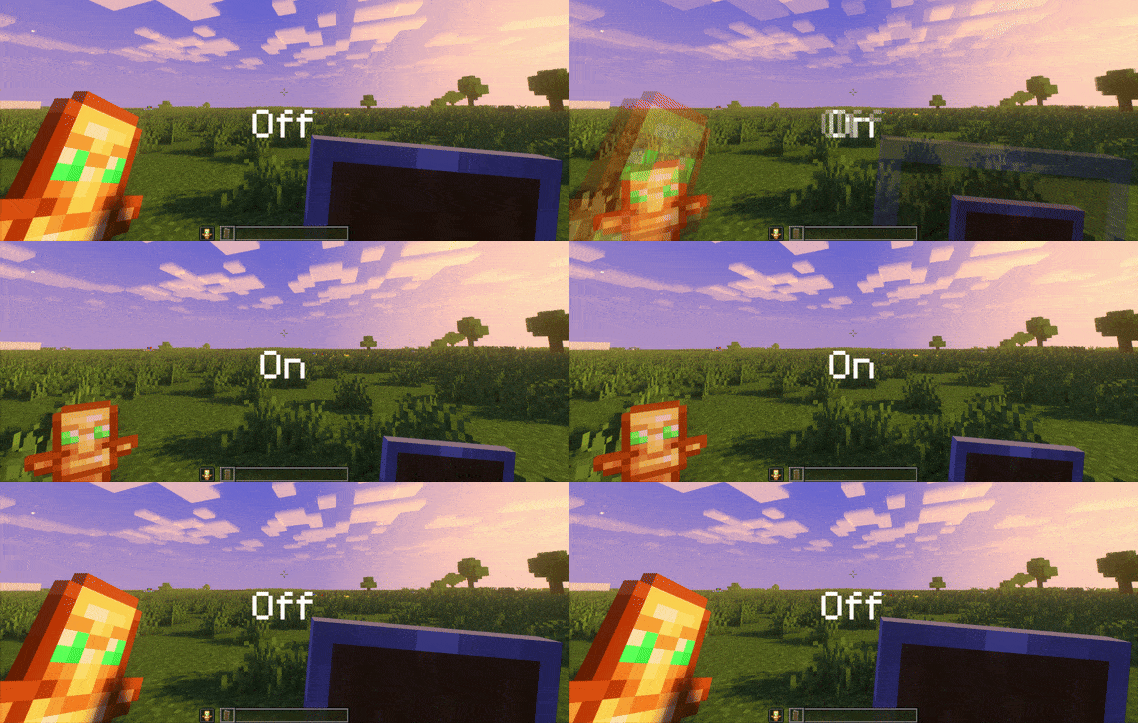
– Small shield
– Small totem
– Small totem pop
– Small totem pop particles
– No mods needed
### Compatibility
The pack works on all version from **1.9** to the **Newest**
⚠️ Versions 1.19.4 and below will tell you “the pack is for a newer version”, but it will work just fine
### Notice
Totem of undying will be extra small when placed in an item frame. This is unfortunately a side effect of the small totem pop effect
⠀
### Want a Minecraft server? Consider using Sparkedhost!
Use code ‘blob’ for 25% off
[](https://billing.sparkedhost.com/aff.php?aff=3085)
### Features
– Smallified equipment and miscellaneous items.
– Fixes multiple texture issues, such as the end crystal offset.
– Blends in well with vanilla textures.
– Fully compatible with other smallifying resource packs!
– Fully functional in any version from 1.5!
### Questions?
Be sure to make suggestions and report bugs or inconsistencies to the [Jotform](https://form.jotform.com/260524716060046)!
### What Version?
If you are using the Modrinth loader, it should automatically select the resource pack for your version!
In case you are not using the Modrinth loader, the letter determines which pack to install:
* P: 1.5 – 18w43a
* T: 18w43a – Latest
## 📂 Simple Datapacks
The purpose of this mod is to simplify the ways of adding datapacks to the game. To do this, the mod creates a folder in the root directory of Minecraft called datapacks. In my opinion, the capabilities of datapacks are underestimated by players, mostly because not everyone understands how to install datapacks into the game. This is more difficult to do than to install a mod or resource pack, although many datapacks bring a lot of content to the game.
My goal is to make a mod that will help players with installing datapacks into the game so that they can get a new portion of unforgettable impressions.
## 💼 Usage

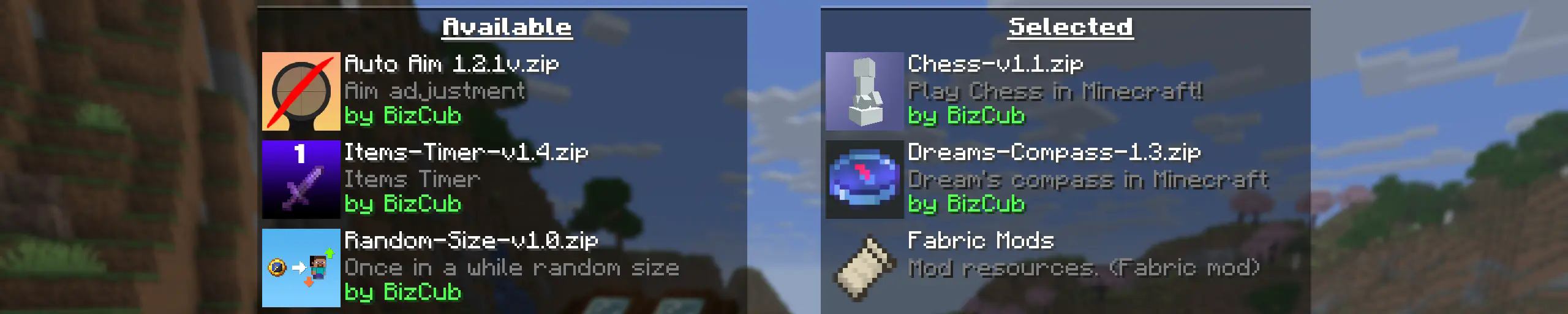
In order to launch a world with datapacks, you need to download any datapack that is compatible with the selected version of Minecraft, open and place the datapack in the datapacks folder, start creating a world and select the desired datapack from the list. However, when using Cloth Config, the mod settings specify the path to the downloads folder, so to use datapacks, you only need to download them, then simply open the datapack selection menu and enable the desired one.
## ✨ Features
Whenever possible, I added the most basic features for the mod that I could imagine.
* Since the main thing for me is that as many players as possible start using datapacks, I made the mod available on 4 different loaders so that it can be launched from almost any modpack.
* The mod has a configuration. The values used by the mod can be changed in the mod menu (Fabric requires ModMenu), and can also be changed in the configuration file, which is available using the Cloth Config API.
* The mod allows players to add and load datapacks from different folders. To change the sources of these packs, you need to configure them in the mod settings. If you want to specify a folder in the game’s root directory, for example, “`my_datapacks“` instead of the full path “`C:Users{USERNAME}AppDataRoaming.minecraftmy_datapacks“`, simply enter the folder name in the field in the mod settings menu.
* By default, datapacks are loaded from the datapacks folder in the root directory and the downloads folder, allowing them to appear in the game immediately after installation (provided Cloth Config API is loaded; otherwise, only the datapacks folder will be used).
* The mod settings have two lists: one for required and one for optional datapacks. The first list specifies the paths to datapacks that are automatically applied when entering a world. The second list contains datapacks that remain inactive but can be enabled at any time using the “`/datapack enable“` command.
* The Simple Datapacks mod runs on the server. Since the mod settings are not accessible on the server, it automatically uses all datapacks from the datapacks folder.
* It’s possible to disable feature packs (experimental datapacks). If you don’t use feature packs, you can disable them to save space on the datapack selection screen. In the mod settings, function packages can be set to required, and then they will be applied when the world starts.
* Unlike similar mods, datapacks will continue to work in the world, even if you disable the mod. In the mod settings, you can enable copying datapacks to the world folder. In this case, the datapack will work without the mod, because the game will read it from the world.
## 🤝 Support