Spot Nether structures instantly! This pack highlights bastions and nether fortresses by subtly enhancing key blocks, making survival exploration faster and easier without cheating. It makes nether fortresses green and bastions and bastion remnants yellow. I personally tried it myself and it saves 10x more time than manually finding one.
credits:**PlanetGuy_122**
nerdPVP
# NerdPVP – A Clean & Competitive PVP Resource Pack
### WARNING : This pack is still in alpha and NOT complete
## Overview
Nerd PVP is a streamlined resource pack designed for competitive Minecraft PVP. It enhances visibility, reduces distractions, and optimizes key elements to give you a tactical edge in combat. Whether you’re playing Bedwars, SkyWars, or Faction PVP, this pack keeps your focus sharp and your performance crisp.
## Key Features
– ✔ Clear & Minimalist Textures – Removes visual clutter for better enemy tracking.
– ✔ Optimized Sword & Tool Designs – Clean, high-visibility models for fast-paced combat.
– ✔ Low Fire – Less obstruction during fights.
– ✔ 16x Resolution – Balanced performance for smooth gameplay.
## Compatibility
Works on Minecraft [version (1.16.x, 1.17.x, 1.18.x,1.19.x, etc) ]
FPS-friendly (compatible with Sodium, Iris, etc.).
## Installation
Download the .zip file.
Place it in your resourcepacks folder.
Activate in-game via Options > Resource Packs.
## Feedback & Updates
Suggestions or bug reports? Say it in the discord server or DM me directly. Updates focus on community-driven improvements!
## Developer note
You can use textures from this pack, just credit the pack maker “membercatcousin”
NBT Viewer
# NBT Viewer
## Usage
There is a configurable key bind – Right ALT by default – which opens the
NBT Viewer GUI.
Inside the GUI, there will be key-value pairs for each element of the data.
For Lists, the index in the list is the key.
Object keys are sorted by name.
## Changelog
### Version 3.0.0
* Ported to 1.20.1
* All elements are represented by a button. For types other than lists and objects, this button does nothing and is
purely decorative.
Navy Blue Shield
# Navy Blue Shield
This resource pack replaces the default shield with a custom 3D model.
**MoreTotems** is a simple Paper plugin which adds some minor tweaks to Totems of Undying.
## 🚀 Quick Start
### 📥 Installation:
> #### ⚠️ Warning!
>
> Please, do not download versions from range:
> [0.1.0-data-1.20.5](https://modrinth.com/datapack/moretotems/version/0.1.0-data-1.20.5)..[0.1.0-1.20.5+mod](https://modrinth.com/datapack/moretotems/version/0.1.0-1.20.5+mod)!
> They are not loading because of [#11](https://github.com/JustHm228/MoreTotems/issues/11) (Data pack is not loading on >=1.20.5) and
> [#13](https://github.com/JustHm228/MoreTotems/issues/13) (Data pack never registers objectives).
>
> So, it is recommended not to use experimental data pack versions of the plugin.
Please ensure that you have the following software installed:
– [Java]() (≥ 11 LTS)
– [Minecraft]() (≥ 1.19.4)
– [Paper]() (≥ 1.19.2 build
[#191]())
To install the plugin on your Minecraft server, you should:
1. Download the latest version.
2. Place it to the “plugins“ directory in the root of the server.
3. Restart the server.
### ⚠️ Experimental versions:
> #### ⚠️ Disclaimer:
>
> I am currently developing some experimental alpha versions of this plugin,
> which can be loaded as vanilla data packs. I recommend not to use them because
> of many bugs. So, if you download such experimental version and load it to
> your world, please be ready for many serious errors.
### 💡 Features:
– **”Unbreakable” Totems of Undying.** A Totem of Undying with the
[“Unbreakable“ tag]() set will not
disappear when used. To get such totem you can use one of the following commands:
– ≤ 1.20.4: “/minecraft:give @s minecraft:totem_of_undying{Unbreakable:1b} 1“
– ≥ 1.20.5: “/minecraft:give @s minecraft:totem_of_undying[minecraft:unbreakable={}] 1“
– **Enchantments for Totems of Undying:**
– **[Unbreaking](https://minecraft.wiki/w/Unbreaking).** Every Totem of Undying enchanted with
Unbreaking of “n“th level has a “100/(n+1)“% chance that it will disappear when used.
Otherwise, it will not. So, the Totem of Undying enchanted with Unbreaking of 3 level has a
75% chance that it will not disappear when used.
### 🔧 Configuration:
Coming soon!
## 📭 Contact me:
## 📖 License
This project and its sources are licensed under the [MIT License](https://github.com/JustHm228/MoreTotems/blob/main/LICENSE):
“`text
MIT License
Copyright (c) 2025 JustHuman228
Permission is hereby granted, free of charge, to any person obtaining a copy
of this software and associated documentation files (the “Software”), to deal
in the Software without restriction, including without limitation the rights
to use, copy, modify, merge, publish, distribute, sublicense, and/or sell
copies of the Software, and to permit persons to whom the Software is
furnished to do so, subject to the following conditions:
The above copyright notice and this permission notice shall be included in all
copies or substantial portions of the Software.
THE SOFTWARE IS PROVIDED “AS IS”, WITHOUT WARRANTY OF ANY KIND, EXPRESS OR
IMPLIED, INCLUDING BUT NOT LIMITED TO THE WARRANTIES OF MERCHANTABILITY,
FITNESS FOR A PARTICULAR PURPOSE AND NONINFRINGEMENT. IN NO EVENT SHALL THE
AUTHORS OR COPYRIGHT HOLDERS BE LIABLE FOR ANY CLAIM, DAMAGES OR OTHER
LIABILITY, WHETHER IN AN ACTION OF CONTRACT, TORT OR OTHERWISE, ARISING FROM,
OUT OF OR IN CONNECTION WITH THE SOFTWARE OR THE USE OR OTHER DEALINGS IN THE
SOFTWARE.
“`
More Culling
### A mod that changes how multiple types of culling are handled in order to improve performance
Culling is when you don’t render things that the player can’t see, to improve performance
Requires Cloth Config!
**Make sure to report any bugs [here](https://github.com/fxmorin/moreculling/issues)!**
**Head over to the [wiki](https://github.com/fxmorin/MoreCulling/wiki) for information on:**
What’s Culled, Performance, Compatibility, Bug Fixes, and more!
Check out [MoreCullingExtra](https://modrinth.com/mod/morecullingextra) for extra culling features
## My other optimizations/fixes
* [MemoryLeakFix](https://modrinth.com/mod/memoryleakfix) – Fixes multiple memory leaks for both the client and server
* [Carpet-Fixes](https://modrinth.com/mod/carpet-fixes) – Largest Server-Side bug fixing mod
* [Blanket](https://modrinth.com/mod/blanket) – Client-side tweaks/fixes
* [RailOptimization](https://modrinth.com/mod/rail-optimization) – Make powered rails less laggy
## More Info
Feel free to contribute to the project!
I’m also fine if you use this mod in your modpacks, just make sure to mention it.
However I don’t allow clients or other mods to merge this mod without permission, if you would like to use this mod in your client or another mod please contact me.
—
More Mobs
# Tschipcraft’s More Mobs
> A server-side data pack/mod for 1.14x-26.1x
YouTube showcase
## Features
Mobs have new variants through custom heads or through unused vanilla mobs! This pack uses **over 85 custom player heads** that can be obtained and placed in your world. Spiders also turn upside down when hanging from ceilings.
This data pack/mod is completely server-side, but can also be installed on the client for singleplayer worlds! No resource pack needed!
[-> For all added heads and available settings, take a look at the wiki <-](https://github.com/Tschipcraft/more_mobs/wiki)
## Installation
Install either as:
* **Data Pack [DP]** ➜ Place `.zip` in your world's `datapacks` folder
* **Mod [Mod]** ➜ Drop into your `mods` folder and optionally install [MidnightLib](https://modrinth.com/project/codAaoxh) for a global config file and UI
To manage settings, reset, or uninstall the pack, use `/trigger tschipcraft.menu` or `/function #tschipcraft:menu`.
## Compatibility
Tested with [Rare Mobs (PMC)](https://www.planetminecraft.com/data-pack/rare-mobs-5186029/) and [Mob Captains](https://modrinth.com/datapack/mob-captains).
**Forge** is only natively supported until Minecraft 1.21.5.
This data pack follows the [Smithed](https://wiki.smithed.dev/conventions/) and essential [MC Datapacks Discord Server](https://mc-datapacks.github.io/en/conventions/index.html) Conventions to ensure data pack compatibility.
## Current issues
>
>
> Currently incompatible with [Special Mobs](https://modrinth.com/datapack/special-mobs) – [see #7](https://github.com/Tschipcraft/more_mobs/issues/7). This will be fixed in a future release.
## External Links
## Partner Offers
Want to buy **Hytale** or upgrade your edition? Use creator code `Tschipcraft` upon checkout for me to receive a commission! (The price for you stays the same)
In Minecraft, the Data Pack is a powerful tool that allows players to extend the game’s content by modifying the game’s rules and logic. Here’s an introduction to a packet that features some monsters to drop minerals:
### Packet Name: **Monsters Drop Mine**
#### Features Overview:
The core function of this packet is to give specific monsters a chance to drop various minerals such as iron ore, gold ore, diamonds, etc., when defeated. This not only adds to the fun of the game, but also provides players with more ways to obtain resources and enrich the gameplay of the game.
#### Design Concept:
In Minecraft, minerals are usually only available through mining, and this packet breaks that convention. By having monsters drop minerals, players can get unexpected surprises as they explore and fight, while also providing another way to get resources for those who enjoy fighting but aren’t willing to dig for long periods of time.
#### Implementation:
This packet is mainly achieved by modifying the monster’s drop rules. In Minecraft, monster drops are defined by ‘loot_tables’ (loot tables). Packs will add new loot tables to specific monsters, or modify existing loot tables so that they have a chance to drop specified minerals when defeated.
For example, for zombies, a packet can add the following rules to its loot table:
“`json
{
“pools”: [
{
“rolls”: 1,
“entries”: [
{
“type”: “minecraft:item”,
“name”: “minecraft:iron_ore”,
“functions”: [
{
“function”: “minecraft:set_count”,
“count”: {
“type”: “minecraft:uniform”,
“min”: 1,
“max”: 3
}
}
]
}
],
“conditions”: [
{
“condition”: “minecraft:random_chance_with_looting”,
“chance”: 0.1,
“looting_multiplier”: 0.05
}
]
}
]
}
“`
This rule means that zombies have a 10% base chance of dropping between 1 and 3 iron ore, and that the drop chance increases by 5% for each level of the player’s loot level.
#### Applicable Scenarios:
This packet is for players who enjoy exploration and combat, especially those who want a richer resource acquisition experience in the game. It gives players the opportunity to earn valuable mineral resources when exploring biomes such as dungeons, forests, or deserts, and after encountering monsters and defeating them.
#### Installation Method:
The player needs to put this packet file (usually in ‘.zip’ format) into the ‘data_packs’ folder in Minecraft. Then enable the data package in the game settings, and you can experience the new feature of monster drop minerals in the game.
#### Notes:
– Players need to be aware that too many mineral drops can disrupt the balance of the game, so it is recommended that players adjust the drop chances according to their playstyle and preferences.
– Packet compatibility needs to be tested against the specific version of Minecraft to ensure it works properly.
Overall, this Monster Mineral Drop Pack brings new gameplay and fun to Minecraft, allowing players to earn resources in battle, enriching the game’s exploration and combat experience.
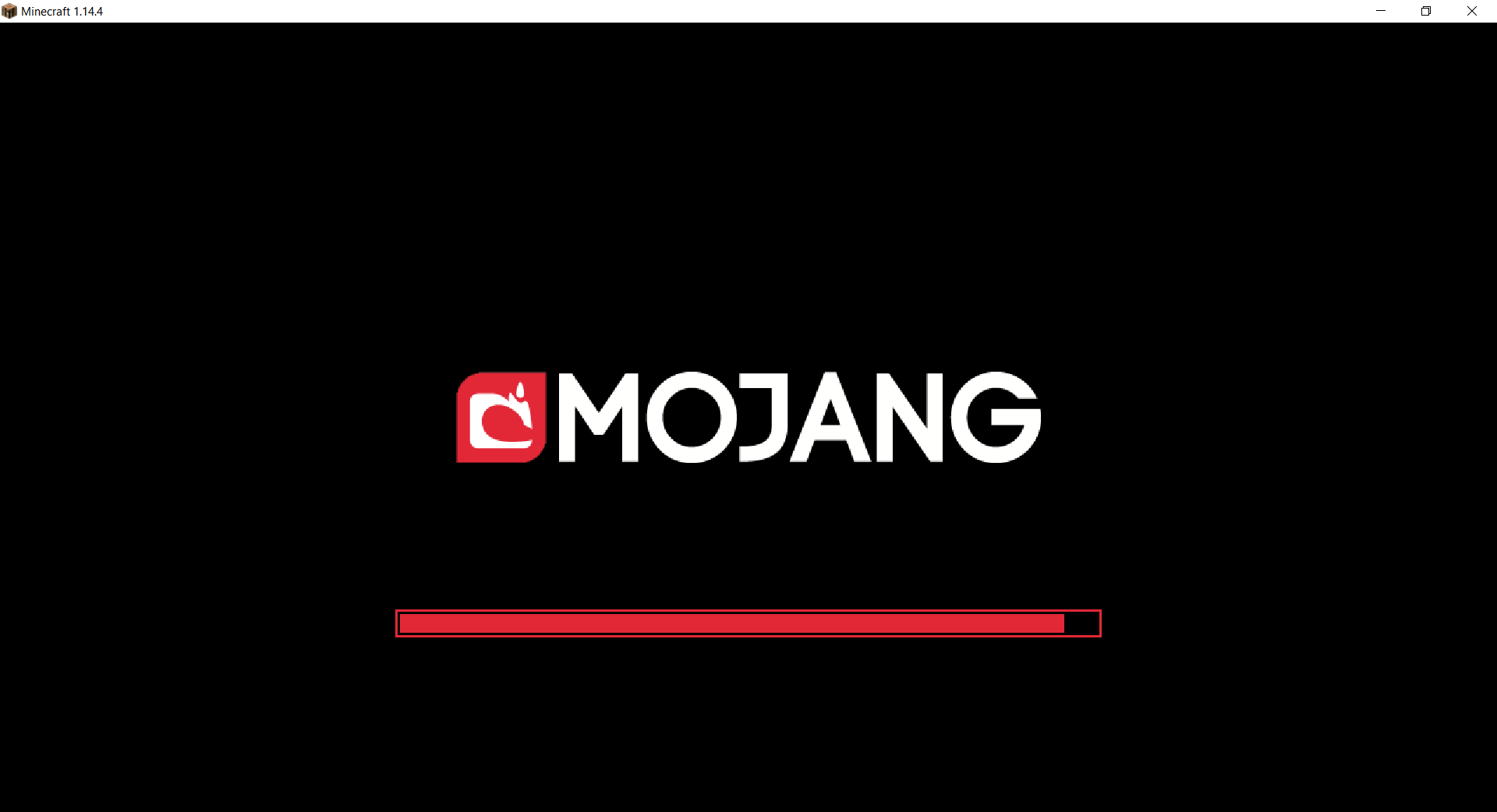
Mojang Black Background
# Mojang Black Background
Changes white background in mojang loading screen to black
Minecraft 1.14 and newer
OptiFine is required to work! [optifine.net](https://optifine.net/home)
## Minecraft 1.16+

## Minecraft 1.14 – 1.15
The resurcepack is also available on [CurseForge](https://www.curseforge.com/minecraft/texture-packs/mojang-black-background)