Low Fire & Side Shield
# 🔥Low Fire & Side Shield
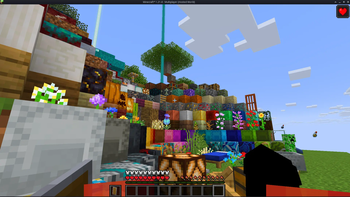
**Low Fire & Side Shield** is a **Minecraft resource pack** designed to keep your screen clear and focused.
It lowers both the **fire overlay** and the **shield position**, introducing a **minimal side shield** that lets you see more of your surroundings without losing the vanilla feel.
Whether you’re in the middle of a **PvP battle**, exploring dangerous caves, or just want a cleaner screen, this pack makes gameplay smoother and more immersive.
It’s lightweight, **FPS-friendly**, and works seamlessly with default Minecraft textures.
—
## ✨ Features
– 🔥 **Reduced fire overlay** — less visual clutter during combat.
– 🛡️ **Lowered side shield** — improved visibility without removing functionality.
– 🎮 **Vanilla-friendly look** — keeps the original Minecraft style intact.
– ⚙️ **Optimized for PvP and survival** — clear visuals, faster reactions.
– 💻 **Lightweight & compatible** — works with most other packs and versions.
—
## 📦 Perfect For
– PvP players needing better visibility
– Streamers who prefer a clean HUD
– Anyone wanting a minimal, modern look in Minecraft
—
**Tags / Keywords:**
`low fire`, `low shield`, `side shield`, `minecraft pvp`, `clear hud`, `visibility pack`, `vanilla friendly`, `clean screen`, `minimal resource pack`, `fps boost`, `combat tweaks`, `minecraft texture pack`, `darkshadowx21`
—
### 📜 License
This project is licensed under the **MIT License**.
You’re free to use, modify, and share this resource pack — just include proper credit to **Darkshadowx21**.
LoginPhaseProxy
**LoginPhaseProxy** is a somewhat “*simple*” Velocity Plugin that allows you to proxy the LoginPluginMessagePacket from backend server to the player and LoginPluginResponsePacket from the player to the backend server. This is useful for modded backend servers that rely on Login Plugin Message communication to work, such as [AutoModpack](https://github.com/Skidamek/AutoModpack).
> Disclaimer: This plugin is in early development and may contain bugs and performance issues. Use it at your own risk.
## 🔁 When to use
| Author(s) | Mod |
|—————————————–|——————————————————————————–|
| [Skidam](https://github.com/Skidamek) | [AutoModpack](https://github.com/Skidamek/AutoModpack) (Fabric/Forge/Neoforge) |
> You’re welcome to suggest new use cases via [Issue](https://github.com/caiostoduto/LoginPhaseProxy/issues/new/choose) or [Pull Request](https://github.com/caiostoduto/LoginPhaseProxy/pulls)!
## ❓ What does it solve (detailed)

Normal Setup ⦁ Made in Figma
On a normal Velocity setup, when a player connects to the proxy, they go through the (P ↔ V) Login Phase, exchanging packets with the Velocity until the proxy sends a Server Login Success Packet, completing the (P ↔ V) Login Phase and triggering the backend connection process. The backend server then goes through its own (V ↔ B) Login Phase, where it may send Login Plugin Message Packets to the Velocity, and they can’t be forwarded to the player, because the (P ↔ V) Login Phase is already complete, so Velocity reponds them with an empty data Login Plugin Response Packet, as it doesn’t know how to handle them. This is a problem for modded backend servers that rely on Login Plugin Message communication to work, such as [AutoModpack](https://github.com/Skidamek/AutoModpack), as they won’t be able to send the necessary data to the player during the Login Phase, and the player won’t be able to join the backend server. This plugin tries to solve this issue by proxying the Login Plugin Message communication between the player and the backend server, allowing modded backend servers to work with Velocity without any issues.
## ✨ How it works (detailed)
~~Basically black magic 🪄🔮~~. It uses [Java Reflection](https://www.oracle.com/technical-resources/articles/java/javareflection.html) to access the internal Velocity classes [ProxyServer](https://github.com/PaperMC/Velocity/blob/ad8de4361c9d6e93b818d3381e85b14e0c90ad05/proxy/src/main/java/com/velocitypowered/proxy/VelocityServer.java) -> [ConnectionManager](https://github.com/PaperMC/Velocity/blob/dev/3.0.0/proxy/src/main/java/com/velocitypowered/proxy/network/ConnectionManager.java)[[1]](https://github.com/caiostoduto/LoginPhaseProxy/blob/main/src/main/java/com/caiostoduto/loginPhaseProxy/initializer/VelocityChannelInitializer.java) to override the serverChannelInitializer[[2]](https://github.com/caiostoduto/LoginPhaseProxy/blob/main/src/main/java/com/caiostoduto/loginPhaseProxy/initializer/FrontendChannelInitializer.java) and backendChannelInitializer[[3]](https://github.com/caiostoduto/LoginPhaseProxy/blob/main/src/main/java/com/caiostoduto/loginPhaseProxy/initializer/BackendChannelInitializer.java), so it can intercept the Velocity communication with the player (P <-> V)[[4]](https://github.com/caiostoduto/LoginPhaseProxy/blob/main/src/main/java/com/caiostoduto/loginPhaseProxy/intercept/FrontendInterceptor.java) and backend server (V <-> S)[[5]](https://github.com/caiostoduto/LoginPhaseProxy/blob/main/src/main/java/com/caiostoduto/loginPhaseProxy/intercept/BackendInterceptor.java), respectively.

Plugin Implementation ⦁ Made in Figma
With that, our plugin watches the Login Phase player connection until it sees a SetCompressionPacket(5) (optionally) and ServerLoginSuccessPacket(6), adding them to a buffer instead of sending them to the player and synthetically sends a loginAcknowledgedPacket(7) to the Velocity pipeline, tricking it into thinking the Login Phase is complete and starting the backend connection process. To make sure the Velocity doesn’t mess the packet interception and sending process, our plugin removes stealthly (so that it doesn’t trigger it’s handlerRemoved lifecycle[[6]](https://github.com/caiostoduto/LoginPhaseProxy/blob/main/src/main/java/com/caiostoduto/loginPhaseProxy/utils/StealthPipeline.java)) the handlers from the Velocity serverChannel pipeline[[4]](https://github.com/caiostoduto/LoginPhaseProxy/blob/main/src/main/java/com/caiostoduto/loginPhaseProxy/intercept/FrontendInterceptor.java) that were added after the Login Phase to Config Phase transition ([MinecraftCompressorAndLengthEncoder](https://github.com/PaperMC/Velocity/blob/ad8de4361c9d6e93b818d3381e85b14e0c90ad05/proxy/src/main/java/com/velocitypowered/proxy/protocol/netty/MinecraftCompressorAndLengthEncoder.java#L33) and [MinecraftCompressDecoder](https://github.com/PaperMC/Velocity/blob/ad8de4361c9d6e93b818d3381e85b14e0c90ad05/proxy/src/main/java/com/velocitypowered/proxy/protocol/netty/MinecraftCompressDecoder.java#L34), others are removed naturally afterwards). Also, our plugin adds the [MinecraftVarintLengthEncoder](https://github.com/PaperMC/Velocity/blob/ad8de4361c9d6e93b818d3381e85b14e0c90ad05/proxy/src/main/java/com/velocitypowered/proxy/protocol/netty/MinecraftVarintLengthEncoder.java#L33)[[4]](https://github.com/caiostoduto/LoginPhaseProxy/blob/main/src/main/java/com/caiostoduto/loginPhaseProxy/intercept/FrontendInterceptor.java) back (was removed at the transition) and sets the [MinecraftDecoder](https://github.com/PaperMC/Velocity/blob/ad8de4361c9d6e93b818d3381e85b14e0c90ad05/proxy/src/main/java/com/velocitypowered/proxy/protocol/netty/MinecraftDecoder.java#L34) state to StateRegistry.LOGIN[[4]](https://github.com/caiostoduto/LoginPhaseProxy/blob/main/src/main/java/com/caiostoduto/loginPhaseProxy/intercept/FrontendInterceptor.java) so the packets are properly encoded and decoded.
If the backend server sends a LoginPluginMessagePacket(10) during its Login Phase, our plugin will intercept it and send it to the player(11), and if the player sends a LoginPluginResponsePacket(12), our plugin will intercept it and send it to the backend server(13). This way, we can effectively proxy the LoginPluginMessagePacket and LoginPluginResponsePacket between the player and the backend server, allowing modded backend servers to work with Velocity without any issues. Then, when the backend server ends the Login Phase sending the ServerLoginSuccessPacket(15), our plugin will flush the buffered packets to the player, completing the Login Phase and allowing the player to join the backend server as normal. Afterwards, if the user sends a LoginAcknowledgedPacket (clientProtocolVersion >= ProtocolVersion.MINECRAFT_1_20_2)(16) after the Login Phase is complete, our plugin will simply ignore it, as it is not expected to be sent by the player at that point. Finally, the plugin will restore the [MinecraftDecoder](https://github.com/PaperMC/Velocity/blob/ad8de4361c9d6e93b818d3381e85b14e0c90ad05/proxy/src/main/java/com/velocitypowered/proxy/protocol/netty/MinecraftDecoder.java#L34) state to its previous state (Config Phase).
So, yeah, *basically black magic* 🪄🔮. Yayyyy!
## 🙏 Acknowledgements
– [Skidam](https://github.com/Skidamek), who inspired me to create this plugin!
– [lucas-gcp](https://github.com/lucas-gcp), who supported me and helped with testing!
Log Cleaner
A lightweight mod that cleans old, unused log files.
The best thing is that this mod keeps files not based on creation date, but the most recent access (of any kind) to the file, so logs that are still being accessed for whatever reason are not removed unwillingly.
It works both client-side only and server-side only, and works in every Minecraft version.
By default, it will clean logs that haven’t been used in more than 14 days, so there’s plenty of time in case you ever need them for debugging, but you can configure it to any amount of days you want.
## Configuration
You can find the mod’s configuration file in `config/logcleaner.json`. There’s two options you can change in there:
– `daysOld`: The number of days a log has to have been unused in order for it to be deleted. Defaults to `14`
– `silent`: If set to `true`, Log Cleaner will not send a message with the amount of deleted log files to the log. Defaults to `false`
MAKE YOUR BUILDING LIMIT UP
# MAKE YOUR BUILDING LIMIT UP
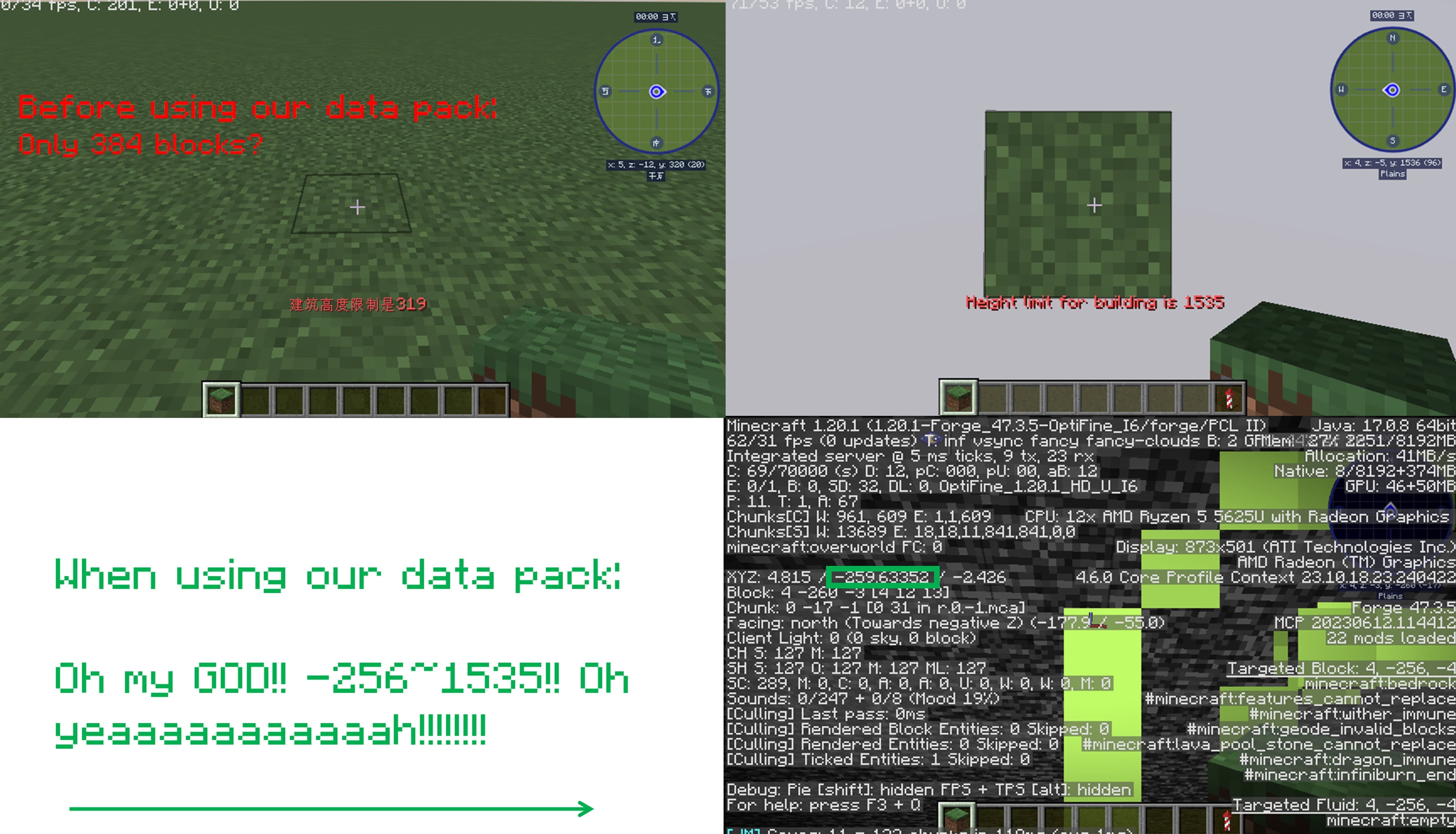
_**Think Minecraft doesn’t have enough building space? Want to build taller buildings? Try our data pack and you can increase the building limit up to 4064 blocks!!**_
## How to install it?
**You may need to create your game world before install the data pack**
1.Open your game folder(“.minecraft”)
### If you use version isolation:
2.Open your “versions” folder
3.Choose your version
4.Open your “saves” folder
5.Choose your save
6.Open your “datapacks” folder
7.Put our data pack in the folder
### If you Don’t use version isolation
2.Open your “saves” folder
3.Choose your save
4.Open your “datapacks” folder
5.Put our data pack in the folder
**PLEASE PAY ATTENTION!! This datapack may affect the normal operation of other mods**

_This is a DATAPACK! Please put it in the “datapacks” folder in your saves folder_
**NOT THE “recoursepacks” FOLDER**
Killer Head
[](https://modrinth.com/project/I7bAUQBi)
[](https://discord.gg/FVq3j5heAc)
[](https://fabricmc.net/)
[](https://quiltmc.org/)
[](https://neoforged.net/)
[](minecraftforge.net)
___
## What’s Killer Head ?
**Killer Head** is a project to drop the killer’s head when his victim dies.
## How it works ?
### Edit player loot table `entities/player.json`
Adds a player head to the death of a player and correlates the characteristics of the killer.
## Complementary
You can also use [Drop Head](https://modrinth.com/project/drop-head).
Here’s [Stackable Heads](https://modrinth.com/project/stackable-heads) which is interesting to use.
## Compatibility
**Killer Head** should work anywhere.
## Support me!
Join my Hardcore Minecraft server: `38.143.19.130:51965`
Keep Inventory Always
## Keep Inventory Always
The mod turns on a game rule that allows you to save your inventory when you die in each world
## How to use
To use the mod, you only need to install it. Now when creating a world, the game rule keepInventory will always be enabled
## Dependencies
– Fabric loader requires [Fabric API](https://modrinth.com/mod/fabric-api)
Kappa
> ⚠️ **DEPRECATION NOTICE**
> OptiFine does not support HTTPS. I have been told by OptiFine staff *not* to use the URL that current versions of Kappa currently use (which has HTTPS support) and instead to use the one that OptiFine the mod uses (which *only* supports HTTP). I do not want my mod to be insecure, and do make insecure connections, so I will no longer update Kappa until HTTPS is enabled, as this is an extremely basic security measure nowadays.
**Kappa** adds OptiFine capes (correctly), and is aimed for use in snapshots. It’s also meant to be very light and to modify very little so it doesn’t upset server moderators, or so it doesn’t get broken very easily (which upsets me!).
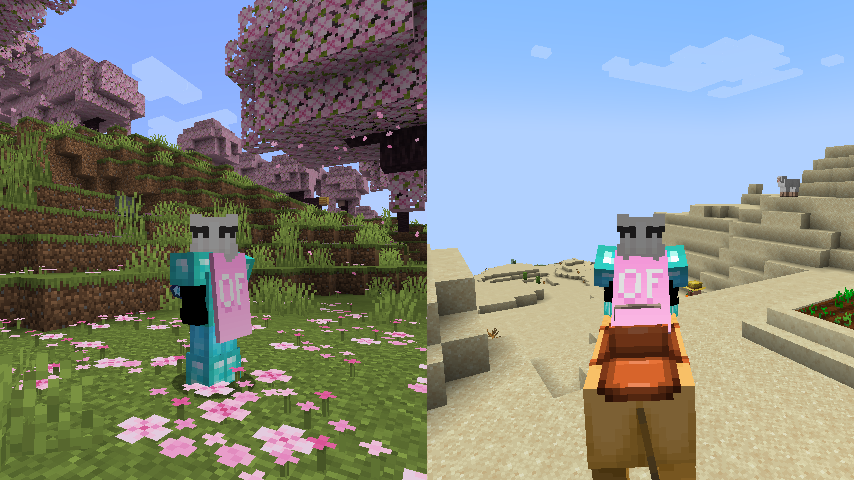
**Notice**: This mod does **not** replace OptiFine nor lets non-donors to wear them.
It merely adds the OptiFine capes and displays them, if you have donated to OptiFine.
If you enjoy OptiFine and want a cape, [consider donating to OF.][1]
**Kappa** is _not_ like other mods! It _works smart, not hard!_ Usually mods just clone the vanilla cape code, but **Kappa** uses it the intended way. Thanks to that, **Kappa** should barely break, if at all!
There’s also an upside to this: mods that affect the vanilla cape will also affect OptiFine capes from Kappa!
Fabric API is _not_ needed.
Usually Fabric/Quilt mods are compatible between versions, but sometimes, like in the 1.17 snapshots, Minecraft itself breaks the mods.
I will test my mod against the latest snapshot, because I like playing with my OptiFine cape, so if my mod is broken, I will update it.
Yes, OptiFine’s cape breaks Minecraft’s commercial usage guidelines, but I already had it for lots longer. I consider it part of my skin.
**On Quilt support:** This mod sits in a gray area, as thus is probably safe to avoid if you’re using Quilt. However, Kappa uses as little Fabric specific components as possible.
[1]: https://optifine.net/donate
Just Hotbar
# Just Hotbar
This texture pack changes the hearts and hotbar, making them simpler

No Java Edition Branding – Remove from Start-Title Screen
Removes the Java Edition Text under The “Minecraft” Logo from the Title Screen!


Also works for with other resourcepacks!


Japanese Title
This resource pack changes Minecraft title screen logo to unused official Japanese logo “マインクラフト”, the Japanese Katakana for “Minecraft”.
Originally sourced from the official website of a design company that created this logo for Mojang. but it was never officially used. For more information check the Minecraft Wiki logo page.
Version 1 replaces the main logo with “マインクラフト” and removes the subtitle.
Version 2 keeps the original main logo and changes the subtitle to “マインクラフト”.
Previews gallery
I do not own this.
日本語:
元は、Mojangのためにこのロゴをデザインしたデザイン会社の公式ウェブサイトからのものですが、公式には使用されませんでした。詳しくはMinecraft Wikiのロゴページをご覧ください。
バージョン1 は、メインロゴを「マインクラフト」に置き換え、サブタイトルを削除しています。
バージョン2 は、元のメインロゴを維持し、サブタイトルを「マインクラフト」に変更しています。
プレビューギャラリー
これは私の所有物ではありません。