NyaPack 🤺 Minimal Armor

**NyaPack 🦋** is a resource pack that lets you show off your skin even more!
Armor becomes more like **accessories** or **situational outfits**, helping you customize your appearance without covering your character entirely.
✨ **Features:**
– **Emissives** and **animations** support in newer versions, all **without additional mods**
– Support for the new **copper armor**
– Versions **without emissive** and **without animations** are also available for those who prefer a simpler look
Give your skin more personality and style! 🦋
Numbered Levels
# Numbered Levels
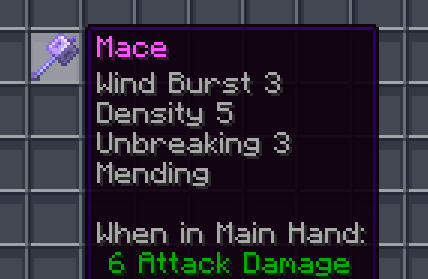
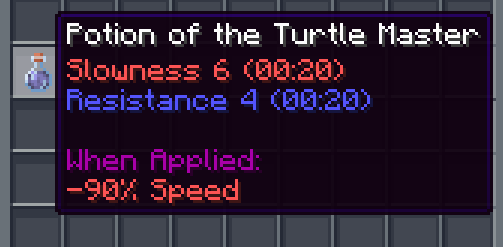
[ 
See more in the Gallery](https://modrinth.com/resourcepack/numbered-levels/gallery)
—
[](https://www.curseforge.com/members/ChicknTurtle) [](https://modrinth.com/user/ChicknTurtle) [](https://www.curseforge.com/minecraft/texture-packs/numbered-levels) [](https://modrinth.com/resourcepack/numbered-levels)
## Features
✨ Enchantment levels are displayed as numbers
🧪 Potion potencies are displayed as numbers
🛠️ Fixes “enchantment.level.255” when levels are above level 10 (or 6 for potions)
🌐 Works in all 137 of Minecraft’s supported languages (as of 1.21.8)
## Info
Examples:
– Sharpness IV → Sharpness 4
– Instant Damage II → Instant Damage 2
– Mending (unchanged)
– Unbreaking I → Unbreaking 1
– Protection enchantment.level.255 → Protection 255
– Strength potion.potency.10 → Strength 10
Feel free to modify this pack or include it in a modpack!
—
[](https://modrinth.com/resourcepack/chicknturtles-3d-totems) [](https://modrinth.com/resourcepack/chicknturtles-better-shield) [](https://modrinth.com/resourcepack/chicknturtles-3d-tools)
**💚 Make sure to follow!**
NotAnnoyingHorses
# NotAnnoyingHorses


**NotAnnoyingHorses** is a Minecraft data pack/mod which allows you to nerf annoying AI of your horse with a nametag.
> _Have you ever been annoyed that your horse immediately leaves you as soon as you get off?_
>
> _With this data pack/mod, this won’t happen again!_
## 🚀 Quick Start
### 📥 Installation:



> #### 🛠️ Install as data pack:
>
> Please ensure that you have the following software installed:
> – [Minecraft]() (≥ 1.13)
>
> To install the data pack to your Minecraft world, you should:
> 1. Download the latest version.
> 2. Drop this data pack to the “datapacks“ folder of your world.
> 3. Load the world.
> #### ⚙️ Install as mod:
>
> Please ensure that you have the following software installed:
> – [Minecraft]() (≥ 1.13)
> – Mod loader ([Fabric](), [Forge](),
> [Quilt](), [NeoForge]())
>
> To install the mod to your client/server, you should:
> 1. Download the latest version.
> 2. Place it to the “mods“ directory in the Minecraft/server root folder.
> 3. Load the world/server.
### 💡 Features:
– **AI nerfing on specific horses.** Use the nametag “nerfed“ on your horse to nerf its AI.
Nerfed horses won’t be able to move by themselves, but you can still use them normally.
– **Reset nerfing of a horse.** Just use nametag “unnerfed“ on your horse to reset nerfing.
## 📭 Contact me:


Not So Scary Spiders
[](https://discord.gg/3qCU9bGPmt)
Nose Goes Definitive
Simply removes the nosepiece from player helmets. Great for those who want their face unobscured! Also fixes two pixels on the side of netherite helmets. [A programmer art variant is also available here](https://modrinth.com/project/nose-goes-definitive-programmer).
This mod is compatible with every version, all the way back to `1.6.1` when resource packs were added. For versions pre-`1.14`, you probably want the [programmer art variant](https://modrinth.com/project/nose-goes-definitive-programmer). In theory, there is no reason it should break with updates, excluding the addition of more armor types or trims.
This is an updated version of [Nose Goes](https://modrinth.com/resourcepack/nose-goes). However, several changes have been made over the original.
– Unique [programmer art variant](https://modrinth.com/project/nose-goes-definitive-programmer)
– Copper helmet support
– Netherite helmet icon changed
– Wild armor trim edited, the only trim which uses the nosepiece
– An edit in the original, above the left and right of the netherite helmet’s face, was reverted
[Miniature](https://modrinth.com/shader/miniature-shader) used for the gallery screenshots.
[Programmer art variant.](https://modrinth.com/project/nose-goes-definitive-programmer) ;D
NoRollback
[](https://modrinth.com/project/K4Ytaql5)
[](https://discord.gg/FVq3j5heAc)
[](https://fabricmc.net/)
[](https://quiltmc.org/)
[](https://neoforged.net/)
[](minecraftforge.net)
___
## What’s NoRollback ?
**NoRollback** is a project that removes 99% _(source : trust me)_ of rollbacks.
**You can remove this project from a world after loading a world with it. One use is enough.**
## How it works ?
### Changed the game rule `elytra_movement_check` and `player_movement_check`
Ignores the player’s speed limit & speed limit when using elytra. This removes most rollbacks but makes it easier to cheat on a server. (source : [Minecraft Wiki – Gamerule](https://minecraft.wiki/w/Game_rule))
## Complementary
If you use this project, you might be interested by [ClienThings](https://modrinth.com/project/clienthings)
## Compatibility
**NoRollback** work with anything and anywhere.
## Support me!
Join my Hardcore Minecraft server: `38.143.19.130:51965`
Black Shield
# Black Shield
This resource pack replaces the default shield with a custom 3D model.
The design uses a black theme.
No OptiFine required. Vanilla compatible.
## More Shield Themes
– [Blue](https://modrinth.com/project/blue-shield)
– [Creeper](https://modrinth.com/project/creeper-shield)
– [Dark Red](https://modrinth.com/project/dark-red-shield)
– [Mirror](https://modrinth.com/project/mirror-shield)
– [Navy Blue](https://modrinth.com/project/navy-blue-shield)
– [Rabbit](https://modrinth.com/project/rabbit-shield)
– [Red](https://modrinth.com/project/red-shield)
No Hotbar
No Hotbar, Pretty Straight forward. Idk what this can be useful for tbh. Maybe clear hotbar? Just use idk.
Q&A:
Can I put this in my modpack?
Sure but add the credit. Or just paste the text below
No Hotbar
By Zacgamingpro1234
https://modrinth.com/resourcepack/nohotbar
If you want to redistribute to other websites just tell me and I’ll try.
You can use it in your modpack.
You can use it for personal use.
If you want to modify this resource you must ask me.
No GUI
No GUI,
A texture pack made for fun and as a challenge. Can you beat it? If you want you can record ur self beating it and I will put you below as a verified winner! (you should dm me on discord for notice)
Also the GUI isn’t black its invisible so you can see stuff under your current tab or something.
Q&A:
Can I put this in my modpack?
Sure but add the credit. Or just paste the text below
No GUI
By Zacgamingpro1234
https://modrinth.com/resourcepack/nogui
You can redistribute this resource but you may not monetize from it.
You can use it for personal use.
No Worldborder
**The first version of the No Worldborder resource pack, which of course removes the worldborder texture so that it is invisible. Useful for taking screenshots of, for example, builds that have a border.**
## Support
If you have any problems, ideas, or other feedback about this project, please contact me via discord or email. You can contact me on Discord by sending a friend request, so you can send me a message.
Discord: tibodp
Mail: [email protected]
## 🌟 My other projects:
– [Torchcraft Lobby Panorama](https://modrinth.com/resourcepack/torchcraft-lobby-panorama)
– [The Ultimate Creator](https://modrinth.com/modpack/the-ultimate-creator)
– [Chromakey Blocks](https://modrinth.com/modpack/the-ultimate-creator)
– [No Worldborder](https://modrinth.com/modpack/the-ultimate-creator)
– [Vuurwerkshow Modpack](https://modrinth.com/modpack/the-ultimate-creator)
– [Vuurwerkshow Panorama](https://modrinth.com/modpack/the-ultimate-creator)
– [Vuurwerkshow Paintings](https://modrinth.com/resourcepack/vuurwerkshow-paintings)