UniLink
## 🔗 UniLink
A mod that allows you to use resources from other directories
## 💼 Usage
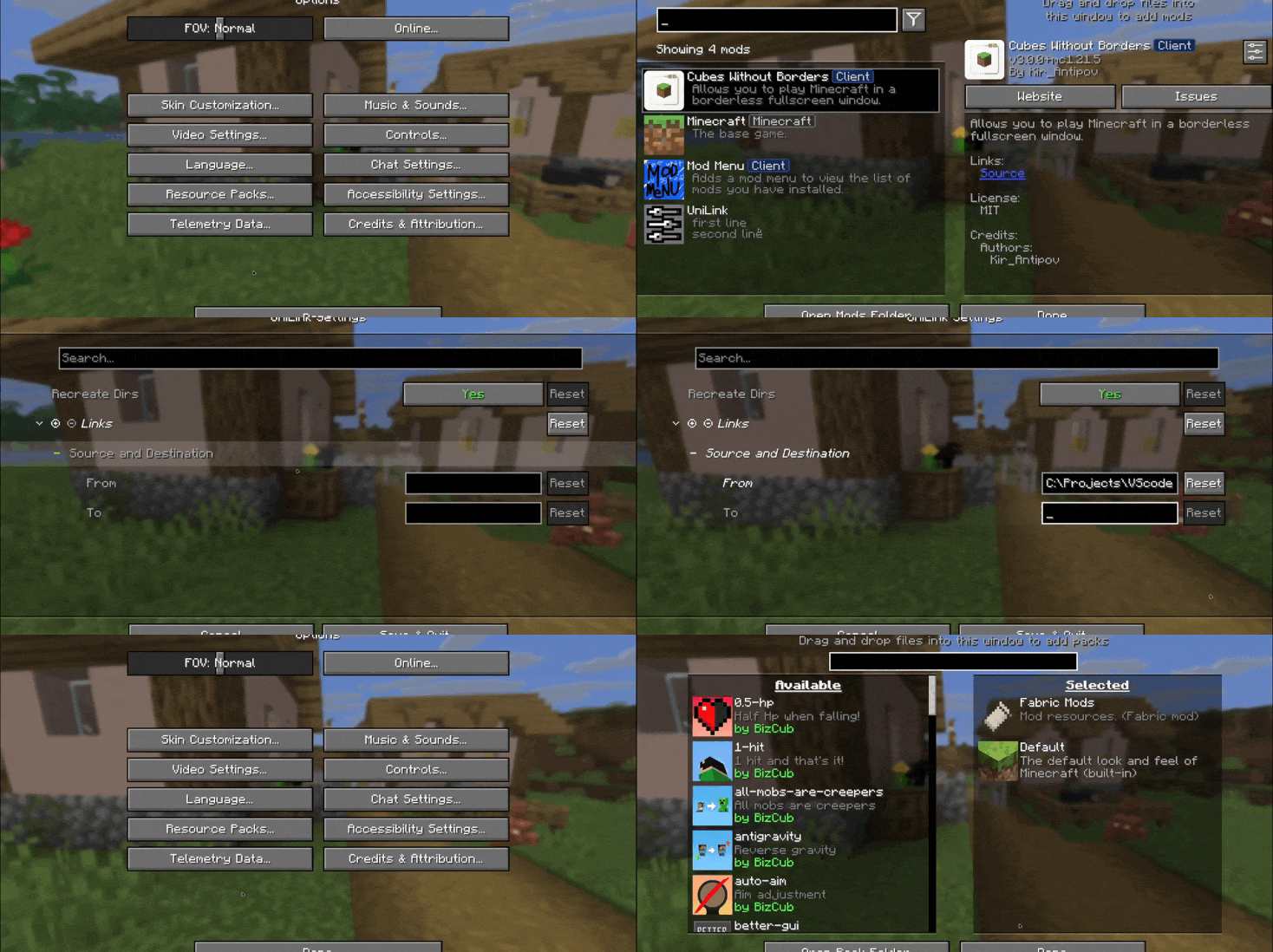
This mod works using symbolic links, which can be used like a folder but don’t require reusing (copying) resources. Some launchers also use symbolic links, but the mod works independently of them. It’s a configuration file. The first field specifies the path to the directory to use, and the second field specifies the path to the folder where the symbolic link should be placed. The final path can be absolute (e.g., “`C:….minecraftsaves“`) or abbreviated (“`saves“`).

If you change the directory used for worlds and then revert the change, the game may freeze while searching for and failing to find the required folder. For this purpose, the configuration file has an option to recreate the folders used by the game.
## 🛠️ How it works
By default, the mod does nothing. However, you can add data to the configuration to create a link: the path from which resources will be used and the path where the symbolic link will be created.
### What follows from this:
* After changing the configuration, new links will be added. Therefore, old, unused links will be deleted.
* Since Minecraft creates some folders, the mod will have to delete the existing folder before creating the link. However, since the mod deletes folders without asking, it has a limitation on deleting directories with files inside. This means that if a folder contains any files, it won’t be deleted and the link won’t be created.
Creating symbolic links requires certain permissions. Therefore, some launchers that don’t have them won’t be able to create links. Solution: Run the launcher as administrator.
## 🤝 Support

ucsur galactic
a resource pack that adds support for the UCSUR’s codepoints for standard galactic so you can type in galactic yourself :>
# what does absolutely any of that mean
UCSUR stands for the [under conscript unicode registry](https://en.wikipedia.org/wiki/ConScript_Unicode_Registry), which is a project that coordinates the usage of [codepoints](https://en.wikipedia.org/wiki/Code_point) in [unicode’s private use areas (PUA)](https://en.wikipedia.org/wiki/Private_Use_Areas) to include different [artificial writing systems (conscripts)](https://en.wikipedia.org/wiki/Constructed_writing_system) – namely scripts for [conlangs](https://en.wikipedia.org/wiki/Constructed_language) – meaning they can be typed and otherwise encoded in text.
the UCSUR has [a section](https://www.kreativekorp.com/ucsur/charts/sga.html) for the [standard galactic alphabet](https://en.wikipedia.org/wiki/Commander_Keen#Standard_Galactic_Alphabet), which is the script minecraft uses in places like the enchantment table. it’s hardcoded into the game, though, and you can’t determine where galactic is used (for the most part) without adding separate unicode characters to minecraft’s font, which is what this pack does!
# how do i use this, like, at all?
yeah, you can’t exactly type it on your keyboard (without third party software, at least), can you? i’d be surprised if you could find a keyboard that lets you type galactic by default
so, i’ve made a [lingojam translator](https://lingojam.com/ucsurgalactic) for this! there’s a good chance your browser won’t be able to see the result, though – how i’ve fixed that is i’ve installed [fairfax hd](http://www.kreativekorp.com/software/fonts/fairfaxhd/) and set it to my browser’s default font, so when the site’s font can’t render the characters, it’ll use fairfax hd as a fallback, which can.
turn PojavLauncher app icon to crafting table
This pack turns the crafting table texture to the [PojavLauncher ](https://pojavlauncher.app/) app icon
TrustMeBro – Bundle
TrustMeBro – Bundle brings the funniest and most ridiculous features inspired by the r/shittymcsuggestions community straight to your Minecraft server. Enable or disable each challenge with simple commands and enjoy chaotic, meme-worthy gameplay with your friends. Perfect for streamers, community servers, or anyone looking to spice up their Minecraft experience with unexpected twists!
– Features / Commands:
– /extremebabyzombie on|off — Toggle if baby zombies are extreme
– /shearmobs on|off — Toggle if you can shear: Villagers, Endermen, Spiders, Striders
– /breadrename on|off — Toggle bread rename (to “Raw Toast”) and potatoes to “Raw Potatoes”
– /powderwater on|off — Toggle if powder dissolves in water
– /nearmobsbecomeinvis on|off — Toggle if near mobs become invisible
– /moss on|off — Toggle if moss duplicates in your inventory and if moss is edible
– /sunblind on|off — Toggle if you could be blinded by looking directly at the sun
– /trowabledragonegg on|off — Toggle if you can throw the dragon egg, like an normal egg, to spawn the ender dragon
– /hotsand on|off — Toggle whether you take damage while sneaking on sand.
– /throwingsnowballvillager on|off — Toggle if you become a really cool advancement if you throw a snowball against a villager.
CODE MADE BY ME!
Keywords:
minecraft, plugin, fun, meme, r/shittymcsuggestions, challenge, bundle, chaos, minigame, server, dumb ideas, community, gameplay, commands
Transparent Totem
This small resource pack makes Totems of Undying appear **transparent**.
> ### [Check out my other packs!]()
> [**All My Packs**]()
> [**Visual Enchantments**]()
> [**Transparent Items**]()
>
> ### And my [Discord Server]()!
Transparent Tools
This small resource pack makes all tools appear **transparent**.
**Even with the new copper tools!**
> ### [Check out my other packs!]()
> [**All My Packs**]()
> [**Visual Enchantments**]()
> [**Transparent Items**]()
>
> ### And my [Discord Server]()!
Transparent Swords
This small resource pack makes all swords appear **transparent**.
**Even with the new copper swords!**
> ### [Check out my other packs!]()
> [**All My Packs**]()
> [**Visual Enchantments**]()
> [**Transparent Items**]()
>
> ### And my [Discord Server]()!
Transparent Potions
This small resource pack makes all potions appear **transparent**.
> ### [Check out my other packs!]()
> [**All My Packs**]()
> [**Visual Enchantments**]()
> [**Transparent Items**]()
>
> ### And my [Discord Server]()!
Transparent Crossbow
This small resource pack makes crossbows appear **transparent**.
> ### [Check out my other packs!]()
> [**All My Packs**]()
> [**Visual Enchantments**]()
> [**Transparent Items**]()
>
> ### And my [Discord Server]()!
Transparent Buttons
Simple **transparent buttons** in menus, compatible with **older AND newer versions** of the game. So yes, it works in **1.8**, just **ignore the red Incompatible marker** in the pack selection screen.
Have any specific mods you would like me to add support for? Join the [**discord**](https://discord.gg/cjBypn33tZ)!