Mod Remapping API
# Mod Remapping API
Remaps non-Fabric mods made for a different environment (by default obfuscated) to the current runtime mappings.
Provides hooks to expand the remapping process from other mods.
This mod doesn’t depend on a specific Minecraft version and should work on any version that Fabric Loader can launch.
### Mods depending on this API:
– [Fabricated Legacy Forge](https://modrinth.com/mod/fabricated-forge)
– [Apron](https://modrinth.com/mod/Apron)
– [Fabricated-Rift](https://modrinth.com/mod/fabricated-rift)
## Credits
### Most of the original code of the mod remapper
– paulevsGitch’s mod BetaLoader
Mod Loading Screen
# Mod Loading Screen
An advanced loading screen with the loading progress of mods. It works on all Minecraft versions, as it doesn’t even require Minecraft. Its only requirement is Fabric Loader 0.12.0 or later or Quilt Loader (specific versions of Quilt support are unknown). Do note that if you run this mod on a game other than Minecraft, the loading screen may not close itself.
## Agent
Mod Loading Screen provides a Java agent, which allows opening the loading screen before even the mod loader itself loads. This feature is primarily targeted at modpack developers who want to make a seamless loading experience. The agent can be used by passing `-javaagent:mod-loading-screen-1.0.4.jar` as a JVM argument. If the agent is used, the loading screen should *not* be installed as a mod.
## API
To depend on the API, use the Modrinth Maven. The API should be JiJed, and doing so will not include Mod Loading Screen inside your mod (it will only include the API, which is only a few kilobytes). The API is designed to have both forwards and backwards binary compatibility with future Mod Loading Screen versions. An API is provided for checking which API calls will return stubs and which ones are real.
“`gradle
repositories {
exclusiveContent {
forRepository {
maven {
name = “Modrinth”
url = “https://api.modrinth.com/maven”
}
}
filter {
includeGroup(“maven.modrinth”)
}
}
}
dependencies {
// implementation, not modImplementation!
include(implementation(“maven.modrinth:mod-loading-screen:1.0.4:api”))
}
“`
The API has two top-level classes: `LoadingScreenApi` and `AvailableFeatures`. Full javadocs are available for both classes.
Mo Glass
# Mo Glass
A Minecraft mod that adds glass stairs and glass slabs to the game, including stained and tinted glass variants, while maintaining all of the seamless transparency and translucency that makes vanilla Minecraft’s glass blocks look so great.

## Features
– Glass Slabs!
– Glass Stairs!
– Stained Glass Slabs! (since v1.3)
– Stained Glass Stairs! (since v1.3)
– Tinted Glass Slabs! (since v1.6)
– Tinted Glass Stairs! (since v1.6)
– Working Transparency! (see below)
– Working Translucency! (for tinted glass)
– Compatible with the Translucent Glass mod! (since Mo Glass v1.10, Translucent Glass v0.2)
## Seamless Transparency
Both the stairs and the slabs are see-through in the same way as vanilla glass blocks. You can place multiple stairs, slabs and full blocks next to each other and they will look like a single piece of glass.

## Working Translucency
Slabs and stairs made from tinted glass will block light if you place them without any air gaps, or let the light through if there is a gap.

## Why aren’t these blocks part of vanilla Minecraft?
Before I started making this mod, I always thought that Mojang just forgot about these blocks, or that they were too lazy to add them. But now that I’ve added these blocks myself and spent many hours to get the transparency to work, I think I finally understand why Mojang didn’t bother. Minecraft’s stairs are surprisingly complex blocks and they were never meant to be made transparent. Slabs might be easy enough, but I think if Mojang added those then people wouldn’t stop asking for the stairs. And glass stairs are an absolute nightmare to make.
Stairs can be placed facing North, East, South or West, they can be upside-down or right-side-up, they can be straight or curved in one of four different ways and they have six faces that may or may not be transparent, depending on what block is next to them. But here’s the catch: On each of those six faces, there could be another block of glass stairs that can also be placed facing North, East, South or West, upside-down or right-side-up and either straight or curved in one of four different ways. And then of course, on each of the six faces there could also be a non-transparent block, a regular glass block or a glass slab that is either placed on the bottom half, top half, or is a double slab.
In the end, there are 10800 possible scenarios that need to be accounted for just to calculate transparency of glass stairs. But then you also have to calculate the transparency of glass slabs (810 possible scenarios) and adjust the transparency calculation of regular glass blocks (270 possible scenarios, or 258 more than before).*
That’s a lot of effort just to add two new blocks to the game – and a lot of opportunities for new bugs to sneak in. That, I think, is why Mojang didn’t bother.
*Here’s how I got those numbers: (click to expand)
possible variations of stairs:
pvStairs = 4 * 2 * 5 = 40
possible variations of slabs:
pvSlabs = 3
possible variations of glass blocks:
pvGlass = 1
possible variations of non-transparent blocks:
pvBlocks = 1 (because any variations would be ignored when calculating transparency)
possible combinations combined:
pvAll = pvStairs + pvSlabs + pvGlass + pvBlocks = 40 + 3 + 1 + 1 = 45
possibly transparent faces of a block (including stairs, even though they have more faces):
f = 6
possible scenarios for transparency of stairs:
psStairs = pvAll * f * pvStairs = 45 * 6 * 40 = 10800
possible scenarios for transparency of slabs:
psSlabs = pvAll * f * pvSlabs = 45 * 6 * 3 = 810
possible scenarios for transparency of glass blocks:
psGlass = pvAll * f * pvGlass = 45 * 6 * 1 = 270
possible scenarios for transparency of glass blocks if glass stairs and slabs don’t exist:
psGlassVanilla = (pvGlass + pvBlocks) * f * pvGlass = (1 + 1) * 6 * 1 = 12
## What about connected textures mods?
~~So far, all connected textures mods that I’ve seen only seem to work on full blocks. They don’t generate connected textures for stairs or slabs, which makes using them with Mo Glass impossible.~~
~~It’s not that Mo Glass doesn’t have support for connected textures, it’s that connected textures mods don’t have support for Mo Glass (or any other mod that adds stairs/slabs).~~
~~This might change one day as people make new mods all the time, so do let me know if there is a connected texture mod that supports stairs now. I’d be happy to add the extra texture files needed (if any) to make that work with Mo Glass.~~
This has changed and support for connected textures is currently being worked on. Please be patient.
## Crafting Recipes
Glass Slab: (click to expand)


Glass Stairs: (click to expand)


## Supported Languages
– Chinese (Simplified) (since v1.2)
– Chinese (Traditional) (since v1.2)
– English (US) (since v1.0)
– French (France) (since v1.6)
– German (Germany) (since v1.2)
– Italian (Italy) (since v1.6)
– Japanese (Japan) (since v1.7)
– Oshiwambo (Oshindonga) (since v1.5)
– Oshiwambo (Oshikwanyama) (since v1.5)
– Portuguese (Brazil) (since v1.7)
– Russian (Russia) (since v1.5)
– Spanish (Argentina) (since v1.4)
– Spanish (Chile) (since v1.4)
– Spanish (Ecuador) (since v1.4)
– Spanish (Spain) (since v1.4)
– Spanish (Mexico) (since v1.4)
– Spanish (Uruguay) (since v1.4)
– Spanish (Venezuela) (since v1.4)
Mirror Shield
# Mirror Shield
This resource pack replaces the default shield with a custom 3D model.
The design uses a mirror theme.
No OptiFine required. Vanilla compatible.
## More Shield Themes
– [Black](https://modrinth.com/project/noire-shield)
– [Blue](https://modrinth.com/project/blue-shield)
– [Creeper](https://modrinth.com/project/creeper-shield)
– [Dark Red](https://modrinth.com/project/dark-red-shield)
– [Navy Blue](https://modrinth.com/project/navy-blue-shield)
– [Rabbit](https://modrinth.com/project/rabbit-shield)
– [Red](https://modrinth.com/project/red-shield)
MineZRoy’s Avontuur – Music Disc
Changes music disc 13 to a very good song about MineZRoy. 100% recommend it!
MI-PBR
A minimal PBR resource pack for the Modern Industrialization mod. Requires a shader supporting “Lab” or “Old/seus” PBR.
This project is still an early work-in-progress so not all blocks are complete.
Message Display Time
## Message Display Time
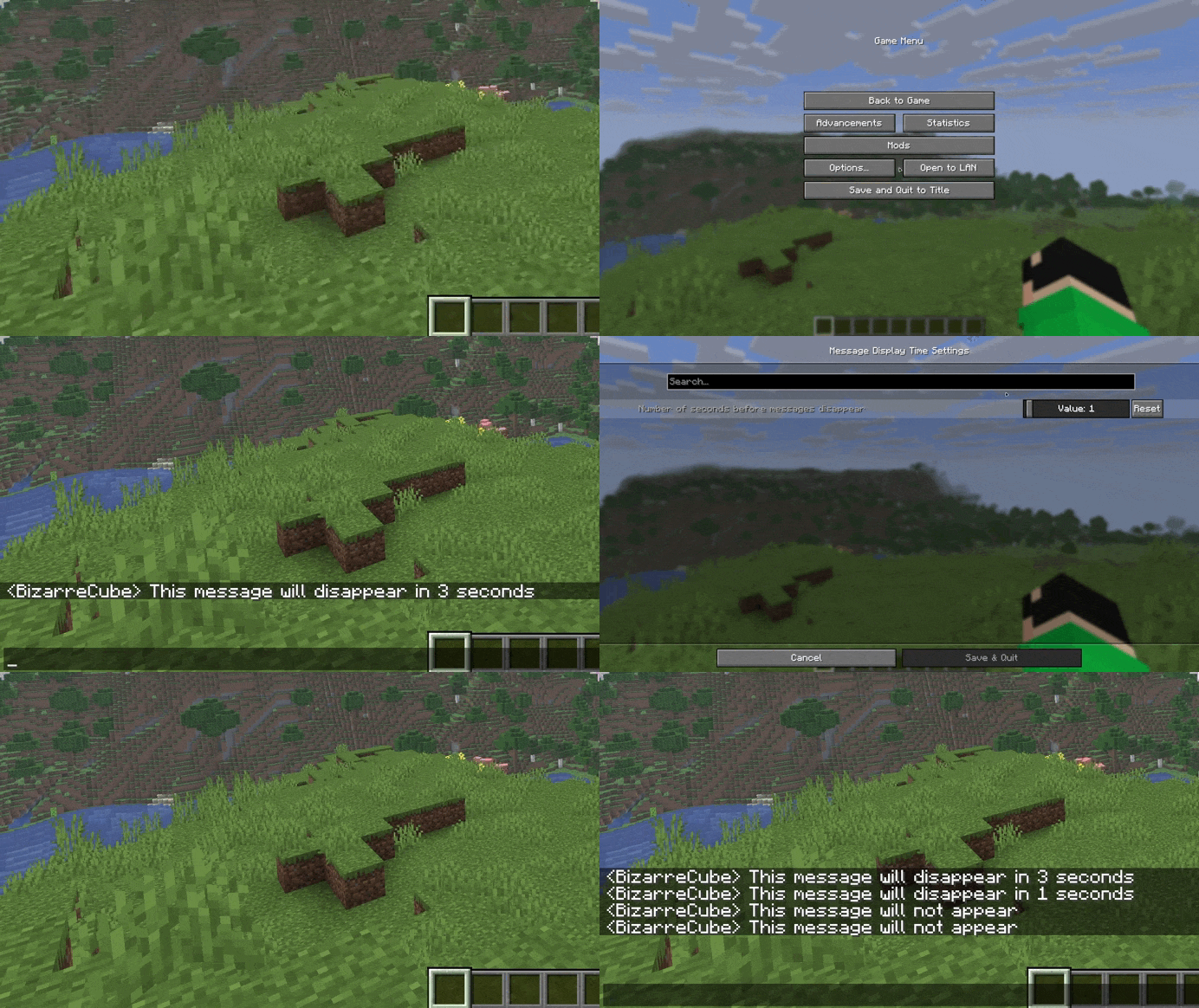
A mod that adds a setting for seconds before messages in chat disappear.
## Usage
By default, the mod changes the number of seconds before disappearance from 10 to 5, but the mod can be customized using the Cloth Config API mod.
## Support
If you like my mods, feel free to support their creator!

Mellstroy (Я уже красный) Totem of Undying
**EN**: This resource pack replaces the original **Totem of Undying** with the Meme from Mellstroy **I’m already red, it won’t work out culturally** with sound. This meme has become very popular on TikTok over the past couple of years.
**RU**: Этот ресурспак заменяет оригинальный **Тотем бессмертия** на Мем от Меллстроя **Я уже красный, культурно не получится** со звуком, данный мем за последние пару лет стал очень популярным в Тик Ток
– [Омайгадность Тотем](https://modrinth.com/resourcepack/ohmygod-totem-of-undying)
– [Тотем Меллстрой](https://modrinth.com/resourcepack/mellstroy-totem-of-undying)
– [ПОЛНАЯ КОЛЛЕКЦИЯ РЕСУРСПАКОВ – МЕМЫ + СТРИМЕРЫ](https://modrinth.com/collection/sfDcDGAi)

MacOS Input Fixes
Fixes [MC-122296](https://bugs.mojang.com/browse/MC-122296)
Fixes [MC-121772](https://bugs.mojang.com/browse/MC-121772)
Fixes [MC-59810](https://bugs.mojang.com/browse/MC-59810)
Fixes [MC-22882](https://bugs.mojang.com/browse/MC-22882)
Fixes control + tab and control + escape not being detected
Specific fixes:
– Correctly detects left click while control is pressed
– Make trackpad scrolling not scroll a ridiculous number of items at once
– It also fixes momentum scrolling (which changes the number of scroll events based on how quickly you did it, even by like x5-10, meaning you couldn’t easily scroll to the correct item)
– On the trackpad it also only considers scrolling while fingers are on the trackpad (and the same for any fancy mice that support the relevant api e.g. probably apple’s fancy mice/trackpad thing)
– It also fixes scrolling being broken when shift is down on some older mice.
– When dropping an item, Minecraft checks for command + the key, since the default key is Q, this doesn’t make sense, so this mod allows both control + key and command + key to work
– Fixes control + tab and control + escape not being detected
Menu Options (under Mouse Settings Screen):
– Option for trackpad scrolling sensitivity (macOS only)
– Option to enable momentum scrolling on hotbar (macOS only)
– Option to disable workaround for smooth scrolling in interfaces (macOS only)
– Option to reverse scrolling of the whole game
– Option to reverse scrolling of the hotbar
– Option to disable the fix for the ctrl + left click becomes right click bug (macOS only)
On platforms other than macOS, the mod does nothing (except the aformentioned menu options), so it can be safely included in any modpack.
Requires Fabric Loader 0.18.5+
Requires Minecraft 1.14+
NOTE!
If you get an error like the following, you need to update Fabric Launcher to the version specified above. Some launchers may require you to update fabric launcher, remove macos input fixes mod fully, and then re-add macos input fixes mod. See https://github.com/hamarb123/MCMacOSInputFixes/issues/60 for the original issue. Note that the “More details” section is very misleading, and parts around it about my mod should be ignored (try disabling it, after the steps before for re-installing, if you are still getting errors to confirm that it is actually an issue with this mod).

Github repository: [https://github.com/hamarb123/MCMacOSInputFixes](https://github.com/hamarb123/MCMacOSInputFixes).
And yes, I know I need a better icon 😉
### DISCLAIMER
As [required](https://www.minecraft.net/en-us/usage-guidelines) to mention prominently according to Mojang – THIS IS NOT AN OFFICIAL MINECRAFT PRODUCT. NOT APPROVED BY OR ASSOCIATED WITH MOJANG OR MICROSOFT.
View the license for the disclaimer of the actual mod.
Low Fire & Side Shield
# 🔥Low Fire & Side Shield
**Low Fire & Side Shield** is a **Minecraft resource pack** designed to keep your screen clear and focused.
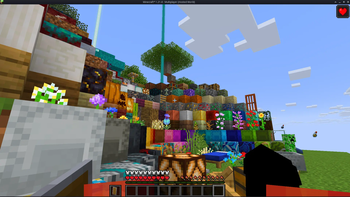
It lowers both the **fire overlay** and the **shield position**, introducing a **minimal side shield** that lets you see more of your surroundings without losing the vanilla feel.
Whether you’re in the middle of a **PvP battle**, exploring dangerous caves, or just want a cleaner screen, this pack makes gameplay smoother and more immersive.
It’s lightweight, **FPS-friendly**, and works seamlessly with default Minecraft textures.
—
## ✨ Features
– 🔥 **Reduced fire overlay** — less visual clutter during combat.
– 🛡️ **Lowered side shield** — improved visibility without removing functionality.
– 🎮 **Vanilla-friendly look** — keeps the original Minecraft style intact.
– ⚙️ **Optimized for PvP and survival** — clear visuals, faster reactions.
– 💻 **Lightweight & compatible** — works with most other packs and versions.
—
## 📦 Perfect For
– PvP players needing better visibility
– Streamers who prefer a clean HUD
– Anyone wanting a minimal, modern look in Minecraft
—
**Tags / Keywords:**
`low fire`, `low shield`, `side shield`, `minecraft pvp`, `clear hud`, `visibility pack`, `vanilla friendly`, `clean screen`, `minimal resource pack`, `fps boost`, `combat tweaks`, `minecraft texture pack`, `darkshadowx21`
—
### 📜 License
This project is licensed under the **MIT License**.
You’re free to use, modify, and share this resource pack — just include proper credit to **Darkshadowx21**.