MI-PBR
A minimal PBR resource pack for the Modern Industrialization mod. Requires a shader supporting “Lab” or “Old/seus” PBR.
This project is still an early work-in-progress so not all blocks are complete.
A minimal PBR resource pack for the Modern Industrialization mod. Requires a shader supporting “Lab” or “Old/seus” PBR.
This project is still an early work-in-progress so not all blocks are complete.
## Message Display Time
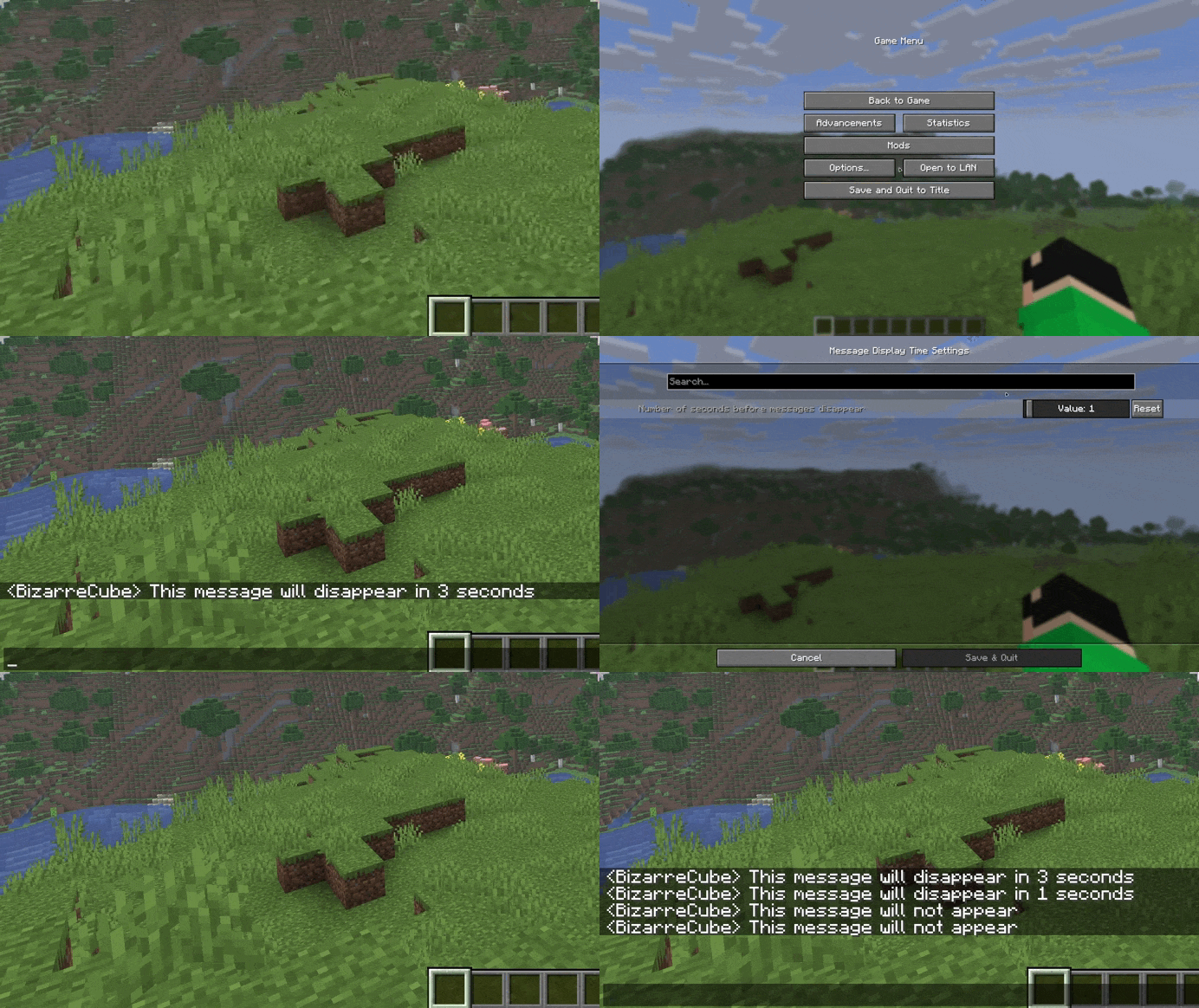
A mod that adds a setting for seconds before messages in chat disappear.
## Usage
By default, the mod changes the number of seconds before disappearance from 10 to 5, but the mod can be customized using the Cloth Config API mod.
## Support
If you like my mods, feel free to support their creator!

**EN**: This resource pack replaces the original **Totem of Undying** with the Meme from Mellstroy **I’m already red, it won’t work out culturally** with sound. This meme has become very popular on TikTok over the past couple of years.
**RU**: Этот ресурспак заменяет оригинальный **Тотем бессмертия** на Мем от Меллстроя **Я уже красный, культурно не получится** со звуком, данный мем за последние пару лет стал очень популярным в Тик Ток
– [Омайгадность Тотем](https://modrinth.com/resourcepack/ohmygod-totem-of-undying)
– [Тотем Меллстрой](https://modrinth.com/resourcepack/mellstroy-totem-of-undying)
– [ПОЛНАЯ КОЛЛЕКЦИЯ РЕСУРСПАКОВ – МЕМЫ + СТРИМЕРЫ](https://modrinth.com/collection/sfDcDGAi)

Fixes [MC-122296](https://bugs.mojang.com/browse/MC-122296)
Fixes [MC-121772](https://bugs.mojang.com/browse/MC-121772)
Fixes [MC-59810](https://bugs.mojang.com/browse/MC-59810)
Fixes [MC-22882](https://bugs.mojang.com/browse/MC-22882)
Fixes control + tab and control + escape not being detected
Specific fixes:
– Correctly detects left click while control is pressed
– Make trackpad scrolling not scroll a ridiculous number of items at once
– It also fixes momentum scrolling (which changes the number of scroll events based on how quickly you did it, even by like x5-10, meaning you couldn’t easily scroll to the correct item)
– On the trackpad it also only considers scrolling while fingers are on the trackpad (and the same for any fancy mice that support the relevant api e.g. probably apple’s fancy mice/trackpad thing)
– It also fixes scrolling being broken when shift is down on some older mice.
– When dropping an item, Minecraft checks for command + the key, since the default key is Q, this doesn’t make sense, so this mod allows both control + key and command + key to work
– Fixes control + tab and control + escape not being detected
Menu Options (under Mouse Settings Screen):
– Option for trackpad scrolling sensitivity (macOS only)
– Option to enable momentum scrolling on hotbar (macOS only)
– Option to disable workaround for smooth scrolling in interfaces (macOS only)
– Option to reverse scrolling of the whole game
– Option to reverse scrolling of the hotbar
– Option to disable the fix for the ctrl + left click becomes right click bug (macOS only)
On platforms other than macOS, the mod does nothing (except the aformentioned menu options), so it can be safely included in any modpack.
Requires Fabric Loader 0.18.5+
Requires Minecraft 1.14+
NOTE!
If you get an error like the following, you need to update Fabric Launcher to the version specified above. Some launchers may require you to update fabric launcher, remove macos input fixes mod fully, and then re-add macos input fixes mod. See https://github.com/hamarb123/MCMacOSInputFixes/issues/60 for the original issue. Note that the “More details” section is very misleading, and parts around it about my mod should be ignored (try disabling it, after the steps before for re-installing, if you are still getting errors to confirm that it is actually an issue with this mod).

Github repository: [https://github.com/hamarb123/MCMacOSInputFixes](https://github.com/hamarb123/MCMacOSInputFixes).
And yes, I know I need a better icon 😉
### DISCLAIMER
As [required](https://www.minecraft.net/en-us/usage-guidelines) to mention prominently according to Mojang – THIS IS NOT AN OFFICIAL MINECRAFT PRODUCT. NOT APPROVED BY OR ASSOCIATED WITH MOJANG OR MICROSOFT.
View the license for the disclaimer of the actual mod.
# 🔥Low Fire & Side Shield
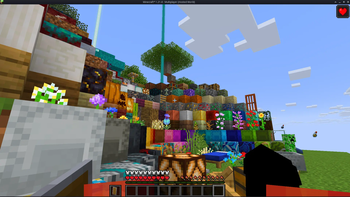
**Low Fire & Side Shield** is a **Minecraft resource pack** designed to keep your screen clear and focused.
It lowers both the **fire overlay** and the **shield position**, introducing a **minimal side shield** that lets you see more of your surroundings without losing the vanilla feel.
Whether you’re in the middle of a **PvP battle**, exploring dangerous caves, or just want a cleaner screen, this pack makes gameplay smoother and more immersive.
It’s lightweight, **FPS-friendly**, and works seamlessly with default Minecraft textures.
—
## ✨ Features
– 🔥 **Reduced fire overlay** — less visual clutter during combat.
– 🛡️ **Lowered side shield** — improved visibility without removing functionality.
– 🎮 **Vanilla-friendly look** — keeps the original Minecraft style intact.
– ⚙️ **Optimized for PvP and survival** — clear visuals, faster reactions.
– 💻 **Lightweight & compatible** — works with most other packs and versions.
—
## 📦 Perfect For
– PvP players needing better visibility
– Streamers who prefer a clean HUD
– Anyone wanting a minimal, modern look in Minecraft
—
**Tags / Keywords:**
`low fire`, `low shield`, `side shield`, `minecraft pvp`, `clear hud`, `visibility pack`, `vanilla friendly`, `clean screen`, `minimal resource pack`, `fps boost`, `combat tweaks`, `minecraft texture pack`, `darkshadowx21`
—
### 📜 License
This project is licensed under the **MIT License**.
You’re free to use, modify, and share this resource pack — just include proper credit to **Darkshadowx21**.
**LoginPhaseProxy** is a somewhat “*simple*” Velocity Plugin that allows you to proxy the LoginPluginMessagePacket from backend server to the player and LoginPluginResponsePacket from the player to the backend server. This is useful for modded backend servers that rely on Login Plugin Message communication to work, such as [AutoModpack](https://github.com/Skidamek/AutoModpack).
> Disclaimer: This plugin is in early development and may contain bugs and performance issues. Use it at your own risk.
## 🔁 When to use
| Author(s) | Mod |
|—————————————–|——————————————————————————–|
| [Skidam](https://github.com/Skidamek) | [AutoModpack](https://github.com/Skidamek/AutoModpack) (Fabric/Forge/Neoforge) |
> You’re welcome to suggest new use cases via [Issue](https://github.com/caiostoduto/LoginPhaseProxy/issues/new/choose) or [Pull Request](https://github.com/caiostoduto/LoginPhaseProxy/pulls)!
## ❓ What does it solve (detailed)

Normal Setup ⦁ Made in Figma
On a normal Velocity setup, when a player connects to the proxy, they go through the (P ↔ V) Login Phase, exchanging packets with the Velocity until the proxy sends a Server Login Success Packet, completing the (P ↔ V) Login Phase and triggering the backend connection process. The backend server then goes through its own (V ↔ B) Login Phase, where it may send Login Plugin Message Packets to the Velocity, and they can’t be forwarded to the player, because the (P ↔ V) Login Phase is already complete, so Velocity reponds them with an empty data Login Plugin Response Packet, as it doesn’t know how to handle them. This is a problem for modded backend servers that rely on Login Plugin Message communication to work, such as [AutoModpack](https://github.com/Skidamek/AutoModpack), as they won’t be able to send the necessary data to the player during the Login Phase, and the player won’t be able to join the backend server. This plugin tries to solve this issue by proxying the Login Plugin Message communication between the player and the backend server, allowing modded backend servers to work with Velocity without any issues.
## ✨ How it works (detailed)
~~Basically black magic 🪄🔮~~. It uses [Java Reflection](https://www.oracle.com/technical-resources/articles/java/javareflection.html) to access the internal Velocity classes [ProxyServer](https://github.com/PaperMC/Velocity/blob/ad8de4361c9d6e93b818d3381e85b14e0c90ad05/proxy/src/main/java/com/velocitypowered/proxy/VelocityServer.java) -> [ConnectionManager](https://github.com/PaperMC/Velocity/blob/dev/3.0.0/proxy/src/main/java/com/velocitypowered/proxy/network/ConnectionManager.java)[[1]](https://github.com/caiostoduto/LoginPhaseProxy/blob/main/src/main/java/com/caiostoduto/loginPhaseProxy/initializer/VelocityChannelInitializer.java) to override the serverChannelInitializer[[2]](https://github.com/caiostoduto/LoginPhaseProxy/blob/main/src/main/java/com/caiostoduto/loginPhaseProxy/initializer/FrontendChannelInitializer.java) and backendChannelInitializer[[3]](https://github.com/caiostoduto/LoginPhaseProxy/blob/main/src/main/java/com/caiostoduto/loginPhaseProxy/initializer/BackendChannelInitializer.java), so it can intercept the Velocity communication with the player (P <-> V)[[4]](https://github.com/caiostoduto/LoginPhaseProxy/blob/main/src/main/java/com/caiostoduto/loginPhaseProxy/intercept/FrontendInterceptor.java) and backend server (V <-> S)[[5]](https://github.com/caiostoduto/LoginPhaseProxy/blob/main/src/main/java/com/caiostoduto/loginPhaseProxy/intercept/BackendInterceptor.java), respectively.

Plugin Implementation ⦁ Made in Figma
With that, our plugin watches the Login Phase player connection until it sees a SetCompressionPacket(5) (optionally) and ServerLoginSuccessPacket(6), adding them to a buffer instead of sending them to the player and synthetically sends a loginAcknowledgedPacket(7) to the Velocity pipeline, tricking it into thinking the Login Phase is complete and starting the backend connection process. To make sure the Velocity doesn’t mess the packet interception and sending process, our plugin removes stealthly (so that it doesn’t trigger it’s handlerRemoved lifecycle[[6]](https://github.com/caiostoduto/LoginPhaseProxy/blob/main/src/main/java/com/caiostoduto/loginPhaseProxy/utils/StealthPipeline.java)) the handlers from the Velocity serverChannel pipeline[[4]](https://github.com/caiostoduto/LoginPhaseProxy/blob/main/src/main/java/com/caiostoduto/loginPhaseProxy/intercept/FrontendInterceptor.java) that were added after the Login Phase to Config Phase transition ([MinecraftCompressorAndLengthEncoder](https://github.com/PaperMC/Velocity/blob/ad8de4361c9d6e93b818d3381e85b14e0c90ad05/proxy/src/main/java/com/velocitypowered/proxy/protocol/netty/MinecraftCompressorAndLengthEncoder.java#L33) and [MinecraftCompressDecoder](https://github.com/PaperMC/Velocity/blob/ad8de4361c9d6e93b818d3381e85b14e0c90ad05/proxy/src/main/java/com/velocitypowered/proxy/protocol/netty/MinecraftCompressDecoder.java#L34), others are removed naturally afterwards). Also, our plugin adds the [MinecraftVarintLengthEncoder](https://github.com/PaperMC/Velocity/blob/ad8de4361c9d6e93b818d3381e85b14e0c90ad05/proxy/src/main/java/com/velocitypowered/proxy/protocol/netty/MinecraftVarintLengthEncoder.java#L33)[[4]](https://github.com/caiostoduto/LoginPhaseProxy/blob/main/src/main/java/com/caiostoduto/loginPhaseProxy/intercept/FrontendInterceptor.java) back (was removed at the transition) and sets the [MinecraftDecoder](https://github.com/PaperMC/Velocity/blob/ad8de4361c9d6e93b818d3381e85b14e0c90ad05/proxy/src/main/java/com/velocitypowered/proxy/protocol/netty/MinecraftDecoder.java#L34) state to StateRegistry.LOGIN[[4]](https://github.com/caiostoduto/LoginPhaseProxy/blob/main/src/main/java/com/caiostoduto/loginPhaseProxy/intercept/FrontendInterceptor.java) so the packets are properly encoded and decoded.
If the backend server sends a LoginPluginMessagePacket(10) during its Login Phase, our plugin will intercept it and send it to the player(11), and if the player sends a LoginPluginResponsePacket(12), our plugin will intercept it and send it to the backend server(13). This way, we can effectively proxy the LoginPluginMessagePacket and LoginPluginResponsePacket between the player and the backend server, allowing modded backend servers to work with Velocity without any issues. Then, when the backend server ends the Login Phase sending the ServerLoginSuccessPacket(15), our plugin will flush the buffered packets to the player, completing the Login Phase and allowing the player to join the backend server as normal. Afterwards, if the user sends a LoginAcknowledgedPacket (clientProtocolVersion >= ProtocolVersion.MINECRAFT_1_20_2)(16) after the Login Phase is complete, our plugin will simply ignore it, as it is not expected to be sent by the player at that point. Finally, the plugin will restore the [MinecraftDecoder](https://github.com/PaperMC/Velocity/blob/ad8de4361c9d6e93b818d3381e85b14e0c90ad05/proxy/src/main/java/com/velocitypowered/proxy/protocol/netty/MinecraftDecoder.java#L34) state to its previous state (Config Phase).
So, yeah, *basically black magic* 🪄🔮. Yayyyy!
## 🙏 Acknowledgements
– [Skidam](https://github.com/Skidamek), who inspired me to create this plugin!
– [lucas-gcp](https://github.com/lucas-gcp), who supported me and helped with testing!
A lightweight mod that cleans old, unused log files.
The best thing is that this mod keeps files not based on creation date, but the most recent access (of any kind) to the file, so logs that are still being accessed for whatever reason are not removed unwillingly.
It works both client-side only and server-side only, and works in every Minecraft version.
By default, it will clean logs that haven’t been used in more than 14 days, so there’s plenty of time in case you ever need them for debugging, but you can configure it to any amount of days you want.
## Configuration
You can find the mod’s configuration file in `config/logcleaner.json`. There’s two options you can change in there:
– `daysOld`: The number of days a log has to have been unused in order for it to be deleted. Defaults to `14`
– `silent`: If set to `true`, Log Cleaner will not send a message with the amount of deleted log files to the log. Defaults to `false`
## Description
Litematica is a modern schematic mod primarily targeting light mod loaders like LiteLoader on MC 1.12.x, Rift on MC 1.13.x and Fabric on MC 1.14+.
There is also a Forge version, but currently only for MC 1.12.2. For later MC versions there are currently only third party ports such as [Forgematica](https://modrinth.com/mod/forgematica).
Litematica has all the main features (plus a bunch more) of the old [Schematica](https://legacy.curseforge.com/minecraft/mc-mods/schematica) mod, except for the printer, which is not planned for Litematica itself, but instead is left to extension mods (see: [aria1th printer](https://modrinth.com/mod/litematica-printer-easyplace-extension) or [the other printer](https://modrinth.com/mod/litematica-printer)).
## Compatibility with shaders
**Litematica’s rendering doesn’t currently work properly with shaders (even with Iris) in 1.21.3+. So when you need to use Litematica (schematic rendering), disable shaders.**
In older MC versions the rendering works better with shaders, at least with Iris, but also depending on the shader pack. Some shader packs break the rendering pretty badly, but some used to work pretty nicely. Optifine in general is/was a lot more problematic, pretty much you can’t use shaders at all with Optifine if you use Litematica. The general recommendation is to use Sodium (and Iris) instead of Optifine.
## Hotkeys
The default hotkey to open the Litematica main menu is `M`.
Note: If you use a non-QWERTY keyboard layout, then the keys may be different, such as `M` becoming `,` on AZERTY.
– `M + C` – The direct hotkey to open the **c**onfig menu
– `M + R` – Toggle ON/OFF ALL **r**endering from Litematica
– `M + G` – Toggle ON/OFF just schematic rendering (“**g**host blocks” – all HUDs for example will still render)
– `M + T` – Toggle ON/OFF the “**t**ool item” (which is by default a stick) functionality
– `M + P` – Directly open the Schematic **P**lacements menu/list
– `M + V` – Open the Schematic **V**erifier menu
– `Numpad minus` – Open the placement configuration menu for the currently selected placement
– `Numpad multiply` – Open the Area Editor menu
– `Page Up/Down` – Change the selected layer in the render layers settings
– `M + Page Up/Down` – Change the render layers mode
– `Ctrl + scroll` (holding the tool) – Cycle the “tool mode” (there is also a button for this in the lower left corner of the main menu)
– `Alt + scroll` (holding the tool) – Nudge/move the selected placement or area selection box or corner (depending on the tool mode) in the direction the player is looking at
– `Ctrl + M` – Toggle or cycle the “sub-mode” or main setting of some of the “tool modes”, such as `pasteReplaceBehavior` in Paste mode, the `Corners` vs. `Expand` behavior in Area Selection mode, or the `Area` vs. `Placement` behavior of the Delete mode
## Warning for multiplayer
The Easy Place mode feature may get you banned on some servers!
The Easy Place feature will always be clicking on the target position’s air block, and this can easily be detected by anti-cheat systems. So this can result in at least two things: The block placement will just be rejected and you just get client-side ghost blocks, or some anti-cheat system flags that as cheating and auto-bans you from the server. So before using Easy Place, find out of it’s allowed on the server!
## If you have Optifine…
In general I don’t recommend using Optifine (with Litematica, or otherwise) due to the various rendering issues it causes. Instead I would recommend using Sodium and/or Iris if you want shaders.
If you have Optifine installed, then there are some options that you most likely will need to disable in Optifine, or otherwise it will break the schematic rendering:
– If you get glitchy weird triangles, then in 1.16+ first try updating to the latest Litematica version. If that doesn’t work, then set shaders to `OFF` (**not** `Internal`) and restart the game.
– `Render Regions` probably needs to be disabled to prevent weird rendering issues (the schematic partially rendering in weird places)
– `Fast Render` might also need to be disabled if there are still some weird HUD/GUI rendering issues
## Documentation
There is a [wiki](https://github.com/maruohon/litematica/wiki). The wiki is still being worked on, and it will probably have a new address at some point (or rather there will be a new wiki in a new location with a lot more coverage).
### Other/older documentation and explanations, some FAQ answers
Here is a Reddit post that explains the very basics of the mod:
– https://old.reddit.com/r/Minecraft/comments/cqdmkk/anyone_can_help_me_how_do_i_make_schematics_with/exeug78/
Litematica – Easy Place support on servers
– https://old.reddit.com/r/litematica/comments/1c7j79l/easy_place_on_server/l0hzmkt/
Schematic format conversions:
– https://old.reddit.com/r/Minecraft/comments/oabwea/schem_files_work_in_litematica_but_schematic/h3ju3sy/
Litematica Normal selection mode with sub-regions:
– https://old.reddit.com/r/feedthebeast/comments/r9n9mi/litematicas_addselectionbox_keybind_wont_work/
– https://old.reddit.com/r/feedthebeast/comments/r9n9mi/litematicas_addselectionbox_keybind_wont_work/hnpe9yg/
Litematica – hiding an area selection:
– https://github.com/maruohon/litematica/discussions/755#discussioncomment-6772682
– https://old.reddit.com/r/fabricmc/comments/yw9r5y/litematica_1192_issues/ixr7l5h/
Litematica – can’t create new selection sub-regions (in Simple mode):
– https://www.curseforge.com/minecraft/mc-mods/litematica?comment=2694
Litematica – Normal/Multi-Region area selection tutorial:
– https://github.com/maruohon/litematica/issues/716#issuecomment-1596121219
Litematica – Easy Place on a server with FabricCarpet but no CarpetExtra:
– https://discord.com/channels/169369095538606080/566649314001158165/1235158483792433214
– https://discord.com/channels/169369095538606080/566649314001158165/1221223833889935420
Litematica – easy/fast selections tutorial:
– https://discord.com/channels/169369095538606080/566649314001158165/1187372903377936435
Litematica – schematic formats:
– https://discord.com/channels/169369095538606080/183172448919748608/1180841121845354516
– https://discord.com/channels/169369095538606080/566649314001158165/1176569283271213098
– https://discord.com/channels/169369095538606080/566649314001158165/1097540707931127938
– https://discord.com/channels/169369095538606080/169369095538606080/1081089742944337941
– https://discord.com/channels/169369095538606080/566649314001158165/1097564948999184394
– https://github.com/maruohon/litematica/issues/812#issuecomment-1924300257
Litematica – saving and pasting with block entity data:
– https://discord.com/channels/169369095538606080/566649314001158165/1193304174838960200
Litematica – Material Lists variants:
– https://www.reddit.com/r/litematica/comments/15yz2bo/material_list_not_showing_up/jxfiwvh/
Litematica – Manual Origin issue:
– https://github.com/maruohon/litematica/issues/751#issuecomment-1671611897
Litematica – placing stairs correctly:
– https://github.com/maruohon/litematica/issues/797#issuecomment-1848386879
Litematica – performance tips with large schematics:
– https://discord.com/channels/169369095538606080/566649314001158165/1186744945399320647
Litematica – large schematics, bad performance or crashes, what to do:
– https://discord.com/channels/169369095538606080/566649314001158165/1122755969651318894
Litematica – how to only show one block type at a time:
– https://discord.com/channels/169369095538606080/566649314001158165/1133702185121755258
Litematica not working/keys not working:
– https://discord.com/channels/169369095538606080/566649314001158165/1196124302634922075
Litematica “only render one block”:
– https://discord.com/channels/169369095538606080/566649314001158165/1061881509579075684
Litematica – finding the schematics directory/game directory:
– https://old.reddit.com/r/litematica/comments/1co6vh4/downloading_schematics_on_different_versions_of/l3c21l9/
– https://old.reddit.com/r/litematica/comments/13es48n/how_to_import_schematics_on_mac/kb8bu5d/
Litematica – using sub-regions:
– https://github.com/maruohon/litematica/discussions/647
Litematica – pasting redstone on servers:
– https://discord.com/channels/169369095538606080/566649314001158165/1063578995347685446
– https://legacy.curseforge.com/minecraft/mc-mods/litematica?comment=2838
– https://discord.com/channels/169369095538606080/566649314001158165/1227276878830764183
Litematica – pasting inventory contents on servers, feat. Litemoretica:
– https://old.reddit.com/r/litematica/comments/1cg186f/items_wont_transfer/
Litematica – paste task not running + somewhat comprehensive mspt and profiling quick howto:
– https://github.com/maruohon/litematica/issues/656
Litematica – schematic placement explained:
– https://github.com/maruohon/litematica/issues/703#issuecomment-1553132401
Litematica – material list:
– https://discord.com/channels/169369095538606080/566649314001158165/1071408321417973780
Litematica – performance tips with large schematics:
– https://discord.com/channels/169369095538606080/566649314001158165/1198321606536200324
Litematica – no schematics directory in the .minecraft directory:
– https://www.reddit.com/r/fabricmc/comments/jn8u5d/how_do_i_add_a_schematic_for_litematic_to_load/jhk6941/
Litematica “not working” (not in Controls) -> F3, malilib keys, Mod Menu:
– https://discord.com/channels/169369095538606080/169369095538606080/1197972330958295110
World Edit pasting:
– https://old.reddit.com/r/technicalminecraft/comments/j9ipu1/how_can_i_load_a_schem_file_that_i_downloaded/g8k49xj/
MacOS how to go up one directory:
– https://discord.com/channels/169369095538606080/1135325334565298237/1186539038572822618
## Youtube tutorials
Here are some of the better Youtube tutorial videos I’ve come across.

# Light Block – Fabric
Implements the Light Block from Bedrock into Fabric

Support dropped.
Lawnage is a mod that adds in lawn similar to that of the long abandoned OffLawn! mod
Lawn blocks do not turn to dirt when you place blocks on them!
You can place saplings on them if ya want even!
Regular lawn:
To craft use 1 dirt with 1 of any foliage (grass flowers leaves saplings etc)or 1 grass block!
Mushroom lawn:
Place shrooms of all types on them!
Craft able with 1 mushroom of any type (from any mod even) and 1 dirt!
also craftable with 1 mycelium
Biome dependent lawn!
Created from: 1 regular grass lawn.
Used to make 1 regular grass lawn.
Switch em back and forth.
Crimson and Warped Lawns!
Made with respective overgrown netherack counterparts
or with 1 netherack and 1 biomass item
or 8 netherack and 1 wart block (makes 8)
[](https://modrinth.com/mod/fabric-api “Here”)
Currently: adds grass lawn and mycelium lawn biome color type, warped, and crimson lawns
Roadmap:
5.0 will be an update for mod support, reading the support for various mods.