No Worldborder
**The first version of the No Worldborder resource pack, which of course removes the worldborder texture so that it is invisible. Useful for taking screenshots of, for example, builds that have a border.**
## Support
If you have any problems, ideas, or other feedback about this project, please contact me via discord or email. You can contact me on Discord by sending a friend request, so you can send me a message.
Discord: tibodp
Mail: [email protected]
## 🌟 My other projects:
– [Torchcraft Lobby Panorama](https://modrinth.com/resourcepack/torchcraft-lobby-panorama)
– [The Ultimate Creator](https://modrinth.com/modpack/the-ultimate-creator)
– [Chromakey Blocks](https://modrinth.com/modpack/the-ultimate-creator)
– [No Worldborder](https://modrinth.com/modpack/the-ultimate-creator)
– [Vuurwerkshow Modpack](https://modrinth.com/modpack/the-ultimate-creator)
– [Vuurwerkshow Panorama](https://modrinth.com/modpack/the-ultimate-creator)
– [Vuurwerkshow Paintings](https://modrinth.com/resourcepack/vuurwerkshow-paintings)
No TNT Minecarts
Whenever a player has a TNT minecart in their inventory, the player gets refunded 1 TNT and 1 minecart. Only works with vanilla TNT minecarts.
Friend and DM me on discord (@Cootshk#0001) for help.
No Rocket Usage
# No Rocket Usage
Rocket flying is annoying! (and unfair, too.)
## Highlights
It prevents firework usage by breaking the equipped elytra upon usage, simple as that.
## Installation
### Datapack
– Make a new world, click on **Datapacks** and put the `.zip` file inside of the `datapacks` folder.
– For existing worlds, put the datapack inside of the `datapacks` folder of that world.
### Mod
– Move the `.jar` file into the `mods` folder.
– Alternatively, you can go to the Mods page and click on **Add File** when using MultiMC or Prism Launcher.
## Extras
This project was made as an experiment to make a functional GitHub repository. Nonetheless, this project will be maintained and updated from time to time on breaking changes.
## License
No Rocket Usage is unlicensed.
No F3/Debug Screen
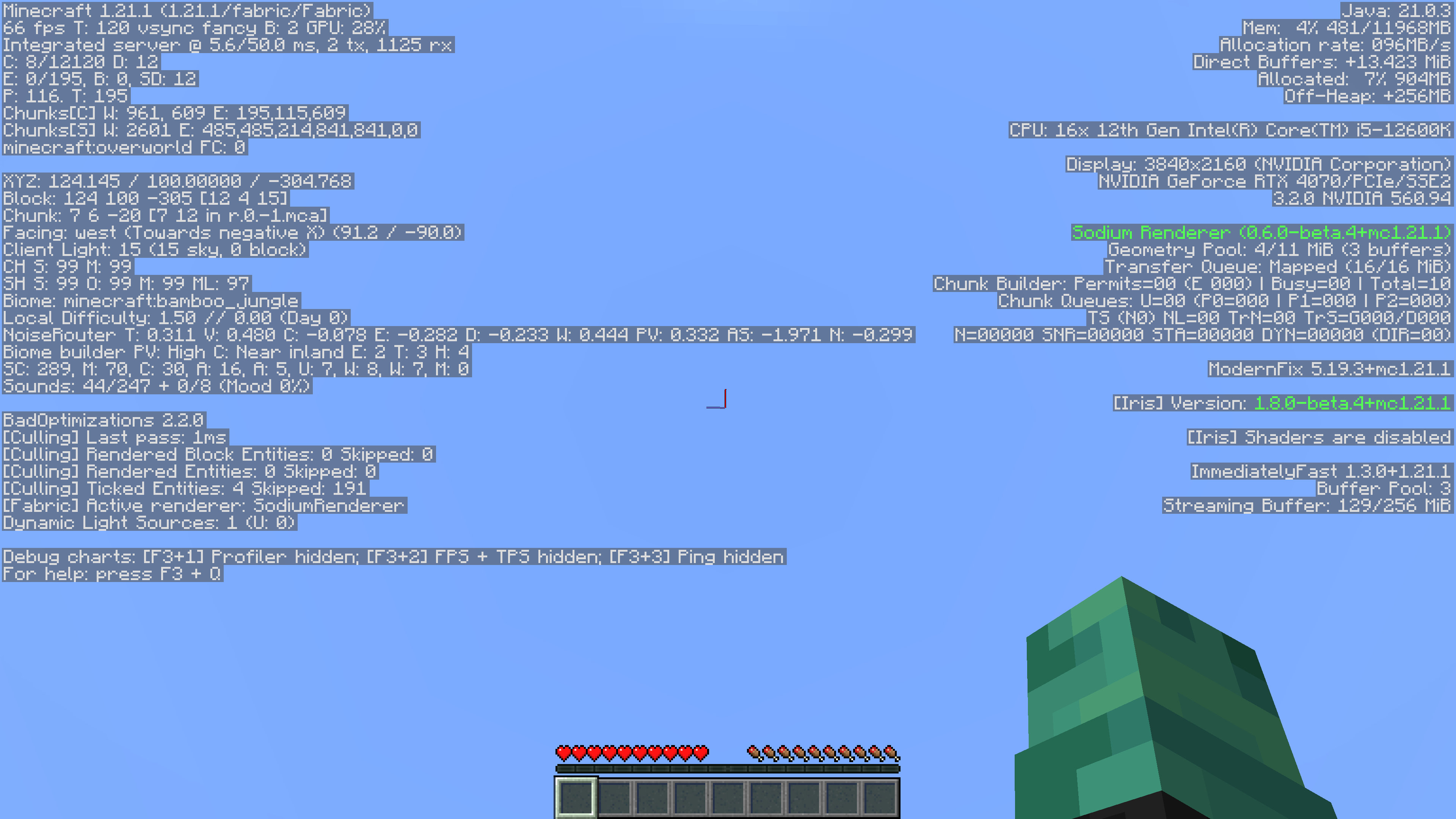
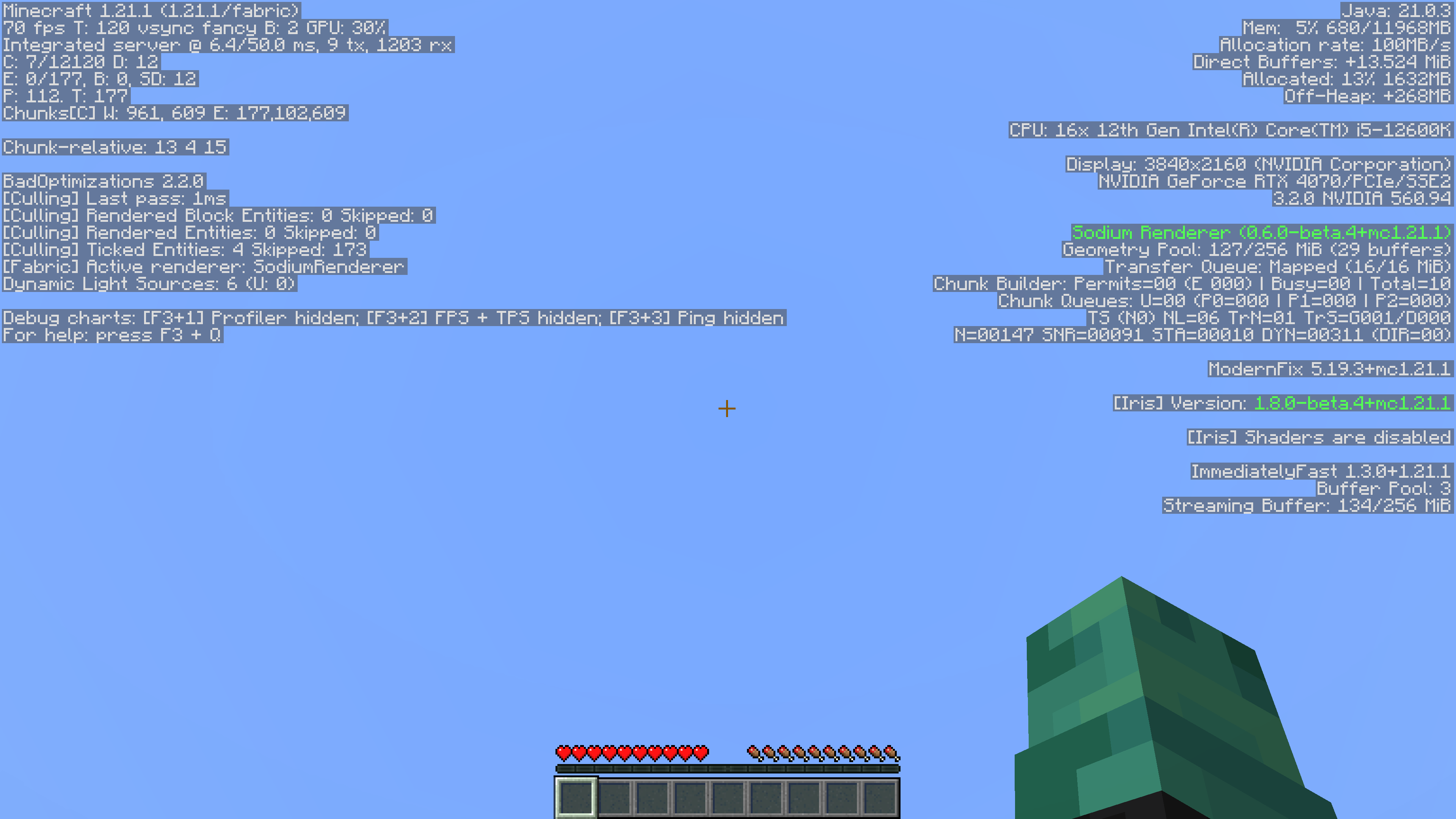
This simple mod removes game-related information from the Debug Menu. Since its also a datapack, its server side so players don’t have to install it!
It also supports playing in single player.
Reasoning
I’ve always felt that the Debug menu was unnecessary. It took away from actual features in the game, like maps and compasses with coordinates, rendering them useless. Things like the pie chart and the ability to randomly find buried treasure by going to 9,9 in a chunk on a beach were too much for me, so I removed it.
Without Mod:
With Mod:
No Armour Armor HUD Hotbar
Removes the Armor Icons from the HUD, for a cleaner GUI. Protection still works!
v1.20.2 (latest) and above is compatible with every other resourcepack.
Just select and put this resourcepack above others in order to work.
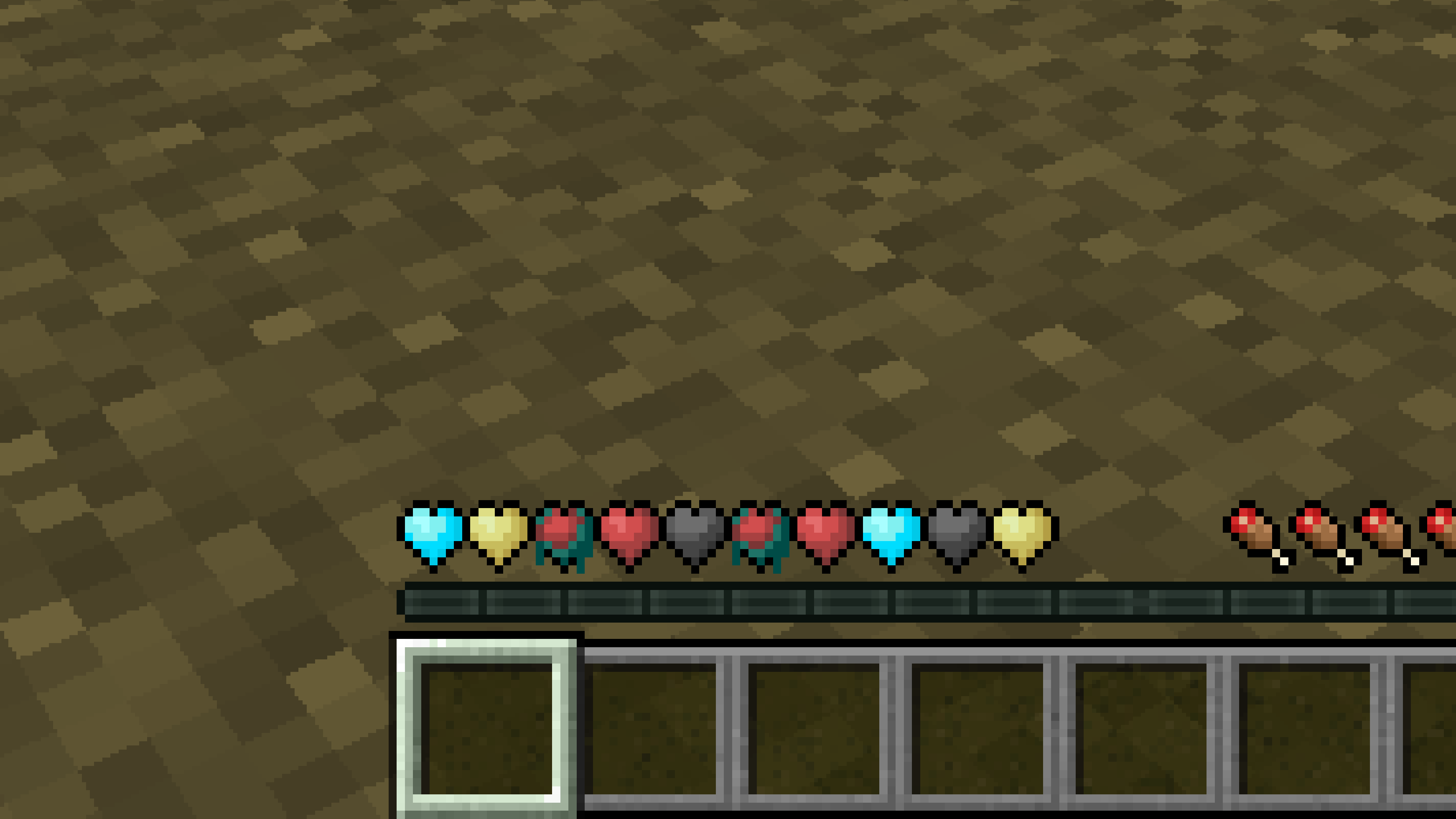
New Hearts, classic colors
# **New Hearts, classic colors**
**Not a fan of the pastel hearts in the [New Hearts](https://modrinth.com/resourcepack/new-hearts) texture pack?**
**This texture pack is for you.**
—
—
New Hearts
# **New Hearts**
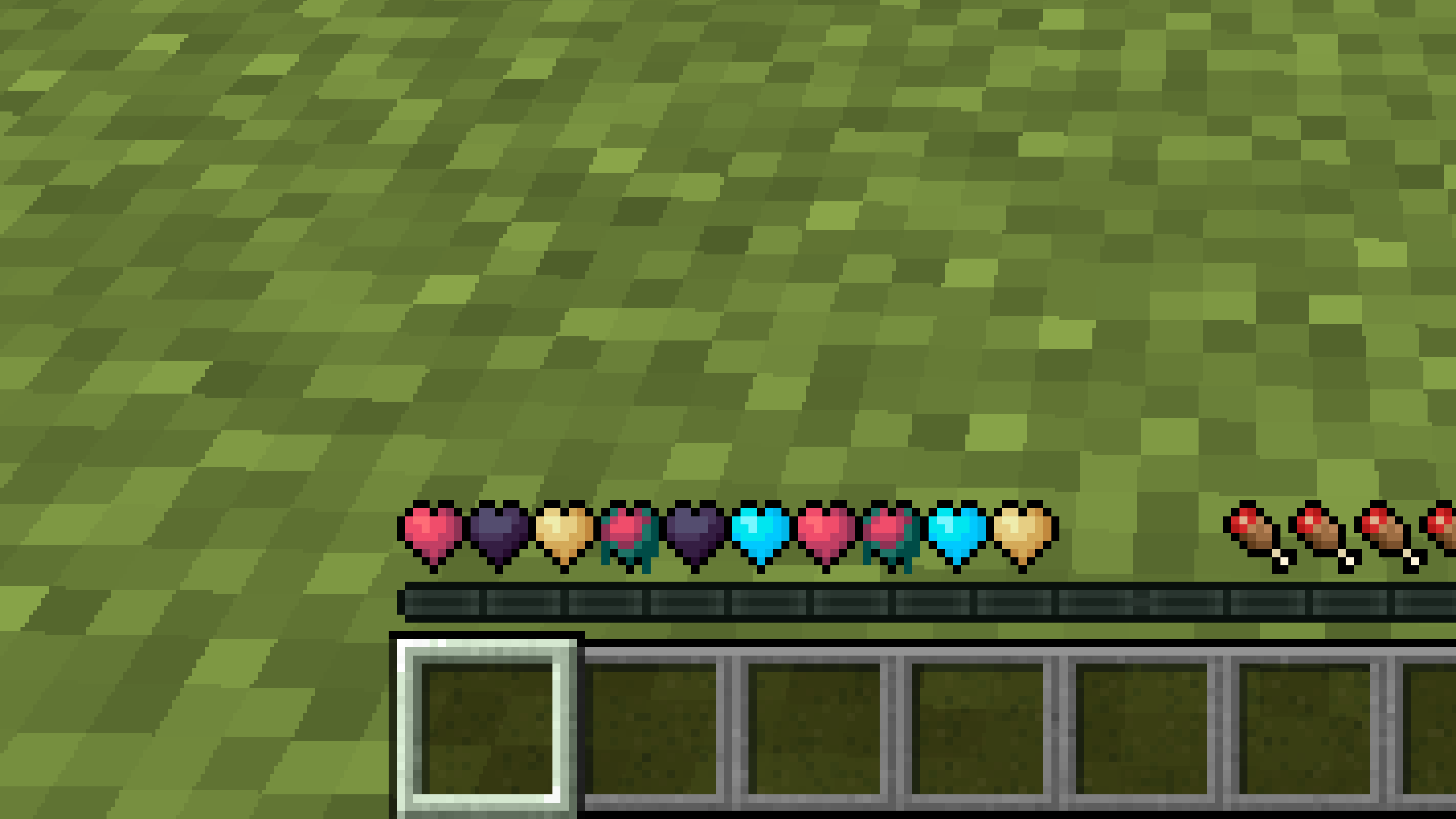
**Don’t like the bright colors of the hearts?**
**This texture pack is for you.**
—
—
## **Description**
**Pastel-colored hearts with softer color transitions.**
—
**Texture pack in classic colors: [New Hearts, classic colors](https://modrinth.com/resourcepack/new-hearts-classic-colors)**
New end stone
# **New end stone**
**Like pink and pastel colors?**
**This texture pack is for you.**
—

—
## **Description**
**This pack slightly modifies end stone, giving it a softer, pastel pink tone.**
nerdPVP
# NerdPVP – A Clean & Competitive PVP Resource Pack
### WARNING : This pack is still in alpha and NOT complete
## Overview
Nerd PVP is a streamlined resource pack designed for competitive Minecraft PVP. It enhances visibility, reduces distractions, and optimizes key elements to give you a tactical edge in combat. Whether you’re playing Bedwars, SkyWars, or Faction PVP, this pack keeps your focus sharp and your performance crisp.
## Key Features
– ✔ Clear & Minimalist Textures – Removes visual clutter for better enemy tracking.
– ✔ Optimized Sword & Tool Designs – Clean, high-visibility models for fast-paced combat.
– ✔ Low Fire – Less obstruction during fights.
– ✔ 16x Resolution – Balanced performance for smooth gameplay.
## Compatibility
Works on Minecraft [version (1.16.x, 1.17.x, 1.18.x,1.19.x, etc) ]
Supports OptiFine (connected textures, custom skies).
FPS-friendly (compatible with Sodium, Iris, etc.).
## Installation
Download the .zip file.
Place it in your resourcepacks folder.
Activate in-game via Options > Resource Packs.
## Feedback & Updates
Suggestions or bug reports? Say it in the discord server or DM me directly. Updates focus on community-driven improvements!
## Developer note
You can use textures from this pack, just credit the pack maker “membercatcousin”
Navy Blue Shield
# Navy Blue Shield
This resource pack replaces the default shield with a custom 3D model.
The design uses a navy blue theme.
No OptiFine required. Vanilla compatible.
## More Shield Themes
– [Black](https://modrinth.com/project/noire-shield)
– [Blue](https://modrinth.com/project/blue-shield)
– [Creeper](https://modrinth.com/project/creeper-shield)
– [Dark Red](https://modrinth.com/project/dark-red-shield)
– [Mirror](https://modrinth.com/project/mirror-shield)
– [Rabbit](https://modrinth.com/project/rabbit-shield)
– [Red](https://modrinth.com/project/red-shield)