eeeeeeeeee
Let me show it with one pic:
Let me show it with one pic:

Download Easyflint and make dropping gravel onto torches a thing of the past.
This data pack lets you craft 1 gravel into 1 flint.
I went looking for a pack like this and didn’t find one that didn’t mess with the 1:1 ratio, so I just made my own.
Easyflint is very lightweight in size. It’s essentially just the recipe and the hidden advancement that makes it show up in the recipe book.
No need to unzip the file or do anything really, just drop it right into the `datapacks` folder for your world or server, and you’re good to go. If you’re using the mod rather than the datapack, place it in your `mods` folder instead.
Have fun,
-kk iris
## 
[](https://www.curseforge.com/minecraft/mc-mods/earth2java-fabric)
[](https://www.curseforge.com/minecraft/mc-mods/earth2java-fabric)

—
#### **Description**
This mod add mobs and items from Minecraft Earth to Minecraft Java Edition. The mobs have not only new textures but also the unique features they have in MCE. You can meet the Moobloom, the Tropical Slime and any other creatures during your adventures. You can also spawn them in your creative world with their respective Spawn Egg.
Starting from MC1.20, entities spawn is based on tags, so any modded biome that is assigned to a certain tag could spawn the associated entitites.
#### **Entities**

#### **Supported Languages**
**Full support**
English (US), Deutsch (Deutschland), Español (España), Français (France), Italiano (Italia), 日本語 (日本), 한국어 (대한민국), Português (Brasil), Русский (Россия)
**Partial support**
Nederlands (Nederland), Български (BG), Čeština (Česká republika), Dansk (DA), Español (México), Ελληνικά (Ελλάδα), Français (Canada), Bahasa Indonesia (Indonesia), Magyar (HU), Norsk bokmål (Norge), Polski (PL), Português (Portugal), Slovensky (SK), Suomi (Suomi), Svenska (Sverige), Türkçe (Türkiye), Українська (Україна), 简体中文, 繁體中文
**Improve translation**
Feel free to PR on github with improved localization.
#### ****How report a bug****
Don’t report bugs in comments. Use the issue tracker by clicking on the **Issues** tab above.
*Dye leather horse armor only where it is meant to be dyed!*
### Something isn’t quite right!
Has suiting up your prized horse in leather horse armor ever caught your eye as queer? Something is dreadfully off with leather horse armor in Minecraft. Unlike the player armor, the colored details of leather horse armor get dyed! Dyed fixes this mistake so your horses can wear their leather armor with pride!
### What is wrong?
Originally an exclusive feature of Pocket Edition, when ported to Java Edition the leather horse armor textures were flattened into a single texture, causing both the colored details and monochrome base texture to be dyed. As well, any code that would have allowed for a separate overlay was lost, meaning this was not as simple to fix as adding a texture. You may think that because this already existed with the leather armor for the player, how could it have possibly gone awry for the leather horse armor? Such remains a mystery!
### Give your horses some love!
Dyed cleaves the leather horse armor texture in two once again and fixes the model code to dye only the base texture! The item model for the leather horse armor is also replaced to fix the dyeing for the item as well!
Please note that this bug has finally been fixed in Minecraft 1.21.11, so while Dyed will still work, it is now unnecessary! It will no longer be marked as compatible starting with 1.21.11.
### Get the goods!
You can find releases of Dyed on both *[Modrinth]* and *[CurseForge]* and also access development builds on *[GitHub]*!
Dyed supports Fabric 1.16+, Forge 1.16+, and NeoForge 1.20.2+.
### Figure it all out!
You can delve into the *[wiki]* for details or submit a *[bug report]* if something isn’t quite right!
Still need something? Head on over to the *[discussions]* forum for support, to read announcements, or discuss anything about the mod!
[Modrinth]: https://modrinth.com/mod/dyed
[CurseForge]: https://www.curseforge.com/minecraft/mc-mods/dyed
[GitHub]: https://github.com/yurisuika/dyed
[wiki]: https://github.com/yurisuika/dyed/wiki
[bug report]: https://github.com/yurisuika/dyed/issues
[discussions]: https://github.com/yurisuika/dyed/discussions
[Discord]: https://discord.gg/0zdNEkQle7Qg9C1H
# Just a dot crosshair.
Works on any 1.6.1+ verison of Minecraft.
– **ENG**: White stupid hamsters are a popular meme from TikTok that includes a series of pictures of hamsters making funny faces. This resource pack includes a picture of one of them.
– **RU**: белые тупые хомяки – популярный мем из тиктока который включает в себя серию из картинок где хомяки корчат смешные рожи, этот ресурспак включает в себя изображение одного из них
[Check collection with all memes + streamers Totems ](https://modrinth.com/collection/sfDcDGAi)
A cute anime-style inventory texture pack featuring a doggie girl theme. This pack redesigns the Minecraft inventory GUI with an adorable dog-girl aesthetic, creating a clean and cozy anime vibe while keeping the interface simple and easy to use.
# DockBridge
Velocity plugin to auto-register Docker-backed servers (e.g., Limbo) and check for updates on Modrinth.
## Features
– Auto-discovery: Containers with label `net.uebliche.dockbridge.autoregister=true` are registered as Velocity servers. Host from container name, port from label `net.uebliche.dockbridge.server_port` (fallback: first exposed port, else 25565).
– Name collisions: Default `suffix` → append short container id (`basename-abcdef`). Alternative `overwrite` → keep basename, last writer wins.
– `/dockbridge` command (permission `dockbridge.command`): Shows label filter, duplicate strategy, last scan stats, and registered servers (no sensitive data).
– Modrinth update check on proxy start; login hint for players with permission `dockbridge.update.notify`.
## Installation
1) Download the latest DockBridge release from Modrinth (jar file).
2) Place the jar into your Velocity `plugins/` folder.
3) (Optional) If Velocity runs in Docker, mount `/var/run/docker.sock` into the Velocity container so DockBridge can discover containers.
4) Start Velocity. On first start, the config file `dockbridge.conf` is created in the Velocity data folder; adjust settings and restart.
5) Permissions:
– `dockbridge.command` for `/dockbridge`
– `dockbridge.update.notify` for update hints on login
## Configuration
`dockbridge.conf` (created in the Velocity data folder on first start):
“`
docker.endpoint=unix:///var/run/docker.sock
docker.poll_interval_seconds=30
filters.proxy_group=default
docker.autoregister.label_key=net.uebliche.dockbridge.autoregister
docker.autoregister.label_value=true
docker.autoregister.name_label=net.uebliche.dockbridge.server_name
docker.autoregister.port_label=net.uebliche.dockbridge.server_port
docker.autoregister.duplicate_strategy=suffix # suffix | overwrite
“`
## Docker labels (example)
“`
net.uebliche.dockbridge.autoregister=true
net.uebliche.dockbridge.server_name=limbo
net.uebliche.dockbridge.server_port=30000
“`
## Local testing
### Gradle run
“`
./gradlew runVelocity
“`
Downloads Velocity, builds the plugin (shadowJar), and starts the proxy with the plugin loaded.
### Docker Compose (Limbo set)
“`
docker compose up –build # or: docker compose -f docker-compose.limbo.yml up –build
“`
Includes three Limbo backends (ports 30000/30001/30002) and Velocity on host port 26678. Velocity runs via `runVelocity` inside the container and mounts your sources/config.
## Commands & permissions
– `/dockbridge` (permission `dockbridge.command`): Status and registered servers.
– Update hint on login: permission `dockbridge.update.notify`.
## Troubleshooting
– No servers registered?
– Ensure your containers have the label `net.uebliche.dockbridge.autoregister=true` and a valid `net.uebliche.dockbridge.server_port`.
– Make sure Velocity can reach Docker: mount `/var/run/docker.sock` (or set `docker.endpoint` to a reachable TCP endpoint).
– Check `/dockbridge` output for last scan count and registered servers.
– Port mismatch or forwarding errors?
– Verify the Limbo (or other backend) port matches the label and the server properties.
– For Velocity forwarding, ensure forwarding secret/mode match on both ends.
– Duplicate names?
– Default strategy is `suffix`. Switch to `overwrite` via `docker.autoregister.duplicate_strategy` if you want last-writer-wins.
## Build
“`
./gradlew build
“`
Produces the shaded jar at `build/libs/DockBridge-
## Contributing
– Fork & PRs welcome. Keep code comments minimal but purposeful.
– Default Java 21, Gradle Kotlin DSL, Velocity API 3.4.0-SNAPSHOT for run task; 3.1.1 for compileOnly/annotationProcessor.
– Run `./gradlew build` before submitting; Docker-based tests are optional.
## **Have you ever been annoyed by that one Player who kept fishing you in PvP?**
##
### This Pack fixes that!
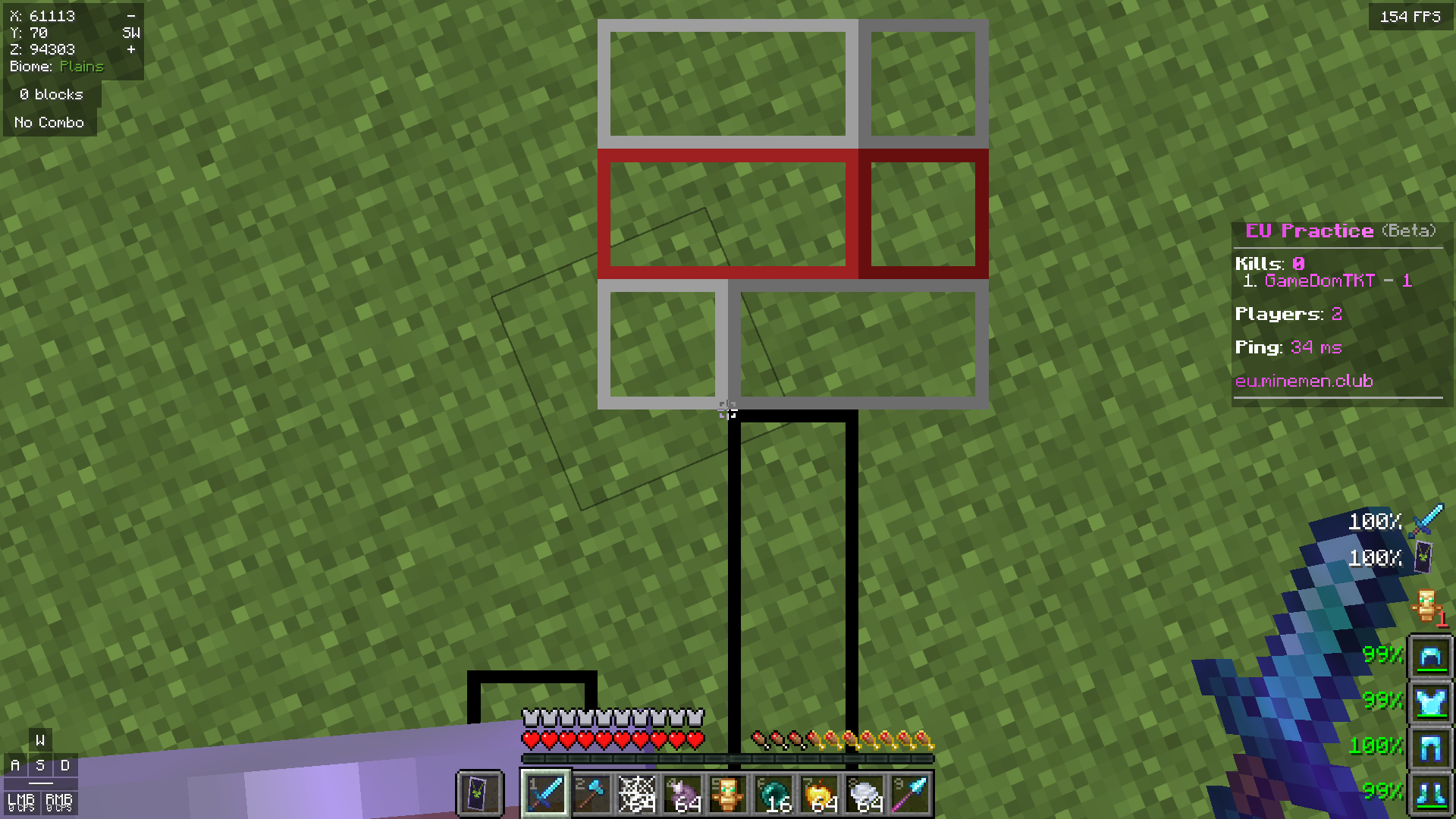
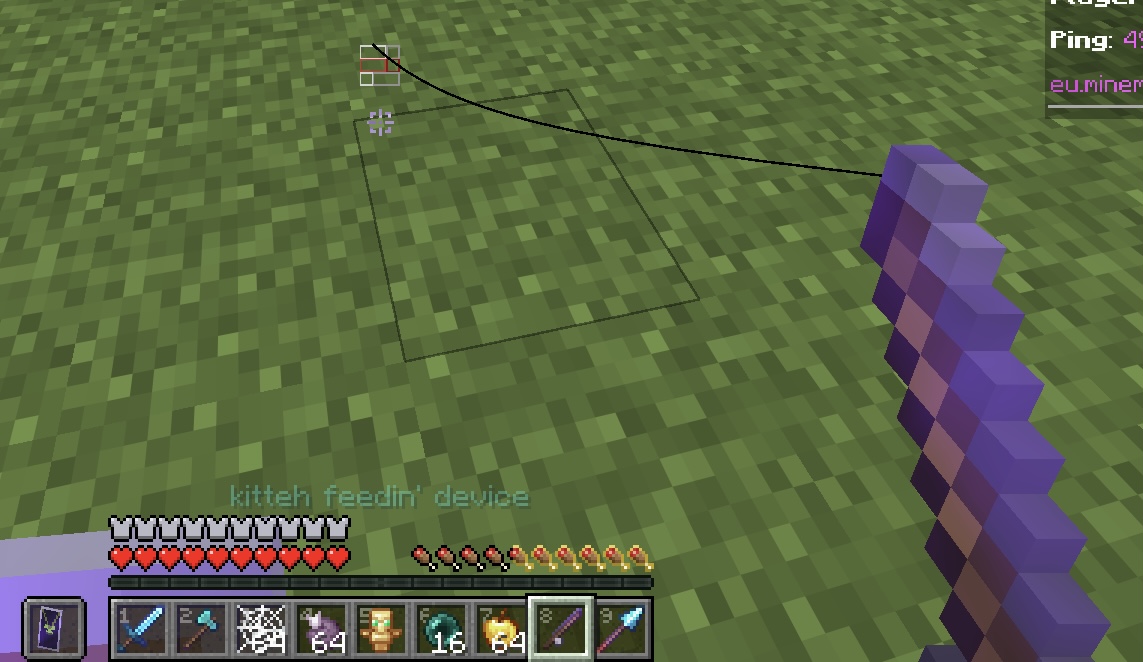
Other than every other Pack doing this, this Pack doesn’t completely remove the Fishing Bobber, it just makes it see-through so you still can see the bobber but it isn’t as annoying as normally.
**Fishing Bobber on Screen**
**Fishing Bobber on Ground**
## **Have you ever been distracted by the effect spirals in your screen?**
### Well, this pack fixes exactly that!
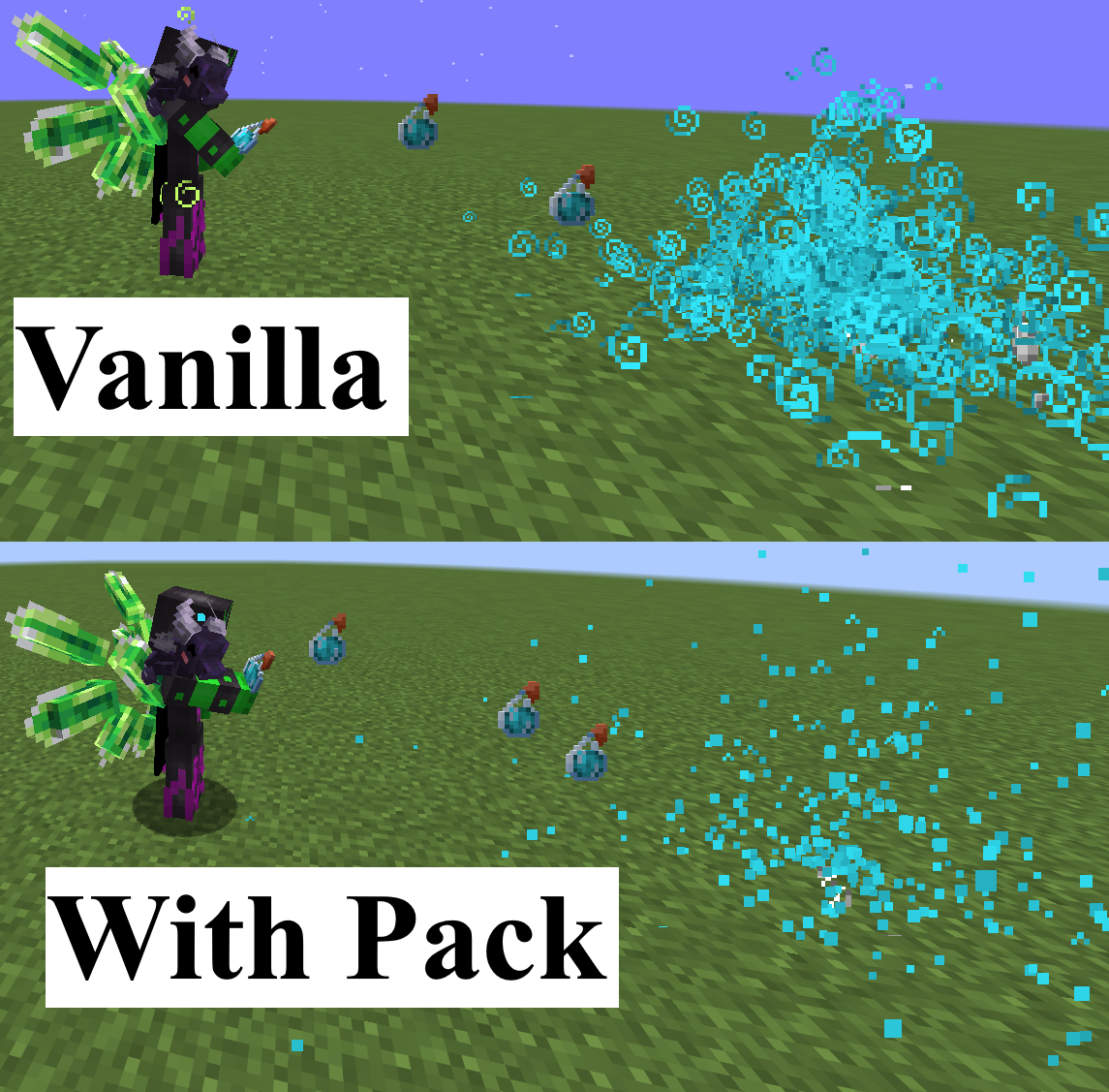
I retextured effect particles to be only one pixel big, so you can still see everything without completely removing them. This is especially useful for PvP, considering that most packs just completely remove the particles, what makes it impossible to see other players effects of invis particles, what is really bad.