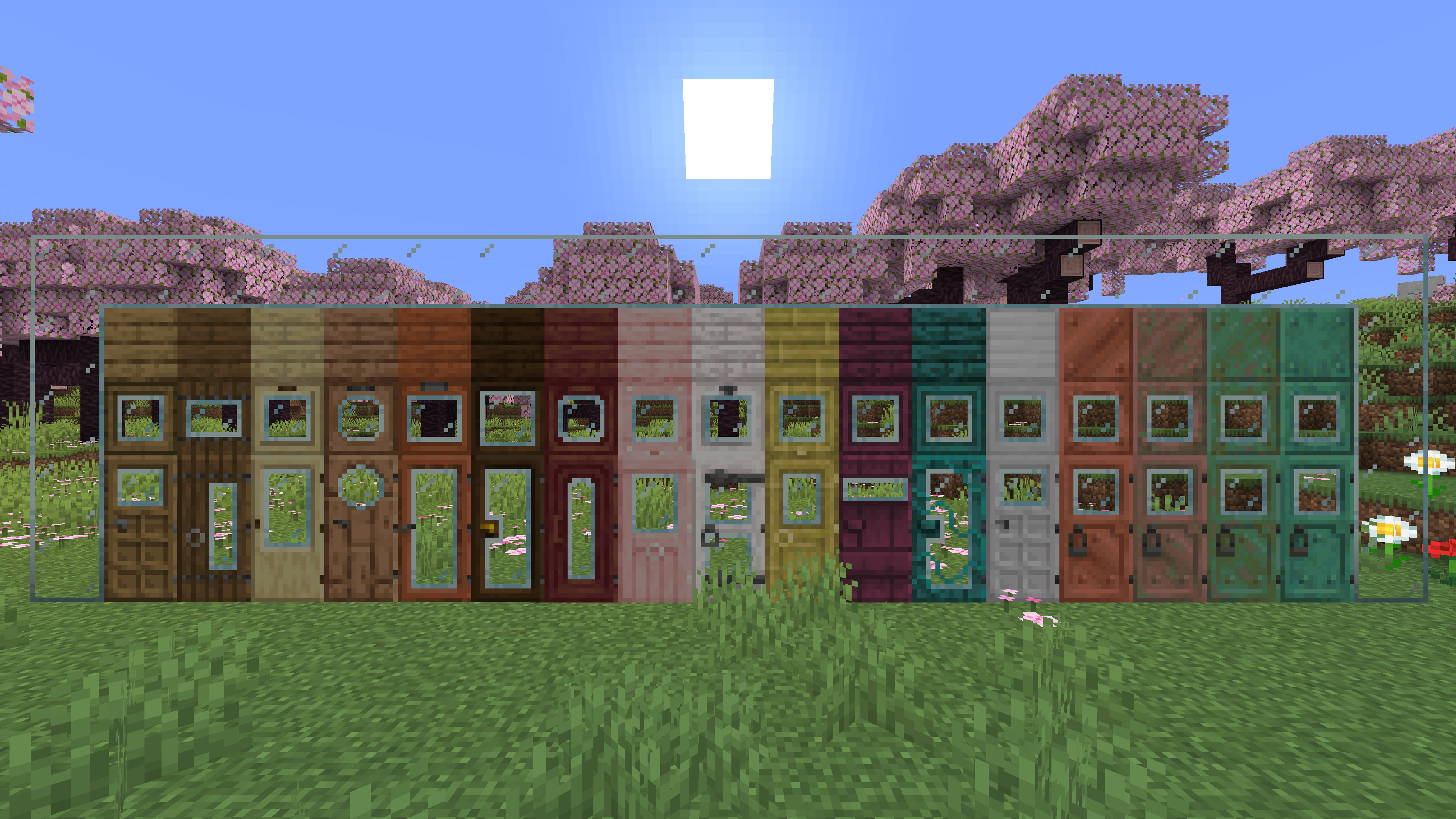
Glass doors and trapdoors
# **Glass doors and Trapdoors**
—
—
## **Description**
**Replaces the default doors and trapdoors with glass textures.**
**The glass variants make it easier to see through doors and trapdoors.**
Geometric Font Legacy

> A sharp, clean remake of the default mojangles font in full HD
# GUI Scale Matters!
The default download is meant for scale 4, but if you use a different size make sure to click on the latest release and download the one you play with for the best experience! You can also use [this link](https://modrinth.com/resourcepack/geometric-font/version/1.1.1) to go there.
# The Font Has Been Remade!
[**Geometric Font 2**](https://modrinth.com/resourcepack/geometric-font-2) has been rebuilt from the ground up as an OpenType font with new features and better consistency. There’s also [**Geometric Font Edge**](https://modrinth.com/resourcepack/geometric-font-edge), a new sci-fi stylized variant! Both can be found using the buttons bellow:
[](https://modrinth.com/resourcepack/geometric-font-2) [](https://modrinth.com/resourcepack/geometric-font-edge)
## About
There are a lot of HD font remakes out there, but none that go for a sharper style that (in my opinion) suits vanilla better. That’s what this font aims to do!
Another problem with HD fonts, due to the way the game displays GUIs, high-resolution textures will look jagged and distorted if you don’t use them with the GUI scale they’re meant for. This pack solves that too! Just make sure to download the version for your preferred GUI scale.
## Resources
– Want to use this font in your own works? See the [license](https://github.com/Xetheon/mc-geometric-font/blob/main/LICENSE.md)
– Curious about updates on things I work on or just want to hang out? Join my [Discord!](https://discord.gg/3gtNAQgv2G)
– Interested in other packs I’ve made? Check out [this list!](https://gist.github.com/Xetheon/c3d677e0762658f8d79cf05e2c6e65ff)
Craftable Overpowered!
# Craftable Overpowered!
This mod/data pack makes Enchanted Golden Apples craftable again and returns the achievement associated with eating one (as an advancement). For those who haven’t played 1.8 or don’t remember the recipe, it will appear in your recipe book once you have obtained a Block of Gold.
The mod is *optional* client-side, but the client **will** still need the resources, so the mod’s resources would need to be present in your server’s resource pack for clients who don’t have the mod (or individually downloaded and enabled client-side). The mod’s resources are identical to the data pack’s assets file, which can be downloaded [here](/mod/gapple/version/1.1-datapack).
There are two versions of the data pack, one that only supports English (and doesn’t need a resource pack) and a version that uses a required resource pack to provide translation strings into the following languages:
### Currently Supported Languages
* `bg_bg`: Български (България) 🇧🇬
* `cs_cz`: Čeština (Česká Republika) 🇨🇿
* `da_dk`: Dansk (Danmark) 🇩🇰
* `de_at`: Österreichisches Deitsch(1) 🇦🇹
* `de_ch`: Schwiizerdutsch(1) 🇨🇭
* `de_de`: Deutsch 🇩🇪
* `el_gr`: Ελληνικά (Ελλάδα) 🇬🇷
* `en_au`: English (Australia) 🇦🇺
* `en_ca`: English (Canada) 🇨🇦
* `en_gb`: English (United Kingdom) 🇬🇧
* `en_nz`: English (New Zealand) 🇳🇿
* `en_ud`: ɥsᴉꞁᵷuƎ (uʍoᗡ ǝpᴉsd∩) ↕️
* `en_us`: English (United States) 🇺🇸
* `en_za`: English (South Africa)(1) 🇿🇦
* `es_ar`: Español (Argentina) 🇦🇷
* `es_cl`: Español (Chile) 🇨🇱
* `es_ec`: Español (Ecuador) 🇪🇨
* `es_es`: Español (España) 🇪🇸
* `es_mx`: Español (México) 🇲🇽
* `es_uy`: Español (Uruguay) 🇺🇾
* `es_ve`: Español (Venezuela) 🇻🇪
* `fi_fi`: Suomi (Suomi) 🇫🇮
* `fr_ca`: Français (Québec) 🏴
* `fr_fr`: Français (France) 🇫🇷
* `hu_hu`: Magyar (Magyarország) 🇭🇺
* `id_id`: Bahasa Indonesia (Indonesia) 🇮🇩
* `it_it`: Italiano (Italia) 🇮🇹
* `ja_jp`: 日本語 🇯🇵
* `ko_kr`: 한국어 🇰🇷
* `nl_be`: Vlaams (Vlaanderen)(1) 🏴
* `nl_nl`: Nederlands (Nederland) 🇳🇱
* `nn_no`: Norsk nynorsk (Norge)(1) 🇳🇴
* `no_no`: Norsk Bokmål (Norge) 🇳🇴
* `pl_pl`: Polski (Polska) 🇵🇱
* `pt_br`: Português (Brasil) 🇧🇷
* `pt_pt`: Português (Portugal) 🇵🇹
* `ru_ru`: Русский 🇷🇺
* `sk_sk`: Slovenčina (Slovensko) 🇸🇰
* `sv_se`: Svenska (Sverige) 🇸🇪
* `tr_tr`: Türkçe (Türkiye) 🇹🇷
* `uk_ua`: Українська 🇺🇦
* `zh_cn`: 简体中文 (中国) 🇨🇳
* `zh_hk`: 繁體中文 (香港) 🇭🇰
* `zh_tw`: 繁體中文 (台灣) 🇹🇼
(1): These may not be accurate to this language setting, but I figured it was better to provide a similar translation rather than not providing any.
fullscreeNO
This client-side mod stops Minecraft from starting in full screen mode, so it doesn’t interrupt whatever you’re currently doing!
You can then press the F11 key as usual, or change the Fullscreen option in Video Options, to put Minecraft in full screen.
Fresh Sun
![[Sun]](https://cdn.modrinth.com/data/cached_images/70807fe14c7d28c4bb53f6770af5e827359c8900.png) Gives the Sun a fresh look. Improving the Sky! ![[Sun]](https://cdn.modrinth.com/data/cached_images/70807fe14c7d28c4bb53f6770af5e827359c8900.png)
Changes the sun texture! It’s no longer a square! It’s a big ball of light with rays!
Available for every version!


Fresh Moon Phases
Gives the Moon texture a new fresh look. Improving the Sky!
Made using real moon images.
### The Full Cycle:
New Moon, Waxing Crescent, First Quarter, Waxing Gibbous,
Full Moon, Waning Gibbous, Third Quarter, and Waning Crescent!!

Inspired by this image:

Freakland Totem of Undying
– **Freakland** is a popular Minecraft server that became popular in 2025 due to the streamer 5opka (five), as well as his friends and invited guests. This resource pack replaces the Totem of Immortality with the server logo
– **Freakland** – популярный майнкрафт сервер который стал популярен в 2025 году за счет стримера 5opka (пятерка) а также его друзей и приглашенных гостей. Этот ресурспак заменяет тотем бессмертия на логотип сервера
[ALL RESOURCEPACKS COLLECTION: MEMES + STREAMERS](https://modrinth.com/collection/sfDcDGAi)
Font Tweak
Changes the look of 7, 4, w, W, and H. My first resource pack. This resource pack was made for me to test how Minecraft handles custom fonts. Feel free to use this mod without any copyright or license issues.
Fix-level

> ### **Fix-level is a lightweight, client-side mod that replaces Roman numeral enchantment** levels with standard numeric values.
### In vanilla Minecraft, enchantment levels are displayed using Roman numerals (I, V, X, etc.), which become hard to read at higher levels and may cause UI issues. Fix-level
### solves this by displaying enchantment levels as regular numbers, ensuring clarity and ###
### consistency even at extremely high values.
### Features
### Converts Roman numeral enchantment levels to numeric values (e.g. V → 5)
### Correctly displays very high levels (such as 255 and above)
### Improves readability and UI clarity
### Does not affect gameplay balance or mechanics
### **Lightweight and fully client-side**
Ideal for
Modpacks
Custom servers
Players using high-level enchantments
Fix-level only changes how enchantment levels are displayed and does not modify their actual behavior or strength
—
| info | Description |
| ———– | ———— |
| Level I | → 1 |
| Level II | → 2 |
| Level III | → 3 |
| Level IV | → 4 |
| Level V | → 5 |
| Level VI | → 6 |
| Level VII | → 7 |
| Level VIII | → 8 |
FastOpenLinksAndFolders
Ever wanted to keep playing during the half a minute that the “Photos” app takes to load the screenshot you just took? Or while you are waiting for your browser to open the link that the server sent in chat or in a book? Maybe you just your game to keep being responsive when you click the “Open resource packs folder”?
Well then this mod is for you!
FastOpenLinksAndFolders keeps your game responsive in those cases where it has to open something outside of the game, including opening screenshots from chat, links in chat or books, or the resource packs and data packs folders. It doesn’t change or optimize anything else, it’s just for those moments where you are opening something and the game would normally freeze. I considered them annoying and decided to make a mod to fix that.
### How does it work?
When Minecraft asks the system to open one of those links, for some reason it decides to wait for the process to close the initial error reporter, blocking whatever is going on at the moment. While some programs in some systems may close the error stream quickly, it’s usually not the case, and for example the “Photos” app from Windows can take a long while to close it, keeping the game frozen until it’s ready. In my very old computer that sometimes took over a minute.
The reason the game does this is to be able to log an error in case the other app fails to load, which makes sense, but isn’t ideal. Since the game doesn’t actually care about those errors or the result of opening (other than printing it to the error log), FastOpenLinksAndFolders makes that waiting operation launch asynchronously, getting you the best of both worlds: Reporting errors if the other app fails to load and not blocking the game while that happens.
### Updates?
Given that this mod is quite simple, it’s unlikely that it’ll require many updates. I’ll try to keep marking working versions in the latest file after checking that it still works, but it’s likely that it will Just Work™. If it doesn’t, just raise an issue on Github if I haven’t realized yet. For instance the first release works from 1.16 to 1.18, and just because I haven’t tested any other version. Let me know if it works on another one!
### Forge?
This is a really simple mod, I’m not sure how useful/worth it would it be given that I don’t really use Forge. I first have to make sure Forge hasn’t touched anything around there, but if there’s (a tiny bit of) interest I will probably make it.