Bare Bones Borders
Bare Bones Borders adds borders to important blonks like ores and powdered snow in the style of Bare Bones.
Also supports emissive textures with the use of Continuity or ~~Optifine~~.
I’m open to suggestions for more blocks or mod support.
Back to the PIT
# Back to the PIT
### formerly known as LRRgh
This resource pack replaces the default Minecraft bell sound with “Back to the PIT”
This can be useful if, for example, you wanted to dig a 16×16 hole down to bedrock, and ring a bell each time you intend to return to that hole.
## CREDITS
“Back to the PIT” sound voiced by the late Wayne June for Darkest Dungeon by Red Hook Studios
— https://www.darkestdungeon.com/darkest-dungeon/
resource pack icon taken from famous youtuber James Turner’s jlrrPit emote
— https://twitch.tv/James_LRR
art made by Taylor “TQ” Quinn
— https://linktr.ee/WitchyTQ
resource pack haphazardly hacked together by MungoDude
— https://kind.social/@mungodude
— https://bsky.app/profile/mungodude.bsky.social
AutoSwitch


# AutoSwitch
**AutoSwitch** is a Minecraft mod (for Fabric / NeoForge) that automatically swaps the held item based on what you’re
about to do – mining, attacking, interacting, or when specific stats change and what is available on your hotbar
(i.e. you hit a stone block with your fist, it will switch to a pickaxe).
It’s rule-driven and highly configurable via a HOCON config file `autoswitch.conf`,
located in the `config` folder which is next to the resource pack folder.
A quick way to navigate there is by going to `Options > Resource Packs > navigate up one folder`.
The mod can be toggled on/off dynamically in game by pressing `R`.
—
## Configuration
> This section only applies to AutoSwitch 12+. Earlier versions used a different config format.
There are four sections in the config file – three for defining selectors and targets when various actions occur,
and one for general feature configuration:
* `attack-action` – rules used when **attacking** (entities or blocks).
* `interact-action` – rules used when **interacting** (right-click-like actions).
* `stat-change-action` – rules triggered by stat events (e.g., using a totem of undying).
* `feature-config` – Controls the overall behaviour of the mod.
Each rule contains:
* `priority` – integer; higher values are given precedence what multiple targets match.
* `target` – what this rule matches (types: `BLOCK`, `ENTITY`, `STAT`, or an `EXPRESSION` allowing the combination of other targets).
Targets can reference tags or specific explicit IDs (`minecraft:ender_chest`, `sugar_cane`).
* `tools` – ordered array of candidates to switch to. Each must be an `ITEM` or an `EXPRESSION` of `ITEM`s,
or be an empty list (to disable switching for that target).
`EXPRESSION`s can have as many elements or as much depth as you wish, allowing for a great deal of control.
The default config covers a wide range of cases and should serve as a great basis for expanding.
Tools and targets can have an optional `data` field to control things like enchantments or blockstates that should be matched.
### Live edits
Simply resave the config file when ingame for it to be automatically reloaded.
### The Gritty Details
#### Expressions
Expressions can be nested to any depth you desire.
Expressions support the following operations:
* `OR` – Match any one of its children
* `AND` – Match all of its children
* `NOT` – Match none of its children
* `XOR` – Match only one of its children
#### Data
Currently, the following data types are supported:
* `BlockState` – The block state to match
* `Component` – Currently only supports `POTION_CONTENTS` on items
* `Enchantment` – The enchantments an item has
* `EntityEquipment` – The equipment an entity is wearing, such as a pig with a saddle
#### Selection Priority
**Decision order (first thing that differs wins):**
1. **Target Priority** – rules with higher priority are preferred.
2. **Target Rating (multi-level)** – compare rating level 0 – n up to the configured maximum.
At each level compare, in order:
* `isGroup` (prefer non-groups)
* `hasData` (prefer those with data)
* `typeRating` (higher preferred, e.g. weapon DPS or mining level)
* `dataRating` (higher preferred, e.g. normalized enchantment level)
3. **Tool Priority** – prefer tools that are intrinsically prioritized higher.
4. **Tool Rating (multi-level)** – same multi-level comparison logic as Target Rating (isGroup → hasData → typeRating → dataRating).
5. **Is the slot currently selected?** – prefer the currently held slot if tied so far.
6. **Smallest slot index** – final tie-breaker: lowest (leftmost) inventory slot wins.
##### Text-based Flowchart
“`
START: candidate inventory slots (all slots that matched a selector)
|
v
Compare Target Priority
|– if different –> choose highest Target Priority –> END
|
v (same)
Compare Target Rating (levels 0..N)
For each level:
– compare: isGroup? (non-group preferred)
– compare: hasData? (with data preferred)
– compare: typeRating (higher wins)
– compare: dataRating (higher wins)
|– if difference found –> choose winner –> END
|
v (no difference)
Compare Tool Priority
|– if different –> choose highest Tool Priority –> END
|
v (same)
Compare Tool Rating (levels 0..N)
(same per-level rules as Target Rating)
|– if difference found –> choose winner –> END
|
v (still tied)
Prefer currently selected slot?
|– Yes –> choose currently selected –> END
|– No –> choose smallest (leftmost) slot –> END
“`
Anton Chigurh (Антон Чигур) Totem of Undying
– Anton Chigur is the main antagonist of Cormac McCarthy’s novel “No Country for Old Men” and its film adaptation. He is a hired assassin, a drug dealer’s mercenary, who ruthlessly eliminates almost everyone he encounters.
– Антон Чигур — главный антагонист романа Кормака Маккарти «Старикам тут не место» и его киноадаптации. Это наёмный убийца, наёмник наркоторговцев, который безжалостно расправляется почти со всеми, кого встречает на своём пути
Check collection with all memes + streamers Totems
anit CHAT
# Chat anit 一个自动屏蔽《Minecraft》中文脏话,和增加IP属地的开源项目。
本插件需要装在Velocity上。前置为SignedVelocity-Proxy需要在velocity和所以1.19.1+的子服上增加
IP属地api为*xiaotuo*提供,脏话屏蔽由*Uapi提供*
使用方法
1.下载本插件,放入velocity的pluging文件夹,启动客户端
>tip
>如果你有子服的Minecraft版本在1.19.1以上需要增加signed velocity 插件到velocity和每个1.19.1+的子服务器。
2.将velocity配置文件“`velocity.toml“` 中“`force-key-authentication“`改为false
3.将所有子服务的配置文件“`server.properties“`中的“`enforce-secure-profile“`改为false
4.启动服务端
**更新日志**: https://github.com/cdpyx/Chatanit/commits/release
English:
# Chat Anit is an open-source project that automatically blocks Chinese profanity in Minecraft and increases IP ownership.
This plugin needs to be installed on Velocity. SignedVelocity Proxy needs to be added on velocity and all 1.19.1+sub servers
The IP locality API is provided by * xiaotuo *, and the profanity blocking is provided by * UAPI*
Usage
1. Download this plugin, place it in the velocity plugin folder, and start the client
> tip
> If you have a sub server version of Minecraft above 1.19.1, you need to add [signed velocity]( https://modrinth.com/plugin/signedvelocity/version/1.3.0 )Plug in to velocity and every 1.19.1+sub server.
2. Change the ‘force key authentication’ in the velocity configuration file ‘velocity. toml’ to false
3. Change the ‘enforce secure profile’ in the ‘server. properties’ configuration file for all sub services to false
4. Start the server
**Update log**: https://github.com/cdpyx/Chatanit/commits/release
Absolutely Not A Zoom Mod
# Absolutely Not A Zoom Mod (ANAZM)
Simple zoom mod with only one mixin, almost without customizability.
Press “C” (by default) to zoom.
Requires Fabric API (The one for 22w13oneBlockAtATime doesn’t).
This is a client-side only mod.
### Why do you make this mod?
I really need a zoom mod in 22w13oneBlockAtATime, but all the zoom mods available now require Fabric API, which causes the generic item blocks to be rendered as white carpets, so I decided to make one by myself.
Among Us

But how to make **Among Uses**? 
All you need is an anvil and a carved pumpkin:
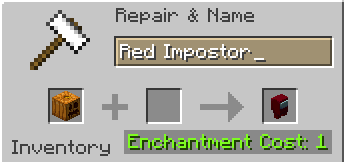
> Rename a carved pumpkin in the anvil to “Color” Impostor
* Example: Red Impostor
* Before snapshot 25w03a, using third-party mods, you could write things like “red impostor” instead of “Red Impostor”, or even “123 red impostor 123”
> After renaming, the item will automatically turn into its custom version
Make your impostors and have fun! 🎭
(HARD) All-White Textures! (Joel’s 2022 Challenge)
Have you ever played Minecraft® and thought “hey, this is too many colors”?
No? Well… just _pretend_ like you did?
Because here and now, I present…
# THE ALL-WHITE CHALLENGE PACK!
I created this pack originally back in 2022 for 1.19 for a friend of mine to ~~suffer~~ **_enjoy his gameplay_** in!
But, you may say, “1.19? Who still plays in 1.19 when 1.21.5 is available and 1.21.6 is already announced!?”, well, I have a treat for you..
# **THIS PACK IS AVAILABLE FOR *EVERY* MINECRAFT® VERSION!**
_Available in Easy (no GUI changes) and Hard (all textures changed)_
*Every single major version…*
– 1.21.5? You can use this pack!
– Beta 1.4? Still works!
– Alpha v1.2.2? I don’t know why, BUT IT WORKS!

*Even EVERY SINGLE DEV VERSION IS SUPPORTED*
– 22w44a? Yup, got it.
– 11w50a? Sure.
– Beta 1.6 Test Build 3? You’re crazy, but the pack works!

*Want to play your favorite “special” version? You can do it!*
– Combat Test 7b? This pack supports it!
– 2020’s 20w14infinite? Of course!
– 2013’s 2.0? Yup! (the Pink Wither looks better than ever)

*It even supports versions that don’t support Texture Packs, such as Infdev!*
*(Note: To play with this pack in versions before Alpha v1.2.2, you’ll need to manually modify your .jar file.)*
# So what are you waiting for?
Dive into the exciting, mind-boggling, seen-on-TV (not really), incredibly playable **world of**_… white._ Can you beat Minecraft® with no colors?
## Limitations
This pack isn’t perfect. In vanilla Minecraft®, you cannot change the water texture, and some foliage colors are hardcoded. In older versions, even less can be changed, therefore, this pack technically isn’t ***all*** white, but—especially in more modern versions—it is *mostly* white, as much as the game allows.
Additionally, the Modrinth API (as of writing this on 25.04.25), does not contain all versions of Minecraft®. This has resulted in me having to use some workarounds and marking a few versions wrongly. For example, v0.18 is marked as supporting *c0.30_01c*, when it actually supports *0.28_01*, *0.29*, *0.29_01*, *0.29_02*, *0.30 (Creative, 1900 Re-upload)*, *0.30 (Creative, Launcher Renew)*, and *0.30 (Survival, 1858 Re-upload)*.
If Modrinth adds these missing versions to their API, this notice shall disappear and the wrongly marked versions will be fixed.
For the time being, **the supported Minecraft® versions can be found in the description/changelog of every pack version, as well as its README.TXT**.
## License & Credits
_Concept and implementation of this texture pack © 2022–2026 PetByte. Minecraft® and all associated assets are © 2009–2026 Mojang Studios and Microsoft. This pack is not affiliated with or endorsed by Mojang Studios or Microsoft._
_Licensed under **CC-BY-ND 4.0**. You may use this pack for personal use, streaming, and content creation (monetized or not), but you **must credit PetByte**. Redistribution and modification are **not allowed**._
_For business inquiries, collaborations, or similar matters, please contact [email protected]. For issues related to this pack, please contact [email protected]. For anything else, feel free to leave a comment._
(EASY) All-White Textures! (Joel’s 2022 Challenge)
Have you ever played Minecraft® and thought “hey, this is too many colors”?
No? Well… just _pretend_ like you did?
Because here and now, I present…
# THE ALL-WHITE CHALLENGE PACK!
I created this pack originally back in 2022 for 1.19 for a friend of mine to ~~suffer~~ **_enjoy his gameplay_** in!
But, you may say, “1.19? Who still plays in 1.19 when 1.21.5 is available and 1.21.6 is already announced!?”, well, I have a treat for you..
# **THIS PACK IS AVAILABLE FOR *EVERY* MINECRAFT® VERSION!**
_Available in Easy (no GUI changes) and Hard (all textures changed)_
*Every single major version…*
– 1.21.5? You can use this pack!
– Beta 1.4? Still works!
– Alpha v1.2.2? I don’t know why, BUT IT WORKS!

*Even EVERY SINGLE DEV VERSION IS SUPPORTED*
– 22w44a? Yup, got it.
– 11w50a? Sure.
– Beta 1.6 Test Build 3? You’re crazy, but the pack works!

*Want to play your favorite “special” version? You can do it!*
– Combat Test 7b? This pack supports it!
– 2020’s 20w14infinite? Of course!
– 2013’s 2.0? Yup! (the Pink Wither looks better than ever)

*It even supports versions that don’t support Texture Packs, such as Infdev!*
*(Note: To play with this pack in versions before Alpha v1.2.2, you’ll need to manually modify your .jar file.)*
# So what are you waiting for?
Dive into the exciting, mind-boggling, seen-on-TV (not really), incredibly playable **world of**_… white._ Can you beat Minecraft® with no colors?
## Limitations
This pack isn’t perfect. In vanilla Minecraft®, you cannot change the water texture, and some foliage colors are hardcoded. In older versions, even less can be changed, therefore, this pack technically isn’t ***all*** white, but—especially in more modern versions—it is *mostly* white, as much as the game allows.
Additionally, the Modrinth API (as of writing this on 25.04.25), does not contain all versions of Minecraft®. This has resulted in me having to use some workarounds and marking a few versions wrongly. For example, v0.18 is marked as supporting *c0.30_01c*, when it actually supports *0.28_01*, *0.29*, *0.29_01*, *0.29_02*, *0.30 (Creative, 1900 Re-upload)*, *0.30 (Creative, Launcher Renew)*, and *0.30 (Survival, 1858 Re-upload)*.
If Modrinth adds these missing versions to their API, this notice shall disappear and the wrongly marked versions will be fixed.
For the time being, **the supported Minecraft® versions can be found in the description/changelog of every pack version, as well as its README.TXT**.
## License & Credits
_Concept and implementation of this texture pack © 2022–2026 PetByte. Minecraft® and all associated assets are © 2009–2026 Mojang Studios and Microsoft. This pack is not affiliated with or endorsed by Mojang Studios or Microsoft._
_Licensed under **CC-BY-ND 4.0**. You may use this pack for personal use, streaming, and content creation (monetized or not), but you **must credit PetByte**. Redistribution and modification are **not allowed**._
_For business inquiries, collaborations, or similar matters, please contact [email protected]. For issues related to this pack, please contact [email protected]. For anything else, feel free to leave a comment._
A Fresh Splash
This resorse pack adds more splash titles!
List of added splashes (commas seperate splashes)
No eating trashcans!
Big Bug!,
Just five minutes…,
May contain latex-infused polyunstaurated fats!,
Sticky stick!,
Why, there are cows!,
Mooo,
Thisisaverylongstringoftextthatyoumayormaynotbeabletoread!,
Mustard,
Minceraft, Not Minecraft!,
“New World”,
Hmmm, what does that button that says “Singleplayer” do?,
:),
Hurry up! What are you staring at me for?,
Mojangsoft!,
Insert text here,
Does not use bistatic radar!,
Me have socks!,
Tnt can explode!,
lllllllllllllllooooooooooooooonnnnnnnnnnnnnnnggggggggggggggg mmmmmeeeeessssssssssaaaaagggggeeeee,
Also try food!,
egg, gge, geg!,
Take eye breaks!,
Are you on a desktop or a laptop?,
java.lang.nullpointerexeption,
Yellow bobbing text!,
Creepier creeper!,
I spent five whole seconds writing this!,
Grrrrr Grrrrr,
Tntntnt!,
3d printer!,
If you type the number keys backwards while holding shift you get “)(*&^%$#@!”!,
Works on Mac, Linux and Windows!,
Use Modrinth for mods and more!,
Rubber Ball!,
PvP and PvE!,
Having fun?,
Minecraft is (usually) fun!,
Pixals!,
Water bucket!