Mellstroy (Я уже красный) Totem of Undying
**EN**: This resource pack replaces the original **Totem of Undying** with the Meme from Mellstroy **I’m already red, it won’t work out culturally** with sound. This meme has become very popular on TikTok over the past couple of years.
**RU**: Этот ресурспак заменяет оригинальный **Тотем бессмертия** на Мем от Меллстроя **Я уже красный, культурно не получится** со звуком, данный мем за последние пару лет стал очень популярным в Тик Ток
– [Омайгадность Тотем](https://modrinth.com/resourcepack/ohmygod-totem-of-undying)
– [Тотем Меллстрой](https://modrinth.com/resourcepack/mellstroy-totem-of-undying)
– [ПОЛНАЯ КОЛЛЕКЦИЯ РЕСУРСПАКОВ – МЕМЫ + СТРИМЕРЫ](https://modrinth.com/collection/sfDcDGAi)

MacOS Input Fixes
Fixes [MC-122296](https://bugs.mojang.com/browse/MC-122296)
Fixes [MC-121772](https://bugs.mojang.com/browse/MC-121772)
Fixes [MC-59810](https://bugs.mojang.com/browse/MC-59810)
Fixes [MC-22882](https://bugs.mojang.com/browse/MC-22882)
Fixes control + tab and control + escape not being detected
Specific fixes:
– Correctly detects left click while control is pressed
– Make trackpad scrolling not scroll a ridiculous number of items at once
– It also fixes momentum scrolling (which changes the number of scroll events based on how quickly you did it, even by like x5-10, meaning you couldn’t easily scroll to the correct item)
– On the trackpad it also only considers scrolling while fingers are on the trackpad (and the same for any fancy mice that support the relevant api e.g. probably apple’s fancy mice/trackpad thing)
– It also fixes scrolling being broken when shift is down on some older mice.
– When dropping an item, Minecraft checks for command + the key, since the default key is Q, this doesn’t make sense, so this mod allows both control + key and command + key to work
– Fixes control + tab and control + escape not being detected
Menu Options (under Mouse Settings Screen):
– Option for trackpad scrolling sensitivity (macOS only)
– Option to enable momentum scrolling on hotbar (macOS only)
– Option to disable workaround for smooth scrolling in interfaces (macOS only)
– Option to reverse scrolling of the whole game
– Option to reverse scrolling of the hotbar
– Option to disable the fix for the ctrl + left click becomes right click bug (macOS only)
On platforms other than macOS, the mod does nothing (except the aformentioned menu options), so it can be safely included in any modpack.
Requires Fabric Loader 0.18.5+
Requires Minecraft 1.14+
NOTE!
If you get an error like the following, you need to update Fabric Launcher to the version specified above. Some launchers may require you to update fabric launcher, remove macos input fixes mod fully, and then re-add macos input fixes mod. See https://github.com/hamarb123/MCMacOSInputFixes/issues/60 for the original issue. Note that the “More details” section is very misleading, and parts around it about my mod should be ignored (try disabling it, after the steps before for re-installing, if you are still getting errors to confirm that it is actually an issue with this mod).

Github repository: [https://github.com/hamarb123/MCMacOSInputFixes](https://github.com/hamarb123/MCMacOSInputFixes).
And yes, I know I need a better icon 😉
### DISCLAIMER
As [required](https://www.minecraft.net/en-us/usage-guidelines) to mention prominently according to Mojang – THIS IS NOT AN OFFICIAL MINECRAFT PRODUCT. NOT APPROVED BY OR ASSOCIATED WITH MOJANG OR MICROSOFT.
View the license for the disclaimer of the actual mod.
LoginPhaseProxy
**LoginPhaseProxy** is a somewhat “*simple*” Velocity Plugin that allows you to proxy the LoginPluginMessagePacket from backend server to the player and LoginPluginResponsePacket from the player to the backend server. This is useful for modded backend servers that rely on Login Plugin Message communication to work, such as [AutoModpack](https://github.com/Skidamek/AutoModpack).
> Disclaimer: This plugin is in early development and may contain bugs and performance issues. Use it at your own risk.
## 🔁 When to use
| Author(s) | Mod |
|—————————————–|——————————————————————————–|
| [Skidam](https://github.com/Skidamek) | [AutoModpack](https://github.com/Skidamek/AutoModpack) (Fabric/Forge/Neoforge) |
> You’re welcome to suggest new use cases via [Issue](https://github.com/caiostoduto/LoginPhaseProxy/issues/new/choose) or [Pull Request](https://github.com/caiostoduto/LoginPhaseProxy/pulls)!
## ❓ What does it solve (detailed)

Normal Setup ⦁ Made in Figma
On a normal Velocity setup, when a player connects to the proxy, they go through the (P ↔ V) Login Phase, exchanging packets with the Velocity until the proxy sends a Server Login Success Packet, completing the (P ↔ V) Login Phase and triggering the backend connection process. The backend server then goes through its own (V ↔ B) Login Phase, where it may send Login Plugin Message Packets to the Velocity, and they can’t be forwarded to the player, because the (P ↔ V) Login Phase is already complete, so Velocity reponds them with an empty data Login Plugin Response Packet, as it doesn’t know how to handle them. This is a problem for modded backend servers that rely on Login Plugin Message communication to work, such as [AutoModpack](https://github.com/Skidamek/AutoModpack), as they won’t be able to send the necessary data to the player during the Login Phase, and the player won’t be able to join the backend server. This plugin tries to solve this issue by proxying the Login Plugin Message communication between the player and the backend server, allowing modded backend servers to work with Velocity without any issues.
## ✨ How it works (detailed)
~~Basically black magic 🪄🔮~~. It uses [Java Reflection](https://www.oracle.com/technical-resources/articles/java/javareflection.html) to access the internal Velocity classes [ProxyServer](https://github.com/PaperMC/Velocity/blob/ad8de4361c9d6e93b818d3381e85b14e0c90ad05/proxy/src/main/java/com/velocitypowered/proxy/VelocityServer.java) -> [ConnectionManager](https://github.com/PaperMC/Velocity/blob/dev/3.0.0/proxy/src/main/java/com/velocitypowered/proxy/network/ConnectionManager.java)[[1]](https://github.com/caiostoduto/LoginPhaseProxy/blob/main/src/main/java/com/caiostoduto/loginPhaseProxy/initializer/VelocityChannelInitializer.java) to override the serverChannelInitializer[[2]](https://github.com/caiostoduto/LoginPhaseProxy/blob/main/src/main/java/com/caiostoduto/loginPhaseProxy/initializer/FrontendChannelInitializer.java) and backendChannelInitializer[[3]](https://github.com/caiostoduto/LoginPhaseProxy/blob/main/src/main/java/com/caiostoduto/loginPhaseProxy/initializer/BackendChannelInitializer.java), so it can intercept the Velocity communication with the player (P <-> V)[[4]](https://github.com/caiostoduto/LoginPhaseProxy/blob/main/src/main/java/com/caiostoduto/loginPhaseProxy/intercept/FrontendInterceptor.java) and backend server (V <-> S)[[5]](https://github.com/caiostoduto/LoginPhaseProxy/blob/main/src/main/java/com/caiostoduto/loginPhaseProxy/intercept/BackendInterceptor.java), respectively.

Plugin Implementation ⦁ Made in Figma
With that, our plugin watches the Login Phase player connection until it sees a SetCompressionPacket(5) (optionally) and ServerLoginSuccessPacket(6), adding them to a buffer instead of sending them to the player and synthetically sends a loginAcknowledgedPacket(7) to the Velocity pipeline, tricking it into thinking the Login Phase is complete and starting the backend connection process. To make sure the Velocity doesn’t mess the packet interception and sending process, our plugin removes stealthly (so that it doesn’t trigger it’s handlerRemoved lifecycle[[6]](https://github.com/caiostoduto/LoginPhaseProxy/blob/main/src/main/java/com/caiostoduto/loginPhaseProxy/utils/StealthPipeline.java)) the handlers from the Velocity serverChannel pipeline[[4]](https://github.com/caiostoduto/LoginPhaseProxy/blob/main/src/main/java/com/caiostoduto/loginPhaseProxy/intercept/FrontendInterceptor.java) that were added after the Login Phase to Config Phase transition ([MinecraftCompressorAndLengthEncoder](https://github.com/PaperMC/Velocity/blob/ad8de4361c9d6e93b818d3381e85b14e0c90ad05/proxy/src/main/java/com/velocitypowered/proxy/protocol/netty/MinecraftCompressorAndLengthEncoder.java#L33) and [MinecraftCompressDecoder](https://github.com/PaperMC/Velocity/blob/ad8de4361c9d6e93b818d3381e85b14e0c90ad05/proxy/src/main/java/com/velocitypowered/proxy/protocol/netty/MinecraftCompressDecoder.java#L34), others are removed naturally afterwards). Also, our plugin adds the [MinecraftVarintLengthEncoder](https://github.com/PaperMC/Velocity/blob/ad8de4361c9d6e93b818d3381e85b14e0c90ad05/proxy/src/main/java/com/velocitypowered/proxy/protocol/netty/MinecraftVarintLengthEncoder.java#L33)[[4]](https://github.com/caiostoduto/LoginPhaseProxy/blob/main/src/main/java/com/caiostoduto/loginPhaseProxy/intercept/FrontendInterceptor.java) back (was removed at the transition) and sets the [MinecraftDecoder](https://github.com/PaperMC/Velocity/blob/ad8de4361c9d6e93b818d3381e85b14e0c90ad05/proxy/src/main/java/com/velocitypowered/proxy/protocol/netty/MinecraftDecoder.java#L34) state to StateRegistry.LOGIN[[4]](https://github.com/caiostoduto/LoginPhaseProxy/blob/main/src/main/java/com/caiostoduto/loginPhaseProxy/intercept/FrontendInterceptor.java) so the packets are properly encoded and decoded.
If the backend server sends a LoginPluginMessagePacket(10) during its Login Phase, our plugin will intercept it and send it to the player(11), and if the player sends a LoginPluginResponsePacket(12), our plugin will intercept it and send it to the backend server(13). This way, we can effectively proxy the LoginPluginMessagePacket and LoginPluginResponsePacket between the player and the backend server, allowing modded backend servers to work with Velocity without any issues. Then, when the backend server ends the Login Phase sending the ServerLoginSuccessPacket(15), our plugin will flush the buffered packets to the player, completing the Login Phase and allowing the player to join the backend server as normal. Afterwards, if the user sends a LoginAcknowledgedPacket (clientProtocolVersion >= ProtocolVersion.MINECRAFT_1_20_2)(16) after the Login Phase is complete, our plugin will simply ignore it, as it is not expected to be sent by the player at that point. Finally, the plugin will restore the [MinecraftDecoder](https://github.com/PaperMC/Velocity/blob/ad8de4361c9d6e93b818d3381e85b14e0c90ad05/proxy/src/main/java/com/velocitypowered/proxy/protocol/netty/MinecraftDecoder.java#L34) state to its previous state (Config Phase).
So, yeah, *basically black magic* 🪄🔮. Yayyyy!
## 🙏 Acknowledgements
– [Skidam](https://github.com/Skidamek), who inspired me to create this plugin!
– [lucas-gcp](https://github.com/lucas-gcp), who supported me and helped with testing!
Log Cleaner
A lightweight mod that cleans old, unused log files.
The best thing is that this mod keeps files not based on creation date, but the most recent access (of any kind) to the file, so logs that are still being accessed for whatever reason are not removed unwillingly.
It works both client-side only and server-side only, and works in every Minecraft version.
By default, it will clean logs that haven’t been used in more than 14 days, so there’s plenty of time in case you ever need them for debugging, but you can configure it to any amount of days you want.
## Configuration
You can find the mod’s configuration file in `config/logcleaner.json`. There’s two options you can change in there:
– `daysOld`: The number of days a log has to have been unused in order for it to be deleted. Defaults to `14`
– `silent`: If set to `true`, Log Cleaner will not send a message with the amount of deleted log files to the log. Defaults to `false`
Killer Head
[](https://modrinth.com/project/I7bAUQBi)
[](https://discord.gg/FVq3j5heAc)
[](https://fabricmc.net/)
[](https://quiltmc.org/)
[](https://neoforged.net/)
[](minecraftforge.net)
___
## What’s Killer Head ?
**Killer Head** is a project to drop the killer’s head when his victim dies.
## How it works ?
### Edit player loot table `entities/player.json`
Adds a player head to the death of a player and correlates the characteristics of the killer.
## Complementary
You can also use [Drop Head](https://modrinth.com/project/drop-head).
Here’s [Stackable Heads](https://modrinth.com/project/stackable-heads) which is interesting to use.
## Compatibility
**Killer Head** should work anywhere.
## Support me!
Join my Hardcore Minecraft server: `38.143.19.130:51965`
Keep Inventory Always
## Keep Inventory Always
The mod turns on a game rule that allows you to save your inventory when you die in each world
## How to use
To use the mod, you only need to install it. Now when creating a world, the game rule keepInventory will always be enabled
## Dependencies
– Fabric loader requires [Fabric API](https://modrinth.com/mod/fabric-api)
Just Hotbar
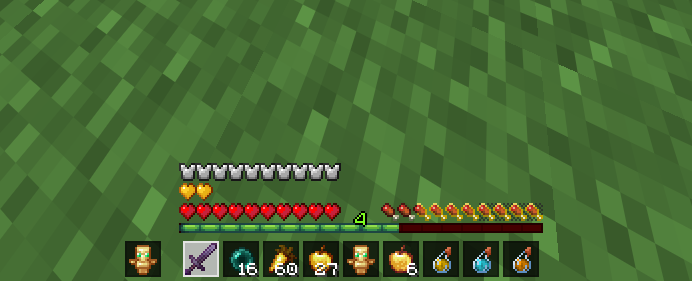
# Just Hotbar
This texture pack changes the hearts and hotbar, making them simpler
No Java Edition Branding – Remove from Start-Title Screen
Removes the Java Edition Text under The “Minecraft” Logo from the Title Screen!


Also works for with other resourcepacks!


Item Scroller
## Description
A client-side mod that adds several more convenient ways of moving items inside inventory screens. This is done by scrolling the mouse wheel over item slots (optionally while holding some modifier keys) or by holding down modifier keys and then left- or right-click dragging over the slots.
There are also special features for faster villager trading and crafting.
Available for Ornithe (1.12.2 [and more versions at some point]), LiteLoader (1.12.x), Rift (1.13.2), Fabric (1.14+) and Forge (1.8 – 1.14.4).
More background and details…
The mod has a few configurable modifier keys (depending on the mod/MC version, in modern versions by default `Shift`, `Ctrl` and `Alt`) to move entire stacks, all matching items, or all items at once. It also has special handling for Villagers to ease the annoying clicking around while trading. As of version `0.11.0`, it also has special crafting inventory handling (with a 18-slot internal “recipe memory”).
The basic item scrolling feature is similar to what NEI (and some other mods) also did/do. But I wanted more control and more ways to move items, so I made this mod to have all those modes that I find useful, in one distinct, client-side mod (so it also works on vanilla servers all the same).
There are config options to individually enable or disable more or less any of the modes. There are also options to reverse the scroll directions, or to change what for example “scrolling up” means. All the configs are accessible via the in-game config menu.
Note: All recent Item Scroller versions (starting from version 0.13.0) require the malilib library mod:
https://modrinth.com/mod/malilib
## Key combinations
Some of the default hotkeys
– `I + C` – In the modern (Rift, Fabric, LiteLoader, Ornithe) versions, the default hotkey to open the in-game config screen is `I + C`
– `Mouse wheel scroll` alone: Move one item at a time from or to the slot hovered over
– `Shift + scroll`: Move matching, entire stacks one by one. The stack hovered over is moved last.
– `Ctrl + scroll`: Move all matching stacks to or from the other inventory.
– `Alt + click`: Move all matching stacks to or from the other inventory. (Same as `Ctrl + scroll`.)
– `Ctrl + Shift + scroll`: Move everything to or from the other inventory
– `Alt + Shift + click`: Move everything to or from the other inventory. (Same as `Control + Shift + scroll`.)
– `Shift + left click and hold + drag`: Move all the stacks that are dragged over
– `Shift + right click and hold + drag`: Move all but the last item from all the stacks that are dragged over
– `Ctrl + left or right click and hold + drag`: Move only one item from all the stacks that are dragged over.
– `Shift + click` on an empty slot with items in the cursor: Move all matching items to that inventory
– `Shift + click` outside the inventory with items in the cursor: Drop all matching items from the entire inventory
– `Ctrl + Drop key + left or right click and hold + drag`: Drop one item from all dragged-over slots
– `Shift + Drop key + right click and hold + drag`: Drop all but one item from all dragged-over slots
– `Shift + Drop key + left click and hold + drag`: Drop all items from all the dragged-over slots
– `W/S + Shift/Control + click (and drag)`: Move items up (W) or down (S) in the inventory
Note: Before version 0.6.1, the Shift + right click and hold + drag functionality required one empty slot in the source inventory for an intermediate click action.
## Villager GUIs
Villager screen special features
Villager GUI has special handling (if enabled in the configs). It is only used when you hover over the output slot.
– `Hold shift and scroll down`: Fill the recipe/trade input slots
– `Hold shift and scroll up`: Move the output items to the player inventory as usual
– When the output slot is empty: hold `Shift and scroll up` to move the input items to the player inventory
So basically you can just hold shift and scroll down/up repeatedly to trade items fast & easy.
In the 1.12.2 and 1.16.5+ versions you can right click the trade buttons to fully trade that one trade. You can also `middle click` or `Shift + middle click` to mark trades as favorites or “global favorites” (= not per individual villager), which moves those trades to the top of the list, and it also allows you to use the hotkey to trade all favorites at once. If a given villager has any non-global favorites, then that takes precedence and the global favorites are not used for that villager (until the per-villager favorites are all unmarked).
## Crafting features
About the crafting features
There are some (quick) crafting helpers features. Most notably the `massCraft` and `craftEverything` hotkeys.
For any of these to work, you need to store a crafting recipe to Item Scroller’s own “recipe storage”. By default you open the recipe view by holding `A` inside an inventory screen. You add recipes by holding open the recipe view with `A`, and then middle clicking on the output item on a crafting grid. You can clear a stored recipe by middle clicking on an empty crafting output slot.
Note that the crafting system needs the crafting inventory and slots to be added to the config, so by default it only works for the vanilla player crafting and crafting table inventories.
Note that the `massCraft` feature is pretty laggy and unreliable due to the massive amount of continuous slot clicks it does, and when the server to client syncs happen in the middle of the slot click cpam, that can lead to outdated inventory state on the client, which basically means that mass craft can craft the wrong items (partial recipes).
So in general I would recommend avoiding the `massCraft` feature unless you absolutely need to use it. And if you do, then you would probably want to use Andrews’ “item scroller craft fix” fork instead ([found here](https://github.com/Andrews54757/itemscroller-crafting-fix/releases)), as it implements the vanilla recipe book item transfer fo mass crafting. That makes it vastly more reliable and less laggy. I will add it to the base mod at some point after I rewrite the entire mod from scratch…
If you only need to craft a “moderate amount” of items, like one inventory of nuggets into ingots or similar, then the `craftEverything` hotkey is what you want. It crafts everything possible once. It doesn’t repeat or loop, so it also shouldn’t craft the wrong things as nothing “external” will update the inventory state during that one operation. It doesn’t nicely work for “expanding” recipes however, such as logs to planks, because it doesn’t throw any items out, so the inventory will fill up midway if you try to craft an entire inventory of logs to planks for example.
Invisible Item Frames

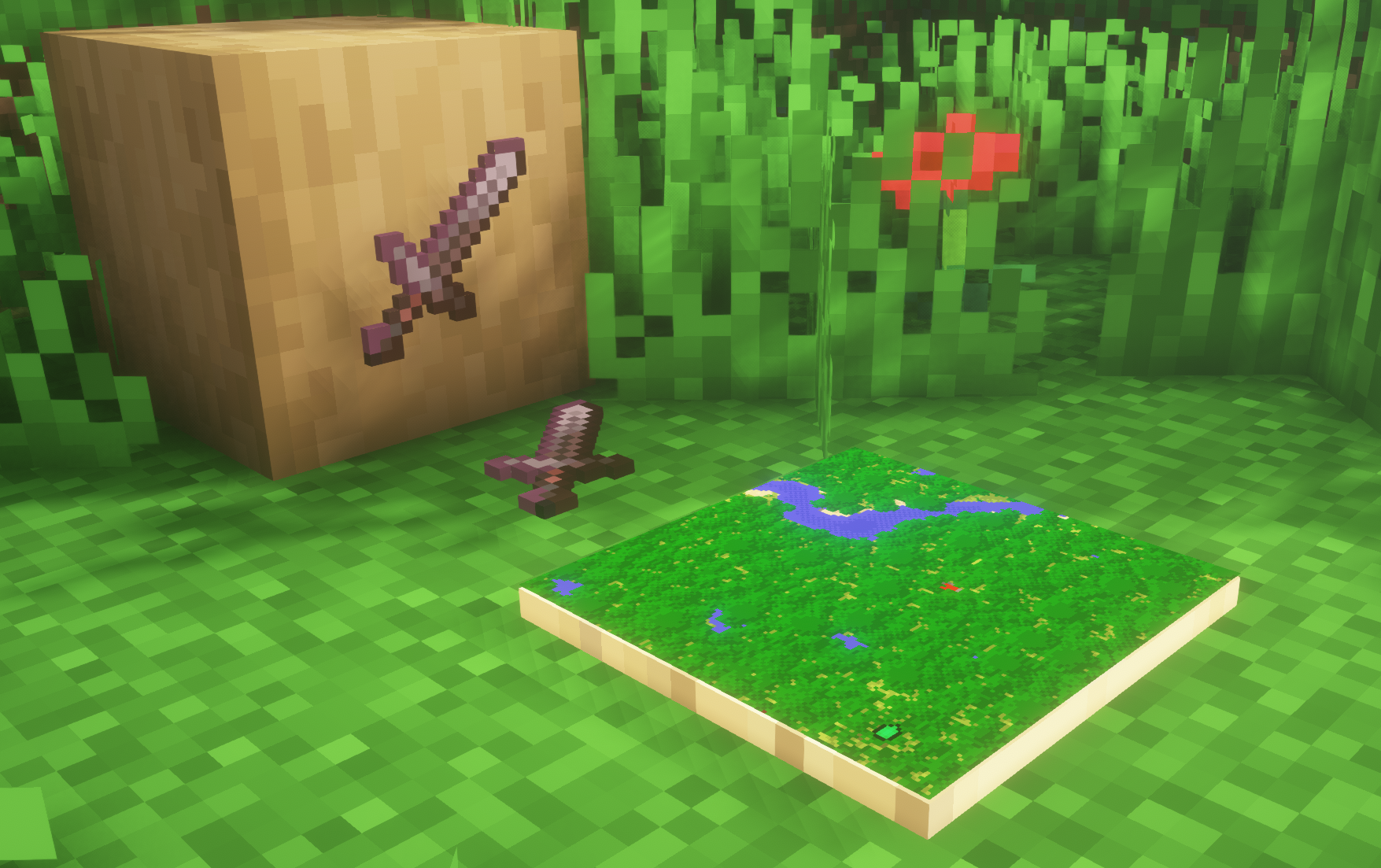
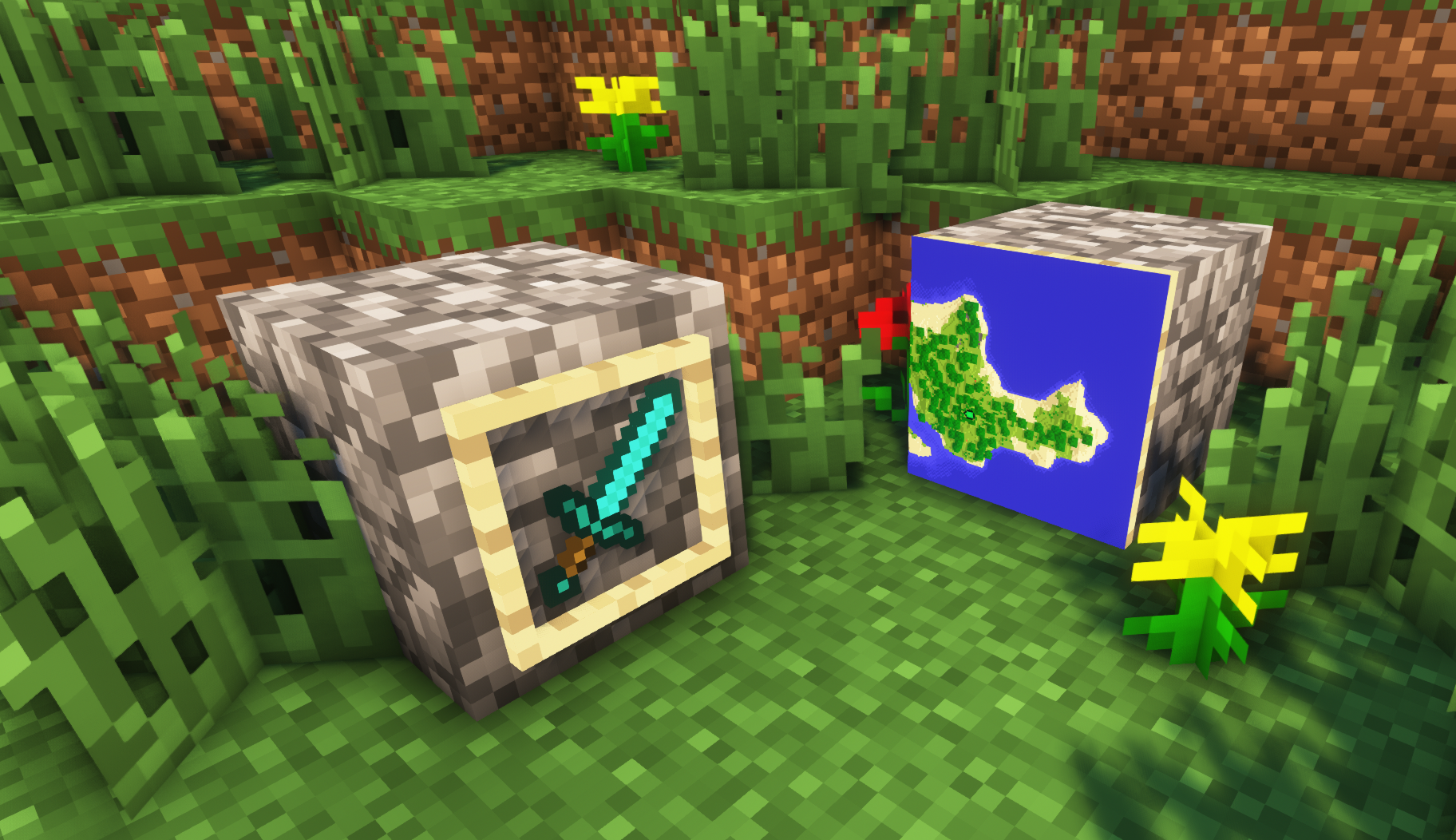
**A simple resource pack that makes item frames invisible**.
—
## Need a Minecraft Server? (Sponsor)
[](https://billing.sparkedhost.com/aff.php?aff=3138)
Get **25% off your first month** with Sparked Host.
—
## Quick info
– **Versions:** 1.4+ (full invisibility from 1.8+)
– **Works with almost all mods (Sodium/Iris and OptiFine too)**
– **No mods or commands required**
– **Additional files for invisible glow item frames and invisible map frames**
– **Versions below 1.8 will only have the center of the frame invisible (view images below for more info)**
—
## Showcase
**1.8+**
1.4-1.7.10
—
FAQ
**Can I use this with other packs?**
> Yes, but place this pack in a **higher priority (above other packs)**.
**How do I remove item frames?**
> Enable debug hitboxes using **F3 + B** and break the frame.
**Can I use this pack in my modpack or server?**
> Yes you are free to use it, as long as you don’t claim this pack as your own.
**Why is my map/glow item frame not invisible?**
> You have to install those separately. They are available under **additional files** or the buttons near the top of this page.
**Does this make the game slower?**
> This pack actually slightly **improves the client-side framerate** in scenes with lots of item frames.
—
## Additional Files
– [Download Invisible Glow Item Frames](https://cdn.modrinth.com/data/gfr4403r/versions/SVxFWAm4/Invisible-Glow-Item-Frames-V4.zip)
– [Download Invisible Map Item Frames](https://cdn.modrinth.com/data/gfr4403r/versions/SVxFWAm4/Invisible-Map-Item-Frames-V1.zip)
—
## Need a Minecraft Server? (Sponsor)
[](https://billing.sparkedhost.com/aff.php?aff=3138)
Use code **MattyWalker** for 25% off your first month.