Tiny Effect Particles
## **Have you ever been distracted by the effect spirals in your screen?**
### Well, this pack fixes exactly that!
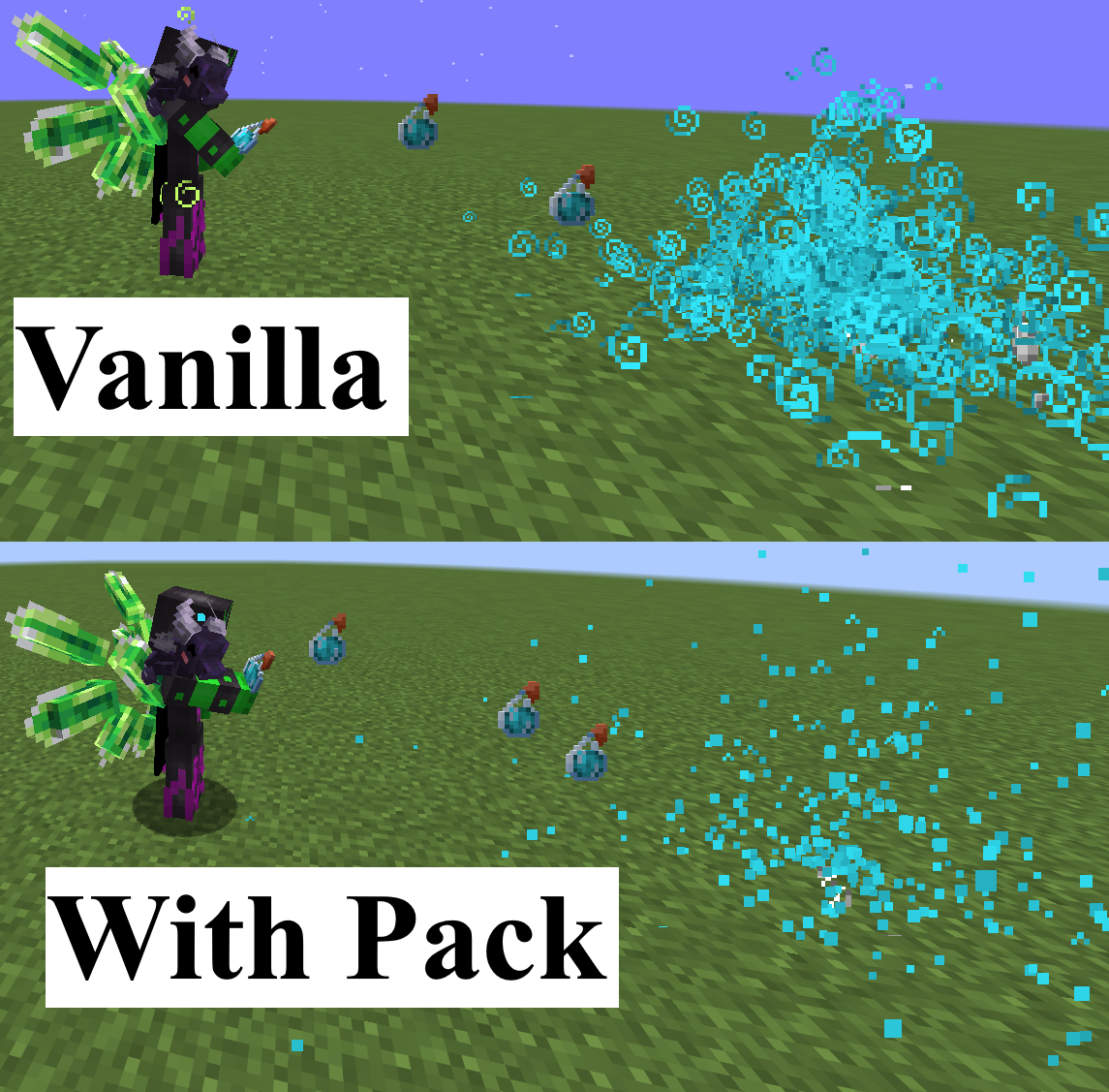
I retextured effect particles to be only one pixel big, so you can still see everything without completely removing them. This is especially useful for PvP, considering that most packs just completely remove the particles, what makes it impossible to see other players effects of invis particles, what is really bad.
dkc2212’s PvP Pack perfected
## The perfect PvP Pack made of other useful PvP Packs, combining all their good Features!
### **The pack contains:**
– [better PvP crossair](https://vanillatweaks.net)
– [low fire](https://vanillatweaks.net)
– [low shield](https://vanillatweaks.net)
– [better enchantment glint](https://vanillatweaks.net)
– [unobtrusive glass, border](https://vanillatweaks.net)
– [hotbar slot numbers](https://vanillatweaks.net)
– [no pumpkin blur](https://vanillatweaks.net)
– [3D Mace (only in hand)](https://modrinth.com/resourcepack/dkc3dmace)
– [no explosion particles](https://modrinth.com/resourcepack/no-explosion-particles)
– small Totem and Totem pop
– [tiny effect particles](https://modrinth.com/resourcepack/dkctinyparticles)
– small weapons, [spears](https://modrinth.com/resourcepack/small-spears), and [utils](https://vanillatweaks.net)
– [no eating particles and small consumables](https://modrinth.com/resourcepack/no-food-eating-particles/version/1.1)
– [transparent fishing bobber/ fishing hook](https://modrinth.com/resourcepack/dkctransparentbobber) (doesn’t work in 26.x)
**Clicking the blue ones will bring you to the page where you can download them seperately from the other ones.**
Credits:
VanillaTweaks https://vanillatweaks.net/
([These Textures](https://vanillatweaks.net/share#96qHGa) in this Pack are from VanillaTweaks Resource Packs)
Dithering3D
# 🎨 Dithering3D – Surface-Stable Fractal Dithering




—
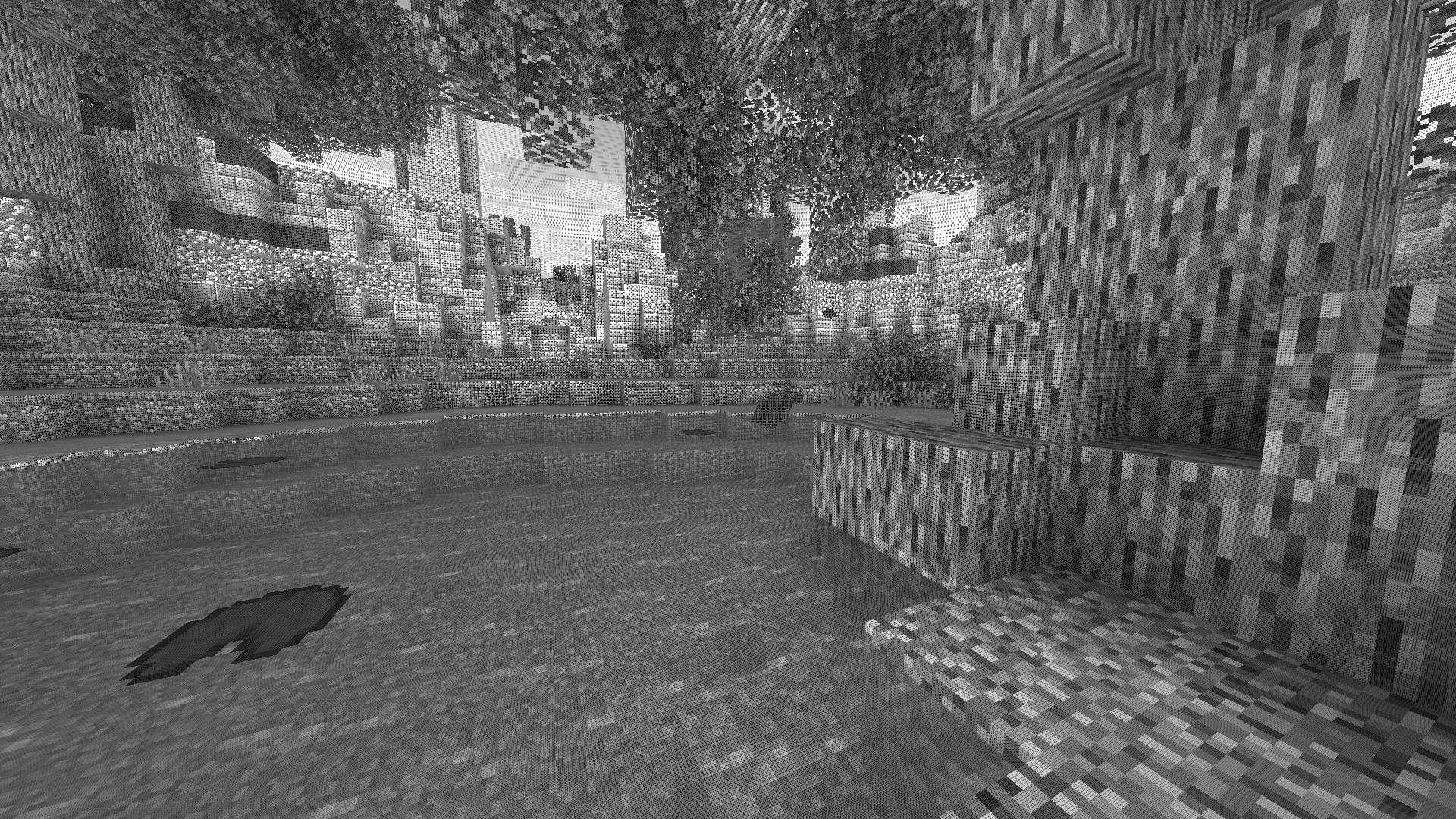
## 🖼️ Screenshots
—
## ✨ A Revolutionary Visual Experience
Transform your Minecraft world with **Surface-Stable Fractal Dithering** — a groundbreaking rendering technique where dither dots **stick to 3D surfaces** instead of the screen, creating a unique manga/comic book aesthetic that feels alive.
> 🎬 *Based on the innovative work by [Rune Skovbo Johansen](https://github.com/runevision/Dither3D)* — **[Watch the explainer video](https://youtu.be/HPqGaIMVuLs)**
—
## 🖼️ What Makes This Shader Special?
### 📌 **Surface-Stable Dots**
Unlike traditional dithering where patterns “swim” on screen, Dither3D anchors each dot to the actual 3D surface. Walk around blocks, and the dots stay perfectly attached!
### 🔄 **Fractal Scaling Magic**
As you move closer or farther from surfaces, dots dynamically split or merge to maintain **constant screen-space density**. It’s mesmerizing to watch!
### 🎨 **Three Color Modes**
| Mode | Description |
|:—-:|:————|
| **Grayscale** | Classic black & white dithering — clean, minimalist, timeless |
| **RGB** | Each color channel gets its own dot layer — vibrant and unique |
| **CMYK Halftone** | Authentic newspaper/comic print simulation with rotated dot angles |
—
## ⚡ Features at a Glance
| Feature | Description |
|:——–|:————|
| 🎯 **Precision Dithering** | SVD-based frequency analysis for mathematically perfect dot placement |
| 🌀 **Anti-Stretch Technology** | Anisotropic smoothing keeps dots circular even on oblique surfaces |
| 🎥 **Camera Stable** | Radial compensation prevents dot swimming during camera rotation |
| ⚙️ **Highly Configurable** | 10+ parameters to fine-tune your perfect look |
| 🚀 **Performance Optimized** | Efficient 3D texture sampling for smooth gameplay |
| 📱 **Universal Compatibility** | Works with OptiFine AND Iris on virtually any Minecraft version |
—
## 🎛️ Customization Options
Fine-tune every aspect of the dithering effect with our intuitive in-game sliders:
### 🔧 Dither Settings
| Parameter | Range | Effect |
|———–|:—–:|——–|
| **Dot Scale** | 2 – 10 | Control overall dot size (exponential) |
| **Size Variability** | 0 – 1 | 0 = Bayer pattern, 1 = Halftone style |
| **Dot Contrast** | 0 – 2 | Sharpen or soften dot edges |
| **Stretch Smooth** | 0 – 2 | Combat stretched dots on angled surfaces |
### 💡 Input Controls
| Parameter | Range | Effect |
|———–|:—–:|——–|
| **Exposure** | 0 – 5 | Brightness multiplier |
| **Offset** | -1 to 1 | Brightness offset adjustment |
### 🎮 Additional Options
– **Inverse Dots** — Flip dot colors for a negative effect
– **Radial Compensation** — Stabilize during camera rotation *(recommended!)*
– **Quantize Layers** — Prevent dot morphing for a more “classic” look
– **Debug Mode** — Visualize fractal layers for development
—
## 📦 Installation
### For OptiFine Users
1. Download and extract the shader pack
2. Place the `shaders` folder in `.minecraft/shaderpacks/`
3. Launch Minecraft → Options → Video Settings → Shaders
4. Select **Dithering3D** and enjoy!
### For Iris Users (Fabric/Quilt)
1. Install Iris Shaders mod (1.2.0+)
2. Download and extract the shader pack
3. Place the `shaders` folder in `.minecraft/shaderpacks/`
4. Press **O** in-game to open shader menu
5. Select **Dithering3D**
> 💡 **Tip:** Press `F3 + T` to quickly reload shaders after making changes!
—
## 🎨 Preset Profiles
Choose from pre-configured profiles for instant results:
| Profile | Color Mode | Dot Scale | Best For |
|:——-:|:———-:|:———:|:———|
| 🟢 **LOW** | Grayscale | 4.0 | Performance, retro feel |
| 🟡 **MEDIUM** | Grayscale | 5.0 | Balanced experience |
| 🟠 **HIGH** | RGB | 5.0 | Colorful, artistic |
| 🔴 **ULTRA** | CMYK | 6.0 | Maximum visual impact |
—
## 🌟 Perfect For
| 📸 Screenshot enthusiasts | Create unique, artistic captures |
|:————————:|:——————————–|
| 🎬 **Content creators** | Stand out with a distinctive visual style |
| 🎮 **Retro lovers** | Relive the charm of 1-bit graphics |
| 🎨 **Artists** | Manga, comic book, and newspaper aesthetics |
| 🧪 **Tech enthusiasts** | Experience cutting-edge rendering techniques |
—
## ❓ FAQ
**Q: Does this work with other shaders?**
> Dithering3D is a standalone shader pack. Combining with other shaders may cause conflicts.
**Q: Why do some surfaces look different?**
> The sky and some special effects may appear different as surface-stable dithering reveals flat geometry.
**Q: Performance impact?**
> Moderate. The 3D texture sampling is optimized but more demanding than vanilla rendering. Most GPUs handle it smoothly.
**Q: Can I use this in my modpack?**
> Yes! Under MPL-2.0 license. Credit appreciated.
—
## 🔬 The Science Behind It
Dithering3D uses **Singular Value Decomposition (SVD)** to analyze UV coordinate derivatives in real-time, determining the exact frequency and direction of surface textures. This mathematical approach enables:
“`
✅ Perfectly uniform dot density regardless of distance
✅ Seamless fractal transitions between detail levels
✅ Circular dots even on extremely angled surfaces
✅ Rotation-stable patterns that don’t “swim”
“`
—
## 📚 Credits & Resources
| Resource | Link |
|:———|:—–|
| 🔗 **Original Algorithm** | [Rune Skovbo Johansen](https://github.com/runevision/Dither3D) |
| 🎥 **Technique Explanation** | [YouTube Video](https://youtu.be/HPqGaIMVuLs) |
| 💬 **Technical Discussion** | [FAQ Thread](https://github.com/runevision/Dither3D/discussions/12) |
—
## 📄 License
“`
Mozilla Public License 2.0 (MPL-2.0)
“`
—
🎨 Transform your world. Experience Dithering3D. 🎨
If you enjoy this shader, consider leaving a ⭐ and sharing this shader page !
Deep Ocean Panorama
Deep Ocean Panorama replaces the Minecraft title-screen panorama with a high-quality, performance-conscious cube-mapped scene.
### Additional Information
Type:
`RELEASE`
Version:
`1.0.0`
MC Version:
`1.13.x, 1.14.x, 1.15.x, 1.16.x, 1.17.x, 1.18.x, 1.19.x, 1.20.x, 1.21.x`
Dark Red Shield
# Dark Red Shield
This resource pack replaces the default shield with a custom 3D model.
The design uses a dark red theme.
No OptiFine required. Vanilla compatible.
## More Shield Themes
– [Black](https://modrinth.com/project/noire-shield)
– [Blue](https://modrinth.com/project/blue-shield)
– [Creeper](https://modrinth.com/project/creeper-shield)
– [Mirror](https://modrinth.com/project/mirror-shield)
– [Navy Blue](https://modrinth.com/project/navy-blue-shield)
– [Rabbit](https://modrinth.com/project/rabbit-shield)
– [Red](https://modrinth.com/project/red-shield)
Cypress (Alphaver) Font
# A font from an alternate timeline!
This font comes from a modified version of Minecraft that’s part of an **unfiction web series** centered around footage of the closed “16.05” branch from the Alpha stage of Minecraft’s development. **It’s basically the classic Minecraft font, but with rounded edges and some subtle differences.** I really like it, so I thought I’d go ahead and port it to modern versions!

Thank you to [the AlphaVer team](https://www.youtube.com/@MinecraftAlphaVersions) for making such a compelling story, and sparking my interest in modding Minecraft. If anyone involved would like for me to take this down, please don’t hesitate to contact me.
CustomSkinLoader
# CustomSkinLoader
## What’s this?
Custom Skin Loader mod for Minecraft.
It’s a mod which can load skins and capes from any online source or from your local.
## Download
Build Server : [CircleCI](https://circleci.com/gh/xfl03/MCCustomSkinLoader) & ~~[Infinity Studio CI](https://ci.infstudio.net/job/CustomSkinLoader/)~~
Release Page : [MCBBS](http://www.mcbbs.net/thread-269807-1-1.html) & [GitHub](https://github.com/xfl03/MCCustomSkinLoader/releases) & [CurseForge](https://minecraft.curseforge.com/projects/customskinloader)
## Contact Us
[QQ Group](https://im.qq.com/): [651287593](https://jq.qq.com/?_wv=1027&k=vF16R5tg)
[Telegram](https://telegram.org/): [@customskinloader](https://t.me/customskinloader)
## Feature
### Support Plenty of Skin Load API and Customizable Skin Load List
Supported Skin Load APIs:
– [Mojang API](http://wiki.vg/Mojang_API)
– [CustomSkinAPI](https://github.com/xfl03/CustomSkinLoaderAPI/tree/master/CustomSkinAPI)
– CustomSkinAPIPlus (Test Only)
– [UniSkinAPI](https://github.com/RecursiveG/UniSkinServer/tree/master/doc)
– [ElyByAPI](http://docs.ely.by/api.html)
– Legacy
You can use this feature to customize your skin load list so as to load your skins from any skin server you want.
If you are the owner of skin server, you can use CustomSkinLoader to load skins from your server if one of the APIs has been actualized by your server.
### HD Skins Support
Even though you don’t have OptiFine and MCPatcher, CustomSkinLoader can still load and render HD skins.
You can easily to get a better view of skins.
### Skull Support
Fixed skull loading bug, you can apply any skin to your skull now.
Dynamic skull supported.
### Profile Cache
– Decrease the frenquency of using the network.
– Meanwhile, you can still load profiles when network is unavailable.(*)
*Only when it is opened in configratulation.
### Local Skin
Load skins without a skin server.
Furthermore, by using this function you can preview your skins in game and even change the default skin and model.
You can load local skins by using any API (excluding MojangAPI).
*While using default configratulation, just put your skins into `.minecraft/CustomSkinLoader/LocalSkin/(skin|cape)s/{USERNAME}.png`.
### Extra List
A json file generated by skin servers which supports this feature.
To add a server to your load list, users just need to put the file into `.minecraft/CustomSkinLoader/ExtraList` .
### Transparent Skin Support
The problem of incorrectly rendering textures has been fixed.
### Spectator Menu Fixed
By using this mod, you can see correct avatar of players in Spectator Menu rather than steve and alex.
## Default Load List
– [Mojang](http://www.minecraft.net/) (Mojang API)
– [LittleSkin](https://littleskin.cn/) (CustomSkinAPI)
– [Blessing Skin](http://skin.prinzeugen.net/) (CustomSkinAPI)
– [ElyBy](http://docs.ely.by/) (ElyByAPI)
– SkinMe (UniSkinAPI)
– [TLauncher](https://tlauncher.org/) (ElyByAPI)
– LocalSkin (Legacy)
If you want to apply to add other skin server to default list, please go to [issue](https://github.com/JLChnToZ/MCCustomSkinLoader/issues).
## To Skin Server Owner
CustomSkinLoader is designed for loading from any server, which makes the mod complex.
It’s not a good idea to refer to CustomSkinLoader’s source code to develop your own skin mod.
It’s recommended to use CustomSkinLoader for your server directly.
Furthermore, you can add your server to ‘Default Load List’.
You can also use ‘ExtraList’ which makes it easier for users to add your server into load list.
## Development and Contribution
See [CONTRIBUTING.md](CONTRIBUTING.md)
## Copyright & LICENSE
### Binary File
You could not modify binary file.
Feel free to use and share this mod and unmodified file in anyway like modpack.
When using in modpack, you must put ‘CustomSkinLoader’ in mod list.
You could not repost this mod to any website without permission.
You could not earn money with this mod excluding modpack.
### Source Code
#### Package ‘customskinloader’
Including some codes from
– [AsteriskTeam/TabIconHackForge](http://git.oschina.net/AsteriskTeam/TabIconHackForge) (GPLv3)
– [RecursiveG/UniSkinMod](https://github.com/RecursiveG/UniSkinMod) (GPLv3)
– [NekoCaffeine/Alchemy](https://github.com/NekoCaffeine/Alchemy) (GPLv3)
Copyright © 2013-2014 Jeremy Lam “JLChnToZ”.
Copyright © 2014-2019 Alexander Xia “xfl03”.
This program is free software: you can redistribute it and/or modify it under the terms of the GNU General Public License as published by the Free Software Foundation, either version 3 of the License, or (at your option) any later version.
This program is distributed in the hope that it will be useful, but WITHOUT ANY WARRANTY; without even the implied warranty of MERCHANTABILITY or FITNESS FOR A PARTICULAR PURPOSE. See the GNU General Public License for more details.
GPLv3: http://www.gnu.org/licenses/gpl.html
You should change the name of the package to avoid others’ misunderstanding.
CRSS Resource Pack
# CRSS Resource Pack
This was the resource pack used in CRSS’ modpack, which has a panorama of the spawn area in [ROP](https://crss.cc/nation/psf).
## CRSS Resource Pack is no longer being updated
I don’t really see a reason to keep updating this resource pack as the modpack is also discontinued.
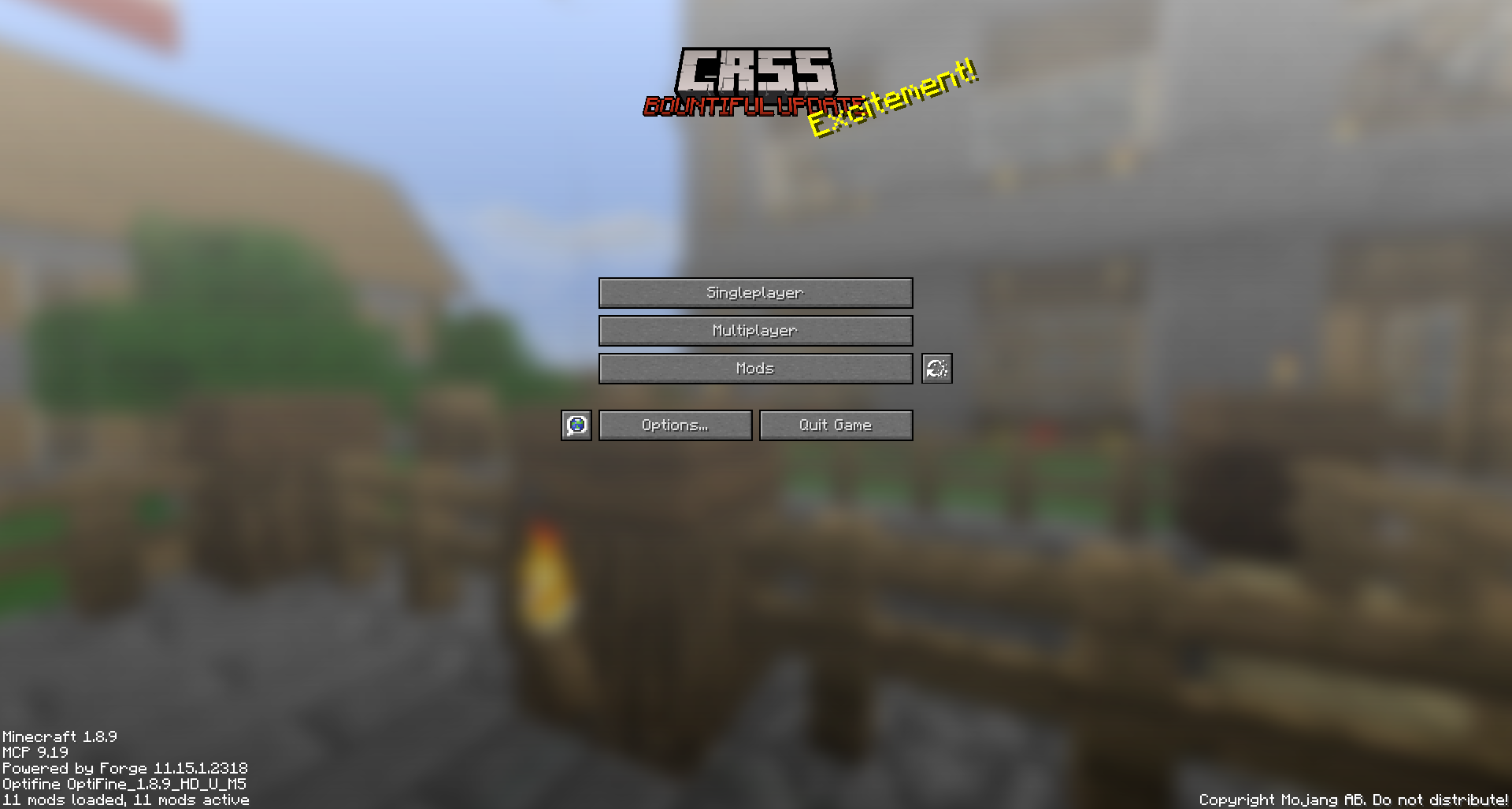
CRSS by Blryface is marked with CC0 1.0

Creeper Shield
# Creeper Shield
This resource pack replaces the default shield with a custom 3D model.
The design uses a creeper theme.
No OptiFine required. Vanilla compatible.
## More Shield Themes
– [Black](https://modrinth.com/project/noire-shield)
– [Blue](https://modrinth.com/project/blue-shield)
– [Dark Red](https://modrinth.com/project/dark-red-shield)
– [Mirror](https://modrinth.com/project/mirror-shield)
– [Navy Blue](https://modrinth.com/project/navy-blue-shield)
– [Rabbit](https://modrinth.com/project/rabbit-shield)
– [Red](https://modrinth.com/project/red-shield)
Creeper Ores
### What does this do?
This resource pack retextures all ores to resemble the face of a creeper.
### What versions does this support?
This resource pack works for versions 1.13 (1.13-pre3) and up.