Creeper Ores
### What does this do?
This resource pack retextures all ores to resemble the face of a creeper.
### What versions does this support?
This resource pack works for versions 1.13 (1.13-pre3) and up.
### What does this do?
This resource pack retextures all ores to resemble the face of a creeper.
### What versions does this support?
This resource pack works for versions 1.13 (1.13-pre3) and up.
Welcome to the CrazyToolModels texture pack for Minecraft! This unique texture pack provides a fresh perspective on the tools in your Minecraft world. Instead of focusing on traditional textures, this pack introduces a completely new dimension by overhauling the model rendering for tools.
A Minecraft Project that adds crafting recipes for normally uncraftable items in Survival mode, along with custom advancements for a more rewarding experience.
**✨ Features**
* **New Crafting Recipes**: Craft items like the Enchanted Golden Apple, Totem of Undying, Trident, Horse Armors, Chainmail Armors, and more.
* **Custom Advancements**: Unique rewards for crafting special items.
* **Wide Compatibility**: Supports Minecraft Java Edition from version 1.13.x up to the latest snapshots.
**🏆 Advancements** & **📜 Recipes**

You will get this Advancement when you craft all **Recycling** recipes.

You will get this Advancement when you craft or have an **Enchanted Golden Apple**.

You will get this Advancement when you craft or have a **Totem of Undying**.

You will get this Advancement when you craft or have a **Trident**.

You will get this Advancement when you craft or have a **Saddle**.

You will get this Advancement when you craft or have an **Experience Bottle**.


Recommended to Use **[Tweaker Stick Data Pack](https://modrinth.com/datapack/tweaker-stick)** to able to use it with full functionality or instead use Creative mode to able to use it until I add an update that fix this problem.


It will take 30 seconds to give you 1 **Gunpowder**.
(Only works on Furnace)


(Only works on Furnace)

It will take 10 seconds to give you 1 **Leather**.
(Only works on Furnace)


~~~~
**Trident (1.21 or newer)**

**Trident (1.20.6 or older)**

**🗒️ News & Updates**
To see the latest News about my Projects:
[Telegram Channel](https://t.me/iAhmedMinecraft)
[Patreon](https://www.patreon.com/c/iahmedminecraft/posts)
Discord: (Coming Soon..)
**📂 Source Code & Issues**
To see the Source Code of the Project:
[GitLab](https://gitlab.com/iahmed_7024-group/craftable-uncraftable-objects)
Report about a problem or tell a suggestion:
[GitLab](https://gitlab.com/iahmed_7024-group/craftable-uncraftable-objects/-/issues)
**🗂️ Installation**
Linux:
World that already exists:
1. Go to this location “~/.minecraft/saves/” (Make sure you are showing the Hidden Folders and Files by pressing Left Ctrl + H).
2. Choose the world folder you want to put the Data Pack in it.
3. Open datapacks folder, then put the data pack.zip in the datapacks folder.
4. Reload the world by /reload command or by Quit the world and rejoin it.
New World:
1. Open Minecraft, then click on “Singleplayer”.
2. Click on “Create New World”, then click “More World Options…”.
3. Click on “Data Packs” button, then drag the data pack file into Minecraft.
4. Click “Done” and “Create New World”.
———————————————-
MacOS:
World that already exists:
1. Go to this location “~/Library/Application Support/minecraft”.
2. Choose the world folder you want to put the Data Pack in it.
3. Open datapacks folder, then put the data pack.zip in the datapacks folder.
4. Reload the world by /reload command or by Quit the world and rejoin it.
New World:
1. Open Minecraft, then click on “Singleplayer”.
2. Click on “Create New World”, then click “More World Options…”.
3. Click on “Data Packs” button, then drag the data pack file into Minecraft.
4. Click “Done” and “Create New World”.
———————————————-
Windows:
World that already exists:
1. Press Win + R, then type %appdata%, then press Enter.
2. Open “Roaming” folder, then “.minecraft” folder, then open “saves” (Make sure you are showing the Hidden Folders and Files by pressing Left Ctrl + Left Shift + . (period)).
4. Choose the world folder you want to put the Data Pack in it.
5. Open datapacks folder, then put the data pack.zip in the datapacks folder.
6. Reload the world by /reload command or by Quit the world and rejoin it.
New World:
1. Open Minecraft, then click on “Singleplayer”.
2. Click on “Create New World”, then click “More World Options…”.
3. Click on “Data Packs” button, then drag the data pack file into Minecraft.
4. Click “Done” and “Create New World”.
Enjoy.
# Important Thing!
I know this is a Minecraft Project and this project has Minecraft things but because my project is an open source, I will talk about this.
Starting September 2026, a silent update, nonconsensually pushed by Google, will block every Android app whose developer hasn’t registered with Google, signed their contract, paid up, and handed over government ID.
For more information: https://keepandroidopen.org/.
A simple mod for backing up all configurations at the start of Minecraft.
## Mod review with subtitles
## Features
– Backs up configurations at the start of Minecraft
– Backs up game configurations
– Backs up mod configurations
– Backs up shader configurations
– Compression of backups
– Removes old backups
## Configuration
The configuration file is located at `config/config-backuper.json`.
– `includeGameConfigs` – add game configurations to the backup
– `includeModConfigs` – add mod configurations to the backup
– `includeShaderPackConfigs` – add shader configurations to the backup
– `maxBackups` – maximum number of stored backups (`-1` disables deletion of old backups, default `10`)
– `compressionEnabled` – use compression for backups (enabling compression reduces the size of the backup, but slows down its creation a bit)
– `backupFolder` – directory for backups (`./` – current game directory)
– `backupFilePrefix` – prefix for backup file names
– `backupFileSuffix` – suffix for backup file names
## Modpacks
You can use this mod in modpacks without requesting permission.
RU:
Этот датапак объединяет сферы опыта в одну, **сохраняя их ценность**. Он немного оптимизирует игру, а также не заставляет ждать впитывания всего опыта. По умолчанию объединяет опыт на растоянии 2 блоков, но с CTE v3 можно выбрать своё растояние с момощью `/function cte:menu` прямо внутри игры.
_Если я забыл обновить на последнюю версию mc, то обновлю по запросу._
EN:
This datapack combines the spheres of experience into one, **preserving their value**. It optimizes the game a bit, and also does not make you wait for the whole experience to be absorbed. By default, it combines the experience at a distance of 2 blocks, but with CTE v3, you can select your distance with the power of `/function cte:menu` right inside the game.
_If I forgot to upgrade to the latest version of the mc, I will update it on request._

# Abstract
Players and modpack developers sometimes find the game crashed with `ConcurrentModificationExceptions` (CME) and `IndexOutOfBoundsExceptions` (IOOBE), which only give stacktrace of current thread and are hard to trace which mod causes them. Here’s one of the crashes which is caused by SimpleReloadInstance in 1.20.1 Forge:
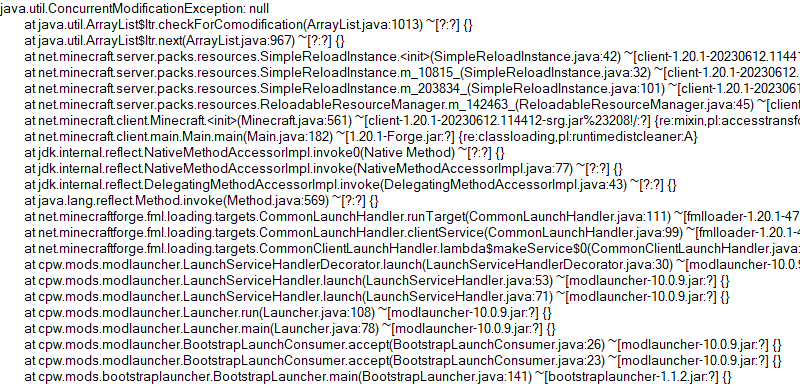
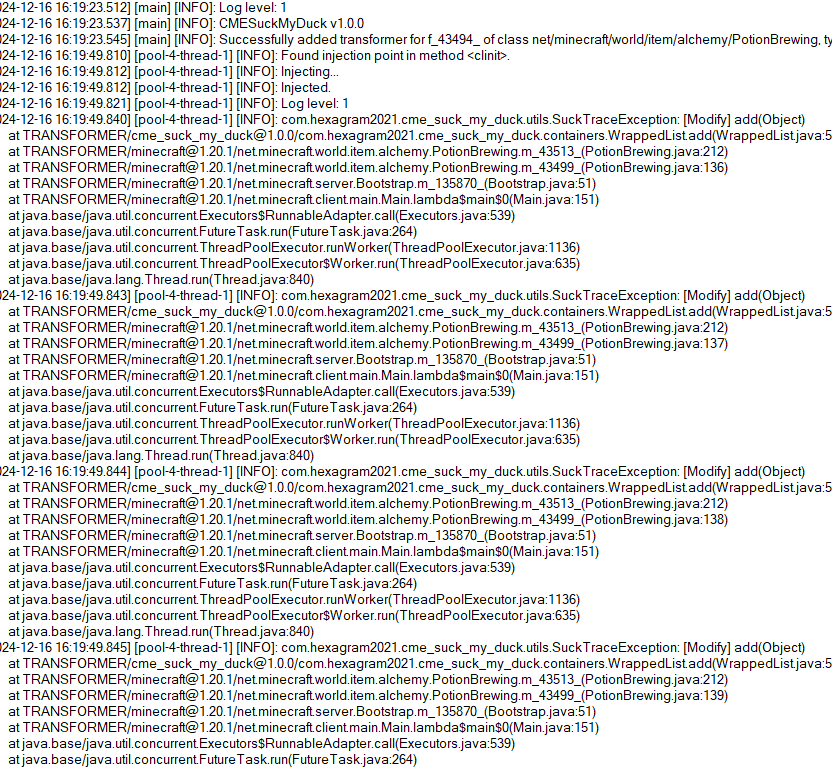
So this is what the mod is developed for. Players who install this mod and add javaagent to JVM Argument correctly will receive a full log for modification history of a certain collection:
# Usage
First, add this jar to mods folder.
Second, edit your Java Virtual Machine Argument in your launcher. Add `-javaagent:mods/CMESuckMyDuck-
Finally, run the game, play and wait until the crash happens.
# Usage for Other Java Projects
This mod can not only be used for Minecraft debugging, but also be utilized to debug other java projects. Similar to Minecraft. The only different step is that you should add gson and asm jar to classpath (`-cp`) before javaagent, and add our `CMESuckMyDuck-
# Arguments
##
A full name of the class, which has a container that you would like to monitor. Use “ instead of `.` (a.k.a. the internal name of class).
##
A field name of the container in target class, which you would like to monitor. For Forge, use SRG name. For Fabric, use intermediary name. For NeoForge, use official name.
##
Currently, we only support three containers: `List`, `Set`, `Map`. This argument indicates the type of monitored container.
##
# How to get
Let’s start with an example.
First, take a look at the stacktrace of CME/IOOBE:
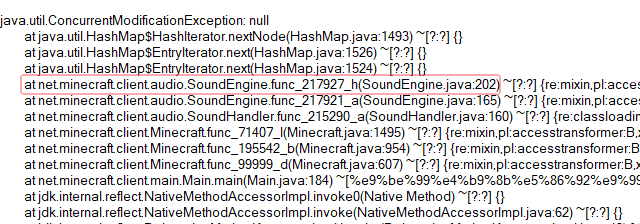
Second, read the source code of SoundEngine and confirm which container is facing this issue:
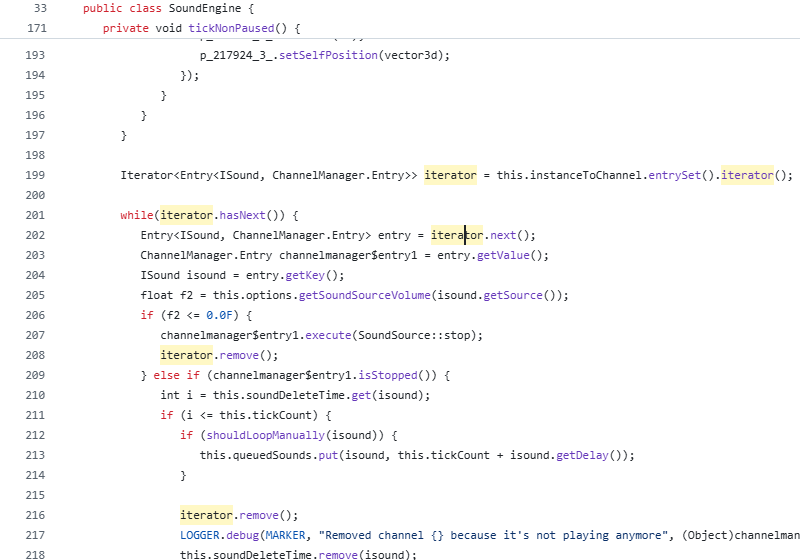
Now we know we should monitor map `field_217942_m` (`instanceToChannel` in `SoundEngine`). Keep going.
Third, install this mod, and add “`-javaagent:mods/CMESuckMyDuck-1.0.0.jar=net/minecraft/client/audio/SoundEngine;field_217942_m;Map;nonstatic`” to Java Virtual Machine Argument. Relaunch the game and wait for the next crash.
Finally, open `CMESuckMyDuck.log` file and you will see which thread and which mod has concurrently modified the container.
# Examples (JVM Arguments)
## ConcurrentModificationException from SoundEngine in Forge 1.16.5 Environment
`-javaagent:mods/CMESuckMyDuck-1.0.0.jar=net/minecraft/client/audio/SoundEngine;field_217942_m;Map;nonstatic`
## ConcurrentModificationException from PotionBrewing in Forge 1.20.1 Environment
`-javaagent:mods/CMESuckMyDuck-1.0.0.jar=net/minecraft/world/item/alchemy/PotionBrewing;f_43494_;List;static`
## ArrayIndexOutOfBoundsException from Zeta mod
`-javaagent:CMESuckMyDuck-1.0.0.jar=org/violetmoon/zetaimplforge/event/ForgeZetaEventBus;convertedHandlers;Map;nonstatic`
# Other options
## Log Level
Use system property `-Dcme_suck_my_duck.log_level=
Default 1, which means no debug message will be logged.
Users can set it to 0 to output debug message, which is not recommended – query functions like Map#get, Set#containsAll will also be logged when set to 0, and make the file very very long.
## ASM API Version (v1.0.2+)
In order to maintain compatibility with the latest version of Minecraft, this mod is compiled with asm version 9.7. For older versions of Minecraft (such as 1.12.2), API level operations such as ASM_9 cannot be applied, so players need to use `-Dcme_suck_my_duck.asm_api_version=
## File Max Entries (v1.0.3+)
Since we notice that when crash happens, the last few operations in the log are much more important than the previous ones. So our mod adopts a paging strategy after v1.0.3, and only the last two pages are retained at the end. The number of logs output on each page (that is, the number of operation call stacks) is fixed, and the default value is 500. Players can use `-Dcme_suck_my_duck.file_max_entries=
## Whitelist of Constructor (v1.0.3+)
Sometimes a container in a certain class is used in many places (eg. CompoundTag#tags). Directly using this mod will cause the log to be too long or the valid content to be replaced by subsequent operations. Therefore, players can specify an additional constructor whitelist to monitor the corresponding container in the corresponding class of a specific module. The default is empty, that is, there is no whitelist. Players can use `-Dcme_suck_my_duck.whitelist_constructor_stacktrace=
## Transform to Thread Safe (v1.0.4+)
Use system property `-Dcme_suck_my_duck.transform_to_thread_safe=true` to transform the field into a thread-safe container.
This is NOT recommended unless you like slowness and don’t want to fix the problem.
## Inject method (v1.0.4+)
Use system property `-Dcme_suck_my_duck.inject_method=true` to switch to inject mode.
If set, you should use `-javaagent:CMESuckMyDuck-
## Ignore threads (v1.0.5+)
Use system property `-Dcme_suck_my_duck.ignore_threads=
## Stop logging early (v1.0.7+)
Use system property `-Dcme_suck_my_duck.stop_logging_if_exception_created=false` to stop logging if critical error occurs.
## Trace ID Updater (v1.0.8+)
Use system property `-Dcme_suck_my_duck.trace_id_updater=
## Monitoring Local Variables (v1.1.0+)
Use system property `-Dcme_suck_my_duck.local_var_index=
If set, you should use `-javaagent:CMESuckMyDuck-
# Conclusion
I like eating peking duck. It’s so delicious!

Makes** withered hearts clear** to see if they are there or not.
Removes the Empty Armor Containers from the HUD, for a cleaner GUI:

vs Minecraft Vanilla:

Inspired by MC vanilla’s ‘Absorption Hearts’:

v1.20.2 (latest) and above is compatible with every other resourcepack.
Just select and put this resourcepack above others in order to work.
# Improve the look of your default Logs with… ↴

## Adds Vanilla-like circulated Logs Top | No Optifine or other Mods needed!
### It’s supports every Version of the game! (even including Legacy ones)
### And day-by-day will have more and more mods supported!
• [Abundance](https://modrinth.com/mod/abundance) – by exoplanetary
• [Architect’s Palette](https://modrinth.com/mod/architects-palette) – by Jsburg
• [Biomes O’ Plenty](https://modrinth.com/mod/biomes-o-plenty) – by Forstride & Adubbz
• [The Aether](https://modrinth.com/mod/aether) – by Oz-Payn
• Vanilla Minecraft – by Mojang
• [Wilder Wild](https://modrinth.com/mod/wilder-wild) – by FrozenBlock
**A resource pack for adding chromakey blocks in Minecraft! This makes it easy to take out the background from screenshots or videos.**
Sea lanterns -> blue
Glowstone -> green
Shroomlight -> red
## Support
If you have any problems, ideas, or other feedback about this project, please contact me via discord or email. You can contact me on Discord by sending a friend request, so you can send me a message.
Discord: tibodp
Mail: [email protected]
## 🌟 My other projects:
– [Torchcraft Lobby Panorama](https://modrinth.com/resourcepack/torchcraft-lobby-panorama)
– [The Ultimate Creator](https://modrinth.com/modpack/the-ultimate-creator)
– [Chromakey Blocks](https://modrinth.com/modpack/the-ultimate-creator)
– [No Worldborder](https://modrinth.com/modpack/the-ultimate-creator)
– [Vuurwerkshow Modpack](https://modrinth.com/modpack/the-ultimate-creator)
– [Vuurwerkshow Panorama](https://modrinth.com/modpack/the-ultimate-creator)
– [Vuurwerkshow Paintings](https://modrinth.com/resourcepack/vuurwerkshow-paintings)