Blinding Pumpkin Overlay
You ever wanted to completely blind your foes with a curse of binding pumpkin? Then this is the resource pack for you!
Should work for every version.
It just makes the pumpkin overlay completely black, thats it.
[Alternative Download [PlanetMinecraft]](https://www.planetminecraft.com/texture-pack/blinding-pumpkin-overlay)
Black Hole Moon
# 
Thanks for checking out Black Hole Moon! This Resource Pack will change the boring moon to a Black Hole. Great to prank your friends, or just to change the moon to something else.
## FAQ
### Does this require any external mods?
Nope. This Resource Pack does not need any external mods for it to function properly.
### Can you put this pack on CurseForge?
I do not plan to put this pack on CurseForge, and probably never will.
### On some versions of Minecraft it either says “The pack is too new” or “The pack is too old”
On these versions “supported_formats” in pack.mcmeta was not introduced yet, because of that it looks at “pack_format” and says on the lines of “Pack format 5? (pack format for 1.15.2) That is old. This pack must not work on me anymore” even though the pack supports that version. Best you can do is just ignore it and enable the pack anyway, do the same if it says “pack is too new”.
### Did you make the Pixel Art yourself?
Yes! and you are free to use it on whatever project your working on. Credit would be appreciated, but its not mandatory, just dont copy the Resource Pack outright and publish it claiming its your own.
BetterGoldBlock
Adds A W Gold Block
Better Zombie X Herobrine
Transform your Minecraft experience with Better Zombie X Herobrine A terrifying and unique texture pack that completely reimagines the classic zombies.
Every zombie you encounter is replaced with a haunting Herobrine version
featuring glowing white eyes that pierce through the darkness creating an unsettling atmosphere for your worlds.
Perfect for adventure maps, horror-themed servers
or just adding a creepy twist to vanilla gameplay. This pack focuses on entity and model textures
Altering the visual appearance of zombies while keeping Minecraft’s vanilla feel intact. With a resolution of 16x–32x, it balances clarity and performance
Ensuring smooth gameplay on most systems. Whether you’re exploring dungeons, fighting mobs, or building eerie landscapes Better Zombie X Herobrine adds a chilling and memorable visual
If the menu looks strange or is missing textures, that’s normal, but it won’t affect your gameplay.
Element that will keep players on edge. Experience the horror… if you dare.
Better Weather Sight
# Better Weather Sight
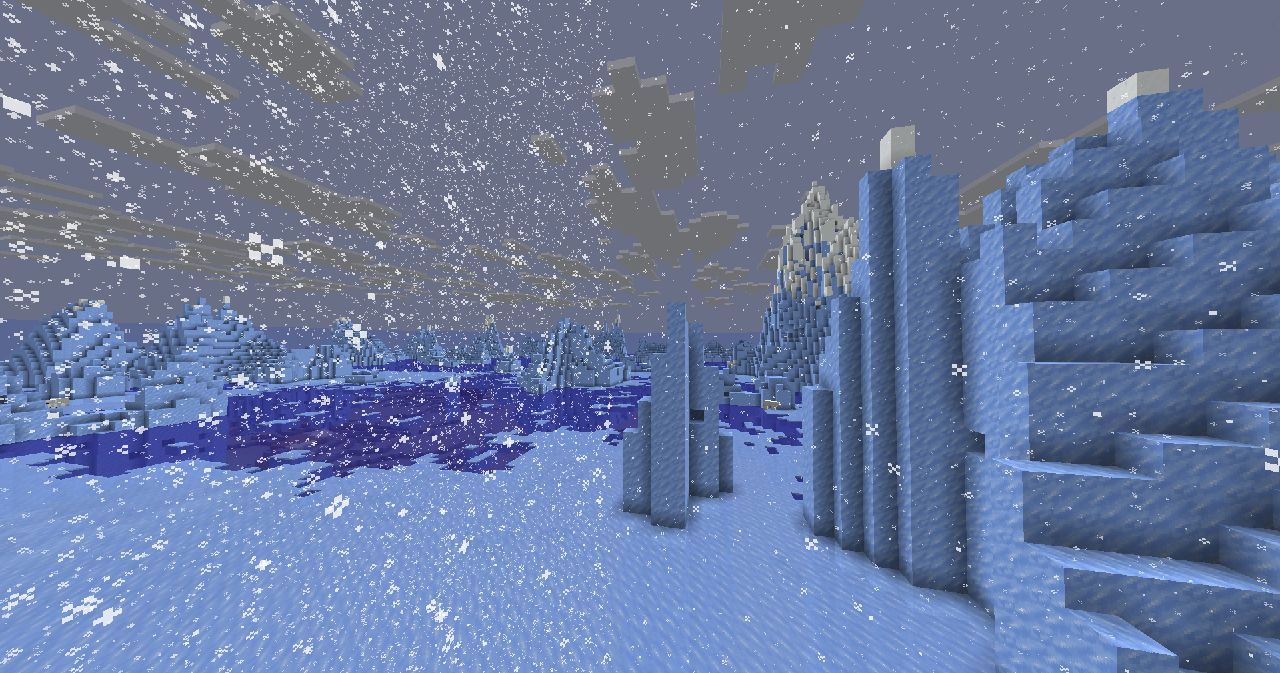
## What it does?
– Makes **rain, snow** doesn’t hide your sight
### Troubleshooting
Weather is still hiding my sight!
Make sure this resource pack is placed above other resource packs in the order.
Better Birch Leaves
# Better Birch Leaves
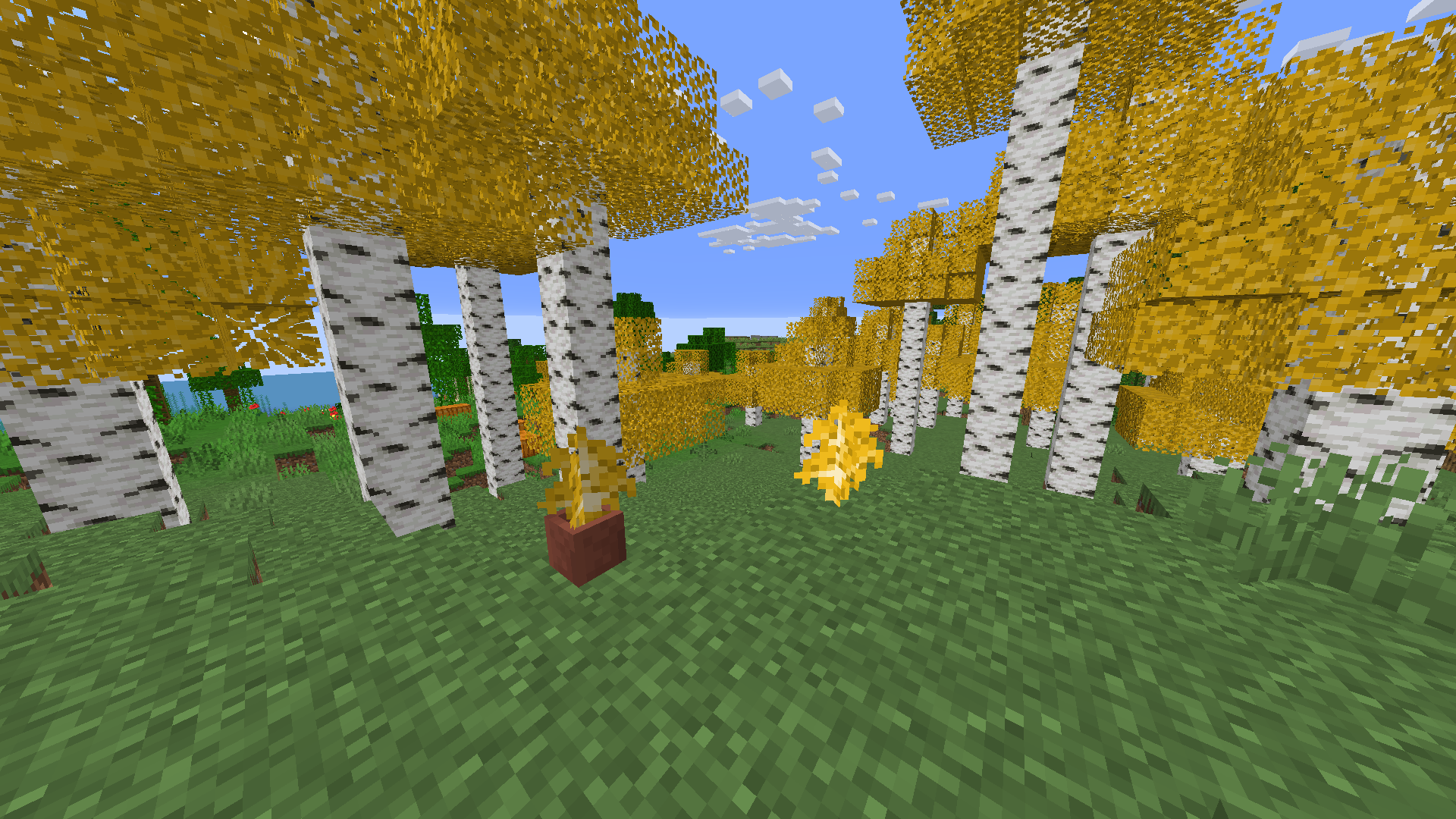
Birch leaves, but beautiful. This resource pack gives **birch leaves and saplings** a **golden-yellow makeover**, making forests feel warmer and more natural — like autumn year-round.
## Features:
– Birch **leaves and saplings** now appear **yellow/golden**, not bright green
– Inspired by the new leaf color style from modern versions
– Works with all biomes — no code, just cleaner visuals!
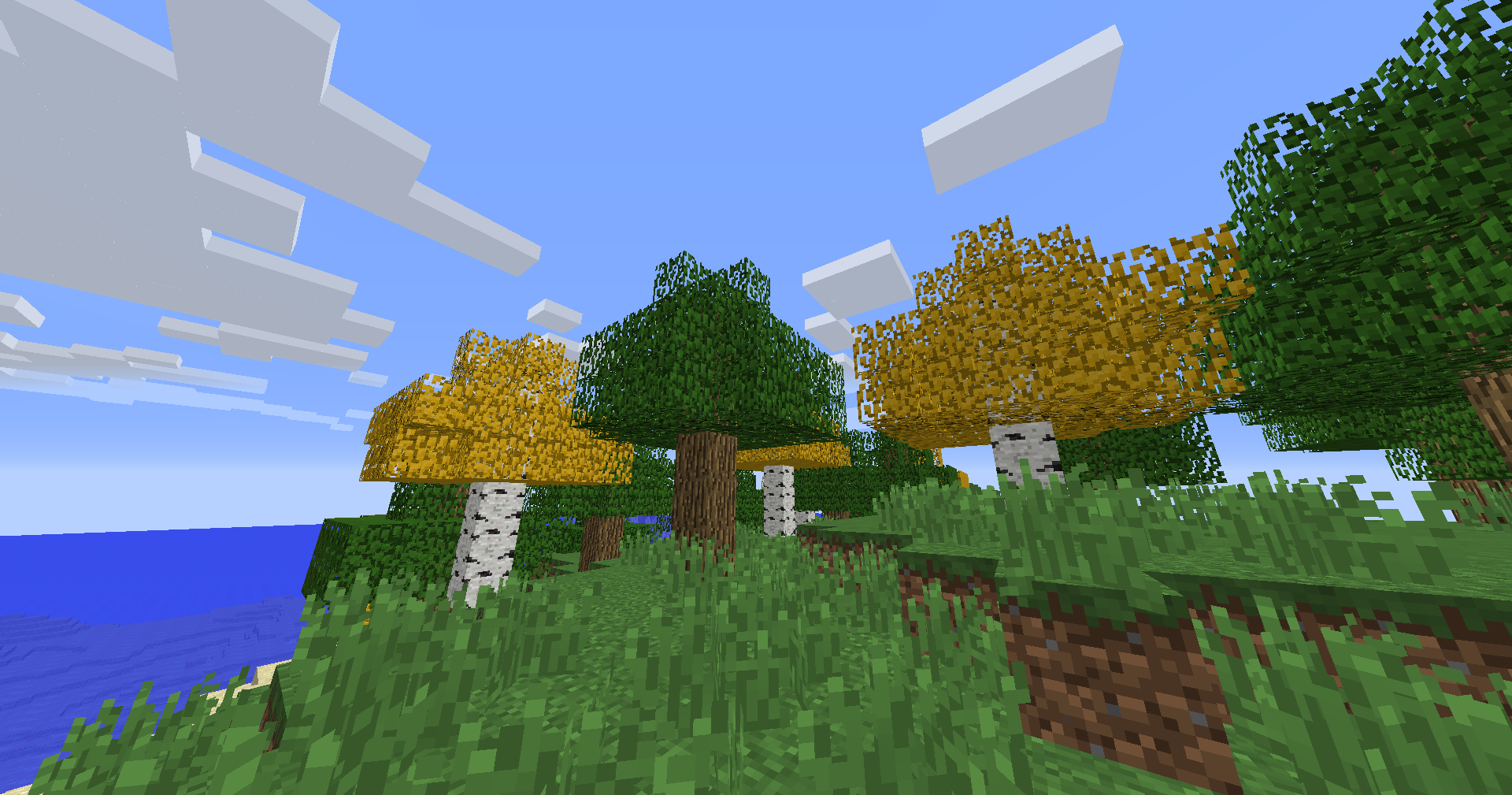
## Older Versions Supported:
– In Minecraft **1.6.1 – 1.12.2**, birch leaves and saplings use the **older-style textures**, blending into classic visuals
## Compatibility:
– **Resource Pack**: Minecraft **1.6.1 – 1.21.11**
– No dependencies needed
Bedwars Ultimate
This Resource Pack focuses on Bedwars and PvP Textures, like tiny Swords or some simple Block Textures.
Tools and Weapons:
25
Blocks:
128
Items:
11
Armor and Equipment:
21
Coming soon: Item Textures 🙂
Bedrock GUI
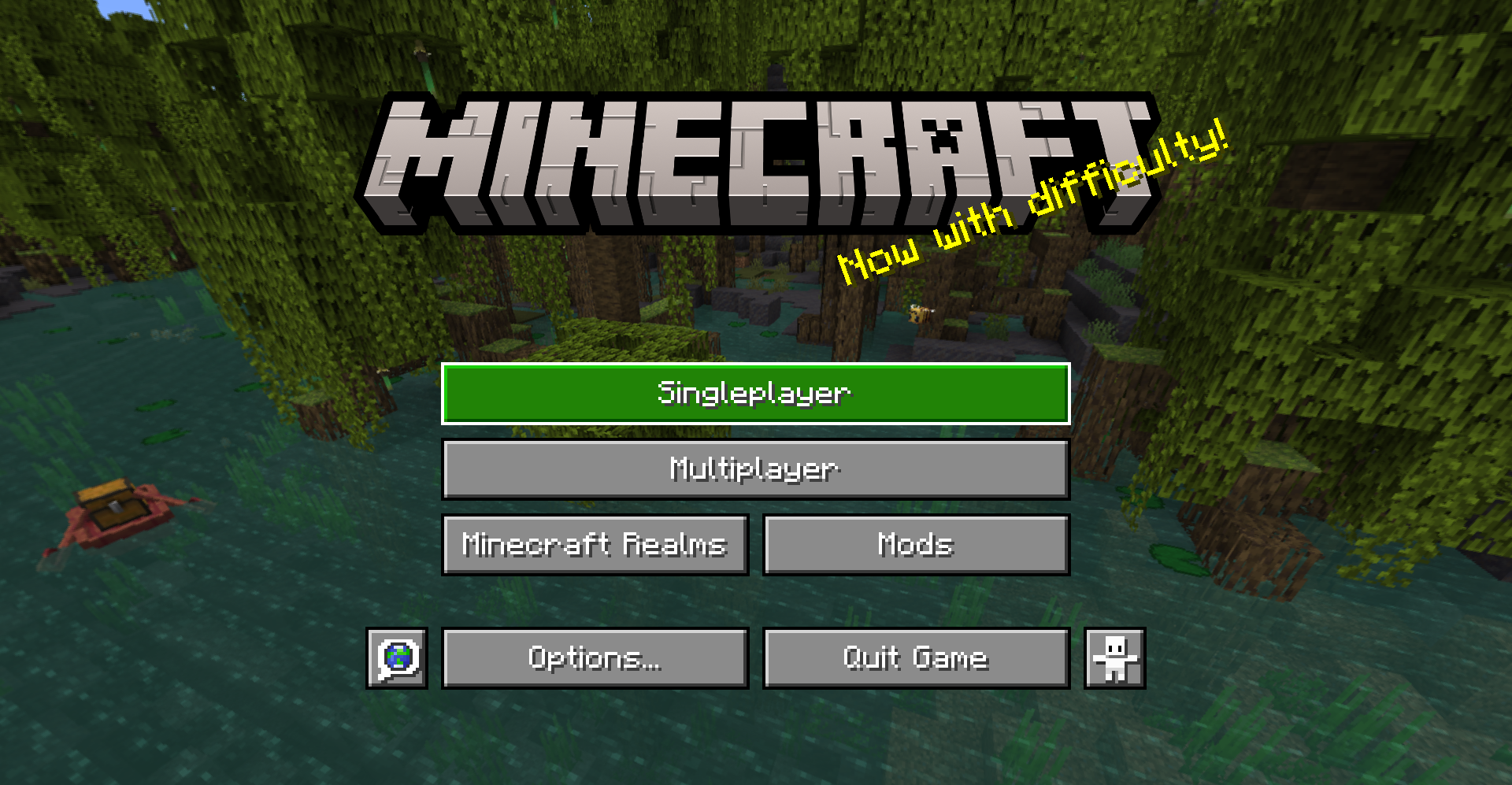
> A gui style for menus based on Bedrock Edition
## About
This pack changes the style of most menu buttons (even some modded ones!) to look more like Bedrock Edition’s gui. It also replaces the vanilla title with the Bedrock one.
Supported mods:
– [Mod Menu](https://modrinth.com/mod/modmenu)
– [Capes](https://modrinth.com/mod/capes)
– [Malilib](https://www.curseforge.com/minecraft/mc-mods/malilib)
– [Litematica](https://www.curseforge.com/minecraft/mc-mods/litematica)
This pack also supports [Respackops!](https://modrinth.com/mod/respackopts) If you have it installed, you’ll be able to disable certain features or even try out alternate styles!
## Install
For loading the pack in-game, check out the official Minecraft wiki page on [how to install resourcepacks](https://minecraft.fandom.com/wiki/Tutorials/Loading_a_resource_pack).
## Usage
You can use these assets however you want and post projects that include them as long as any of the following pages are linked to as credit: [Github](https://github.com/Xetheon/bedrock-gui) | [Modrinth](https://modrinth.com/resourcepack/bedrock-gui) | [Curseforge](https://www.curseforge.com/minecraft/texture-packs/bedrock-gui)
Please do not rehost this pack directly. If you want to make releases on other platforms, redirect downloads to any of the above links.
Atum
# Atum (Random and set seed autoresetter)
[](https://ko-fi.com/voidxwalker)
Mod to automatically reset random and set seeds
## Usage
Press the golden boots button on the main menu to start the world resetting mode.
To reset, simply leave the world (either the normal save and quit or the fast reset button).
To exit the resetting mode, press the “Stop Resets & Quit” button at the bottom left of the options menu.
Adds a hotkey (by default F6) that when pressed will reset as soon as possible no matter what (even works outside a world and during chunk generation).
———-
To change the seed that gets reset, change the difficulty, change the generator type (like superflat), change generate structures or change bonus chest simply shift-click on the golden boots.
An empty seed will result in the mod resetting random seeds.
## Info and Compatibility
This mod is valid for speedruns on http://speedrun.com/mc and its category extensions.
Just replace Duncan’s autoresetter jar with the newest release of this one, attempts and difficulty files are compatible.
Closet Witch’s Fast Reset mod is compatible (https://github.com/jan-leila/FastReset/releases) and will make resetting with the hotkey more efficient.
My World Preview Mod is compatible (https://github.com/VoidXWalker/WorldPreview) and will make resetting with the hotkey more efficient.
Note for resource pack creators: the “Stop Resets & Quit” button can be changed by customizing menu.stop_resets in your language file if you like.
## Authors
– [@Void_X_Walker](https://www.github.com/voidxwalker)
## Acknowledgements
– [@DuncanRuns](https://github.com/DuncanRuns) for creating the original autoreset mod
April Fools’ Translation Pack
# April Fools’ Translation Pack
[](https://modrinth.com/mod/april-fools-translation)
[](https://crowdin.com/project/mcaf-resourcepack)
[Deutsch](https://github.com/mc-wiki/mcaf-resourcepack/blob/main/README.de.md) | English | [日本語](https://github.com/mc-wiki/mcaf-resourcepack/blob/main/README.ja.md) | [文言](https://github.com/mc-wiki/mcaf-resourcepack/blob/main/README.lzh.md) | [简体中文](https://github.com/mc-wiki/mcaf-resourcepack/blob/main/README.zh-hans.md) | [繁體中文](https://github.com/mc-wiki/mcaf-resourcepack/blob/main/README.zh-hant.md)
**Play April Fools’ snapshots with community translations from the Minecraft Wiki.**
[April Fools’ snapshots](https://minecraft.wiki/w/April_Fools’_Day_jokes) are not officially localized via Crowdin, but the Minecraft Wiki community provides translations for their features. This project makes these community translations available in game, in an effort to promote consensus on item names.
## Features
– Provides accurate and up-to-date localization for April Fools’ snapshots.
– Fixes missing translation keys and major typos (e.g., correcting `shepard_potato.png` to `shepherd_potato.png` in 24w14potato).
### Supported versions
– [15w14a](https://minecraft.wiki/w/Java_Edition_15w14a) (2015)
– [1.RV-Pre1](https://minecraft.wiki/w/Java_Edition_1.RV-Pre1) (2016)
– [3D Shareware v1.34](https://minecraft.wiki/w/Java_Edition_3D_Shareware_v1.34) (2019)
– [20w14∞](https://minecraft.wiki/w/Java_Edition_20w14∞) (2020)
– [22w13oneBlockAtATime](https://minecraft.wiki/w/Java_Edition_22w13oneBlockAtATime) (2022)
– [23w13a_or_b](https://minecraft.wiki/w/Java_Edition_23w13a_or_b) (2023)
– [24w14potato](https://minecraft.wiki/w/Java_Edition_24w14potato) (2024)
– [25w14craftmine](https://minecraft.wiki/w/Java_Edition_25w14craftmine) (2025)
– [26w14a](https://minecraft.wiki/w/Java_Edition_26w14a) (2026)
[Minecraft 2.0](https://minecraft.wiki/w/Java_Edition_2.0) (2013) is **not** included in this project since resource packs were unavailable in that version.
### Supported languages
Translations are provided by the community on [Crowdin](https://crowdin.com/project/mcaf-resourcepack); suggest new translations there.
| Code | Language | Endonym | Progress |
|———-|———————–|————————|———————————————————————————————————–|
| `de_de` | German | Deutsch (Deutschland) |  |
|
| `en_ud` | English (Upside Down) | ɥsᴉꞁᵷuƎ (uʍoᗡ ǝpᴉsd∩) |  |
|
| `enp` | Anglish | Anglish (Oned Riches) |  |
|
| `es_es` | Spanish | Español (España) |  |
|
| `fil_ph` | Filipino | Filipino (Pilipinas) |  |
|
| `fr_fr` | French | Français (France) |  |
|
| `he_il` | Hebrew | עברית (ישראל) |  |
|
| `it_it` | Italian | Italiano (Italia) |  |
|
| `ja_jp` | Japanese | 日本語 (日本) |  |
|
| `ko_kr` | Korean | 한국어 (대한민국) |  |
|
| `lzh` | Literary Chinese | 文言 (華夏) |  |
|
| `nl_nl` | Dutch | Nederlands (Nederland) |  |
|
| `pt_br` | Portuguese (Brazil) | Português (Brasil) |  |
|
| `pt_pt` | Portuguese (Portugal) | Português (Portugal) |  |
|
| `ru_ru` | Russian | Русский (Россия) |  |
|
| `th_th` | Thai | ไทย (ประเทศไทย) |  |
|
| `uk_ua` | Ukrainian | Українська (Україна) |  |
|
| `zh_cn` | Chinese (Simplified) | 简体中文 (中国大陆) |  |
|
| `zh_hk` | Chinese (Hong Kong) | 繁體中文 (香港特別行政區) |  |
|
| `zh_tw` | Chinese (Traditional) | 繁體中文 (台灣) |  |
|
You can request adding a new language [by creating an issue on GitHub](https://github.com/mc-wiki/mcaf-resourcepack/issues).
## How to use
1. Visit the [Latest Release](https://github.com/mc-wiki/mcaf-resourcepack/releases/latest) page (3 hours/sync) or [Modrinth](https://modrinth.com/resourcepack/april-fools-translation) (1 week/sync).
2. Download the resource pack for your language.
3. Install it in your game.
Need help installing? See the [wiki tutorial](https://minecraft.wiki/w/Tutorial:Loading_a_resource_pack).
## Contributing
Translations take place on [Crowdin](https://crowdin.com/project/mcaf-resourcepack); you can contribute to the translations there with other [translators](https://github.com/mc-wiki/mcaf-resourcepack/blob/main/README.md#translators). They are synced with this repository regularly.
## FAQ
**Q1: I see untranslated texts in-game. What should I do?**
A1: Contribute translations on [Crowdin](https://crowdin.com/project/mcaf-resourcepack). If the text isn’t on Crowdin, it’s likely hardcoded and can’t be fixed by a resource pack.
**Q2: I see raw translation keys (e.g., `rule.food_restriction.air_block`).**
A2: This usually means a missing entry in the language files. Please report it in the [Issues](https://github.com/mc-wiki/mcaf-resourcepack/issues) section.
**Q3: How can I add support for a new language?**
A3: You can request adding a new language [on Crowdin](https://crowdin.com/project/mcaf-resourcepack).
## Translators