CRSS Resource Pack

# CRSS Resource Pack

This was the resource pack used in CRSS’ modpack, which has a panorama of the spawn area in [ROP](https://crss.cc/nation/psf).

## CRSS Resource Pack is no longer being updated

I don’t really see a reason to keep updating this resource pack as the modpack is also discontinued.

![The pack applied in 1.8.9](https://cdn.modrinth.com/data/cached_images/84f6348ce59731fcb57e5761b6da10b551149029.png)

CRSS by Blryface is marked with CC0 1.0

CME is Bad

# Abstract
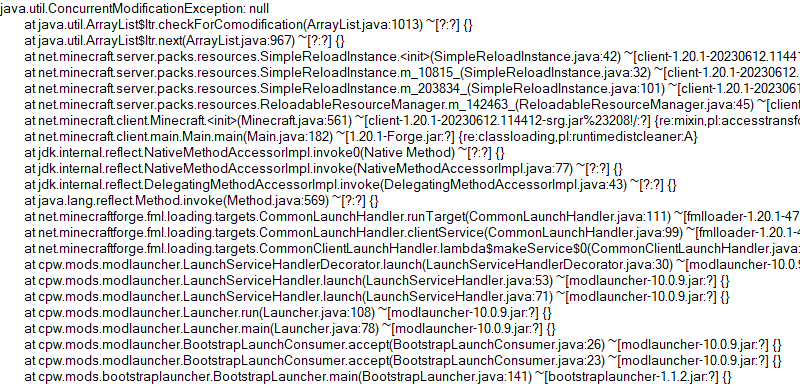
Players and modpack developers sometimes find the game crashed with `ConcurrentModificationExceptions` (CME) and `IndexOutOfBoundsExceptions` (IOOBE), which only give stacktrace of current thread and are hard to trace which mod causes them. Here’s one of the crashes which is caused by SimpleReloadInstance in 1.20.1 Forge:
![CME from SimpleReloadInstance](https://cdn.modrinth.com/data/cached_images/877cd1d1976b1969fffb619bdbd62b13244e02c8.png)

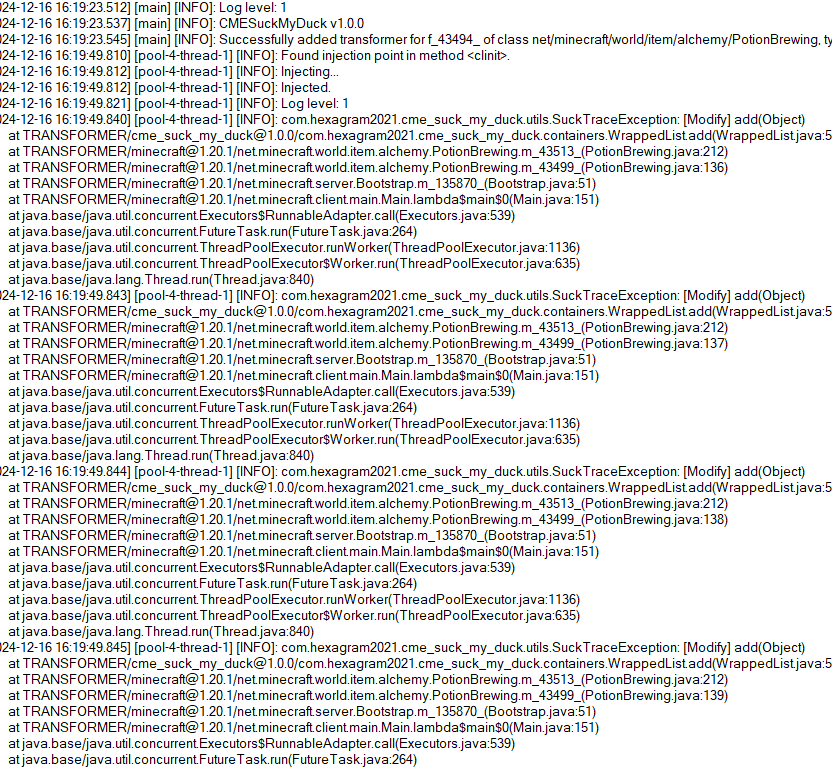
So this is what the mod is developed for. Players who install this mod and add javaagent to JVM Argument correctly will receive a full log for modification history of a certain collection:
![log of this mod](https://cdn.modrinth.com/data/cached_images/d3d00f23694f96591fc77d8387540d7ce29c078a.png)

# Usage
First, add this jar to mods folder.

Second, edit your Java Virtual Machine Argument in your launcher. Add `-javaagent:mods/CMESuckMyDuck-.jar=;;;`.

Finally, run the game, play and wait until the crash happens.

# Usage for Other Java Projects
This mod can not only be used for Minecraft debugging, but also be utilized to debug other java projects. Similar to Minecraft. The only different step is that you should add gson and asm jar to classpath (`-cp`) before javaagent, and add our `CMESuckMyDuck-.jar` to classpath after javaagent.

# Arguments
##
A full name of the class, which has a container that you would like to monitor. Use “ instead of `.` (a.k.a. the internal name of class).

##
A field name of the container in target class, which you would like to monitor. For Forge, use SRG name. For Fabric, use intermediary name. For NeoForge, use official name.

##
Currently, we only support three containers: `List`, `Set`, `Map`. This argument indicates the type of monitored container.

## `static` or `nonstatic`. This argument indicates the container is a static field or non-static field.

# How to get and
Let’s start with an example.

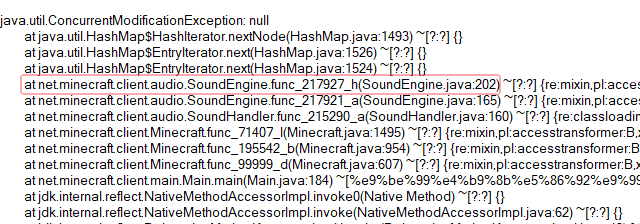
First, take a look at the stacktrace of CME/IOOBE:
![Replace this with a description](https://cdn.modrinth.com/data/cached_images/f4908f0fb44bc480d0fba4a1714bf9dbca4b8043.png)

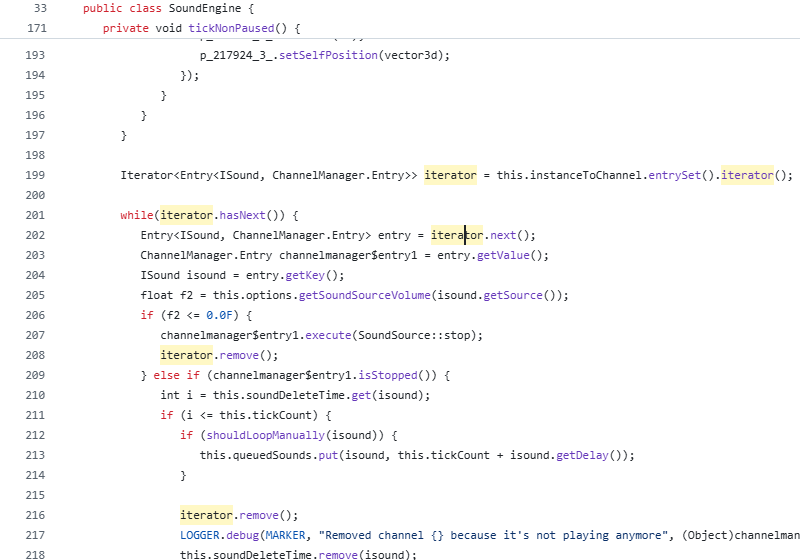
Second, read the source code of SoundEngine and confirm which container is facing this issue:
![Replace this with a description](https://cdn.modrinth.com/data/cached_images/26c2eefabbde9a9ce3aea62dbfdf1012d736c16d.png)

Now we know we should monitor map `field_217942_m` (`instanceToChannel` in `SoundEngine`). Keep going.

Third, install this mod, and add “`-javaagent:mods/CMESuckMyDuck-1.0.0.jar=net/minecraft/client/audio/SoundEngine;field_217942_m;Map;nonstatic`” to Java Virtual Machine Argument. Relaunch the game and wait for the next crash.

Finally, open `CMESuckMyDuck.log` file and you will see which thread and which mod has concurrently modified the container.

# Examples (JVM Arguments)
## ConcurrentModificationException from SoundEngine in Forge 1.16.5 Environment
`-javaagent:mods/CMESuckMyDuck-1.0.0.jar=net/minecraft/client/audio/SoundEngine;field_217942_m;Map;nonstatic`

## ConcurrentModificationException from PotionBrewing in Forge 1.20.1 Environment
`-javaagent:mods/CMESuckMyDuck-1.0.0.jar=net/minecraft/world/item/alchemy/PotionBrewing;f_43494_;List;static`

## ArrayIndexOutOfBoundsException from Zeta mod
`-javaagent:CMESuckMyDuck-1.0.0.jar=org/violetmoon/zetaimplforge/event/ForgeZetaEventBus;convertedHandlers;Map;nonstatic`

# Other options
## Log Level
Use system property `-Dcme_suck_my_duck.log_level=` to set custom log level.

Default 1, which means no debug message will be logged.

Users can set it to 0 to output debug message, which is not recommended – query functions like Map#get, Set#containsAll will also be logged when set to 0, and make the file very very long.

## ASM API Version (v1.0.2+)

In order to maintain compatibility with the latest version of Minecraft, this mod is compiled with asm version 9.7. For older versions of Minecraft (such as 1.12.2), API level operations such as ASM_9 cannot be applied, so players need to use `-Dcme_suck_my_duck.asm_api_version=` to modify the ASM API version compatibility. For example, game version 1.12.2: `-Dcme_suck_my_duck.asm_api_version=5`.

## File Max Entries (v1.0.3+)

Since we notice that when crash happens, the last few operations in the log are much more important than the previous ones. So our mod adopts a paging strategy after v1.0.3, and only the last two pages are retained at the end. The number of logs output on each page (that is, the number of operation call stacks) is fixed, and the default value is 500. Players can use `-Dcme_suck_my_duck.file_max_entries=` to modify the maximum number of elements on the page.

## Whitelist of Constructor (v1.0.3+)

Sometimes a container in a certain class is used in many places (eg. CompoundTag#tags). Directly using this mod will cause the log to be too long or the valid content to be replaced by subsequent operations. Therefore, players can specify an additional constructor whitelist to monitor the corresponding container in the corresponding class of a specific module. The default is empty, that is, there is no whitelist. Players can use `-Dcme_suck_my_duck.whitelist_constructor_stacktrace=` to specify it. If any line in the stack trace where the container is constructed includes the content of the whitelist string, the container will be monitored – otherwise, the container will not be monitored, which greatly simplifies the log output information.

## Transform to Thread Safe (v1.0.4+)
Use system property `-Dcme_suck_my_duck.transform_to_thread_safe=true` to transform the field into a thread-safe container.

This is NOT recommended unless you like slowness and don’t want to fix the problem.

## Inject method (v1.0.4+)
Use system property `-Dcme_suck_my_duck.inject_method=true` to switch to inject mode.

If set, you should use `-javaagent:CMESuckMyDuck-.jar=;` and whenever this method is called, you will receive a stack trace in log files.

## Ignore threads (v1.0.5+)
Use system property `-Dcme_suck_my_duck.ignore_threads=;;;…` to ignore some thread that is expected to modify the given container (or call the given method). For example, `-Dcme_suck_my_duck.ignore_threads=”Server thread”`.

## Stop logging early (v1.0.7+)
Use system property `-Dcme_suck_my_duck.stop_logging_if_exception_created=false` to stop logging if critical error occurs.

## Trace ID Updater (v1.0.8+)
Use system property `-Dcme_suck_my_duck.trace_id_updater=;` to update trace ID when calling the given method. This might be useful in inject mode.

## Monitoring Local Variables (v1.1.0+)
Use system property `-Dcme_suck_my_duck.local_var_index=` to monitor local variable at given index in the given method.

If set, you should use `-javaagent:CMESuckMyDuck-.jar=;;`. By the way, the index can be reused by different local variables. So you might have to use `-Dcme_suck_my_duck.match_local_index=` to specify the ordinal of ASTORE operation to indicate which local variable to monitor.

# Conclusion
I like eating peking duck. It’s so delicious!

![Photo by Polina Tankilevitch: https://www.pexels.com/photo/close-up-photo-of-savory-peking-duck-dish-on-a-ceramic-bowl-5848604/](https://cdn.modrinth.com/data/cached_images/d4ce4bba6f0bef8780cd5843390bf3358dd9b55b_0.webp)

Circular Logs

# Improve the look of your default Logs with… ↴

![Circular Log’s Logo](https://cdn.modrinth.com/data/cached_images/271d9f58613a83ac09fe634c67d279d0c5ca6e8b.png)

## Adds Vanilla-like circulated Logs Top | No Optifine or other Mods needed!

### It’s supports every Version of the game! (even including Legacy ones)
### And day-by-day will have more and more mods supported!

Supported Mods

• [Abundance](https://modrinth.com/mod/abundance) – by exoplanetary

• [Architect’s Palette](https://modrinth.com/mod/architects-palette) – by Jsburg

• [Biomes O’ Plenty](https://modrinth.com/mod/biomes-o-plenty) – by Forstride & Adubbz

• [The Aether](https://modrinth.com/mod/aether) – by Oz-Payn

• Vanilla Minecraft – by Mojang

• [Wilder Wild](https://modrinth.com/mod/wilder-wild) – by FrozenBlock

Cave Tweaks

CAVE TWEAKS!

❤️ Made by Wilozyx and DraconicAxolotl! ❤️

Cave tweaks is a vanilla-esque tweaks 16x pack for most minecraft versions. The goal of the pack is to include most versions from infdev (yep), alpha, beta and release!
This pack is 100% public domain, we totally allow and encourage people who enjoy the pack to use, edit and improve upon our textures for their own works if you wish to do so!

Wish to support us?

Subscribe to our channels on youtube!

[Wilozyx’s Channel](https://www.youtube.com/@wilozyx) |
[DraconicAxolotl’s Channel](https://www.youtube.com/@Draconic_Axolotl)

What versions is the pack available for, currently?

| Sign | State |
|———————|:———————:|
| ✔️ | Fully done & uploaded |
| ❌ | Not done but planned |
| 🔨 | Currently being worked on |
| ⏳ | Done and awaiting to be posted |

| Version | Status |
|———————|:———————:|
| Beta 1.0 | 🔨 |
| Beta 1.1 | 🔨 |
| Beta 1.2 | 🔨 |
| Beta 1.3 | ⏳ |
| Beta 1.4 | ⏳ |
| Beta 1.5 | ✔️ |
| Beta 1.6 | ✔️ |
| Beta 1.7 | ✔️ |
| Beta 1.8 | ✔️ |
| Release 1.0 | ✔️ |
| Release 1.1 | ✔️ |
| Release 1.2| ✔️ |
| Release 1.3| ✔️ |
| Release 1.4| ✔️ |
| Release 1.5| ✔️ |
| Release 1.6| ✔️ |
| Release 1.7| ✔️ |
| Release 1.8| ✔️ |
| Release 1.9| ✔️ |
| Release 1.10| ✔️ |
| Release 1.11| 🔨 |
| Release 1.12+| ❌ |

Blinding Pumpkin Overlay

You ever wanted to completely blind your foes with a curse of binding pumpkin? Then this is the resource pack for you!

Should work for every version.

It just makes the pumpkin overlay completely black, thats it.
[Alternative Download [PlanetMinecraft]](https://www.planetminecraft.com/texture-pack/blinding-pumpkin-overlay)

Better Zombie X Herobrine

Transform your Minecraft experience with Better Zombie X Herobrine A terrifying and unique texture pack that completely reimagines the classic zombies.

Every zombie you encounter is replaced with a haunting Herobrine version
featuring glowing white eyes that pierce through the darkness creating an unsettling atmosphere for your worlds.

Perfect for adventure maps, horror-themed servers
or just adding a creepy twist to vanilla gameplay. This pack focuses on entity and model textures

Altering the visual appearance of zombies while keeping Minecraft’s vanilla feel intact. With a resolution of 16x–32x, it balances clarity and performance

Ensuring smooth gameplay on most systems. Whether you’re exploring dungeons, fighting mobs, or building eerie landscapes Better Zombie X Herobrine adds a chilling and memorable visual

If the menu looks strange or is missing textures, that’s normal, but it won’t affect your gameplay.

Element that will keep players on edge. Experience the horror… if you dare.

Better Birch Leaves

# Better Birch Leaves

Birch leaves, but beautiful. This resource pack gives **birch leaves and saplings** a **golden-yellow makeover**, making forests feel warmer and more natural — like autumn year-round.

## Features:

– Birch **leaves and saplings** now appear **yellow/golden**, not bright green

– Inspired by the new leaf color style from modern versions

– Works with all biomes — no code, just cleaner visuals!

![Birch leaves are yellow / golden](https://cdn.modrinth.com/data/cached_images/aff43d648794213f1a8418f6acb662ddbc65d2cb.png)

## Older Versions Supported:

– In Minecraft **1.6.1 – 1.12.2**, birch leaves and saplings use the **older-style textures**, blending into classic visuals

![Birch trees in 1.8.9](https://cdn.modrinth.com/data/cached_images/101618ff4b3da17ffb48f4933e89b21374125d9d.png)

## Compatibility:

– **Resource Pack**: Minecraft **1.6.1 – 1.21.11**

– No dependencies needed

Bedwars Ultimate

This Resource Pack focuses on Bedwars and PvP Textures, like tiny Swords or some simple Block Textures.

Tools and Weapons:
25

Blocks:
128

Items:
11

Armor and Equipment:
21

Coming soon: Item Textures 🙂

anit CHAT

# Chat anit 一个自动屏蔽《Minecraft》中文脏话,和增加IP属地的开源项目。

本插件需要装在Velocity上。前置为SignedVelocity-Proxy需要在velocity和所以1.19.1+的子服上增加
IP属地api为*xiaotuo*提供,脏话屏蔽由*Uapi提供*
使用方法
1.下载本插件,放入velocity的pluging文件夹,启动客户端
>tip
>如果你有子服的Minecraft版本在1.19.1以上需要增加[signed velocity](https://modrinth.com/plugin/signedvelocity/version/1.3.0) 插件到velocity和每个1.19.1+的子服务器。

2.将velocity配置文件“`velocity.toml“` 中“`force-key-authentication“`改为false
3.将所有子服务的配置文件“`server.properties“`中的“`enforce-secure-profile“`改为false
4.启动服务端

**更新日志**: https://github.com/cdpyx/Chatanit/commits/release

English:
# Chat Anit is an open-source project that automatically blocks Chinese profanity in Minecraft and increases IP ownership.

This plugin needs to be installed on Velocity. SignedVelocity Proxy needs to be added on velocity and all 1.19.1+sub servers
The IP locality API is provided by * xiaotuo *, and the profanity blocking is provided by * UAPI*
Usage
1. Download this plugin, place it in the velocity plugin folder, and start the client
> tip
> If you have a sub server version of Minecraft above 1.19.1, you need to add [signed velocity]( https://modrinth.com/plugin/signedvelocity/version/1.3.0 )Plug in to velocity and every 1.19.1+sub server.

2. Change the ‘force key authentication’ in the velocity configuration file ‘velocity. toml’ to false
3. Change the ‘enforce secure profile’ in the ‘server. properties’ configuration file for all sub services to false
4. Start the server

**Update log**: https://github.com/cdpyx/Chatanit/commits/release

Among Us

![preview](https://cdn.modrinth.com/data/cached_images/e74a4ac1d21ec0cf1963ce7cf1315bcc446116dd.jpeg)


But how to make **Among Uses**?

All you need is an anvil and a carved pumpkin:

![preview2](https://cdn.modrinth.com/data/cached_images/17409462a9f761afc9daee65895749fb15a95883.png)

> Rename a carved pumpkin in the anvil to “Color” Impostor
* Example: Red Impostor
* Before snapshot 25w03a, using third-party mods, you could write things like “red impostor” instead of “Red Impostor”, or even “123 red impostor 123”

> After renaming, the item will automatically turn into its custom version

Make your impostors and have fun! 🎭