VulkanMod Just for Chinese
# Hello! This translation pack for VulkanMod just for Chinese!
It is for people just need Chinese translation,it can’t support you any other problem.
It are not VulkanMod,if you need,Please go to [there](https://modrinth.com/mod/vulkanmod) for VulkanMod!
# 欢迎使用VulkanMod专属中文翻译包!✨
## 有何不同🤔
只支持中文翻译,简便实用!⚡
## 安装🔨
这是一个 资源包 文件,请放置在resourcepacks文件夹中。这通常会在游戏目录下方(开启版本隔离),也可以在游戏中的“资源包…”界面选择右下角“打开包文件夹”打开。
## 可以将其内置于整合包中吗🤨
当然,您可以将其内置于资源包中。
顺带一提,您也可以修改包文件,只是请不要将作者私自标注为您!
## 翻译不准/遇到问题🛠️
请反馈至评论区或QQ 3564937130。
vLobbyConnect
# vLobbyConnect – The Ultimate Lobby Manager for Velocity Proxy
vLobbyConnect is a **powerful and lightweight Velocity plugin** designed to seamlessly manage lobby connections for **players using different Minecraft protocol versions**. Whether your server supports multiple Minecraft versions or needs efficient load balancing, vLobbyConnect ensures players are sent to the **correct lobby** every time.
## 🚀 Why Use vLobbyConnect?
– **Version-Specific Lobby Assignment** – Automatically sends players to the appropriate lobby based on their Minecraft version.
– **Seamless Load Balancing** – Distributes players evenly across multiple lobbies, preventing overcrowding and lag.
– **Failsafe Mechanisms** – If a lobby is misconfigured or full, players are redirected to an available fallback lobby.
– **Easy Setup & Configuration** – Just drop the plugin into Velocity, configure the lobbies, and you’re good to go!
## Setup
1. Place the plugin jar in your Velocity plugins folder.
2. Configure your lobbies in two places:
### Plugin Config (config.yml)
This file is located in `src/main/resources/config.yml` (it will be copied to `plugins/vLobbyConnect/config.yml` on first run):
“`yaml
lobbies:
1.20lobby1: “name1”
1.20lobby2: “name2”
1.8lobby1: “name3”
1.8lobby2: “name4”
# To add more lobbies, follow the pattern “VERSIONlobbyX”
# Example:
# 1.13lobby8: “name5”
“`
### Velocity Server Configuration (velocity.toml)
In your `velocity.toml`, configure the servers with the required modifications. For example:
“`toml
[servers]
name1 = “ip”
name2 = “ip”
name3 = “ip”
name4 = “ip”
try = [] # keep fallback empty
“`
## ⚡ Commands
– **/lobby**
– **/hub**
These 2 Instantly teleports the player to the appropriate lobby.
message @kmaba on discord for quick assistance
## 🛡️ Future Enhancements (Planned Features)
– **Customizable Messages** – Modify join/fallback messages in `config.yml`.
– **Priority Lobbies** – Assign preferred lobbies based on player rank or permissions.
## 🎮 Conclusion
vLobbyConnect is the **ultimate lobby management solution** for Velocity servers, ensuring a smooth, version-compatible experience for all players. Download it today and **enhance your network’s performance and player experience!** 🚀
Test this plugin out on play.craftium.ro!
VLobby
# VLobby
[](https://github.com/4drian3d/VLobby/actions/workflows/gradle.yml) [](https://discord.gg/5NMMzK5mAn) 
Lobby plugin for Velocity
[](https://www.bisecthosting.com/4drian3d?r=ModVLobby)
## Requirements
– Velocity 3.2.0+
– Java 17+
– [MCKotlin](https://modrinth.com/plugin/mckotlin)
## Features
– Multi lobby support
– MiniMessage formatting
– Multiple Sending Modes
– You can set it to be able to teleport to each server with its own command. For example, if you have the “survival” server, the command to go to that server would be “/survival”. This is configurable in the CommandHandler section
## Commands
In VLobby there are 2 CommandHandlers
### REGULAR
It is the default operation of VLobby, you can set as many commands as you want to teleport to a group of Lobby servers (or to a single Lobby if you have only one Lobby).
### COMMAND_TO_SERVER
With this CommandHandler you can teleport to any server using its name as command.
For example, to teleport to the `survival` server, you would require the `vlobby.command.survival` permission and you would use the `/survival` command
VividHorizons
# VividHorizons by ilb0tta (1.6.1 – 26.1.2)

⚙️ Installation guide
– Go into the **Versions** tab of this page and download the resource pack for the version that you need.
– Now put the file you just downloaded into the Minecraft’s **resourcepacks** folder, which is situated in this directory.
“`
C:UsersYOUAppDataRoaming.minecraftresourcepacks
“`
– No need to unzip or changing file structure.
– Go into Minecraft –> Options –> Go into Resource packs and apply the resource pack you’ve just put in.
## 🎁 What is the point of this pack?
This simple resource pack aims to create a better and more enjoyable experience for all Minecraft players, by changing biomes, grass and foliage (e.g. leaves) colors to make them more vivid and colorful.
Ah, and **NO MODS OR OPTIFINE NEEDED**.
## ✨ Features
– Boosted Biomes colors,
– Boosted Grass colors,
– Boosted Foliage and Dry variant colors,
– Usable with other resource pack, such as 32x ones.
– Always (or near) up to date for the latest Minecraft version!
## ❤️ Support and Questions
If you have any kind of questions or run into issues with the resource pack, don’t hesitate to leave a comment or ask a question, and I’ll be happy to help.
[Found a bug? / Report an issue. Click here.](https://github.com/ilb0tta/VividHorizons/issues)
[Have a question or suggestion? Click Here.](https://github.com/ilb0tta/VividHorizons/discussions/new/choose)
## 📖 License and more…
This pack is licensed under **ARR**, which stands for “All Rights Reserved”.
What does this mean?
This means that this work is owned by me, **ilb0tta**, and you, the user, are allowed to download and use this pack **only from official sources where it has been published by me** (such as Modrinth.com).
Any other use is **strictly prohibited**, including, but not limited to:
– Reposting or redistributing the pack;
– Modifying the pack and sharing the modified version;
– Selling any part of this work;
– Using assets from this pack in other projects.
If you have any questions or doubts feel free to contact me.
Credits
– Resource Pack made by **ilb0tta**, All Rights Reserved;
– pack.png file **© ilb0tta**, All Rights Reserved;
– VividHorizons is an original name created by **ilb0tta**, All Rights Reserved.
My Goal
My goal is to provide the community with high-quality content that improves players’ gameplay. So please, don’t steal, copy or redistribute someone else’s work. Making something with your own hands makes you feel more confident and grateful towards yourself. ❤️
## 💎 Sponsors
### NextDNS
Browse safer with **_NextDNS_**, it automatically blocks ads, trackers, and malicious sites **before they can even load**, across all your sites, apps, devices and networks, with zero hassle.
Protect your family with **built-in parental controls** and manage everything easily from a simple, **real-time dashboard**. With **encrypted DNS servers** in multiple locations, your privacy stays secure wherever you are.
[**Create an account through this link**](https://nextdns.io/?from=up775rtn) and get **_unlimited protection on all your devices_** for **just $19.99 per year!**
### HidenCloud
Need a powerful **AMD-powered DDR5 RAM** Dedicated Minecraft Hosting platform that **doesn’t break the bank**? Check out **HidenCloud**, starting at just less than **50$/YEAR** for a good MC plan. [**Try HidenCloud now with this link**](https://dash.hidencloud.com/aff/XIBLH3) to get a **5% DISCOUNT CODE** on your entire order. (And support my projects!)
NOTE: to get the discount simply click the link, scroll down and click “**set up**” a plan, then your discount code will be **already applied at your checkout!**
TIP: you can **stack** coupons!
Thank you for supporting my projects, I truly appreciate it!,
ilb0tta.
Vivecraft Spigot Extension
# Vivecraft Spigot Extensions
VSE is a companion plugin for [Vivecraft](https://modrinth.com/mod/vivecraft), the VR mod for Java Minecraft.
VSE is for [Spigot](https://www.spigotmc.org/), [Paper](https://papermc.io/software/paper) and [Folia](https://papermc.io/software/folia) servers and adds several enhancements for VR players.
# Features
– Vivecraft players will see other Vivecraft players head, arm and leg movements.
– Support for Vivecraft 2-handed archery.
– Assign permission groups for VR players.
– Fixes projectiles and dropped items from VR players.
– Shrinks Creeper explosion radius for VR players from 3 to 1.75m (Configurable)
– Reduces Mobs melee attack radius for VR players ny -0.4m (Configurable)
– Support for Vivecraft Roomscale Blocking (Toggleable)
– Support for Vivecraft Dual Wielding (Toggleable)
– Support for Vivecraft Climbey Tools (Toggleable)
– Support for Vivecraft Arrow Headshots (Configurable)
– Support for faster block breaking (Toggleable)
– Option to limit server to Vivecraft players only.
See the config.yml when you run the plugin, or the [Config](https://github.com/Vivecraft/Vivecraft-Spigot-Extension/wiki/Config) wiki entry for all available configuration options.
# Versioning
The plugins version number is split into two parts, the first part is the Vivecraft version that the plugin supports the features of, and the second part is the release version, this increments with fixes or when adding support for new Minecraft versions.
Example:
`1.3.3-0`: This version supports the features of Vivecraft `1.3.3` and is the first release for that version
# Using Proxies
When using proxy servers you might need to add a compatibility plugin to your proxy server so that our data is correctly forwarded to the spigot/paper/folia server.
A this moment we have extensions for
– BungeeCoord: [Vivecraft BungeeCord Extensions](https://github.com/Techjar/Vivecraft_BungeeCord_Extensions/releases)
– Velocity: [Vivecraft Velocity Extensions](https://github.com/Techjar/Vivecraft_Velocity_Extensions/releases)
# Metadata
VSE provides Spigot metadata on `Player` objects so other plugins can provide special support for handed interactions or somesuch. If you aren’t sure what metadata is, check the [Spigot documentation](https://hub.spigotmc.org/javadocs/spigot/org/bukkit/metadata/Metadatable.html). The API supports multiple plugins using the same metadata key, so make sure you filter to our specific plugin name (`Vivecraft-Spigot-Extension`).
For details on available data see the [wiki](https://github.com/Vivecraft/Vivecraft-Spigot-Extension/wiki/Metadata)
# API
We also have an API to access more data, like the history of all available body parts, for more details on that see the [wiki](https://github.com/Vivecraft/Vivecraft-Spigot-Extension/wiki/API).
Vitelist

[My Website](https://pandadev.net)

***

Vitelist is a simple, but useful Whitelist plugin for Velocity based on UUIDs, so it does not rely on player names.
***

– Vitelist runs on [Velocity](https://papermc.io/software/velocity).
***

If you have any issues or find a bug, please remember to report it
here [GitHub](https://github.com/0PandaDEV/Vitelist/issues)
***
Check out my other projects on [my profile](https://modrinth.com/user/PandaDEV)
visual corps
Visual Crops is a lightweight resource pack that replaces the default crop textures for wheat, carrots, potatoes and beetroot. Each growth stage is more visually distinct, making it easy to tell at a glance when your crops are ready to harvest — no more guessing!
Visible Powder Snow and Cobwebs
A simple resource pack that makes Powder Snow and Cobwebs more visible by tinting them cyan.
Helps you avoid getting trapped, making it useful for both PvP and general gameplay.
Visible Amount Food
# Visible Amount Food
## ENGLISH
With this texture pack you will be able to see the amount of food thighs recovered in each meal. It will be useful to you, since you will finally know what food is best and when you should eat it so as not to waste it.
###
### By @d_de_diego_d
##
## ESPAÑOL
Con este paquete de texturas podrás ver la cantidad de muslos de comida que se recupera en cada comida. Te será útil, ya que porfin sabras que comida es mejor y cuando debes comerla para no malgastarla.
### By @d_de_diego_d
© TRIDEX 2025 – All Rights Reserved
visbarrier
# Visbarrier
Toggle barrier block visibility in Minecraft Forge 1.8 – 1.12 with better performance
Uses better rendering methods:
* Seamless rendering
* Connected Textures
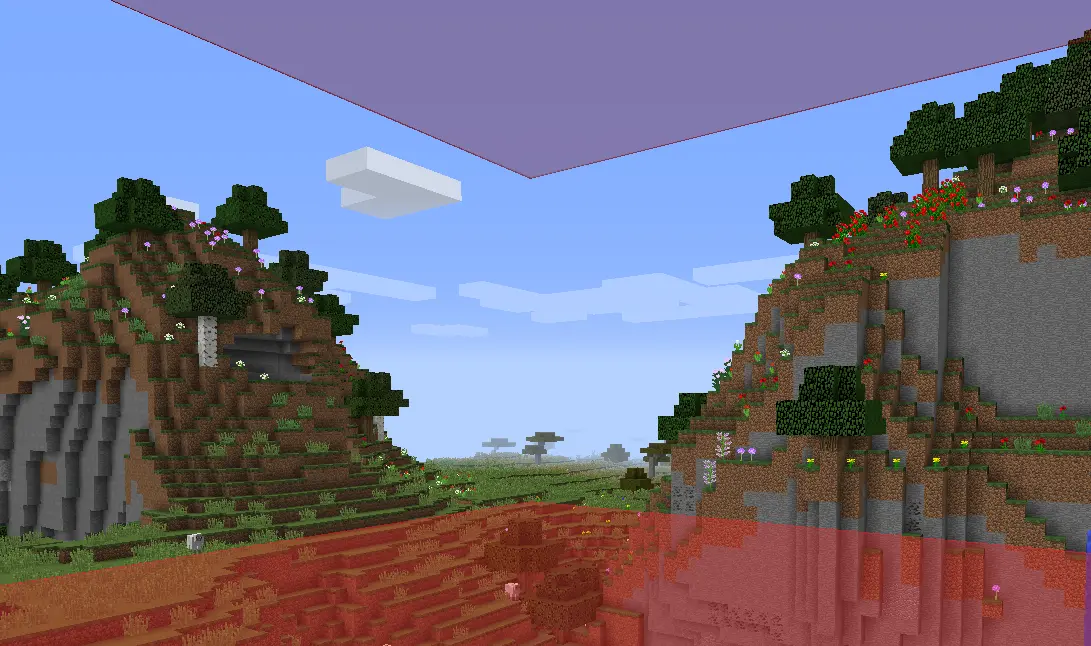
Note: Did not really test for 1.9 – 1.11 so let me know if it works well. I know 1.8.9 works great and 1.12.2 doesn’t have connected textures right now
## Features
– Optimized Rendering
– Keybind Toggle
– Connected Textures
– Optional Chat Notifications
– Resource Pack Compatible
## Usage
**Press `B`** to toggle barrier visibility on/off
*(Rebind in Options → Controls → Visbarrier)*
You’ll see a chat notification confirming the toggle:
| Barriers ON | Barriers OFF |
|————-|————–|
|  |  |
## Commands
Mod settings in `/visbarrier` commands
| Command | Alias | Effect |
|———|——-|——–|
| `/visbarrier connect` | `/visbarrier ct` | Toggle connected textures on/off |
| `/visbarrier notify` | `/visbarrier n` | Toggle keybind chat notifications on/off |
## Customization
Override the barrier appearance with a resource pack:
– **Texture**: `assets/minecraft/textures/blocks/barrier.png`
– **Model**: `assets/minecraft/models/block/barrier.json`
If a resource pack provides its own barrier texture, Visbarrier’s connected textures are automatically bypassed so the resource pack renders as intended.
## TODO
– Maybe fix 1.12.2 connected textures but honestly I don’t know who uses it
– Also let me know if other versions broken and maybe I’ll fix it maybe I won’t 🙂
—
## Credits
v2 is originally forked from [Diabet/olvend’s barrier mod](https://github.com/olvend/VisibleBarriers) (MIT License)