WERM
# WERM – Web Engine for Realm Monetization

The official Minecraft plugin for WERM – the future of game monetization. Global wallets, instant delivery, and powerful analytics—all with the lowest fees in the industry.
Website •
Dashboard •
Discord
—
## 🆕 What’s New in v1.0.4
### ⚡ Performance & Reliability Release
This release adds batch delivery confirmation and async file I/O to improve performance and reliability during high-load scenarios.
| Feature | Description |
|———|————-|
| 📦 **Batch Delivery Confirmation** | Up to 10 confirmations per API call for 90% reduction in network overhead |
| 🔄 **Async File I/O** | Non-blocking queue persistence with debounced writes prevents main thread blocking |
| 🛑 **Graceful Shutdown** | Proper executor termination ensures no data loss during server stops |
| ⚡ **Faster Bulk Deliveries** | Improved performance when multiple items need to be delivered at once |
**Technical Details:**
– Batch size: 10 confirmations per API call
– I/O thread: Daemon thread named `WERM-ConfirmationQueue-IO`
– Shutdown timeout: 5 seconds for graceful termination
– Debounced writes: 2-second delay to coalesce multiple queue changes
### Previous Releases:
v1.0.3 – Performance Optimization
| Feature | Description |
|———|————-|
| 🔗 **HTTP Connection Pooling** | New OkHttp-based connection manager with 5-connection pool and 5-minute keep-alive |
| 📉 **Smart Polling** | Dynamic polling with exponential backoff—reduces API calls by up to 75% during idle periods |
| ⚡ **Faster Response Times** | Keep-alive connections eliminate connection setup overhead |
| 🛠️ **Improved Resource Usage** | Connection reuse reduces memory footprint and CPU usage |
**Technical Details:**
– Connection pool: 5 max idle connections, 5-minute keep-alive
– Timeouts: 10s connect, 30s read, 10s write
– Backoff: Up to 4x base interval after consecutive empty responses
– Instant reset when player joins or delivery found
v1.0.2 – bStats Update
– **🔧 bStats Update** – Updated bStats plugin ID for proper metrics tracking
– All security hardening from v1.0.1 remains in place
v1.0.1 – Security Features
| Feature | Description |
|———|————-|
| 🛡️ **Command Validation** | Blocks dangerous commands (op, deop, ban, stop) from being executed via deliveries |
| 🔐 **TLS 1.2+ Enforcement** | All API connections now require modern TLS protocols |
| 📝 **Debug Redaction** | Sensitive data (tokens, UUIDs) automatically redacted in debug logs |
| 💾 **Confirmation Queue** | Pending delivery confirmations survive server restarts |
| ✅ **Input Sanitization** | Player names and UUIDs sanitized before command execution |
| 🌐 **Endpoint Validation** | HTTPS and domain whitelist enforcement for API endpoints |
| ⏱️ **Rate Limiting** | Verification attempts limited to prevent brute-force abuse |
| 🔄 **Auto-Discovery** | Project ID now auto-discovered from API (no hardcoding) |
—
## 🌐 What is WERM?

WERM is a modern, all-in-one monetization platform built specifically for Minecraft servers. Think of it as a **Tebex alternative**—but with better features, lower fees, and a focus on the modern server owner experience.
### Platform Features
| Feature | Description |
|———|————-|
| 🔍 **Server Discovery** | Get your server listed on our public directory where players can find, vote for, and join servers |
| 💰 **Global Wallet System** | Players have one wallet across all WERM-powered servers (1 credit = 1 USD cent) |
| 🛒 **Built-in Storefront** | Beautiful, customizable store pages with categories, sales, gifting, and wishlists |
| ⚡ **Instant Delivery** | Hybrid delivery system using webhooks + polling ensures items are delivered fast |
| 🗳️ **Voting System** | Integrated voting with Votifier/NuVotifier support to boost your server’s ranking |
| 💬 **Discord Integration** | Display your Discord member count on your server listing |
| 🌍 **Multi-Currency Support** | Accept payments globally with automatic currency conversion |
| 💸 **Lowest Fees** | Starting at just 3% platform fee (vs 5%+ competitors) |
### Why Choose WERM?
– **Free Tier Available** – Start monetizing with no monthly fees (up to $500/month revenue)
– **Modern Dashboard** – Clean, intuitive interface for managing your server and products
– **Real-time Analytics** – Track sales, player engagement, and revenue trends
– **Cross-Server Economy** – Players can use their wallet credits on any WERM server
– **Open & Transparent** – No hidden fees, no surprise charges
—
## ✨ Plugin Features

### 🔗 Account Verification
Players can securely link their Minecraft account to WERM using a simple 6-character verification code. Generate a code on the website, enter it in-game, and you’re connected!
### 📦 Automatic Delivery System
Automatically delivers purchased products to players using configurable console commands. Supports both immediate delivery and requiring players to be online.
### 💓 Server Heartbeat
Keeps your server status updated on the WERM dashboard with real-time player counts and server version information.
### 🎮 Player Join Detection
Automatically checks for and delivers pending purchases when players join the server.
### ⚡ Async Processing
All API calls are processed asynchronously to ensure zero impact on your server’s performance.
### 🛡️ Secure Authentication
Uses secure plugin token authentication to ensure only your server can manage deliveries.
### 📝 Fully Customizable
All messages are fully configurable with Minecraft color code support (`&` codes).
—
## 📜 Commands

| Command | Description | Permission |
|———|————-|————|
| `/werm verify ` | Link your Minecraft account with WERM | `werm.verify` (default: true) |
| `/werm help` | Display help information | None |
| `/werm status` | View plugin connection status | `werm.admin` (default: op) |
| `/werm reload` | Reload plugin configuration | `werm.admin` (default: op) |
**Aliases:** `/w`
---
## 🎯 Permissions
| Permission | Description | Default |
|------------|-------------|---------|
| `werm.verify` | Allows players to verify their Minecraft account | `true` |
| `werm.admin` | Admin commands (reload, status) | `op` |
---
## ⚙️ Configuration
```yaml
# WERM Plugin Configuration
# Generate your plugin token at https://wermpay.com/dashboard/servers
plugin-token: "werm_XXXXXXXX_XXXXXXXXXXXXXXXXXXXXXXXXXXXXXXXX"
# Enable debug logging for troubleshooting
debug: false
# Heartbeat Settings
heartbeat:
interval: 60 # Send status every X seconds
send-player-count: true # Include player count in heartbeat
# Delivery Settings
delivery:
interval: 15 # Check for deliveries every X seconds
# Customizable messages (supports & color codes)
messages:
prefix: "&8[&6WERM&8] &r"
verify-success: "&aYour Minecraft account has been linked successfully!"
verify-failed: "&cVerification failed: &7%reason%"
delivery-received: "&aYou received: &e{product} &ax{quantity}"
# ... and more customizable messages
```
---
## 📦 Delivery Placeholders
When configuring your product commands in the WERM dashboard, you can use these placeholders:
| Placeholder | Description |
|-------------|-------------|
| `{player}` or `{player_name}` | Player's username |
| `{uuid}` or `{player_uuid}` | Player's UUID |
| `{quantity}` | Quantity purchased |
| `{product_id}` | Product ID |
| `{product_name}` | Product name |
| `{order_id}` | Order ID |
| `{delivery_id}` | Delivery ID |
**Example Commands:**
```
give {player} diamond 64
lp user {player} parent add vip
eco give {player} 1000
```
---
## 🚀 Installation

1. **Download** the WERM plugin JAR file
2. **Place** it in your server's `plugins` folder
3. **Start/restart** your server
4. **Generate** a plugin token in your [WERM Dashboard](https://wermpay.com/dashboard/servers)
5. **Edit** `plugins/WERM/config.yml` and add your plugin token
6. **Run** `/werm reload` or restart your server
7. ✅ Your server will now appear as **online** in the WERM dashboard!
---
## 📋 Requirements
- **Server Software:** Spigot, Paper, Purpur, or any Spigot-based fork
- **Minecraft Version:** 1.13+
- **Java Version:** 8+
- **WERM Account:** [Create one here](https://wermpay.com)
---
## 🔧 How It Works
1. **Setup:** Configure the plugin with your unique plugin token from the WERM dashboard
2. **Heartbeat:** The plugin sends periodic heartbeats to keep your server status updated
3. **Purchases:** When a customer makes a purchase on your WERM store, a delivery is queued
4. **Delivery:** The plugin polls for pending deliveries and executes the configured commands
5. **Confirmation:** Successful deliveries are confirmed and marked as completed
---
## 💬 Support
Need help? Join our [Discord Server](http://discord.gg/ujFRXksUBE) for support and community discussions.
---
## 📄 License
This plugin is provided by WERM for use with the WERM monetization platform.
---
WERM - The Future of Game Monetization
© 2026 WERM | Made with ❤️ for the Minecraft community
Weezer Albums
Replaces some music discs with songs from each Weezer album. The resource pack is client-side only. All music belongs to Weezer. WARNING: SOME SONGS ARE 18+ | New ideas? Email me at [email protected].
WebSenderReloaded
WebSender Reloaded, ready to help you!
Send a command to your Minecraft or Hytale server via DrawWEB or similar web scripts.
– Send command with PHP your Bungee, Velocity or Bukkit server!
– BungeeCord/Velocity and Spigot support!
– %100 Customizable config!
– Fast socket system!
– Multiple server support!
– /websender command. Perm: websender.admin
– Important: When you install the plugin, make sure to change the password, otherwise the plugin will not work. Also, if you change the websender port, enter a port that is not used elsewhere on your server.
**Important:** When you install the plugin, make sure to change the password, otherwise the plugin will not work. Also, if you change the websender port, enter a port that is not used elsewhere on your server.
**PHP EXAMPLE:**
If you downloaded version 1.0.1 or lower, the contents of the folder named “ExamplePHP” in the zip are incorrect, you can download version 1.0.2 or 1.2 to get the correct examples.
**Configuration for Plugin v1.5+ (Important)**
If you have installed version 1.5 or higher, you must configure your
“`
WebsenderAPI.php
“`
file according to your server’s Java version. Please follow the steps below.
**Step 1: Update the WebsenderAPI.php File**
1. Open the **.zip** archive you downloaded for the plugin.
1. Find the **WebsenderAPI.php** file located inside the ExamplePHP folder.
1. Replace the existing **WebsenderAPI.php** file on your website with this new one.
WebConsoleServer
# WebConsoleServer
A Minecraft plugin that exposes your server console through a WebSocket connection. Built for [groupez.dev](https://groupez.dev), a test server generator for paid plugins.
## Features
– Real-time console log streaming via WebSocket
– Password-protected authentication
– Log history persistence (loads previous logs on client connection)
– Support for both **Spigot/Paper** and **Velocity** platforms
– Included test web page for quick testing
## Supported Platforms
| Platform | Minecraft Version | Java Version |
|———-|——————-|————–|
| Spigot/Paper | 1.8.8+ | Java 8+ |
| Velocity | 3.3.0+ | Java 21+ |
## Test Web Page
A test web page is included in the `web/` folder. Open `web/index.html` in your browser to connect to the WebSocket server and view console logs in real-time.
## Installation
1. Download the appropriate JAR for your platform from [Modrinth](https://modrinth.com/project/webconsoleserver)
2. Place the JAR in your server’s `plugins` folder
3. Restart your server
4. Configure the plugin in `plugins/WebConsoleServer/config.properties` (Velocity) or `plugins/WebConsoleServer/config.yml` (Spigot)
## Configuration
“`properties
# IP address to bind the WebSocket server (use 0.0.0.0 for all interfaces)
websocket-host=0.0.0.0
# Port for the WebSocket server
websocket-port=8765
# Password for WebSocket authentication (leave empty for no authentication)
websocket-password=changeme
# Maximum number of log lines to keep in history
max-log-history=500
“`
## WebSocket Protocol
### Authentication Flow
1. Client connects to `ws://host:port`
2. Server sends `{“type”:”auth_required”}`
3. Client sends `{“type”:”auth”,”password”:”your_password”}`
4. Server responds with `{“type”:”auth_success”}` or `{“type”:”auth_failed”}`
5. On success, server sends log history followed by `{“type”:”history_complete”}`
### Message Types
| Type | Direction | Description |
|——|———–|————-|
| `auth_required` | Server → Client | Authentication is required |
| `auth` | Client → Server | Authentication request with password |
| `auth_success` | Server → Client | Authentication successful |
| `auth_failed` | Server → Client | Authentication failed |
| `log` | Server → Client | Console log message |
| `history_complete` | Server → Client | All historical logs have been sent |
### Log Message Format
“`json
{“type”:”log”,”message”:”[12:34:56] [INFO] [ServerName]: Your log message here”}
“`
## Building from Source
“`bash
# Build all modules
./gradlew build
# Output JARs are located in target/
# – WebConsoleServer-Spigot-1.0.jar
# – WebConsoleServer-Velocity-1.0.jar
“`
On Windows, use `gradlew.bat` instead of `./gradlew`.
## License
MIT License
## Links
– [groupez.dev](https://groupez.dev) – Test server generator for paid plugins
– [Github](https://github.com/GroupeZ-dev/WebConsoleServer) – Source code
Wayland Fix
*Note: if you do not use Linux, this mod is not for you*
“[Wayland](https://wayland.freedesktop.org/) is a replacement for the X11 window system protocol and architecture with the aim to be easier to develop, extend, and maintain.”
With the increasing popularity of Wayland compositors on Linux, including several desktop environments switching to Wayland by default, application support for Wayland makes the Linux desktop experience all the better.
While Minecraft does run under XWayland, features like per-monitor HiDPI scaling do not function. If you experience problems related to XWayland, this mod is for you.
# Requirements
A Wayland-supported system GLFW installation and the following JVM flag is required:
“`
-Dorg.lwjgl.glfw.libname=/usr/lib/libglfw.so
“`
To install the proper GLFW on Arch Linux, run:
“`sh
sudo pacman -S glfw-wayland
“`
# Motivation
I wrote this mod after using [Sway WM](https://swaywm.org/) with a HiDPI display. All XWayland applications look blurry, so it is not an option. The community solution was to [patch the system glfw](https://github.com/Admicos/minecraft-wayland), but I’d rather not do that.
# Bug Reports
If you continue to experience problems with Minecraft on Wayland after installing this mod, file a bug report [on the issue tracker](https://github.com/StackDoubleFlow/MCWaylandFix/issues) if it hasn’t already been reported.
Wawla – What Are We Looking At
This mod is an addon for Waila/Hwyla. It gathers a lot of additional information about the game and presents it using the information display HUD. This mod requires Hwyla or Waila, along with Bookshelf.
NOTE: This mod requires other mods to run properly!
Features include
- Animal Breeding Cooldown
- Animal Growing Up timer.
- Armor points
- Block Blast Resistance (Off by default)
- Block Hardness (Off by default)
- Block Break Progress
- Block Enchantment Power
- Total Enchanting Power for Enchanting Table
- Horse Speed
- Horse Jump Strength
- Item Frame Contents
- Player Head Username
- Villager Professions
- Trapped Chests displayed as normal Chests instead.
Notice: If you are using older versions of the mods, some features may not be available, and some additional features may not be documented. This page only maintains info on the latest versions.
Like the mod and want to support me?
[](https://nodecraft.com/r/darkhax)
**This project is sponsored by Nodecraft. Use code [DARKHAX](https://nodecraft.com/r/darkhax) for 30% off your first month of service!**
Wavetrack
**WaveTrack Plugin**
***Open-source project for the AsianF4rmer Network and DataThorn Technologies family.***
A Spigot/Bukkit plugin for Minecraft 1.8 that allows developers to play preconfigured sound tracks to players using a single command instead of multiple `/playsound` commands.
**Features**
– **Track-based Sound System**: Create reusable sound tracks with multiple sounds
– **Delay Support**: Add delays between sounds in a track (measured in ticks, 20 ticks = 1 second)
– **Nearby Player Support**: Optionally play sounds to nearby players at a reduced volume
– **Category Organization**: Organize tracks into categories for better management
– **In-game Configuration**: Create and edit tracks using commands without editing config files
– **YAML Configuration**: All tracks are saved to `config.yml` for easy manual editing
– **Tab Completion**: Full tab completion support with common Minecraft 1.8 sounds
– **Permission System**: Granular permissions for different command actions
**Commands**
All commands start with `/wavetrack` (alias: `/wt`)
**Playing Tracks**
“`
/wavetrack play
“`
Plays a track to the specified player. If the track has `nearby-players` enabled, nearby players will also hear the sounds at a reduced volume.
**Creating Tracks**
“`
/wavetrack create
“`
Creates a new empty track in the specified category.
**Deleting Tracks**
“`
/wavetrack delete“`
Permanently deletes a track.
**Adding Sounds**
“`
/wavetrack addsound [volume] [pitch] [delay]
“`
Adds a sound to a track.
– `sound`: The Minecraft sound name (e.g., `random.levelup`, `mob.villager.yes`)
– `volume`: Sound volume (default: 1.0)
– `pitch`: Sound pitch (default: 1.0)
– `delay`: Delay in ticks before playing this sound (default: 0)
**Removing Sounds**
“`
/wavetrack removesound
“`
Removes a sound from a track by its index. Use `/wavetrack info` to see indices.
**Editing Sounds**
“`
/wavetrack editsound
“`
Edit a specific property of an existing sound in a track.
– `index`: The sound index (use `/wavetrack info` to see indices)
– `property`: One of `sound`, `volume`, `pitch`, `delay`
– `value`: The new value for the property
**Examples:**
“`
/wavetrack editsound mytrack 0 volume 0.5
/wavetrack editsound mytrack 1 sound random.levelup
/wavetrack editsound mytrack 2 delay 20
“`
**Clearing All Sounds**
“`
/wavetrack clearsounds“`
Removes all sounds from a track (keeps track settings).
**Renaming Tracks**
“`
/wavetrack rename
“`
Renames an existing track.
**Copying Tracks**
“`
/wavetrack copy [newcategory]
“`
Creates a copy of a track with a new name. Optionally place it in a different category.
**Moving Tracks to a Different Category**
“`
/wavetrack move
“`
Moves a track to a different category.
**Configuring Nearby Players**
“`
/wavetrack setnearby
“`
Enable or disable playing the track to nearby players.
“`
/wavetrack setradius
“`
Set the radius (in blocks) for nearby player detection.
“`
/wavetrack setvolumemultiplier
“`
Set the volume multiplier for nearby players (0.0 to 1.0).
**Viewing Track Info**
“`
/wavetrack info“`
Shows detailed information about a track including all sounds and settings.
**Listing Tracks**
“`
/wavetrack list [category]
“`
Lists all tracks, optionally filtered by category.
**Reloading Configuration**
“`
/wavetrack reload
“`
Reloads the configuration file without restarting the server.
**Permissions**
| Permission | Description | Default |
|————|————-|———|
| `wavetrack.*` | All WaveTrack permissions | op |
| `wavetrack.play` | Play tracks to players | op |
| `wavetrack.create` | Create new tracks | op |
| `wavetrack.edit` | Edit existing tracks (add/remove sounds, change settings) | op |
| `wavetrack.delete` | Delete tracks | op |
| `wavetrack.list` | List tracks and view track info | op |
| `wavetrack.reload` | Reload plugin configuration | op |
**Configuration**
The plugin automatically generates a `config.yml` file with example tracks:
“`yaml
**Default settings for sounds (used when not specified)**
defaults:
volume: 1.0
pitch: 1.0
delay: 0
nearby-players: false
nearby-radius: 10
nearby-volume-multiplier: 0.5
**Tracks organized by category**
tracks:
examples:
level-up:
nearby-players: true
nearby-radius: 15
nearby-volume-multiplier: 0.4
sounds:
– sound: random.levelup
volume: 1.0
pitch: 1.0
delay: 0
– sound: random.orb
volume: 0.8
pitch: 1.2
delay: 5
rare-drop:
nearby-players: true
nearby-radius: 20
nearby-volume-multiplier: 0.3
sounds:
– sound: random.levelup
volume: 1.0
pitch: 0.8
delay: 0
– sound: fireworks.blast
volume: 1.0
pitch: 1.0
delay: 5
– sound: fireworks.twinkle
volume: 0.8
pitch: 1.2
delay: 15
“`
**Minecraft 1.8 Sound Reference**
Below is a complete list of all available sounds in Minecraft 1.8. Use these exact names when adding sounds to tracks.
**Ambient**
– `ambient.cave.cave` – Cave ambient sounds
– `ambient.weather.rain` – Rain sound
– `ambient.weather.thunder` – Thunder sound
**Damage**
– `damage.fallbig` – Large fall damage
– `damage.fallsmall` – Small fall damage
– `damage.hit` – Hit sound
– `damage.hurtflesh` – Flesh hurt sound
**Dig (Block Breaking)**
– `dig.cloth` – Breaking cloth/wool
– `dig.glass` – Breaking glass
– `dig.grass` – Breaking grass
– `dig.gravel` – Breaking gravel
– `dig.sand` – Breaking sand
– `dig.snow` – Breaking snow
– `dig.stone` – Breaking stone
– `dig.wood` – Breaking wood
**Fire**
– `fire.fire` – Fire burning
– `fire.ignite` – Ignite/flint and steel
***Fireworks***
– `fireworks.blast` – Firework explosion
– `fireworks.blast_far` – Distant firework explosion
– `fireworks.largeBlast` – Large firework explosion
– `fireworks.largeBlast_far` – Distant large firework explosion
– `fireworks.launch` – Firework launch
– `fireworks.twinkle` – Firework twinkle
– `fireworks.twinkle_far` – Distant firework twinkle
***Liquid***
– `liquid.lava` – Lava ambient
– `liquid.lavapop` – Lava pop
– `liquid.splash` – Splash sound
– `liquid.swim` – Swimming
– `liquid.water` – Water ambient
***Minecart***
– `minecart.base` – Minecart rolling
– `minecart.inside` – Inside minecart
***Mob Sounds***
| Category | Sounds |
|———-|——–|
| **Bat** | `mob.bat.death`, `mob.bat.hurt`, `mob.bat.idle`, `mob.bat.loop`, `mob.bat.takeoff` |
| **Blaze** | `mob.blaze.breathe`, `mob.blaze.death`, `mob.blaze.hit` |
| **Cat** | `mob.cat.hiss`, `mob.cat.hitt`, `mob.cat.meow`, `mob.cat.purr`, `mob.cat.purreow` |
| **Chicken** | `mob.chicken.hurt`, `mob.chicken.plop`, `mob.chicken.say`, `mob.chicken.step` |
| **Cow** | `mob.cow.hurt`, `mob.cow.say`, `mob.cow.step` |
| **Creeper** | `mob.creeper.death`, `mob.creeper.say` |
| **Ender Dragon** | `mob.enderdragon.end`, `mob.enderdragon.growl`, `mob.enderdragon.hit`, `mob.enderdragon.wings` |
| **Enderman** | `mob.endermen.death`, `mob.endermen.hit`, `mob.endermen.idle`, `mob.endermen.portal`, `mob.endermen.scream`, `mob.endermen.stare` |
| **Ghast** | `mob.ghast.affectionate_scream`, `mob.ghast.charge`, `mob.ghast.death`, `mob.ghast.fireball`, `mob.ghast.moan`, `mob.ghast.scream` |
| **Guardian** | `mob.guardian.attack`, `mob.guardian.curse`, `mob.guardian.death`, `mob.guardian.elder.death`, `mob.guardian.elder.hit`, `mob.guardian.elder.idle`, `mob.guardian.flop`, `mob.guardian.hit`, `mob.guardian.idle`, `mob.guardian.land.death`, `mob.guardian.land.hit`, `mob.guardian.land.idle` |
| **Horse** | `mob.horse.angry`, `mob.horse.armor`, `mob.horse.breathe`, `mob.horse.death`, `mob.horse.gallop`, `mob.horse.hit`, `mob.horse.idle`, `mob.horse.jump`, `mob.horse.land`, `mob.horse.leather`, `mob.horse.soft`, `mob.horse.wood` |
| **Donkey** | `mob.horse.donkey.angry`, `mob.horse.donkey.death`, `mob.horse.donkey.hit`, `mob.horse.donkey.idle` |
| **Skeleton Horse** | `mob.horse.skeleton.death`, `mob.horse.skeleton.hit`, `mob.horse.skeleton.idle` |
| **Zombie Horse** | `mob.horse.zombie.death`, `mob.horse.zombie.hit`, `mob.horse.zombie.idle` |
| **Iron Golem** | `mob.irongolem.death`, `mob.irongolem.hit`, `mob.irongolem.throw`, `mob.irongolem.walk` |
| **Magma Cube** | `mob.magmacube.big`, `mob.magmacube.jump`, `mob.magmacube.small` |
| **Pig** | `mob.pig.death`, `mob.pig.say`, `mob.pig.step` |
| **Rabbit** | `mob.rabbit.death`, `mob.rabbit.hurt`, `mob.rabbit.idle`, `mob.rabbit.hop` |
| **Sheep** | `mob.sheep.say`, `mob.sheep.shear`, `mob.sheep.step` |
| **Silverfish** | `mob.silverfish.hit`, `mob.silverfish.kill`, `mob.silverfish.say`, `mob.silverfish.step` |
| **Skeleton** | `mob.skeleton.death`, `mob.skeleton.hurt`, `mob.skeleton.say`, `mob.skeleton.step` |
| **Slime** | `mob.slime.attack`, `mob.slime.big`, `mob.slime.small` |
| **Spider** | `mob.spider.death`, `mob.spider.say`, `mob.spider.step` |
| **Villager** | `mob.villager.death`, `mob.villager.haggle`, `mob.villager.hit`, `mob.villager.idle`, `mob.villager.no`, `mob.villager.yes` |
| **Wither** | `mob.wither.death`, `mob.wither.hurt`, `mob.wither.idle`, `mob.wither.shoot`, `mob.wither.spawn` |
| **Wolf** | `mob.wolf.bark`, `mob.wolf.death`, `mob.wolf.growl`, `mob.wolf.howl`, `mob.wolf.hurt`, `mob.wolf.panting`, `mob.wolf.shake`, `mob.wolf.step`, `mob.wolf.whine` |
| **Zombie** | `mob.zombie.death`, `mob.zombie.hurt`, `mob.zombie.infect`, `mob.zombie.metal`, `mob.zombie.remedy`, `mob.zombie.say`, `mob.zombie.step`, `mob.zombie.unfect`, `mob.zombie.wood`, `mob.zombie.woodbreak` |
| **Zombie Pigman** | `mob.zombiepig.zpig`, `mob.zombiepig.zpigangry`, `mob.zombiepig.zpigdeath`, `mob.zombiepig.zpighurt` |
***Note Blocks***
– `note.bass` – Bass note
– `note.bassattack` – Bass attack
– `note.bd` – Bass drum
– `note.harp` – Harp note
– `note.hat` – Hi-hat
– `note.pling` – Pling note
– `note.snare` – Snare drum
***Portal***
– `portal.portal` – Portal ambient
– `portal.travel` – Portal travel
– `portal.trigger` – Portal activation
***Random***
– `random.anvil_break` – Anvil break
– `random.anvil_land` – Anvil land
– `random.anvil_use` – Anvil use
– `random.bow` – Bow shoot
– `random.bowhit` – Arrow hit
– `random.break` – Item break
– `random.burp` – Burp
– `random.chestclosed` – Chest close
– `random.chestopen` – Chest open
– `random.click` – Click
– `random.door_close` – Door close
– `random.door_open` – Door open
– `random.drink` – Drinking
– `random.eat` – Eating
– `random.explode` – Explosion
– `random.fizz` – Fizz/extinguish
– `random.fuse` – TNT fuse
– `random.glass` – Glass break
– `random.levelup` – Level up
– `random.orb` – Experience orb
– `random.pop` – Item pop
– `random.splash` – Splash
– `random.successful_hit` – Successful hit
– `random.toast` – Toast/achievement
– `random.wood_click` – Wood click
***Records (Music Discs)***
– `records.11`, `records.13`, `records.blocks`, `records.cat`, `records.chirp`
– `records.far`, `records.mall`, `records.mellohi`, `records.stal`, `records.strad`
– `records.wait`, `records.ward`
***Step (Walking)***
– `step.cloth` – Walking on cloth/wool
– `step.grass` – Walking on grass
– `step.gravel` – Walking on gravel
– `step.ladder` – Climbing ladder
– `step.sand` – Walking on sand
– `step.snow` – Walking on snow
– `step.stone` – Walking on stone
– `step.wood` – Walking on wood
**Tile**
– `tile.piston.in` – Piston retract
– `tile.piston.out` – Piston extend
**Example Usage**
***Creating a Victory Track***
“`
/wavetrack create victory events
/wavetrack addsound victory random.levelup 1.0 1.0 0
/wavetrack addsound victory fireworks.blast 1.0 1.2 10
/wavetrack addsound victory fireworks.twinkle 0.8 1.0 20
/wavetrack setnearby victory true
/wavetrack setradius victory 25
/wavetrack setvolumemultiplier victory 0.3
“`
***Playing the Track***
“`
/wavetrack play victory PlayerName
“`
***Testing a Track on Yourself***
“`
/wavetrack play victory YourName
“`
***License***
This plugin is provided as-is for use on Minecraft servers by the DataThorn Technologies family. Modifications to the content of this plugin are prohibited. Attempts to profit from this plugin without granted permission from the DataThorn Technologies family or the AsianF4rmer Network will be answered with legal action.
WasteLand Emeralds
# WasteLand Emeralds
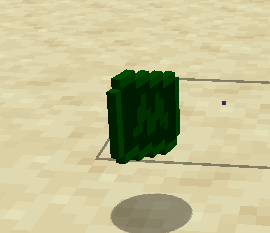
### This resource pack changes the texture of an emerald so that it looks like money
Warm Mojangles
This fontpack changes the color of the default font in Minecraft to be more pleasing to the eye.
To install it, make sure to select it in the resource packs screen and put it on top of other font packs.
# MY OTHER FONTS
– [Marga Font by SourAlien](https://modrinth.com/resourcepack/marga-font-by-souralien)
– [Paramita Font by SourAlien](https://modrinth.com/resourcepack/paramita-font-by-souralien)
– [PP Font](https://modrinth.com/project/pp-font)
– [Anicca Font by SourAlien](https://modrinth.com/resourcepack/anicca-font-by-souralien)
– [Tiny Bold Font](https://modrinth.com/resourcepack/tiny-bold-font)
– [SAS SMALL CAPS FONT](https://modrinth.com/resourcepack/sas-small-caps-font)
– [sas all lowercase font](https://modrinth.com/resourcepack/sas-all-lowercase-font)
– [Samsara Mono by SourAlien](https://modrinth.com/resourcepack/samsara-mono-font-by-souralien)
– [Ostrakon Font by SourAlien](https://modrinth.com/resourcepack/ostrakon-font-by-souralien)
– [Epsilon Font by SourAlien](https://modrinth.com/resourcepack/epsilon-font-by-souralien)
– [Alice Font](https://modrinth.com/resourcepack/alice-font)
– [Sleek DR](https://modrinth.com/resourcepack/sleek-dr)
– [Synesthete’s Dream](https://modrinth.com/resourcepack/synesthetes-dream)
– [HD B&W Font](https://modrinth.com/resourcepack/hd-bw-font)
WardSS
# WardSS 1.4
## Description:
A powerful Minecraft plugin for managing staff controls (ScreenShare) with advanced features.
## Features:
freeze_system:
– command: “/ss ”
description: “Freeze a player for screening”
– automatic_teleport: “Moves staff and player to a predefined location”
– custom_titles: “Display titles/subtitles when a player is frozen/unfrozen”
– automatic_return: “Player is returned to their original location after unfreeze”
## Private_chat:
– “Exclusive chat between staff and frozen players”
– “Customizable message format”
– “Invisible to other players”
## Report_system:
– command: “/ssreport ”
description: “Report a player for staff review”
– command: “/reportlist”
permission: “wardss.report”
description: “View the list of all reported players”
– “Staff notified when a report is sent”
– “Configurable report broadcasts”
– “Customizable report message format”
– “Improved tab completions for /ssreport ”
## Protections:
– “Block commands for frozen players”
– “Notify staff on command attempts”
– “Automatic ban if a player disconnects during screening”
– “Staff bypass mode for unrestricted movement”
## Commands:
– “/ss – Freeze/unfreeze a player”
– “/ss setlocation – Set teleport location for screenings”
– “/ss bypass – Toggle bypass mode for staff”
– “/ssreport – Report a player for staff review”
– “/reportlist – View all reported players”
permissions:
– “wardss.use – Use the /ss command”
– “wardss.notify – Receive notifications”
– “wardss.bypass – Use bypass mode”
– “wardss.setlocation – Set screening teleport location”
– “wardss.report – Access /reportlist command”
## Configuration:
messages:
– prefix: “&7[&c&lWardSS&7]”
– staff-freeze: “&aYou have frozen %player% for screening!”
– player-frozen: “&cYou have been frozen by %staff%!”
– staff-unfreeze: “&aYou have unfrozen %player%!”
– player-unfrozen: “&aThe screening is over, you have been unfrozen!”
– frozen-title: “&c&lYOU HAVE BEEN FROZEN”
– frozen-subtitle: “&7Do not disconnect or you will be banned!”
– unfrozen-title: “&a&lYOU HAVE BEEN UNFROZEN”
– unfrozen-subtitle: “&7Thank you for your cooperation!”
– no-permission: “&cYou don’t have permission!”
– player-not-found: “&cPlayer not found!”
– already-frozen: “&cThis player is already frozen!”
– not-frozen: “&cThis player is not frozen!”
– teleport-set: “&aThe teleport position has been set!”
– teleport-not-set: “&cThe teleport position has not been set!”
– teleport-usage: “&cUsage: /ss ”
– report-sent: “&aReport sent successfully!”
– report-received: “&7You have received a new report”
– report-broadcast: “&7New report: &c%report%”
– report-submitted: “&7Report submitted by &c%player%”
– bypass-active: “&aBypass mode activated”
– bypass-inactive: “&cBypass mode deactivated”
– private-chat-format: “&8[&cSS&8] &7%player%: &f%message%”
– player-quit: “&c%player% disconnected during screening!”
– command-blocked: “&cYou cannot use commands while frozen!”
– command-attempt: “&c%player% attempted to use command: %command%”
### settings:
– notify-staff: true
– prevent-commands: true
– prevent-movement: true
– prevent-interaction: true
– prevent-damage: true
– title-fade-in: 10
– title-stay: 100
– title-fade-out: 10
## Installation:
– “Download the JAR from the releases section”
– “Place it in your server’s plugins folder”
– “Restart the server”
– “Configure config.yml as needed”
– “Set the teleport location with /ss setlocation”
## Requirements:
– “Bukkit/Spigot Server 1.8+”
– “Java 8 or higher”
– “Properly configured permissions”
## Additional_notes:
– “Ensure permissions are correctly set in your permissions plugin”
– “Recommended: Set teleport location in a secure, enclosed area”
– “Check for updates regularly for new features and fixes”
## License: “All Rights Reserved – No part of this plugin, including source code and resources, may be used, copied, modified, or redistributed without the explicit permission of the author.”