XaeroSupport

Please join my Discord to get
updates and for me to fully assist you with bugs,
questions, or suggestions.
Discord: [**click here**](https://drak.gg/discord)

## XaeroSupport
Adds XaeroMinimap and XaeroWorldMap support to your Minecraft server!
## Definitions
**Xaero Server-Specifics**:
– How filled out your maps are on a specific world. (The loaded/filled in chunks when you open your map for a specific world.)
– Waypoints.
**Backend Server**:
– A Minecraft server behind a Minecraft proxy that is also not a Minecraft proxy.
**Minecraft Proxy**:
– Such as:
– Velocity and forks.
– BungeeCord and forks.
**Server Id**:
– A unique identifier (that is a number) that tells players’ Xaero mods (on the client) that your server is your server.
## FAQ
**Q**: Does this affect performance?
**A** (Simple): No.
**A** (Full): Most plugins won’t affect performance, even if they are bigger plugins. What effects performance is how the plugins do operations with your server. This plugin does no operations, it is all just packets and it only sends packets when a player joins.
**Q**: Is this a `1:1` (`1 to 1`) replacement of the Xaero **mods** (server-side), but as a **plugin**?
**A** (Simple): No, but eventually yes.
**A** (Full): Right now, all this does is add support for `Xaero Server-Specifics` (look in the `Definitions` to define). Eventually, I will add more `1:1` functionality from the Xaero mods.
**Q**: Why would I use this if it is not a `1:1` replacement?
**A** (Full): Well, keep in mind that eventually it will be. But, in the mean time, this is extremely useful for `Minecraft Proxies` because it makes it so each of your `Backend Servers` can have their own `Xaero Server-Specifics` (look in the `Definitions` to define) — this is very helpful due to how Xaero stores these in your game’s files.
**Q**: What would happen if I don’t use this, or something like this and I have players who use Xaero’s mod join my server?
**A** (Full): Xaero used to keep `Xaero Server-Specifics` defined per world/server name. Which is an issue if you have multiple servers you join with the same name (i.e. if you have all your server’s named `Minecraft Server` — which is the default). Xaero recently added functionality to look at the IP that players used to join your server to differentiate the `Xaero Server-Specifics`, but this only works if you have an updated mod and if your server isn’t behind a `Minecraft Proxy`. **If the players’ mod thinks you are on the same server/world *when you are not*, it will overwrite/reset the map data it already has filled out, or even delete or add some way points. This plugin fixes that.**

– No more need for Paper forks!
– Some paper forks (such as `Leaf` and `DivineMC`) add exactly what this plugin does directly into your server software, this plugin adds it as a plugin so you don’t need to rely on `Leaf` or `DivineMC` to be stable.
– Easy set up! (Drag and drop!)
– It automatically generates a `Server Id` for your server.
Xaero’s Vanilla GUI
This resource pack customizes Xaero’s Minimap to seamlessly blend with Minecraft’s vanilla aesthetic. Enjoy a minimalistic design with colors and icons that match the base game, bringing a consistent and immersive feel to your adventures. Ideal for players who want the functionality of Xaero’s Minimap without straying from the classic Minecraft look.
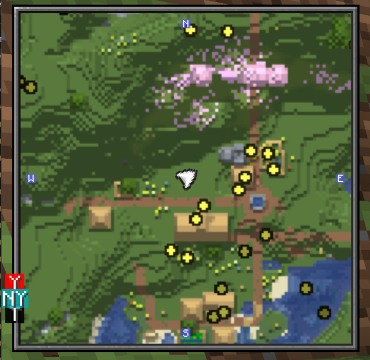
### USE XAEROPLUS TO FIX THE CURSOR PLACEMENT!
Further more with this resourcepack, I suggest [Xaero’s Map Frame](https://modrinth.com/resourcepack/xaeros-map-frame) highly to go along with the aesthetic!
Xaero map RU-UA
## Xaero map RU-UA
**RU Это полный перевод(кроме разовых, тестовых функций) мода Xaero world map, если у вас с ним будут проблемы пишите в наш трекер проблем**
**UA Це повний переклад (крім разових, тестових функцій), мода Xaero world map, якщо у вас з ним будуть проблеми пишіть у наш трекер проблем**
X Ray | Spectator xray
# **🕵️♂️ X-Ray for Spectator Mode**
**Enhance your Minecraft Java experience with a lightweight, “one-click by activating spectator” X-ray solution. By simply switching to Spectator Mode, this pack highlights ores and hidden structures, making resource gathering or world-checking a breeze.**
**🚀 How to Use**
For the best results, follow these simple steps:
– Import & Activate: Add the resource pack to your resourcepacks folder and enable it in-game.
– Optimize Visuals: Turn Smooth Lighting: OFF in your Video Settings to make ores glow and stand out against the darkness.
– Enter Spectator Mode:
– Type /gamemode spectator in the chat.
– Pro Tip: Use the shortcut F3 + N to toggle instantly.
–
* 📸 Results
Check out the visibility improvements
# **Results**


📜 Terms of Use
I want you to enjoy this pack, but please respect the following guidelines:
✅ Allowed
* Showcase: Use this pack in your videos or streams (please provide a link to the official download page).
* Personal Use: Feel free to edit the files for your own private use.
❌ Not Allowed
* Monetized Links: Do not redistribute this pack via AdFly, Linkvertise, or similar services.
* Re-uploading: Do not edit and re-share this project as your own.
> [!IMPORTANT]
> Feedback: If you feel the need to leave a low rating, please leave a comment explaining why so I can improve the pack for everyone!
>
❤️ Support the Creator
If you find this tool helpful, consider supporting my work:
Support me on Ko-fi
Would you like me to help you draft a specific “Frequently Asked Questions” section to help reduce common support queries?
WU_SHUANGCB’s Zombie Skin
**描述**
计划用于在我的模组包中,现在它被提前释放。
适用于 Minecraft 的 WU_SHUANGCB’s Zombie Skin(版本 1.7.1 至 1.21.1)
**特征**:独特僵尸皮肤使僵尸看起来更加具有攻击性。
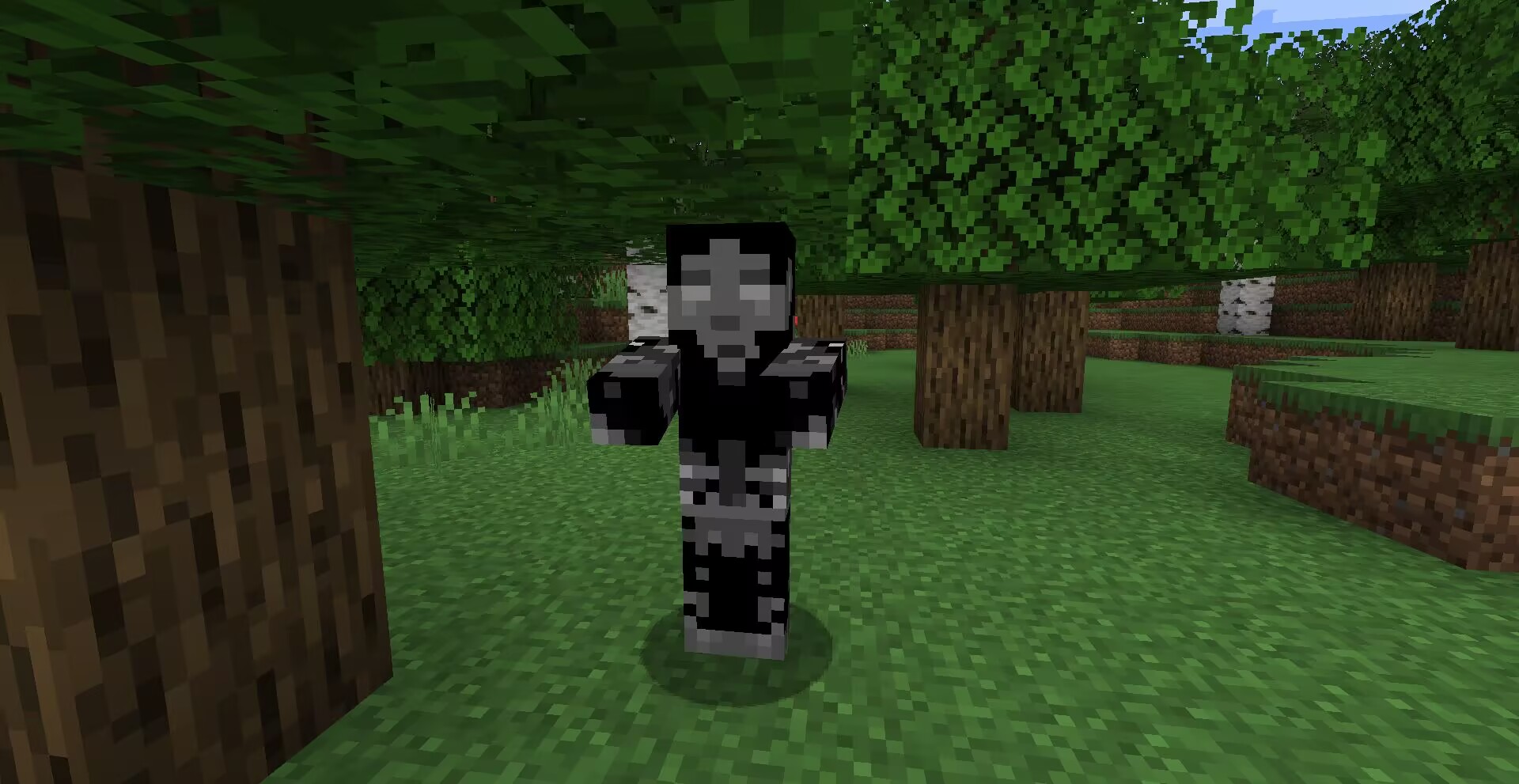
**方式**:高清修复或[ETF实体纹理特性等效模组](https://www.curseforge.com/minecraft/mc-mods/entity-texture-features-fabric)。
![以防万一请使用最新版[ETF]实体纹理特性!](https://cdn.modrinth.com/data/cached_images/8acb9763063226da407072ec6b8c2bb456cdefa1.png)
**兼容**:目前新增了[CrimsonSteve’s more mobs](https://www.curseforge.com/minecraft/mc-mods/crimsonsteves-more-mobs)和[Mutant More](https://modrinth.com/mod/new-mutant-more)模组的僵尸纹理。与其他纹理使用时不需要将它位于顶部,该纹理存在一个TH版本[在这里](https://modrinth.com/resourcepack/wu_shuangcbs-zombie-skin,-but-with-th),将来会兼容更多。
其他功劳:Tissou为我的音频提供灵感,
EnderB_C_为我提供灵感。
您可以随意使用,若注明出处会更好。
**Description**:
Planned for use in my modpacks, now that it’s being released early.
WU_SHUANGCB’s Zombie Skin for Minecraft (Versions 1.7.1 to 1.21.1)
**Features**: Unique zombie skins make zombies look more aggressive.

**Method**: OptiFine or equivalent [[ETF] Entity Texture Features mod](https://www.curseforge.com/minecraft/mc-mods/entity-texture-features-fabric).

**Compatibility**: A new zombie texture for [CrimsonSteve’s more mobs](https://www.curseforge.com/minecraft/mc-mods/crimsonsteves-more-mobs) and the [Mutant More](https://modrinth.com/mod/new-mutant-more) has been added for now. There is no need to have it at the top when using it with other textures, a TH version of this texture exists [here](https://modrinth.com/resourcepack/wu_shuangcbs-zombie-skin,-but-with-th) and will be compatible with more in the future.
Additional Credits: Tissou for providing inspiration for my audio,
EnderB_C_ for providing inspiration.
Feel free to use it, and it would be appreciated if you give credit.

WorldResourcepacks
######  Made in Germany with love (and [beer](https://s.moep.tv/beer))
######

_Did you ever want to set a different server resource pack for your each of your worlds? Or switch your current resource pack with just one command? Then you came to the right place!
_
This plugin lets you set one Server Resource Pack for each of your worlds or event your whole server! It also allows you to specify packs that should be usable on multiple worlds!
It is also compatible with my [Bungee Resourcepacks](https://modrinth.com/plugin/bungeeresourcepacks) and [Velocity Resourcepacks](https://modrinth.com/plugin/velocityresourcepacks) plugin and will not make the player redownload a resource pack after server switching if it got already applied by Bungee/Velocity Resourcepacks on another server!
**Please check if there are newer [development builds](https://ci.minebench.de/job/resourcepacksplugins/) before reporting issues!**
> Please note that the Vanilla Minecraft client only applies server resource packs that are smaller than **250MiB**! (50MiB before 1.15, 100MiB before in 1.18)
>
> Also certain new **SSL certificates** for URLs (like Let’s Encrypt) do not work with the old Java version shipped with Minecraft (Java 1.8.0_51, [a bug report](https://bugs.mojang.com/browse/mc-143768) regarding that has been filed with Mojang) so you’ll have to either use a different certificate or a non encrypted download (not recommended!)
**Note:** This plugin does not work with older Minecraft versions above 1.8 that do not support server resourcepacks!
### **Features**
* Set different server resourcepacks per world or whole server
* Match world names with regex!
* Commands to configure the plugin ingame
* Language system with messages depending on the locale of the client
* Simplified compoment/json message formatting syntax ([MineDown](https://wiki.phoenix616.dev/library:minedown:syntax))
* Configurable delay before sending the pack to a player
* Remembers which pack a user has currently applied and doesn’t resend on world switch
* Let the user set the pack himself. The pack can be re-applied on each login and will be used for resets on servers that don’t have the pack
* Inform the user which pack the server send them if it was done automatically
* [ResourcePackSendEvent](https://docs.phoenix616.dev/resourcepacksplugins/de/themoep/resourcepacksplugin/bukkit/events/resourcepacksendevent.html) and [ResourcePackSelectEvent](https://docs.phoenix616.dev/resourcepacksplugins/de/themoep/resourcepacksplugin/bukkit/events/resourcepackselectevent.html) for developers to react on the sending or selecting of a pack in their own plugins
* Send the correct pack format depending on the client’s version (requires ViaVersion or ProtocolSupport) with pack-variants either via the version, protocol number or pack format id.
* Automatically generates the sha1 hashes!
* Compatible with [AuthMe Reloaded](https://www.spigotmc.org/resources/authme-reloaded.6269/), [OpenLogin](https://www.spigotmc.org/resources/openlogin-1-7x-1-19x.57272/), NLogin, [LibrePremium](https://www.spigotmc.org/resources/librepremium-proxy-authorization-plugin-automatic-login-2fa.101040/), JPremium.
Do you need it to be compatible with more plugins? [Contact me](https://github.com/phoenix616/resourcepacksplugins/issues/new)!
### **Statistics**
* [McStats.org](http://metrics.griefcraft.com/plugin/worldresourcepacks/)
* [bStats.org](https://bstats.org/plugin/bungeecord/worldresourcepacks)
### **Commands**
To execute every /wrp command you need the `worldresourcepacks.command` permission!
**/wrp reload [resend]** – `worldresourcepacks.command.reload` – Reloads the config file; resends the packs to every online player if the 2nd argument is “resend”
**/wrp version** – `worldresourcepacks.command.version` – Shows the version of this plugin
**/wrp generatehashes** – `worldresourcepacks.command.generatehashes` – Manually generate the resource pack hashes
**/wrp addpack ** – `worldresourcepacks.command.addpack` – Add a new pack
**/wrp pack ** – `worldresourcepacks.command.pack` – View and edit an existing pack
**/wrp listassignments** – `worldresourcepacks.command.listassignments` – View all world assignments
**/wrp deleteassignment ** – `worldresourcepacks.command.deleteassignment` – Delete a world assignment
**/wrp assignment ** – `worldresourcepacks.command.assignment` – View and edit a world assignment
**/wrp globalassignment** – `worldresourcepacks.command.globalassignment` – View and edit the global assignment
**/resetpack [] []** – `worldresourcepacks.command.resetpack` – Reset the pack (of a player) to the empty one or the stored pack. (Like what would happen if you joined a server without any pack) If is set to false the stored pack of the player is reset too.
To execute every /usepack command you need the `worldresourcepacks.command.usepack` permission!
To execute it for other players you need `worldresourcepacks.command.usepack.others`!
To have access to a specific pack a player needs the `worldresourcepacks.pack.` permission or the one defined for the pack in it’s config section!
**/usepack** – List all packs available to you
**/usepack []** – Send a specific pack to yourself or another player
### **Config**
The config.yml allows you to configure everything you can do set up via the commands and a lot more, take a look at the commands in the [file on GitHub](https://github.com/phoenix616/resourcepacksplugins/blob/master/bukkit/src/main/resources/config.yml) for an explanation on all options! (Some might only be available on the [latest development builds](https://ci.minebench.de/job/ResourcepacksPlugins/)!
### **About the client freeze**
> **This should no longer be an issue starting with 1.20.3!**
When a server resource pack is send to a client it will shortly freeze after the download is complete. (Same as manually applying a local pack) This happens because the client has to reload all resources, check which resources overlap and do some other calculation and manipulation with them. (Like stitching all the textures together to a single image like they were in the first texture pack format) It’s not a download issue as the client will locally cache the pack files and not re-download them if their hash didn’t change.
How long this takes generally depends on the PC’s performance and the size of the textures (HD packs take longer) that are used in all resource packs that the player has applied. (So even if the server resource pack doesn’t contain any HD textures or textures at all the client will still completely reload all locally applied resource packs) This is something that has to be fixed in the client by Mojang for example by only reloading resources that changed.
**1.14, 1.15 and 1.16 have some major improvements there and 1.20.3 basically fixed it all so suggest players to use these if they have issues with your server resourcepack!**
### **Dev-Resources**
The source is available on [GitHub](https://github.com/phoenix616/resourcepacksplugins) and licensed under the [GPLv3](https://github.com/phoenix616/resourcepacksplugins/blob/master/license).
Development builds can be found on the Minebench.de [Jenkins](http://ci.minebench.de/job/resourcepacksplugins/).
There are also some [Javadocs](http://docs.phoenix616.dev/resourcepacksplugins/) if you intend to develop plugins based on mine.
### **Support**
You can receive support in the [resource discussion thread on SpigotMC](https://www.spigotmc.org/threads/world-resourcepacks.125581/), the [GitHub issue tracker](https://github.com/phoenix616/resourcepacksplugins/issues), [my IRC channel](https://irc.phoenix616.dev/), or [my Discord](https://phoenix616.dev/discord).
### **Metrics**
This resource includes [bstats.org](https://bstats.org/) metrics. If you don’t want bstats to collect info on your server then you can disable it in the *bStats/config.yml* file. The license the used bStats-lite class is under can be found [here](https://github.com/btobastian/bstats-metrics/blob/master/license).
#####
*This resource is distributed without any warranty or liability by the author. Read more about it [here](https://github.com/Phoenix616/ResourcepacksPlugins/blob/master/LICENSE#L589-L610)*
WorldLock

* [**BukkitOfUtils**](https://modrinth.com/plugin/bukkitofutils)

Please join the Streamline Hub Discord in order to get updates and for me to fully assist you with bugs, questions, or suggestions.
Discord: [**click here**](https://dsc.gg/streamline)

Block players from entering or teleporting to specified worlds — All configurable with commands.

This offers a very simple configuration and setup all while remaining very light-weight.

1. Download and install BukkitOfUtils. Found here: [BukkitOfUtils](https://modrinth.com/plugin/bukkitofutils)
2. Download the correct version of this plugin for you server version.
3. Place in your `plugins` folder.
4. Stop server.
5. Start server.
6. Use to your liking.

## How to block a world
1. Install plugin. (Shown above.)
2. `/manageworlds add ` – where `` is replaced with the world you want to block.
## Notes
Players with operator or the `*` permission can access all worlds by default.
To disable these players from bypassing the world block, set their permission for `worldlock.bypass.*` to false.
## Functions
* Block specified worlds from:
* Teleportation.
* Moving to.
* Portal-Warping to.
* List blocked worlds.
* Bypassable with permissions.
* Permission: `worldlock.bypass.`

## Commands
* `/manageworlds`
* `/manageworlds add `
* Adds a world to the blocked worlds.
* `/manageworlds remove `
* Removes a world from the blocked worlds.
* `/manageworlds list`
* Lists all worlds in the blocked worlds list.
WorldChatter

# Security Features
### Anti-Swear
This helps to prevent any sensitive or inappropriate words from your chat to help keep it clean.
It has the ability to customize words (BlackList / WhiteList).
### Anti-Repeat
This prevents players from repeating the same words or letters over and over again.
### Anti-ADs
It will block any type of IPs or URLs from the player.
### Anti-Caps
This helps to prevent the player from sending large uppercased messages in the chat!
# Configurations!
### Detection Messages!
If anyone triggers one of the security settings, you will be alerted, and they will be alerted as well.
“`yaml
DetectedMessage: “&c%player_name%’s message got detected by the following flags &e[%flags%] n———-> &6%message%” # Change how the detection message is sent
DetectedPlayerMessage: “&cYou have been detected by the following flags &e[%flags%]” # Changes how the message is sent to the player (set it to “” if you don’t want to send it)
“`
### Switch Messages (For Proxies)
This will notify everyone in the server or the previous and current server when a player switches from one server to another!
“`yaml
# This switch message is only available for both BungeeCord & Velocity
SwitchSettings:
enabled: true
global: true # false is just the current server & previous server / true all the servers
premessage: “&a%player_name% &ehas switched from &6%previous_server% &eto &f%current_server%”
comessage: “&a%player_name% &ehas arrived from &6%previous_server%”
“`
### Others
“`yaml
SpamMessage: “&cYour message is blocked by the &eAnti-Spamn&7Remaining time: %duration% seconds” # Changes how the anti-spam message is sent (set it to “” if you don’t want to send it)
ChatClearMessage: “&eThe Chat has been cleared by &a%sender%” # Changes how the cleared chat message gets sent
NoPermissionMessage: “&eYou’re not allowed to use this command!”
“`
# Utilities Features!
### Aliases
This feature enhances WorldChatter’s placeholders by allowing customization of player and place names using two new placeholders: `{player_name}` and `{player_place}`.
“`yaml
aliases:
enabled: true
place:
world: “&aOverworld&r”
player:
OmarOmar93: “OmarOmar93 &o&eTest Omar Yes”
“`
### Chat Locking
This allows staff or console to lock or unlock the chat using `wc lock`!
“`yaml
ChatLockMessage:
enabled: true
public: true # TRUE | Shows the message to everyone or FALSE | just the sender
locked: “&eThe Chat is now &cLOCKED &eby &a%sender%”
unlocked: “&eThe Chat is now &aUNLOCKED &eby &a%sender%”
currently: “&eThe Chat is Currently &clocked”
“`
### Clear Chat!
Clear the chat with `wc clear`!
### Custom Join and Quit Messages!
Customize join and quit messages with special permissions for certain players.
“`yaml
Join:
enabled: true
level: 1 # 1 is just current place / 2 the whole server
place: “world” # place to send the message
message: “&a%player_name% &fhas joined the game!”
permmode: true # Checks to use the permissions mode to send messages / disabled will use default message
permissions:
“admin”:
permissions: [ “worldchatter.control”, “*” ]
message: “&a%player_name% &fhas joined the gamen&e[Teleport to %player_name%]”
Quit:
enabled: true
level: 1 # 1 is just current place / 2 the whole server
place: “world” # place to send the message – type %place% to make it the last player’s place
message: “&a%player_name% &fhas left the game!”
permmode: false # Checks to use the permissions below to show a different message or no!
permissions:
“admin”:
permissions: [ “worldchatter.control”, “*” ]
message: “&a%player_name% &fhas left the game &8You have nothing to do to that player :P”
“`
### Notifications
Customize notification sounds for detections.
“`yaml
notification:
enabled: true
staff: # notification detection for staff
sound: “BLOCK_NOTE_BLOCK_PLING” # the sound to play as the notification you can find it here by https://helpch.at/docs/SERVER_VERSION_GOES_HERE/index.html?org/bukkit/Sound.html
volume: 1 # volume of the sound
pitch: 1 # pitch of the sound
player: # notification detection to the player
sound: “BLOCK_NOTE_BLOCK_PLING”
volume: 1
pitch: 1
“`
### Channels
Introducing the new **Channels** Feature!
Add Places or Players **or both if you would like!** Into each other and priortize them from top to bottom according to the importance of each channel!
“`yml
GlobalSending: true
channels:
admin:
players:
– “OmarOmar93”
– “HoneySalted”
– “Notch”
places:
– “World”
– “Lobby”
main:
places:
– “world”
– “world_nether”
– “world_the_end”
“`
### Debug Mode – (Implemented in Channels only Currently)
The New Debug mode is what prints out more information about WorldChatter! like, Warnings, Errors and infos for each action happening inside the plugin!
“`yml
debug:
enabled: true
info: “&7[&9WorldChatter Debugger &r| Info&7]&r ”
warning: “&7[&9WorldChatter Debugger &r| &eWarning&7]&e ”
error: “&7[&9WorldChatter Debugger &r| &4Error&7]&4 ”
“`

# WorldChatterAPI
Learn more about the API and its capabilities by [Clicking here!](https://github.com/OmarOmar93/WorldChatterAddonChecker)
# Donate!
If you’d like to support the development of WorldChatter and other projects, consider donating!
[Buy me a Coffee!](https://www.paypal.com/paypalme/omaomar93)
# Other Projects!
[WorldCaster](https://modrinth.com/plugin/worldcaster)
Standalone Broadcast Add-on
# Supported Plugins!
– PlaceholderAPI
– Multiverse-Core
– ItemsAdder (With PlaceholderAPI)
– Luckperms
– And other plug-ins that have PlaceholderAPI’s placeholder!
# Massive thank you to:
– **Abdelaziz189356** – For the help with 2.0, 2.1, and 3.0 being possible, 3.0 Tester!
– **yousife_7aloly** – The tester for 2.0!
– **FastEverlast** – The Tester for 2.4!
– **Fabrizio Santana, 4zy** – 3.0 Testers
There are lots of additional features to explore!
Thank you for taking the time to read this and use the plugin!
WorldManager
# WorldManager
WorldManager is a simple plugin allowing worlds to be automatically reset on demand.
**NOTE:** The plugin is currently in beta, so please check out [here](https://github.com/Zffu/WorldManager) to suggest features you’d like!
## Commands
### /worldmanager
This is the main command of the plugin, allows to have a list of the commands.
### /worlds
This command allows you to have information on worlds handled by WorldManager.
### /loadworld
This command allows you to load a world handled by WorldManager.
### /unloadworld
This command allows you to unload a world handled by WorldManager.
### /createworld
This command allows you to create a world reset option for the specified world.
## Permissions & Messages
WorldManager allows its users to modify the required permissions and messages to whatever they’d like. In order to do so, please head to the config
## API
WorldManager comes with an API allows you to use its features without the plugin.
Wool Revamped
# **Wool Revamped** by Lvminosity
**Wool Revamped** is a 16x resource pack with simple and cool wool textures, mainly for Bedwars / FPS Boost
Note: this pack is generally intended to be used as an overlay for many other bedwars texture packs, however it is still compatible with other packs