XItemsRemover
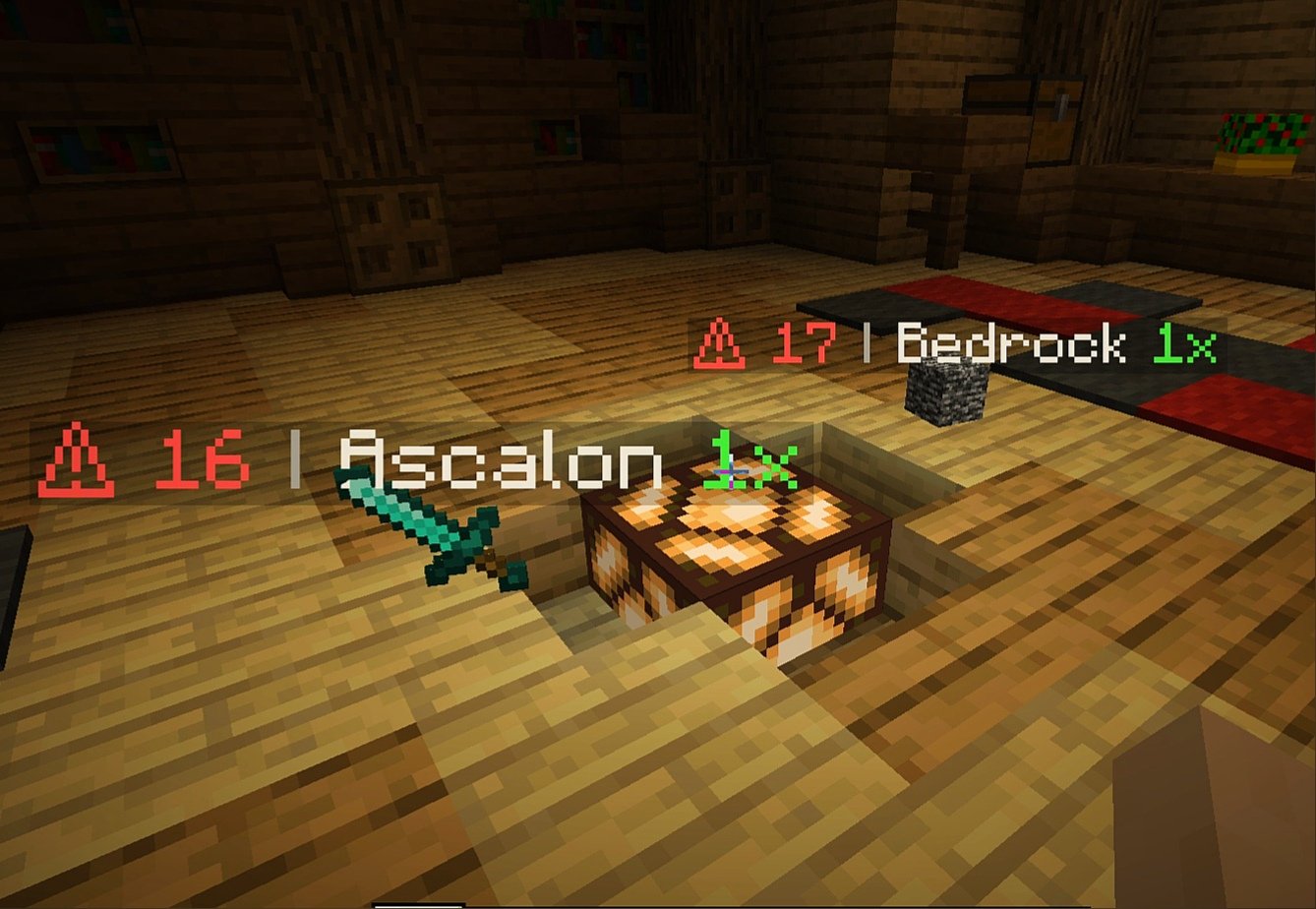
XItemsRemover – is a small plugin that automatically removes dropped items with a timer displayed on these items until they are removed. The time until deletion is configured in the plugin configuration.
IMPORTANT
If you have items with displayed name ‘AIR‘ – specify ‘api-version’ in plugin.yml with version of your server!
For example, if your server version is 1.16.5, add the following line to plugin.yml of XItemsRemover:
api-version: 1.16
### Configuration
“`
Items:
# Format:
# ‘‘: “”
# Available placeholders:
# {time} – time remaining before remove (in seconds)
# {display_name} – display name of itemstack (if empty – used localized material name}
# {amount} – itemstack amount
Display-name-formats:
‘1’: “§c⚠ {time} §7| §f{display_name} §a{amount}x”
’10’: “§c{time}”
Remove-timer:
# Timer for removing an item in seconds
Default: 30
After-player-death: 180
Async: true
# Section for specifying a unique timer or display name
# for certain materials
# Format:
# :
# : 15
# :
# :
#: false
# If you only need to edit one parameter
# (name or time) you can just delete the line with the second.
# If you need the plugin not to track a certain type of materials, then set ‘tracked: false’
Custom-materials:
COBBLESTONE:
Timer: 15
Display-name-formats:
’15’: “Cobblestone :D”
STONE:
Timer: 10
GRASS:
Display-name-formats:
’30’: “Grazz”
SAND:
Tracked: false
# Worlds in which plugin does not work
Restricted-worlds:
– “restricted_world”
“`
### Commands and permissions
Command | Permission
————- | ————-
‘**/itemsremover**’ [Alias: ‘**/ir**’] – prints all plugin commands. | items.remover.commands.help
‘**/itemsremover help**’ – prints all plugin commands. | items.remover.commands.help
‘**/itemsremover reload**’ – reloads plugin configurations. | items.remover.commands.reload
XGamemode

### “*You’re not switching modes, you’re switching dimensions.*”
~~*2000 Downloads?! Thanks!*~~
# 1 Feature
## 1.1 Offline Player
You can change the gamemode of a player, **even he (or she) was offline**.
## 1.2 Permissions
Allow permission group plugins (_like Luckperms_) to manage **which gamemodes can be switched to** and **which gamemodes cannot be switched to**.
_e.g. Allow to switch to survival mode but not to any other mode._
## 1.3 Alias
**/gamemode** is simplified to **/gm** and **/g**.
_(of course you can still use /gamemode)_
## 1.4 Cross-Server Storage
Support **MySQL** and **SQLite** storage backends. Player gamemodes are saved and synchronized across multiple servers in a network.
## 1.5 Folia Support
**Fully compatible with Folia servers** — using region-based scheduling for optimal performance.
## 1.6 Lightweight
The Plugin size is only **~25 KB** and has **almost no impact** on server performance!
# 2 Caution
## 2.1 Shortcut Keys
If you need to use shortcut keys such as **F3+F4**, please install another plugin **F3NPerm**.
## 2.2 Versions
**1.8.X +**
**All Bukkit based server** (Paper, Spigot, Purpur, Folia, etc.)
# 3 Commands
“`markdown
– /xgamemode
– /xgamemode reload
– /gm
– /gm
– /gm -all
– /gm -online
– /gm -offline
/g = /gm = /gamemode
/xg = /xgm = /xgamemode
“`
# 4 Permission Node
“`markdown
– xgamemode.survival
– xgamemode.creative
– xgamemode.adventure
– xgamemode.spectator
– xgamemode.others.survival
– xgamemode.others.creative
– xgamemode.others.adventure
– xgamemode.others.spectator
– xgamemode.reload
– xgamemode.admin
“`
# 5 Custom Config
## 5.1 Basic Settings
“`yaml
lang: en-US
“`
**Language** setting
“`yaml
default_gamemode: survival
“`
If a **new player joined your server**, **which gamemode should he (she) be**?
**survival**, **creative**, **adventure**, **spectator**
“`yaml
show_logo: true
“`
Show logo or not when plugin enabled.
**true**, **false**
“`yaml
debug: false
“`
Enable debug logging for troubleshooting.
**true**, **false**
## 5.2 Storage Configuration
“`yaml
storage:
type: yaml
“`
**Storage backend type**: **yaml**, **sqlite**, **mysql**
### SQLite Example
“`yaml
storage:
type: sqlite
# No additional config needed — data.db will be created automatically
“`
### MySQL Example
“`yaml
storage:
type: mysql
mysql:
host: localhost
port: 3306
database: minecraft
username: root
password: your_password
“`
## 5.3 Custom Messages
“`yaml
messages:
en-US: # Original en-US Language by Wind_Blood
reloaded: “&aXGamemode Reloaded!”
# ……
custom_lang: # Add Your Custom Language!
reloaded: “Thank you for using XGamemode!”
# ……
“`
**Customizable Messages**. You can add **your own new language** here!
## 5.4 An Example config.yml
“`yaml
lang: msgForMyServer
default_gamemode: survival
show_logo: false
debug: false
storage:
type: yaml
messages:
msgForMyServer:
reloaded: “很明显作者是中国人 会说中文很正常 然后我也不知道为什么我要在一堆英文里写一段中文 挺好笑的 哈哈哈 对了 看到我就是缘分 XGamemode 官方 QQ 反馈交流群:点击链接加入群聊【XGamemode 反馈群】:https://qm.qq.com/q/rpTk5LK7w4 欢迎加”
usage: “&cUsage: /gm [player/-all/-online/-offline]”
console_usage: “&cUsage: /gm ”
invalid_gamemode: “&cInvalid Gamemode!”
invalid_player: “&cInvalid Player!”
gamemode_self: “&aYour Gamemode Changed to {mode}!”
gamemode_all: “&aChanged All Player’s Gamemode to {mode}!”
gamemode_online: “&aAll Online Player’s Gamemode Changed to {mode}!”
gamemode_offline: “&aAll Offline Player’s Gamemode Changed to {mode}!”
no_permission: “&cYOU ARE NOT ALLOWED TO DO THAT!”
gamemode_other: “&a{player}’s Gamemode Changed to {mode}!”
gamemode_other_offline: “&a{player} (Offline)’s Gamemode Changed to {mode}!”
“`
# 6 Developer API (Async)
## Get Instance
“`java
Main plugin = Main.getInstance();
“`
## Get Player Gamemode
“`java
plugin.getPlayerMode(playerUUID).thenAccept(mode -> {
if (mode != null) {
// mode is GameMode.SURVIVAL, CREATIVE, ADVENTURE, or SPECTATOR
// Player is online or has saved data
} else {
// Player not found or no saved gamemode yet
}
});
“`
## Set Player Gamemode
“`java
plugin.setPlayerMode(playerUUID, GameMode.SURVIVAL).thenAccept(success -> {
if (success) {
// Gamemode changed and saved successfully
// Works for both online and offline players
} else {
// Failed to save (database error, etc.)
}
});
“`
## Listen to Gamemode Changes
“`java
@EventHandler
public void onGamemodeChange(GamemodeChangeEvent event) {
Player player = event.getPlayer(); // Online player only
GameMode oldMode = event.getOldMode();
GameMode newMode = event.getNewMode();
}
“`
> **Note:** All APIs are **fully async** and thread-safe. The `GamemodeChangeEvent` is only fired for **online players** when their mode is actually changed. The `getPlayerMode()` method returns `null` if the player has no saved gamemode data.
# 7 Reprint Post
www.minebbs.com/resources/xgamemode.11041
hangar.papermc.io/Wind_Blood/XGamemode
modrinth.com/plugin/xgamemode
# 8 Feedback
Just e-mail me with **[email protected]**. Thanks!
XG7Lobby
# I’ll record it again…
# This plugin depends on a core! Download it below:
https://modrinth.com/plugin/xg7plugins
—
# XG7Lobby – Complete Lobby/Hub System
## 📖 What is XG7Lobby?
**XG7Lobby** is a powerful lobby/hub management plugin designed to revolutionize the server join experience. With a wide range of configurable options, the plugin offers **more than 20 customizable features**, including: **Global PVP**, **interactive menus**, **animated scoreboard/tablist**, **custom forms for Geyser**, and much more!
—
## ⚡ Main Features
### 🏰 Multi-Lobby System
Configure **as many lobbies as you want**, including cross-server locations with SQL database support! Players can easily teleport using the `/lobby` command, with a configurable cooldown system and the option to teleport to a specific lobby ID.
### 🎨 Advanced Menu System
Improve your lobby experience with XG7Lobby’s menu system. You can use custom Geyser forms, personalized GUIs, and configurable hotbars — all adjustable to your liking!
### 📊 Scoreboard, Tablist, Bossbar & More
Bring your server to life with **fully animated** scoreboards, tablists, and bossbars. Display useful information such as player statistics, server status, or events in a visually appealing and dynamic way.
### 🎉 Join, Quit & First Join Events
Customize what happens when players join or leave the server, and make a great first impression on new players with a special welcome. Add messages, sounds, effects, or even rewards to make joining and leaving more memorable.
### ⚔️ Global PVP System
Does the lobby sometimes feel boring? With the global PVP system, that won’t be a problem anymore! Let players fight each other in the lobby with the powerful system provided by XG7Lobby, including full statistics for kills, deaths, and KDR.
### 🦘 Multi-Jump System
Go beyond the classic double jump! Configure triple jumps, infinite jumps, or unique jump effects to add fun mechanics to your server.
### 🚀 LaunchPad
Add excitement with customizable launchpads that throw players into the air. Perfect for hubs, lobbies, or minigame arenas with a fun and interactive touch.
### 🛡️ Complete Moderation System
Keep your server safe with robust moderation tools, including warning systems, mute, kick, ban, IP-ban, and automatic punishments based on configurable infraction levels.
### 💬 Advanced Chat Protection
A complete protection system including anti-swearing, anti-spam, and blocking unwanted commands. Keep your chat clean and organized automatically.
### 🔧 Build System
Control who can build in the lobby using the `/build` command, with full protection against block breaking and placing.
### 👻 Vanish System
Allows staff members to become invisible to other players using the `/vanish` command.
### ⚙️ Custom Commands
Add your own commands to fit your server’s style. Customize shortcuts, actions, and utilities without needing extra plugins.
### 👤 NPC & Hologram System
Create user interaction by taking advantage of the new NPC and hologram creation features!

—
## 📋 Full Feature List
* Fully configurable
* Multiple lobbies
* Global PVP system
* Custom menus (GUI, forms, and hotbar)
* Animated scoreboard, tablist, and bossbar
* Multi-jump system
* Launchpad
* Moderation system
* World-based lobby
* Join and quit events
* First join events
* Repeating events
* Auto broadcast
* Customizable MOTD
* Build system
* Custom commands
* Vanish system
* Anti-swearing
* Anti-spam
* NPCs and holograms
* Action queue system
* Preferences menu
* Hide chat
Xenon
## Xenon
Xenon is a lightweight, open-source network core plugin designed for small to mid-sized Minecraft networks. It provides essential backend systems to help you manage players, permissions, and moderation across multiple servers.
## Features
* **Grant System** – Flexible permission grants with support for temporary and permanent ranks
* **Rank System** – Fully manageable rank hierarchy for structured permission control
* **Punishment System** – Bans, mutes, warnings, and other moderation tools
* **Gift Card System** – Redeemable codes for ranks, perks, or rewards
* **Alt Detection System** – Identify and manage alternate accounts
* **Advanced Chat Filter** – Blocks most variations of profanity
* **Server Manager** – Execute and broadcast commands across connected servers
* **Many More..** – There is more..
> **Note:** Xenon is not intended for production environments or large-scale networks. If you’re running a larger or more demanding network, consider using heather instead.
## Authors:
– All credits go to matheus.
Xe [16x] [10K&ANNIVERSARY]
If you play Nodebuff, check out Nitrogen
Download it [here](https://cdn.modrinth.com/data/VGFo3zOB/versions/4C88wd5s/%21%20%20%20%C2%A79Nitrogen%2032x%20%C2%A73%5Bv2-FIX%5D%C2%A7f.zip)
—
One year ago, this pack started as a random idea and way too many late-night hours in front of my PC.
Now, a full year later, it’s still here — and better than ever.
Xe & Xe Lite — Anniversary Edition
After a lot of polishing and tweaks, this pack now works smoothly across multiple game modes:
– Practice (Nodebuff, Boxing, Sumo, and more)
– Skywars
– Bedwars
– Minigames
Whether you’re sweating in PvP or just chilling, the visuals stay clean and consistent.
Check the **Gallery** to see how the pack looks in-game.
—
FAQ
Q: How do I enable motion blur?
A: Use Xe (not Xe Lite) and a client with OptiFine.
Go to Video Settings → Shaders → Anti-aliasing and set it to FXAA 4X.
Q: Can I use this pack in my videos?
A: Yes. A link to this page in the description is appreciated, but not required.
Q: How can I support the pack?
A: Making videos or sharing it with others helps a lot. There’s no donation option right now.
—
## 10,000 Downloads // Thank You
Hitting 10K downloads on the 1-year anniversary (in fact, 1.5 year) is honestly wild.
Thanks to everyone who used, shared, and stuck with this pack: more updates coming.
XD’s Utils
## Description
XD’s Utils is a plugin and mod that provides a custom web interface that you can monitor the whole server, create backups to restore points of your server with a simple script to restore to a backup, an API to get and modify data of the server and plugin through sending web requests, and more!
## Features
| Feature | Implementation |
|——————-|—————-|
| Invsee | ✅ |
| AFK Detector | ✅ |
| Bounties | ✅ |
| Custom Shops | ✅ |
| Economy | ✅ |
| Chat Muting | ✅ |
| Chat Censoring | ✅ |
| Disabled Commands | ✅ |
| Disabled Items | ✅ |
| Custom Messages | ✅ |
| Backups | ✅ |
| Web Interface | ✅ |
| Commands | ✅ |
> ✅ : Implemented
>
> 🚧 : Work in Progress
>
> ❌ : Not implemented
## Config
Config Example
“`yml
# /$$ /$$ /$$$$$$$ /$$
# | $$ / $$| $$__ $$| $/
# | $$/ $$/| $$ $$|_//$$$$$$$
# $$$$/ | $$ | $$ /$$_____/
# >$$ $$ | $$ | $$ | $$$$$$
# /$$/ $$| $$ | $$ ____ $$
# | $$ $$| $$$$$$$/ /$$$$$$$/
# |__/ |__/|_______/ |_______/
# /$$ /$$ /$$ /$$ /$$
# | $$ | $$ | $$ |__/| $$
# | $$ | $$ /$$$$$$ /$$| $$ /$$$$$$$
# | $$ | $$|_ $$_/ | $$| $$ /$$_____/
# | $$ | $$ | $$ | $$| $$| $$$$$$
# | $$ | $$ | $$ /$$| $$| $$ ____ $$
# | $$$$$$/ | $$$$/| $$| $$ /$$$$$$$/
# ______/ ___/ |__/|__/|_______/
# ============================ #
# WEB #
# ============================ #
# Enabled (true/false)
enable_web: true
# Hosted Port (1000-99999)
port: 8080
# ============================ #
# BACKUPS #
# ============================ #
# Enabled (true/false)
enable_backups: true
# Folders to back up & Backup interval (Folder Names: Minutes)
folders:
– world: 120
– world_nether: 240
– world_the_end: 240
– plugins/XDs-Utils: 300
# Max folder size (MB) (-1/0 for unlimited)
max_size: 1024
# Max backups (Int) (-1/0 for unlimited)
max_backups: 10
# Compression level (0-9)
compression_level: 7
# ============================ #
# MESSAGES #
# ============================ #
# Message to send when a player joins for the first time (true/false)
enable_first_join_message: true
# %player% – Player’s name
# %message% – Message to send
first_join_message: “%yellow%Welcome %gray%%player% %yellow%to the server!”
# Message to send when a player joins (true/false)
enable_custom_join_message: true
# %player% – Player’s name
# %message% – Message to send
join_message: “%green%+ %gray%%player%”
# Message to send when a player leaves (true/false)
enable_custom_leave_message: true
# %player% – Player’s name
# %message% – Message to send
leave_message: “%red%- %gray%%player%”
# Custom player messages (true/false)
enable_custom_message_format: true
# %player% – Player’s name
# %message% – Message to send
custom_message_format: “%gray%%player% %dark_gray%» %gray%%message%”
# ============================ #
# DISABLED ITEMS #
# ============================ #
# Items to disable (Item IDs)
disabled_items:
# – minecraft:item_1
# – minecraft:item_2
# – minecraft:item_3
# Method to disable items
# 1 – Removes Recipe
# 2 – Removes Recipe & Clears Item
disable_method: 1
# ============================ #
# DISABLED COMMANDS #
# ============================ #
disabled_commands:
# – “/command_1”
# – “/command_2”
# – “/command_3”
# ============================ #
# CHAT CENSORING #
# ============================ #
# Words to censor
censored_words:
# – “censored_word1”
# – “censored_word2”
# – “censored_word3”
# Regex patterns to censor
censor_regex_patterns:
# – “censored_regex_pattern1”
# – “censored_regex_pattern2”
# – “censored_regex_pattern3”
# Method to censor words
# 0 – Do nothing (Only logs)
# 1 – Replaces Words with ‘*’
# 2 – Removes Words from message
# 3 – Do not send message
censor_method: 1
# ============================ #
# ECONOMY #
# ============================ #
# Enable the shop (true/false)
enable_shop: true
# Allow anyone to create shops (true/false)
anyone_create_shops: true
# Enable bounties (true/false)
enable_bounties: true
# Bounty you gain when you kill a player (Int/Float/Double)
kill_reward: 100.00
# Amount of money to give to players when join the next day (Int/Float/Double)
daily_balance: 100.00
# Items in the default shop (Item ID: Cost, Amount, Slot)
shop_items:
– minecraft:elytra:
cost: 50000
amount: 1
slot: 0
– minecraft:netherite_ingot:
cost: 25000
amount: 1
slot: 1
– minecraft:diamond:
cost: 2500
amount: 1
slot: 2
– minecraft:emerald:
cost: 2500
amount: 1
slot: 3
– minecraft:gold_ingot:
cost: 50
amount: 1
slot: 4
– minecraft:iron_ingot:
cost: 50
amount: 1
slot: 5
“`
XD’s Library
### XD’s Library
#### XDPXI’s library for numerous tasks.
—
### Features
> Please view the [Documentation](https://xdlib.xdpxi.dev/) for the correct features for your version
—
### Building from Source
#### To build the mod from source follow the steps below:
– Clone the [Git repository](https://github.com/XDPXI/XDLib)
– Run `gradlew build` or `build.ps1` in your terminal in the cloned repository
#### The compiled mod will be in `build/libs`
xali’s Potions – Addon
This project is fan made and not directly related to any of xali’s works. Xali owns all the rights to “xali’s Potions”
Click the banner below to download original “xali’s Potions”. Original file is required for this pack to operate correctly!
[](https://www.modrinth.com/resourcepack/xalis-potion)
^ Click it ^
Resource packs must be installed in the following order:

### **1.21.5+** Updating the pack to 1.21.5+ right now is not possible due to [this Minecraft bug](https://report.bugs.mojang.com/servicedesk/customer/portal/2/MC-305269). As soon as this issue is fixed, I’ll update the pack to the next supported version
—
**ATTENTION!**
You are **required** to install any mod that can work with custom CIT resource packs for the pack to be able to operate: [Optifine](https://optifine.net/home), [CIT Resewn](https://modrinth.com/mod/cit-resewn), [Forge CIT](https://www.curseforge.com/minecraft/mc-mods/forge-cit), [CIT Reforged](https://www.curseforge.com/minecraft/mc-mods/cit-reforged), [[CIT] CustomItemTextures](https://modrinth.com/mod/cit), etc. The pack should work on any Minecraft version with any mentioned mods. Ignore the “Incompatible” warning.
The purpose of this pack is to provide additional mod support to “xali’s Potions”. This pack does not include any textures that are already included in “xali’s Potions” and only adds those which are missing. This pack probably won’t be updated with any more additional mods in the future because it was made just for our own personal experience that I decided to share.
Mods supported by this pack:
– Nether’s Exoticism
– Kobolds
– Undergarden
– Alex’s Mobs
– Upgrade Aquatic
– Removed Content Revival
– Phantasm
—
All the art is done by HASKO, pack assembled by DedMaxim99
HASKO [VK page](https://vk.com/hasko_arts)
Anybody is free to use this pack anywhere. Just do not rename the pack, please.
Contact me (DedMaxim99):
My [YouTube channel](https://www.youtube.com/channel/UCrMHx89X71br0aDlzwsLDHQ)
My [Twitch channel](https://www.twitch.tv/dedmaxim99)
My [VK page](https://vk.com/id728112150)
My [Telegram](https://t.me/DedMaxim99)
xali’s Enchanted Books – Fix
This project is fan made and not directly related to any of xali’s works. Xali owns all the rights to “xali’s Enchanted Books”
Click the banner below to download original “xali’s Enchanted Books”.
Original file is required for this pack to operate correctly!
## What does this pack “fix”?
**If there are mods present that increase enchantments’ max levels like Apotheosis, those books would have missing textures. So, with this Apotheosis examle, there are books like “Sharpness VII”, that won’t have a custom texture without this pack. The fix makes it so any level above vanilla maximum will use the texture of max level enchantment. This pack does not include any textures that are already included in “xali’s Enchanted Books” and only adds those which are missing, so you need to install both: this fix and the original pack.**
DOWNLOAD ORIGINAL AND ADDON:
[](https://www.modrinth.com/resourcepack/xalis-enchanted-books)
[](https://modrinth.com/resourcepack/xalis-enchanted-books-addon)
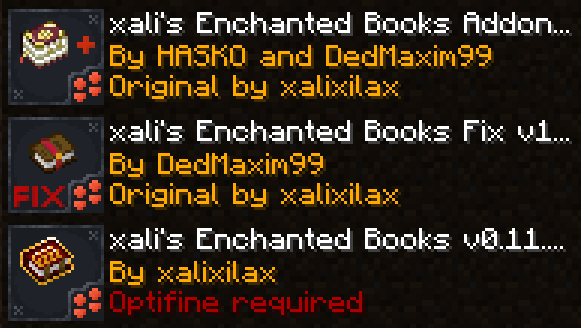
**[Below 1.21.5]** Resource packs must be installed in the following order:
**[1.21.5+]** Starting 1.21.5, if you use xali’s Enchanted Books – Addon you DO NOT need to use this pack. The “fix” is now integrated into the Addon pack!
—
**ATTENTION!**
You are **required** to install any mod that can work with custom CIT resource packs for the pack to be able to operate: [Optifine](https://optifine.net/home), [CIT Resewn](https://modrinth.com/mod/cit-resewn), [Forge CIT](https://www.curseforge.com/minecraft/mc-mods/forge-cit), [CIT Reforged](https://www.curseforge.com/minecraft/mc-mods/cit-reforged), [[CIT] CustomItemTextures](https://modrinth.com/mod/cit), etc. The pack should work on any Minecraft version with any mentioned mods. Ignore the “Incompatible” warning.
**ATTENTION!** At the moment of writing, 04 Jul 2024, CIT Reforged has a [bug](https://github.com/Tfarcenim/CIT-Reforged/issues/16) that prevents this pack from operating! Use Optifine or try to launch Fabric version, CIT Resewn, using Sinytra Connector
—
Anybody is free to use this pack anywhere. Just do not rename the pack, please.
Contact me:
My [YouTube channel](https://www.youtube.com/channel/UCrMHx89X71br0aDlzwsLDHQ)
My [Twitch channel](https://www.twitch.tv/dedmaxim99)
My [VK page](https://vk.com/id728112150)
My [Telegram](https://t.me/DedMaxim99)
xali’s Enchanted Books – Addon
This project is fan made and not directly related to any of xali’s works. Xali owns all the rights to “xali’s Enchanted Books”
Click the banner below to download original “xali’s Enchanted Books”. Original file is required for this pack to operate correctly!
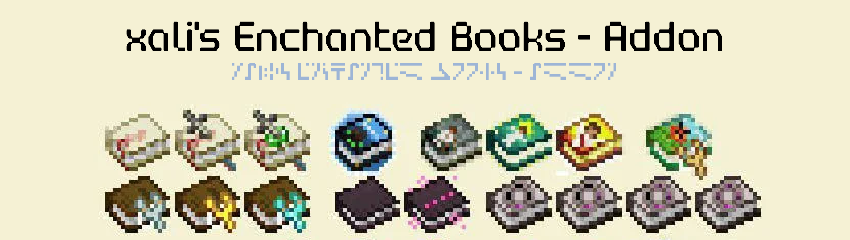
The purpose of this pack is to provide additional mod support to “xali’s Enchanted Books”. This pack does not include any textures that are already included in “xali’s Enchanted Books” and only adds those which are missing. This pack probably won’t be updated with any more additional mods in the future because it was made just for our own personal experience that I decided to share.
[](https://www.modrinth.com/resourcepack/xalis-enchanted-books)
^ Click it ^
Resource packs must be installed in the following order:

### **ATTENTION!**
**[1.21.5+]** Since vanilla Minecraft now has support for custom item models, no additional mods are required!
Additionally, now [xali’s Enchanted Books – Fix]([https://modrinth.com/resourcepack/xalis-enchanted-books-fix](https://modrinth.com/resourcepack/xalis-enchanted-books-fix)) is integrated into the Addon due to how custom models for enchanted books are implemented by Mojang.
**[Below 1.21.5]** You are **required** to install any mod that can work with custom CIT resource packs for the pack to be able to operate: [Optifine](https://optifine.net/home), [CIT Resewn](https://modrinth.com/mod/cit-resewn), [Forge CIT](https://www.curseforge.com/minecraft/mc-mods/forge-cit), [CIT Reforged](https://www.curseforge.com/minecraft/mc-mods/cit-reforged), [[CIT] CustomItemTextures](https://modrinth.com/mod/cit), etc. The pack should work on any Minecraft version with any mentioned mods. Ignore the “Incompatible” warning.
Mods supported by this pack:
– Supplementaries
– Combat Roll
– Endless Biomes
– Kobolds
– Undergarden
– Farmer’s Delight
—
All the art is done by HASKO, pack assembled by DedMaxim99
HASKO [VK page](https://vk.com/hasko_arts)
Anybody is free to use this pack anywhere. Just do not rename the pack, please.
Contact me (DedMaxim99):
My [YouTube channel](https://www.youtube.com/channel/UCrMHx89X71br0aDlzwsLDHQ)
My [Twitch channel](https://www.twitch.tv/dedmaxim99)
My [VK page](https://vk.com/id728112150)
My [Telegram](https://t.me/DedMaxim99)