Too Much Bread
# Too Much Bread
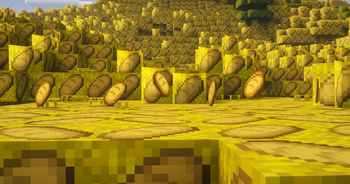
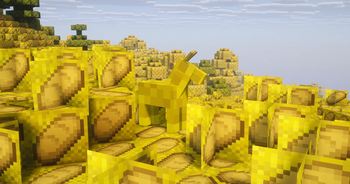
Everything bread and only bread
### Features:
1. Every Item Name is Bread
2. Every Item is Bread
3. Every Block is Bread
4. Every Armor is Bread
5. basicly EVERYTHING is Bread
Too Many Guns
## Support Me



## Showcase
## Information
**On the _Versions_ tab, you can choose and download the individual texture packs for each gun model. If you just press the normal _Download_ button, you will not be able to choose which gun model texture pack you download.**
texture packs that replace the bow texture with various 3d gun models. also replaces arrows with bullets and changes bow and arrow sounds to gun sounds.
no naming items required! works on most multiplayer servers and single player.
most of the models are only available in 1.20/1.21, but the awp and desert eagle also have 1.8 versions.
TUTORIAL: how to change gun textures
each gun model has 2 different textures (all showcased in the video).
1. first extract the .zip file.
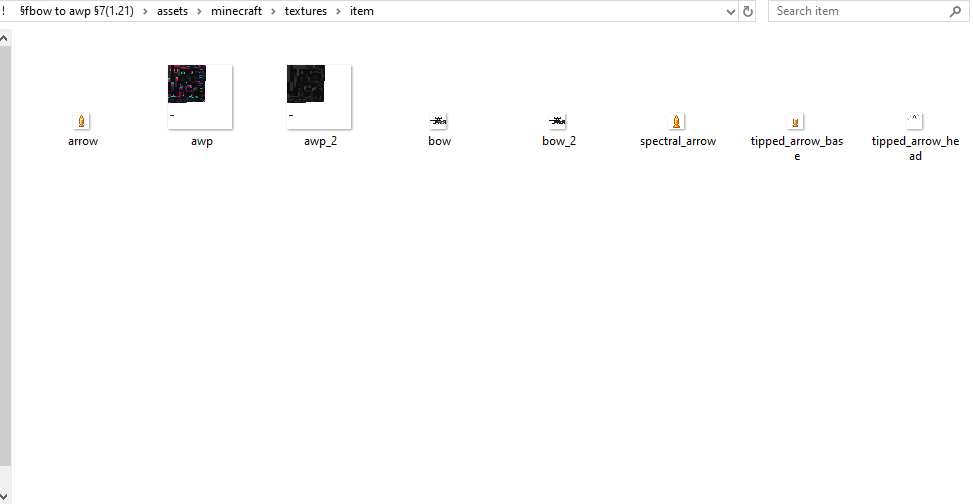
2. open the pack folder and navigate to assets>minecraft>textures>item. the folder should look similar to the screenshot below.
3. there are 2 different files named bow and 2 different files named awp (or whatever the name of the gun you are using is).
the files without the “_2” at the end of their name are the textures that are used in-game, so **to change textures just change the file names** (for example, in the screenshot, rename awp to awp_2 and rename awp_2 to awp).
4. reload your texture pack in-game and the texture will change
## Public Usage
if you’d like to use assets/modified versions of this pack in your own projects and publicly share them, credit me and link this page or my YouTube video.
– **as long as you credit me,** you may use this pack or assets from this pack in your own public social media posts, mod packs, resource packs, and bedrock ports
– **please do not** create new showcase webpages, download links, or claim credit for making this pack or assets from this pack.
– **if you are unsure,** message me on discord (L33tfox) for permission
TogglePVP
# TogglePVP
A simple plugin that allows you to quickly switch PVP mode without any problems. Versions 1.8 to 1.21.5 are supported. It is ideal for various local events. It will be improved in the future!
## Commands
– /pvp help
– /pvp on/off – Enables/disables PVP on the entire server
### Available commands
– /pvp
– /tpvp
– /togglepvp
# Important
Only a player with operator rights can switch PVP!
Toby Fox Music
# Toby Fox Music
This resource pack replaces the songs on all music disc with a selection of songs from Undertale and Deltarune
You can use this on any version, please ignore the game’s warning about improper versions
Undertale and Undertale OST created by Toby Fox
Deltarune and Deltarune OST created by Toby Fox
Made by myself with inspo from DogeCowboy (there are other iterations of this idea but this pack is not based on those creators’ designs)
## Discs -> New Tracks:
5 -> A DARK ZONE
11 -> Dogsong
13 -> THE WORLD REVOLVING
Blocks -> Black Knife
Cat -> Rude Buster
Chirp -> A CYBER’S WORLD?
Creator -> Field of Hopes and Dreams
Creator (Music Box) -> sans.
Far -> Death By Glamour
Lava Chicken -> Scarlet Forest
Mall -> MEGALOVANIA
Mellohi -> Acid Tunnel of Love
Otherside -> Hopes and Dreams
Pigstep -> Spear of Justice
Precipice -> Battle Against a True Hero
Relic -> Dark Sanctuary
Stal -> BIG SHOT
Strad -> My Castle Town
Tears -> It’s TV Time!
Wait -> GUARDIAN
Ward -> Your Best Nightmare
TNT to Grass

# What does this resource pack do?
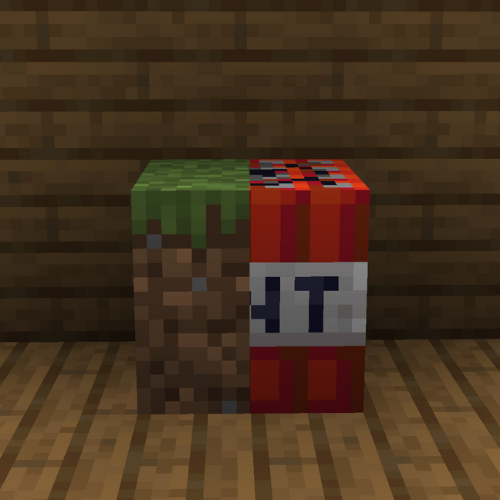
This resource pack **replaces the TNT textures to the grass textures**.
# How do I trick someone into using this pack?
1) **Download the pack**
2) **Change the name** of the .zip file
3) **Change the pack.mcmeta file** and **pack.png** to less _suspicious_ ones.
# Credits
We (**_ELTE Studios_**), **developed** and **made** this pack using the **Butterium** modpack for the **best optimisation, smoothness and QOL**, you can **download it on modrinth here**.
# pack.png
TNT Rust
Replaces the textures of vanilla TNT with a pixel skin for sachel from the game Rust, this version of TNT looks beige, which looks more beautiful to me, this resource pack may also be useful to you for some mode in Minecraft in the style of Rust
LeoTweaks TNTRUN Outlines
Just adds a slightly darker outline to all TNT-RUN related blocks to make Single hopping and Area perception a bit easier in the TNT RUN minigame.
TNT Drop All
give explosions (tnt, creeper, etc.) a 100% block drop rate, replacing the 25% drop rate of pre-19w11a, making many farms more efficient and stopping the loss of blocks by creeper explosions
it stands apart as the only mod of it’s kind for legacy fabric
the first mod i made by myself, not very complicated heh
TLobbyCommand
# TLobbyCommand
Simple hub & lobby command
# Features
– Hub & lobby command
– Multiple lobbys
# Commands
– /tlc version
# Permissions
– tlc.version
# Dependencies
– None
TitleInfo
# TitleInfo — The Ultimate Navigation Suite 🚀

✨ Elevate Your Minecraft Experience ✨
Action Bars • Waypoints • Smart Sharing • Developer API
**TitleInfo** is a high-performance, lightweight utility designed to bridge the gap between immersion and information. By leveraging the Action Bar and a robust Waypoint system, it provides essential data without cluttering your chat or screen.
Now featuring a **Full Developer API**, TitleInfo is the perfect foundation for survival servers, RPGs, and competitive factions that want to integrate coordinate and navigation data into their own systems.
—
## 🌟 Core Features
### 📡 Dynamic Action Bar
Stop typing `/coords`. Keep your eyes on the world with real-time HUD elements:
* **📍 Precision Tracking:** Coordinates (X, Y, Z) and Facing Direction.
* **🌍 World Data:** Current Biome and In-game/Real-world Time.
* **🚩 Active Navigation:** Distance and direction to your selected Waypoint.
* **⚙️ Toggleable:** Use `/ti display` to customize exactly what *you* see.
### 📍 Advanced Waypoint System
* **Set & Forget:** Create waypoints at your feet or specific coordinates.
* **Smart HUD:** Select a waypoint to see a live distance tracker in your action bar.
* **Cross-World Support:** Track locations across dimensions with ease.
### ✉️ Seamless Coordinate Sharing
* **Global/Private:** Share your location with the whole server or a specific friend.
* **One-Click Waypoints:** Recipients can instantly save shared coordinates as their own waypoints.
### 🛠️ Administrative Control
* **Player Support:** Set or remove waypoints for players remotely.
* **UI Management:** Force-toggle display options for specific players or ranks.
—
## 💻 Developer API
TitleInfo now exposes a powerful API for other plugin developers to hook into the navigation flow.
### 🔌 Quick Start
Add the **TitleInfo.jar** to your project dependencies and access the API via the provider:
> TitleInfoApi api = TitleInfoApiProvider.get();
### 📍 Example: Setting a Waypoint
You can update or create waypoints for any player. It is recommended to use the **Async** methods to keep your main thread healthy:
> UUID playerId = player.getUniqueId();
> Location loc = player.getLocation();
>
> // Set a waypoint asynchronously
> api.upsertWaypointAsync(playerId, “Home Base”, loc).thenAccept(success -> {
> if (success) {
> player.sendMessage(“Waypoint synchronized!”);
> }
> });
### 📡 Example: Listening for Events
Hook into user actions to add custom logic, such as blacklisting certain names:
> @EventHandler
> public void onWaypointSet(TitleInfoWaypointSetEvent event) {
> // Prevent players from naming waypoints “Spawn”
> if (event.getWaypointName().equalsIgnoreCase(“Spawn”)) {
> event.setCancelled(true);
> event.getPlayer().sendMessage(“That waypoint name is reserved!”);
> }
> }
—
## 🎨 Commands & Permissions
| Command | Description | Permission |
| :— | :— | :— |
| `/ti display ` | Toggle specific HUD elements | `titleinfo.display` |
| `/ti share [player]` | Share your current location | `titleinfo.share` |
| `/ti waypoint ` | Manage your personal waypoints | `titleinfo.waypoint` |
| `/ti admin ` | Administrative overrides | `titleinfo.admin` |
—
## 🚀 Installation & Tech Specs
1. **Download** the latest release.
2. **Drop** into your `/plugins` folder.
3. **Restart** and enjoy!
* **✅ Compatibility:** Minecraft 1.13 – 1.21.x+
* **📦 Dependencies:** None (Standalone), but supports **Adventure API** for rich text.
—
Developed with ❤️ by RRS