Utility+
#
🔧 Utility+ – The All-In-One Texturepack
Utility+ is a comprehensive all-in-one Minecraft texture pack that fixes dozens of small annoyances in a single download. Instead of juggling 10 different packs to get the perfect experience, Utility+ bundles everything together. Cleaning up your visuals, removing distractions, and making Minecraft smoother and more enjoyable.
Whether you’re adventuring, building, or PvPing, Utility+ helps you see more, hear less of the annoying stuff, and focus on what matters most, playing the game.
# ✨ Features
– 🎃 Better pumpkin blur for improved visibility
– 🔇 Removes annoying cave sounds
– 🛡️ Smaller, less intrusive shield
– 🔥 Low fire on the ground with a cleaner overlay
– 📦 More visible trapped chests
– 🪙 Smaller totem pop + smaller totem
– 📖 Custom enchantment icons for clarity
– 💨 Particle fixes for a cleaner experience
– 🧱 Disables random rotation for naturally generated blocks
– 📶 Improved ping icons
– 📦 Smaller items in hand and inventory
– 🎯 Sleeker, smaller crosshair
– 📚 Custom enchanted book textures _(credits: mythitorium – License: Apache 2.0)_
– ➕ …and more!
**Check the [Gallery Tab](https://modrinth.com/resourcepack/utility+/gallery) for pictures**
This project includes assets from [Vanilla Tweaks](https://vanillatweaks.net/), used in accordance with their [Terms Of Use](https://vanillatweaks.net/terms)
This project also includes modified assets from [Even Better Enchants](https://modrinth.com/resourcepack/even-better-enchants), licensed under Apache-2.0.
# ⚙️ Compatibility
**If you want the custom enchanted books to work:**
– Minecraft 1.21.5 and above: ✅ No dependencies required!
– Minecraft 1.21.4 and below: 🔧 Requires CIT Resewn, Optifine, or EnchantedBookEnabler
Optifine or Sodium is recommended for the best experience
_Have more feature ideas or need help? Contact polar882 on Discord!_
UniversalPluginUpdater
UniversalPluginUpdater
[](https://github.com/DreamVoid/UniversalPluginUpdater/releases/latest)

[简体中文](https://github.com/DreamVoid/UniversalPluginUpdater/blob/main/README.md) | English
—
## Introduction
UniversalPluginUpdater (UPU) is a Minecraft server plugin that allows you to quickly update existing server plugins, while also providing APIs to help developers easily implement automatic update functionality for their plugins.
The development of UniversalPluginUpdater was inspired by [APT](https://wiki.debian.org/zh_CN/Apt).
## Documents and tutorials
For first-time UPU users, reading the [UPU Help Manual](https://docs.upu.dreamvoid.me/en/) can help them get started quickly. Many questions can be answered by consulting the documentation, which also includes how UPU checks for updates to other plugins.
## Download
* Stable version
* [Modrinth](https://modrinth.com/plugin/upu/versions)
* [Hangar](https://hangar.papermc.io/DreamVoid/UniversalPluginUpdater/versions)
* [GitHub Releases](https://github.com/DreamVoid/UniversalPluginUpdater/releases)
## Commands
This is just a list of some commonly used commands. For a complete list of commands, please refer to the [documentation](https://docs.upu.dreamvoid.me/en/core/commands).
| Command | Description |
| — | — |
| /universalpluginupdater (/upu) | UniversalPluginUpdater main command |
| /upu update | update list of available plugins. |
| /upu list | list all available plugins |
| /upu download | download existing plugins’ newer version by downloading. |
| /upu upgrade | upgrade existing plugins by downloading/installing newer version. |
| /upu repo | configuration file repository sub-command |
## License
[GNU General Public License v3.0](https://github.com/DreamVoid/UniversalPluginUpdater/blob/main/LICENSE)
—
[DreamVoid](https://github.com/DreamVoid), Made with ❤.
Upside Down Shader
**English version:**
Upside Down Shader — Play Minecraft Upside Down 🙃
Turns your entire Minecraft world upside down. Sky at the bottom, ground at the top. No reason, no purpose, just chaos. Can you survive like this?
**Features:**
– Entire screen flipped upside down
– Sky at the bottom, ground at the top
– Zero performance cost
– Works with any resource pack
Compatible with Minecraft 1.0–1.21.x via OptiFine or Iris.
Subscribe so you don’t miss any updates! If you have questions or need support, join our Discord.
—
**Русская версия:**
Upside Down Shader — Играй в Майнкрафт вверх ногами 🙃
Переворачивает весь твой Майнкрафт вверх ногами. Небо внизу, земля вверху. Никакой причины, никакого смысла, просто хаос. Сможешь выжить так?
**Возможности:**
– Весь экран перевёрнут вверх ногами
– Небо внизу, земля вверху
– Никаких потерь производительности
– Работает с любым ресурс паком
Совместимо с Minecraft 1.0–1.21.x через OptiFine или Iris.
Подписывайтесь, чтобы не пропустить обновления! Если есть вопросы — заходите в Discord за поддержкой.
Unused Ost Discs
A simple little pack that changes the music discs to something more C418. Used well in conjuction with redsquare’s [C418 Music Only](https://modrinth.com/resourcepack/c418-songs-only) Recource Pack, Alongside Programmer art and mzov_jen’s [Programmer Art Continuation Project](https://modrinth.com/resourcepack/pacp).
The pack will say its “incompatable/broken” but works just fine.
Hope you enjoy!
# replacements:
Creator – Équinoxe
Creator (Music Box) – Beginning
Otherside – Moog City 1
5 – Kyoto
11 – Eleven
Relic – Dog
Pigstep – Excuse
Precipice – Intro
Tears – Droopy likes your face
Lava Chicken – Flake
unsup
***Un**a’s **S**imple **Up**dater*
unsup is a somewhat minimal implementation of a generic working directory
syncer in Java. It supports running as a Java agent, to piggy-back off of the
launch of another program.
***It is particularly good at syncing small private modpacks or one-offs in small groups, where a full public distribution (e.g. on Modrinth!) is overkill or undesirable.*** It is capable of downloading mods from their original sources, wherever that may be… as long as it speaks HTTP(S).
An [unsup.ini](https://git.sleeping.town/unascribed/unsup/wiki/Config-format)
must be placed in the working directory for unsup to know what to do, or a `-Dunsup.bootstrapUrl=` JVM argument specifying where to find such a file.
The updater works hard to ensure the working directory is never left in an
inconsistent state. Short of a sudden power loss in the middle of applying
changes (an incredibly short time window), an unsup update cannot result in
an inconsistent or corrupted working directory.
It does hash-based consistency validation (with your choice of function, SHA-256 recommended) on all downloads and on files before overwriting
them, warning the user if they’ve changed something that has been updated. It
additionally supports signing manifests using OpenBSD Signify for additional
security.
unsup’s unique simplified design means it is compatible with **all launchers**,
from the vanilla launcher to MultiMC. Just add `-javaagent:unsup.jar` to the
JVM arguments, and place `unsup.jar` and `unsup.ini` in the .minecraft
directory.
In Prism Launcher, you can utilize unsup as a “component” by importing the
`com.unascribed.unsup.json` from the latest release on Forgejo. (I can’t upload JSON files to Modrinth). This will allow Prism
Launcher to download and manage unsup. (MultiMC does not support Java agent
components, despite requests.)
It also has a built-in concept of *environments* and *flavors*, allowing it to
be used to manage server installs rather than just clients, and allowing users
to pick between multiple mutually incompatible mod sets with a feature-packed interface unlike any other updater tool.
unsup is also capable of updating MultiMC’s “components”, including
unsup itself if it is added as one. This means you can update mod loaders or
Minecraft itself.
## Creating Packs
You can either point unsup at a [Packwiz](https://packwiz.infra.link/) pack.toml (recommended),
or write a native unsup manifest by hand. See [the wiki](https://git.sleeping.town/unascribed/unsup/wiki/Manifest-format) for info on the
native manifest format. The Creator GUI is on hold, as Packwiz has become a
de-facto standard for Minecraft modpacks.
## Stability
unsup has been used for modpacks on versions from b1.7.3 to 1.21.5, both client and server,
and is known to work with Forge (both legacy and modern), Fabric, Quilt, and NeoForge. It
has successfully powered many modpacks, from [small](https://git.sleeping.town/Rewind/Upsilon)
to [large](https://github.com/ModFest/bc23-pack). Native manifest and Packwiz manifest
support are both quite stable, and have been used extensively.
Signing support is still somewhat experimental, and has not been deployed by anyone at
large scale. That someone could be you — please let me know if it works well!
## GUI
unsup has a minimal and elegant GUI that works everywhere (yes, including
macOS) and can have all of its colors customized to make it fit in with your
branding. It ships with a dark theme with minty accents. Check out the gallery tab!
## License
unsup is released under the LGPLv3.
Unstable Death Sound
Plays the wither spawn sound when someone dies like Unstable SMP
**⚠️ I have not tested this resource pack on any version below 26.1**
This may not work on some servers
Here are some that it doesn’t work on (you can report more on the github):
– mcpvp.club
UnSignedVelocity2
# UnSignedVelocity2
[](https://github.com/MemencioPerez/UnSignedVelocity2/actions)



Allow your moderation plugins to work again for users with versions 1.19.1 or higher
This plugin works by removing signed information from commands and messages sent by clients 1.19.1 or higher, allowing plugins that cancel proxy messages, such as ChatRegulator or AuthMeVelocity, to work again
This is a fork of the original UnSignedVelocity made by 4drian3d, updated to work with newer Minecraft versions
## Requirements
– Velocity 3.4.0+
– Java 17+
– [PacketEvents 2.4.0+](https://modrinth.com/plugin/packetevents)
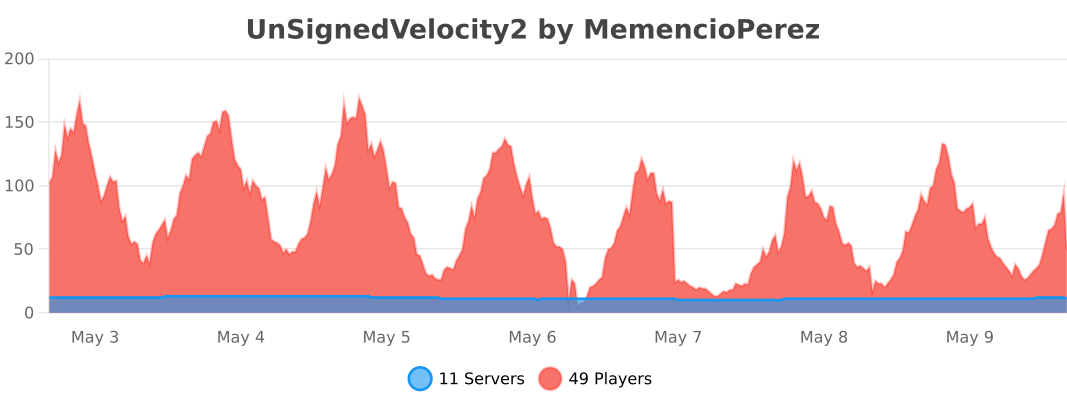
## Metrics
[](https://bstats.org/plugin/velocity/UnSignedVelocity2/24373)
Devin’s Unobtrusive Grass
This pack shortens grass, ferns and more to make them less obtrusive.
*Works well with [GrassKiss](https://modrinth.com/mod/grass-kiss)*
## 📥 Installation guide
Simply download the zip file and drop it into your `.minecraft/resourcepacks` folder. After that, enable it in your resource packs menu. If you are using other resource packs, you may need to move this one to the top for the textures to be applied.
## 🔧 Modified blocks
– Grass
– Tall grass
– Rose bush
– Fern
– Large fern
Unobtrusive Armor
Removes parts of the armor textures so you can see your friends’ skins! (If you have any…)
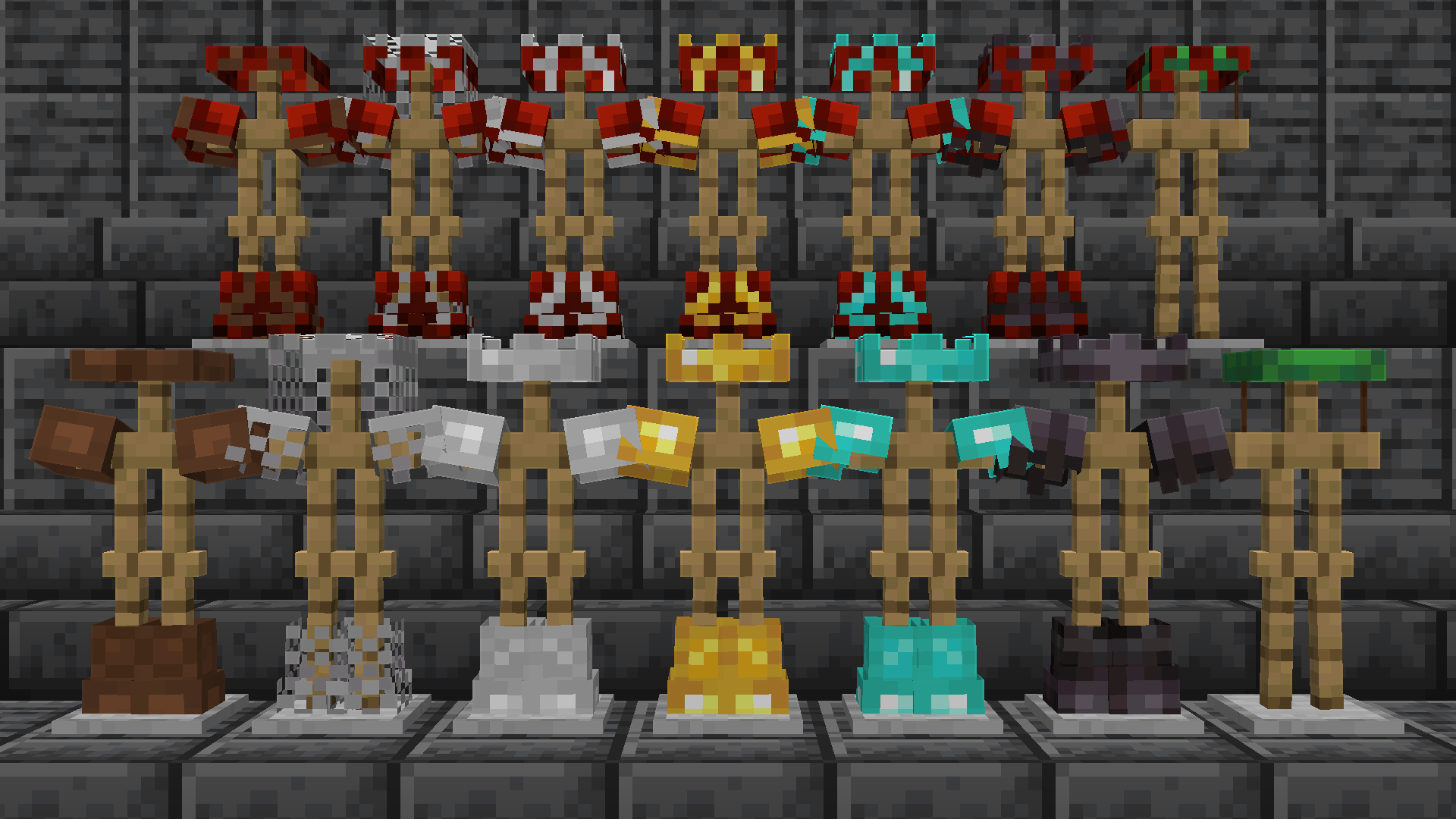
*Note: copper armor is also included as of v3.0, I’m just too lazy to retake this picture.*
Inspired from the [**Limited Life Series**](https://www.youtube.com/watch?v=33-8xUvoRwM&list=PLU2851hDb3SGuiXDCZW0GEtXeEsjwobG8&index=3) by [**Grian**](https://www.youtube.com/@Grian)
Unobstructive Armor
# Unobstructive Armor
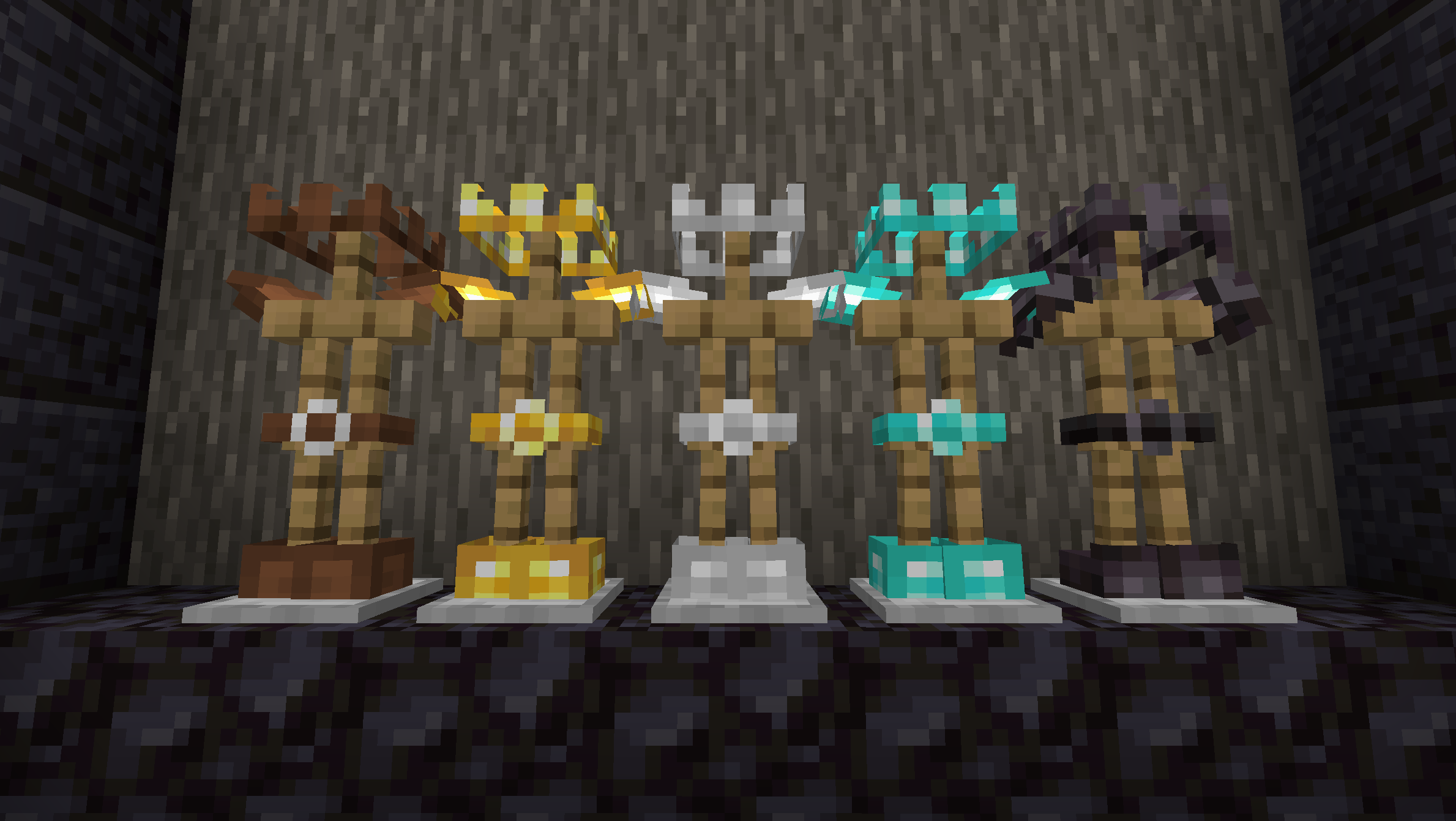
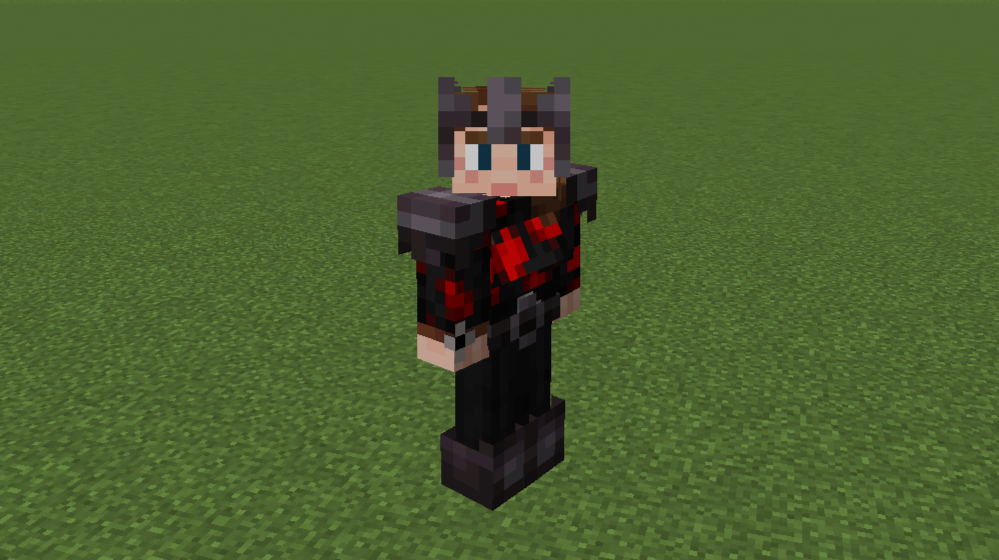
Unobstructive Armor retextures helmets, chestplates, leggings, and boots into crowns, shoulder pads, belts, and shorter boots so that less of players’ skins are hidden by armor while still keeping worn armor identifiable.
### Armor types
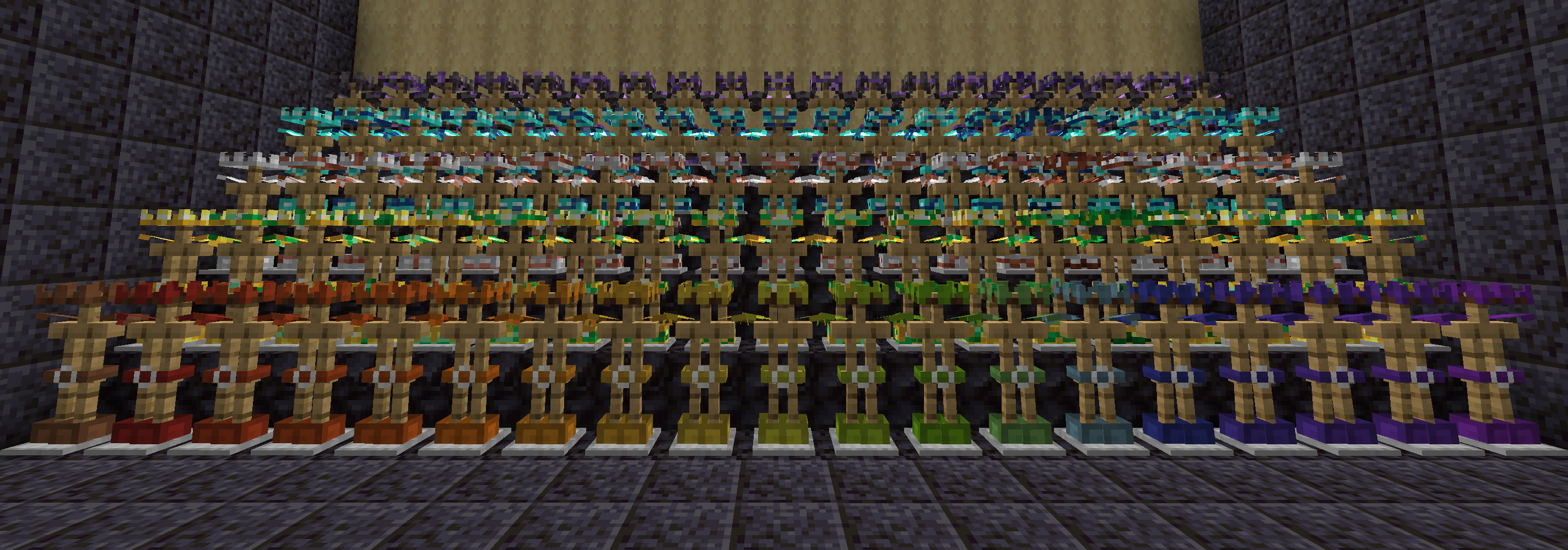
Leather, gold, iron, diamond, and netherite armor have been retextured with the new shapes.
### Armor trims
Every armor trim has been tweaked to fit with the retextured armor shapes.
### Helmet items
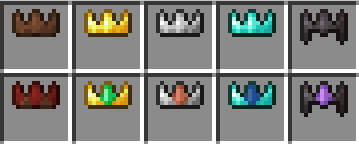
The helmet items are retextured to represent their crown presentation instead. The other armor pieces haven’t been retextured because I found that they weren’t as easily recognisable as armor in the inventory.
### Visible player skins
The majority of each player’s skin is visible while wearing full armor.
**Note:** My skin used in the screenshots and resource pack icon uses [Ears](https://modrinth.com/mod/ears) to modify the chest. This resource pack only changes armor textures – it makes no modifications to player models or skins.
### Similar packs
After creating this resource pack I discovered that another exists with a similar concept and name: [Unobtrusive Armor](https://modrinth.com/resourcepack/unobtrusive-armor). While I came to the same idea indepdenently, I want to acknowledge that I was not the first to implement this idea. Feel free to check out Unobtrusive Armor and see which resource pack you prefer.