ViaVersionStatus
# Description
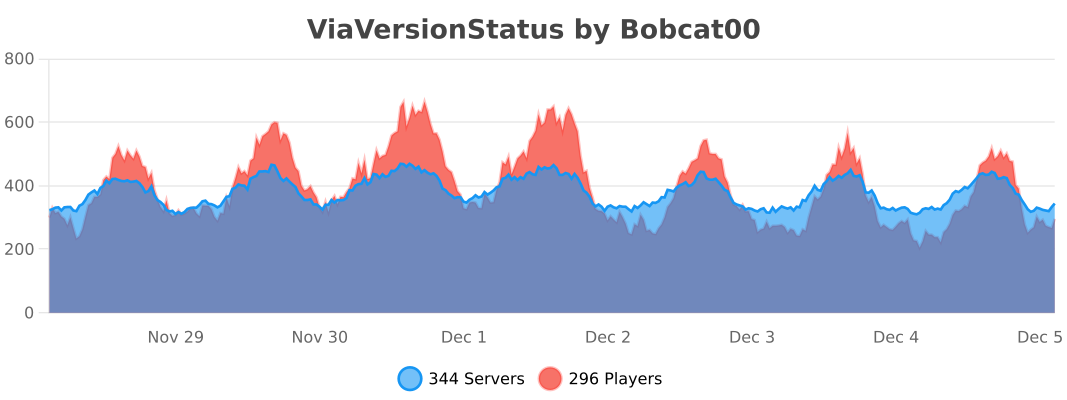
ViaVersionStatus will report which Minecraft versions your players are using when they join your server. Reports are sent to your server log file and online players with the permission viaversionstatus.notify. Optionally, if a player joins with a client version different than your server version, the plugin can send the player a warning that he’s not using the matching client version. The plugin can also issue console commands based on the client’s version.
Reasonable default values are provided in the configuration file, so you can simply put the plugin in your plugins folder and restart your server. The plugin requires [ViaVersion](https://modrinth.com/plugin/viaversion) and Java 17+.


Note that ViaVersion provides a command to show the versions of all currently online players: /viaversion list
# Permissions
ViaVersionStatus has a number of permissions to allow fine-tuning of its behavior. However, all you really need to do is give the permission **viaversionstatus.notify** to admins you want to receive in-game version notifications when other players join. If you give yourself the ‘*’ permission, you might also want to set **viaversionstatus.notify.ignoresame** to false.
Following are details of all ViaVersionStatus permissions:
## Permission Details
The following permissions normally given only to admins, as they control the in-game notification given when players join the server.
**viaversionstatus.notify** – A player with this permission will get a message with the player’s client version (as shown above) when they join the server. Defaults to op.
**viaversionstatus.notify.ignoresame** – A player with this permission will not get a message with the player’s client version if the client’s version matches the server’s version. Defaults to false.
The following permissions apply to the players joining your server and can be used to control exactly which features of ViaVersionStatus will be invoked when they join. All of the following permissions default to false, so simply give a player(s) a permission to exempt them from the corresponding processing. Most of these features can also be disabled in the config file if you want to do so for all players.
**viaversionstatus.exempt** – Exempts this player from all processing at join.
**viaversionstatus.exempt.log** – Exempts this player from client version being logged at join.
**viaversionstatus.exempt.notify** – Exempts this player from notifying other players at join while also preventing them from triggering the configured join notification command.
**viaversionstatus.exempt.notify.message** – Exempts this player from notifying other players at join.
**viaversionstatus.exempt.notify.command** – Exempts this player from triggering the configured join notification command.
**viaversionstatus.exempt.warn** – Exempts this player from receiving an older version warning while also preventing them from triggering the configured older version warning command.
**viaversionstatus.exempt.warn.message** – Exempts this player from receiving an older version warning.
**viaversionstatus.exempt.warn.command** – Exempts this player from triggering the configured older version warning command.
**viaversionstatus.exempt.warn.newer** – Exempts this player from receiving an newer version warning while also preventing them from triggering the configured newer version warning command.
**viaversionstatus.exempt.warn.newer.message** – Exempts this player from receiving a newer version warning.
**viaversionstatus.exempt.warn.newer.command** – Exempts this player from triggering the configured newer version warning command.
# Configuration (optional)
Strings in the configuration file can use four variables: **%player%** is replaced with the player’s name, **%displayname%** is replaced with the player’s “display name”, **%version%** is replaced with the version of the player’s client, and **%server%** is replaced with the detected server version. You can also use the standard Minecraft color codes. Strings should be enclosed in double quotes (“…”).
**notify-ops** – If true, ops will be notified of the client’s version when any player joins the server.
**notify-string** – This message is sent to players with the viaversionstatus.notify permission when any player joins the server.
**notify-command** – This command is issued by the console when a player joins the server (defaults to none).
**warn-players** – If true, players joining with a client that is older than the server version will be warned with the warn-string message.
**warn-string** – This message is set to players joining with a client that is older than the server version, if enabled. Note that warn-players must be true to use this.
**warn-command** – This command is issued by the console when a player joins with a client that is older than the server version (defaults to none). Note that warn-players must be true to use this.
**warn-players-newer** – If true, players joining with a client that is newer than the server version will be warned with the warn-string message.
**warn-string-newer** – This message is set to players joining with a client that is newer than the server version, if enabled. Note that warn-players-newer must be true to use this.
**warn-command-newer** – This command is issued by the console when a player joins with a client that is newer than the server version (defaults to none). Note that warn-players-newer must be true to use this.
**high-priority** – When set to true, ViaVersionStatus will run later in the login process. This can be useful if %displayname% in notify-string is not working as expected.
**list-supported-protocols** – If true, the protocols (Minecraft versions) supported by ViaVersion will be written to the log file at startup.
**enable-metrics** – If true, bStats metrics will be enabled by this plugin, subject to the bStats global config entry.
**prism-integration** – If true, ViaVersionStatus will send an event to the Prism logging plugin, with the player’s name and client version. See the section below for more details.
**prism-action-string** – This string is used by Prism when displaying a player’s client version.
A note about %displayname%: The displayname is set by other plugins, so this is dependent on the other plugin’s timing. In particular, EssentialsX has a built-in time delay which will prevent the displayname from appearing in the notification sent to ops. However, the displayname can be used in the version warning sent to the players.
The default configuration results in the messages shown above.
# Prism Integration
If you use the [Prism V4](https://modrinth.com/plugin/prism) logging plugin, you can have ViaVersionStatus log each player’s name and client version when they join the server. Prism V4 is a complete rewrite of Prism. The event is logged with the action vvs-connect. You can specify this during a lookup with the parameter a:connect. You must be using **Prism V4.3-dev31 or later**.
In order to enable the Prism integration you need to set **prism-integration** in the ViaVersionStatus config file to true. ViaVersionStatus will write to the log file if it has successfully hooked into Prism.
Here’s an example of the Prism lookup results:

# Commands
None.
# Miscellaneous
This plugin is compatible with ViaVersion, ViaBackwards, and ViaRewind.
This plugin uses the bStats metrics system to provide _anonymous_ usage data. You may opt-out by changing **enable-metrics** in the ViaVersionStatus config file. The metrics are available at [https://bstats.org/plugin/bukkit/ViaVersionStatus](https://bstats.org/plugin/bukkit/ViaVersionStatus)
ViaRewind
# ViaRewind
**ViaVersion addon to allow 1.8.x and 1.7.x clients on newer server versions.**
Runs on 1.9-latest servers or 1.8 clients and lower.
**You can override the included version in [ViaFabric](https://modrinth.com/mod/viafabric) or [ViaProxy](https://github.com/ViaVersion/ViaProxy):**
– in **ViaFabric**, put ViaRewind into the `mods` folder
– in **ViaProxy**, put ViaRewind into the `jars` folder
Requires Java 17. See [here](https://docs.papermc.io/misc/java-install) how to update your installed Java version. As a last resort, you can download Java 8 downgraded builds from [our ci](https://ci.viaversion.com/view/ViaRewind/job/ViaRewind-Java8/).
**Requires [ViaVersion](https://hangar.papermc.io/ViaVersion/ViaVersion) and [ViaBackwards](https://hangar.papermc.io/ViaVersion/ViaBackwards) to be installed..**
Releases/Dev Builds
–
You can find releases in the following places:
– **Hangar (for our plugins)**: https://hangar.papermc.io/ViaVersion/ViaRewind
– **Modrinth (for our mods)**: https://modrinth.com/mod/viarewind
– **GitHub**: https://github.com/ViaVersion/ViaRewind/releases
Dev builds for **all** of our projects are on our Jenkins server:
– **Jenkins**: https://ci.viaversion.com/view/ViaRewind/
Other Links
–
**Maven:** https://repo.viaversion.com/
**Issue tracker:** https://github.com/ViaVersion/ViaRewind/issues
**List of contributors:** https://github.com/ViaVersion/ViaRewind/graphs/contributors
vHubs
# vHubs
    
vHubs is a lightweight, configurable Velocity plugin for managing hub servers and hub behaviour across your proxy network. It focuses on easy setup, flexible hub definitions, and useful convenience commands to streamline player flow on large networks.
## Features
– Hub server management: define one or more hub servers. Allows for randomized server selection.
– Simple commands for staff and users to teleport to hubs.
– Permission-based control for fine-grained access.
## Quick start
1. Drop `vHubs-VERSION.jar` into your Velocity `plugins` folder.
2. Start or restart your Velocity proxy to generate the default config.
3. Edit `plugins/vhubs/config.yml` to add your hubs and preferences.
## Installing
1. Place `vHubs-VERSION.jar` into your Velocity `plugins` folder.
2. Start or restart your Velocity proxy.
3. Edit the generated configuration file (`plugins/vhubs/config.yml`) to suit your preferences.
Once installed and configured, vHubs will automatically handle hub commands behavior according to your config.
Permission nodes are configurable in your permission manager of choice.
## Why vHubs?
– Purpose-built for Velocity: simple, stable, and focused on proxy-side hub logic.
– Quick setup: install, edit a small YAML, and you’re ready.
– Community-friendly: open to feedback and contributions.
## Contributing
Contributions are welcome. Good first steps:
– Open issues to report bugs or propose features.
– Submit pull requests with clear descriptions and tests where possible.
– Follow repository code style and include a changelog entry for larger changes.
## Building from Source
Prerequisites: Java 17+, Maven.
“`bash
git clone https://github.com/szymon-off/vHubs.git
cd vHubs
mvn clean package
“`
The built jar will be in the `target` directory.
## Support
For help or to report issues, please use the [GitHub Issues page](https://github.com/szymon-off/vHubs/issues)
or join our [Discord server](https://discord.gg/your-invite-link).
## License
vHubs is licensed under the GPLv3 License. See the [LICENSE](LICENSE.md) file for details.