TimerAPI
# TimerAPI
An api easily create and coding as simple to timer.
## Features
* On start, end and tick handling
* Method chain writing
* Some utility methods
* Run timer as async
## Usage
Add below to `build.gradle.kts`.
“`kotlin
repositories {
maven(“https://repo.chihuyu.love/snapshots/”)
}
“`
“`kotlin
dependencies {
compileOnly(“love.chihuyu:TimerAPI:1.4.1-SNAPSHOT”)
}
“`
## Example
“`kotlin
// this timer length is 180 * 20(1sec) = 3600tick(3min)
val timer = TimerAPI.build(“wait ramen”, duration = 180, period = 20, delay = 0)
.start {
hotWater.drip()
}
.tick {
some()
}
.end {
ramen.eat()
}
timer.run()
“`
## Support
If you need any help or want to share some ideas to add, just DM me!
Discord: @hirosukt
TimedTopper
# Info
This is an addon of Topper to add a new type of timely leaderboards where you can configure so that the leaderboard will be reset after a desired time. It’s a timely leaderboard plugin with heavy optimization and some of the most requested features.
# Feature
– Run on Topper – A leaderboard plugin
– Configurable reset time with support for Quartz Cron Expression
– PlaceholderAPI support with placeholders to get top values and remaining time
– Multiple Data Storage support: YAML, JSON, SQLITE and MYSQL
– Rewards to players when the board is reset
– API for developers
# DEMO VERSION
This version allows users to try the addon before considering buying the full version. It comes with some limitation:
– Support creating only 1 (one) leaderboard
– Use local storage (.properties), no SQLITE or MYSQL
– Limit the reset time to either “hourly”, “daily” or “weekly”. No Cron Expression support
– No rewards to players
– Some messages to tell the server owners to about the demo version and how to buy the full version
Go to this page to buy the full version
Timed Commands






Full transcript
Timed Commands
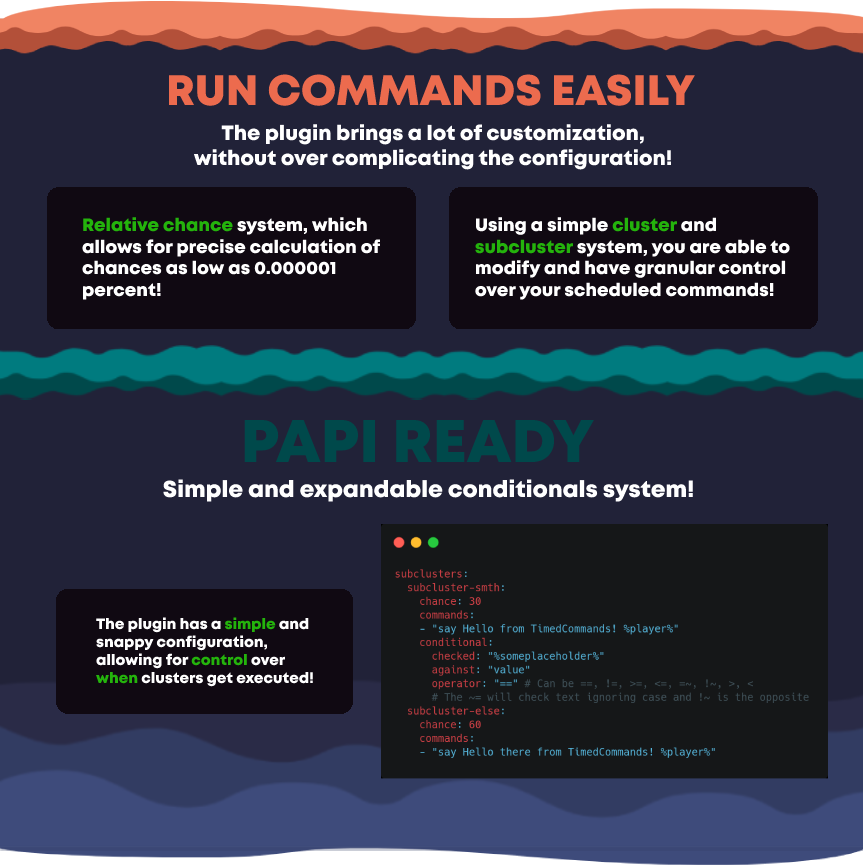
The simplest way to run a command schedule!
RUN COMMANDS EASILY
The plugin brings a lot of customization, without over complicating the configuration!
Relative chance system, which allows for precise calculation of chances as low as 0.000001 percent!
Using a simple cluster and subcluster system, you are able to modify and have granular control over your scheduled commands!
PAPI READY
Simple and expandable conditionals system!
The plugin has a simple and snappy configuration, allowing for control over when clusters get executed!

Time Is Money

The plugin does exactly what’s in the name – It pays out your online players for their online time! Thus you’re able to configure an amount of money that should be given to the player for their online time. In addition, it is possible to give items instead of a money payout. So for instance, you could give your players a diamond and 100 $ every 10 minutes.
## Config
“`yml
configuration-version: 12
debug-log: false
# You can disable the plugin’s payout feature in certain worlds
disabled_in_worlds:
– “creative_world”
# You can define if the player gets a payout whether player is afk or not.
# the permission tim.afkbypass would avoid this for certain user or groups.
afk_payout: false
# If afk payout is enabled, what percent should be paid out?
afk_payout_percent: 10
display-messages-in-chat: true
display-messages-in-actionbar: true
display-messages-in-actionbar-time: 10
give_money_every_second: 600
store-money-in-bank: false
# Define if multiple accounts should get payed with the same ip-address. You may disable this if your players are using multiple accounts per ip.
allow-multiple-accounts: true
# Option to increase the maximal amount of players of the same IP getting a payout. Only applies when allow-multiple-accounts is set to false.
max-multiple-accounts: 1
# Optional: Define a server bank account for withdrawing money from that account for the payouts instead of creating money out of nowhere
bank-account: “”
# Payouts will be delivered by “chance” instead “permission”.
choose-payout-by-chance: false
# Enable this if you want to add up all lower payouts to the final payout (only relevant when using permissions)
merge-payouts: false
# You can add as many payouts you want. You only can choose between “permission”
# and “chance”, not both.
payouts:
1:
payout_amount: 50
max_payout_per_day: 1000
# chance: 10
permission:
2:
payout_amount: 100
max_payout_per_day: 10000
commands:
– /give %player% diamond 1
commands_if_afk:
– /give %player% dirt 1
# chance: 90
# You can use any permission name you want. e.g. myserver.donor
permission: tim.vip
# Translations
message: “&aYou earned &c%money% &afor 10 minutes online time!”
message_payoutlimit_reached: “&cYou have reached the payout limit today. You earned 0$”
message_afk: “&cYou havn’t earned money because you were afk!”
message_afk_payout: “&6You earned &c%money% (%percent%% of normal payout) &6for 10 minutes online time while afk!”
message_multiple_ips: “&cYou havn’t earned money because you’re playing with multiple accounts!”
message_actionbar: “&aYou earned &c%money% &afor 10 minutes online time!”
message_payoutlimit_reached_actionbar: “&cYou have reached the payout limit today. You got 0$”
message_afk_actionbar: “&cYou haven’t earned money because you were afk!”
message_afk_actionbar_payout: “&6You earned &c%money% &6for 10 minutes online time while afk!”
message_atm_noperms: “&cYou don’t have the permission to use ATM’s!”
message_atm_nomoneyinbank: “&cYou don’t have enough money in bank!”
message_atm_nomoney: “&cYou don’t have enough money!”
# ATM -> Place down a sign with [atm] on the first line to use it!
enable_atm: true
atm_title: “&cATM”
atm_withdraw: “&cWithdraw”
atm_deposit: “&cDeposit”
atm_balance: “&cBank balance:”
atm_worth_gradation:
– 10.0
– 100.0
– 1000.0
– 10000.0
# You can seperate the ATM balances for different worlds by group them. Just set group-atms to true and write atm_groups as described below.
# Note: Existing bank accounts will be removed when enabling this feature.
group-atms: false
# Example groups for seperating all worlds:
#atm_groups:
# group1:
# – world
# group2:
# – world_nether
# group3:
# – world_the_end
# Example groups for seperating skyblock worlds and survival worlds:
#atm_groups:
# group1:
# – ASkyblock_world
# – Askyblock_spawn
# group2:
# – survival_world
# – farm_world
“`
## ATM
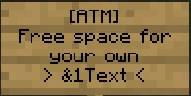
The ATM allows your players to withdraw money stored in the ATM that was previously added by Time Is Money to their account:
TigerReports
# TigerReports by MrTigreroux
**1.7+ Spigot** plugin
**MySQL** & **BungeeCord** support
**Vault** chat prefixes and suffixes support
**Discord** support by installing TigerReportsSupports plugin
## Description
TigerReports is a highly configurable and detailed plugin to manage player reports. It works with a simple command `/report` which registers many data that is displayed in a staff GUI (a chest).
## Operation
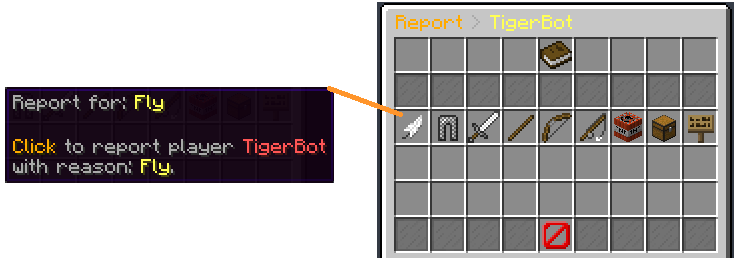
Players can report online and offline players (it depends on the config) with a cooldown and a minimum amount of characters. If they don’t specify any reason, a GUI (chest) is opened to select one of the defaults (configurable) reasons.
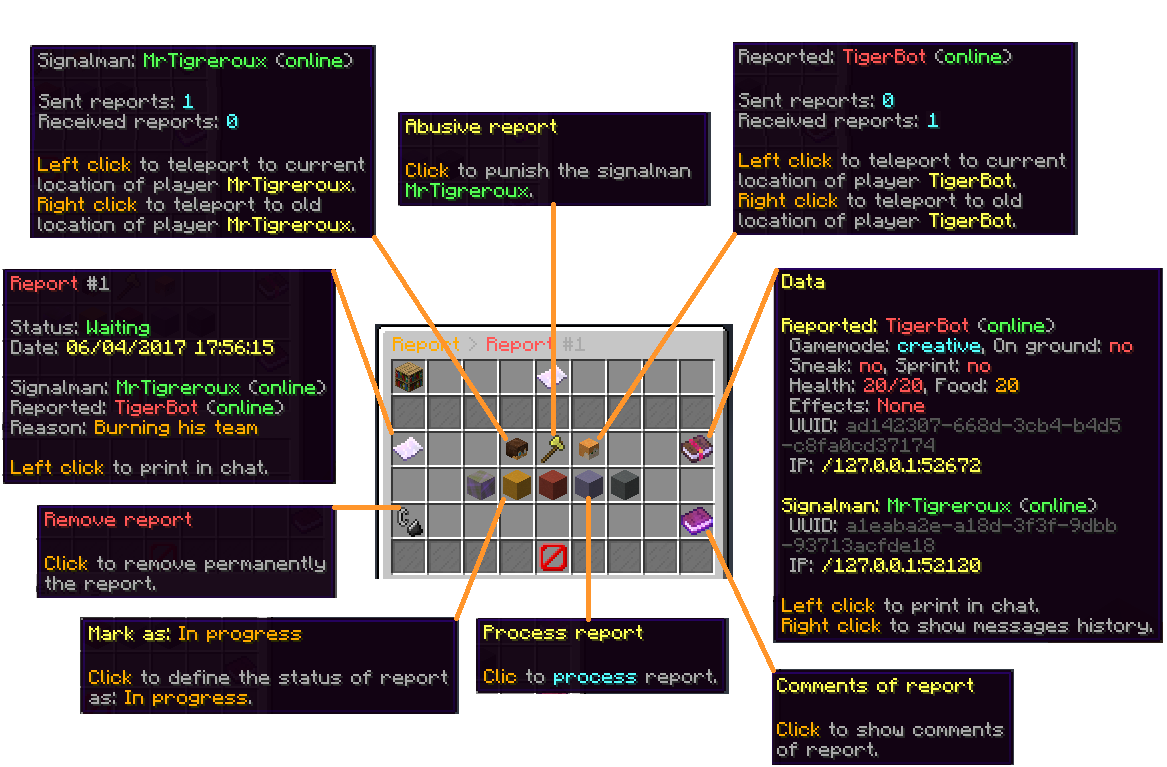
When a report is sent, online staff is alerted by a clickable message that opens a menu.
This menu allows to:
– **Teleport** to current and older (during the report) location of the reporter and the reported players.
– **Punish** if it’s an abusive report with a cooldown of configured time (the report is marked as false when this punishment is used).
– See **advanced data** like gamemode, health, effects, and more of the reported player.
– Mark the **report status** as: Waiting, In progress, Important or Done.
– **Archive** the report (removed from the main menu but kept in the database).
– **Delete** the report definitively.
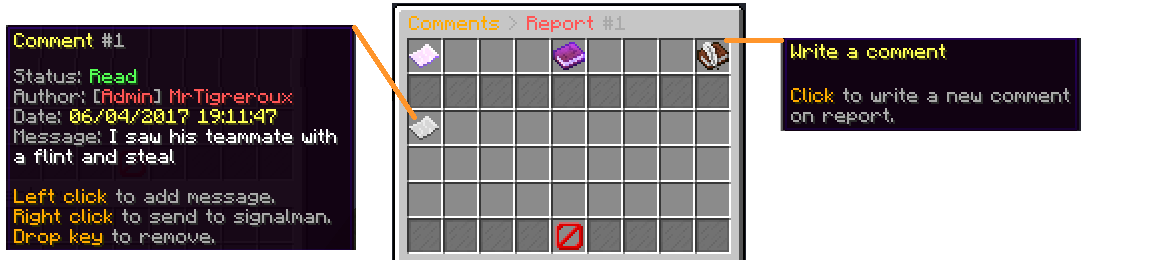
– Write and see **comments** from the staff on the report.
– See **messages history of participants** of the report posted before the report.
When a staff marks a report as Done, he can leave an appreciation between: true, uncertain and false.
The report is displayed in the main menu until an advanced staff archives or deletes it.
## Pictures
**Reason menu:**
**Report menu:**
**Comments menu:**
## Config
The plugin can be configured in config.yml file.
You can see a list of all parameters that can be modified and a description of what they do here.
The default config.yml settings are here.
## Messages
Messages are by **default in French** but all can be modified in messages.yml file.
**Why?** Because I’m French I don’t want the default messages of the plugin to have bad english but I nevertheless wrote a base of english below if you don’t have the time/motivation to translate them by yourself.
They are updated after all new versions.
If you run a 1.16+ Spigot server, you can set hex colors in messages.yml file with `&#FFFFFF` or `&x&F&F&F&F&F&F` format for #FFFFFF hex color with `&` set for Config: ColorCharacter in config.yml file.
**Important:** If you use Minecraft **1.8 or less**, you must encode messages.yml file with **ANSI**, else you must encode it with **UTF-8**.
If messages are not changed, it means that you encoded with wrong format.
**Also**, you can’t put a comment (`#Message`) at first line of the file. If you do it messages will simply not be implemented.
### Update your messages
If you recently updated TigerReports to the latest version, you can update your messages (in messages.yml file) with this online tool:

### Default messages
Click on your language below, then press `CTRL` and `A` keys to select all the messages and then copy/paste them (`CTRL` and `C` then `CTRL` and `V`).
*(thanks to people who shared these translations, their pseudo is at the top of the file)*
English
Français
Español
中文
Русский
Tiếng Việt
Nederlands
Polskie
Deutsch
Italiano
## Commands
You can see all available commands here.
## Permissions
You can see all available permissions here.
## Installation
TigerReports is a plugin which doesn’t depend on the Minecraft version. It is meant to work on all versions of Spigot **higher or equal to 1.7**.
Installation of TigerReports is standard:
– Stop your Spigot server.
– Download and put TigerReports.jar file in plugins folder of your server.
– Launch your server.
That’s it, you can now edit all that you want in `./plugins/TigerReports` folder, save your changes and apply them on the server by reloading with `/reports reload` command. Some features/messages need a restart of the server to be updated.
If you have a **BungeeCord network**:
You have to configure a **MySQL database** in config.yml file (at the bottom of the file) of **each of your Spigot servers** and leave the BungeeCord option enabled.
_(**You don’t have** to put TigerReports.jar in the plugins folder of the BungeeCord network server)_
I recommend you to:
– Edit messages.yml and config.yml files to your needs.
– Check that all is good on one server.
– Select TigerReports folder (in plugins folder of your server), then hold `CTRL` key and select TigerReports.jar.
– You can now copy both files and paste them on each of your Spigot servers.
If you want the **Discord** support:
Install the TigerReportsSupports plugin following instructions in the presentation page of that plugin (in *Installation* section).
### Common issues
The BungeeCord (only) commands cannot be executed by a Spigot plugin for a player, therefore **you can’t configure** a BungeeCord command in PunishCommands in config.yml file. **However**, a player can still execute them, therefore you can send a tellraw to the staff member, explaining him that he has to click on the message to execute the BungeeCord command.
You can use an online tellraw generator like this one.
Example of a command put for PunishCommands in config.yml file:
“`
‘-CONSOLE tellraw _Staff_ {“text”:”[Apply the punish command]”,”clickEvent”:{“action”:”run_command”,”value”:”/bungeebancommand _Reported_ 5d Fly”}}’
“`
*(Note: you must put `’` at the beginning and at the end of the command because the tellraw command contains `”`)*
If you experience some lags/want to minimize the impact of the plugin on the server performance:
You can consider:
– setting a high value for `Config: MenuUpdatesInterval`
– disabling `Config: CollectSkulls`
– setting a small value for `Config: MessagesHistory`
– setting a small value for `Config: MaxReports`
– enabling `Config: StackReports` if you frequently have several reports for a same player
– disabling `Config: ChatReport` feature
– setting a small or empty list for `Config: CommandsHistory`
– enabling `Config: ReportOnline`
## Terms of Service
Please respect my work respecting these directions:
– Do not claim this plugin as yours.
– Do not distribute or sell this plugin on this site or another, just redirect to this page.
– Do not copy part or all of source code without quoting me and notifying me (MrTigreroux).
And that’s all, thank you for reading this page.
If you want to look at sources, the plugin is on GitHub.
> If you encounter any bug or have suggestions, let me know them here:
> – GitHub
>
> I will answer as soon as possible.
Please keep in mind that I made this plugin for free to help people who don’t know how to create their own plugin, a like or feedback is highly appreciated. 🙂
Thorough Keybindings
For as many Minecraft versions as possible, this mod makes the keybindings of usually fixed mappings rebindable. This is a client side mod.
For example, this lets you remap Escape and F3 in-game, even in versions before F3 was made rebindable. Also adds rebinding options for Shift, Control, Alt as well as the digits to navigate the profiling pie chart. Furthermore, backports mappings to earlier game versions, like rebinding F5 or hotbar slot keys.
For versions 1.14 to 1.21, this mod uses Fabric and requires the Fabric API to run.
For versions beta 1.0 to release 1.13, this mod uses Ornithe with Fabric and requires the Ornithe Standard Libraries to run.
Thijzert’s Exploration Panorama
Changes the panorama in the main menu to be a custom one made with Thijzert’s Exploration Pack.
Clan Forge
ClanForge is a modern, modular clans plugin for Spigot/Paper (1.20+). It focuses on fair PvP, community building, and server-friendly management tools. ClanForge provides flexible ranks and permissions, economy integration, land sharing hooks, wars, chat channels, leaderboards, and a clean API for developers. It aims to be feature-rich while remaining configurable and performant.
Key Features
– Clan management with default ranks (leader, trusted, member) and custom roles.
– Economy support via Vault : banks, upkeep, member fees, and kill rewards.
– Land sharing integrations: WorldGuard , PlotSquared , GriefPrevention .
– Wars, alliances, rivalries, friendly fire controls, and regroup/home.
– KDR tracking, leaderboards via commands or GUI, bulletin boards.
– Clan and alliance chat with spy mode, PlaceholderAPI placeholders.
– Storage support for MySQL and SQLite (configurable).
– Developer-friendly API with 25+ planned events.
– Voting flows, tamable mobs sharing rules, vitals/coordinates sharing.
– Smart tab completions and polished UX.
Current State (honest overview)
– Implemented: base plugin, /clan command ( create , info , leave , list ), in-memory clan manager, config and soft-dependencies, Vault hook, basic PlaceholderAPI expansion, storage scaffolding (MySQL/SQLite).
– In progress/planned: full persistence (schema/CRUD), GUI menus, war management, land sharing rules, moderation commands, extended API events, Discord integration, and web stats.
Integrations
– Optional dependencies: Vault , PlaceholderAPI , WorldGuard , PlotSquared , GriefPrevention .
– ClanForge detects and hooks these when present, with feature toggles in config.yml .
Commands (initial)
– /clan create — create a new clan.
– /clan info — show your clan details.
– /clan leave — leave your current clan.
– /clan list — list existing clans.
– Additional commands (ranks, wars, bank, chat, alliances) are being added as modules mature.
Configuration & Storage
– config.yml lets you enable/disable modules, set economy values, and choose mysql or sqlite .
– Default is lightweight, in-memory operation; production servers should configure persistence.
Why Choose ClanForge
– Balanced, server-friendly design with clear toggles for every system.
– Clean codebase and API to extend or integrate with your ecosystem.
– Roadmap-driven development with transparency about what’s implemented vs planned.
Paid Version
Looking for the full-featured version of ClanForge with advanced systems, priority updates, and extended support?
Get the Paid Version here:
https://builtbybit.com/resources/clanforge.92456/
Theburntpeanut Totem of Undying
EN: **Theburntpeanut** is a popular Twitch streamer who gained popularity due to his comical pea appearance, which earned him the Streamer Awards 2025 for Best Twitch Streamer. This resource pack replaces the immortality totem with his meme photo
RU: **Theburntpeanut** это популярный твич стример витубер, который обрел популярность за счет своей несуразной внешности арахиса, за счет чего и отлечился и витуб-сообществе своей мемностью и даже выиграл награду The Streamer Awards 2025 как лучший витубер. Данный ресурспак заменяет тотем бесмертия на его мемное фото
Check collection with all memes + streamers Totems
TheBridge Terracotta
# 🛠️ The Bridge Terracotta Overlay (1.8/1.8.9) 🛠️
🎮 Enhance your The Bridge experience with style! This custom resource pack, specifically designed for Minecraft versions 1.8.9/1.8, brings a sleek and modern overlay to your favorite game.
## 🏆 Features:
### 🔥 Custom Textures:
– Get a fresh look for blocks, items, and UI elements, all tailored to enhance your gameplay.
### 🎨 Sleek Design:
– Clean and modern aesthetics to make your gameplay more immersive and enjoyable.
## 🚀 Installation:
– Just drag and drop the pack into your resource packs folder, and you’re good to go!
## 👁️ Preview:
SOON
_🕹️ Take your The Bridge game to the next level with the The Bridge Terracotta Overlay! Download now and dominate with style._