TNT Rust
Replaces the textures of vanilla TNT with a pixel skin for sachel from the game Rust, this version of TNT looks beige, which looks more beautiful to me, this resource pack may also be useful to you for some mode in Minecraft in the style of Rust
LeoTweaks TNTRUN Outlines
Just adds a slightly darker outline to all TNT-RUN related blocks to make Single hopping and Area perception a bit easier in the TNT RUN minigame.
TNT Drop All
give explosions (tnt, creeper, etc.) a 100% block drop rate, replacing the 25% drop rate of pre-19w11a, making many farms more efficient and stopping the loss of blocks by creeper explosions
it stands apart as the only mod of it’s kind for legacy fabric
the first mod i made by myself, not very complicated heh
TheNewEconomy
**Note: This resource is no longer maintained/supported.**
# The New Economy


The New Economy, TNE, is the ultimate economy plugin for your Minecraft server, no matter what platform you’re on. While
TNE is pushed as being “feature-packed,” but it’s not feature-packed in the normal sense of jamming a bunch of useless features
into the core plugin, but rather using modules.

The economy plugin for server owners that want more out of their economy.
# About TNE
TNE was originally created for hey0’s hMod long before Bukkit/Spigot/Paper was a thing. Since then, it has taken on many
forms and this is the future form of the plugin. This core is designed to be robust and carry TNE into the future with or
without Minecraft by not being platform-dependent.
# Requirements
TNE has some minimum requirements that should be followed.
– MySQL 8.0+ (if using MySQL for storage)
– MariaDB 10.7.0+
– Java 17+
# Switched?
– Converter Coming Soon! Take the poll: here
# Support
To get an actual response use a support method below, not the reviews.
– Developer API Docs
– Discord
– Github
# Features
## Menu System
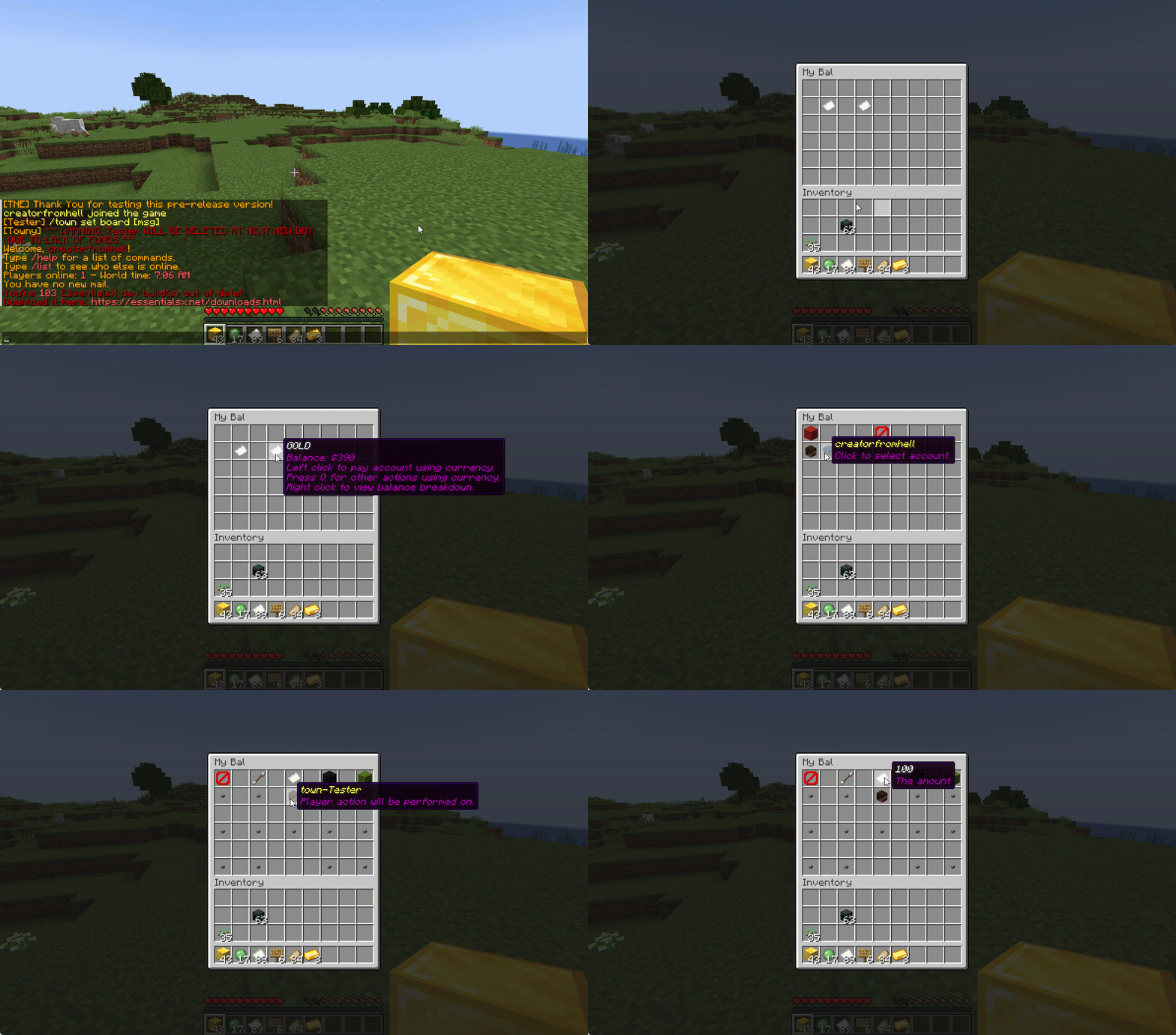
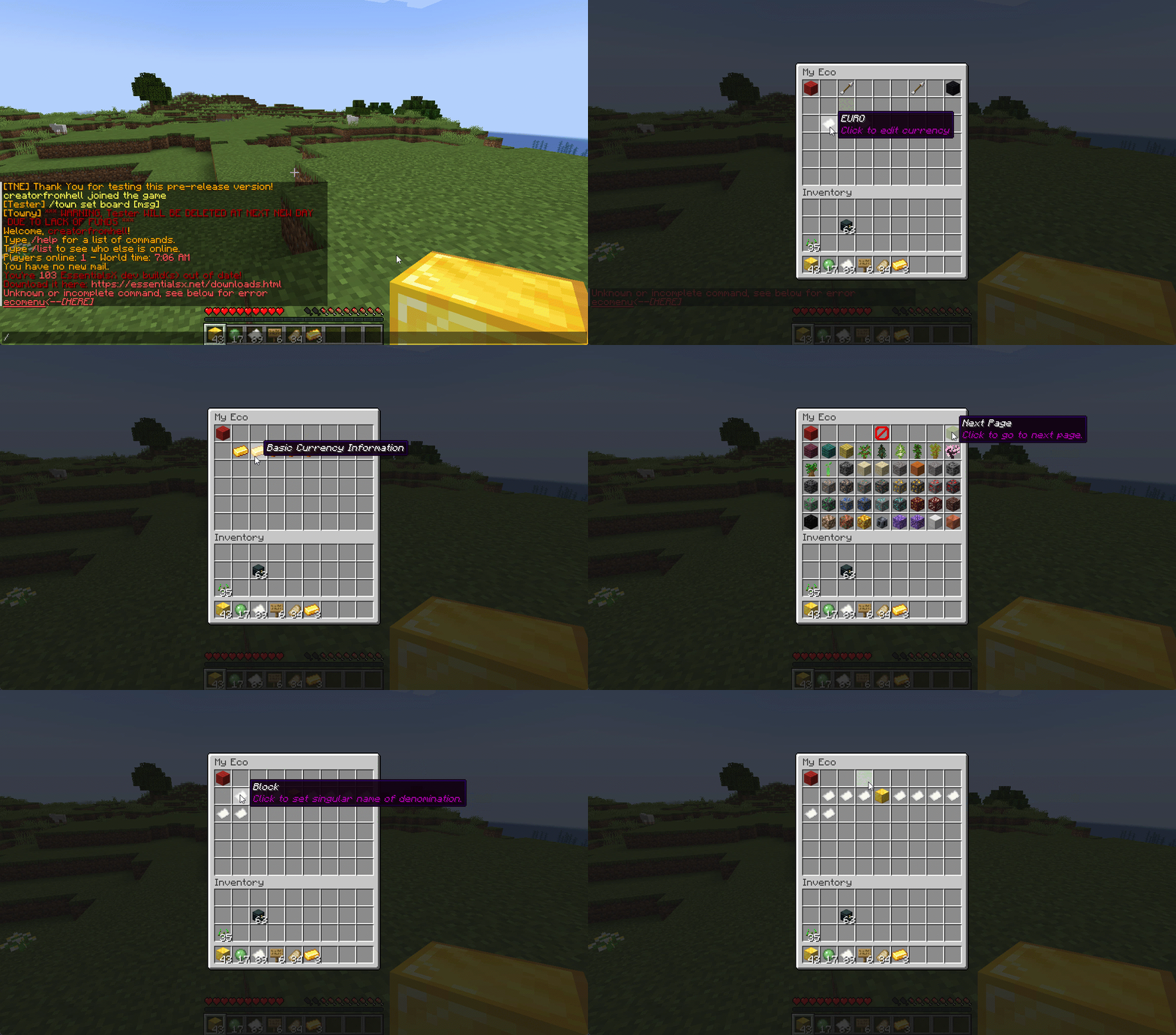
Want to use menus for currency creation and player actions? We got you!
### MyBal for Players
### MyEco for Admins
## Support your favorite plugins
We provide support for all your favorite plugins from Towny to Factions. Anything that supports Vault, supports TNE!
## Cross-Server
We support cross-server balance syncing through our velocity and bungee plugins, as well as Redis!
### Bungee
Download: here
### Velocity
Download: here
## Updates
We continue to develop updates for TNE for free, and fix bugs as they’re reported.
## All the currencies – Unlimited
TNE Allows you to create unlimited currencies with ease through the currency creation GUI.
### Types
TNE Supports different types of currencies!
#### Virtual: Simple currency that exists in thin air
#### Item: Use minecraft items as currency.
– Shulker Box Support
– Bundle Support
### Fine Tune your Currency
Lots of per-currency configuration options.
– Create a custom balance format for each currency
– Set a starting amount for each currency
– Set custom conversion rates for each currency
– Create custom crafting recipes for item currencies
– Block Mob drops for each currency
– Set the max balance for each currency
– Set enderchest balance inclusion per currency
– Set item currencies to use MiniMessage inputs for display name and lores!
– Set custom note items for each currency, used to have a currency voucher for each currency.
– Allows for use of model data items as currency items
### Fine Tune Who Can Access What Currency
TNE allows you to fine tune who can run commands with each currency. You’re able to block players from using
/pay for certain currencies, and even checking their balance for others!
#### Mixed: This type uses both virtual and item balances, and allows players to switch their balance between items and virtual whenever!
#### Experience: Use experience as currency.
#### Experience-level: Use experience levels as currency.
## Money Notes
Convert your virtual currency into a physical money note using the /money note command.
## Multi-platform
Use Sponge? Sure. Paper? Why not? Both? Over Velocity? Definitely! Switch between, your TNE data works
for you no matter your platform. More platforms soon!
### Supported:
– Paper/Spigot/Purpur
– Sponge8
### Coming:
– Fabric
– Sponge7
## Discord Server
We have a discord server available to those users that have questions or need support!
## Configurability
TNE strives to allow you to configure things as much as possible. From the messages to starting money, to max holdings!
## MISC Features
– Adventure Chat support for translations to allow for awesome colorful messages!
– Support for Placeholders, include top 10
– Easy commands for easy administration
– Transaction Logging
– Easy-to-use menu system for currency creation and balance actions!
– Multiple data types
– SQL, YAML, and Maria DB
– Tab completion for commands!
– baltop command
## Open Source
Contribute on the github!
## Placeholders
| Name | Description |
|——————————————————-|—————————————————————-|
| tne_balance | Returns player’s balance. |
| tne_balance_formatted | Returns formatted player’s balance. |
| tne_world_worldname | returns player’s balance for specific world. |
| tne_world_worldname_formatted | returns the formatted player’s balance for specific world. |
| tne_currency_currencyname | returns player’s balance for specific currency. |
| tne_currency_currencyname_formatted | returns player’s balance for specific currency. |
| tne_wcur_worldname_currencyname | returns player’s balance for specific world and currency. |
| tne_wcur_worldname_currencyname_formatted | returns player’s balance for specific world and currency. |
| tne_toppos | returns player’s position on baltop |
| tne_toppos_world name or all | returns player’s balance for specific currency. |
| tne_toppos_world name or all_currency name or all | returns player’s balance for specific world and currency. |
| tne_toppos__position_ | returns the value for the position based on the value of Messages.Money.PlaceholderTopEntry in messages.yml |
## Permissions & Commands
## /tne
**About:** All commands that are designated as being for administrative purposes.
**Shortcuts:** /tne menu(/ecomenu), /tne(/ecomin, /ecoadmin, /ecomanage, /tneneweconomy)
**Base node:** tne.admin (default: ops)
**Wildcard node:** tne.admin.*
| Command | Permission | Description | Default |
|———————————–|——————-|———————————————————————————————————–|—————|
| tne backup | tne.admin.backup | Creates a backup of all server data. | ops |
| tne create [balance] | tne.admin.create | Creates a new economy account. Player ~ The account owner. Balance ~ The starting balance of the account. | ops |
| tne debug [level] | tne.admin.debug | Toggles console debug mode to the specified level. | ops |
| tne delete | tne.admin.delete | Deletes a player account. Player ~ The account owner. | ops |
| tne extract | tne.admin.extract | Extracts all player balances with their username attached for database related debugging. | ops |
| tne menu | tne.admin.menu | Opens up the tne economy admin menu | ops |
| tne purge | tne.admin.purge | Deletes all player accounts that have the default balance | ops |
| tne reload [configs] | tne.admin.reload | Used to reload configurations. | ops |
| tne reset | tne.admin.reset | Deletes all economy-related data from the database. | ops |
| tne restore | tne.admin.restore | Restores all balances that are located in extracted.yml after performing the extract command. | ops |
| tne save | tne.admin.save | Force saves all TNE data. | ops |
| tne status [status] | tne.admin.status | Displays, or sets, the current account status of an account. Player ~ The account owner. | ops |
| tne version | tne.admin.version | Displays the version of TNE currently running. | ops |
## /money
**About:** All commands that are used to interact with the server’s money system.
**Shortcuts:** /money balance(/bal, /balance), /money pay(/pay), /money top(/baltop), /money menu(/mybal)
**Base node:** tne.money (default: everyone)
**Wildcard node:** tne.money.*
| Command | Permission | Description | Default |
|————————————————————|———————–|—————————————————————————————-|—————|
| money balmenu | tne.money.mybal | Opens up the mybal menu. | everyone |
| money balance [world] [currency] | tne.money.balance | Displays your current holdings. | everyone |
| money convert [from currency] | tne.money.convert | Convert some of your holdings to another currency. | everyone |
| money deposit [currency] | tne.money.deposit | Deposits money from an item form into a virtual bank for mixed currencies. | everyone |
| money give [world] [currency] | tne.money.give | Adds money into your economy, and gives it to a player. | ops |
| money givenote [currency] | tne.money.givenote | Gives the specified player a currency note for the specified amount. | ops |
| money note [currency] | tne.money.note | Makes your virtual currency physical, for storage/trading purposes. | everyone |
| money other [world] [currency] | tne.money.other | Retrieves the balance of a player. | everyone |
| money pay [currency] | tne.money.pay | Use some of your holdings to pay another player. | everyone |
| money request [currency] | tne.money.request | Request money from a player. |
| money set [world] [currency] | tne.money.set | Set the holdings of a player. | ops |
| money setall [world] [currency] | tne.money.setall | Set the holdings of all players. | ops |
| money take [world] [currency] | tne.money.take | Removes money from your economy, specifically from a player’s balance. | ops |
| money top [page] | tne.money.top | A list of players with the highest balances. | ops |
| money top [page] [refresh(true/false)] | tne.money.top.refresh | This permission allows the user to include the refresh argument to refresh the baltop. | ops |
| money withdraw [currency] | tne.money.withdraw | Withdraws money from your virtual balance into its item form. | ops |
## /transaction
**About:** All commands that are used to interact with the transaction system.
**Shortcuts:** /trans
**Base node:** tne.transaction (default: everyone)
**Wildcard node:** tne.transaction.*
| Command | Permission | Description | Default |
|——————————————————————–|———————————————————|—————————————————————————————|—————|
| transaction away [page #] | tne.transaction.away | Displays transactions that you missed since the last time you were on. | everyone |
| transaction history [player:name] [page:#] [world:name/all] | tne.transaction.history / tne.transaction.history.other | See a detailed break down of your transaction history. Page ~ The page number you wish to view. World ~ The world name you wish to filter, or all for every world. Defaults to current world. | everyone |
| transaction info | tne.transaction.info | Displays information about a transaction. UUID ~ The id of the transaction. | everyone |
| transaction void | tne.transaction.void | Undoes a previously completed transaction. UUID ~ The id of the transaction. | ops |
TLobbyCommand
# TLobbyCommand
Simple hub & lobby command
# Features
– Hub & lobby command
– Multiple lobbys
# Commands
– /tlc version
# Permissions
– tlc.version
# Dependencies
– None
TitleInfo
# TitleInfo — The Ultimate Navigation Suite 🚀

✨ Elevate Your Minecraft Experience ✨
Action Bars • Waypoints • Smart Sharing • Developer API
**TitleInfo** is a high-performance, lightweight utility designed to bridge the gap between immersion and information. By leveraging the Action Bar and a robust Waypoint system, it provides essential data without cluttering your chat or screen.
Now featuring a **Full Developer API**, TitleInfo is the perfect foundation for survival servers, RPGs, and competitive factions that want to integrate coordinate and navigation data into their own systems.
—
## 🌟 Core Features
### 📡 Dynamic Action Bar
Stop typing `/coords`. Keep your eyes on the world with real-time HUD elements:
* **📍 Precision Tracking:** Coordinates (X, Y, Z) and Facing Direction.
* **🌍 World Data:** Current Biome and In-game/Real-world Time.
* **🚩 Active Navigation:** Distance and direction to your selected Waypoint.
* **⚙️ Toggleable:** Use `/ti display` to customize exactly what *you* see.
### 📍 Advanced Waypoint System
* **Set & Forget:** Create waypoints at your feet or specific coordinates.
* **Smart HUD:** Select a waypoint to see a live distance tracker in your action bar.
* **Cross-World Support:** Track locations across dimensions with ease.
### ✉️ Seamless Coordinate Sharing
* **Global/Private:** Share your location with the whole server or a specific friend.
* **One-Click Waypoints:** Recipients can instantly save shared coordinates as their own waypoints.
### 🛠️ Administrative Control
* **Player Support:** Set or remove waypoints for players remotely.
* **UI Management:** Force-toggle display options for specific players or ranks.
—
## 💻 Developer API
TitleInfo now exposes a powerful API for other plugin developers to hook into the navigation flow.
### 🔌 Quick Start
Add the **TitleInfo.jar** to your project dependencies and access the API via the provider:
> TitleInfoApi api = TitleInfoApiProvider.get();
### 📍 Example: Setting a Waypoint
You can update or create waypoints for any player. It is recommended to use the **Async** methods to keep your main thread healthy:
> UUID playerId = player.getUniqueId();
> Location loc = player.getLocation();
>
> // Set a waypoint asynchronously
> api.upsertWaypointAsync(playerId, “Home Base”, loc).thenAccept(success -> {
> if (success) {
> player.sendMessage(“Waypoint synchronized!”);
> }
> });
### 📡 Example: Listening for Events
Hook into user actions to add custom logic, such as blacklisting certain names:
> @EventHandler
> public void onWaypointSet(TitleInfoWaypointSetEvent event) {
> // Prevent players from naming waypoints “Spawn”
> if (event.getWaypointName().equalsIgnoreCase(“Spawn”)) {
> event.setCancelled(true);
> event.getPlayer().sendMessage(“That waypoint name is reserved!”);
> }
> }
—
## 🎨 Commands & Permissions
| Command | Description | Permission |
| :— | :— | :— |
| `/ti display ` | Toggle specific HUD elements | `titleinfo.display` |
| `/ti share [player]` | Share your current location | `titleinfo.share` |
| `/ti waypoint ` | Manage your personal waypoints | `titleinfo.waypoint` |
| `/ti admin ` | Administrative overrides | `titleinfo.admin` |
—
## 🚀 Installation & Tech Specs
1. **Download** the latest release.
2. **Drop** into your `/plugins` folder.
3. **Restart** and enjoy!
* **✅ Compatibility:** Minecraft 1.13 – 1.21.x+
* **📦 Dependencies:** None (Standalone), but supports **Adventure API** for rich text.
—
Developed with ❤️ by RRS
TitleAnnouncer
# TitleAnnouncer




A lightweight plugin to send Titles, Actionbars, Bossbars and Chat Announces to Paper servers and Velocity networks.
## Features
– Ability to send announcements by using titles, actionbars, bossbars, and chat messages.
– Send announcements to users in the same world or server you are in.
– Send announcements to a specific user.
– Use of the MiniMessage format throughout the plugin, allowing the maximum possible customization.
– MiniPlaceholders support

## Commands
To use the commands in Velocity, just add a “v” at the beginning of the command, for example: “/vannounce” or “/vtitleannouncer”.
### Announce Command
| Command | Arguments | Permission |
|————————-|————————————————————————————————|————————|
| /announce or /vannounce | [(Format type)](#format-argument) [(Target Argument)](#target-argument) (Format Arguments) | titleannouncer.command |
## Arguments
### Target Argument
When sending an announcement, you can define who to send it to using the target argument.
This argument allows you to select either an online player or the executor themselves, a server, or a world to send the announcement to.
The available targets are:
#### Self Target
This target allows you to send the respective announcement to the same executor of the command.
Keep in mind that if the server console uses this target, it will not be able to receive bossbars, actionbars, titles, or sounds;
it will only be able to receive chat announcements
**Example Usage**
`/(v)announce chat self Some announcement`
#### Player Target
This target allows you to send an announcement to a specific player.
Use the format `“player:PlayerName”`.
As it is an argument that uses a colon character and due to limitations of the Minecraft Vanilla command system,
it must be enclosed in quotation marks.
If executed in-game, online player names will be suggested.
**Example Usage**
`/(v)announce title “player:4drian3d” “TitleAnnouncer” “by 4drian3d”`
#### All Target
This target allows you to send an announcement to all players on the server or proxy.
If you run the command from TitleAnnouncer in Velocity, the announcement will be sent to all players on your network.
If you run it from TitleAnnouncer installed in Paper, the announcement will be sent to players connected to the server where it is run.
**Example Usage**
`/(v)announce actionbar all TitleAnnouncer | `
#### Server Target
> This target is exclusive to Velocity
This target allows you to send an announcement to the specific server where the player executing it is connected, or to a specific server.
For the executor to send the announcement to the server where it is connected, you only need to place `server` as an argument.
But if the executor wants it to be executed on another server, it must be specified with the format `“server:ServerName”`.
Like the player argument, when requiring `:`, it must be enclosed in quotation marks.
**Example Usage**
`/vannounce bossbar server 30 blue notched_12 A big announcement!!!`
`/vannounce bossbar “server:lobby” 30 blue notched_12 A big announcement!!!`
#### World Target
> This target is exclusive to Paper
This target allows you to send an announcement to the world where the player executing the command is located or to a specified world.
If you want to send the announcement to the world where the player is located, you must use the `world` argument.
But if you want to specify another world, you must use the `“world:WorldName”` argument.
Like the player argument, when requiring `:`, it must be enclosed in quotation marks.
**Example Usage**
`/announce bossbar world 30 blue notched_12 A big announcement!!!`
`/announce bossbar “world:lobby” 30 blue notched_12 A big announcement!!!`
### Format Argument
#### Chat Format
| Arguments | Permission |
|————-|—————————–|
| [Message] | titleannouncer.command.chat |

#### Actionbar Format
| Arguments | Permission |
|————-|———————————-|
| [Message] | titleannouncer.command.actionbar |

#### Title Format
| Arguments | Permission |
|—————————————————————–|——————————|
| [Title] [SubTitle] (FadeIn Time) (Stay Time) (FadeOut Time) | titleannouncer.command.title |

#### BossBar Format
| Arguments | Permission |
|—————————————————|——————————–|
| [Display Time] [Color] [Overlay] [Content] | titleannouncer.command.bossbar |

#### Sound Format
> If running on Velocity, this format will only be able to send sounds to players with versions higher than 1.19.3.
| Arguments | Permission |
|———————————————-|——————————|
| [Sound Key] (Source Type) (Volume) (Pitch) | titleannouncer.command.sound |
TitanLogin
TITAN LOGIN – MASSIVE PLATFORM UPDATE
Release Overview
Titan Login has officially evolved from a simple authentication plugin
into a powerful, modular login platform. This update introduces advanced
GUI systems, new authentication methods, administrative tools, and the
official launch of the Titan Login Extension Store.
————————————–
NEW: LOGIN SELECTOR GUI
————————————–
Players can now choose their preferred
login method through a dedicated Login
Selector GUI.
✔ Permission-based access(needs gui permission) ✔ Remembers
player selection automatically ✔ Opens
chosen login method on future logins ✔
Clean and professional user experience
This feature ensures flexibility while
keeping the system organized and
user-friendly.
————————————–
NEW ADMIN COMMAND
/tl admin reset method
Administrators can now reset a player’s selected login method instantly.
This is useful for support, troubleshooting, or forcing re-selection
when needed.
————————————–
UNIFIED COMMAND HANDLER
————————————–
/tl /titanlogin
Typing either command now displays a
clean list of available subcommands,
making the system more intuitive and
professional.
————————————–
NEW LOGIN METHODS
1) ANVIL GUI LOGIN A modern, immersive login experience using the Anvil
interface. Secure, clean, and difficult to shoulder-surf.
2) PINPAD LOGIN GUI (COMING SOON) An upcoming interactive PIN-based
login system designed for maximum security and usability.
————————————–
OFFICIAL EXTENSION STORE LAUNCH
————————————–
Website:
https://titanlogin-store.netlify.app
Titan Login now supports a full
extension ecosystem.
✔ Developers can build custom
extensions ✔ Server owners can extend
functionality ✔ Modular architecture
for infinite scalability ✔ Full
documentation and guidance available
on the website
Titan Login is no longer just a plugin
— it is now a growing platform.
————————————–
UPCOMING MAJOR UPDATE (After February 28)
A massive update is scheduled to further enhance performance, security,
and customization features. Titan Login is continuously evolving toward
becoming the most advanced authentication solution for Minecraft
servers.
————
FINAL NOTE
————
Titan Login is built with scalability, security, and innovation in mind.
With modular architecture and a growing ecosystem, this project is
setting a new standard for login systems.
This is only the beginning.
Tip4serv Donation Webstore
Tip4serv.com provides gaming communities with a platform to effortlessly set up their virtual store and facilitate the sale of digital goods, including donations.
Managing a community and creating content can be demanding tasks. We aim to streamline the process, enabling managers to efficiently handle donations and automatically reward players.
Our mission is to deliver a user-friendly platform that simplifies the experience for both creators and buyers.
Here are examples of stores that you can customize: https://murga.tip4serv.com, https://neon.tip4serv.com and https://steelcraft.tip4serv.com
## Features for starter plan (only 5% fee)
– Unlimited game servers & commands
– Create subscriptions plan
– Commands status tracking
– Stock management
– Deliver roles & messages on Discord
– Create discount coupon
– Add managers for your store
– Purchase email and invoice
– Sales statistics
– Private flow for subscribers
– Custom sub-domain
– Resend commands
– No ads
## Features for PRO members (subscription required)
– Dynamic Dark/Light theme
– Account linking with avatars
– Product page with gallery & video
– GUI colors editor & additional CSS
– Top customers & related products
## Store available in 15 languages
English, Danish, Dutch, English, French, German, Hungarian, Italian, Norwegian, Polish, Portuguese, Romanian, Russian, Spanish, Swedish and Turkish.
## Payment method
Here are the payment methods you can offer your players: Visa, Paypal, Cash App, Google Pay, Apple Pay, Ideal, GiroPay, BanContact, Sofort, Sepa, EPS, BACS, Amazon Pay, Revolut Pay, Mobile Pay, MultiBanco, BECS, Przelewy24, Boleto, Oxxo, Afterpay, Link.
## How does this work?
Tip4Serv checks if a player has made a donation on your Tip4Serv store and delivers the order in a minute (e.g., group, money, etc.) by executing commands in the server console.
Create your store and connect your Minecraft server in **5 minutes** on Tip4Serv in 4 simple steps:
1. **Store Settings:**
Enter your store name and set the desired URL.
2. **Payment Methods:**
Select your preferred payment options.
3. **Connect Server:**
Link your Minecraft server to Tip4Serv using your API key.
4. **Add Products:**
Create and configure products with executable commands on your server.
## Commands
**tip4serv connect** – Link your server to Tip4Serv (Ensure the API key is correctly set in tip4serv/tip4serv.key).
**tip4serv reload** – Deliver pending orders if there are any.
**/storelink** – Show a link to the store in the server chat.
## Proxy commands (Velocity & Bungeecord)
**tip4proxy connect** – Link your server to Tip4Serv.
**tip4proxy reload** – Deliver pending orders if there are any.
## Need help?
– Documentation
– Contact us
Tiny Tools+
Are the default tools taking up too much screen space? “Tiny Tools+” offers a clean and subtle redesign of all essential items — Sword, Pickaxe, Axe, Shovel, and Hoe — now in smaller, sleeker versions!
This pack retains the vanilla Minecraft feel while making your tools more compact — perfect for PvP or simply a cleaner visual experience.