TumiTranslator
# TumiTranslator
Add rich translations to you Minecraft Server or Proxy
## Installation
– Install MiniPlaceholders
– Drag and drop on your plugins folder
– Start the server
## Features
– Add the translations you want, and use them anywhere on your server.
– Support for MiniPlaceholders placeholders. (Full support anywhere for global placeholders;
for player placeholders, requires plugins compatible with MiniMessage using the latest version)
## Placeholders
In addition to providing translations that can be used anywhere on your server,
TumiTranslator also provides placeholders for using your translations.
This is the recommended way to use translations, usable in plugins compatible with MiniPlaceholders.
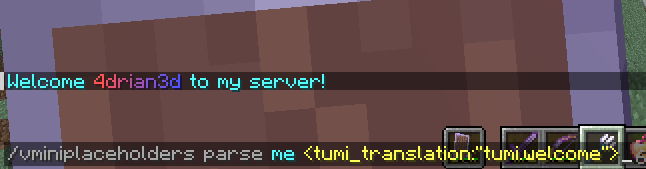
– ``
Returns a translation in the language of the target/executor.
If the translation does not exist in the specified language,
it will attempt to use the translation in the configured default language.
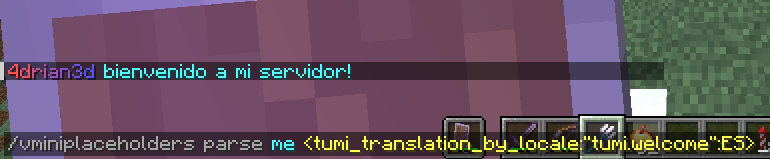
– ``
Returns a translation in the specified language.
If the translation does not exist in the specified language,
it will attempt to use the translation in the default language configured.
## Usage in General Translations
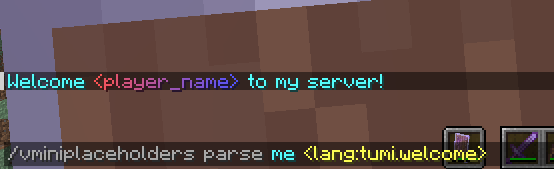
The recommended use of TumiTranslator is through its MiniPlaceholders placeholders.
But if you want to use them anywhere else, it is possible. Here are some examples.
Please note that player placeholders are not yet supported in this way of displaying placeholders.
This feature will be applied to MiniMessage in future versions.
### Lang Tag
– ``
## Videos
#### TumiTranslator with Velocitab

#### TumiTranslator with VCustomBrand

## Support
Support is exclusively for those who have purchased the plugin from BuiltByBit or Polymart. You will be given a role on my Discord server with access to an exclusive channel.
TUNG TUNG SAHUR
# TUNG TUMG SAHUR
## ENGLISH
Tung Tung Sahur replaces the classic Totem of Immortality with TUNG TUNG SAHUR 3D, inspired by the Italian Brainrots. Keep the same revival power, but with a humorous and original touch that will make anyone laugh when they see it in your hand. Protection with meme style! 🎭✨
By @d_de_diego_d
## ESPAÑOL
Tung Tung Sahur reemplaza el clásico Tótem de la Inmortalidad por TUNG TUNG SAHUR 3D, inspirado en los Italian Brainrots. Mantén el mismo poder de revivir, pero con un toque humorístico y original que hará reír a cualquiera al verlo en tu mano. ¡Protección con estilo meme! 🎭✨
By @d_de_diego_d
© TRIDEX 2025 – All Rights Reserved
Tulip
## What is Tulip?
Tulip is a lightweight and easy-to-use config library for Minecraft that simplifies the process of saving and loading data to and from config files. With its simple API, Tulip allows you to easily manage your mod’s config settings. Whether you’re a beginner or an experienced modder, Tulip’s intuitive design means that it is easy to handle things like saving and loading data all while the mod handles errors for you.
You can use this mod to add configurations to your mods. To clarify, this mod isn’t for making config screens (where other config libraries do so), this library is for handling saving and loading. You will have to create your own config screen class to handle actually dealing with your mod’s data.
## Well, where do I find a source to learn how to use this library?
I’ve made a GitHub wiki page that explains every step in the process of using Tulip, as well as setting up a simple config screen along with it. You can find it here.
## IMPORTANT
Please note that most likely older versions of Tulip are broken and should be considered broken even if they aren’t. If you’re a mod creator and would like to use Tulip, please be sure to download the latest version of Tulip.
## Potential Future Additions
– Quick config screen creation
– JSON config files
– Automatic class serialization and deserialization
TU7 Tutorial World Panorama
Panorama of the Legacy Console TU7 Tutorial World
Credits to this site for providing the map: https://www.theminecraftarchitect.com/
TU69 Tutorial World Panorama
Panorama of the Legacy Console TU69 Tutorial World
Credits to this site for providing the map: https://www.theminecraftarchitect.com/
TU5 Tutorial World Panorama
Panorama of the Legacy Console TU5 Tutorial World
Credits to this site for providing the map: https://www.theminecraftarchitect.com/
TU46 Tutorial World Panorama.
Panorama of the Legacy Console TU46 Tutorial World
Credits to this site for providing the map: https://www.theminecraftarchitect.com/
TU31 Tutorial World Panorama
Panorama of the Legacy Console TU31 Tutorial World
Credits to this site for providing the map: https://www.theminecraftarchitect.com/
TU19 Tutorial World Panorama
Panorama of the Legacy Console TU19 Tutorial World
Credits to this site for providing the map: https://www.theminecraftarchitect.com/
TU12 Tutorial World Panorama
Panorama of the Legacy Console TU12 Tutorial World
Credits to this site for providing the map: https://www.theminecraftarchitect.com/