VillagerGUIApi






Full Transcript
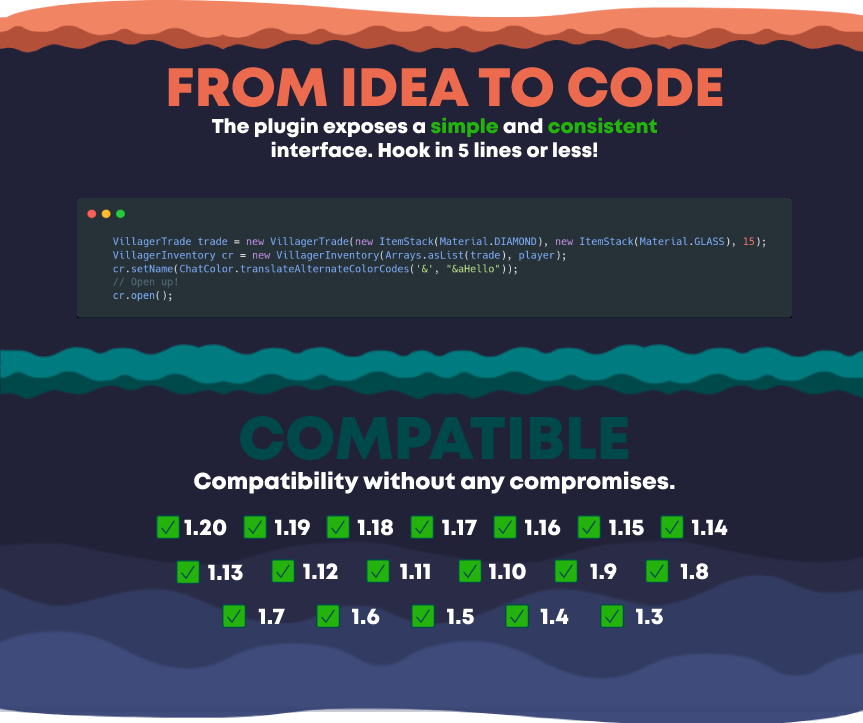
FROM IDEA TO CODE
The plugin exposes a simple and consistent interface. Hook in 5 lines or less!
COMPATIBLE
Compatibility without any compromises.
Supports all versions from 1.3 to 1.19
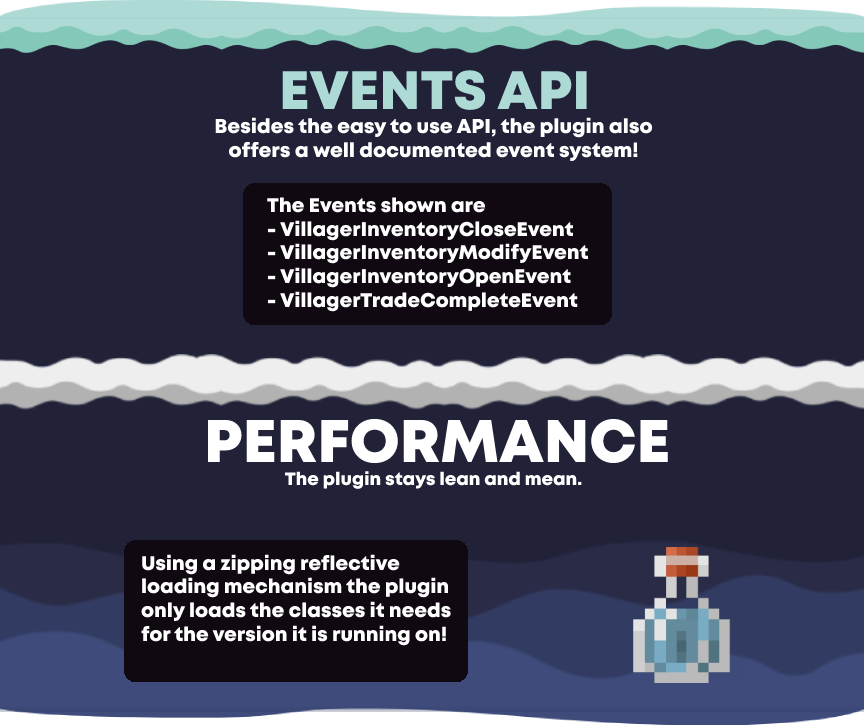
EVENTS API
Besides the easy to use API, the plugin also offers a well documented event system!
The Events shown are
– VillagerInventoryCloseEvent
– VillagerInventoryModifyEvent
– VillagerInventoryOpenEvent
– VillagerTradeCompleteEvent
PERFORMANCE
The plugin stays lean and mean.
Using a zipping reflective loading mechanism the plugin only loads the classes it needs for the version it is running on!

Vignette Removed
Vignette is an effect that darkens the corners of the screen.
So I made this quick resource pack removing the Vignette Effect, enjoy.
Vignette is most noticable in dark spaces or in The Nether, and it can be annoying.
(This resource pack will also remove the red world border tint!)
Click the link below to be taken to a comparison shot where you can see the difference between having vignette on vs off, and vice versa.
https://cdn.knightlab.com/libs/juxtapose/latest/embed/index.html?uid=8027fbc2-e30b-11ea-bf88-a15b6c7adf9a

Link: http://bisect.thenexusproject.net/

### ↑ (This is an overexaggerated comparison, but it shows what the resourcepack does.) ↑
ViaVersion Texture Fix (VVTF)
Resource pack for servers that adds items, mobs, blocks from 1.13-1.21 to versions 1.8.9 and 1.12.2! Only works on servers.
ViaRewind
# ViaRewind
**ViaVersion addon to allow 1.8.x and 1.7.x clients on newer server versions.**
Runs on 1.9-latest servers or 1.8 clients and lower.
**You can override the included version in [ViaFabric](https://modrinth.com/mod/viafabric) or [ViaProxy](https://github.com/ViaVersion/ViaProxy):**
– in **ViaFabric**, put ViaRewind into the `mods` folder
– in **ViaProxy**, put ViaRewind into the `jars` folder
Requires Java 17. See [here](https://docs.papermc.io/misc/java-install) how to update your installed Java version. As a last resort, you can download Java 8 downgraded builds from [our ci](https://ci.viaversion.com/view/ViaRewind/job/ViaRewind-Java8/).
**Requires [ViaVersion](https://hangar.papermc.io/ViaVersion/ViaVersion) and [ViaBackwards](https://hangar.papermc.io/ViaVersion/ViaBackwards) to be installed..**
Releases/Dev Builds
–
You can find releases in the following places:
– **Hangar (for our plugins)**: https://hangar.papermc.io/ViaVersion/ViaRewind
– **Modrinth (for our mods)**: https://modrinth.com/mod/viarewind
– **GitHub**: https://github.com/ViaVersion/ViaRewind/releases
Dev builds for **all** of our projects are on our Jenkins server:
– **Jenkins**: https://ci.viaversion.com/view/ViaRewind/
Other Links
–
**Maven:** https://repo.viaversion.com/
**Issue tracker:** https://github.com/ViaVersion/ViaRewind/issues
**List of contributors:** https://github.com/ViaVersion/ViaRewind/graphs/contributors
vHubs
# vHubs
    
vHubs is a lightweight, configurable Velocity plugin for managing hub servers and hub behaviour across your proxy network. It focuses on easy setup, flexible hub definitions, and useful convenience commands to streamline player flow on large networks.
## Features
– Hub server management: define one or more hub servers. Allows for randomized server selection.
– Simple commands for staff and users to teleport to hubs.
– Permission-based control for fine-grained access.
## Quick start
1. Drop `vHubs-VERSION.jar` into your Velocity `plugins` folder.
2. Start or restart your Velocity proxy to generate the default config.
3. Edit `plugins/vhubs/config.yml` to add your hubs and preferences.
## Installing
1. Place `vHubs-VERSION.jar` into your Velocity `plugins` folder.
2. Start or restart your Velocity proxy.
3. Edit the generated configuration file (`plugins/vhubs/config.yml`) to suit your preferences.
Once installed and configured, vHubs will automatically handle hub commands behavior according to your config.
Permission nodes are configurable in your permission manager of choice.
## Why vHubs?
– Purpose-built for Velocity: simple, stable, and focused on proxy-side hub logic.
– Quick setup: install, edit a small YAML, and you’re ready.
– Community-friendly: open to feedback and contributions.
## Contributing
Contributions are welcome. Good first steps:
– Open issues to report bugs or propose features.
– Submit pull requests with clear descriptions and tests where possible.
– Follow repository code style and include a changelog entry for larger changes.
## Building from Source
Prerequisites: Java 17+, Maven.
“`bash
git clone https://github.com/szymon-off/vHubs.git
cd vHubs
mvn clean package
“`
The built jar will be in the `target` directory.
## Support
For help or to report issues, please use the [GitHub Issues page](https://github.com/szymon-off/vHubs/issues)
or join our [Discord server](https://discord.gg/your-invite-link).
## License
vHubs is licensed under the GPLv3 License. See the [LICENSE](LICENSE.md) file for details.
VHS Shader
**English version:**
VHS Shader — Play Minecraft Like It’s on an Old VHS Tape 📼
Transforms your Minecraft into a retro VHS camera recording. RGB color split, tape wobble, scanlines, random tracking glitches, color bleed, warm yellow tint, heavy grain and head switching artifact at the bottom — everything you’d expect from a dusty old VHS tape found in the attic.
**Features:**
– RGB color split like deteriorating tape
– Horizontal tape wobble distortion
– CRT scanlines
– Random tracking glitch lines
– Horizontal color bleed
– Warm yellow-green VHS tint
– Heavy 24fps film grain
– Head switching artifact at the bottom of the screen
– Brightness flicker like power fluctuation
– Camera lens vignette
Compatible with Minecraft 1.0–1.21.x via OptiFine or Iris.
Subscribe so you don’t miss any updates! If you have questions or need support, join our Discord.
—
**Русская версия:**
VHS Shader — Играй в Майнкрафт как на старой VHS кассете 📼
Превращает твой Майнкрафт в запись на ретро VHS камеру. Расползание RGB каналов, дрожание ленты, сканлайны, случайные глитчи трекинга, размытие цветов, тёплый жёлтый тинт, тяжёлое зерно и артефакт переключения головки внизу экрана — всё как на пыльной кассете найденной на чердаке.
**Возможности:**
– Расползание RGB каналов как на изношенной ленте
– Горизонтальное дрожание ленты
– CRT сканлайны
– Случайные полосы трекинга
– Горизонтальное размытие цветов
– Тёплый жёлто-зелёный VHS тинт
– Тяжёлое зерно на 24 fps
– Артефакт переключения головки внизу экрана
– Мигание яркости как перепады питания
– Виньетка объектива камеры
Совместимо с Minecraft 1.0–1.21.x через OptiFine или Iris.
Подписывайтесь, чтобы не пропустить обновления! Если есть вопросы — заходите в Discord за поддержкой.
VersionTinmoli
# VersionTinmoli
> **Version**: 1.0.2
> **Supported Platforms**: Velocity 3.0+ | BungeeCord 1.16+ | Bukkit/Spigot/Paper 1.20.1+
A lightweight Minecraft proxy/server plugin for customizing the version name displayed in the server list, with rich color and formatting support.
[中文文档](README_CN.md) | [English Documentation](README.md)
—
## Table of Contents
– [Features](#features)
– [Supported Platforms](#supported-platforms)
– [Quick Start](#quick-start)
– [Color Support](#color-support)
– [Commands](#commands)
– [Configuration](#configuration)
– [FAQ](#faq)
– [Changelog](#changelog)
—
## Features
– **Colored Version Names** – Velocity supports MiniMessage format (RGB, gradients, rainbow), BungeeCord/Bukkit support legacy color codes
– **Rich Formatting** – Bold, italic, underline, strikethrough support
– **Hot Reload** – Reload configuration with `/vt reload` command
– **Dynamic Modification** – Instantly modify version name with `/vt md ` command
– **Simple Configuration** – YAML configuration file
– **Lightweight** – No performance impact
– **Auto Fallback** – Compatible with older client versions
– **Multi-language** – Supports English and Chinese
—
## Supported Platforms
| Platform | Version | Java Version | Status |
|———-|———|————–|——–|
| Velocity | 3.0+ | Java 21+ | Fully Supported |
| BungeeCord | 1.16+ | Java 17+ | Fully Supported |
| Bukkit/Spigot | 1.20.1-1.21.11 | Java 17+ | Requires newer version |
| Paper | 1.20.1-1.21.11 | Java 17+ | Fully Supported |
—
## Quick Start
### Installation
1. Download the JAR file for your platform from [Releases](https://github.com/Tinmoli/VersionTinmoli/releases)
2. Place the JAR file in your server’s `plugins/` directory
3. Restart the server
4. Edit the configuration file (auto-generated)
5. Use `/vt reload` to reload the configuration
### Configuration File Location
– **Velocity**: `plugins/versiontinmoli/config.yml`
– **BungeeCord**: `plugins/VersionTinmoli/config.yml`
– **Bukkit**: `plugins/VersionTinmoli/config.yml`
—
## Color Support
### Velocity – MiniMessage Format
“`yaml
# Named colors
version_name: “Velocity 1.8-1.21”
# RGB colors (1.16+)
version_name: “<#FF5555>Red <#55FF55>Green”
# Gradient effects
version_name: “Rainbow Server”
# Rainbow effects
version_name: “Rainbow Server”
# Style combinations
version_name: “VIP | Online”
“`
**Available Colors**: ``, ``, ``, ``, ``, ``, ``, ``, ``, ``, ``
**Available Styles**: ``, ``, ``, ``
—
### BungeeCord/Bukkit – Legacy Color Codes
“`yaml
# Basic colors
version_name: “&6BungeeCord &71.8-1.21”
# With formatting
version_name: “&l&6VIP Server&r &7| &a1.8-1.21”
# Multi-color combinations
version_name: “&cRed &6Gold &eYellow &aGreen”
“`
**Color Codes**: `&0`-`&9`, `&a`-`&f` (black, dark blue, dark green, dark aqua, dark red, purple, gold, gray, dark gray, blue, green, aqua, red, pink, yellow, white)
**Format Codes**: `&l` (bold), `&m` (strikethrough), `&n` (underline), `&o` (italic), `&r` (reset)
—
### Client Compatibility
| Client Version | Supported Colors |
|—————-|——————|
| 1.16+ | Full RGB colors |
| 1.7-1.15 | 16 named colors |
| < 1.7 | Basic colors |
---
## Commands
| Command | Permission | Description |
|---------|------------|-------------|
| `/vt` | `versiontinmoli.admin` | Show plugin information |
| `/vt reload` | `versiontinmoli.admin` | Reload configuration file |
| `/vt md ` | `versiontinmoli.admin` | Modify version name |
**Permission Notes**: Velocity/BungeeCord require `versiontinmoli.admin` permission, Bukkit defaults to OP
—
## Configuration
### Basic Configuration
“`yaml
# VersionTinmoli Configuration File
# Customize the version name displayed in the server list
# Language setting (en_US or zh_CN)
language: “en_US”
# Version name configuration
version_name: “Velocity 1.8.x-1.21.11”
“`
### Language Settings
The plugin supports multiple languages. You can set the language in the configuration file:
– `en_US` – English
– `zh_CN` – Simplified Chinese
After modifying the `language` field, use `/vt reload` to reload the configuration and switch languages. All command messages and prompts will be displayed in the corresponding language.
### Language File Customization
Language files are automatically copied to the external directory on first run:
– **Velocity**: `plugins/versiontinmoli/lang/`
– **BungeeCord**: `plugins/VersionTinmoli/lang/`
– **Bukkit**: `plugins/VersionTinmoli/lang/`
You can edit these files to customize messages. The plugin will load from the external directory first, then fall back to the built-in files.
### Configuration Examples
**Regular Server**
“`yaml
# Velocity
version_name: “Minecraft 1.8-1.21”
# BungeeCord/Bukkit
version_name: “&6Minecraft &71.8-1.21”
“`
**VIP Server**
“`yaml
# Velocity
version_name: “VIP Server”
# BungeeCord/Bukkit
version_name: “&l&6VIP Server”
“`
**Minigames Server**
“`yaml
# Velocity
version_name: “MiniGames | Online”
# BungeeCord/Bukkit
version_name: “&cM&6i&en&ai&9G&ba&dm&5e&cs &f| &aOnline”
“`
**PVP Server**
“`yaml
# Velocity
version_name: “PVP | Fighting”
# BungeeCord/Bukkit
version_name: “&l&cPVP &r&7| &eFighting”
“`
—
## FAQ
### Migrating from TOML to YAML
If you’re upgrading from an older version (before v1.0.2), you need to migrate your configuration from TOML format to YAML format.
**Automatic Migration (Recommended):**
1. Backup your `config.toml` file
2. Delete the `config.toml` file
3. Restart the server or run `/vt reload`
4. The plugin will automatically create a new `config.yml` file
5. Edit `config.yml` and set your custom version name
**Manual Migration:**
TOML format (old):
“`toml
version_name = “My Server 1.20”
“`
YAML format (new):
“`yaml
version_name: “My Server 1.20”
“`
Main difference: Use colon `:` instead of equals sign `=`
### Configuration Not Working
1. Ensure the configuration file is in the correct location
2. Check YAML syntax is correct
3. Use `/vt reload` to reload configuration
4. If still not working, restart the server
### Colors Not Displaying or Showing as Text
**Problem**: RGB color codes display as text like `Red Green`
**Cause**: Using incorrect closing tags ``
**Solution**:
“`yaml
# Wrong
version_name: “<#FF5555>Red <#55FF55>Green”
# Correct
version_name: “<#FF5555>Red <#55FF55>Green”
version_name: “Red Green”
“`
**Other Color Issues**:
1. **Velocity**: Use MiniMessage format `text`
2. **BungeeCord/Bukkit**: Use `&` or `§` color codes
3. RGB colors require Minecraft 1.16+ client
4. Check server logs for errors
### Platform-Specific Requirements
1. **Velocity**: Requires Velocity 3.0+ and Java 21+
2. **BungeeCord**: Requires BungeeCord 1.16+ and Java 17+
3. **Bukkit**: Requires Minecraft 1.20.1+ and Java 17+
—
## License
This project is licensed under the MIT License.
## Support
For issues or suggestions, please submit them on [GitHub Issues](https://github.com/Tinmoli/VersionTinmoli/issues).
—
**Documentation Version**: 1.0.2
**Maintainer**: Tinmoli
Version Manager
# Version Manager – Advanced Version Control
Version Manager is your ultimate solution for managing Minecraft versions on your server. With real-time version control and powerful features, you can easily manage which Minecraft versions can connect to your server.
## Key Features
### Version Control
– Enable/disable specific versions (1.8.9, 1.16.5, etc.)
– Control entire version groups (all 1.8.x versions)
– Real-time changes – no server restart needed
– Support for all versions from 1.8 to 1.21
## Commands
| Command | Description |
|———|————-|
| /vg enable | Allow players to join with specified version |
| /vg disable | Block players using specified version |
| /vg list | Show all version statuses |
| /vg reload | Reload the plugin |
Examples:
“`
/vg disable 1.8 – Blocks all 1.8.x versions
/vg enable 1.16.5 – Allows version 1.16.5
/vg disable 1.20 – Blocks all 1.20.x versions
“`
## Permissions
| Permission | Description |
|————|————-|
| versiongate.admin | Access to all commands |
| versiongate.bypass | Bypass version restrictions |
## Requirements
– Server: Spigot/Paper 1.8.8 or newer
– Java: Java 8 or higher
– Memory: Minimal impact
– Optional: ViaVersion, ProtocolSupport
Support
For support, please visit our [Discord Server](https://discord.com/invite/krcaTEK5VD) on issue for any bugs or feature requests.
Versatility
Versatility is a resource pack which focuses on converging vanilla (recent versions of Minecraft) and pvp (old Minecraft) elements in the same environment. Of course, it also develops based on the intended version. Versatility for 1.8.9 is much more about pvp, just like the same pack but for 1.20.2 is more aimed at vanilla.
In any case, you will enjoy characteristics of both areas, such as:
– Slight remodeling of some blocks, emphasizing three-dimensionalism and a sense of depth;
– Connected Texture Models (CTM);
– Dark theme UI’s;
– Minimalist hotbar;
– Better grass (Inspired by Optifine’s Fast Better Grass);
– Smoother font (WIP);
– New enchantment glint.
In addition to others more targeted on just one version:
– Custom sky (1.8.9);
– Backported modern Minecraft textures (1.8.9);
– Blurried entity shadows (1.8.9).
This pack also has some tweaks, but nothing too severe. I’m not a big fan of features that fall outside the scope of Minecraft. But hey, have fun putting other resource packs alongside this one!
… And there are certainly other smaller changes that I just haven’t expressed here. Feel free to discover what would they be. Take advantage of your versatility!
* For those of you who have read this far, know that the icon for this pack is the netherite sword with the model for 1.8.9!
Verlixia

### DISCLAIMER!
Most of the Verlixia code is originally by Capt Tatsu in his [BSL Shaders](https://modrinth.com/shader/bsl-shaders). Verlixia is a “fork” of BSL Shaders v8.3 with permission by Capt Tatsu himself. Credits to Capt Tatsu! Verlixia is also currently in beta and slightly unfinished.
## Verlixia!
**Verlixia** is a shaderpack based on BSL that adds/changes:
– Color toning: Warmer colors during the day but cooler colors during night time and storms!
– Better darkness: Nights and caves are more darker for realism, including storms.
– Wet reflections: Water is now reflective by default and now after it rains, blocks will have a shiny wet reflection!
– Multi-colored block lighting: Soul torches and redstone objects have their own colored glow, but is pretty subtle!
– Heat haze: A wavy effect when you are looking at things like lava, fire, torches or in a desert, savanna or the Nether!
– Wind gust system: Waving is now randomized and can be a little wavy up to wavy based off wind gust.
– New atmospherics: The End has an endless purple aurora in the sky and way more purple toned than BSL, the Moon has a more bluish tint than BSL too.
– Darkness effect rework, including desaturtion, film grain boost and a slight chromatic aberration effect, for horror effect.
### Platforms, versions and hardware requirements
Verlixia can be ran with the Iris mod with Sodium and/or OptiFine, works best on Iris due to its modern architecture and Sodium integration. Verlixia can work also on many versions and subversions like BSL, this includes:
– 1.21.x (has been tested)
– 1.20.x
– 1.19.x
– 1.18.x
– 1.17.x
– 1.16.x
– 1.15.x
– 1.14.x
– 1.13.x
– 1.12.x
– 1.11.x
– 1.10.x
– 1.9.x
– 1.8.x
Verlixia is pretty demanding, more demanding than BSL so you will need these for your PC for **High** experiences on **1440p**:
| Tier | Recommended GPUs | Target Performance |
| :— | :— | :— |
| **Minimum** | RTX 1660 Super / RX 5600 XT / Arc A380 | 40+ FPS |
| **Recommended** | RTX 5070 Ti / RX 9070 XT | 144+ FPS |
| **Best Performance** | RTX 5090 | 240+ FPS |
| Tier | Recommended CPUs | Target Performance |
| :— | :— | :— |
| **Minimum** | Ryzen 5 3600 / i3-12100 | 30+ FPS |
| **Recommended** | Ryzen 7 7700X / i9-12700K | 144+ FPS |
| **Best Performance** | Ryzen 9 9950X3D / i9-14900KS | 240+ FPS |
However these are just estimates and may be inaccurate and depends on how powerful your CPU is. These estimates only count 1440p and High, 1080p + Medium has lower requirements and 4K + Ultra has way higher requirements. This also depends on how much RAM you have, 32 GB is recommended / give Minecraft 6GB.
### License & testing info
Verlixia is created by KaiakK, original BSL shaders by Capt Tatsu. This plugin was tested on a RTX 4060, 1440p, 16GB of RAM! First shader pack by me ever, probably the last too.
Thanks for 8,000 downloads!