TigerReports
# TigerReports by MrTigreroux
**1.7+ Spigot** plugin
**MySQL** & **BungeeCord** support
**Vault** chat prefixes and suffixes support
**Discord** support by installing TigerReportsSupports plugin
## Description
TigerReports is a highly configurable and detailed plugin to manage player reports. It works with a simple command `/report` which registers many data that is displayed in a staff GUI (a chest).
## Operation
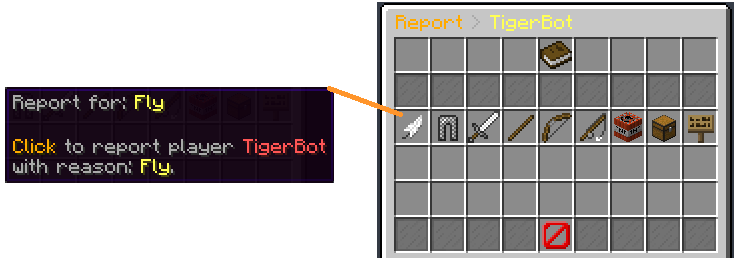
Players can report online and offline players (it depends on the config) with a cooldown and a minimum amount of characters. If they don’t specify any reason, a GUI (chest) is opened to select one of the defaults (configurable) reasons.
When a report is sent, online staff is alerted by a clickable message that opens a menu.
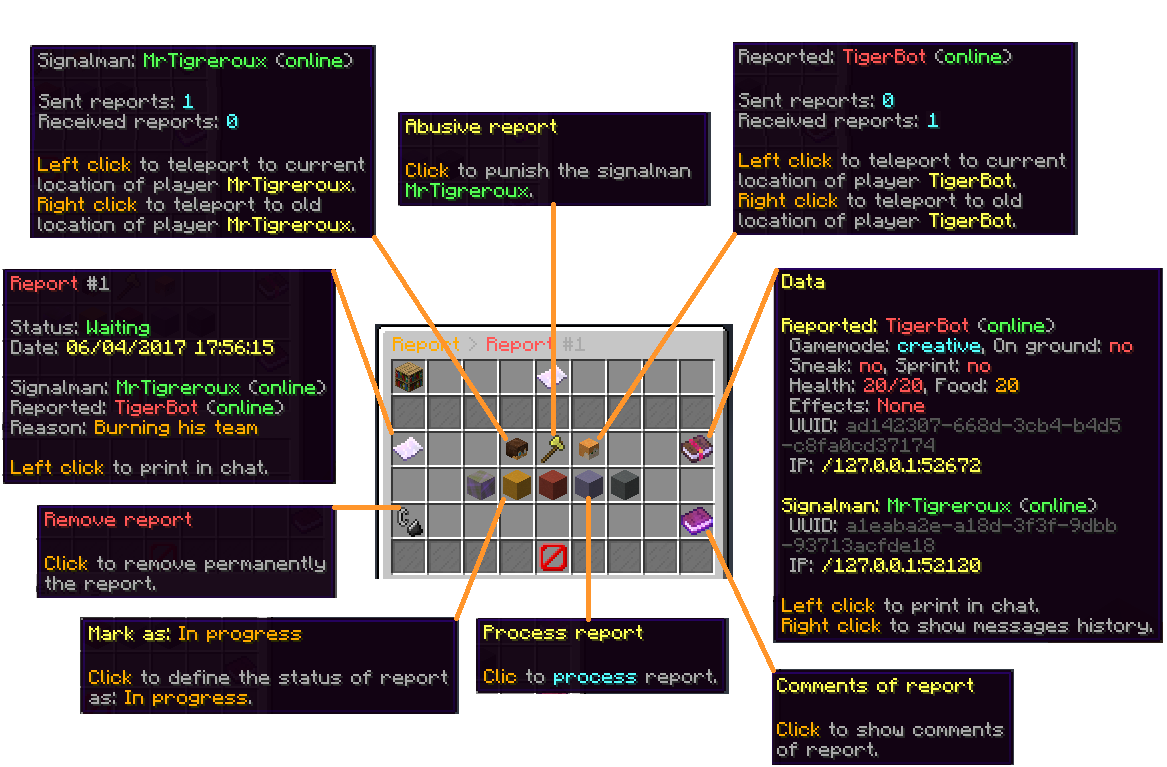
This menu allows to:
– **Teleport** to current and older (during the report) location of the reporter and the reported players.
– **Punish** if it’s an abusive report with a cooldown of configured time (the report is marked as false when this punishment is used).
– See **advanced data** like gamemode, health, effects, and more of the reported player.
– Mark the **report status** as: Waiting, In progress, Important or Done.
– **Archive** the report (removed from the main menu but kept in the database).
– **Delete** the report definitively.
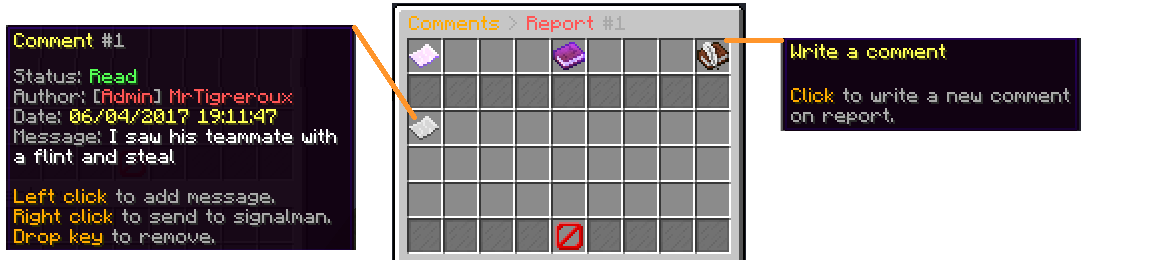
– Write and see **comments** from the staff on the report.
– See **messages history of participants** of the report posted before the report.
When a staff marks a report as Done, he can leave an appreciation between: true, uncertain and false.
The report is displayed in the main menu until an advanced staff archives or deletes it.
## Pictures
**Reason menu:**
**Report menu:**
**Comments menu:**
## Config
The plugin can be configured in config.yml file.
You can see a list of all parameters that can be modified and a description of what they do here.
The default config.yml settings are here.
## Messages
Messages are by **default in French** but all can be modified in messages.yml file.
**Why?** Because I’m French I don’t want the default messages of the plugin to have bad english but I nevertheless wrote a base of english below if you don’t have the time/motivation to translate them by yourself.
They are updated after all new versions.
If you run a 1.16+ Spigot server, you can set hex colors in messages.yml file with `&#FFFFFF` or `&x&F&F&F&F&F&F` format for #FFFFFF hex color with `&` set for Config: ColorCharacter in config.yml file.
**Important:** If you use Minecraft **1.8 or less**, you must encode messages.yml file with **ANSI**, else you must encode it with **UTF-8**.
If messages are not changed, it means that you encoded with wrong format.
**Also**, you can’t put a comment (`#Message`) at first line of the file. If you do it messages will simply not be implemented.
### Update your messages
If you recently updated TigerReports to the latest version, you can update your messages (in messages.yml file) with this online tool:

### Default messages
Click on your language below, then press `CTRL` and `A` keys to select all the messages and then copy/paste them (`CTRL` and `C` then `CTRL` and `V`).
*(thanks to people who shared these translations, their pseudo is at the top of the file)*
English
Français
Español
中文
Русский
Tiếng Việt
Nederlands
Polskie
Deutsch
Italiano
## Commands
You can see all available commands here.
## Permissions
You can see all available permissions here.
## Installation
TigerReports is a plugin which doesn’t depend on the Minecraft version. It is meant to work on all versions of Spigot **higher or equal to 1.7**.
Installation of TigerReports is standard:
– Stop your Spigot server.
– Download and put TigerReports.jar file in plugins folder of your server.
– Launch your server.
That’s it, you can now edit all that you want in `./plugins/TigerReports` folder, save your changes and apply them on the server by reloading with `/reports reload` command. Some features/messages need a restart of the server to be updated.
If you have a **BungeeCord network**:
You have to configure a **MySQL database** in config.yml file (at the bottom of the file) of **each of your Spigot servers** and leave the BungeeCord option enabled.
_(**You don’t have** to put TigerReports.jar in the plugins folder of the BungeeCord network server)_
I recommend you to:
– Edit messages.yml and config.yml files to your needs.
– Check that all is good on one server.
– Select TigerReports folder (in plugins folder of your server), then hold `CTRL` key and select TigerReports.jar.
– You can now copy both files and paste them on each of your Spigot servers.
If you want the **Discord** support:
Install the TigerReportsSupports plugin following instructions in the presentation page of that plugin (in *Installation* section).
### Common issues
The BungeeCord (only) commands cannot be executed by a Spigot plugin for a player, therefore **you can’t configure** a BungeeCord command in PunishCommands in config.yml file. **However**, a player can still execute them, therefore you can send a tellraw to the staff member, explaining him that he has to click on the message to execute the BungeeCord command.
You can use an online tellraw generator like this one.
Example of a command put for PunishCommands in config.yml file:
“`
‘-CONSOLE tellraw _Staff_ {“text”:”[Apply the punish command]”,”clickEvent”:{“action”:”run_command”,”value”:”/bungeebancommand _Reported_ 5d Fly”}}’
“`
*(Note: you must put `’` at the beginning and at the end of the command because the tellraw command contains `”`)*
If you experience some lags/want to minimize the impact of the plugin on the server performance:
You can consider:
– setting a high value for `Config: MenuUpdatesInterval`
– disabling `Config: CollectSkulls`
– setting a small value for `Config: MessagesHistory`
– setting a small value for `Config: MaxReports`
– enabling `Config: StackReports` if you frequently have several reports for a same player
– disabling `Config: ChatReport` feature
– setting a small or empty list for `Config: CommandsHistory`
– enabling `Config: ReportOnline`
## Terms of Service
Please respect my work respecting these directions:
– Do not claim this plugin as yours.
– Do not distribute or sell this plugin on this site or another, just redirect to this page.
– Do not copy part or all of source code without quoting me and notifying me (MrTigreroux).
And that’s all, thank you for reading this page.
If you want to look at sources, the plugin is on GitHub.
> If you encounter any bug or have suggestions, let me know them here:
> – GitHub
>
> I will answer as soon as possible.
Please keep in mind that I made this plugin for free to help people who don’t know how to create their own plugin, a like or feedback is highly appreciated. 🙂
Clan Forge
ClanForge is a modern, modular clans plugin for Spigot/Paper (1.20+). It focuses on fair PvP, community building, and server-friendly management tools. ClanForge provides flexible ranks and permissions, economy integration, land sharing hooks, wars, chat channels, leaderboards, and a clean API for developers. It aims to be feature-rich while remaining configurable and performant.
Key Features
– Clan management with default ranks (leader, trusted, member) and custom roles.
– Economy support via Vault : banks, upkeep, member fees, and kill rewards.
– Land sharing integrations: WorldGuard , PlotSquared , GriefPrevention .
– Wars, alliances, rivalries, friendly fire controls, and regroup/home.
– KDR tracking, leaderboards via commands or GUI, bulletin boards.
– Clan and alliance chat with spy mode, PlaceholderAPI placeholders.
– Storage support for MySQL and SQLite (configurable).
– Developer-friendly API with 25+ planned events.
– Voting flows, tamable mobs sharing rules, vitals/coordinates sharing.
– Smart tab completions and polished UX.
Current State (honest overview)
– Implemented: base plugin, /clan command ( create , info , leave , list ), in-memory clan manager, config and soft-dependencies, Vault hook, basic PlaceholderAPI expansion, storage scaffolding (MySQL/SQLite).
– In progress/planned: full persistence (schema/CRUD), GUI menus, war management, land sharing rules, moderation commands, extended API events, Discord integration, and web stats.
Integrations
– Optional dependencies: Vault , PlaceholderAPI , WorldGuard , PlotSquared , GriefPrevention .
– ClanForge detects and hooks these when present, with feature toggles in config.yml .
Commands (initial)
– /clan create — create a new clan.
– /clan info — show your clan details.
– /clan leave — leave your current clan.
– /clan list — list existing clans.
– Additional commands (ranks, wars, bank, chat, alliances) are being added as modules mature.
Configuration & Storage
– config.yml lets you enable/disable modules, set economy values, and choose mysql or sqlite .
– Default is lightweight, in-memory operation; production servers should configure persistence.
Why Choose ClanForge
– Balanced, server-friendly design with clear toggles for every system.
– Clean codebase and API to extend or integrate with your ecosystem.
– Roadmap-driven development with transparency about what’s implemented vs planned.
Paid Version
Looking for the full-featured version of ClanForge with advanced systems, priority updates, and extended support?
Get the Paid Version here:
https://builtbybit.com/resources/clanforge.92456/
The Rename Compat Project
# Preamble
Spiritual compatibility has always been something that irked me in Minecraft modding; not when two things don’t work together at all but specifically when two things have entirely identical names.
Further complications are created when the two items have differing uses or rarities as simply replacing one thing with another (BlockSwap, Biome Swapper Etc.) won’t always preserve balance. Not to mention someone probably worked hard on the assets you’re now stripping from the mod! So here’s my solution;
This resource pack aims to eventually rename every common item/mob/block/biome found in modern modded Minecraft to something else or, usually, something with more specificity. Limestone from Alex’s Caves becomes Primordial Limestone to preserve spiritual compatibility with Quark’s Limestone, for example. I tried to ensure each name choice matched whatever the mod author was likely going for but if I made any missteps, please let me know! These new names will appear everywhere you can think of (except special debug menus) including Advancements and Subtitles!
The RCP fully supports all ModLoaders and Minecraft Versions as old as 1.12.2! Additionally, special adjustments have been made to ensure cross-compatibility across all modern versions, including 1.16 (Not just for 1.20 anymore!)
## Priorities
The Rename Compat Project aims to solve many problems within modded Minecraft, not just compatibility. The 3 Pillars of Priority for The RCP are as follows
Compatibility; The original mission statement of the project and overall primary priority. The Rename Compat Project seeks to use renames to eventually make every single mod in Minecraft ‘spiritually compatible’ with one another by renaming away duplicates, eliminating redudancy and turning incompatibility into variety.
Polish; While the contents of The RCP itself have always been held to the highest standards of polish, as development has progressed, the polish of every other mod has become a huge priority as well. There are great mods with iffy polish on the spelling, and capitalization side of things; The RCP is attempting to resolve those issues with all mods singlehandedly.
Consistency; Similarly to polish, many mods do not name things in a manner consistent to their parent mods’ or sometimes even vanilla Minecraft naming conventions. ‘Bucket of Entity’, rather than ‘Entity Bucket’, for example. The RCP seeks to unify the naming conventions within all mods to provide a clean and infinitely more searchable registry of blocks, items, mobs, etc.
## Support List (v1.5)
Biomes:
Biomes O’ Plenty, Terralith, Oh the Biomes We’ve Gone (+Oh The Biomes You’ll Go), Traverse Reforged, Terrestria Reforged, Alex’s Caves, YUNG’s Cave Biomes, Autumnity, Atmospheric, Sapwood, Regions Unexplored, Nature’s Spirit, [Let’s Do] Blooming Nature, Promenade (Fabric), Bayou Blues, Abundance, Nature Arise, Mystic’s Biomes, Wetland Whimsy, Sleepy Hollows, Beneath the Wetlands (Fabric)
Worldgen:
Ecologics, Environmental, Windswept, Twigs, Spelunkery, Galosphere, Darker Depths, Better Default Biomes, Caverns & Chasms, Biome Makeover (+Compat Makeover), Immersive Weathering, Terraqueous, Project: Vibrant Journeys, Good Ending, Swampier Swamps, Unearthed, Seafarer, Sakura, Haunted Harvest, [Let’s Do] Meadow, [Let’s Do] Beach Party, Wilder Wild (Fabric), Mystical World, Wilds, Aquatic Frontiers, Wild Lands
Farmer’s Delight:
Farmer’s Delight, Farmer’s Respite (+Respiteful), Brewin’ And Chewin’, (+Cocktails Delight) Delightful, Collector’s Reap, Hearth and Harvest, Crabber’s Delight, Cultural Delights, Vanilla Delight, Rustic Delight, Vintage Delight, Coffee Delight, Unusual Delight (Hostile Delight), Fruit’s Delight, Veggies Delight, Large Meals, Dungeons Delight, Miner’s Delight, Ube’s Delight, Casualness Delight, Trails & Tales Delight, Sunflower Delight, Berries & Cherries, My Nether’s Delight, Seed Delight, Gensokyo Delight ~ Youkai’s Homecoming
Compat Addons: Abnormals Delight, Simple Delights, Aether Delight, Alex’s Delight, Twilight Flavors & Delight, Windswept Delights, Galospheric Delight, Jellyfishing Delight, Yucutan Delight, Ice and Fire Delight, Crate Delight, Nature’s Delight, Vampire’s Delight, Enderite’s Delight, Naturalist Delight
Farming/Food:
Thermal Cultivation, Croptopia (+Croptopia Additions) Pam’s Harvestcraft 2 (Crops, Trees, Core & Extended), Vanilla Cookbook, Crockpot, Aromatic, Caupona, Cosmopolitan, [Let’s Do] Farm & Charm, Simple Farming, Enhanced Farming, Forestry, [Let’s Do] Vinery, [Let’s Do] Bakery, [Let’s Do] Brewery, [Let’s Do] Applewood, [Let’s Do] Candlelight, [Let’s Do] Herbal Brews, [Let’s Do] Corn Expansion, Sprout, Butchery, Sushi Go Crafting, Neapolitan, Peculiars, Seasonals, Cookielicious, Wild Berries, Simply Tea, Just More Cakes!
Magic:
Hexalia, Goety, Hexerei, Malum, Occultism, Arcanus (Fabric), Bewitchment (Fabric), Feywild, Vampirism
Mobs, Animals:
Alex’s Mobs, Naturalist, Aquaculture 2, [Let’s Do] Wilder Nature, Unnamed Animal Mod, Living Things, Critters and Companions, Luminous: Overworld, Spawn, Buzzier Bees, Prehistoric Fauna, Unusual Prehistory, Upgrade Aquatic, Bountiful Critters, Fintastic, Fish of Thieves, Tameable Beasts, Glorious Creatures, Mo’ Creatures: Nostalgia Edition, Better Animals Plus, Faunify, Hybrid Aquatic, Oceanic Realms, Ben’s Sharks, Animalium, Jellyfishing, Silly Critters, Thalassophobia, Koopa’s Critters, Zoological Mod: Decorations & Animal Collection, Aardvark’s Weird Zoology
Mobs, Monsters:
Ice and Fire, Born in Chaos, Friends & Foes, Ender Zoology, More Critters, Plenty of Golems, Enderman Overhaul, Mobs of Mythology, Species, Orcz, Fish’s Undead Rising, Creatures and Beasts (+Port), Tameable Beasts, Astemir’s Forestcraft, Terramity, Iter RPG, The Graveyard, Danny’s Expansion, Grimoire of Gaia, Zombie Variants, Zombies+, Luminous: Beasts, Luminous: Nether, Rotten Creatures, The Undead Revamped, Dungeons Mod, Wesley’s Roguelike Dungeons, Legendary Creatures, MobZ, AdventureZ (Fabric), Enemy Expansion, Opposing Force, Mob Compack
Ore/Tech:
Mekanism, Applied Energistics 2, Refined Storage, EnderIO, Immersive Engineering, Industrial Foregoing, Ad Astra, Voltaic, Powah!, Electrodynamics, Railcraft Reborn, Cyclic, Fantasy Metals, Immersive Ores, Ancient Elements, Oreganized, Create, Create: Bells & Whistles, Create: The Factory Must Grow, Silent’s Gems, Silent Gear, ExtraGems, Gobber 2, Ores Above Diamonds, The Gems Project, Gems & Crystals, Simple Ores, Gems & Jewels, Gem Infusions, Crystals Overhauled, Gemspark, More Gems (Fabric), Organics, Enderite CJ Edition, LieOnLion’s Enderite, Aethersteel
Dimensions:
Deeper Darker, Rubinated Nether, BetterNether (Fabric), Nourished Nether, Jaden’s Nether Expansion, Even Better Nether, Nether’s Exoticism, BetterEnd (Fabric), Unusual End, Enlightened End, End’s Phantasm, Endergetic Expansion, Twilight Forest, Rediscovered, The Aether, Aether Redux, Ancient Aether, Blue Skies, Lands of Icaria
Decor:
Stoneworks, Premium Wood, Mr. Crayfish’s Furniture Mod: Refurbished, Dusty Decorations, Beautify, The New Shutters, Variant Crafting Tables (Both Versions), Variant Barrels, MrCrayfish’s More Furniture Mod, Iron Age Furniture, Adorn, All Macaw’s Series Compat Mods, Blocks+, Furnitures O’ Plenty
Other Mods:
Minecolonies, Quark, Supplementaries, Call of Yucatán, Additional Additions, Sully’s Mod, Arts & Crafts, Ravage & Cabbage, Special Drops, Better Archeology, Scorched Guns, Samurai Dynasty, Tool’s Complement, Fuze’s Relics, End Remastered
Extra Compatibility:
Every Compat: Wood Good, Stone Zone, Gems Realm
Dynamic Trees + All Addons
Other: Dramatic Doors, Compat O’ Plenty, More Storage Drawers, Storage Drawers Extra, Functional Storage Extra, All The Wood We’ve Got, Apple Crates (BOP/BYG), More Chest Variants (MCV) – BM/BOP, Bark O Plenty, Blue Skies Bark, Simply Tools, Vanilla AOITs, LieOnLion’s Gilded Armor, More Horse Armor, Extra Golems, Decorative Blocks Modded Compat, Tool’s Complement – Caverns and Chasms & Oreganized, Crate Delight: Croptopia
Retro Support (1.12):
Quark, Biomes O’ Plenty, Oh The Biomes You’ll Go, Mystical World, Traverse, Fish’s Undead Rising, Natura, Mo’ Creatures, Better Animals Plus, Twilight Forest, Bewitchment, Familiar Fauna, Traverse, Moar Signs
Supported but not Included:
Tide, Go Fish (Fabric), Thermal Foundation, L_Ender’s Cataclysm, Special Mobs, Kobolds, Archeological, Unusual Prehistory 2, Xycraft: World, Enderite Mod
## Extra
Terralith support incidentally means no more ugly “biome.terralith.gravel_beach” appearing under your Xaero’s Minimap or on your Nature’s Compass; Terralith biomes will now appear correctly (as “Gravel Beach” in this instance).
One element of ‘polish’ includes reverting British spellings back to American ones. I’m sorry if you have a preference for British spellings but as every included lang file is ‘en_US’, I felt it would be better to introduce consistency. I don’t necessarily like ‘Grey’ items escaping the search query because I searched for ‘Gray’ and I don’t think most people do either, whether they’re American or English.
Requests for additional mods to be supported are ALWAYS encouraged in the comments and will usually be included in the very next update!!
Please visit the FAQ for more information Here
The RCP uses MIT licenses meaning you are free to use this pack in any way you would like. Feel free to include in modpacks without permission, no need to even credit (but I sure would appreciate it)!
## Special Thanks
Starcage: Thank you to Starcage for developing Startools https://github.com/Starcage1/StarTools-MMDC; an excellent utility for checking duplicates in Modpacks! It even includes special functionality for RCP detection! Use it while testing your modpack, even if you don’t use the RCP, it’s incredible. It was a great help to me personally to find those little niche duplicates I wouldn’t necessarily think of.